
Local-first threat hunting for the logs you already have: Zeek, Pi-hole, syslog or the systemd journal, CloudTrail. Every run names the technique behind each detector. No agent, no daemon, no black box - between grep and a SIEM.

between grep and a SIEM


sigwood is a local-first, command-line threat-hunting tool for self-hosters. Point it at
logs you already have - Zeek, Pi-hole/dnsmasq, syslog, or CloudTrail - and it profiles
what's in them, then runs a handful of detectors over them: beaconing, suspicious DNS, port
scans, bulk outbound transfers, out-of-character TLS setups, authentication structure, rare
syslog events, unusual CloudTrail activity, and behavioral patterns in names your Pi-hole
already blocked.
Not a SIEM. Not an agent. Not magic. Nothing to deploy - no database, no daemon, no network, no account. Install it, point it at a directory of logs, read the output. It runs on your own box, over logs at rest, and your logs never have to leave your machine.
Status: stable (
1.2.0). The ten detectors work and are covered by tests; what 1.0 means says which interfaces are now fixed and which are not. Built with heavy AI assistance under human review; the FAQ says how, and the evidence ledger records what has and has not been measured. Feedback is welcome.
Install · Manual · FAQ · Contract · Roadmap · Known issues · Schemas · Prior work · Security
pipx install sigwood        # or: pip install sigwood in a venv - see Installation

sigwood /var/log/           # point it at a directory
sigwood /opt/zeek/dns.log   # or a single file
That's it - no config required. Here is the kind of thing a run surfaces (illustrative output, not real network data):
dns - 1 finding · 1 high
domain names that stand apart from the rest, including machine-generated-looking
names of the sort malware uses for disposable command domains, and large batches
of related lookups
────────────────────────────────────────────────────────────────────────────────
groups (1)
          names  entropy score  queries  clients
  high       16  2.10-1.85          418        1  k7x2p9qz3f.example

beacon - 2 findings · 2 medium
outbound connections that keep a regular rhythm
────────────────────────────────────────────────────────────────────────────────
medium  192.168.1.37  →  198.51.100.20:443/tcp    period=3.0m    rhythm=0.624   480 conns
medium  192.168.1.37  →  203.0.113.50:8443/tcp    period=10.0m   rhythm=0.606   144 conns

syslog - 1 finding · 1 medium
rare log patterns, and recorded reboots or administrative runs, so changes on a
machine do not disappear into routine logs
────────────────────────────────────────────────────────────────────────────────
privileged (1)
  medium  Accepted password for root from 198.51.100.20 port 51900 ssh2

-v explains why each finding surfaced
Read top to bottom, that is a story: an internal host making high-entropy lookups under one
throwaway domain, calling out to two external IPs on a fixed schedule, and a root SSH login
from one of those same IPs. A finding means "unusual for your network," not "known-bad" -
it is a lead to look at, not a verdict. Add -v for the evidence behind each score and the
next steps to run it down.
Only have a Pi-hole? That is a complete setup on its own:
sigwood digest /var/log/pihole/pihole.log   # orient: what's in the log
sigwood /var/log/pihole/                    # hunt: DNS clustering over your queries
sigwood dnsblock /var/log/pihole/           # bonus: behavior in names Pi-hole blocked
The usual invocations:
sigwood digest /var/log/messages     # orient first - a fast, factual profile of a file
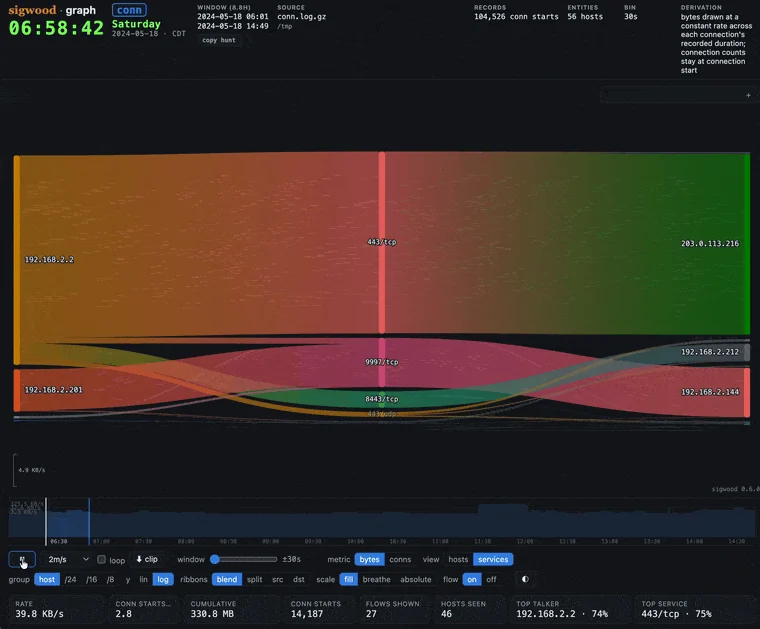
sigwood graph /opt/zeek              # replay the flows as a self-contained HTML artifact
sigwood syslog /var/log              # run a single detector
sigwood init                         # detection-driven setup, writes a config
sigwood hunt                         # run the curated default hunt
No logs handy? The repository includes a small synthetic corpus generator - one compromised host, no real network data - so you can watch it work first:
git clone https://github.com/helixmap/sigwood
cd sigwood
python3 demo/gen_corpus.py                 # writes a synthetic corpus; no network calls
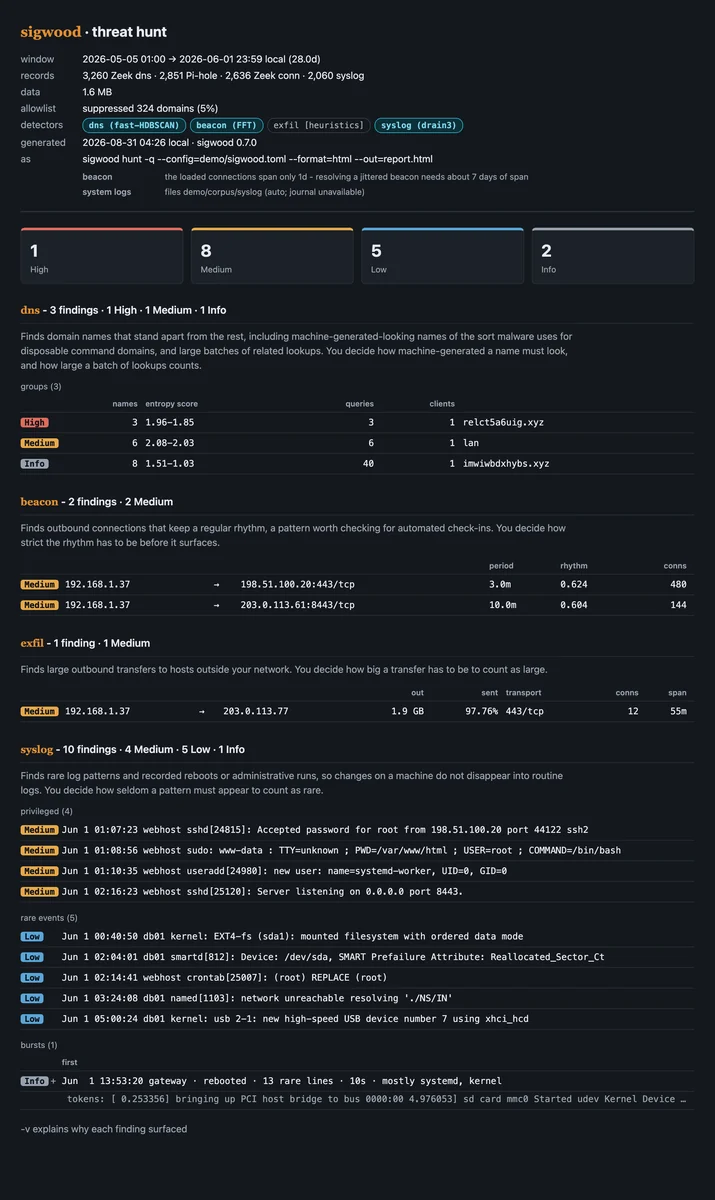
sigwood hunt --config=demo/sigwood.toml    # beacons, a DGA burst, a bulk transfer out, and the syslog trail
The generated logs live under demo/corpus/ (gitignored); the full walkthrough is in
demo/README.md. Here is a
full run against that corpus, followed by the same findings in HTML format:

...and the same flows replayed by sigwood graph, one self-contained HTML file:
One name everywhere: the PyPI distribution, the command, the import package, and the config
section are all sigwood. Requires Python 3.11 through 3.14; 3.15 is refused at install time
until its dependency stack ships wheels for it.
The recommended install is pipx, which keeps sigwood in its own
isolated environment and on your PATH (and sidesteps the externally-managed-environment
refusal a bare pip install hits on modern distros):
# Debian / Raspberry Pi OS / Ubuntu:  sudo apt install pipx
# Fedora:                             sudo dnf install pipx
# macOS:                              brew install pipx

pipx ensurepath              # once - then reopen your shell
pipx install sigwood
sigwood --help

