AI-Powered Windows Diagnostic & Self-Healing Tool



SuperDiagnosticTool is an intelligent system diagnostic utility that combines real-time hardware telemetry with Google Gemini AI to analyze, diagnose, and automatically remediate Windows system issues. Built with a safety-first architecture, it provides production-grade diagnostics for any Windows configuration.
Screenshots
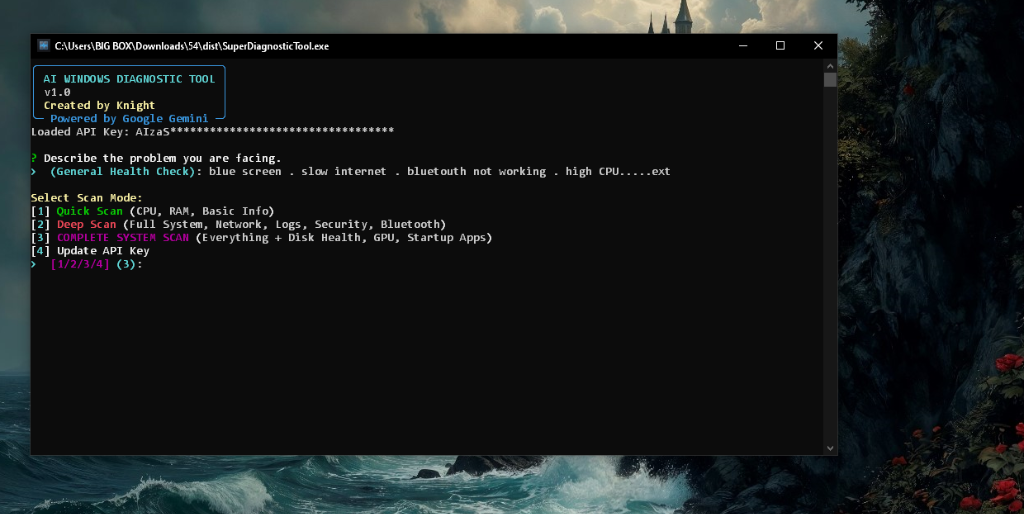
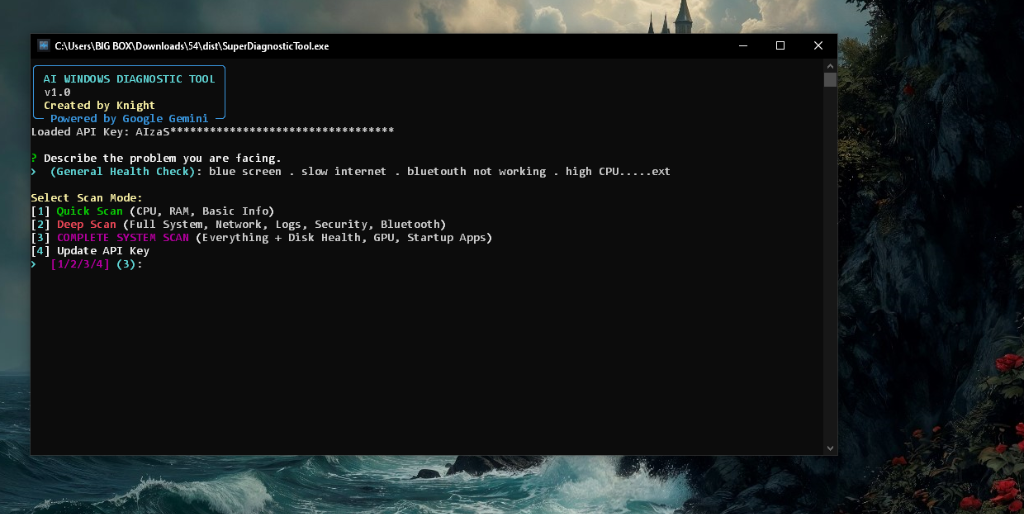
Main interface showing scan mode selection and problem description input
Key Features
Universal Hardware Support
- Dynamic Scaling: Automatically adapts to any CPU configuration (1-128+ cores)
- Hardware-Agnostic Logic: Works seamlessly on legacy systems (Intel Pentium) to high-end workstations (AMD Threadripper, Intel Xeon)
- Graceful Fallbacks: Safe handling of unsupported features (CPU frequency, battery detection, swap memory)
- Low-Spec Optimized: Lightweight execution prevents system lags even on resource-constrained hardware
Intelligent AI Analysis
- Google Gemini Integration: Advanced AI-powered system analysis and diagnostics
- Context-Aware Recommendations: Correlates user-reported issues with system telemetry
- Security Auditing: Scans for suspicious processes, resource leaks, and potential malware
- Post-Fix Verification: Generates completion reports showing what was fixed vs. what requires manual attention
Safety-First Architecture
Production-Grade Security (85%)
Multi-Layer Validation
- Knowledge Base Matching: Validates AI solutions against 5 tested, known solutions with success rates
- Dry-Run Simulation: Preview all changes before execution (services, files, registry)
- Multi-Level Script Validation: Blacklist, whitelist, and risk scoring (0-100)
- System Restore Points: Automatic restore point creation before any modifications
Enhanced Monitoring
- Pre/Post Execution Snapshots: Complete system state capture before and after changes
- Change Detection: Automatic tracking of all modifications (services, registry, startup items)
- Rollback Generation: Auto-generated scripts to undo changes if needed
- Execution Logging: Comprehensive logs of all operations
PowerShell Safety
- Admin Privilege Verification: All remediation scripts include elevation checks
- Variable Sanitization: Regex-based escaping prevents errors while preserving
$env: variables
- Service Safety Checks: Verifies service existence before operations
- Sandbox Execution: Monitored environment with timeout protection
- Error Handling: Comprehensive try-catch blocks with safeguards
Comprehensive System Scanning
- Performance Metrics: CPU usage (overall + per-core), memory breakdown, top resource consumers
- Network Intelligence: Active interfaces, DNS configuration, Wi-Fi signal strength, connectivity tests
- Security Integrity: Antivirus status, firewall profiles, Windows Update history
- Hardware Health: Disk SMART status, GPU information, battery status (laptops)
- System Services: Startup applications, failed services, critical event logs
- Process Auditing: Identifies suspicious processes based on resource usage and location
Human-Centric Reporting
- Professional HTML Reports: Dark-themed, responsive diagnostic reports with visual metrics
- Past-Tense Completion Language: Reports use
[FIXED], [CLEANED], [DISABLED] tags to show completed actions
- Manual Attention Section: Clearly separates automated fixes from items requiring user intervention
- Timestamped Archives: All reports saved to
AI_Reports/ directory for historical tracking
Quick Start
Download
Download SuperDiagnosticTool.exe - Standalone executable (no Python required)
Requirements
- Windows 10 or Windows 11
- Administrator privileges
- Google Gemini API Key (Get free key)
First Run
- Download and run
SuperDiagnosticTool.exe
- Enter your Google Gemini API key when prompted
- Describe your system issue
- Select scan mode (Quick/Deep/Complete)
- Review AI analysis and remediation script
- Execute fixes or view detailed HTML report
Installation (For Developers)
Prerequisites
- Python 3.8 or higher
- pip package manager
Install Dependencies
pip install psutil google-generativeai rich
Run from Source
python super_diagnose_v2.py
Usage
API Key Setup
Option A: Interactive Input (Recommended for first-time users)
- The tool will prompt you to enter your API key on first run
- Key is saved locally in
gemini.key for future use
Option B: Environment Variable
set GEMINI_API_KEY=your_api_key_here
Option C: Manual Key File
Create gemini.key in the same directory:
your_api_key_here
Scan Modes
| Mode | Scans | Use Case |
|---|
| Quick Scan | CPU, RAM, Basic Info | Fast performance check |
| Deep Scan | System, Network, Security, Logs, Bluetooth, Processes | Comprehensive troubleshooting |
| Complete Scan | All of the above + Disk Health, GPU, Startup Apps | Full system audit |
Example Workflow
# 1. Run the tool
SuperDiagnosticTool.exe

# 2. Describe your issue
> High CPU usage and slow performance

# 3. Select scan mode
> 3 (Complete System Scan)

# 4. Wait for AI analysis
[Scanning system layers...]
[Processing telemetry logic...]

# 5. Review remediation script
[PowerShell script displayed]
> Execute? (y/n)

# 6. View HTML report
> Open detailed report? (y/n)
Technical Details
Code Architecture
- Modular design with separate functions for each diagnostic category
- Comprehensive error handling with try-except blocks
- Hardware-agnostic queries with graceful fallbacks
- Professional docstrings and clear variable naming
PowerShell Script Generation
- Admin privilege verification before execution
- Regex-based variable escaping to prevent syntax errors
- Environment variables (
$env:TEMP, $env:PATH) preserved correctly
- Safe service management with existence checks
- Error suppression using
-ErrorAction SilentlyContinue
Gemini AI Integration
- Structured prompts for consistent output parsing
- Delimited sections (
[ANALYSIS_START], [FIX_START]) for reliable extraction
- Context-aware analysis based on system telemetry
- Past-tense reporting for completed remediation actions
Security & Privacy
 guettaf-hossam/superdiagnostictool