
 gabrielsoltz/metahub
Automated security findings enrichment and impact evaluation tool for AWS. Enriches vulnerability data with resource context, associations, and tags to calculate contextual impact scores for prioritized remediation.


MetaHub is an automated contextual security findings enrichment and impact evaluation tool for vulnerability management. You can use it with AWS Security Hub or any ASFF-compatible security scanner. Stop relying on useless severities and switch to impact scoring definitions based on YOUR context.

MetaHub is an open-source security tool for impact-contextual vulnerability management. It can automate the process of contextualizing security findings based on your environment and your needs, YOUR context, identifying ownership, and calculate an impact scoring based on it that you can use for defining prioritization (where should you start?) and automations like remediations, alerts or tickets. The tool is for AWS environments and you can use it with AWS Security Hub or any ASFF compatible scanners (like Prowler).
ℹ️ Explore and extend the new MetaHub Dashboards using Powerpipe!
MetaHub describes your context by connecting to your affected resources in your affected accounts. It can describe information about your AWS account and organization, the affected resources tags, related CloudTrail events, your affected resource configurations and all their associations: if you are contextualizing a security finding affecting an EC2 Instance, MetaHub will not only connect to that instance itself but also its IAM Roles; from there, it will connect to the IAM Policies associated with those roles. It will connect to the Security Groups and analyze all their rules, the VPC and the Subnets where the instance is running, the Volumes, the Auto Scaling Groups, and more. You can apply filters to automate detecting other resources with the same properties and do in-depth investigations.
After fetching all the information from your context, MetaHub will evaluate the impact conditions for all your resources: exposure, access, encryption, status, environment, application, and owner and based on those calculations and in addition to the information about the security findings affecting the resource all together, MetaHub will generate a score for each finding and affected resource.
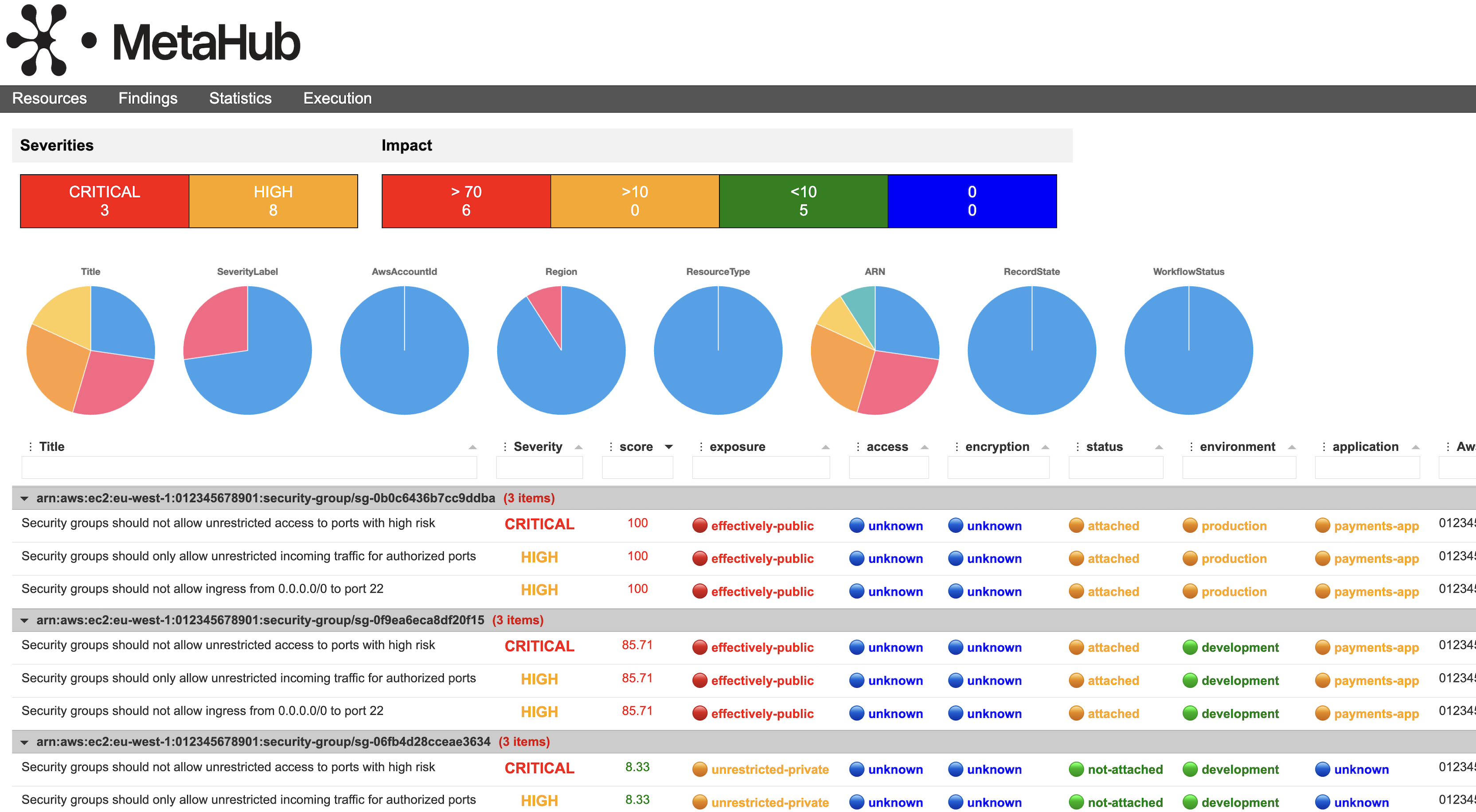
Check the following dashboard generated by MetaHub. You have the affected resources, grouping all the security findings affecting them together and the original severity of each finding. After that, you have the score and all the criteria MetaHub evaluated to generate that score. All this information is filterable, sortable, groupable, downloadable, and customizable.
The following is the JSON output for an EC2 instance; see how MetaHub organizes all the information about its context together, under associations, config, tags, account and cloudtrail, and finally the impact key with the score and all the criteria evaluated to generate that score.

MetaHub provides a range of ways to list, manage, and output your security findings for investigation, suppression, updating, and integration with other tools. It is designed for use as a CLI tool or within automated workflows, such as AWS Lambda functions. It supports different outputs, some of them programatic json, but also powerful html, xlsx and csv that you can customize.
If you use AWS Security Hub, MetaHub integrates smoothly and extends its functionalities. It can be used as a Security Hub Custom Action, it supports AWS Security Hub filters, you can manage the workflow status of your findings, and you can even enrich your findings directly in AWS Security Hub.
MetaHub is designed to be used with AWS and supports multi-account setups. You can run the tool from any environment by assuming roles in your AWS Security Hub master and your child/service accounts. This allows you to fetch aggregated data from multiple accounts using your AWS Security Hub multi-account implementation while also fetching and enriching those findings with data from the accounts where your affected resources are running. Refer to Configuring Security Hub for more information.
Read your security findings from AWS Security Hub with the default filters and executes the default context options:
./metahub
Read a specific (filtered by Id) security finding from AWS Security Hub and executes the default context options:
./metahub --sh-filters Id=arn:aws:securityhub:us-east-1:123456789012:security-control/CloudFront.1/finding/8bd4d049-dcbc-445b-a5d1-595d8274b4c1
Read all the security findings affecting one resource which are ACTIVE (filtered by ResourceId and RecordState) from AWS Security Hub and executes the default context options:
./metahub --sh-filters RecordState=ACTIVE ResourceId=arn:aws:ec2:eu-west-1:123456789012:subnet/subnet-0b7d243ff90ebc03e
Read all the security findings affecting an AWS Account which are ACTIVE (filtered by AwsAccountId and RecordState) for resources with a tag Environment and the value stg and executes the context options config and tags:
./metahub --sh-filters RecordState=ACTIVE AwsAccountId=123456789012 --mh-filters-tags Environment=stg --context config tags
Read your security findings from Prowler as an input file and executes the default context options:
python3 prowler.py aws -M json-asff -q
./metahub --inputs file-asff --input-asff /path/to/prowler-findings.json.asff
Read your security findings from Powerpipe as an input file and executes the default context options:
