
Skip to content
KitploitKITPLOIT
ToolsBlog
Submit
ToolsBlog
Submit

Hacking, PenTest, and Cybersecurity Tools for Your Security Arsenal!

Kitploit is a directory of hacking, cybersecurity, and pentesting tools. Discover the latest project updates to find vulnerabilities, analyze systems, automate testing, and strengthen your security.

··Feeds·Contact·Privacy·© 2026 Kitploit

Tool Directory

Categories

View all categories
Loading categories
trippy — A network diagnostic tool combining traceroute and ping for analyzing network paths, latency, and packet loss with an interactive terminal UI. | Kitploit
Tools/GitHubGitHub/fujiapple852/trippy
General Purpose UtilitiesNetwork MappingInformation GatheringNetwork Security
GitHubfujiapple852/trippy

trippy

A network diagnostic tool combining traceroute and ping for analyzing network paths, latency, and packet loss with an interactive terminal UI.


View Repository
7.7k2733 days agoReviewed by Kitploit
Website

Most Popular

View all →

Discover the most used tools by our community.

Explore all tools

Browse our collection of tools

View all tools →
Share


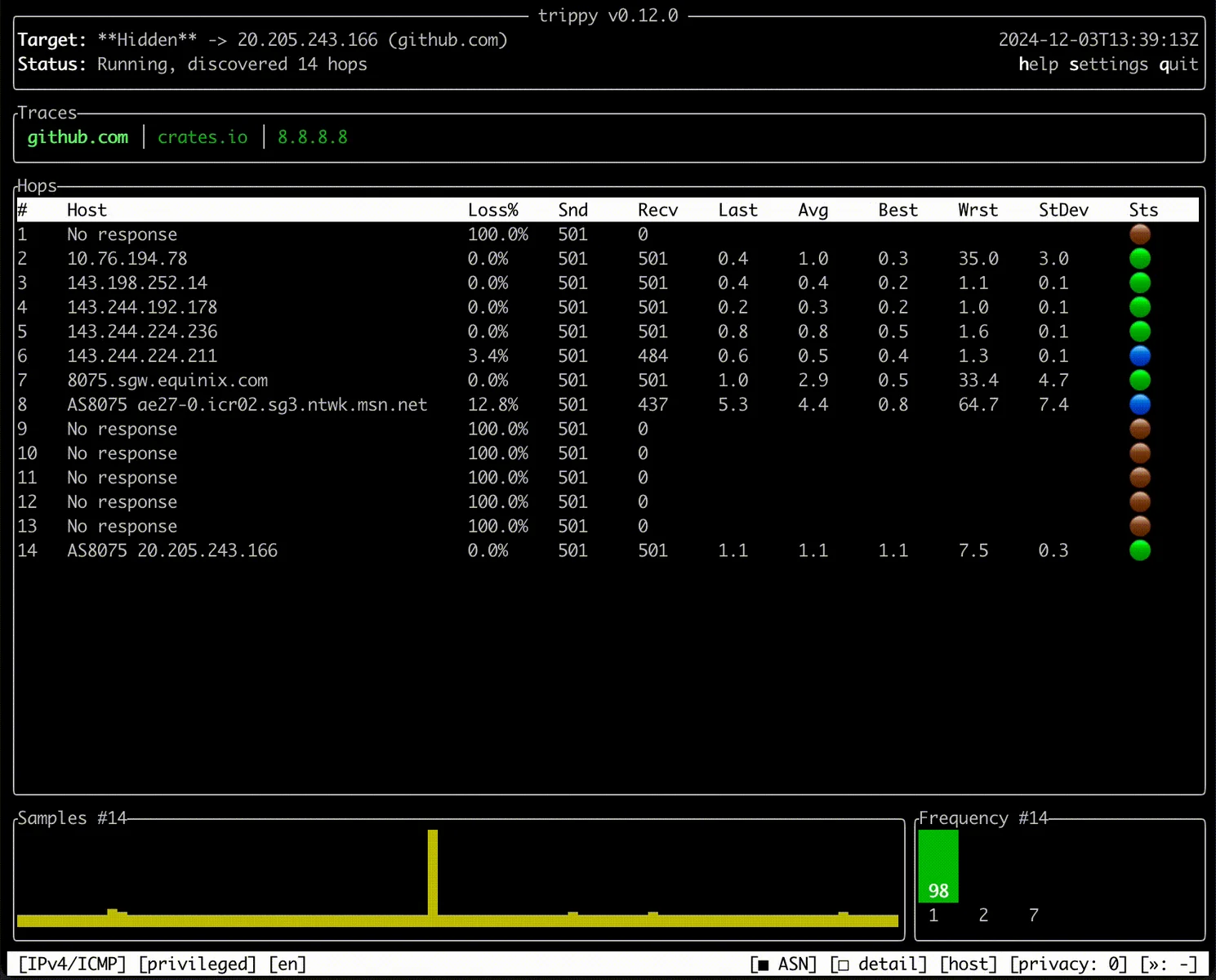
Trippy combines the functionality of traceroute and ping and is designed to assist with the analysis of networking issues.
trippy

Quick Start

See the guide.

getting started

Install

Trippy runs on Linux, BSD, macOS, and Windows. It can be installed from most package managers, precompiled binaries, or source.

For example, to install Trippy from cargo:

root@kitploit:~
cargo install trippy --locked
All package managers

Cargo

Crates.io

root@kitploit:~
cargo install trippy --locked

APT (Debian)

Debian 13 package

root@kitploit:~
apt install trippy

ⓘ Note:

Only available for Debian 13 (trixie) and later.

PPA (Ubuntu)

Ubuntu PPA

root@kitploit:~
add-apt-repository ppa:fujiapple/trippy
apt update && apt install trippy

ⓘ Note:

Only available for Ubuntu 24.04 (Noble) and 22.04 (Jammy).

Snap (Linux)

trippy

root@kitploit:~
snap install trippy

Homebrew (macOS)

Homebrew package

root@kitploit:~
brew install trippy

WinGet (Windows)

winget package

root@kitploit:~
winget install trippy

Scoop (Windows)

Scoop package

root@kitploit:~
scoop install trippy

Chocolatey (Windows)

Chocolatey package

root@kitploit:~
choco install trippy

NetBSD

pkgsrc current package

root@kitploit:~
pkgin install trippy

FreeBSD

FreeBSD port

root@kitploit:~
pkg install trippy

OpenBSD

OpenBSD port

root@kitploit:~
pkg_add trippy

Arch Linux

Arch package

root@kitploit:~
pacman -S trippy

Gentoo Linux

Gentoo package

root@kitploit:~
emerge -av net-analyzer/trippy

Void Linux

Void Linux x86_64 package

root@kitploit:~
xbps-install -S trippy

ALT Sisyphus

ALT Sisyphus package

root@kitploit:~
apt-get install trippy

Chimera Linux

Chimera Linux package

root@kitploit:~
apk add trippy

Nix

nixpkgs unstable package

root@kitploit:~
nix-env -iA trippy

Docker

Docker Image Version (latest by date)

root@kitploit:~
docker run -it fujiapple/trippy

All Repositories

Packaging status

See the installation guide for details of how to install Trippy on your system.

Run

To run a basic trace to example.com with default settings, use the following command:

root@kitploit:~
sudo trip example.com

See the usage examples and CLI reference for details of how to use Trippy. To use Trippy without elevated privileges, see the privileges guide.

Documentation

Full documentation is available at trippy.rs.

documentation links

Getting Started

See the Getting Started guide.

Features

See the Features list.

Distributions

See the Distributions list.

Privileges

See the Privileges guide.

Usage Examples

See the Usage Examples.

Command Reference

See the Command Reference.

Theme Reference

See the Theme Reference.

Column Reference

See the Column Reference.

Configuration Reference

See the Configuration Reference.

Locale Reference

See the Locale Reference.

Versions

See the Version Reference.

Frequently Asked Questions

Why does Trippy show "Awaiting data..."?

See the Awaiting Data guide.

How do I allow incoming ICMP traffic in the Windows Defender firewall?

See the Windows Defender Firewall guide.

What are the recommended settings for Trippy?

See the Recommended Tracing Settings guide.

Acknowledgements

Trippy is made possible by ratatui ( formerly tui-rs), crossterm as well as several foundational Rust libraries.


Trippy draws heavily from mtr and also incorporates ideas from both libparistraceroute & Dublin Traceroute.

The Trippy networking code is inspired by pnet and some elements of that codebase are incorporated in Trippy.

The AS data is retrieved from the IP to ASN Mapping Service provided by Team Cymru.

The trippy.cli.rs CNAME hosting is provided by cli.rs.

The Trippy chat room is sponsored by Zulip.

Trippy logo designed by Harun Ocaksiz Design.

License

This project is distributed under the terms of the Apache License (Version 2.0).

Unless you explicitly state otherwise, any contribution intentionally submitted for inclusion in time by you, as defined in the Apache-2.0 license, shall be licensed as above, without any additional terms or conditions.

See LICENSE for details.

Copyright 2022 Trippy Contributors

Download Tool