Self-hosted threat intelligence platform — feed aggregation, AI triage, MITRE ATT&CK coverage, and Sentinel-integrated detection engineering. Runs standalone or fully Azure-integrated.
A self-hosted threat intelligence platform that aggregates RSS feeds from 60+ security vendors, runs AI triage, correlates findings against your RunZero asset inventory, and surfaces actionable alerts through a dark-mode web dashboard.
Built to run standalone with zero cloud dependency, or fully integrated into an Azure/Entra/Sentinel environment — pick the tier that matches what you've got.
| Tier | Script | AI triage | Auth | Storage | You get |
|---|---|---|---|---|---|
| Basic | scripts/setup-basic.sh | Off | Local API key | Local Postgres (Docker) | Feed aggregation, IOC extraction, MITRE matrix, dashboards — no AI, no cloud, nothing to sign up for |
| Basic + API | scripts/setup-basic-api.sh | Anthropic (direct) | Local API key | Local Postgres (Docker) | Everything above, plus AI severity/TTP/summary triage |
| Azure + API | scripts/setup-azure.ps1 | Azure AI Foundry | Microsoft Entra ID SSO | Your own Postgres (Azure DB for PostgreSQL, etc.) | Full deployment to Azure Container Apps, SSO with per-user roles. (The detections.ai pipeline integration is coming in a future release — see below.) |
All three run the exact same application code — the only thing that changes is which env vars are set. See Environment Variables for the full reference.
# Basic — no AI, no cloud
./scripts/setup-basic.sh
# Basic + API — adds direct Anthropic triage
./scripts/setup-basic-api.sh
# Azure + API — full SIEM-integrated deployment (PowerShell 7+, az CLI)
./scripts/setup-azure.ps1
The two bash scripts stand up a local Postgres container, apply the schema, and generate backend/.env / frontend/.env.local for you — then print the two commands to actually start the app (pip install + run backend, npm install + run frontend dev server). setup-azure.ps1 is a thin wrapper around infra/provision.ps1, the real Azure Container Apps deployment runbook.
RUNZERO: Matches (entries correlated against your inventory, filterable by severity/date/confidence/KEV), Exposure (org-level confirmed/possible standing with remediation tracking), and Metrics (intake vs. remediation trends over time)This repo actually ships two related but independently-usable things under the "detections" umbrella:
The DETECTIONS tab — a self-contained review surface, split into nine sub-tabs:
Microsoft.SecurityInsights/hunts object plus its constituent saved-search queries (gated by SENTINEL_HUNTING_SYNC_ENABLED and a mode — off/manual/auto — configurable per-team in Settings > API Settings; never a silent auto-push unless you opt in).Microsoft.SecurityInsights/alertRules) — a distinct Sentinel resource type from Hunting, since these are what actually fire incidents/alerts on a schedule — with the same tune-suggestion apply/dismiss workflow.Runs entirely inside the main backend, no extra deployment needed for the review surface itself. Its own API design deliberately follows detections.ai's conventions below, even though it's fully self-contained.
detections.ai pipeline orchestrator — coming soon. detections.ai has a public API in development for AI-assisted detection generation, and this repo has a real integration built for it (backend/detection_pipeline/orchestrator.py) that takes triaged threat intel, checks it against existing detection coverage, and generates draft KQL for your Sentinel workspace as a scheduled job. This integration will support that API once it's available, and isn't part of this public release yet. In the meantime, you don't need it to use the Detections tab at all — Local Detections Import below covers the same "get real detections into this app" goal for AI-generation-free and Sentinel-free setups today.
Given the app's name and primary pitch, the single most common question from a self-hoster on the Basic tier is probably going to be "I don't have Sentinel or an AI provider configured — can I still get anything out of the Detections/Hunts tabs?" The answer is yes: point the app at a folder of your own detection rule files (hand-written, exported from a real Sentinel/Defender tenant, or pulled from a public Sigma/Sentinel rule repo) and it will catalog, MITRE-tag, and statically validate them — no Sentinel connection and no DETECTIONS_AI_API_KEY/Anthropic key required for any of it.
.kql/.txt/.yar/.spl-or-any-extension files, each optionally paired with a .json/.yaml sidecar ({"file": "myrule.kql", "title": "...", "description": "...", "technique_id": "T1059.001"}) for metadata Microsoft's own export doesn't need declared separately; YARA; Suricata; Sigma YAML (single- or multi-document); Splunk SPL; and Microsoft's own native exported Analytics Rule/Hunting Query JSON (only Scheduled-kind rules carry a raw KQL query this app can evaluate — every other kind is recognized and reported, not silently skipped).ALL DETECTIONS/GENERATED HUNTS views too, not just its own tab. The dedicated Local Detections sub-tab (under DETECTIONS, admin-only to trigger an import) is where you point it at a folder and watch per-file progress/results.LOCAL_IMPORT_DIR to an absolute path on the backend's filesystem (a mounted volume, in a container deployment) — everything imported must live under that root; the UI lets you pick a sub-path underneath it, never an arbitrary filesystem location. See Environment Variables.examples/local-detections-samples/ ships a small ready-to-import folder — two valid KQL rules (one paired with a .json sidecar to show that mechanism), one deliberately invalid rule (to see the flagged-invalid banner), and one unrecognized file (to see the failed-import banner). Point LOCAL_IMPORT_DIR at it to see all three result states on your very first import, no rule-writing required.Local Detections — a completed import run: the summary banner calls out files that were cataloged but flagged invalid by static analysis (here, a rule that alerts on a single hardcoded hash) right alongside the ones that imported cleanly, and every file becomes a normal hunt/detection row below

All screenshots below use synthetic data (fake org names, RFC 5737 example IPs, .example domains) generated for documentation — no real threat intel or customer data.
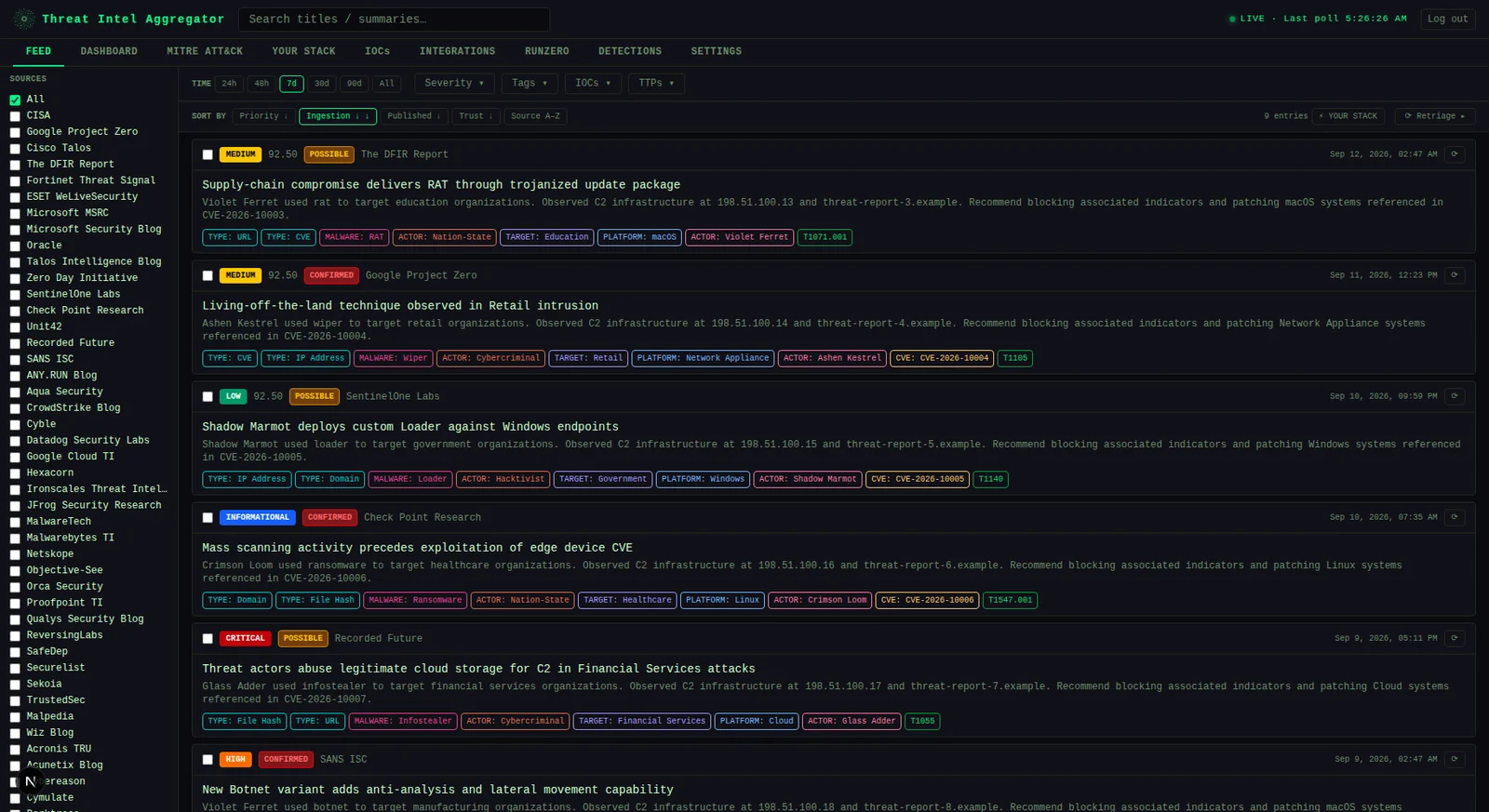
Feed — browse and filter triaged threat intel entries with severity, tags, IOCs, and TTPs

Dashboard — at-a-glance severity breakdown and top MITRE ATT&CK techniques

MITRE ATT&CK — full matrix heatmap of technique coverage across ingested intel

Your Stack — define your environment; feed entries are re-scored by relevance

IOCs — searchable ledger of all extracted indicators with STIX/CSV export

Integrations — connector overview for Sentinel, Defender, and RunZero: configured/enabled status and shortcuts into each one's own tab

RunZero — asset correlation, org-level exposure tracking, and remediation metrics, all sourced from your RunZero inventory

Exposure — orgs ranked by threat match count; click any card to see matched entries

Detections — the full catalog of registered analytics (AI-generated and locally-imported alike), each with its static-gate/backtest/review status and MITRE technique

Settings — AI triage controls, feed health monitoring, source trust scores, and user management

┌─────────────────────────────────────────┐
│ Next.js 16 frontend (port 3000) │
│ Tailwind CSS · dark theme │
└──────────────┬──────────────────────────┘
│ REST API (Bearer token)
┌──────────────▼──────────────────────────┐
│ FastAPI backend (port 8000) │
│ APScheduler · slowapi rate limiting │
└──┬──────────┬──────────┬────────────┬───┘
│ │ │ │
Postgres AI provider RunZero API detections.ai
(modular: (asset sync) (coming soon --
Anthropic or see Features below)
Azure AI Foundry)
Backend (backend/) — Python 3.12 + FastAPI. Postgres for all storage (SQLite and Azure Blob Storage have been fully retired). AI provider and auth method are both env-var-selected, not hardcoded — see below.
Frontend (frontend/) — Next.js 16, plain JavaScript, Tailwind CSS. Auto-detects auth mode from the backend at load time.
Infra (infra/) — Azure Bicep templates for Container Apps, Key Vault, and Container Registry (apps.bicep + platform.bicep + app-stack.bicep, deployed via provision.ps1). Only relevant to the Azure + API tier.
AZURE_AD_TENANT_ID set → Entra mode: Microsoft Entra ID SSO, per-user roles (first login becomes admin, everyone else defaults to viewer).
AZURE_AD_TENANT_ID unset → Local mode: a single shared LOCAL_API_KEY grants admin access to anyone who has it. No user management, no Azure dependency. The frontend calls GET /api/auth/mode on load and renders the matching login screen automatically — nothing to configure on the frontend side.
Both modes issue the same kind of app-signed JWT afterward, so every other route (require_auth/require_admin) works identically regardless of which mode issued the token.
Run scripts/setup-basic.sh or scripts/setup-basic-api.sh (see Deployment tiers) — they handle Postgres and .env generation for you. Then:
cd backend && pip install -r requirements.txt && uvicorn main:app --reload --port 8000
cd frontend && npm install && npm run dev
cd backend
python -m venv .venv
source .venv/bin/activate # Windows: .venv\Scripts\activate
pip install -r requirements.txt
cp env.example .env # fill in required values — see Environment Variables below
uvicorn main:app --reload --port 8000
cd frontend
npm install
cp env.local.example .env.local # set NEXT_PUBLIC_API_URL=http://localhost:8000
npm run dev
cp backend/env.example backend/.env # fill in required values
docker compose up --build
Frontend → http://localhost:3000 Backend API docs → http://localhost:8000/docs
Copy backend/env.example to backend/.env and fill in. Grouped by what tier needs them:
Always required:
| Variable | Description |
|---|---|
PG_DSN | Postgres connection string |
JWT_SECRET_KEY | Secret for signing app session tokens (python -c "import secrets; print(secrets.token_hex(32))") |
Auth — pick one mode:
| Variable | Description |
|---|---|
LOCAL_API_KEY | Local mode: shared key that grants admin access. Leave AZURE_AD_TENANT_ID unset to activate this mode |
AZURE_AD_TENANT_ID | Entra mode: tenant ID for SSO. Setting this activates Entra mode |
AZURE_AD_CLIENT_ID | Entra mode: app registration client ID |
AZURE_AD_CLIENT_SECRET | Entra mode: app registration secret (frontend only) |
NEXTAUTH_SECRET | Entra mode: NextAuth session encryption secret (frontend only) |
AI triage — optional, pick one provider (omit both to run with triage disabled):
| Variable | Description |
|---|---|
AI_PROVIDER | anthropic (default) or azure |
ANTHROPIC_API_KEY | Direct Anthropic API key |
AZURE_FOUNDRY_ENDPOINT | Azure AI Foundry endpoint, e.g. https://<resource>.services.ai.azure.com/anthropic |
AZURE_FOUNDRY_API_KEY | Azure AI Foundry API key |
AZURE_FOUNDRY_DEPLOYMENT | Foundry deployment name (default claude-haiku-4-5) |
AZURE_FOUNDRY_API_VERSION | Foundry API version (default 2025-05-01) |
Optional:
| Variable | Description |
|---|---|
RUNZERO_API_TOKEN | Enables RunZero asset sync and correlation |
ALLOWED_ORIGINS | Comma-separated CORS allowlist (default http://localhost:3000) |
ENABLE_SCHEDULER | Set false to disable the background feed poller (default true) |
ARCHIVE_AFTER_DAYS | Auto-archive threshold in days (default 90) |
PG_POOL_MIN / PG_POOL_MAX / PG_POOL_TIMEOUT | Postgres connection pool tuning (defaults 1 / 10 / 30) |
LOCAL_IMPORT_DIR | Enables Local Detections Import — absolute path on the backend's filesystem that every import is confined to. Unset disables the feature entirely (its tab shows a "not configured" message) |
Frontend (frontend/.env.local or frontend/env.local.example):
| Variable | Description |
|---|---|
NEXT_PUBLIC_API_URL | Backend URL as seen by the browser. Baked into the JS bundle at build time. Leave unset to route API calls through the built-in same-origin proxy (frontend/pages/api/[...proxy].js) instead — required whenever the backend has no public ingress (e.g. the Azure + API tier's internal-only Container App) |
BACKEND_URL | Backend URL as seen by the Next.js server itself. Used by NextAuth's login exchange and, when NEXT_PUBLIC_API_URL is unset, by the same-origin proxy that forwards every /api/* browser request server-side |
detections.ai orchestrator — coming soon (not part of this public release yet; documented here for when it ships. Azure + API tier, separate deployable — see backend/detection_pipeline/orchestrator.py):
| Variable | Description |
|---|---|
DETECTIONS_AI_API_KEY | Required to run the orchestrator at all |
SENTINEL_WORKSPACE_ID | Log Analytics workspace customer ID (GUID), for backtesting. Optional |
PIPELINE_BATCH_SIZE | Entries per run (default 5) |
PIPELINE_DRY_RUN | true to claim and log without calling the API |
PIPELINE_LANGUAGE | Detection query language (default kql) |
Sentinel Hunts sync (optional, off by default — see Settings > API Settings for the on/off/manual/auto mode):
| Variable | Description |
|---|---|
SENTINEL_HUNTING_SYNC_ENABLED | true to allow any hunt sync attempt at all. Unset/false is a pure no-op — zero ARM calls |
AZURE_SUBSCRIPTION_ID | Subscription containing the Sentinel workspace |
AZURE_RESOURCE_GROUP | Resource group containing the Sentinel workspace |
SENTINEL_WORKSPACE_NAME | The workspace's name, not its customer ID — a different value than SENTINEL_WORKSPACE_ID above, which the backtesting data-plane client uses instead |
The real, current IaC is infra/apps.bicep + infra/platform.bicep + infra/app-stack.bicep, deployed via infra/provision.ps1 (or the thin wrapper scripts/setup-azure.ps1). It provisions Container Apps, Key Vault-backed secrets, and managed identities — Postgres itself is not provisioned by this repo; point PG_DSN (stored as the pg-dsn Key Vault secret) at any reachable Postgres server.
./scripts/setup-azure.ps1
# or directly:
cd infra
cp migration.psd1.example migration.psd1 # fill in your resource group, apps, etc.
./provision.ps1
provision.ps1 is idempotent — safe to re-run after editing the manifest. See its own header comment for the full step-by-step (platform → app stack → secrets → Easy Auth → image import → apps → post-checks).
The detections.ai orchestrator (a scheduled Container Apps Job driven by an Orchestrator block in migration.psd1 — see migration.psd1.example for the shape, and store your key as the DETECTIONSAIAPIKEY Key Vault secret) isn't part of this public release yet — see Two detections-related features above.
├── backend/
│ ├── main.py # FastAPI app, all endpoints
│ ├── db.py # Postgres queries
│ ├── pgcompat.py # connection pool + SQLite-style placeholder translation
│ ├── feed_manager.py # RSS polling, AI triage (provider-modular), scheduler
│ ├── enrichment.py # IOC extraction, KEV cache, stack rematch
│ ├── runzero_sync.py # RunZero asset sync and correlation engine
│ ├── dedup.py # CVE deduplication logic
│ ├── auth.py # Entra ID SSO + local API-key auth, app JWT sign/verify
│ ├── ioc_export.py # STIX 2.1 and CSV export
│ ├── stack_presets.py # Pre-built tech stack templates
│ ├── detection_pipeline/ # detections.ai orchestrator, MITRE alignment-check,
│ │ # Sentinel hunts/analytics-rules sync + tuning,
│ │ # audit log, local_import.py (Local Detections Import)
│ └── tests/ # pytest test suite, incl. fixtures/local_import/
├── frontend/
│ ├── pages/
│ │ ├── index.js # Main app shell + tab routing
│ │ └── login.js # Entra ID or local API-key login, auto-detected
│ ├── lib/
│ │ ├── authMode.js # GET /api/auth/mode, cached per page load
│ │ ├── authFetch.js # Bearer auth + 401-retry wrapper
│ │ └── authSession.js # token storage, JWT decode/expiry helpers
│ └── components/
│ ├── layout/ # TopBar, Sidebar, TabBar, TopFilterBar, TimeRangeToggle
│ ├── feed/ # FeedList, FeedCard
│ ├── integrations/ # IntegrationsPanel, ExposurePanel, RunZeroPanel,
│ │ # RunZeroMatchesPanel, RunZeroMetricsPanel
│ ├── detections/ # DetectionsPanel (tab shell) + one component per
│ │ # sub-tab: DetectionsCatalogPanel, AlignmentReviewPanel,
│ │ # DispositionAlertsPanel, HuntsPanel, SentinelHuntsPanel,
│ │ # SentinelAnalyticsRulesPanel, LocalDetectionsPanel,
│ │ # AuditPanel, plus shared TuningSuggestionBadge
│ ├── settings/ # SettingsPanel, CadencePicker, SeverityCards
│ └── mitre/ # MitreMatrix
├── infra/ # Azure Bicep templates + provision.ps1
├── scripts/ # Tiered setup scripts (see Deployment tiers)
└── docker-compose.yml
63 feeds across three tiers:
Authorization: Bearer <token>secrets.compare_digest) for the local auth key.env / Azure Key VaultMIT — see LICENSE.