 emilc3978/cve-2022-37969poc
Tutorial of CVE-2022-37969 with focus on the methodology of Kernel exploitation, not CVE's internal causes

This was made to clarify general aspects concerning Windows exploitation. It explains basic concepts applied to CVE-2022-37969. The final result is a working PoC. It does not clarify every aspect about the CVE, but provides re-usable pieces of code and explains mechanisms that can be found in many general exploits.
The target user would be a beginner reverse engineer, exploit developer that seeks a working proof of concept source code to test and understand basic Windows Internals. It provides a reference point to further learning.
Requirements: Basic kernel debugging, basic Reverse Engineering, basic Windows internals, c/c++ programming skills
A program is a piece of code that is running on a machine. Generally a program receives data (input) makes calculations using the inputs and generates data (output). Most programs are wirtten by humans, and thus have bugs. A bug is generated by some source code that was not written correctly (the programmer wanted to do somenthing with the input, the resulting code was different from the intended result). Most bugs are corrected before launching the product, but some remain. This happens because there are different types of bugs, some harder to spot than others.
Windows is a computer program, was written by humans, and thus it has bugs. Why is it important? Because Windows systems ca run programs that operate sensitive data like, bank accounts, health care databases, and other. Some bugs can be used to illegally gain access to restricted data (this a good usecase for an exploit)
There are multiple kind of bugs, some usefull some not. Generally bugs are generated by inputs to the program that in conjunction with the lines of code that were written wrong generate a malformed output or behaviour of the program. Finding that input is the job of the security specialist (or hacker). The next step is assesing the resulted malformed output/behaviour and answering the question "Can it be used in a usefull manner ?". This is where bugs are classified in different categories. For example a bug may generate behaviour that corrupts some data structures and causes the target computer to restart. It's usefullness is limited. One bug may cause the input to be written in a memory zone that controls access permissions to restricted files. This kind of bug is more usefull.
So from the set of all possible bugs the hacker searches the subset that is most useful to it's purpose. Generally speaking the problem is "Can i give the target program a specially crafted input so that I do not break the system but I can elevate my level of access and profit?"
After this non-techincal introduction the scope the tutorial can be formulated: Can we find a Windows program that accepts malformed input and as a result of wrong developer code can illegally elevate our permissions from regular user to administrator?
Target program: Windows CLFS (Common Log File System Driver)
Expoit name: CVE-2022-37969
Type: Local Privilege Escalation
VULNERABLE ISO DOWNLOAD: Download Here
The Windows address space is roughly divided between user-space (running general programs) and kernel-space (running the operating system itself and hardware component software-->drivers). One regular user must not access the kernel space, but there are mechanisms by which regular-user-programs can access parts of the kernel code (system calls, driver procedures). Why do we need access? To interract with the OS in a secure and controlled manner, that is provided by the OS designers.
Some drivers use data inputs provided by the user to operate on kernel-space-data-structures. If the input generates a bug, then the kernel might be corrputed. One case is the Common Log File System Driver. By using some special input we can force the driver to alter kernel-data-structures that hold the privilege access level for the user and overwrite regular user with administrator
What needs to be modified in order to elevate the privilege to admin?
We begin with the end-goal in mind. Windows stores inside a kernel data structure named _EPROCESS information for each process running on the system. Example of _Eprocess
One important field is struct _EX_FAST_REF Token. This is another data structure that further points to data referencing the privilege level of that respective process. In the following picture System process has a system token and Explorer process has a regular user token.

So to elevate the privilege of Explorer.exe we would need to copy the value from System's _EPROCESS-->Token to Explorer's _EPROCESS-->Token. We will acomplish something similar by copying System Token into our own program's Token and launching a Command Prompt from the elevated process (Children processes inherit the token of the father process).
To complete these actions we need mechanisms for:
Introduction: The nature of Windows over the years : As with the discovery of new vulnerabilities, Windows needed patching to mitigate them. Also with the emergence of new technology, Widows needed updates to stay competitive. One crucial requirement was backwards-compatibility with previus versions. And sometimes security was achieved via obscurity. Data structures, function definitions were removed from manuals, but the functionality still remained. By reverse engineering, researchers were able to use those functionalities to various purposes.
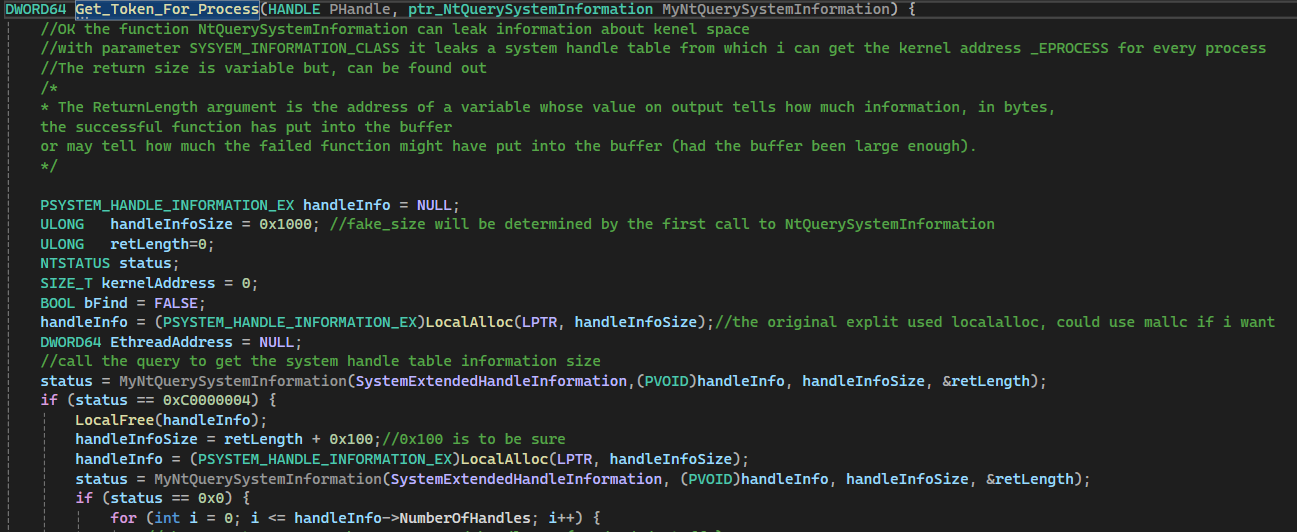
For finding the kernel address of _EPROCESS we will use a undocumented function: NtQuerySystemInformation (See link for parameters). By using the SystemInformationClass parameter we can specify what kind of information we want to retrieve. We will retrieve general process information by specifying SystemExtendedHandleInformation value (#define SystemExtendedHandleInformation 0x40).
A caveat of using NtQuerySystemInformation is that we do not know beforehand what is the length of the returned data, but NtQuerySystemInformation has a mechanism that helps. It it is called with a wrong sized array for the required data, it returns ERROR and the correct data size that should have been requested. This can be used to correctly read Process Information in the following way:
NtQuerySystemInformation with a dummy SystemInformationLength parameterReturnLength parametre valueNtQuerySystemInformation again with the correct SystemInformationLength value returned earlierThe returned data structure is of type PSYSTEM_HANDLE_INFORMATION_EX. This is a undocumented data structure. (See link) that leads to a SYSTEM_HANDLE_TABLE_ENTRY_INFO_EX data structure, that holds in the Object field the Kernel address of _Eprocess data structure for the corresponding process.
