ThreatSentry AI: AI-Powered Threat Hunting Tool



Automate external asset discovery, intelligently enrich with multi-source data, and leverage ensemble machine learning to predict and prioritize risk. Transform alert fatigue into actionable intelligence.
🚀 Mission Statement
ThreatSentry AI eliminates security alert fatigue and enables proactive threat hunting through intelligent risk prioritization. It combines automated asset discovery, multi-source data enrichment, and advanced machine learning to transform raw security data into actionable intelligence.
👨💻 Author & Acknowledgments
Project Lead: EclipseManic
Development Note: This comprehensive enterprise security platform was architected and developed by a single developer with assistance from AI development tools for code generation, optimization, and documentation—demonstrating the viability of AI-augmented software engineering for complex systems.
📋 Executive Summary
Modern security teams face unprecedented challenges:
- Alert Fatigue: Thousands of daily alerts with signal-to-noise ratios making manual triage impossible
- Fragmented Data: Critical context scattered across SIEM, CMDB, patch systems, and network monitoring
- Reactive Posture: Responding to known threats rather than hunting for emerging risks
- Resource Constraints: Limited budgets and personnel in increasingly complex infrastructure
ThreatSentry AI solves these problems through:
- Automated External Asset Discovery via Shodan API for continuous visibility
- Intelligent Multi-Source Enrichment from NVD, internal systems, and behavioral analytics
- ML-Powered Risk Scoring using ensemble models for accurate threat prioritization
- Executive-Ready Dashboards for actionable intelligence and rapid response
- Proactive Alerting that surfaces high-risk assets before incidents occur
✨ Core Features
🤖 Intelligent Risk Scoring Engine
- Ensemble Machine Learning Model: Combines Random Forest, Gradient Boosting, and Neural Networks for robust risk classification
- Multi-Factor Analysis: Evaluates 40+ security and business attributes beyond simple vulnerability counts:
- Temporal Context: Exposure duration, patch lag, incident history
- Network Position: Critical service status, network segment, firewall protection
- Behavioral Signals: Authentication failures, traffic anomalies, false positive history
- Compliance Impact: Data sensitivity, regulatory requirements, connected critical assets
- Confidence Scoring: Each prediction includes a confidence metric (0-1) for analysts to gauge reliability
- Continuous Learning: Model retrains automatically on configurable intervals with feedback integration
🌐 Automated Asset Discovery & Intelligence Fusion
- Shodan Integration: Continuous discovery of internet-facing devices with advanced query support
- Preset queries for common scenarios (SSL certificates, RDP services, ICS/Modbus, etc.)
- Custom query support for organization-specific asset hunting
- NVD Enrichment: Automatic CVE correlation using intelligent banner parsing
- Banner service extraction supporting 14+ product types (Apache, Nginx, MySQL, IIS, etc.)
- CVSS scoring and severity classification
- Prevents data loss: Only updates CVE metrics when vulnerabilities are found
- Internal Data Integration (Extensible architecture for your environment):
- CMDB Collector: Asset classification, criticality levels, compliance tags
- SIEM Collector: Behavioral metrics, authentication patterns, anomaly scores
- Patch Management Collector: Patch currency, missing updates, patch lag analysis
- Network Monitoring Collector: Traffic patterns, DDoS detection, anomaly scores
- Unified Database: SQLite with 40+ indexed columns for efficient querying and reporting
- PyQt5-Based GUI with dark/light theme support:
- Real-time risk distribution visualization (bar charts with Matplotlib)
- Sortable, filterable device table with color-coded risk indicators
- Quick-filter by Organization, Country, Risk Level
- Auto-search across IP, Org, Country, Risk fields
- Interactive Device Inspection:
- Detailed vulnerability list with CVSS scores
- Vulnerability timeline and historical tracking
- Risk factor breakdown explaining the scoring
- Bulk Operations:
- Manual scan triggers (Shodan + NVD enrichment)
- CSV/JSON data import with field validation
- Model retraining with performance metrics
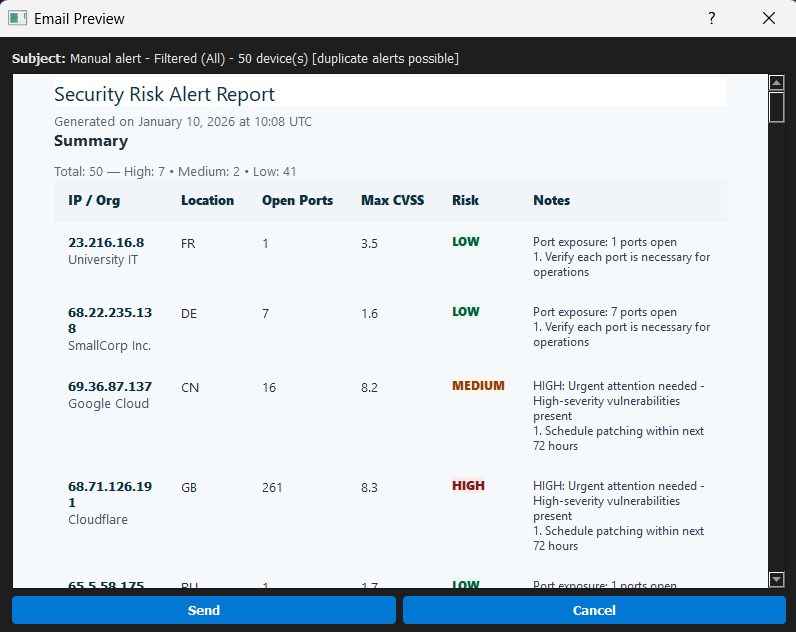
- Manual alert sending to validate configurations
- Analytics Panel (Advanced):
- Risk distribution trends
- CVE impact analysis
- Organization-wise vulnerability metrics
📧 Proactive Email Alerting
- SendGrid Integration: Automatic HTML email notifications for high-risk assets
- Triggered immediately upon risk label change (Low/Medium → High)
- Prevents duplicate alerts with "notified" status tracking
- Rich Alert Content:
- Executive summary with risk score and confidence
- Detailed vulnerability list (top N by CVSS)
- Risk factor breakdown for security team context
- Actionable remediation recommendations
- Flexible Configuration: Define alert recipients, email templates, and trigger conditions
Sample Alert Email
![Automated Security Alert Email Template]
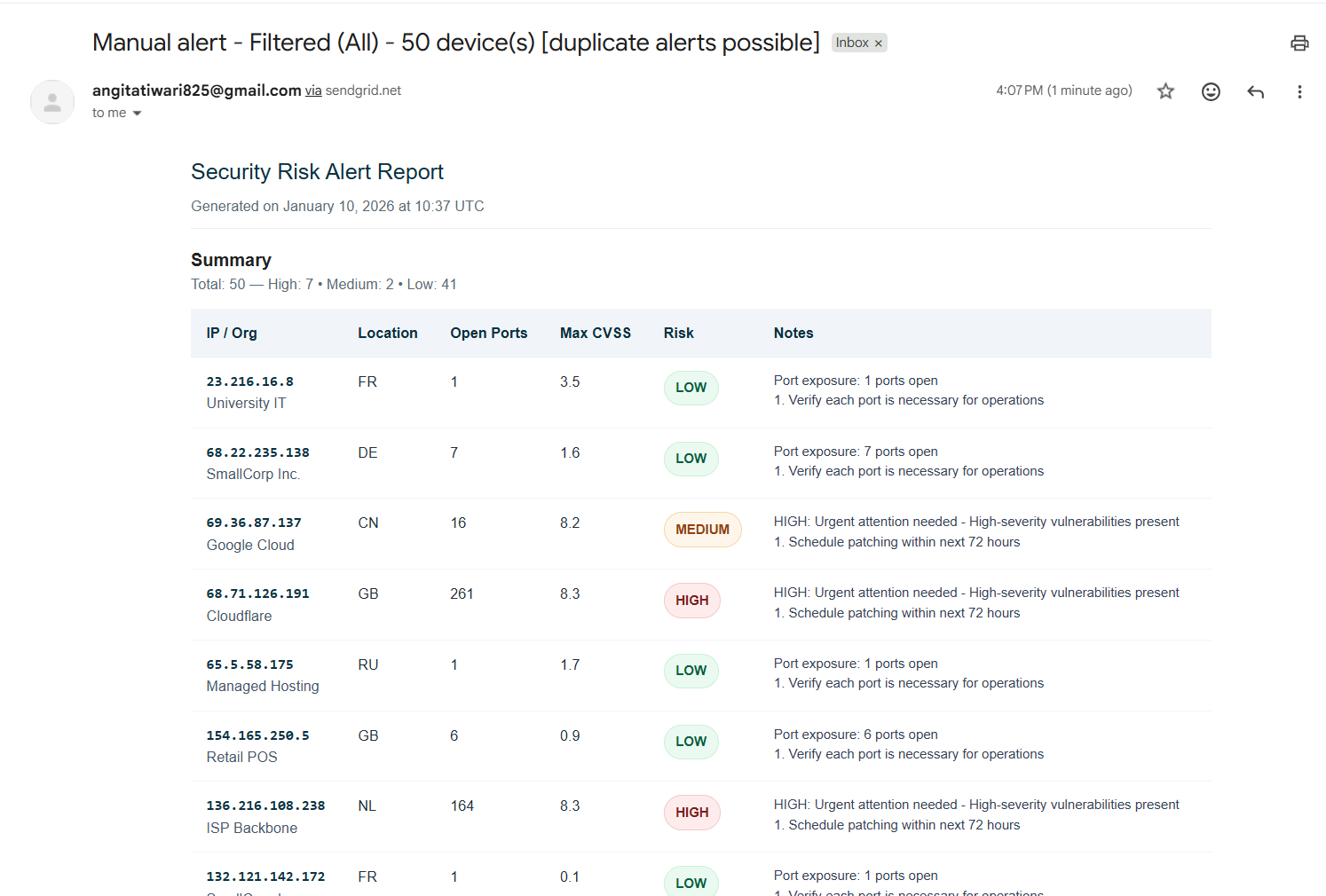
HTML formatted email with risk summary, CVE details, and remediation guidance sent via SendGrid
📈 Model Transparency & Continuous Improvement
- Performance Monitoring:
- Accuracy tracking across training epochs
- Confusion matrix and classification reports
- Feature importance analysis to understand model decisions
- Data drift detection indicators
- Feedback Loop:
- Manual risk label corrections by analysts
- True positive/false positive tracking
- Model weight adjustments based on feedback
- Automated retraining schedule with metadata logging
- Optimized for Scale:
- Database indexing on 5+ columns for sub-millisecond queries
- Result caching for frequently accessed data (28.7x speedup)
- Pagination with "Load More" for large datasets (50 rows initial + 50 row increments)
- Non-blocking UI with worker threads (QThread, ThreadPoolExecutor)
- Robust Error Handling:
- Exponential backoff retry logic for API failures (Shodan, NVD, SendGrid)
- Graceful degradation if optional services unavailable
- Comprehensive logging with file rotation
- Thread-safe signal/slot architecture prevents race conditions
- Memory Efficient:
- Garbage collection after chart renders
- Lazy-loaded UI tabs to reduce startup time
- Session context managers ensure proper cleanup
� Visual Overview
Main Dashboard
![ThreatSentry AI Dashboard - Main Threat Hunting Interface]
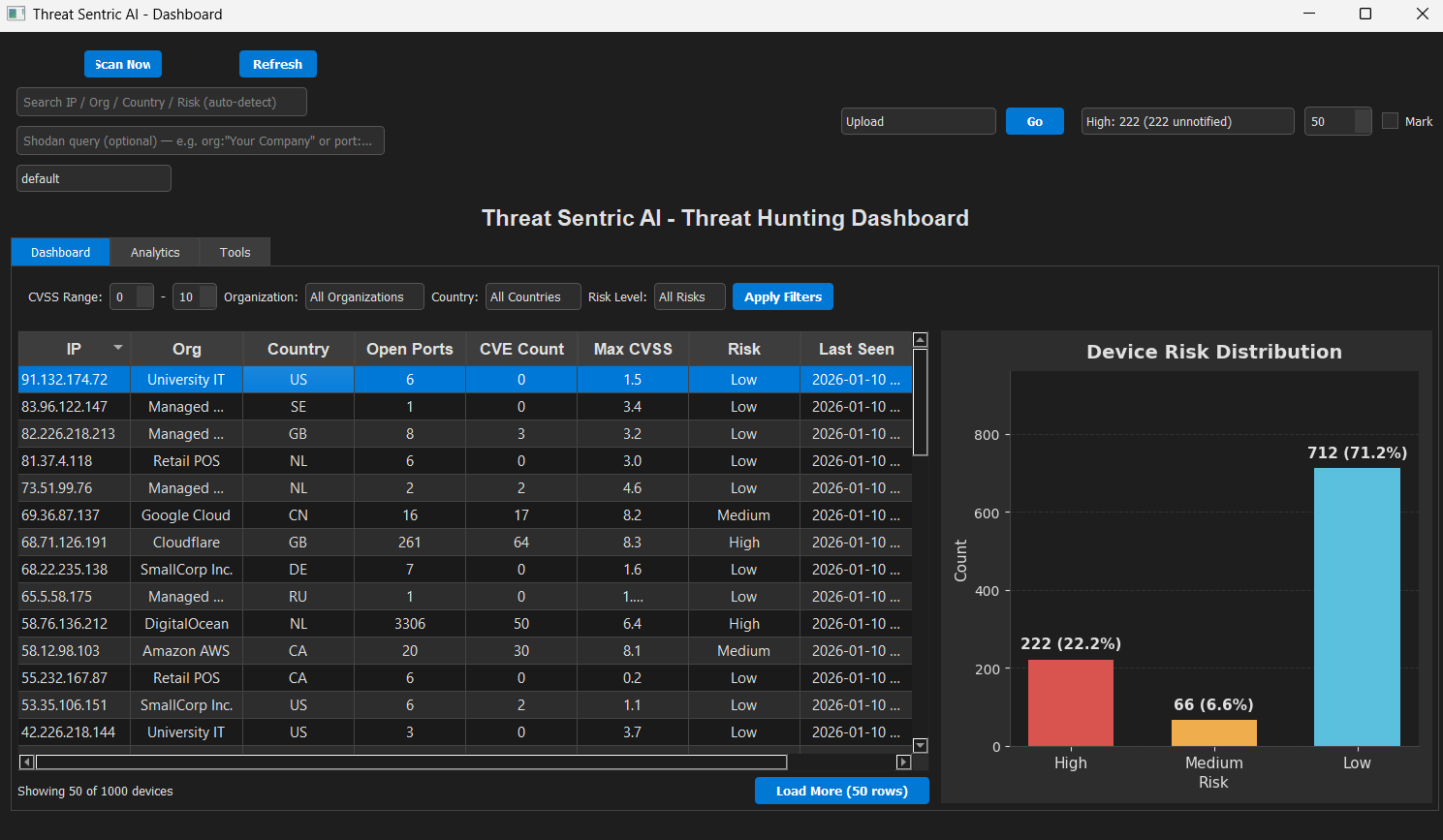
Real-time risk visualization with sortable device table and risk distribution bar chart
 eclipsemanic/threatsentry-ai
