
Skip to content
KitploitKITPLOIT
ToolsBlog
Submit
ToolsBlog
Submit

Hacking, PenTest, and Cybersecurity Tools for Your Security Arsenal!

Kitploit is a directory of hacking, cybersecurity, and pentesting tools. Discover the latest project updates to find vulnerabilities, analyze systems, automate testing, and strengthen your security.

··Feeds·Contact·Privacy·© 2026 Kitploit

Tool Directory

Categories

View all categories
Loading categories
Tools/GitHubGitHub/d3vhex/sentora
Vulnerability ScannersThreat IntelligenceIntrusion DetectionIncident ResponseAI SecurityLog Analysis
GitHubd3vhex/sentora

Sentora

An open-source, self-hosted AI-powered SIEM, EDR and SOAR platform for modern security operations.


View Repository
61 day agoNot yet reviewed

Most Popular

View all →

Discover the most used tools by our community.

Explore all tools

Browse our collection of tools

View all tools →
Share

Sentora Community Edition

License: AGPL v3 Python 3.10+ Built with Sanic

Self-hosted security stack for small/mid teams that don't have a dedicated SOC. Drop an agent on each endpoint, point them at the server, and you get SIEM logs, file integrity, package vulnerabilities, an OpenSearch-powered log explorer, autonomous AI triage and a SOAR playbook engine, all in one docker compose up.

The "AI" part is a locally-running Ollama model (default llama3.2:3b). Logs never leave the box; there's no OpenAI key, no Anthropic key, no phone-home. If you want a smarter model and have the RAM, swap it in .env.
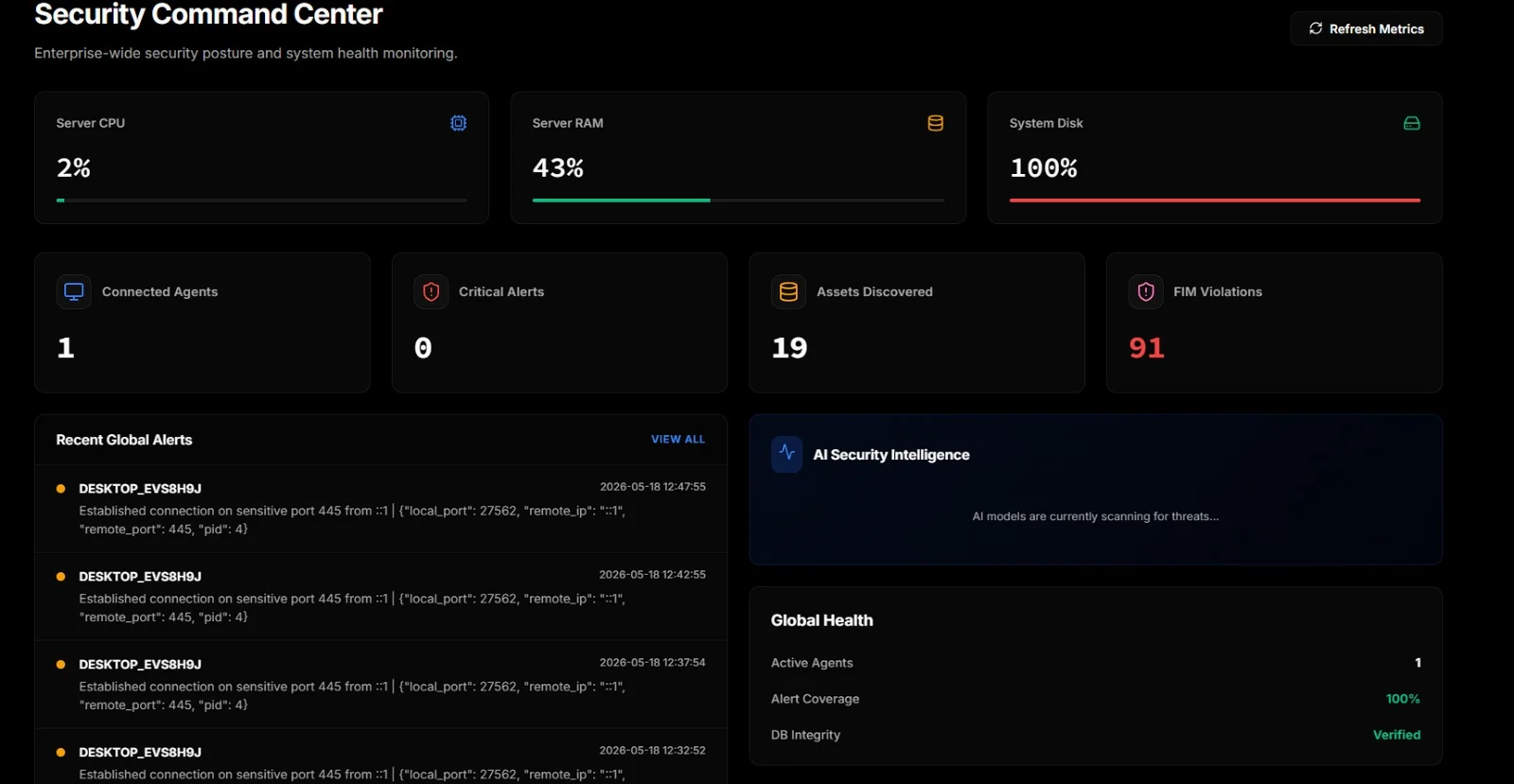
Dashboard


What it actually does

  • Collects telemetry from Windows and Linux agents over a single TCP channel. SIEM events, alerts, FIM, packages, network connections, open ports, Docker activity, screen frames.

  • Detects with Sigma rules, on the endpoint. 23 rules covering 23 MITRE ATT&CK techniques ship in conf/sigma/builtin/; drop community rulesets in beside them. Sigma matches named fields rather than text, so Image|endswith: '\vssadmin.exe' cannot be defeated by the word "vssadmin" appearing in an unrelated message — and CommandLine|utf16le|base64offset|contains reads inside a base64 -EncodedCommand payload, where the plaintext command line shows only the wrapper. Measured on the eval corpus: 9 of 10 attacks caught by Sigma alone, 0 of 9 hard negatives falsely flagged. This layer is deterministic and keeps working when the model is unavailable.

  • Correlates across events, which no per-event rule can do. A single failed logon is routine; five accounts failing from one source in forty seconds is a password spray, and looking at any one of those five events will never tell you that. Covers spray, brute force, a success arriving after repeated failures, and bursts of account creation or service installs — on both platforms, from Windows event IDs or from parsed auth.log lines.

    Runs at two vantage points, because they see different attacks. Per host on the agent, where an attack against one machine is visible in full. And across hosts in the ingest path, where a spray walked one failure at a time over fifty machines shows up — no single agent sees more than one event, and that is the more competent attack, since spraying wide and shallow stays under both per-account lockout and per-host thresholds.

    Total coverage with Sigma: 27 techniques. Every window fires once rather than once per event, and every counter is bounded — a counter keyed on an attacker-supplied username is a memory exhaustion primitive, not a detection.

  • Maps detections to MITRE ATT&CK, from the rules themselves. Rules carry tags: attack.t1490, so there is no hand-kept mapping table to go stale. The coverage page separates three states a single "coverage %" would hide: covered and seen, covered and quiet, and not covered at all — the last being the only one where the console's silence means nothing.

  • Triages every event with a local LLM. Three workers run in parallel: one watches every incoming event in real time, one runs operator-driven deep scans, and one decides whether to take a defensive action (BLOCK_IP, ISOLATE_HOST, KILL_PROCESS, etc.).

  • Shadow mode for the defensive worker. Flip AI_SHADOW_MODE=1 and every autonomous verdict is staged for human approval in the SOAR Hub instead of being dispatched. Useful for tuning the model on real traffic before letting it act on its own.

  • Indexes everything in OpenSearch so you can grep your fleet with fuzzy / exact / starts-with queries from one place.

  • Runs SOAR playbooks built in a small visual editor with multi-step, per-node result tracking, can be triggered manually or by AI verdict.

  • Vulnerability scans every agent's installed packages against OSV (online or via an internal mirror).

  • Pulls threat-intel feeds from abuse.ch (Feodo, ThreatFox, URLhaus) into a local indicator table, with staleness pruning and an air-gap switch.

  • Validates agent configs before pushing them. YAML parse, structural shape and regex compilation — an invalid regex is valid YAML and silently disables the rule containing it.

  • Built-in remote desktop via WebSocket JPEG streaming, no separate VNC install needed on the endpoint.

What it looks like

The sidebar groups everything into three sections: telemetry (dashboard, agents, alerts, assets, FIM, logs, AI), automation response (defensive actions, playbooks, automation rules), and administration.
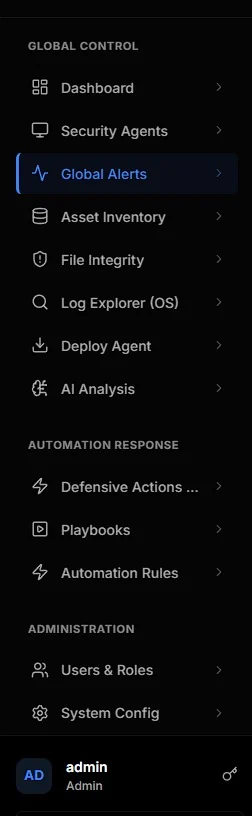
Sidebar navigation

Per-agent view

Each enrolled agent has its own page with twelve tabs. The overview shows live resource meters, the most recent SIEM logs, agent metadata and a threat summary:
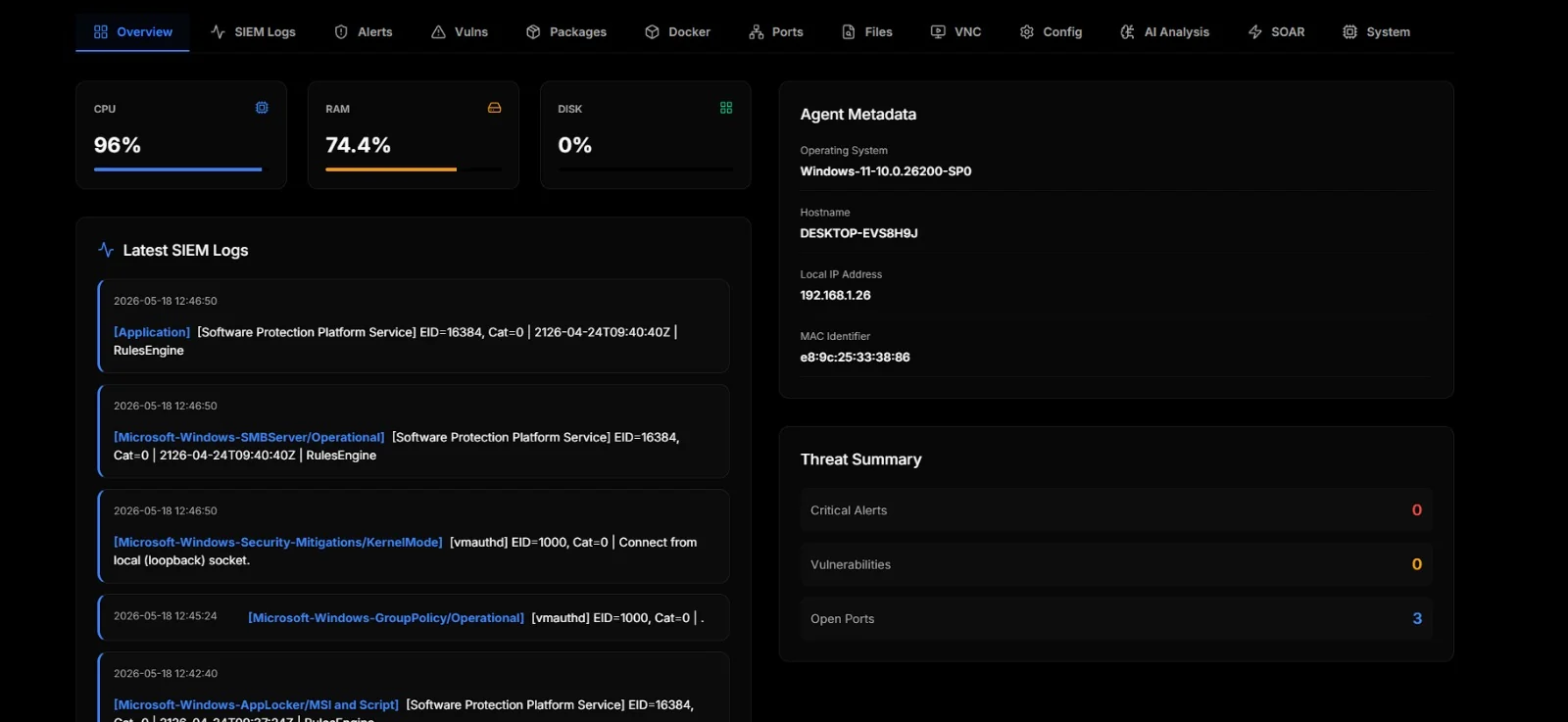
Agent overview

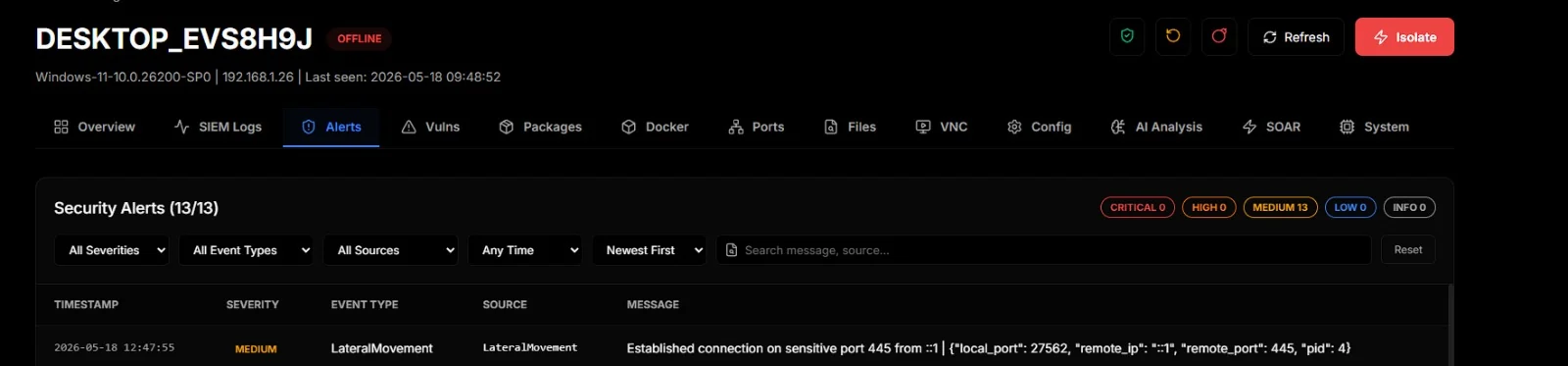
Alerts are everything the agent's own correlation rules already flagged. Severity-coloured, filterable, searchable:
Agent alerts

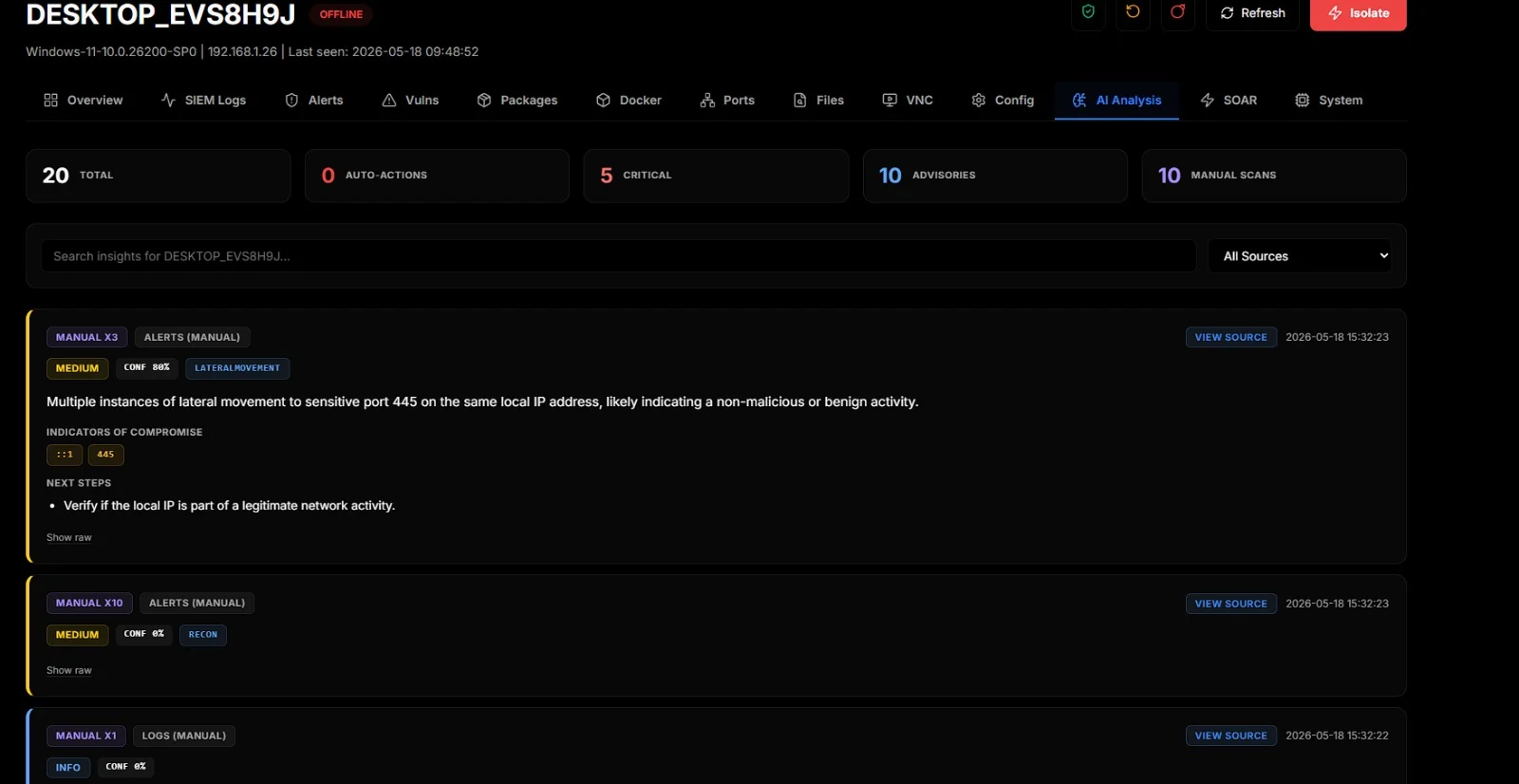
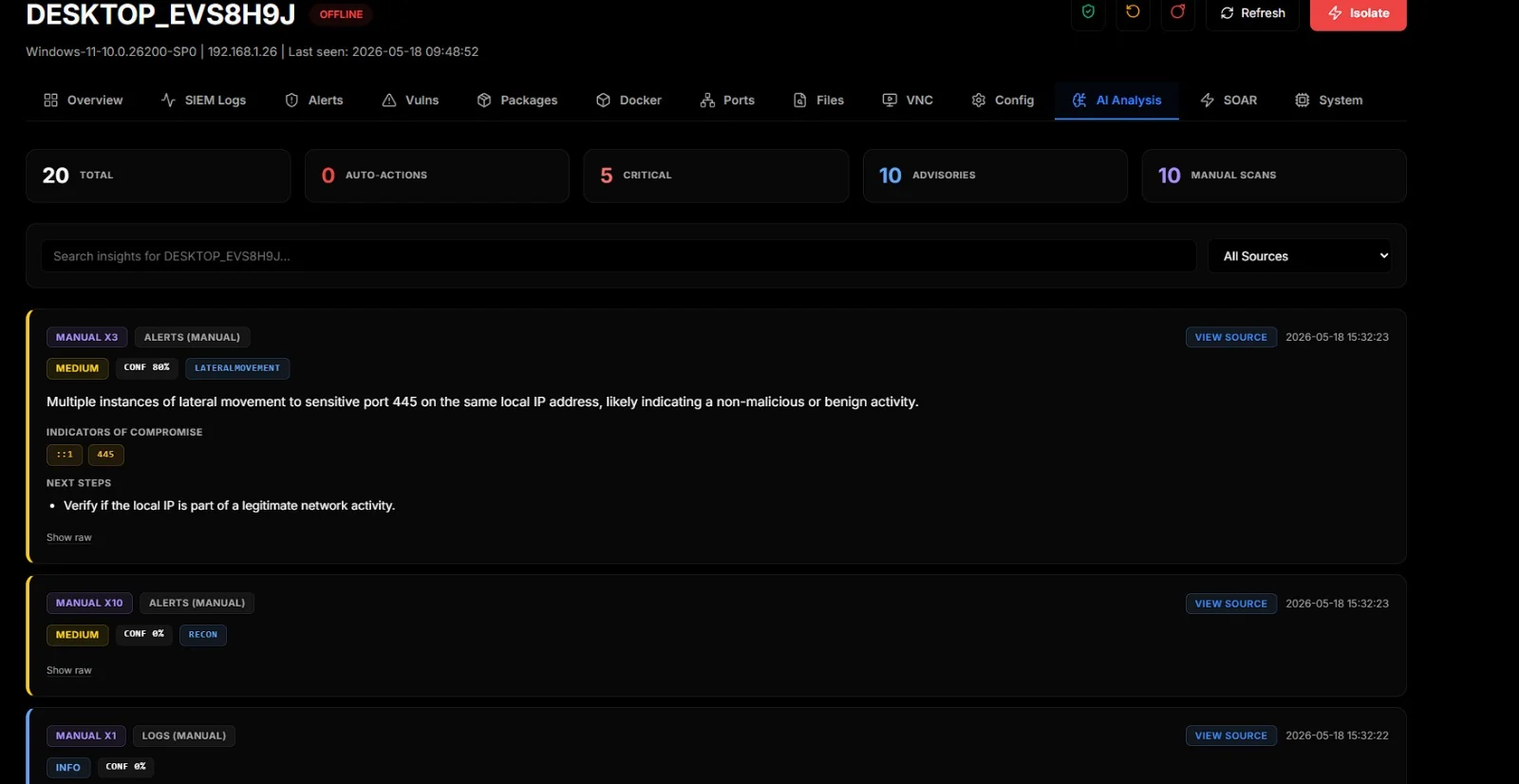
The AI Analysis tab is the operator-facing side of the local LLM. Manual and automatic scans both land here. Each insight carries a verdict chip, confidence, MITRE indicators (when the model returns them), IOCs, next steps, and a View Source button that opens the exact log row the AI looked at:
AI analysis

Asset inventory

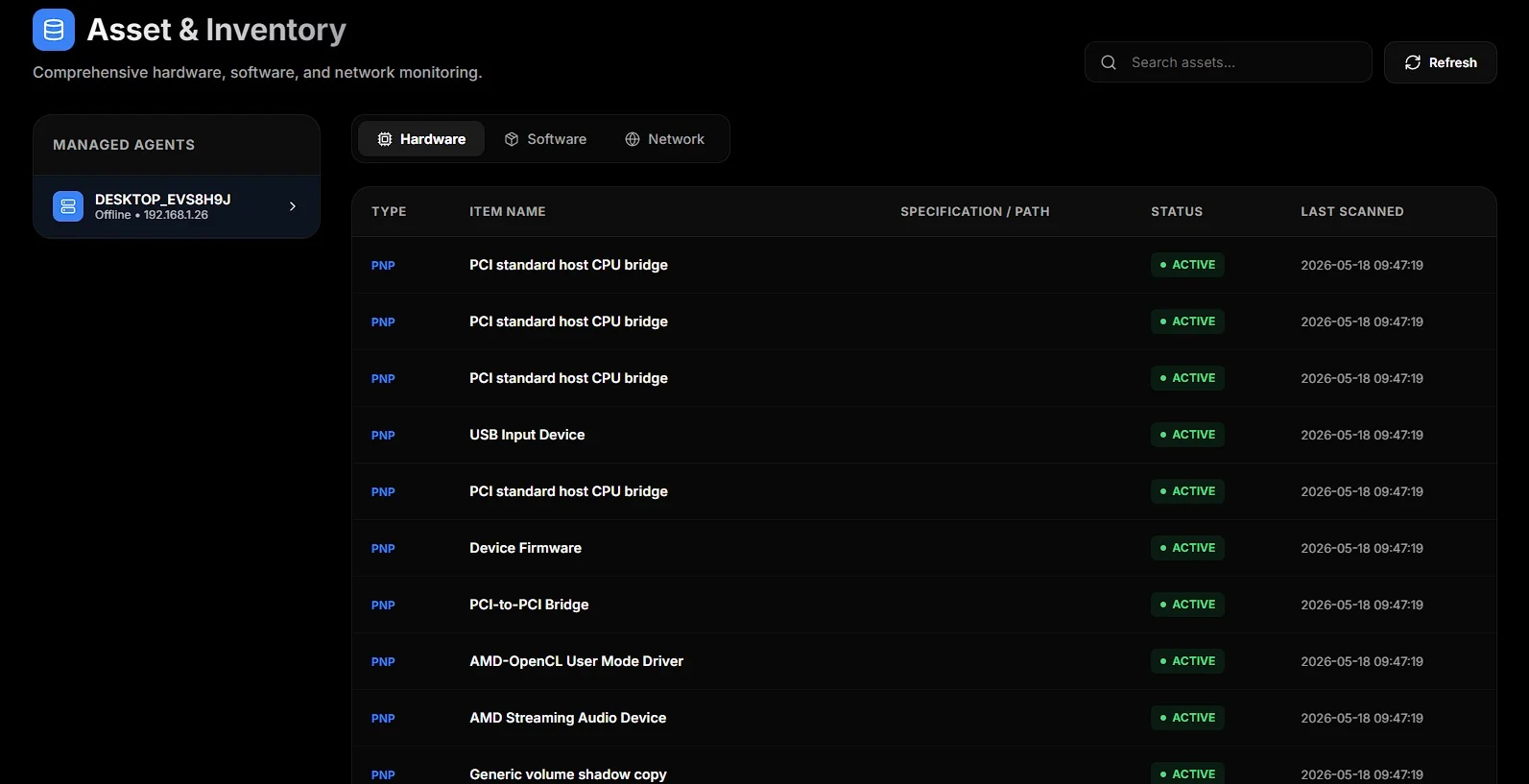
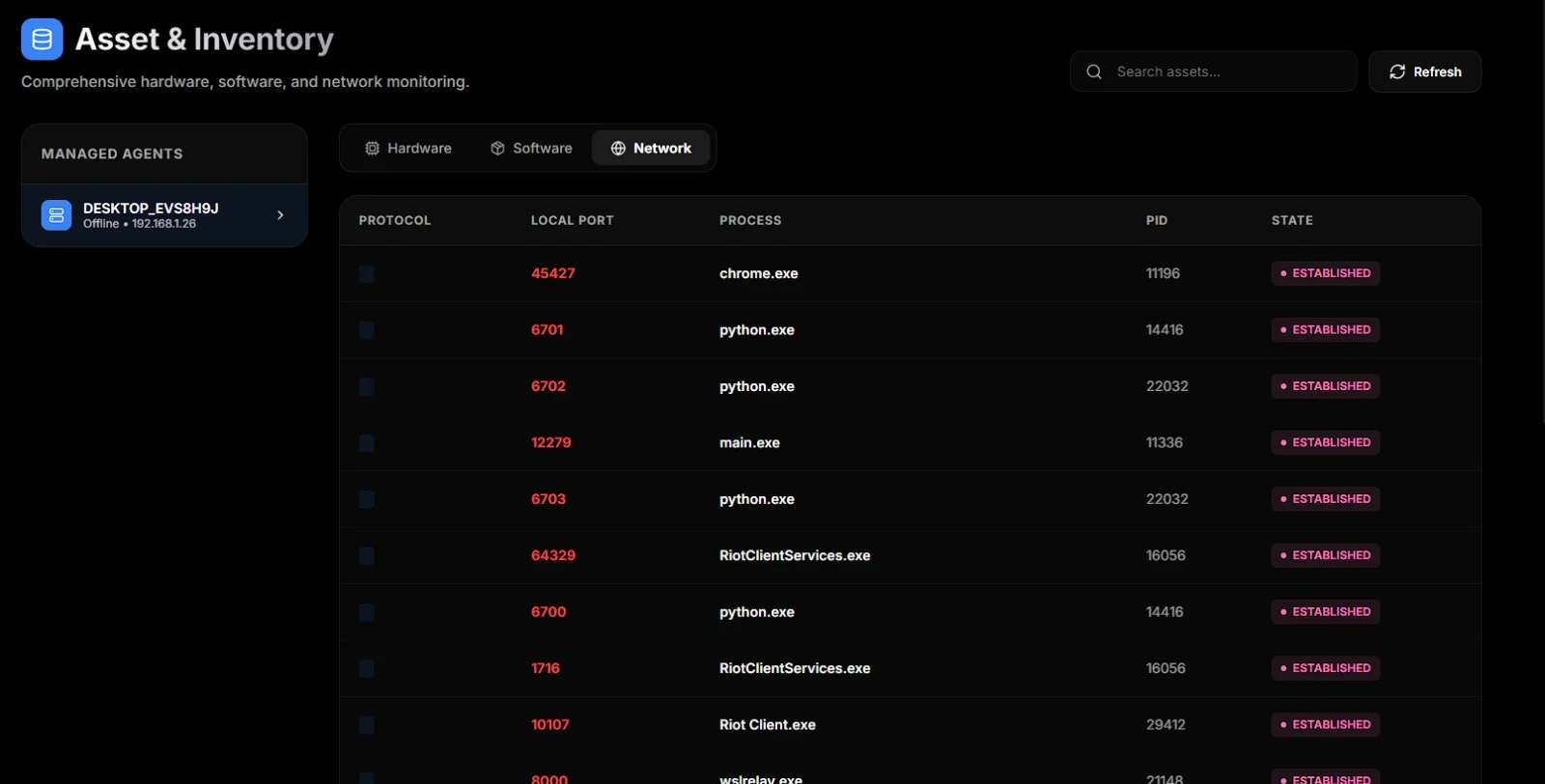
Hardware, software, and network sockets per agent. Hardware tab lists every PnP device, software lists installed packages, network lists every TCP/UDP socket with its owning process:
Asset inventory: hardware

Asset inventory: network

Log Explorer

Cross-agent search backed by OpenSearch. Pick an agent, pick a dataset (SIEM events, security alerts, process events, network, FIM, audit logs), and search. There's also a button to open OpenSearch Dashboards (Kibana fork) for power users:
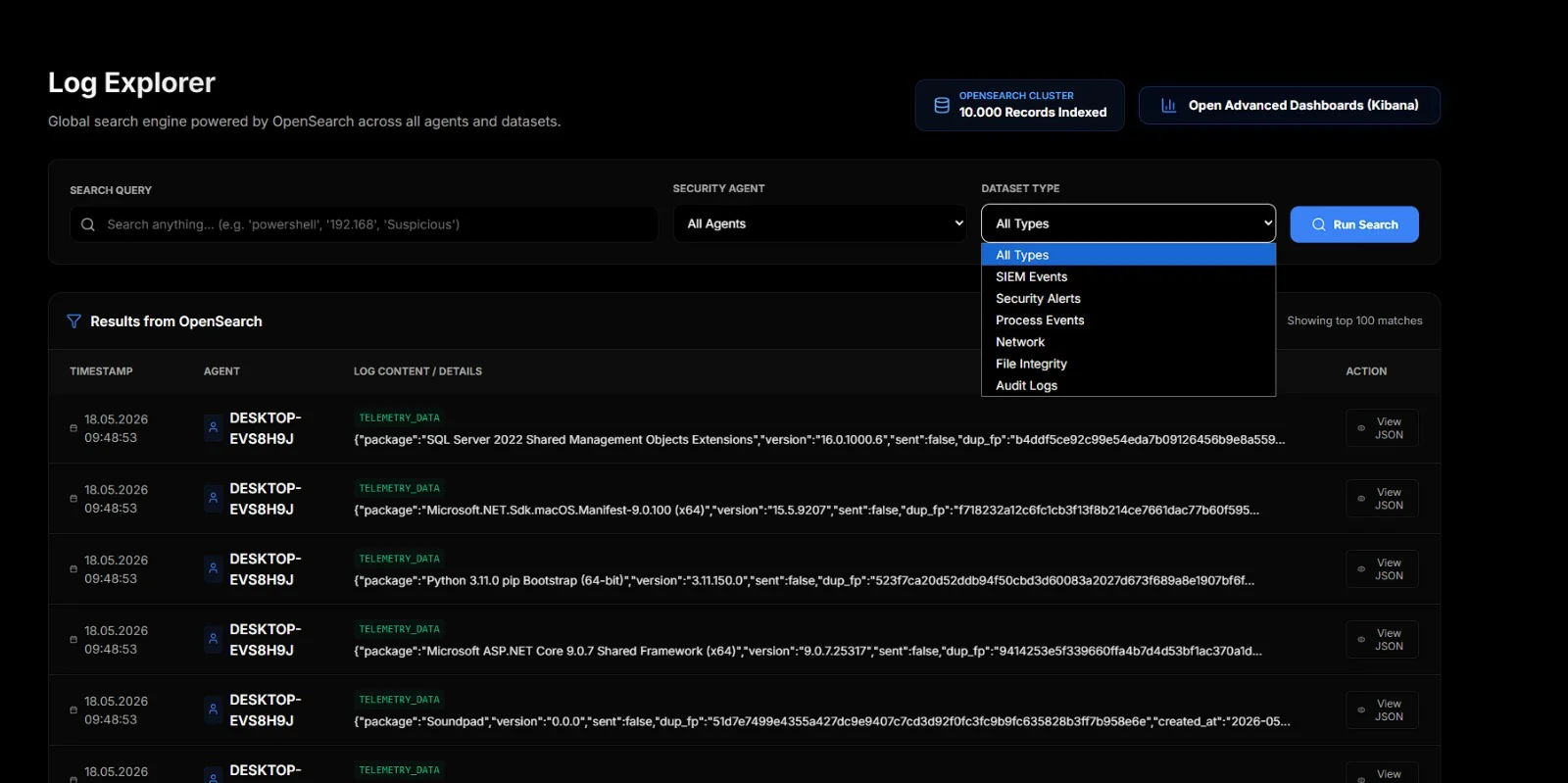
Log Explorer

Audit logs

Every login attempt against the platform itself, both local and LDAP, with result, source IP, and timestamp. Useful when someone is in the "who-logged-in-when" mood:


Audit logs


Quick start

You'll need Docker 24+ with Compose v2 and Python 3.10+ on the host (only for the one-time agent build step). The full stack wants ~16 GB RAM, see System requirements below.

root@kitploit:~
git clone https://github.com/d3vhex/Sentora.git
cd Sentora

# .env holds your local secrets. Never commit it.
cp .env.example .env

# Generate the machine-generated secrets (FERNET_KEY, RABBITMQ_PASSWORD,
# AGENT_SHARED_SECRET, OPENSEARCH_PASSWORD). Safe to re-run — it never
# overwrites a value that is already set.
python scripts/init_secrets.py

# Then set DB_PASSWORD by hand. Compose refuses to start without it.
# On an existing deployment, rotate it with scripts/rotate_db_password.py
# instead — MySQL fixes the root password at first init, so editing .env
# alone locks the app out rather than changing the account.

# Build the agent binary once. The server serves it via
# /api/agent/download/{linux,windows}; skipping this means agents can't be
# deployed because the download endpoint returns 404.
cd Sentora
./build_agent.sh                 # on Linux/macOS/WSL
# .\build_agent.ps1              # on Windows
cd ..

docker compose up --build -d

Open http://localhost:8000. Default login is admin / admin123. Change it immediately under Users & Roles.

Ollama auto-pulls llama3.2:3b on first boot. Verify with:

root@kitploit:~
docker exec sentora-ollama ollama list

Deploying an agent: from the Deploy Agent page, copy the one-liner for the OS you want. On the target machine (admin shell), paste it. The installer downloads the binary, drops a config, enrols with the server, and registers itself as a scheduled task / systemd unit.


Services in the compose

ServicePortReachable fromPurpose
app:8000anywhereREST API + React UI
ingest:5001anywhereTCP log collector (the agent sends here)
db:3307localhostMySQL 8.0 (3306 inside the network)
rabbitmq:5672 / :15672localhostJob queue + management UI
ollama:11434localhostLocal LLM runtime
opensearch:9200localhostFull-text log search
opensearch-dashboards:5601localhostOptional Kibana-style explorer
ai-worker-{automation,manual,defensive}—LLM analysis workers

Only app and ingest listen on all interfaces. The rest bind to BIND_ADDR (default 127.0.0.1), because none of them authenticate in the default configuration — OpenSearch runs with its security plugin disabled and Dashboards is an unauthenticated view of every collected log. Expose one by putting it behind the same reverse proxy and auth as app, not by widening BIND_ADDR.

The "Open Dashboards" button in Log Explorer links to port 5601 on the server's hostname, so it works from the host itself; remote operators need that reverse proxy.


System requirements

ProfileCPURAMDiskNotes
Lab (≤ 5 agents)4 cores12 GB40 GB SSDllama3.2:3b, OpenSearch heap at 1 GB
Small team (10–50 agents)8 cores16 GB100 GB SSDCompose defaults are fine
Production (50+ agents)16+ cores32 GB+250 GB+ NVMeMove OpenSearch and Ollama onto their own hosts

Idle footprint:

  • Ollama (llama3.2:3b): ~3 GB, more under inference
  • OpenSearch: ~2 GB default heap, disk grows with retention
  • MySQL: 500 MB – 1 GB
  • RabbitMQ: ~300 MB
  • Sanic + ingest + 3 AI workers: ~1 GB combined

If you're tight on RAM, swap to qwen2.5:1.5b or another small Ollama model and shrink the OpenSearch heap. A GPU isn't required but Ollama will use it automatically if present.


Defensive AI auto-actions

When the defensive worker's verdict is ACT with confidence ≥ AI_AUTO_ACT_CONF (default 0.75) and the recommended action is on the safe-list below, the worker queues the action straight into the agent's automations table:

root@kitploit:~
BLOCK_IP        KILL_PROCESS      RESTART_SERVICE   ISOLATE_HOST
DISABLE_USER    QUARANTINE_FILE   SUSPEND_PROCESS   LOGOFF_USER
CONTAINER_ISOLATE   CONTAINER_STOP   CONTAINER_KILL

Anything outside that list (arbitrary RUN_CMD, DELETE_FILE, etc.) gets downgraded to an advisory insight. The operator has to dispatch it manually from the SOAR Hub. Auto-dispatched actions show a red AUTO chip in the UI.

To disable autonomy entirely, set AI_AUTO_ACT_CONF=1.0 in .env. To disable the periodic defensive sweep, set AI_DEFENSIVE_SWEEP_ENABLED=0.

Shadow mode

Set AI_SHADOW_MODE=1 in .env and the defensive worker stops firing real actions. Verdicts that would have triggered an autonomous response are saved as proposals instead, with source_file = AI_DEFENSIVE_SHADOW and shadow_status = pending. The operator reviews each one from SOAR Hub > Shadow Queue and either:

  • Approve > the real SOAR action (call_agent_soar) fires and the proposal is marked approved (with timestamp + operator name).
  • Reject > the proposal is marked rejected with an optional note. No action is taken.

Proposals never expire; nothing decides for you. Useful for letting the model run on production telemetry while you build confidence in its verdicts before unleashing real BLOCK_IP / ISOLATE_HOST etc.


Security notes

Authentication

The UI authenticates with a server-side session: login issues an opaque token in an HttpOnly cookie, and userdb.sessions is the authority. Only the SHA-256 of the token is stored, so a database dump yields nothing presentable.

Two clocks apply, both configurable in .env:

SettingDefaultMeaning
SESSION_IDLE_MINUTES60Session dies this long after its last request
SESSION_ABSOLUTE_HOURS12Hard ceiling regardless of activity
SESSION_COOKIE_SECURE0Set to 1 once TLS terminates in front of the app
SESSION_COOKIE_SAMESITELaxLax blocks the cross-site POST/XHR that CSRF needs

Sessions are revoked immediately on password change, admin password reset, role change and account deletion — an admin removing someone's access no longer leaves their open tab working.

Every route is deny-by-default: without a valid session a request is rejected before the handler runs. The exceptions are the login endpoint, the SPA shell, static assets, and the agent-facing endpoints, which authenticate with X-Agent-Key or an enrollment token instead.

X-User-ID is still sent by the frontend, but it is no longer identity — the server validates it against the session and rejects a mismatch. Because browsers cannot attach custom headers to cross-site requests without a CORS preflight, requiring it on state-changing requests backs up SameSite as a second CSRF control.

Route protection is declared with @require_permission(...) and enforced by middleware through a registry, so it applies regardless of which side of @app.route the decorator sits on. The boot log prints the tally:

root@kitploit:~
[Auth] Routes: <n> permission-gated, <n> session-only, <n> public.

If that line reports 0 permission-gated, RBAC is not being enforced — treat it as an outage.

Every route must be one of three things: permission-gated, listed in _PUBLIC_HANDLERS, or named in SESSION_ONLY_HANDLERS in tests/test_auth_wiring.py with a comment saying why session alone is enough. A test asserts it, so a new route cannot quietly arrive ungoverned — which is how run_playbook, delete_soar_action and test_ldap_connection had ended up reachable by any account that could log in.

Login throttling

Five failed attempts for one account, or twenty from one address, inside fifteen minutes, and further attempts are refused with 429 until the window passes. Counted from login_logs, which was already recording every failure and which nothing read — bcrypt was the only brake on online guessing.

SettingDefaultMeaning
LOGIN_MAX_FAILURES_USER5Per-account failures allowed in the window
LOGIN_MAX_FAILURES_IP20Per-address failures; higher, because an office shares one NAT address
LOGIN_LOCKOUT_WINDOW_MIN15How far back failures are counted

The check runs before the password comparison, so it also removes the timing difference between a known and an unknown username. It fails open if login_logs is unreachable: a login page that cannot be reached because the audit table is down is its own outage.

Client addresses behind a proxy

X-Forwarded-For is honoured only from a peer listed in TRUSTED_PROXIES (comma-separated addresses or CIDRs, empty by default). With nothing in front of the app the header is attacker-supplied, so believing it unconditionally — which is what this replaced — let a caller write any address into the audit trail and reset their own rate limit in the same request.

root@kitploit:~
TRUSTED_PROXIES=10.0.0.0/8,192.168.1.5

Leave it empty when the app is reached directly.

The agent's own API

The agent listens on 0.0.0.0:9099 and runs as SYSTEM or root. Every route requires X-Agent-Key; /self_destruct requires this agent's own enrolment key specifically, so a leaked fleet-wide secret cannot uninstall every endpoint at once. /health answers liveness without a key and discloses nothing further without one.

There is no permissive fallback. An earlier build accepted any non-empty key whenever AGENT_MASTER_SECRET was unset on the host — which nothing ever set, so it was the default everywhere. An EDR that fails open is worse than no EDR, because the console reports the endpoint as protected.

AGENT_BIND moves the listener. It is still 0.0.0.0 by default because the server reaches agents over HTTP on this port; binding to loopback needs a replacement transport, not a config change.

CORS

CORS_ORIGINS defaults to empty. In the normal deployment this app serves the SPA itself, so requests are same-origin and no entry is needed. A wildcard is rejected outright: browsers refuse Access-Control-Allow-Origin: * on any request carrying cookies. Split-origin deployments must list explicit origins and set SESSION_COOKIE_SAMESITE=None with SESSION_COOKIE_SECURE=1.

Default secrets

.env.example ships with placeholders. The real .env is git-ignored. Rotate these before exposing the platform to anything beyond localhost:

  • DB_PASSWORD
  • AGENT_SHARED_SECRET (agent auth fallback). Auto-generated on first boot if unset.

The admin / admin123 login no longer needs remembering: the seeded account is created with must_change_password, and while that is set the session can reach nothing but /change-password. Enforced in middleware rather than in the UI, because a flag the front end is trusted to honour is a suggestion and the API answers curl too.

TLS certificates

Nothing ships a private key. A working certs/server.key and certs/rootCA.key used to be committed, which gave every deployment the same TLS identity and published it: anyone who had ever cloned the repository held the key, so the certificate proved nothing about who was on the other end.

With TLS_ENABLED=1 and no certificate present, the app generates one on first boot. Each install gets its own key and the key never leaves the machine that made it. certs/*.key and certs/*.crt are git-ignored.

The CA is self-signed, so browsers warn unless you trust it explicitly. That warning is honest — prefer it to a shared secret that produces no warning at all. For anything public, point TLS_CERT / TLS_KEY at a real certificate; when they are set and missing, the app says so rather than substituting a self-signed one.

To regenerate by hand:

root@kitploit:~
python certs/generate_certs.py --force

The old keys are still in git history. Treat the pair that shipped before this change as burned; new installs no longer use it.

Local Fernet keys

The server uses two Fernet keys, both auto-generated on first boot:

KeyLocationProtects
Agent keydata/fernet.key (or FERNET_KEY_PATH)Agent telemetry; handed out via /api/agents/bootstrap
Server key.env FERNET_KEYServer-internal at-rest fields (e.g. password column)

chmod 600 both. Back them up. Losing either makes the corresponding encrypted data unreadable. There is no in-place rotation yet.

Threat intel

Two independent mechanisms, both optional:

Per-verdict enrichment (ai/intel.py). The AI worker cross-checks indicators found in a log against AlienVault OTX and VirusTotal. Needs OTX_API_KEY / VT_API_KEY; unset means no external call at all.

Indicator feeds (core/threat_feeds.py). Populates the threat_intel table hourly from abuse.ch — Feodo Tracker (botnet C2 addresses), ThreatFox (mixed IoCs with a confidence score) and URLhaus (malware-distributing URLs).

Indicators carry last_seen and are pruned after THREAT_INTEL_STALE_DAYS (default 30): an address that hosted a C2 last quarter usually belongs to someone else now, and keeping it produces false positives indefinitely. Each feed is capped at THREAT_INTEL_MAX_PER_FEED rows because the table is read on the alert path.

abuse.ch has been moving downloads behind a free account key. A feed returning 401/403 says so in the server log; set THREAT_INTEL_AUTH_KEY.

Check what actually arrived:

root@kitploit:~
docker logs sentora-server | grep ThreatIntel

Air-gap mode

root@kitploit:~
OSV_MODE=mirror
OSV_MIRROR_URL=http://osv.internal

THREAT_INTEL_MODE=off
# or serve the feeds internally:
# THREAT_INTEL_FEODO_URL=http://mirror.internal/feodo.json

With those set, plus OTX_API_KEY / VT_API_KEY unset, nothing leaves the network. Fonts are bundled, Ollama is local, no CDN is contacted.

Fleet exposure

/api/exposure/report counts unpatched packages and file-integrity events across the fleet, per agent, worst first. It reports its own coverage: complete: false when an agent could not be read, because a total over half the fleet is not a fleet total.

There is deliberately no score. The endpoint previously returned 100 - vulns*2 - fim*5 as a "compliance score" — that maps to no framework, does not scale with fleet size, and pins to zero on any real fleet. Severity grading is absent for the same reason: vulnerabilities_report has no severity column and its fields are encrypted at rest, so any grade would have to be invented.

Agent config validation

POST /<agent>/config/<type> validates before anything reaches a sensor: YAML parse, structural shape, and — the layer that matters — regex compilation. An invalid regex is perfectly valid YAML and silently disables the category containing it, so a syntax-only check would push it straight to the endpoint. The editor lints against the same endpoint as you type and reports issues with clickable line numbers.


Architecture overview

root@kitploit:~
 Agent (Win / Linux)
    │  TCP frames + REST polling
    ▼
 ingest (:5001) ──► RabbitMQ ──► AI worker fleet (3 modes)
    │                                  │
    ▼                                  ▼
 MySQL (per-agent <name>_db)    ai_analysis_results
    │
    ▼
 app (Sanic :8000)  ──► React UI + REST + WebSocket screen proxy

The deeper version (per-module layout, schema, AI pipeline, SOAR autonomy, air-gap surfaces) lives in docs/Sentora_Architecture.md.

Operational docs:

DocumentCovers
ArchitectureModule layout, data flow, auth model, AI pipeline
Production deploymentSizing, network topology, TLS, backup, monitoring, air-gap
Update runbookUpgrades, agent rollout, DB migrations, rollback
Progress reportWhat has changed and why

Development setup

root@kitploit:~
# 1. Database. Only init_userdb.sql — it creates and selects `userdb`.
#
#    db/init.sql is NOT a server-init script. It is the per-agent schema
#    template, applied by server.create_tables_if_not_exist() after
#    connecting to that agent's own database, which is why it contains no
#    CREATE DATABASE or USE. Running it standalone fails at line 5 with
#    "No database selected" — the same way it broke every first-time
#    `docker compose up` while it was mounted into the MySQL init directory.
mysql -u root -p < db/init_userdb.sql

# 2. Backend. requirements.lock pins every version the image is built
#    from; requirements.txt is the loose list it was resolved from.
pip install -r requirements.lock
python app.py

# 3. Ingest (separate terminal)
python server.py

# 4. Frontend dev server
cd frontend
npm install
npm run dev

AI workers manually

Same script, three roles:

root@kitploit:~
WORKER_TYPE=automation python ai_worker.py
WORKER_TYPE=manual     python ai_worker.py
WORKER_TYPE=defensive  python ai_worker.py

Production: let docker-compose.yaml do it.


Contributing

PRs welcome. Before opening:

  1. Fork → branch → PR against main.
  2. Run the checks:
root@kitploit:~
pytest -ra                                   # no MySQL or RabbitMQ needed
python -m compileall -q app.py core security
cd frontend && npx tsc --noEmit && npm run build && cd ..

# With the stack up — enumerates every route and calls it twice
python scripts/api_smoke_test.py
  1. New endpoints must be wrapped in @require_permission(...). The boot log prints the tally; if it reports 0 permission-gated, something is wrong with the wiring, not with your route.
  2. Anything that reaches an agent or an external host needs validation on the server side, not only in the browser. Two implementations drift, and the browser's copy is the one operators end up trusting.

For anything bigger than a fix, open an issue first so we can align on the approach.


Project layout

root@kitploit:~
.
├── app.py                     # Sanic API + React SPA host
├── server.py                  # TCP ingest
├── ai_worker.py               # AI worker fleet (3 modes)
├── ai/
│   ├── utils.py               # LLM helpers, AI cache, SOAR queueing
│   └── intel.py               # OTX / VT per-verdict enrichment (opt-in)
├── core/
│   ├── mq.py                  # RabbitMQ publisher
│   ├── opensearch.py          # OpenSearch index/search
│   ├── config_validation.py   # Agent YAML validation (parse, shape, regex)
│   └── threat_feeds.py        # abuse.ch indicator feeds
├── security/
│   ├── session.py             # Server-side session store
│   └── ssrf.py                # Proxy destination rules
├── scanners/
│   └── vuln.py                # Server-side OSV scanner
├── scripts/
│   ├── init_secrets.py        # Generate the secrets .env needs
│   ├── rotate_db_password.py  # Rotate the MySQL root password safely
│   └── api_smoke_test.py      # Exercise every route against a live server
├── tests/                     # pytest; no MySQL or RabbitMQ required
├── frontend/                  # React 18 + TS SPA
│   └── src/lib/               # Shared logic (playbook action catalogue)
├── Sentora/                   # Cross-platform agent
├── certs/                     # Self-signed dev certs
├── docs/                      # Architecture + screenshots
└── docker-compose.yaml

License

AGPL-3.0. See LICENSE.

Use, modify, redistribute. The thing AGPL adds on top of regular GPL: if you run a modified version on a network server where other users interact with it, you must publish the modifications under AGPL too.

  • Self-hosting for internal use → no source-disclosure obligation.
  • Public-facing SaaS on top of a modified Sentora → you must publish the modifications.
  • Want to ship a closed-source derivative or skip the network-copyleft clause? A commercial licence waiver is available. Contact the author.

The "Sentora" name and logo are trademarks of the project authors and are not covered by AGPL. Fork freely, but rename if you redistribute as your own product.


What's not in Community Edition

Community Edition has zero artificial caps: no agent limit, no retention limit, no feature gating on the core. Run it as wide as your hardware allows.

The paid Pro / Enterprise distribution adds enterprise-glue features (SAML/SCIM SSO, multi-tenancy, compliance reports, HA, WORM audit, signed air-gap update bundles, 4-eyes SOAR approvals, premium ticketing/SIEM forwarders). The core detection capability never gets moved behind that wall.

If any of that matters for your deployment, reach out.

Download Tool