
Skip to content
KitploitKITPLOIT
ToolsBlog
Log in
Submit
ToolsBlog
Submit

Hacking, PenTest, and Cybersecurity Tools for Your Security Arsenal!

Kitploit is a directory of hacking, cybersecurity, and pentesting tools. Discover the latest project updates to find vulnerabilities, analyze systems, automate testing, and strengthen your security.

··Feeds·Contact·Privacy·© 2026 Kitploit

Tool Directory

Categories

View all categories
Loading categories
pe_tree — Python module for viewing Portable Executable (PE) files in a tree-view using pefile and PyQt5. Can also be used with IDA Pro and Rekall to dump in-memory PE files and reconstruct imports. | Kitploit
Tools/GitHubGitHub/blackberry/pe_tree
Memory ForensicsVulnerability AnalysisReverse EngineeringDebuggersForensicsMalware AnalysisDigital ForensicsBinary AnalysisArchived
GitHubblackberry/pe_tree

pe_tree

Python module for viewing Portable Executable (PE) files in a tree-view using pefile and PyQt5. Can also be used with IDA Pro and Rekall to dump in-memory PE files and reconstruct imports.

1.3k173194 years agoReviewed by Kitploit

Most Popular

View all →

Discover the most used tools by our community.

Explore all tools

Browse our collection of tools

View all tools →
Share
View Repository

PE Tree

PE Tree is a Python module for viewing Portable Executable (PE) files in a tree-view using pefile and PyQt5. It can also be used with IDA Pro, Ghidra, Volatility, Rekall and minidump to view and dump in-memory PE files, as well as perform import table reconstruction.

Table of contents

  1. Features
  2. Application
    • Requirements
    • Features
    • Installation
      • Windows
      • Mac/Linux
      • For developers
    • Usage
    • Dark-mode
  3. IDAPython
    • Requirements
    • Features
    • Installation
      • Using setuptools
      • Install manually
      • For developers
    • Usage
    • Example
      • Dumping in-memory PE files
  4. Rekall
    • Requirements
    • Features
    • Installation
    • Usage
  5. Volatility
    • Requirements
    • Features
    • Installation
    • Usage
  6. Ghidra
    • Requirements
    • Features
    • Installation
    • Usage
  7. Minidump
    • Requirements
    • Features
    • Installation
    • Usage
  8. Configuration
    • Overview
    • Options
    • Location
    • 3rd party data sharing
  9. Troubleshooting
  10. Contributing
    • Developer documentation
  11. License

Features

  • Standalone application with plugins for:
    • IDA Pro
    • Ghidra
    • Volatility
    • Rekall
    • Minidumps
    • Carving
  • Supports Windows, Linux and Mac
  • Parsing PE files and memory images from:
    • File-system
    • ZIP archives (including password protected)
    • Windows memory dumps (raw, EWF, vmem etc.)
    • Live Windows memory (using rekall)
    • Windows Minidump
    • IDA Pro database
    • Ghidra database
    • Binary file carving
  • Rainbow PE map:
    • Provides a high-level overview of PE structures, size and file location
    • Allows for fast visual overview and comparison of PE samples
  • Displays the following PE headers in a tree-view:
    • MZ header
    • DOS stub
    • Rich headers
    • NT/File/Optional headers
    • Data directories
    • Sections
    • Imports
    • Exports
    • Debug information
    • Load config
    • TLS
    • Resources
    • Version information
    • Certificates
    • Overlay
  • Extract and save data from:
    • DOS stub
    • Sections
    • Resources
    • Certificates
    • Overlay
    • Export to CyberChef for further manipulation
  • Perform VirusTotal searches of:
    • File hashes
    • PDB path
    • Timestamps
    • Section hash/name
    • Import hash/name
    • Export name
    • Resource hash
    • Certificate serial
  • Dump loaded PE images from memory:
    • Fix up section pointers and sizes
    • Fix up PE headers:
      • Remove unnecessary data directory pointers
      • Recalculate PE checksum
      • Update entry-point
    • Reconstruct import address and directory tables (IAT/IDT) using several methods:
      1. Use existing IAT/IDT
      2. Rebuild IDT from existing IAT
      3. Rebuild IAT and IDT from disassembly (using IDA Pro, Ghidra or capstone)

Application

The PE Tree standalone application finds portable executables in files, folders and ZIP archives.
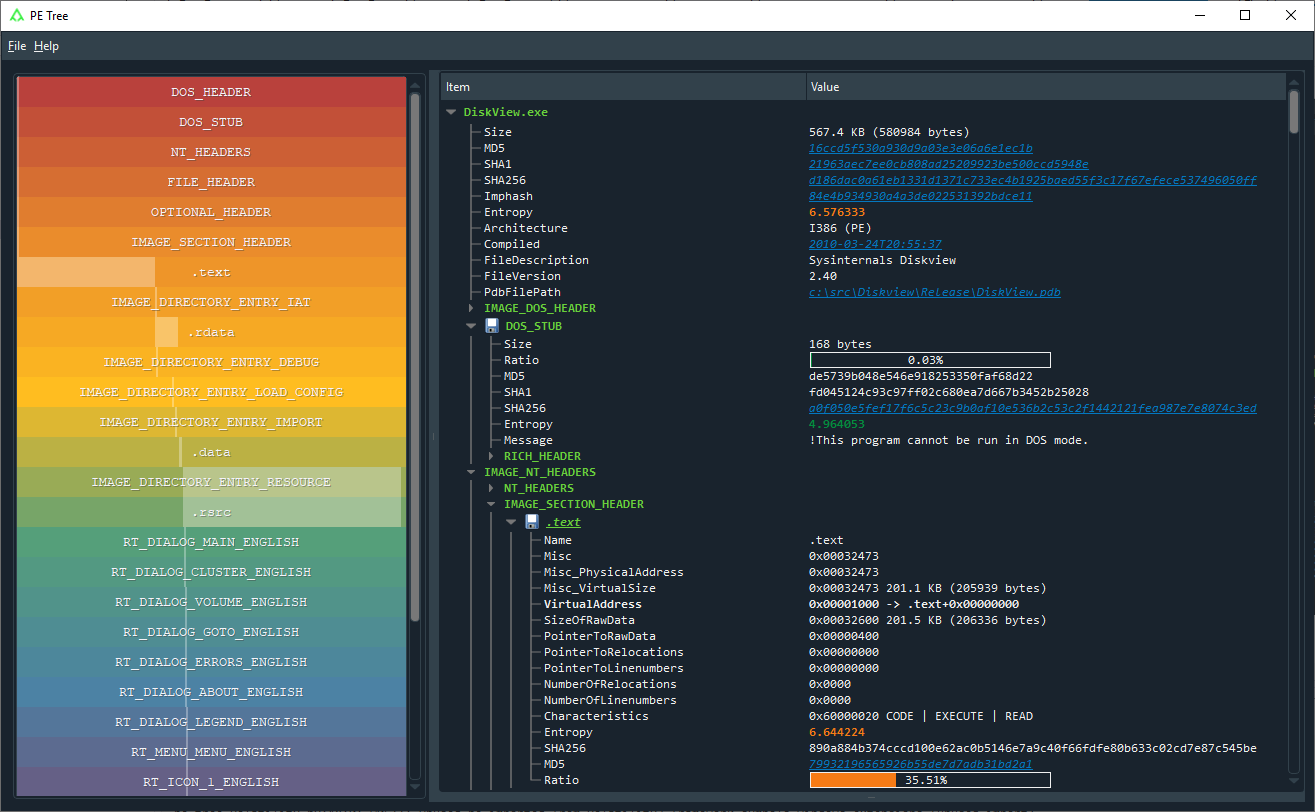
PE Tree standalone application

Requirements

  • Python 3.5+

Features

  • Scan files and folders for PE files
  • Extract PE files from ZIP archives (including password protected with infected)
  • Carve PE files from binary files
  • Double-click VA/RVA to disassemble with capstone
  • Hex-dump data

Installation

Using pip (recommended)

Install directly from GitHub using a fresh virtual environment and pip:

Windows
> virtualenv env
> env\Scripts\activate
> pip install --upgrade pip
> pip install git+https://github.com/blackberry/pe_tree.git
Mac/Linux
$ python3 -m venv env
$ source ./env/bin/activate
$ pip install --upgrade pip
$ pip install git+https://github.com/blackberry/pe_tree.git

For developers

Git clone the repository and setup for development:

Windows
> git clone https://github.com/blackberry/pe_tree.git
> cd pe_tree
> virtualenv env
> env\Scripts\activate
> pip install -e .
Mac/Linux
$ git clone https://github.com/blackberry/pe_tree.git
$ cd pe_tree
$ python3 -m venv env
$ source ./env/bin/activate
$ pip install -e .

Usage

Run PE Tree and scan for portable executables in files, folders and ZIP archives:

$ pe-tree -h
usage: pe-tree [-h] [filenames [filenames ...]]

PE-Tree

positional arguments:
  filenames   Path(s) to file/folder/zip

optional arguments:
  -h, --help  show this help message and exit

Run PE Tree and attempt to carve portable executable files from a binary file:

$ pe-tree-carve -h
usage: pe-tree-carve [-h] filename

PE-Tree (Carve)

positional arguments:
  filename    Path to file to carve

optional arguments:
  -h, --help  show this help message and exit

Dark-mode

Dark-mode can be enabled by installing QDarkStyle:

$ pip install qdarkstyle

IDAPython

The PE Tree IDAPython plugin finds portable executables in IDA databases.
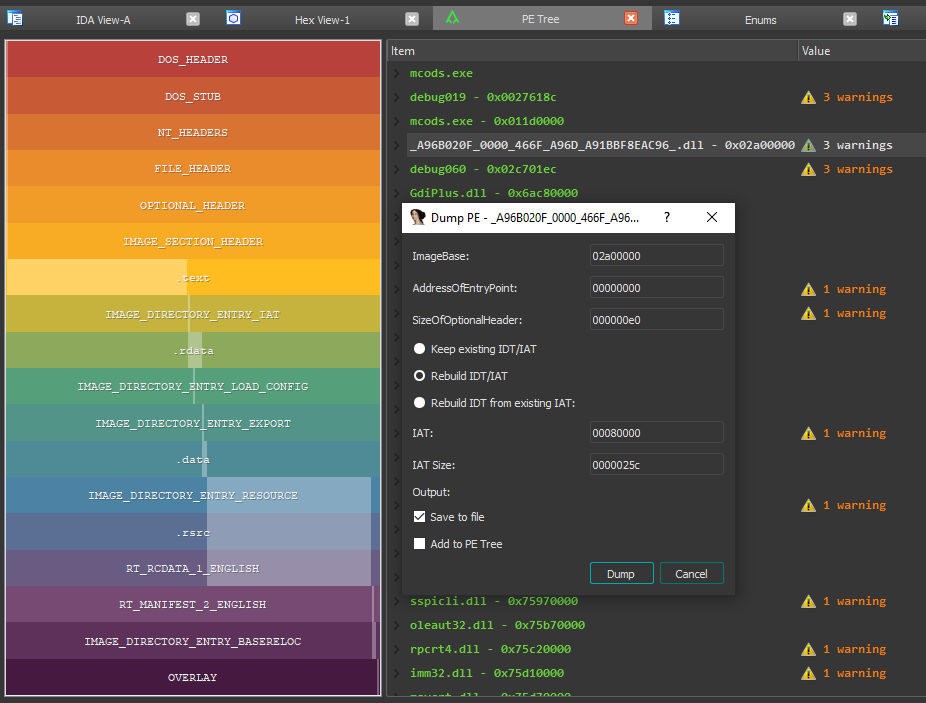
PE Tree IDAPython plugin

Requirements

  • IDA Pro 7.0+ with Python 2.7
  • IDA Pro 7.4+ with Python 2.7 or 3.5+

Features

  • Easy navigation of PE file structures
  • Double-click on a memory address in PE Tree to view in IDA-view or hex-view
  • Search an IDB for in-memory PE images and;
    • Reconstruct imports (IAT + IDT)
    • Dump reconstructed PE files
    • Automatically comment PE file structures in IDB
    • Automatically label IAT offsets in IDB

Installation

To install and run as an IDAPython plugin you can either use setuptools or install manually.

Using setuptools

  1. Download pe_tree and install for the global Python interpreter used by IDA:

    $ git clone https://github.com/blackberry/pe_tree.git
    $ cd pe_tree
    $ python setup.py develop --ida
    
  2. Copy pe_tree_ida.py to your IDA plugins folder

Install manually

  1. Download pe_tree and install requirements for the global Python interpreter used by IDA:

    $ git clone https://github.com/blackberry/pe_tree.git
    $ cd pe_tree
    $ pip install -r requirements.txt
    
  2. Copy pe_tree_ida.py and the contents of ./pe_tree/ to your IDA plugins folder

For developers

To forgo installing as a plugin, and simply run as a script under IDA, first install the pe_tree package requirements for the global Python installation:

Download Tool