 biniamf/ai-reverse-engineering
AI-Assisted Reverse Engineering with Ghidra

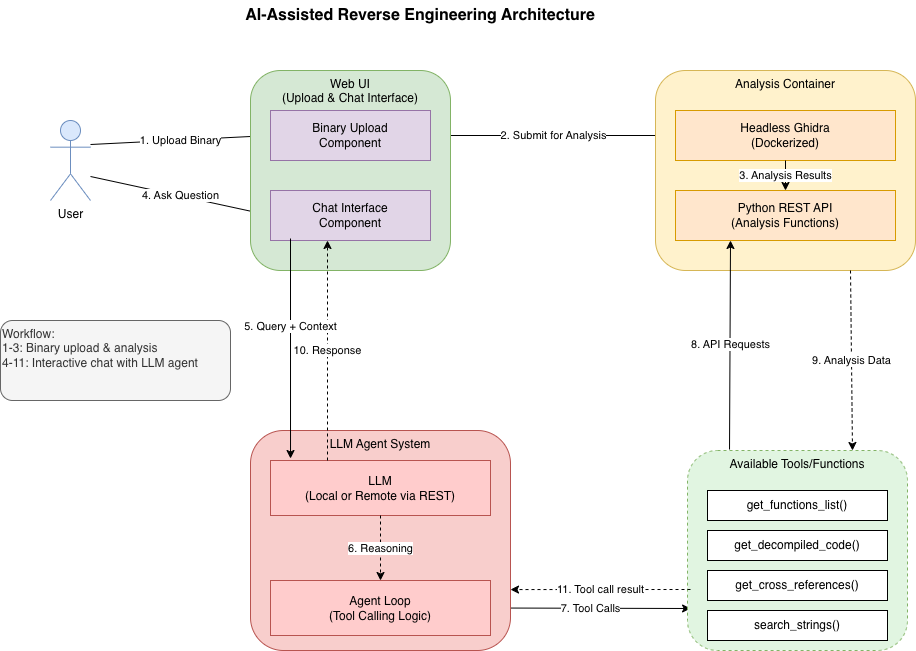
Rev·Deck is a local, single-user static-analysis workstation. It pairs an evidence-first web UI with an LLM copilot over a binary analyzed by a headless Ghidra service: browse deterministic evidence (functions, strings, imports, cross-references, a bounded call graph) directly, or ask the assistant bounded questions whose factual claims must cite inspectable evidence.
Analyzed binaries are never executed. The browser only talks to this Flask app; the app proxies validated, typed requests to the Ghidra service.
https://github.com/user-attachments/assets/fba14dc5-7ad5-4137-9349-ed824da64fbe
cp .env.example .env      # set API_BASE and MODEL_NAME; set API_KEY if required
docker compose up --build
Docker Compose reads .env automatically for interpolation. It fails before
starting if API_BASE or MODEL_NAME is missing; API_KEY=not-used remains
valid for local/keyless providers. The stack starts both services. Open
http://127.0.0.1:5000.
To run only the Ghidra service:
docker pull biniamfd/ghidra-headless-rest:latest   # ensure the newest image

docker run --rm \
  -p 127.0.0.1:9090:9090 \
  -v "$(pwd)/data:/data/ghidra_projects" \
  --security-opt no-new-privileges:true \
  biniamfd/ghidra-headless-rest:latest
For a reproducible pin, use the tested release digest instead of latest:
docker run --rm \
  -p 127.0.0.1:9090:9090 \
  -v "$(pwd)/data:/data/ghidra_projects" \
  --security-opt no-new-privileges:true \
  biniamfd/ghidra-headless-rest:1.2.1@sha256:971591a3a8448d8ed969079b452306e806f36079c3ddd298f4a618d6e2f1442d
biniamfd/ghidra-headless-rest:latest.Copy .env.example to .env and fill these in; see that file for the full
list and defaults.
| Variable | Default | Meaning |
|---|---|---|
API_BASE | required | OpenAI-compatible base URL (http/https). Compose fails early when absent. |
API_KEY | not-used | Provider key. Never logged or sent to the browser; not-used is valid for keyless local providers. |
MODEL_NAME | required | Model id expected by the configured endpoint. Compose fails early when absent. |
LLM_STREAM | auto | Streaming transport: auto (stream, fall back to blocking once on a pre-output compatibility error), true (always stream), false (always blocking). |
GHIDRA_API_BASE | http://127.0.0.1:9090 | Ghidra service base URL. |
GHIDRA_IMAGE | biniamfd/ghidra-headless-rest:1.2.1@sha256:971591a3... | Tested release pinned by immutable digest. :latest also resolves to this digest; override to pin a different release. |
HOST / PORT | 127.0.0.1 / 5000 | Dev-server bind. |
MAX_UPLOAD_BYTES | 104857600 | Upload size cap. |
CHATS_DIR | webui/chats | Chat history directory. |
Rev·Deck talks to any OpenAI-compatible Chat Completions endpoint through
the OpenAI SDK, configured entirely by API_BASE / API_KEY / MODEL_NAME.
There is no provider-specific header, parameter, or model logic: a local
Ollama server (API_BASE=http://127.0.0.1:11434/v1), a
self-hosted vLLM/llama.cpp/LM Studio endpoint, OpenAI itself, or a gateway such
as OpenRouter all work the same way.
Example .env provider settings (use placeholders, never commit real keys):
# Ollama
API_BASE=http://127.0.0.1:11434/v1
API_KEY=not-used
MODEL_NAME=qwen3:8b
# OpenRouter
API_BASE=https://openrouter.ai/api/v1
API_KEY=replace-with-your-key
MODEL_NAME=anthropic/claude-opus-4.8
# OpenAI
API_BASE=https://api.openai.com/v1
API_KEY=replace-with-your-key
MODEL_NAME=replace-with-a-supported-model-id
# LM Studio, vLLM, or llama.cpp (adjust port/model to the server)
API_BASE=http://127.0.0.1:1234/v1
API_KEY=not-used
MODEL_NAME=replace-with-the-served-model-id
By default (LLM_STREAM=auto) the assistant requests a streamed response
and relays tokens to the browser as they arrive. Streaming also gives a
stronger cancellation guarantee: when you stop a response (or close the tab),
Rev·Deck promptly closes the underlying provider stream and performs no further
tool or model rounds, so upstream generation is torn down rather than left
running to completion in the background.
Caveats:
auto, if the provider rejects the streamed
request with a compatibility error (HTTP 400/404/405/422) before any content
or tool-call output, Rev·Deck falls back to a single blocking call once and
remembers that for the rest of the process. Auth (401/403), rate-limit (429),
and server (5xx) errors are not treated as compatibility problems and are
surfaced as errors instead of silently retried. Set LLM_STREAM=false to skip
streaming entirely, or LLM_STREAM=true to require it (no fallback).Open the app and upload a binary to start an analysis job. Obvious plain-text content asks for confirmation before it is sent to Ghidra; use the explicit raw- binary override only when the content is intentionally firmware/data rather than an executable format. Once analysis completes, switch between two workspace tabs:
Both modes take a per-task step budget, and a No step limit option that
runs until the task finishes (still capped by MAX_STEP_BUDGET so a looping
model cannot run away). If a run reaches its budget, it reports partial results
and offers Continue — which resumes the same conversation using the evidence
already retrieved, without redoing completed tool calls. Cost grows with the
number of tool/model calls, so higher budgets cost more.
Available workflows:
| Workflow | Purpose | Requires a target function address |
|---|---|---|
program_triage | Summarize the program's likely purpose from metadata, imports, strings, and functions. | No |
suspicious_behavior | Surface deterministic indicators first, then bounded, clearly-labeled hypotheses. | No |
selected_function | Decompile a function and explain it with its callers/callees. | Yes |
call_chain | Explore one bounded native/synthesized call-graph neighborhood from a starting function. | Yes |
attack_surface_triage | Read deterministic score coverage/top-K, then deeply inspect at most three candidates; scores are priorities, not verdicts. | No |
vulnerability_hypothesis | Select one bounded candidate and present evidence, counter-evidence, and open questions; never auto-confirms. | No |
