
Cisco RV110w UPnP stack overflow
UPnP has been a hot topic recently. I happened to have a Cisco RV110W device on hand. In August 2021, Cisco officially disclosed a 0day regarding UPnP in the RV series, but the specific details were not published. So I wanted to debug and exploit this vulnerability using the device. The vulnerability advisory can be seen on the official website.
First, update the firmware to the latest version 1.2.2.8. The next challenge is how to debug and locate the vulnerability. The first step in debugging is to get a shell on the device. However, the latest firmware does not provide a debug interface. I obtained debug access to the latest firmware via UART and by modifying the firmware package. For the specific method, refer to a previous article I wrote: Router Debugging: Getting a Shell.
The Cisco RV110W uses the MIPSEL architecture, so we need a corresponding gdb-server. You can either cross-compile one yourself or use a pre-compiled one. I recommend gdb-static-cross.
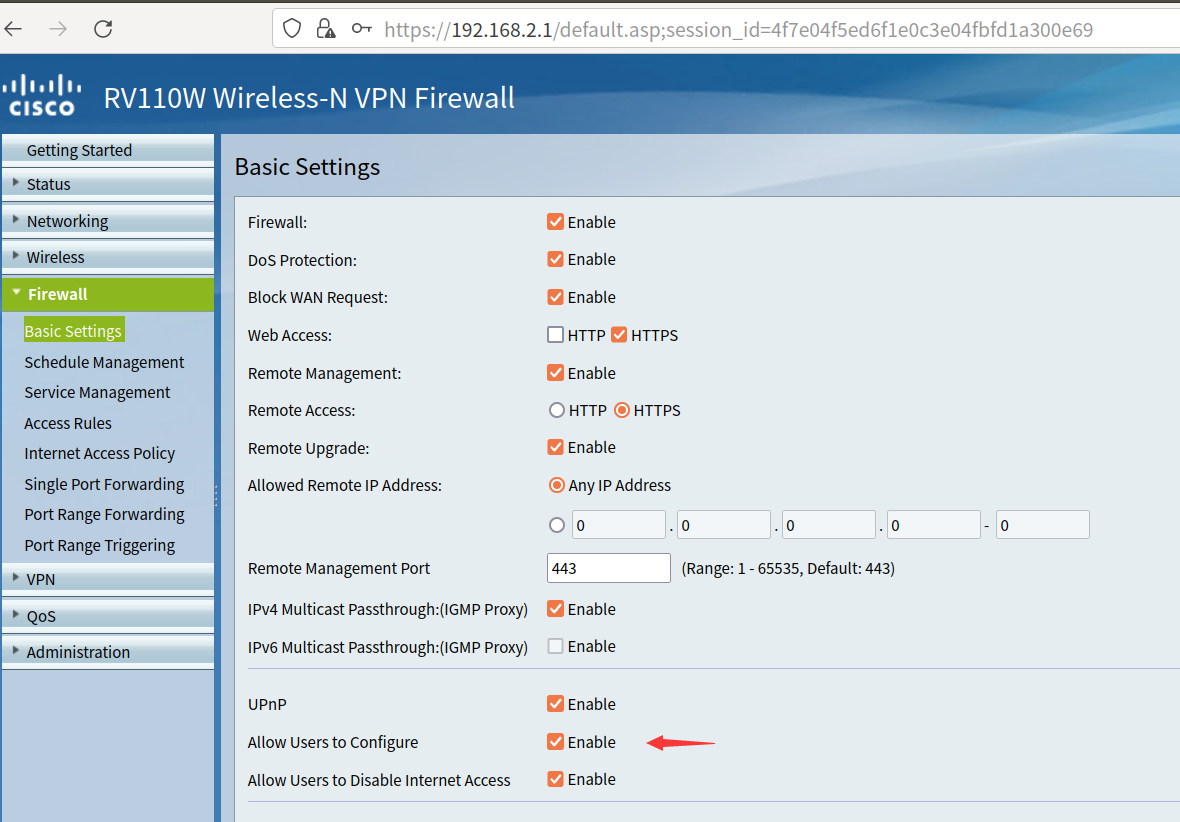
The official advisory indicates the vulnerability exists in the UPnP service. First, log into the admin panel, go to FireWall → Basic Settings, and enable UPnP.
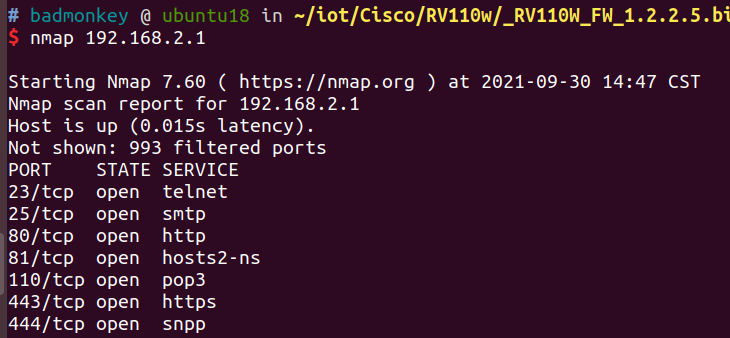
Then scan the ports with nmap, but the UPnP port is not found. However, testing shows that UPnP is indeed open.
Here I use UPnPy for vulnerability testing and exploitation.
import socket
msg = \
    b'M-SEARCH * HTTP/1.1\r\n' \
    b'HOST:239.255.255.250:1900\r\n' \
    b'ST:upnp:rootdevice\r\n' \
    b'MX:2\r\n' \
    b'MAN:"ssdp:discover"\r\n' \
    b'\r\n'

# Set up UDP socket
s = socket.socket(socket.AF_INET, socket.SOCK_DGRAM, socket.IPPROTO_UDP)
s.bind((b"192.168.2.100",23333)) # local IP
s.settimeout(2)
s.sendto(msg, (b'239.255.255.250', 1900))
addr = ('192.168.2.1', 1900) # gateway IP
try:
    while True:
        data, addr = s.recvfrom(65507)
        print(addr,data)

except socket.timeout:
    pass
Indeed, we receive a UPnP response, and there is a corresponding UPnP process running on the device.
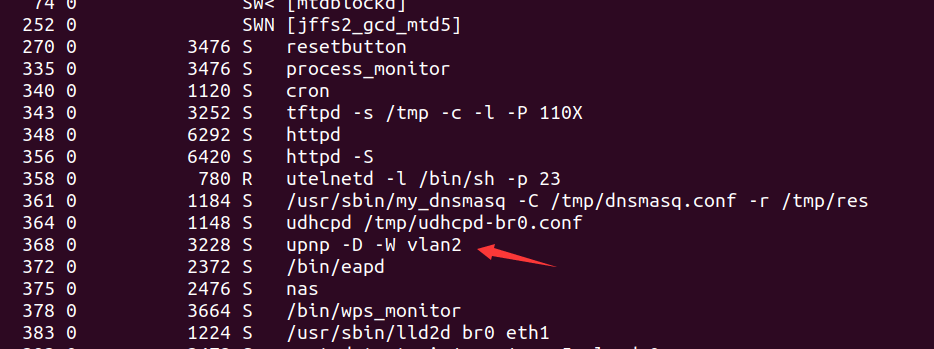
UPnP is a general protocol standard, and most vendors implement it according to the standard, meaning many actions are identical. However, it is still necessary to analyze the services provided by the device to locate and exploit the vulnerability. Again, use UPnPy to gather information.
import upnpy
import socket

import requests
from upnpy.ssdp.SSDPDevice import SSDPDevice
msg = \
    b'M-SEARCH * HTTP/1.1\r\n' \
    b'HOST:239.255.255.250:1900\r\n' \
    b'ST:upnp:rootdevice\r\n' \
    b'MX:2\r\n' \
    b'MAN:"ssdp:discover"\r\n' \
    b'\r\n'

# Set up UDP socket
s = socket.socket(socket.AF_INET, socket.SOCK_DGRAM, socket.IPPROTO_UDP)
s.bind((b"192.168.2.100",23333))
s.settimeout(2)
s.sendto(msg, (b'239.255.255.250', 1900))
addr = ('192.168.2.1', 1900)
data = b""
try:
    while True:
        data, addr = s.recvfrom(65507)
        print(addr,data)
except socket.timeout:
    pass

# data = b'HTTP/1.1 200 OK\r\nCache-Control: max-age=120\r\nDate: Fri, 01 Jan 2010 00:44:16 GMT\r\nExt: \r\nLocation: http://192.168.2.1:1780/InternetGatewayDevice.xml\r\nServer: POSIX UPnP/1.0 linux/5.70.48.16\r\nST: upnp:rootdevice\r\nUSN: uuid:31474a87-67ea-dae4-2f73-f157fb06d22b::upnp:rootdevice\r\n\r\n'
# data = b'HTTP/1.1 200 OK\r\nCache-Control: max-age=3600\r\nST: upnp:rootdevice\r\nUSN: uuid:824ff22b-8c7d-41c5-a131-8c3bad401726::upnp:rootdevice\r\nEXT:\r\nServer:  Unspecified, UPnP/1.0, Unspecified\r\nLocation: http://192.168.3.1:56688/rootDesc.xml\r\n\r\n'

device = SSDPDevice(addr, data.decode())
services = device.get_services()

services_id = [services[i].id.split(":")[-1] for i in range(len(services))]

for id in services_id:
    service = device[id]
    actions = service.get_actions()
    for action in actions:
        for argument in action.arguments:
            print(id,action.name,argument.name)
This yields a series of service information, partially listed below:
WANIPConn1 AddPortMapping NewRemoteHost
WANIPConn1 AddPortMapping NewExternalPort
WANIPConn1 AddPortMapping NewProtocol
WANIPConn1 AddPortMapping NewInternalPort
WANIPConn1 AddPortMapping NewInternalClient
WANIPConn1 AddPortMapping NewEnabled
WANIPConn1 AddPortMapping NewPortMappingDescription
WANIPConn1 AddPortMapping NewLeaseDuration
WANIPConn1 DeletePortMapping NewRemoteHost
WANIPConn1 DeletePortMapping NewExternalPort
WANIPConn1 DeletePortMapping NewProtocol
WANIPConn1 GetExternalIPAddress NewExternalIPAddress
These services can be roughly categorized into get-type, set-type, and a few delete-type services. Since one of the main purposes of UPnP is to expose internal network devices to external networks, certain configurations (such as port mapping) are necessary. As configuration requires parameters, these parameters are essentially the parameters in set-type services.
Since not all services are implemented by the vendor, we need to reverse-engineer the firmware ourselves. First, locate upnp_mainloop.
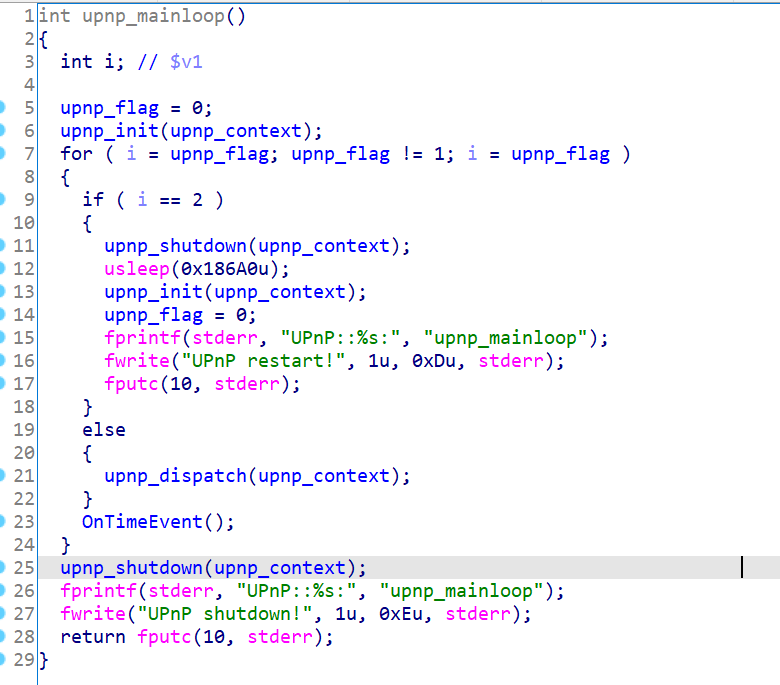
All processing logic is implemented in upnp_dispatch. Following that, we find the handling parts for SSDP and HTTP requests.
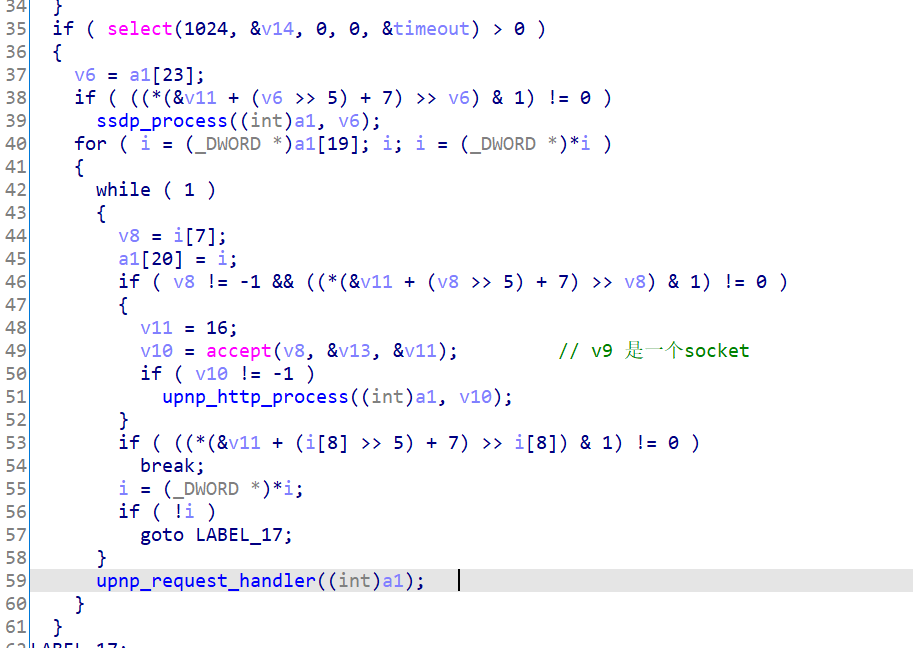
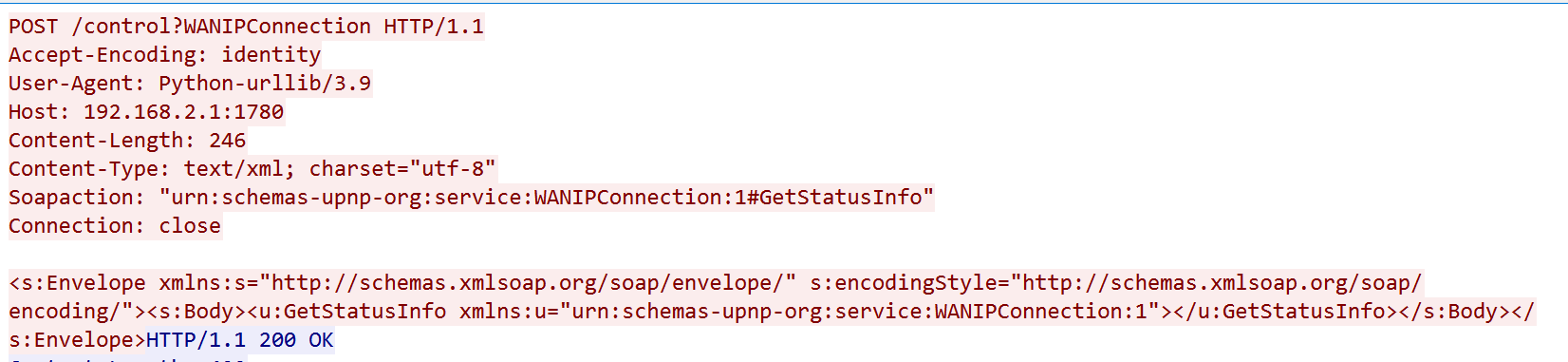
ssdp_process handles the M-Search request during discovery, while upnp_http_process handles HTTP requests. Since normal service calls are HTTP requests, it is likely that upnp_http_process contains the vulnerability. An example of a service call is shown below.
Inside upnp_http_process, it further calls upnp_http_fsm_engine.
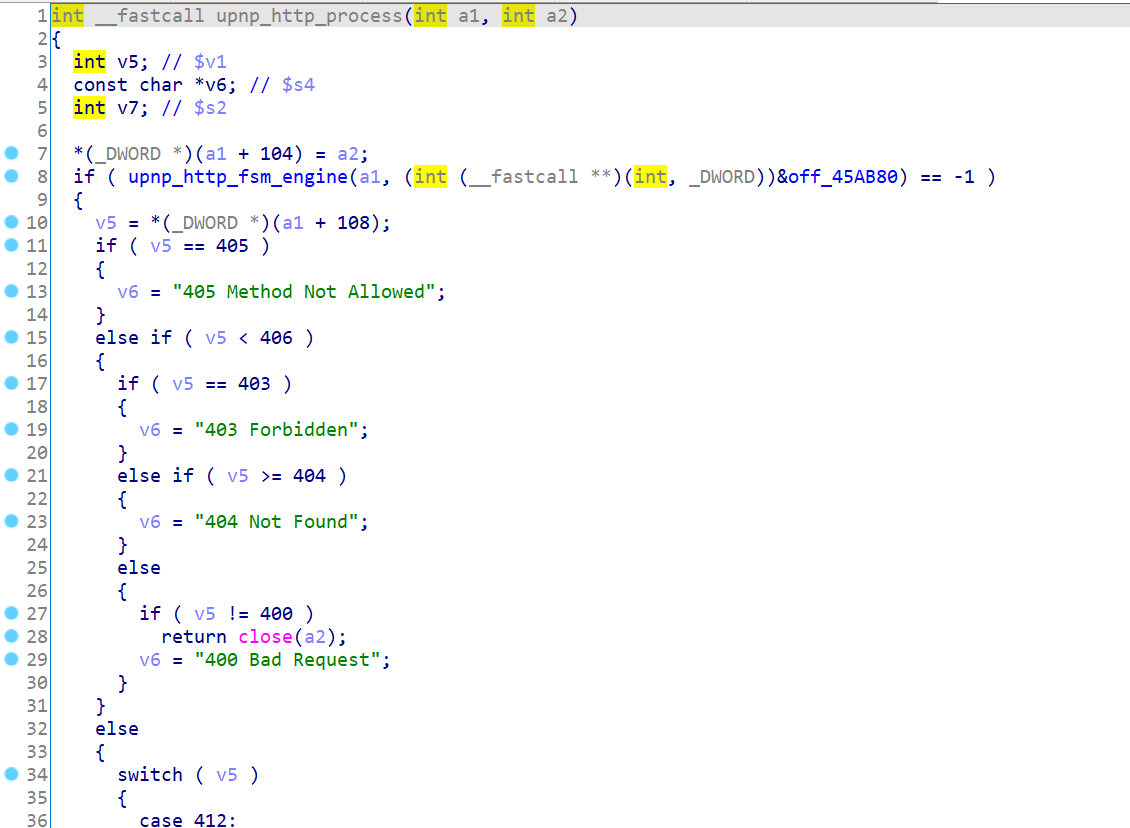
Following that, we find that it executes several functions at off_45ab80.
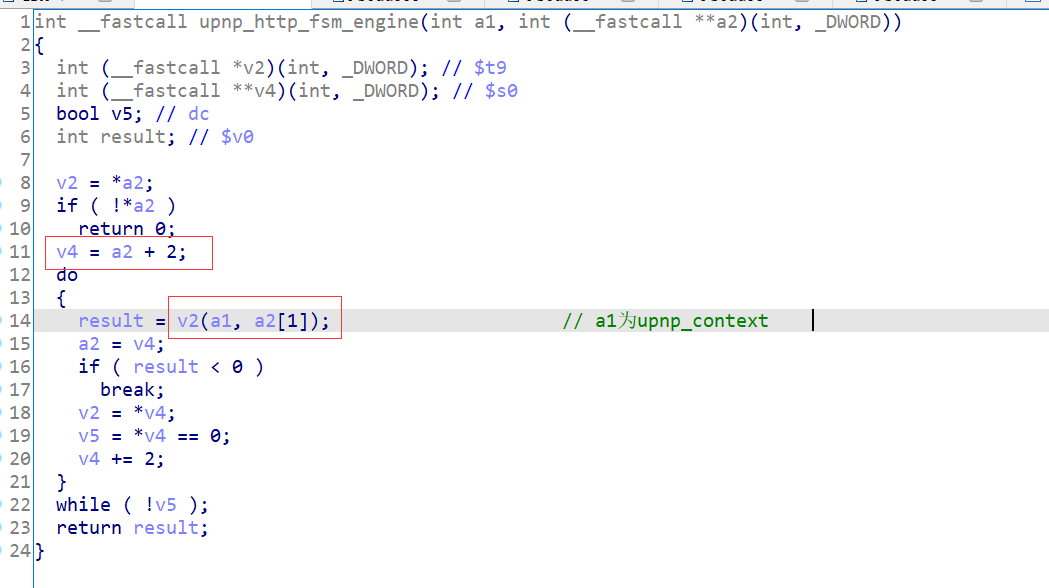
These functions include initialization and protocol header parsing. The last function is upnp_http_fsm_dispatch, which is suspected to call the corresponding service function.
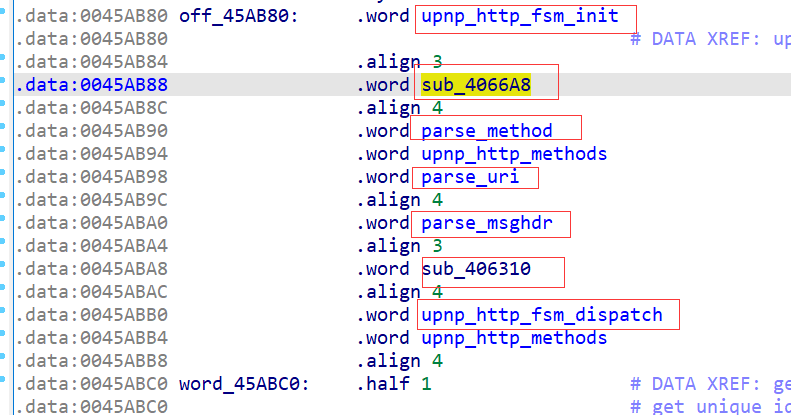
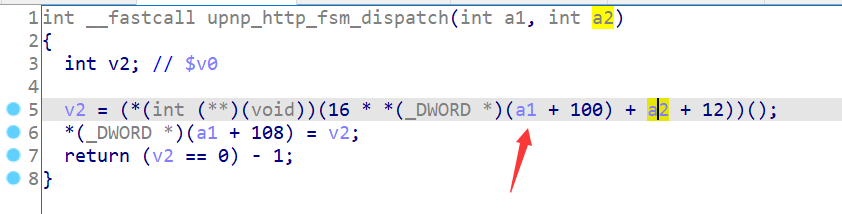
Following upnp_http_fsm_dispatch, we indeed find that it calls function methods, but it does so based on a1 and a2, making it impossible to determine the specific called function without dynamic debugging.