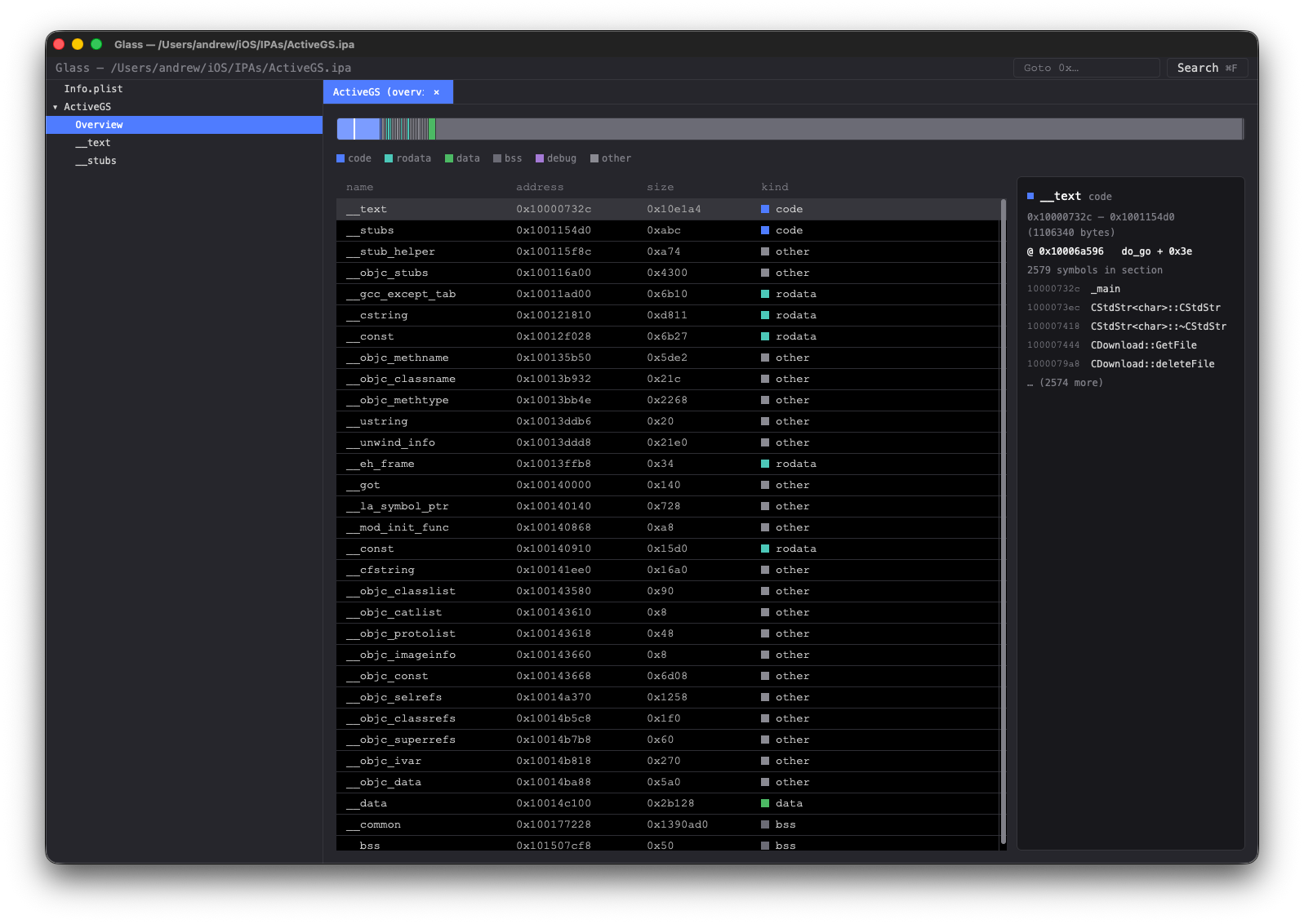
Glass - a fast and free IDA Pro alternative
as in transparent and smooth
A fast, native, mobile-app first interactive disassembler. Spiritual successor to IDA Pro for the Android / iOS reverse engineering workflow, built around:
smali for APK / DEX / smali handlingarmv8-encode for AArch64 and ARMv7 (A32 / Thumb) — native .so, iOS Mach-Ogpui (Zed) for GPU-accelerated native UIredb for content-addressed persistencerquickjs for scriptable plugins (planned)License: GPL-3.0-only (inherited from smali).
We’ve all used IDA Pro — it’s the industry standard for reversing and has years of plugins behind it, but it’s slow, expensive, and dated. Glass is 100% Rust native with a GPU-accelerated UI for fluid interaction. It’s also 100% free and open source — please contribute.
arm64-v8a and armeabi-v7a copies of a library are searched in one query). Byte-pattern grammar with masking + gaps; typed-assembly grammar for AArch64 and ARMv7, with an ISA-aware autocomplete dropdown.A walk through the main views — click any thumbnail to see it full size.
Every analysis Glass does in the GUI is also exposed as a CLI verb that emits structured JSON. The same glass binary is the automation entry point — pick a subcommand and you get a one-shot, scriptable result, perfect for jq pipelines and CI.
# What classes ship in this APK?
glass classes ./app.apk --package com.example. --text
# Who calls glass::main, by address?
glass callers ./libfoo.so --artifact libfoo.so --symbol "glass::main"
# Every `onCreate` across DEX, machine-readable:
glass search ./app.apk onCreate | jq '.data.hits[] | select(.kind=="method")'
# All ObjC + Swift types in an iOS bundle (filter by kind if you like):
glass types ./app.ipa --kind swift-class --text
# Drill into one type — methods, ivars, properties for ObjC;
# fields + vtable for Swift:
glass type ./app.ipa --artifact app --name blackjack.ContentView
Pass --text for a human-readable rendering, omit it for JSON.
Full reference: docs/cli-api.md.
This means you can script and automate common operations.
Every CLI verb is also exposed as a tool through an inbuilt MCP (Model Context Protocol) server, so any MCP-aware host — Claude Desktop, Cursor, Zed, your own client — can drive Glass directly to help with reversing tasks.
# Print the machine-readable skill catalog (one JSON object listing
# every verb with its schema and an example invocation).
glass skills
# Run as an MCP stdio server. Plug into any MCP host's tool list.
glass mcp
To register with Claude Desktop, add Glass to ~/Library/Application Support/Claude/claude_desktop_config.json:
{
"mcpServers": {
"glass": { "command": "/usr/local/bin/glass", "args": ["mcp"] }
}
}
The model can then call inspect, symbols, disasm, cfg-of, dex-callers, search and every other verb on any bundle you point it at. Tool results come back as the same JSON envelope you'd get from the CLI.
Three complementary engines, all available from the same ⌘F palette in the GUI and as CLI / MCP verbs.
Bundle-wide fuzzy match across native symbols, DEX classes / methods / fields, and string literals in code and data sections. Live-filtered as you type; results dispatch to the right view (listing for native addresses, smali viewer for DEX targets, hex view for data hits). Indices build on a background thread after load — a progress chip shows while in flight.
glass search ./app.apk onCreate # all things named like "onCreate"
glass search ./libfoo.so init --limit 20
CLI reference: search verb in docs/cli-api.md.
Byte-level pattern engine. Each atom is a 2-character hex mask (c0, e?, ?f, ??) or a gap (* = 0..=32 bytes, *(min..max) for explicit bounds). Matches don't span sections. In the GUI palette, ⌘2 switches to Binary mode; the Code only checkbox (default on) restricts the scan to text sections so you aren't drowning in data hits when looking for an instruction shape.
# returning-true stub finder — `mov w0, #1 ; ret`
glass bin-search ./libfoo.so --artifact libfoo.so --pattern '20 00 80 52 c0 03 5f d6'
# any ADRP+ADD pair with no intervening bytes
glass bin-search ./libfoo.so --artifact libfoo.so --pattern '?? ?? ?? 9? ?? ?? 4? 91'
# raw data: find embedded magic
glass bin-search ./libfoo.so --artifact libfoo.so --pattern 'de ad be ef'
Full grammar + worked examples: docs/BinSearch.md.
Write the assembly, Glass compiles it to bytes. A ;-separated sequence is encoded via armv8-encode — AArch64 (mov w0, #1, adrp x1, *) and ARMv7 in both modes (Thumb mov r1, r7 / bxeq lr / push {r4-r7, lr} and A32). Any wildcards are translated to operand-bit masks before the byte engine takes over. The scan is global — every native artifact in the bundle gets the right ISA's atoms (Android apps with both arm64-v8a and armeabi-v7a libraries are searched in a single query).
Inside Binary mode in the GUI, ⌘B toggles between Bytes and Asm grammars; an ISA-aware autocomplete dropdown shows variants that still match what you've typed — r1 filters out AArch64 candidates, w0 filters out ARMv7 ones.
Wildcards:
# AArch64 — every `mov w0, #N` (any N)
glass insn-search ./libfoo.so --artifact libfoo.so --pattern 'mov w0, #*'
# AArch64 — any ADRP into x1 followed immediately by ADD into the same reg
glass insn-search ./libfoo.so --artifact libfoo.so --pattern 'adrp x1, * ; add x1, x1, #*'
# ARMv7 (Thumb) — `mov r1, r*` followed by a return
glass insn-search ./libfoo.so --artifact libfoo.so --pattern 'mov r1, r* ; bx lr'
# ARMv7 (any cond) — conditional bx in literal-pool callers
glass insn-search ./libfoo.so --artifact libfoo.so --pattern 'bxeq lr'
# every `ret x30` — concrete, no wildcards
glass insn-search ./libfoo.so --artifact libfoo.so --pattern 'ret'
The response carries bytes_hex showing the compiled mask (e.g. 01/1f ?? ?? 90/9f for adrp x1, *) so you can see exactly which bits are pinned vs wildcarded. Captures (<name:kind> cross-referencing the same operand later in the pattern) are designed but not yet implemented.
Full design + phasing: docs/InsnPattern.md. CLI/MCP reference: insn-search in docs/cli-api.md.
Glass is usable today for reversing Android (APK / DEX / native .so) and iOS (IPA / Mach-O) apps targeting AArch64 and 32-bit ARMv7 (armeabi-v7a libraries, A32 + Thumb).
File loading
.apk, .aab), iOS bundles (.ipa), or any standalone ELF / Mach-O binary (.so, .dylib, raw executables) directly — Glass auto-detects the format.arm64e is preferred, plain arm64 is the fallback. Works on bundles and on standalone files alike (e.g. glass gui /usr/lib/dyld).libfoo.so shipped in two APKs (or the same libswiftCore.dylib across two IPAs) shares analysis state.smali).iOS — IPA / Mach-O
Payload/*.app/, parse Info.plist, and pick the arm64 / arm64e slice from any fat binary inside.Frameworks/*.framework + *.dylib is loaded as its own native artifact, with the same Overview + per-section disassembly views used for Android .so files.__objc_classlist — classes, categories, methods, ivars, properties — with demangled names (legacy _TtC... Swift mangling included) and clickable jumps from method addresses into the listing.__swift5_types — classes, structs, enums with their fields and (for classes) vtables, also clickable into the listing.Android — APK / DEX / native
.so files under lib/<abi>/ loaded per ABI; AArch64 (arm64-v8a) and ARMv7 (armeabi-v7a) both get full disassembly views. Other ABIs (x86 / x86_64) route to the hex view until a decoder lands.Editing
r1 shows ARMv7 variants only; w0 shows AArch64 only.AArch64 native (ELF + thin Mach-O)
.eh_frame FDEs, and synthesized <name>@plt entries. C++/Rust/Swift demangling via symbolic-demangle.adrp + add/ldr pairs resolved to data targets, including string literals shown inline as comments.ARMv7 native (ELF)
00 00 padding), 32-bit Thumb-2 and A32 show 4..eh_frame, and synthesized <name>@plt entries (12-byte stubs).movw + movt fusion: movw R, #lo16 ; movt R, #hi16 is detected across instruction pairs and the resolved 32-bit constant gets a ; "..." rodata-string comment on the movt row.ldr Rt, [pc, #imm] literal-pool loads dereference one level into rodata for the same kind of inline string comment AArch64's ADRP+ADD path produces.UI
change me finds changeMessage and change_me_count but not dispatchMenuVisibilityChanged).arm64-v8a + armeabi-v7a get unified results with the artifact + section labelled per match.redb; relaunching reopens where you left off.embedded.mobileprovision parsing.resources.arsc parsing).r0, lsl #2) and pre/post-index memory ([rN, #imm]!, [rN], #imm) parse but only concretely — no wildcards inside brackets.Glass runs on macOS 13+ (the primary target, GPU-accelerated via Metal — no extra SDK needed, the Metal framework ships with the OS), Linux (X11 or Wayland via gpui_linux, Vulkan-backed), and Windows 10/11 (Direct3D-backed via gpui, built with the MSVC toolchain).
There is a release prebuilt binary for macOS under Releases but if you need to build from source: the good news: it's two commands.
Install Rust (if you don't already have it):
curl --proto '=https' --tlsv1.2 -sSf https://sh.rustup.rs | sh
Linux only — install gpui's native dependencies. The easiest way is to run Zed's setup script, which knows about apt / dnf / pacman / etc:
curl -sSL https://raw.githubusercontent.com/zed-industries/zed/main/script/linux | bash
This pulls in libxkbcommon-dev, the Wayland and XCB headers, Vulkan, ALSA, and the rest of the toolchain gpui_linux needs to link. Without these the build fails at link time with missing xkbcommon / wayland-client symbols.
If you'd rather not run the script, the equivalent packages on Debian / Ubuntu (amd64) are:
sudo apt-get update && sudo apt-get install -y \
build-essential clang cmake pkg-config \
libfontconfig-dev libfreetype-dev \
libwayland-dev libxkbcommon-x11-dev \
libasound2-dev libvulkan-dev \
libzstd-dev libsqlite3-dev libssl-dev \
libglib2.0-dev
The build fails early in a dependency build script (fontconfig was not found in the pkg-config search path) if is missing, and later at link time for the X11/Wayland/Vulkan libraries. is needed because the Frida driver links GLib dynamically on Linux (on macOS the Frida devkit bundles it statically) — without it the link fails with .
Always use the release build — debug builds disassemble orders of magnitude slower.
.app bundleTo wrap the release binary in a Glass.app bundle for double-click launch from Finder:
cargo build --release -p glass-cli
./packaging/make-app.sh
open dist/Glass.app
The bundle is ad-hoc signed (not Developer-ID signed / notarized), so on first launch macOS will refuse to open it; right-click → Open to bypass Gatekeeper once.
Two ways to grab a prebuilt zip without building locally:
main — every push uploads a Glass-app-<sha>.zip as a 14-day workflow artifact. Pull it from the Actions tab.v* tag (e.g. v0.1.0) triggers the same workflow and additionally publishes a Glass-<tag>-macOS.zip to the Releases page with auto-generated release notes.embedded.mobileprovision parsing. (ObjC __objc_classlist and the Swift __swift5_types metadata pass have landed — see glass types / glass type.).so files.| Token | Meaning |
|---|
* | any operand (kind inferred from the chosen opcode) |
#* | any immediate (hints the opcode picker) |
x, w | any AArch64 X- or W-class register |
r | any ARMv7 GPR (r0..r15, sp, lr, pc) |
<*>, <X>, <W>, <R>, <imm> | bracketed equivalents, useful nested in other syntax ([x, #*], [r, #*]) |
libfontconfig-devlibglib2.0-devundefined symbol: g_object_unrefWindows only — install the native build toolchain. gpui requires the MSVC toolchain (the GNU/MinGW target is not supported). Using winget:
# 1. MSVC compiler, linker, and Windows SDK (the "Desktop development with C++" workload).
winget install --id Microsoft.VisualStudio.2022.BuildTools `
--override "--quiet --wait --add Microsoft.VisualStudio.Workload.VCTools --includeRecommended"
# 2. CMake — tree-sitter (via the Zed `language` crates) builds wasmtime's C API with it.
winget install --id Kitware.CMake
# 3. LLVM/Clang — `bindgen` (frida-sys, gpui, media) needs libclang.dll.
winget install --id LLVM.LLVM
The LLVM installer does not add itself to PATH, so point bindgen at libclang.dll before building (set it permanently via System → Environment Variables, or per-shell):
$env:LIBCLANG_PATH = "C:\Program Files\LLVM\bin"
Without these the build fails in dependency build scripts: linker 'link.exe' not found (no MSVC), failed to spawn 'cmake' (no CMake), or Unable to find libclang (no LIBCLANG_PATH). The glass binary's stack reserve is bumped automatically on MSVC (see crates/glass-cli/build.rs) so the CLI doesn't overflow Windows' small default main-thread stack — no action needed.
Clone and build:
git clone https://github.com/azw413/Glass.git
cd glass
cargo build --release -p glass-cli
cp target/release/glass <to somewhere on your PATH>
The first build will compile gpui and friends and will take several minutes. Subsequent builds are fast.
Run it:
# Open the GUI on an Android APK or iOS IPA — no subcommand needed.
glass ~/path/to/app.apk
glass ~/path/to/app.ipa
# Or on a standalone binary — ELF .so, Mach-O .dylib, or raw
# executable. Fat / universal Mach-O is sliced automatically.
glass ~/path/to/libfoo.so
glass ~/path/to/libBar.dylib
glass /usr/lib/dyld
# No args → opens an empty Glass window; use File → Open.
glass
# Headless bundle inspect
glass bundle ~/path/to/app.apk
# Inspect persisted state for a bundle
glass db-dump ~/path/to/app.apk
| Crate | Purpose |
|---|
glass-core | Shared types (CodeKind, IDs) |
glass-arch-arm | AArch64 + ARMv7 disassembly, symbol map, PLT synthesis, demangling |
glass-arch-dex | DEX / smali facade over smali |
glass-mobile | APK + IPA bundle loading, native-lib extraction, manifest |
glass-db | Content-addressed persistence (redb): bundles, tabs, settings |
glass-device | Android (adb) + iOS (usbmux) device discovery |
glass-api | Analysis verbs (search, xrefs, CFG, edits) shared by CLI + MCP + GUI |
glass-ui | gpui front-end: tree, listing, hex, manifest, palette |
glass-cli | Headless inspector + GUI launcher |
glass-mcp | MCP server exposing every CLI verb as a tool |
glass-script | QuickJS plugin runtime (placeholder) |
