Challenges with on-premises malware detection
It can be difficult for security teams to continuously monitor all on-premises servers due to budget and resource constraints. Signature-based antivirus alone is insufficient as modern malware uses various obfuscation techniques. Server admins may lack visibility into security events across all servers historically. Determining compromised systems and safe backups to restore from during incidents is challenging without centralized monitoring and alerting. It is onerous for server admins to setup and maintain additional security tools for advanced threat detection. The rapid mean time to detect and remediate infections is critical but difficult to achieve without the right automated solution.
Determining which backup image is safe to restore from during incidents without comprehensive threat intelligence is another hard problem. Even if backups are available, without knowing when exactly a system got compromised, it is risky to blindly restore from backups. This increases the chance of restoring malware and losing even more valuable data and systems during incident response. There is a need for an automated solution that can pinpoint the timeline of infiltration and recommend safe backups for restoration.
How to use AWS services to address these challenges
The solution leverages AWS Elastic Disaster Recovery (AWS DRS), Amazon GuardDuty and AWS Security Hub to address the challenges of malware detection for on-premises servers.
This combo of services provides a cost-effective way to continuously monitor on-premises servers for malware without impacting performance. It also helps determine safe recovery point in time backups for restoration by identifying timeline of compromises through centralized threat analytics.
-
AWS Elastic Disaster Recovery (AWS DRS) minimizes downtime and data loss with fast, reliable recovery of on-premises and cloud-based applications using affordable storage, minimal compute, and point-in-time recovery.
-
Amazon GuardDuty is a threat detection service that continuously monitors your AWS accounts and workloads for malicious activity and delivers detailed security findings for visibility and remediation.
-
AWS Security Hub is a cloud security posture management (CSPM) service that performs security best practice checks, aggregates alerts, and enables automated remediation.
Architecture
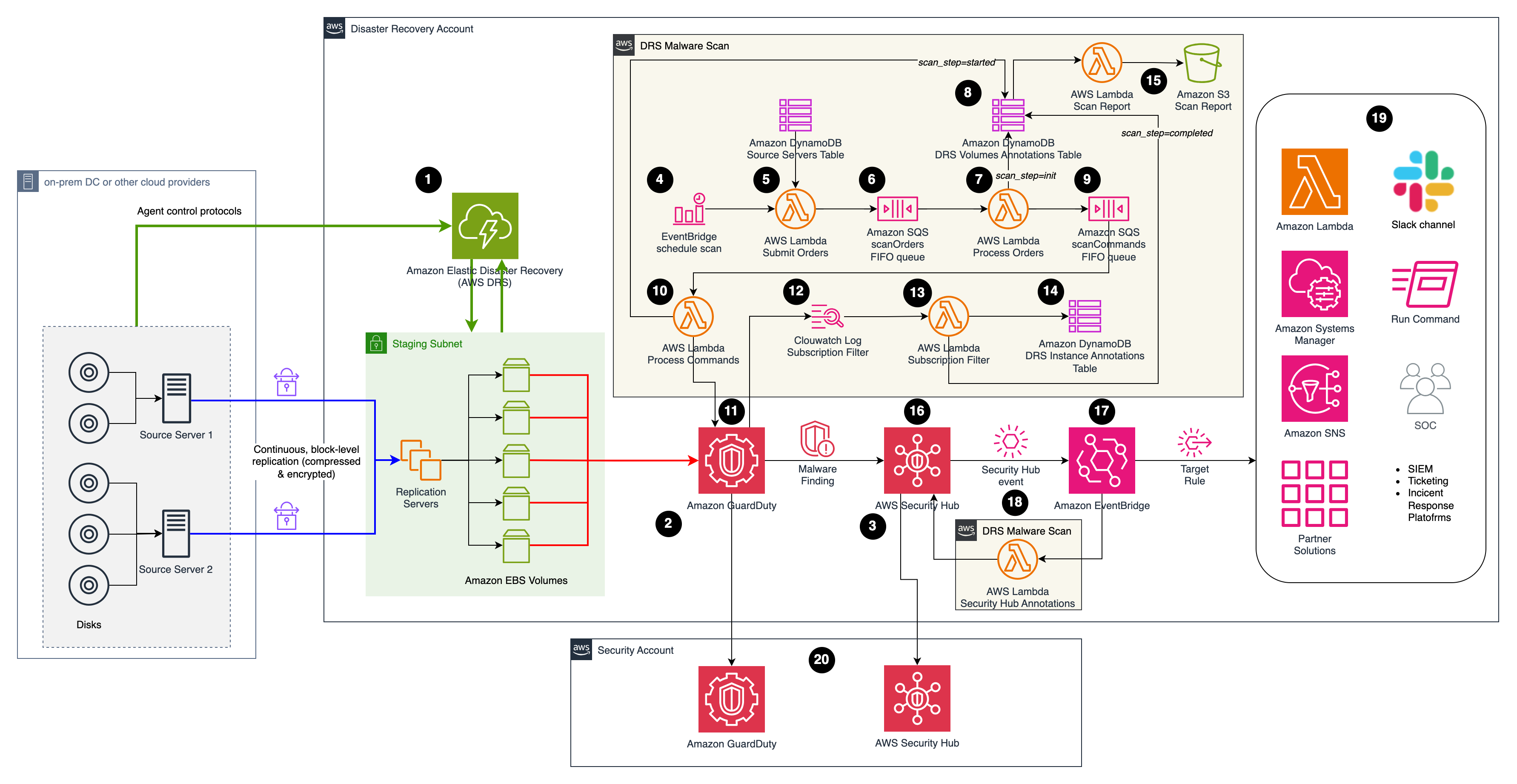
Solution description
The Malware Scan solution assumes on-premises servers are already being replicated with AWS DRS, and Amazon GuardDuty & AWS Security Hub are enabled. The cdk stack in this repository will only deploy the boxes labelled as DRS Malware Scan in the architecture diagram.
- AWS DRS is replicating source servers from the on-premises environment to AWS (or from any cloud provider for that matter). For further details about setting up AWS DRS please follow the Quick Start Guide.
- Amazon GuardDuty is already enabled.
- AWS Security Hub is already enabled.
- The Malware Scan solution is triggered by a Schedule Rule in Amazon EventBridge (with prefix DrsMalwareScanStack-ScheduleScanRule). You can adjust the scan frequency as needed (i.e. once a day, a week, etc).
- The Schedule Rule in Amazon EventBridge triggers the Submit Orders lambda function (with prefix DrsMalwareScanStack-SubmitOrders) which gathers the source servers to scan from the Source Servers DynamoDB table.
- Orders are placed on the SQS FIFO queue named Scan Orders (with prefix DrsMalwareScanStack-ScanOrdersfifo). The queue is used to serialize scan requests mapped to the same DRS instance, preventing a race condition.
- The Process Order lambda picks a malware scan order from the queue and enriches it, preparing the upcoming malware scan operation. For instance, it inserts the id of the replicating DRS instance associated to the DRS source server provided in the order. The output of Process Order are malware scan commands containing all the necessary information to invoke GuardDuty malware scan.
- Malware scan operations are tracked using the DRSVolumeAnnotationsDDBTable at the volume-level, providing reporting capabilities.
- Malware scan commands are inserted in the Scan Commands SQS FIFO queue (with prefix DrsMalwareScanStack-ScanCommandsfifo) to increase resiliency.
- The Process Commands function submits queued scan commands at a maximum rate of 1 command per second to avoid API throttling. It triggers the on-demand malware scan function provided by Amazon GuardDuty.
- The execution of the on-demand Amazon GuardDuty Malware job can be monitored from the Amazon GuardDuty service.
- The outcome of malware scan job is routed to Amazon Cloudwath Logs.
- The Subscription Filter lambda function receives the outcome of the scan and tracks the result using DynamoDB (step #14).
- The DRS Instance Annotations DynamoDB Table tracks the status of the malware scan job at the instance level.
- The CDK stack named ScanReportStack deploys the Scan Report lambda function (with prefix ScanReportStack-ScanReport) to populate the Amazon S3 bucket with prefix scanreportstack-scanreportbucket.
- AWS Security Hub aggregates and correlates findings from Amazon GuardDuty.
- The Security Hub finding event is caught by an EventBridge Rule (with prefix DrsMalwareScanStack-SecurityHubAnnotationsRule)
- The Security Hub Annotations lambda function (with prefix DrsMalwareScanStack-SecurityHubAnnotation) generates additional Notes (Annotations) to the Finding with contextualized information about the source server being affected. This additional information can be seen in the Notes section within the Security Hub Finding.
- The follow-up activities will depend on the incident response process being adopted. For example based on the date of the infection, AWS DRS can be used to perform a point in time recovery using a snapshot previous to the date of the malware infection.
- In a Multi-Account scenario, this solution can be deployed directly on the AWS account hosting the AWS DRS solution. The Amazon GuardDuty findings will be automatically sent to the centralized Security Account.
Usage
Pre-requisites
- An AWS Account.
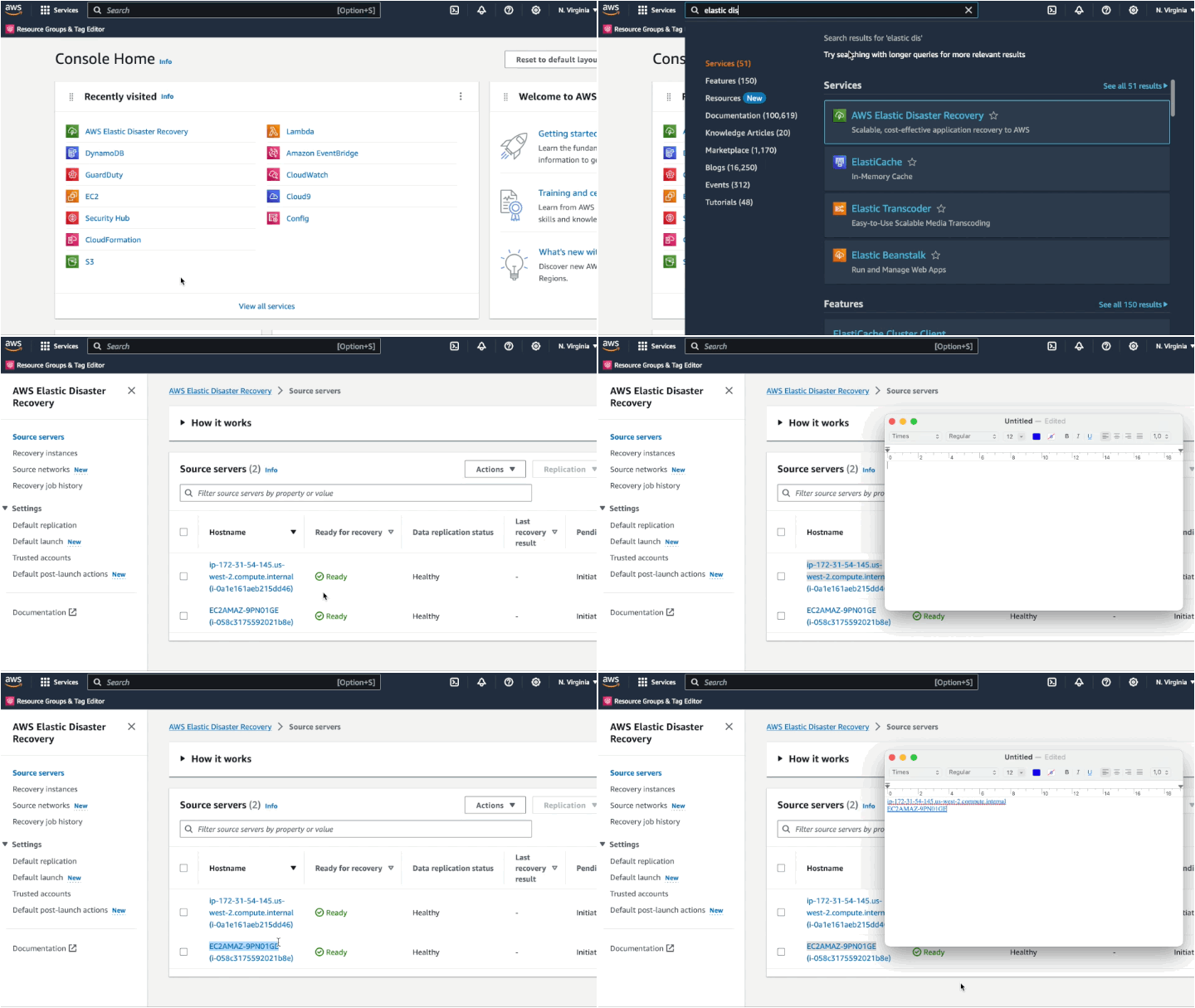
- Amazon Elastic Disaster Recovery (DRS) configured, with at least 1 server source in sync. If not, please check this documentation. The Replication Configuration must consider EBS encryption using Custom Managed Key (CMK) from AWS Key Management Service (AWS KMS). Amazon GuardDuty Malware Protection does not support default AWS managed key for EBS.
- IAM Privileges to deploy the components of this solution.
- Amazon GuardDuty enabled. If not, please check this documentation
- Amazon Security Hub enabled. If not, please check this documentation
 aws-samples/drs-malware-scan
