
Skip to content
KitploitKITPLOIT
ToolsBlog
Submit
ToolsBlog
Submit

Hacking, PenTest, and Cybersecurity Tools for Your Security Arsenal!

Kitploit is a directory of hacking, cybersecurity, and pentesting tools. Discover the latest project updates to find vulnerabilities, analyze systems, automate testing, and strengthen your security.

··Feeds·Contact·Privacy·© 2026 Kitploit

Tool Directory

Categories

View all categories
Loading categories
BlackLotus — BlackLotus aka CVE-2023-24932 Detection/Remediation Scripts for Intune, ConfigMgr, and generic use | Kitploit
Tools/GitHubGitHub/ajf8729/blacklotus
Vulnerability AnalysisConfiguration AuditingCloud SecurityDevSecOpsMisconfigurationIncident Response
GitHubajf8729/blacklotus

BlackLotus

BlackLotus aka CVE-2023-24932 Detection/Remediation Scripts for Intune, ConfigMgr, and generic use

View Repository
81 year agoNot yet reviewed

Most Popular

View all →

Discover the most used tools by our community.

Explore all tools

Browse our collection of tools

View all tools →
Share

BlackLotus

BlackLotus aka CVE-2023-24932 remediation scripts for Intune, ConfigMgr, and generic ad-hoc use.

Blog post: https://ajf.one/blacklotus

General Notes

  • These remediation scripts do NOT initiate any reboots. These are designed to be run "over time", and eventually the device will report as compliant over its course of "natural" reboots, either due to monthly updates, user-initiated, or otherwise.
  • The entirety of the remediation script MUST be placed within the detection script for Intune Remediation and ConfigMgr CI use. This is due to how these scripts work as a "choose your own adventure" story, with multiple exit points, each returning its own output.
  • At the start of each script are the equivalent to "detection" scripts, in order to prevent making any changes or performing any excessive logging on an already compliant device.
  • Feel free to open an issue here, or ping me on Discord in WinAdmins (@krbtgt) if you run into any issues or have any feedback, it would be much appreciated!

Phase 1: Installing the updated certificate definitions to the DB, and updating the Boot Manager on your device

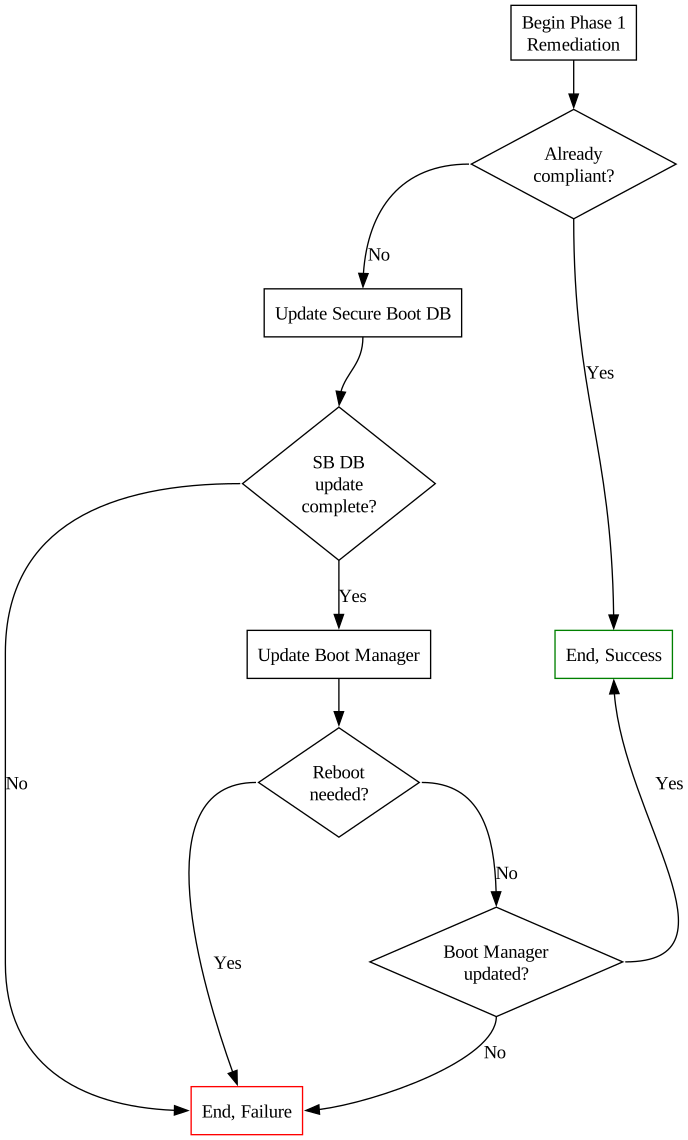
Process Flowchart:

The Phase 1 script will perform steps 1 & 2 from the guidance published by Microsoft, by doing the following:

  1. Set the AvailableUpdates registry value to 0x40
  2. Start the \Microsoft\Windows\PI\Secure-Boot-Update scheduled task to perform step 1, "Install the updated certificate definitions to the DB"
  3. Validate step 1 is complete
  4. Set the AvailableUpdates registry value to 0x100
  5. Start the \Microsoft\Windows\PI\Secure-Boot-Update scheduled task to perform step 2, "Update the Boot Manager on your device"
  6. Validate step 2 is complete

Validation is done between each step, and will be logged to $env:TEMP\BlackLotusPhase1Remediation.log, as well as returned to Intune (if running the script as a Remediation).

Phase 2: Enabling the revocation and applying the SVN update to the firmware

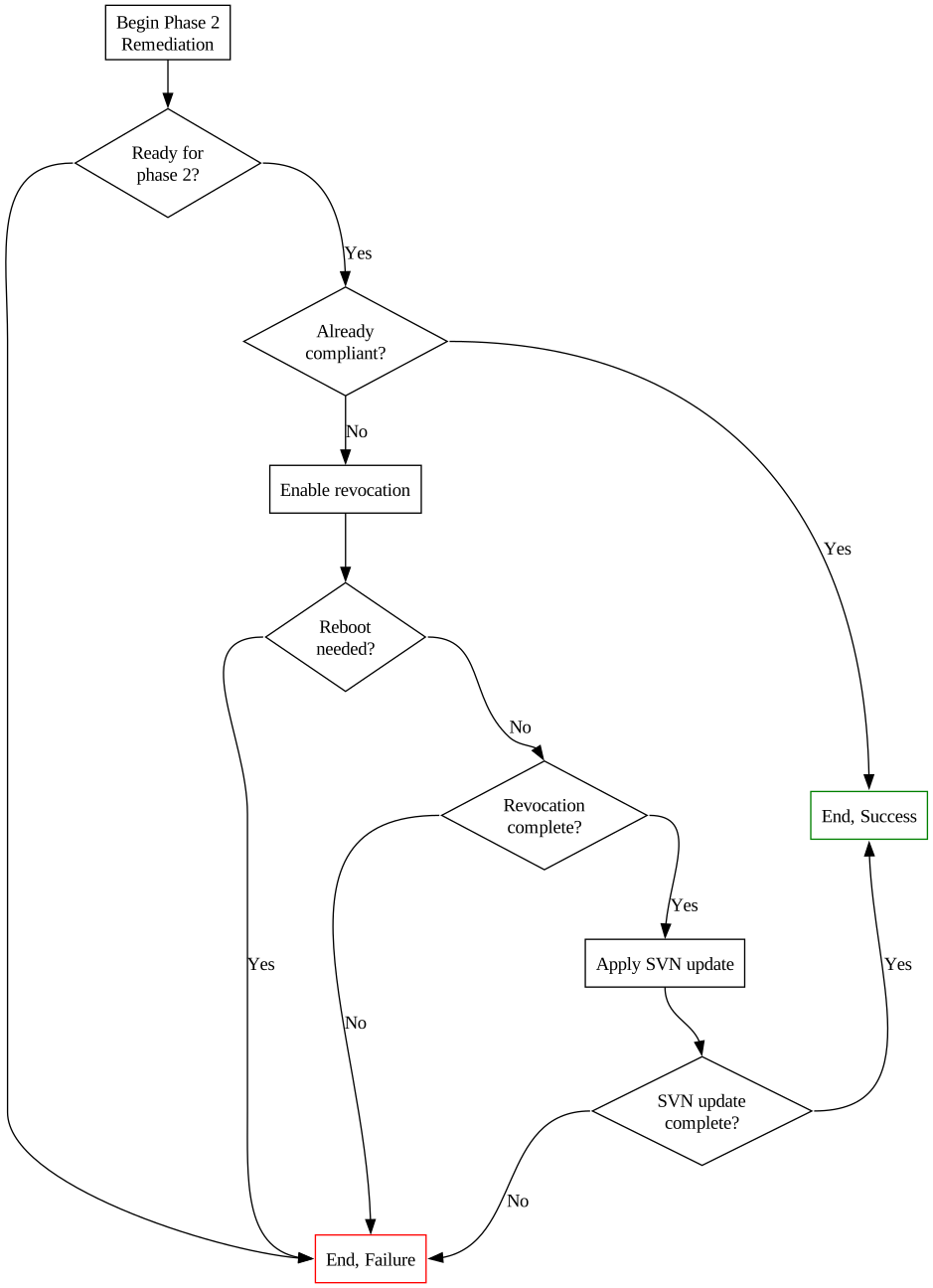
Process Flowchart:

The Phase 2 script will perform steps 3 & 4 from the guidance published by Microsoft, by doing the following:

  1. Set the AvailableUpdates registry value to 0x80
  2. Start the \Microsoft\Windows\PI\Secure-Boot-Update scheduled task to perform step 3, "Enable the revocation"
  3. Validate step 3 is complete
  4. Set the AvailableUpdates registry value to 0x200
  5. Start the \Microsoft\Windows\PI\Secure-Boot-Update scheduled task to perform step 4, "Apply the SVN update to the firmware"
  6. Validate step 4 is complete
Download Tool