
Skip to content
KitploitKITPLOIT
ToolsBlog
Submit
ToolsBlog
Submit

Hacking, PenTest, and Cybersecurity Tools for Your Security Arsenal!

Kitploit is a directory of hacking, cybersecurity, and pentesting tools. Discover the latest project updates to find vulnerabilities, analyze systems, automate testing, and strengthen your security.

··Feeds·Contact·Privacy·© 2026 Kitploit

Tool Directory

Categories

View all categories
Loading categories
forensic-timeliner — A high-speed forensic timeline engine for Windows forensic artifact CSV output built for DFIR investigators. Quickly consolidate CSV output from processed triage evidence for Eric Zimmerman (EZ Tools) Kape, Axiom, Hayabusa, Chainsaw and Nirsoft into a unified timeline. | Kitploit
Tools/GitHubGitHub/acquiredsecurity/forensic-timeliner
ForensicsIncident ResponseLog Analysis
GitHubacquiredsecurity/forensic-timeliner

forensic-timeliner

A high-speed forensic timeline engine for Windows forensic artifact CSV output built for DFIR investigators. Quickly consolidate CSV output from processed triage evidence for Eric Zimmerman (EZ Tools) Kape, Axiom, Hayabusa, Chainsaw and Nirsoft into a unified timeline.


View Repository

Most Popular

View all →

Discover the most used tools by our community.

Explore all tools

Browse our collection of tools

View all tools →
Share
333385 months agoReviewed by Kitploit

A high-speed forensic processing engine built for DFIR investigators. Quickly consolidate CSV output from top-tier triage tools into a unified mini timeline with built-in filtering, artifact detection, date filtering, keyword tagging, and deduplication.


Version Downloads Stars Contributors Maintained C# .NET 9


Release

Forensic Timeliner v2.3 – Release Notes

New Features

  • Cross-Platform Browser History Parsing

    • New ForensicWebHistoryParser — parses live browser history CSV from forensic-webhistory (Rust tool)
    • Supports Chrome, Firefox, Safari, Brave, Edge, Opera, Vivaldi, and Arc
    • Activity detection: Search queries, Downloads, and File Open events automatically enriched in description
    • Header validation to distinguish from other CSV formats
  • Recovered Browser History Support

    • New ForensicWebHistoryCarvedParser — parses recovered/deleted browser entries
    • Handles carved SQLite database rows with reduced column set
    • Identifies recovery source (e.g., "Carved from WAL", "Carved from Journal")
  • Core Library Refactoring

    • Extracted all parsers, models, utilities, and interfaces into ForensicTimeliner.Core class library
    • Enables reuse by the web platform without code duplication
    • All existing parsers (EZ Tools, Hayabusa, Chainsaw, Nirsoft, Axiom) moved to Core

Bug Fixes

  • Fixed date filtering display — RowsFilteredByDate was incorrectly calculated when no date filtering was applied, showing all rows as "filtered"
  • Fixed deduplication counter initialization (RowCountAfterDedup)

Other Changes

  • License updated to CC BY-NC 4.0
  • Added --NoPrompt flag for scripting and automation pipelines


Table of Contents

  • Main Features
  • Quick Start
  • Downloads
  • Screenshots
  • Command Line Arguments
  • Timeline Output
  • Yaml Config
  • Tool Documentation
  • Usage Guide
  • Artifact and Output Support Table
  • License

Main Features

  • Combine csv output from

    • EZ Tools / Kape
    • Axiom
    • Chainsaw
    • Hayabusa
    • Nirsoft
    • forensic-webhistory (cross-platform browser history)
    • output data into a unified timeline
  • Automatic CSV discovery from triage directories (all configurable) with YAML

    • Yaml files already use default namings for tools with default output
    • For tools like Hayabusa where you can set the file output name you should name the file some variaition of Hayabusa.csv and put it in a folder named Hayabusa
    • Simply provide the base directory of where the triage output lives and the tool will attempt to discover the csv files based on
    • File Name
    • Folder Name
    • File Headers
    • For Event Logs Channel\Provider Filters
    • For MFT File Extension and Path Filters
  • Timeline enrichment with with keyword tagging for use with Timeline Explorer. Automatically create a TLE session file based on keyword searching for CSV output.

  • RFC-4180-compliant export for compatibility with tools like Timeline Explorer

  • Date filtering and deduplication controls

  • Interactive Setup and Yaml Discovery Preview


Quick Start

TL;DR! Get some Kape/EZ Forensic Output

Download the exe and run:

root@kitploit:~
ForensicTimeliner.exe --Interactive
root@kitploit:~
ForensicTimeliner.exe --BaseDir C:\triage\hostname --ALL --OutputFile C:\timeline.csv
root@kitploit:~
.\ForensicTimeliner.exe --ProcessEZ --BaseDir "C:\Users\admin0x\Desktop\sample_data\host_t800" --OutputFile "C:\Users\admin0x\Desktop\test" --ExportFormat csv --EnableTagger
  • Open TLE Session file from your output directory. If you move the file you need to updste the session file path.

  • Use default naming for your csv files and make sure they are inside the base directory you set. There is a fallback to auto discover csv files based on file headers, or adjust the filename in the YAML settings.

  • Use the --EnableTagger feature view command line to build a Timeline Explorer session file based on keyword tagging. Adjust keywords in config\keywords\keywords.yaml


Downloads

Latest Release: v2.3

Download sample data for testing purposes here.

Sample Data


Screenshots

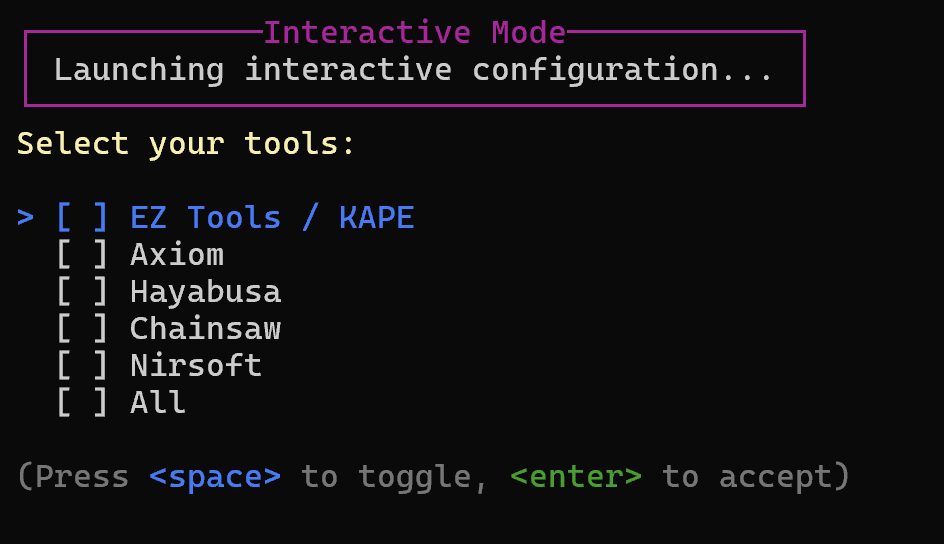
Interactive Menu

image

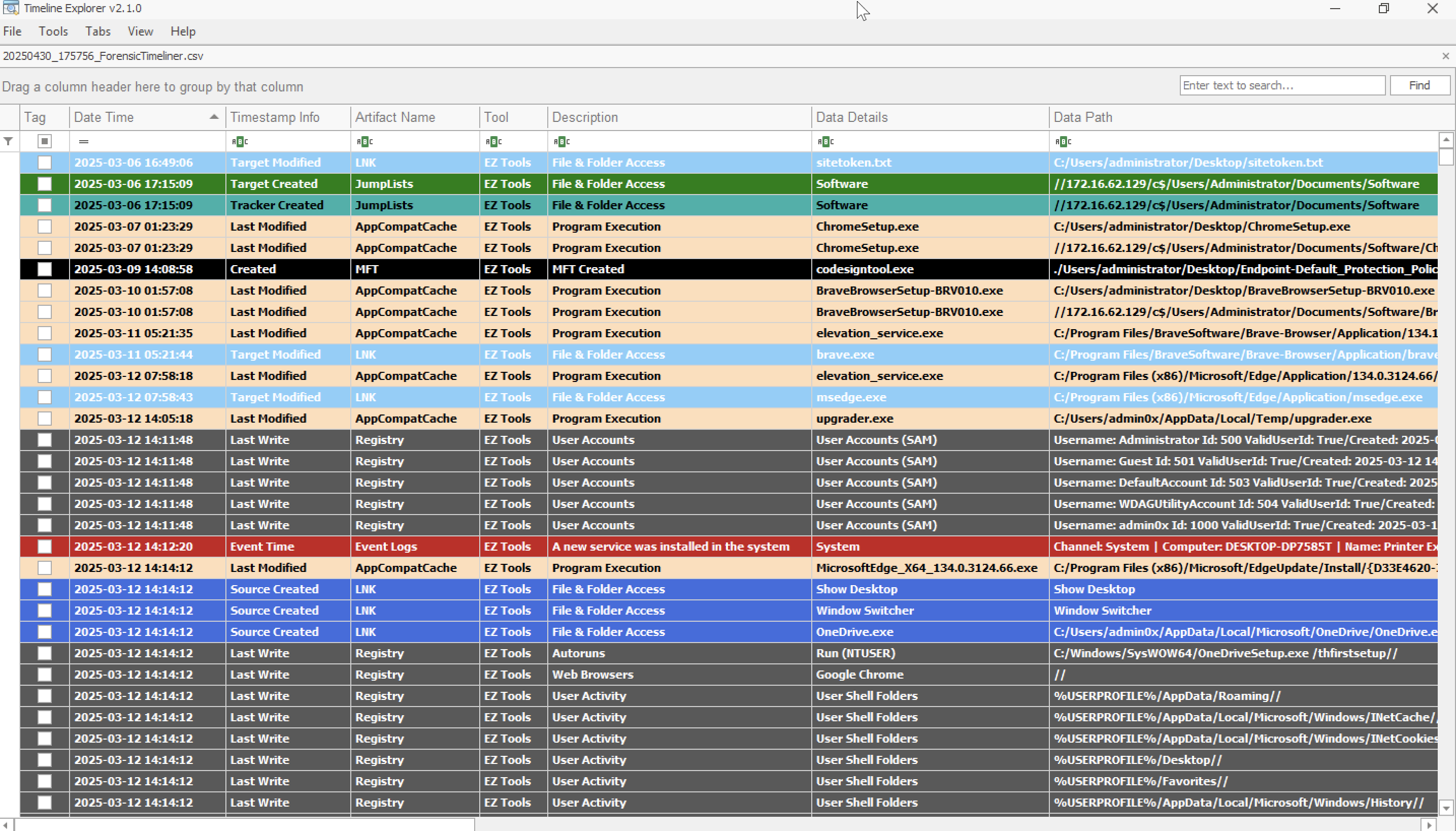
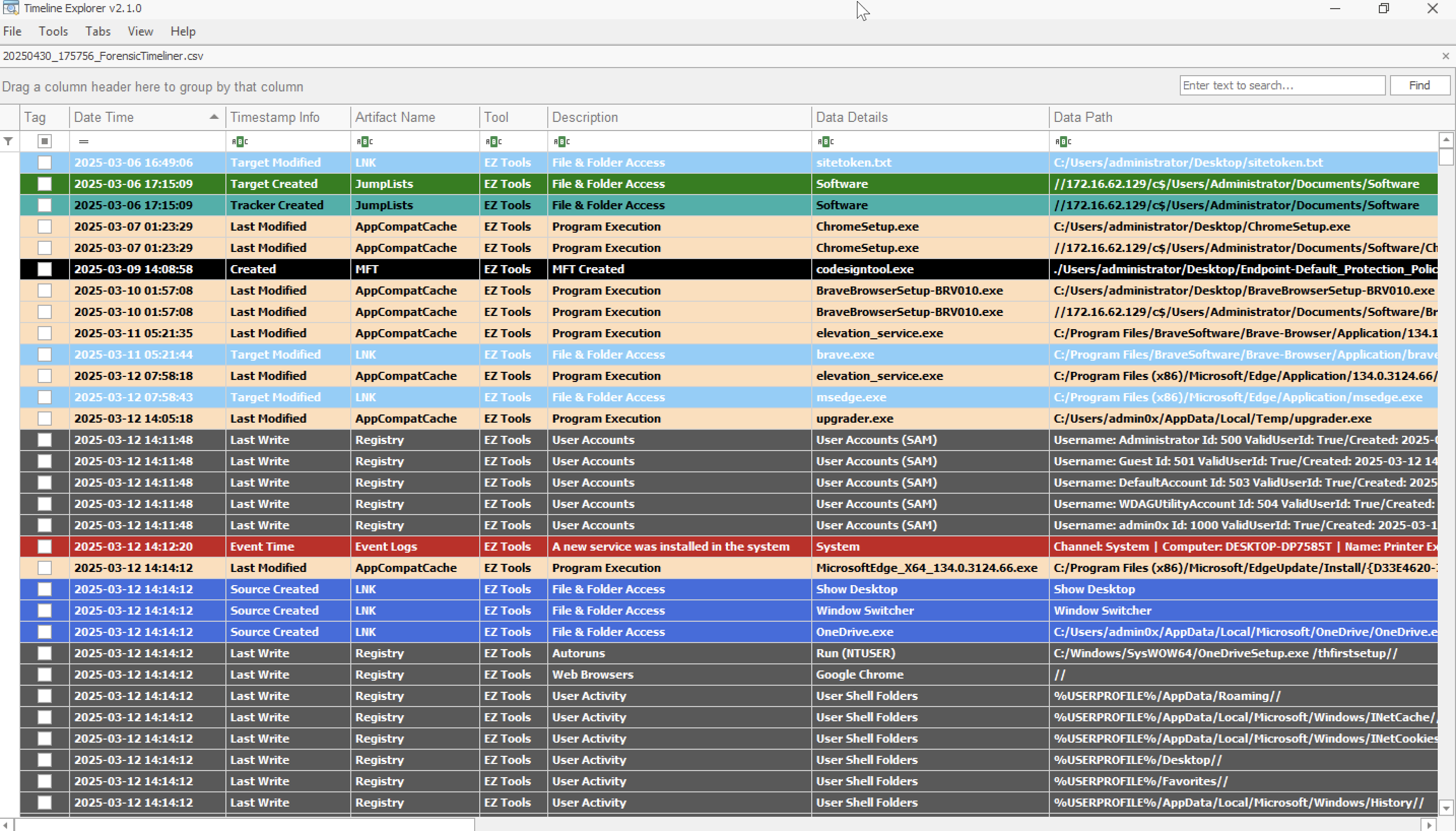
Timeline Explorer Support image

  • Auto coloring applied in TLE with latest plugin files
  • Automatically Build a TLE Session File with tagged rows based on keywords
    • Edit the Keywords config file and add your keywords
    • Run ForensicTimeliner.exe from the command line using the --EnableTagger flag

Command Line Arguments


Timeline Output Field Structure

🧾 Timeline Output Field Structure All output is exported as RFC-4180-compliant CSV and ready for review in Timeline Explorer, Excel, or other forensic tools.

Each timeline entry includes the following fields:

root@kitploit:~
DateTime,TimestampInfo,ArtifactName,Tool,Description,DataDetails,DataPath,FileExtension,EventId,User,Computer,FileSize,IPAddress,SourceAddress,DestinationAddress,SHA1,Count,EvidencePath

YAML Config

Timeline parsers can be customized using per-artifact YAML definitions. These control:

  • Artifact discovery (filename_patterns, foldername_patterns, etc.)
  • Filtering (event_channel_filters, provider_filters, paths, extensions)
  • Timestamp mapping (timestamp_fields) ** MFT Only
  • Optional overrides (ignore_filters) ** MFT & Event Logs
    • Set ignore_filters: true to skip all filters for MFT and Event Logs.

📚 Tool Output Processing Documentation

Detailed documentation for each supported tool showing how artifacts are parsed and mapped to the unified timeline format:

Supported Tools

  • EZ Tools - Comprehensive Windows artifact analysis (Activity Timeline, Amcache, AppCompatCache, Event Logs, JumpLists, LNK Files, MFT, Prefetch, Registry, Shellbags, UserAssist, and more)
  • Hayabusa - Sigma-based Windows event log analysis and threat hunting
  • Chainsaw - MITRE ATT&CK focused event log analysis (Account Tampering, Credential Access, Lateral Movement, Persistence, PowerShell, and more)
  • Axiom - Magnet Forensics comprehensive artifact extraction (Web History, Prefetch, Registry, File System, and more)
  • Nirsoft - Cross-browser history analysis and Windows utility artifacts
  • Browser History (forensic-webhistory) - Cross-platform browser history extraction with SQLite carving for Chrome, Firefox, Safari, Brave, Edge, Opera, Vivaldi, and Arc

Each documentation page includes:

  • Field Mapping Tables - How source CSV fields map to timeline format
  • Special Behaviors - Unique processing logic and features
  • Expected CSV Format - Required input format and structure
  • Integration Notes - Tips for optimal usage and file organization

Event Log Filters

Define EventChannelFilters per channel in your YAML configuration as seen below. Spport for [] to include an entire event log as needed.

root@kitploit:~
event_channel_filters:
  Application: []
  Microsoft-Windows-PowerShell/Operational: [4100, 4103, 4104]
  Microsoft-Windows-RemoteDesktopServices-RdpCoreTS/Operational: [72, 98, 104, 131, 140]
  Microsoft-Windows-TerminalServices-LocalSessionManager/Operational: [21, 22]
  Microsoft-Windows-TerminalServices-RemoteConnectionManager/Operational: [261, 1149]
  Microsoft-Windows-TaskScheduler/Operational: [106, 140, 141, 129, 200, 201]
  Microsoft-Windows-WinRM/Operational: [169]
  SentinelOne/Operational: [1, 31, 55, 57, 67, 68, 77, 81, 93, 97, 100, 101, 104, 110]
  Security: [1102, 4624, 4625, 4648, 4698, 4702, 4720, 4722, 4723, 4724, 4725, 4726, 4732, 4756]
  System: [7045]

provider_filters:
    edgeupdate: [0]
    SentinelHelperService: [0]
    brave: [0]
    Edge: [256]
    SentinelOne: [1, 31, 55, 57, 67, 68, 77, 81] 

MFT Processing and Filtering MFT parsing includes automatic timestamp normalization and extension/path filtering.

By default, only Created0x10 timestamps are included to focus on file creation events and limit the overall timeline size

Default filters:

root@kitploit:~
DEFAULT_EXTENSIONS = [".identifier", ".exe", ".ps1", ".zip", ".rar", ".7z"]
DEFAULT_PATHS = ["Users"]

Artifact and Output Support Table


License

Creative Commons Attribution-NonCommercial 4.0 International (CC BY-NC 4.0)


Download Tool
ArgumentTypeDefaultDescription
--BaseDirstringC:\triageRoot directory to recursively search for supported artifact CSVs
--OutputFilestring"timeline.csv"Output file or folder for exported timeline
--ExportFormatstringcsvExport format: csv, json, or jsonl
--StartDatedatetimenullFilter: only include rows after this date
--EndDatedatetimenullFilter: only include rows before this date
--Deduplicate / -dboolfalseRemove duplicate timeline rows after export
--EnableTaggerboolfalseEnables keyword-based tagging via config/keywords/keywords.yaml
--IncludeRawDataboolfalseAdds a RawData column for unmodified source row contents (if available) experimental
--NoBannerboolfalseSkip printing the banner/logo at start
--NoPromptboolfalseBypass prompts to run with a script or for automation pipeline
--Help / -hboolfalseShow help and usage information
--ALL / -aboolfalseProcess all tools listed below (based on discovery)
--Interactive / -iboolfalseLaunch an interactive CLI to build a custom command
--ProcessEZboolfalseEnable EZ Tools artifact parsing
--ProcessAxiomboolfalseEnable Axiom artifact parsing
--ProcessChainsawboolfalseEnable Chainsaw artifact parsing
--ProcessHayabusaboolfalseEnable Hayabusa artifact parsing
--ProcessNirsoftboolfalseEnable Nirsoft artifact parsing
--ProcessBrowserHistoryboolfalseEnable cross-platform browser history parsing (forensic-webhistory)
ArtifactSupported Tool(s)Example Filename(s)
AmcacheEZ Tools, AxiomUnAssociatedFileEntries.csv, AssociatedFileEntries.csv, AmCache File Entries.csv
AppCompatCacheEZ Tools, AxiomAppCompatCache.csv, Shim Cache.csv
AutoRunsAxiomAutorun Items.csv
Chrome HistoryAxiomChrome Web History.csv
Deleted FilesEZ ToolsRBCmd_Output.csv
Edge HistoryAxiomEdge Web Visits.csv, Edge Web History.csv
Event LogsEZ Tools, Axiom_EvtxECmd_Output.csv, Windows Event Logs.csv
Firefox HistoryAxiomFirefox Web Visits.csv
IE HistoryAxiomEdge-Internet Explorer 10-11 Main History.csv
JumpListsEZ Tools, AxiomAutomaticDestinations.csv, Jump Lists.csv
LNK FilesEZ Tools, Axiom_LECmd_Output.csv, LNK Files.csv
MFTEZ Tools, ChainsawMFTECmd$MFT_Output.csv, mft.csv
MRU Folder AccessAxiomMRU Folder Access.csv
MRU Opened/Saved FilesAxiomMRU Opened-Saved Files.csv
MRU Recent Files & FoldersAxiomMRU Recent Files & Folders.csv
Opera HistoryAxiomOpera Web Visits.csv
PersistenceChainsawpersistence.csv
PrefetchEZ Tools, Axiom_PECmd_Output.csv, Prefetch Files - Windows 8-10-11.csv
PowerShell ExecutionChainsawpowershell.csv, powershell_script.csv
RDP EventsChainsawrdp_events.csv
Recycle BinAxiomRecycle Bin.csv
RegistryEZ Tools_RECmd_Batch_Kroll_Batch_Output.csv
Service InstallationChainsawservice_installation.csv
Service TamperingChainsawservice_tampering.csv
ShellbagsEZ Tools, Axiom_UsrClass.csv, Shellbags.csv
Sigma Rule MatchesChainsawsigma.csv
UserAssistEZ Tools, AxiomUserAssist.csv
TypedUrlsEZ Tools*__TypedURLS__NTUSER.CSV
Threat Events (Chainsaw)Chainsawaccount_tampering.csv, defense_evasion.csv, credential_access.csv
Web Browsing HistoryNirsoft, Axiom, forensic-webhistoryWebResults.csv, Chrome/Firefox/Edge History.csv, forensic_webhistory*.csv
Carved Browser Historyforensic-webhistoryforensic_webhistory_carved*.csv
VPN / RAS LogsChainsawmicrosoft_rasvpn_events.csv, microsoft_rds_events.csv
Login AttacksChainsawlogin_attacks.csv
Log TamperingChainsawlog_tampering.csv
Antivirus DetectionsChainsawantivirus.csv
Applocker EventsChainsawapplocker.csv
Indicator RemovalChainsawindicator_removal.csv
Lateral MovementChainsawlateral_movement.csv