
arduino-pico v6.1.0
Raspberry Pi Pico Arduino core, for all RP2040 and RP2350 boards
Arduino-Pico


Raspberry Pi Pico Arduino core, for all RP2040 and RP2350 boards
This is a port of Arduino to the RP2040 (Raspberry Pi Pico processor) and RP2350 (Raspberry Pi Pico 2 processor). It uses the bare Raspberry Pi Pico SDK and a custom GCC 16.1/Newlib 4.6 toolchain and supports ARM and RISC-V cores.
Documentation
See https://arduino-pico.readthedocs.io/en/latest/ along with the examples for more detailed usage information.
Contributing
Read the Contributing Guide for more information on submitting pull requests and porting libraries or sketches to this core.
Supported Boards
- Raspberry Pi Pico
- Raspberry Pi Pico W
- Raspberry Pi Pico 2
- Raspberry Pi Pico 2W
- 0xCB Helios
- Adafruit Feather RP2040
- Adafruit Feather RP2040 SCORPIO
- Adafruit Feather RP2040 DVI
- Adafruit Feather RP2040 Adalogger
- Adafruit Feather RP2040 RFM
- Adafruit Feather RP2040 ThinkINK
- Adafruit Feather RP2040 USB Host
- Adafruit Feather RP2040 CAN
- Adafruit Feather RP2040 Prop-Maker
- Adafruit ItsyBitsy RP2040
- Adafruit Metro RP2040
- Adafruit QT Py RP2040
- Adafruit STEMMA Friend RP2040
- Adafruit Trinkey RP2040 QT
- Adafruit MacroPad RP2040
- Adafruit KB2040
- Adafruit Feather RP2350 Adalogger
- Adafruit Feather RP2350 HSTX
- Adafruit Floppsy
- Adafruit Metro RP2350
- Adafruit Fruit Jam RP2350
- Amken BunnyBoard
- Amken Revelop
- Amken Revelop Plus
- Amken Revelop eS
- Architeuthis Flux Jumperless
- Architeuthis Flux Jumperless V5
- Arduino Nano RP2040 Connect
- ArtronShop RP2 Nano
- BIGTREETECH SKR-Pico
- Breadstick Raspberry
- BridgeTek IDM2040-7A
- BridgeTek IDM2040-43A
- Cytron IRIV IO Controller
- Cytron Maker Nano RP2040
- Cytron Maker Pi RP2040
- Cytron Maker Uno RP2040
- Cytron Motion 2350 Pro
- Cytron Maker Sumo RP2350
- DatanoiseTV PicoADK
- DatanoiseTV PicoADK v2
- Degz Robotics Suibo RP2040
- DeRuiLab FlyBoard2040Core
- DFRobot Beetle RP2040
- L'atelier d'Arnoz DudesCab
- ElectronicCats HunterCat NFC RP2040
- EVN Alpha
- ExtremeElectronics RC2040
- GeeekPi RP2040 Plus
- GroundStudio Marble Pico
- iLabs Challenger 2040 LTE
- iLabs Challenger 2040 LoRa
- iLabs Challenger 2040 SubGHz
- iLabs Challenger 2040 WiFi
- iLabs Challenger 2040 WiFi/BLE
- iLabs Challenger 2040 WiFi6/BLE
- iLabs Challenger NB 2040 WiFi
- iLabs Challenger 2040 SD/RTC
- iLabs Challenger 2040 NFC
- iLabs Challenger 2040 UWB
- iLabs Connectivity 2040 LTE/WiFi/BLE
- iLabs RPICO32
- iLabs Challenger 2350 WiFi/BLE
- iLabs Challenger 2350 BConnect
- iLabs Challenger 2350 NB-IoT
- iLabs Challenger ZP 2350 LoRa
- iLabs CPico 2350
- Makerbase MKS THR36
- Makerbase MKS THR42
- Melopero Cookie RP2040
- Melopero Shake RP2040
- METE HOCA Akana R1
- MyMakers RP2040
- MyMakers RP2350B
- Neko Systems BL2040 Mini
- Newsan Archi
- nullbits Bit-C PRO
- Olimex Pico2BB48
- Olimex Pico2XL
- Olimex Pico2XXL
- Olimex RP2040-Pico30
- Pcbcupid GLYPH 2040
- Pcbcupid GLYPH MINI 2040
- PicoLume Transceiver
- Pimoroni PGA2040
- Pimoroni PGA2350
- Pimoroni PicoPlus2
- Pimoroni PicoPlus2W
- Pimoroni Plasma2040
- Pimoroni Plasma2350
- Pimoroni Plasma2350W
- Pimoroni Servo2040
- Pimoroni Tiny2040
- Pimoroni Tiny2350
- Pimoroni Explorer
- Pintronix PinMax
- RAKwireless RAK11300
- redscorp RP2040-Eins
- redscorp RP2040-ProMini
- Generic Sea-Picro
- Silicognition RP2040-Shim
- Solder Party RP2040 Stamp
- Solder Party RP2350 Stamp
- Solder Party RP2350 Stamp XL
- Soldered Electronics NULA RP2350
- Soldered Electronics NULA Ethernet W55RP20
- Soldered Electronics NULA Node
- SparkFun IoT RedBoard RP2350
- SparkFun MicroMod RP2040
- SparkFun ProMicro RP2040
- SparkFun ProMicro RP2350
- SparkFun Thing Plus RP2040
- SparkFun Thing Plus RP2350
- SparkFun IoT Node LoRaWAN
- SparkFun XRP Controller (Beta)
- SparkFun XRP Controller
- Seeed INDICATOR RP2040
- Seeed XIAO RP2040
- Seeed XIAO RP2040 Plus
- Seeed XIAO RP2350
- uPesy RP2040 DevKit
- VCC-GND YD RP2040
- Vicharak Shrike-Lite
- Viyalab Mizu RP2040
- Waveshare RP2040 Zero
- Waveshare RP2040 One
- Waveshare RP2040 LoRa
- Waveshare RP2040 Matrix
- Waveshare RP2040 PiZero
- Waveshare RP2040 Plus
- Waveshare RP2040 LCD 0.96
- Waveshare RP2040 LCD 1.28
- Waveshare RP2350 Core
- Waveshare RP2350 Zero
- Waveshare RP2350 PiZero
- Waveshare RP2350 Plus
- Waveshare RP2350B Plus W
- Waveshare RP2350 LCD 0.96
- Waveshare RP2350-POE-ETH
- WeAct Studio RP2350B Core Board
- WIZnet W5100S-EVB-Pico
- WIZnet W5100S-EVB-Pico2
- WIZnet W5500-EVB-Pico
- WIZnet W5500-EVB-Pico2
- WIZnet W55RP20-EVB-Pico
- WIZnet W6300-EVB-Pico
- WIZnet W6300-EVB-Pico2
- WIZnet WizFi360-EVB-Pico
- Generic RP2040
- Generic RP2350
Features
- Adafruit TinyUSB Arduino (USB mouse, keyboard, flash drive, generic HID, CDC Serial, MIDI, WebUSB, others)
- Bluetooth on the PicoW (Classic and BLE) with Keyboard, Mouse, Joystick, and Virtual Serial
- Bluetooth Classic and BLE HID master mode (connect to BT keyboard, mouse, or joystick)
- Generic Arduino USB Serial, Keyboard, Joystick, and Mouse emulation
- WiFi (Pico W, ESP32-based ESPHost, Atmel WINC1500)
- Ethernet (Wired WizNet W6300, WizNet W6100, WizNet W5500, WizNet W5100, ENC28J60)
- HTTP client and server (WebServer)
- SSL/TLS/HTTPS
- Over-the-Air (OTA) upgrades
- Filesystems (LittleFS and SD/SDFS)
- Multicore support (setup1() and loop1())
- FreeRTOS SMP support
- Overclocking and underclocking from the menus
- digitalWrite/Read, shiftIn/Out, tone, analogWrite(PWM)/Read, temperature
- Analog stereo audio in using DMA and the built-in ADC
- Analog stereo audio out using PWM hardware
- Bluetooth A2DP audio source (output) and sink (input) on the PicoW
- USB drive mode for data loggers (SingleFileDrive, FatFSUSB)
- Peripherals: SPI master/slave, Wire(I2C) master/slave, dual UART, emulated EEPROM, I2S audio input/output, Servo
- printf (i.e. debug) output over USB serial
- Transparent use of PSRAM globals and heap (RP2350 only)
- ARM or RISC-V (Hazard3) support for the RP2350
- Semihosted serial and file system access
- GPROF profiling support
The RP2040 PIO state machines (SMs) are used to generate jitter-free:
- Servos
- Tones
- I2S Input
- I2S Output
- Software UARTs (Serial ports)
- Software SPIs
Installing via Arduino Boards Manager
Windows-specific Notes
Please do not use the Windows Store version of the actual Arduino application because it has issues detecting attached Pico boards. Use the "Windows ZIP" or plain "Windows" executable (EXE) download direct from https://arduino.cc. and allow it to install any device drivers it suggests. Otherwise the Pico board may not be detected. Also, if trying out the 2.0 beta Arduino please install the release 1.8 version beforehand to ensure needed device drivers are present. (See #20 for more details.)
Linux-specific Notes
Installing Arduino using flatpak (often used by "App Stores" in various Linux distributions) will mean it has restricted access to the host. This might cause uploads to fail with error messages such as the following:
Scanning for RP2040 devices
...
No drive to deploy.
If you encounter this, you will need to either install Arduino in a different manner, or override the flatpak sandboxing feature using the following command, then restarting Arduino.
flatpak override --user --filesystem=host:ro cc.arduino.IDE2
Installation
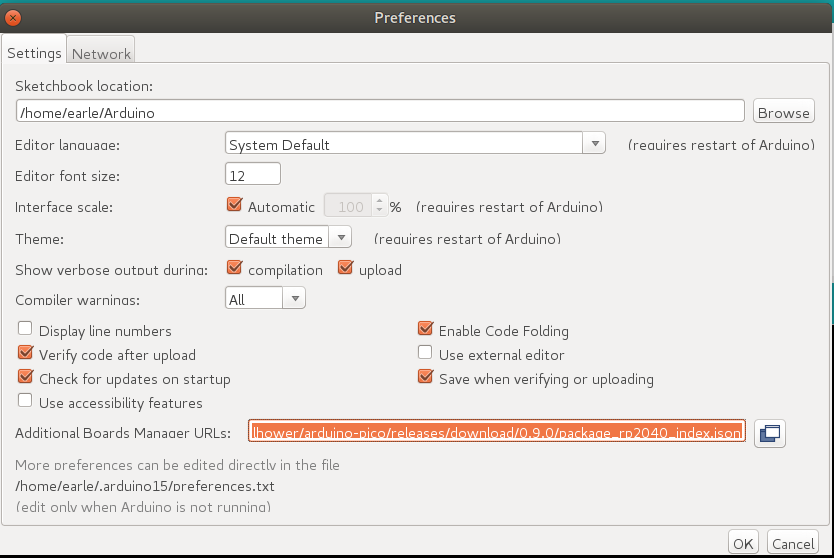
Open up the Arduino IDE and go to File->Preferences.
In the dialog that pops up, enter the following URL in the "Additional Boards Manager URLs" field:
https://github.com/earlephilhower/arduino-pico/releases/download/global/package_rp2040_index.json