
jadx-magic-strings v1.0.3-dev
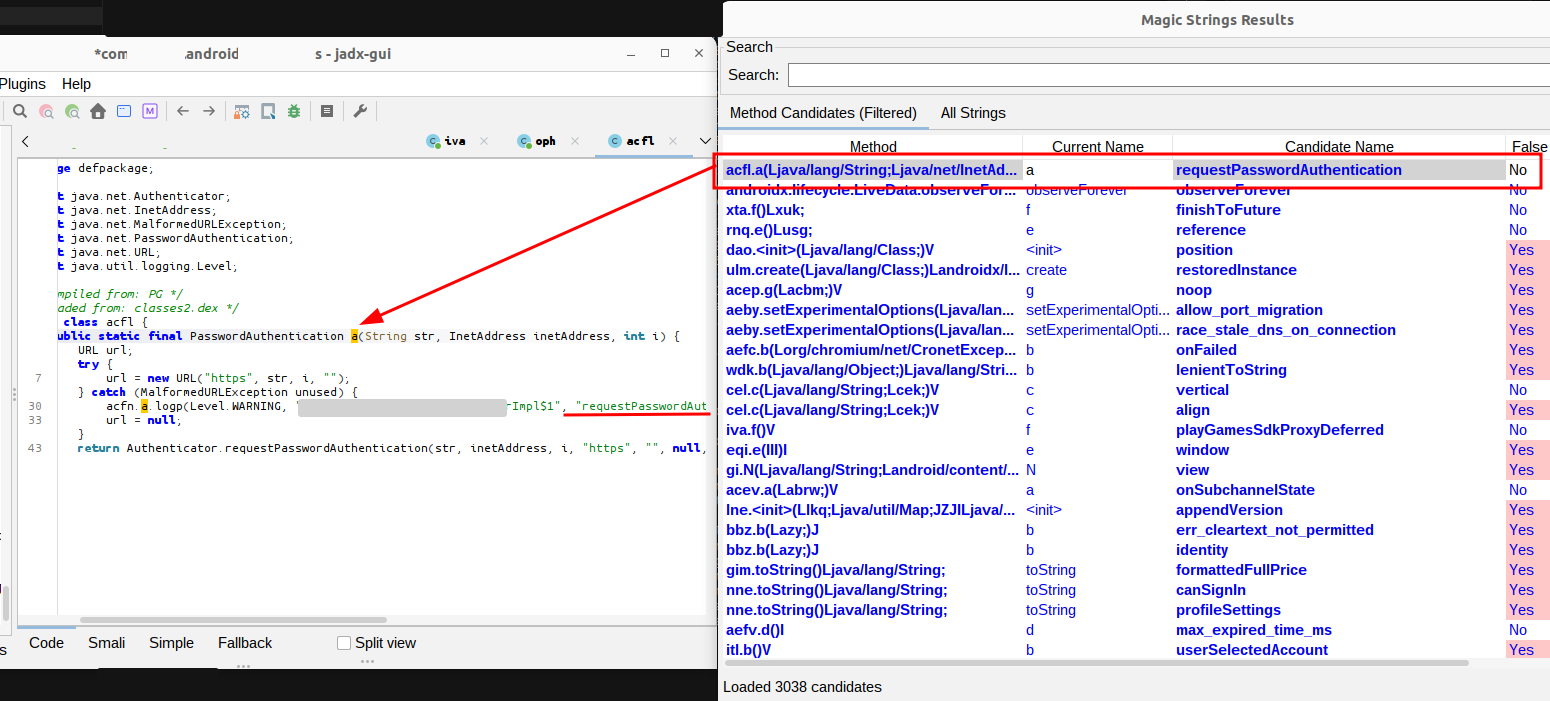
JADX plugin that extracts method names, class references, and source file paths from string constants found in DEX files and decompiled Android code.
JADX Magic Strings Plugin
A JADX plugin that extracts information from string constants.
Features
The plugin extracts and analyzes string constants from decompiled code to find:
- Source File References: Detects references to Java/Kotlin source files (
.java,.kt,.kts,.scala,.groovy) in string constants - Method Name Candidates: Identifies potential method names from strings using regex patterns
- String Analysis: Collects all string constants with their associated methods and classes
Installation
Option 1: Install from GitHub (Recommended)
If this plugin is published to GitHub, you can install it directly:
jadx plugins --install "github:0rshemesh:jadx-magic-strings"
Option 2: Build and Install from Source
-
Clone the repository:
git clone https://github.com/0rshemesh/jadx-magic-strings.git cd jadx-magic-strings -
Build the plugin:
./gradlew build -
Install the plugin:
jadx plugins --install-jar build/libs/jadx-magic-strings-1.0.1.jarOr manually copy the JAR to JADX plugins directory:
- Linux/Mac:
~/.local/share/jadx/plugins/dropins/ - Windows:
%APPDATA%\jadx\plugins\dropins\
- Linux/Mac:
Building the Plugin
The plugin can be built independently:
./gradlew build
The plugin JAR will be created at:
build/libs/jadx-magic-strings-1.0.1.jar
Requirements:
- Java 11 or higher
- Gradle (or use the included Gradle wrapper:
./gradlew)
Usage
In JADX GUI
-
Install the plugin (see Installation section above)
-
Run JADX GUI:
jadx-gui -
Open your APK/DEX file in JADX GUI
-
Wait for decompilation to complete (the plugin runs automatically after decompilation)
-
Access the plugin:
- Go to the Plugins menu in the menu bar
- Click on "Magic Strings: Show Results"
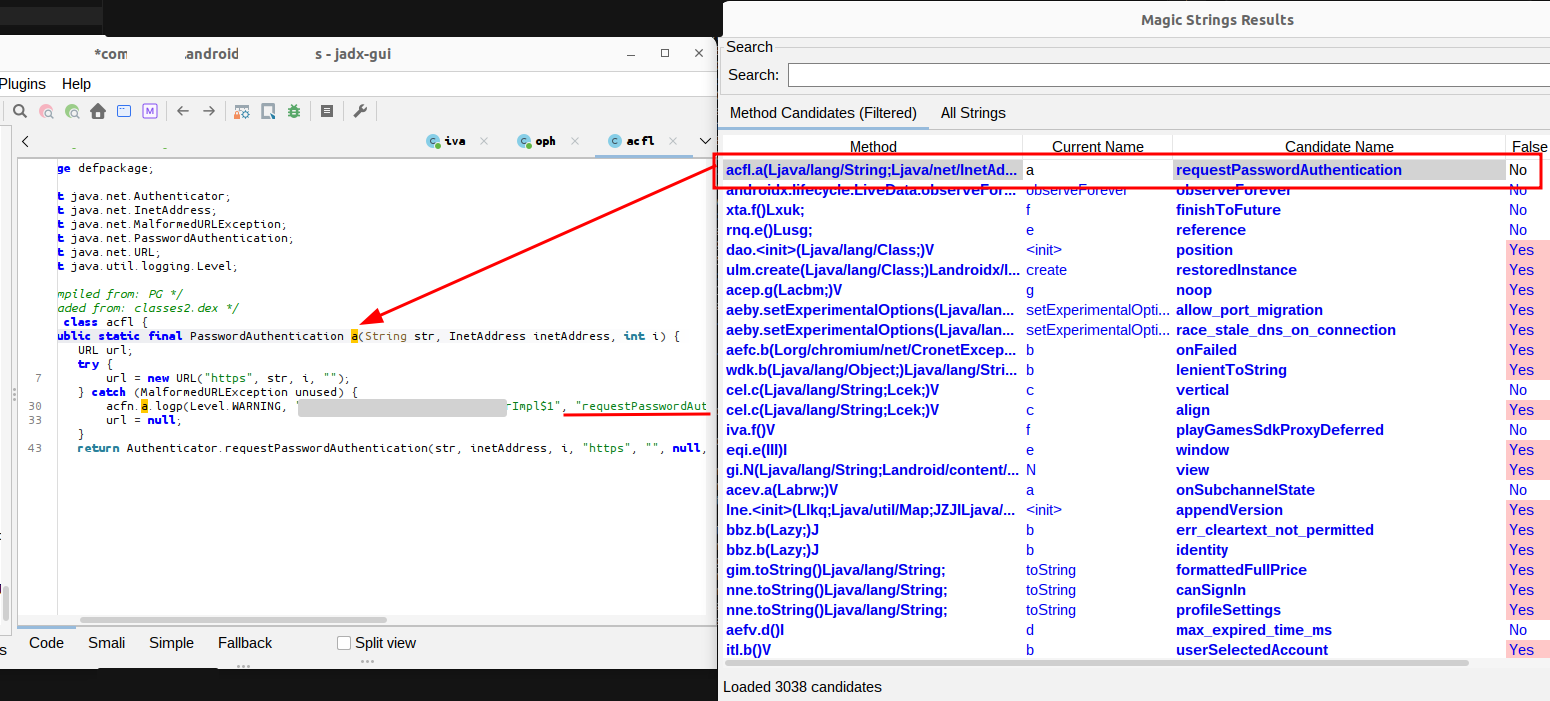
- A dialog window will open with multiple tabs:
- Source Files: Tree view showing detected source file paths and their references
- Top Candidates + Source Files: Combined view of highest-scoring method candidates grouped by source file
- Method Candidates (Filtered): Table showing filtered method name candidates
- All Strings: Table showing all extracted string constants
In JADX CLI
The plugin runs automatically during decompilation, but there's no CLI interface to view the results. Use the GUI to see the extracted information.
How It Works
- After decompilation, the plugin scans all methods in all classes
- Extracts string constants from instruction nodes (CONST_STR instructions)
- Analyzes strings using regex patterns:
- Source files: Matches file paths ending in
.java,.kt, etc. - Method names: Matches camelCase patterns that look like method names
- Source files: Matches file paths ending in
- Stores results in a data structure accessible via the GUI
Example Use Cases
- Reverse Engineering: Find original source file names that might reveal project structure
- Deobfuscation: Identify method names from debug strings or error messages
- Code Analysis: Understand relationships between strings and methods
- Malware Analysis: Extract interesting strings that might indicate functionality
Limitations
- The plugin only works after decompilation is complete
- String extraction depends on the code being decompiled (some obfuscated code may not have accessible strings)
- Method name detection uses heuristics and may produce false positives
- Source file detection relies on strings containing file paths (not always present)
Troubleshooting
Plugin doesn't appear in menu:
- Make sure the plugin is installed correctly
- Check that the plugin JAR is in the plugins directory
- Verify the service file exists:
META-INF/services/jadx.api.plugins.JadxPlugin - Ensure you're using a compatible JADX version (1.5.2+)
No results shown:
- The code might not contain relevant strings
- Try decompiling a different APK/DEX file
- Some obfuscated code may not have extractable strings
Build errors:
- Make sure you're using Java 11 or higher
- Run
./gradlew clean buildto rebuild everything - Check that the JADX version in
build.gradle.ktsmatches an available version on Maven Central
Author
Created and maintained by 0rshemesh.
- GitHub: @0rshemesh
- Repository: jadx-magic-strings
- Email: [email protected]
License
This plugin is licensed under the Apache License 2.0. See the LICENSE file for details.