 zblurx/impersonate-rs
Rusty Impersonate

💡 IRS ist eine Bibliotheksversion von https://github.com/zblurx/impersonate-rs, zblurx
Neuimplementierung von Defte Impersonate in reinem Rust. Weitere Informationen dazu findest du in diesem Blogbeitrag.
Der Token-Impersonation-Ansatz ist ein wenig anders als bei Defte Impersonate: Hier musst du eine PID auswählen, deren Primärtoken du impersonieren möchtest. Danach führt irs.exe Folgendes aus:
CreateProcessWithTokenW ausführen und das Ergebnis in die Named Pipe schreibenMit diesem Ansatz kannst du jeden Benutzer auf dem Zielcomputer impersonieren, solange du über Administratorrechte verfügst (kein NT SYSTEM erforderlich). Er ist sowohl mit als auch ohne GUI nutzbar.
# Build it from docker
git clone https://github.com/zblurx/impersonate-rs
cd impersonate-rs
make release

# Or from cargo in your host
make windows

# or
# 32 bits
RUSTFLAGS="--remap-path-prefix $$HOME=~" cargo build --release --target i686-pc-windows-gnu
# 64 bits
RUSTFLAGS="--remap-path-prefix $$HOME=~" cargo build --release --target x86_64-pc-windows-gnu

# Build documentation
cargo doc --open --no-deps

# More information
make help
Wie eine statische Binärdatei:
PS C:\Users\maldev\Desktop> .irs.exe --help
IRS (Impersonate-RS) It's a windows token impersonation tool written in Rust. zblurx <https://twitter.com/_zblurx>

Usage: irs.exe <COMMAND>

Commands:
  list   List all process PID available to impersonate Tokens
  exec   Execute command line from impersonate PID and get output
  spawn  Spawn new process from impersonate PID
  help   Print this message or the help of the given subcommand(s)

Options:
  -h, --help  Print help
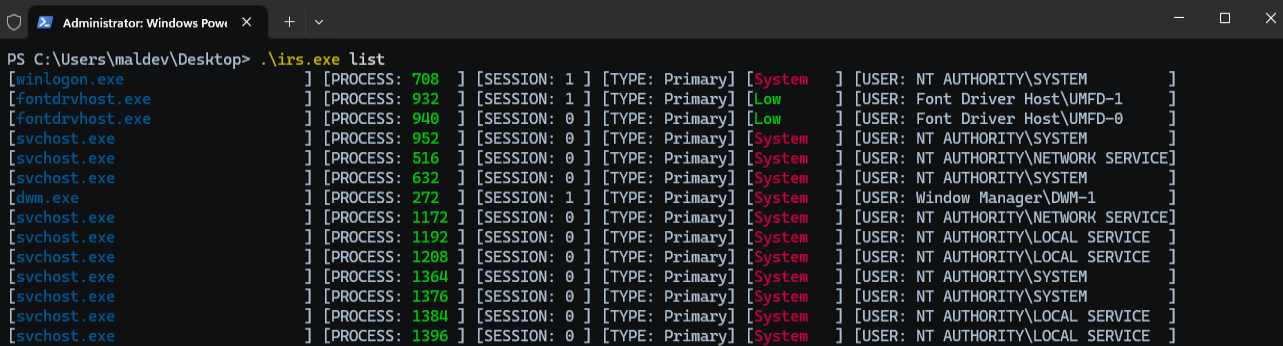
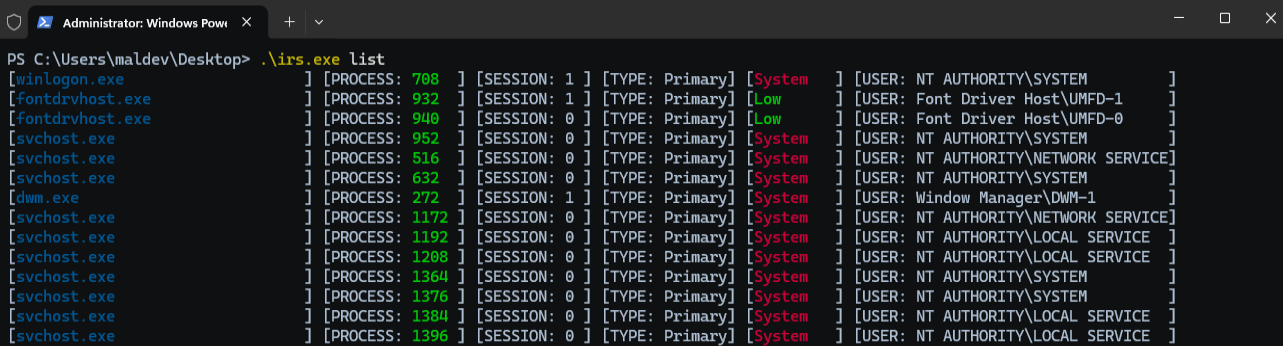
listDer Befehl list listet Prozesse mit ihrer Sitzungs-ID, dem Tokentyp und dem zugehörigen Benutzer auf.
[winlogon.exe                    ] [PROCESS: 624  ] [SESSION: 1 ] [TYPE: Primary] [System] [USER: AUTORITE NT\Système         ]
[lsass.exe                       ] [PROCESS: 672  ] [SESSION: 0 ] [TYPE: Primary] [System] [USER: AUTORITE NT\Système         ]
[svchost.exe                     ] [PROCESS: 780  ] [SESSION: 0 ] [TYPE: Primary] [System] [USER: AUTORITE NT\Système         ]
[fontdrvhost.exe                 ] [PROCESS: 788  ] [SESSION: 0 ] [TYPE: Primary] [Low   ] [USER: Font Driver Host\UMFD-0     ]
[fontdrvhost.exe                 ] [PROCESS: 796  ] [SESSION: 1 ] [TYPE: Primary] [Low   ] [USER: Font Driver Host\UMFD-1     ]
[svchost.exe                     ] [PROCESS: 888  ] [SESSION: 0 ] [TYPE: Primary] [System] [USER: AUTORITE NT\SERVICE RÉSEAU  ]
[svchost.exe                     ] [PROCESS: 948  ] [SESSION: 0 ] [TYPE: Primary] [System] [USER: AUTORITE NT\Système         ]
[dwm.exe                         ] [PROCESS: 412  ] [SESSION: 1 ] [TYPE: Primary] [System] [USER: Window Manager\DWM-1        ]
[svchost.exe                     ] [PROCESS: 460  ] [SESSION: 0 ] [TYPE: Primary] [System] [USER: AUTORITE NT\Système         ]
[svchost.exe                     ] [PROCESS: 696  ] [SESSION: 0 ] [TYPE: Primary] [System] [USER: AUTORITE NT\SERVICE LOCAL   ]
[REDACTED]
[svchost.exe                     ] [PROCESS: 836  ] [SESSION: 0 ] [TYPE: Primary] [System] [USER: AUTORITE NT\SERVICE LOCAL   ]
[svchost.exe                     ] [PROCESS: 908  ] [SESSION: 0 ] [TYPE: Primary] [System] [USER: AUTORITE NT\SERVICE LOCAL   ]
[svchost.exe                     ] [PROCESS: 1060 ] [SESSION: 0 ] [TYPE: Primary] [System] [USER: AUTORITE NT\SERVICE LOCAL   ]
[svchost.exe                     ] [PROCESS: 1088 ] [SESSION: 0 ] [TYPE: Primary] [System] [USER: AUTORITE NT\SERVICE LOCAL   ]
[svchost.exe                     ] [PROCESS: 1124 ] [SESSION: 0 ] [TYPE: Primary] [System] [USER: AUTORITE NT\Système         ]
[svchost.exe                     ] [PROCESS: 1176 ] [SESSION: 0 ] [TYPE: Primary] [System] [USER: AUTORITE NT\Système         ]
execDer Befehl exec öffnet die im Argument pid angegebene Zielprozess-ID, dupliziert deren Token und führt einen Befehl mit dem neuen Token aus.
X:\>whoami
adcs1\administrator

PS C:\Users\maldev\Desktop> .\irs.exe exec --pid 708 --command whoami
[2025-10-13T20:59:42Z INFO  irs::impersonate::exec] Impersonate user NT AUTHORITY\SYSTEM
nt authority\system

PS C:\Users\maldev\Desktop> .\irs.exe exec --pid 708 --command "whoami /all"
[2025-10-13T20:59:42Z INFO  irs::impersonate::exec] Impersonate user NT AUTHORITY\SYSTEM

USER INFORMATION
----------------

User Name           SID
=================== ========
nt authority\system S-1-5-18


GROUP INFORMATION
-----------------

Group Name                             Type             SID          Attributes
====================================== ================ ============ ==================================================
BUILTIN\Administrators                 Alias            S-1-5-32-544 Enabled by default, Enabled group, Group owner
Everyone                               Well-known group S-1-1-0      Mandatory group, Enabled by default, Enabled group
NT AUTHORITY\Authenticated Users       Well-known group S-1-5-11     Mandatory group, Enabled by default, Enabled group
Mandatory Label\System Mandatory Level Label            S-1-16-16384


PRIVILEGES INFORMATION
----------------------
