
Aggregiert CVE-Details, Exploit-Datenbanken und EPSS-Scores mit KI-Risikobewertung und Import von Schwachstellenscannern für priorisiertes Patchen.
SploitScan ist ein leistungsstarkes und benutzerfreundliches Tool, das entwickelt wurde, um den Prozess der Identifizierung von Exploits für bekannte Schwachstellen und deren jeweilige Ausnutzungswahrscheinlichkeit zu optimieren. Es befähigt Cybersicherheitsexperten, schnell bekannte und getestete Exploits zu identifizieren und anzuwenden. Besonders wertvoll ist es für Fachleute, die ihre Sicherheitsmaßnahmen verbessern oder robuste Erkennungsstrategien gegen neu auftretende Bedrohungen entwickeln möchten.
CVE-Informationen abrufen
Ruft detaillierte Informationen über Schwachstellen ab.
EPSS-Integration
Überprüft die Wahrscheinlichkeit einer Ausnutzung mit Daten aus dem Exploit Prediction Scoring System.
Sammeln öffentlicher Exploits
Sammelt öffentlich verfügbare Exploit-Daten, um den Kontext jeder Schwachstelle zu verstehen.
CISA-KEV-Integration
Zeigt schnell an, ob eine Schwachstelle im Katalog der bekannten ausgenutzten Schwachstellen von CISA aufgeführt ist.
KI-gestützte Risikobewertung
Erhält Risikobewertungen von mehreren KI-Anbietern (OpenAI ChatGPT, Google Gemini, Grok AI oder DeepSeek), die potenzielle Risiken erläutern und Abhilfemaßnahmen vorschlagen.
HackerOne-Berichte
Findet heraus, ob eine Schwachstelle Gegenstand von HackerOne-Bug-Bounty-Berichten war, einschließlich grundlegender Einstufung und Schweregraddetails.
Patch-Prioritätssystem
Erhält eine einfache Prioritätseinstufung für das Patchen basierend auf CVSS, EPSS und verfügbaren Exploit-Informationen.
Multi-CVE-Unterstützung und Exportoptionen
Arbeiten mit mehreren CVEs gleichzeitig und Export der Ergebnisse in HTML, JSON oder CSV.
Import von Schwachstellenscannern
Importiert Scanergebnisse von gängigen Schwachstellenscannern (Nessus, Nexpose, OpenVAS, Docker), um direkt nach bekannten Exploits zu suchen. Unterstützt jetzt auch verzeichnisbasierten Import mit --input-dir für die Stapelverarbeitung mehrerer Berichte.
Fein granulare Methodenauswahl
Wählen Sie aus, welche spezifischen Datenabrufmethoden ausgeführt werden sollen (z. B. CISA, EPSS, HackerOne, KI usw.), damit Sie nur die benötigten Informationen erhalten.
Lokale CVE-Datenbank aktualisieren und klonen
Pflegen Sie eine lokale Kopie des CVE-List-V5-Repositorys. So können Sie die vollständigen CVE-Daten auf Ihrem Rechner für den Offline-Gebrauch aktualisieren und durchsuchen.
Stichwortbasierte CVE-Suche über Quellen hinweg
Suchen Sie mit Stichwörtern (z. B. „Apple“) sowohl in Ihrer lokalen Datenbank als auch in entfernten Quellen wie CISA und Nuclei-Templates nach CVEs.

git clone https://github.com/xaitax/SploitScan.git cd sploitscan pip install -r requirements.txt
### pip```shell
pip install --user sploitscan
apt install sploitscan
### API-Schlüssel erhalten
- **VulnCheck**: Registrieren Sie sich kostenlos bei [VulnCheck](https://vulncheck.com/), um Ihren API-Schlüssel zu erhalten.
- **OpenAI**: Erstellen Sie ein Konto und erhalten Sie einen API-Schlüssel bei [OpenAI](https://platform.openai.com/signup/).
- **Google Gemini**: Erstellen Sie ein Konto und erhalten Sie einen API-Schlüssel bei [Google AI Studio](https://aistudio.google.com/app/apikey).
- **xAI Grok**: Erstellen Sie ein Konto und erhalten Sie einen API-Schlüssel bei [xAI](https://x.ai/api).
- **DeepSeek**: Erstellen Sie ein Konto und erhalten Sie einen API-Schlüssel bei [DeepSeek](https://platform.deepseek.com/api_keys).
### Konfigurationsdatei
SploitScan sucht standardmäßig an mehreren Orten nach einer `config.json`. Es lädt die erste gültige Datei, die es findet, in dieser Reihenfolge:
1. **Benutzerdefinierter Pfad, übergeben mit `--config` oder `-c`**
2. **Umgebungsvariable**: `SPLOITSCAN_CONFIG_PATH`
3. **Lokale und standardmäßige Konfigurationsdatei-Orte**:
- Aktuelles Arbeitsverzeichnis
- `~/.sploitscan/config.json`
- `~/.config/sploitscan/config.json`
- `~/Library/Application Support/sploitscan/config.json` (macOS)
- `%APPDATA%/sploitscan/config.json` (Windows)
- `/etc/sploitscan/config.json`
> **Hinweis**: Es wird nur eine Datei geladen – die erste, die in der obigen Reihenfolge gefunden wird. Sie können Ihre `config.json` in einem dieser Pfade ablegen.
Eine typische `config.json` könnte so aussehen:```json
{
"vulncheck_api_key": "",
"openai_api_key": "",
"google_ai_api_key": "",
"grok_api_key": "",
"deepseek_api_key": ""
}
$ python .\sploitscan.py -h
███████╗██████╗ ██╗ ██████╗ ██╗████████╗███████╗ ██████╗ █████╗ ███╗ ██╗ ██╔════╝██╔══██╗██║ ██╔═══██╗██║╚══██╔══╝██╔════╝██╔════╝██╔══██╗████╗ ██║ ███████╗██████╔╝██║ ██║ ██║██║ ██║ ███████╗██║ ███████║██╔██╗ ██║ ╚════██║██╔═══╝ ██║ ██║ ██║██║ ██║ ╚════██║██║ ██╔══██║██║╚██╗██║ ███████║██║ ███████╗╚██████╔╝██║ ██║ ███████║╚██████╗██║ ██║██║ ╚████║ ╚══════╝╚═╝ ╚══════╝ ╚═════╝ ╚═╝ ╚═╝ ╚══════╝ ╚═════╝╚═╝ ╚═╝╚═╝ ╚═══╝ v0.14.0 / Alexander Hagenah / @xaitax / [email protected]
usage: sploitscan.py [-h] [-e {json,csv,html}] [-t {nessus,nexpose,openvas,docker}] [--ai {openai,google,grok,deepseek}] [-k KEYWORDS [KEYWORDS ...]] [-local] [-f] [-m METHODS] [-i IMPORT_FILE] [-c CONFIG] [-d] [cve_ids ...]
SploitScan: Retrieve and display vulnerability and exploit data for specified CVE ID(s).
positional arguments: cve_ids Enter one or more CVE IDs (e.g., CVE-YYYY-NNNNN). This is optional if an import file is provided via -i.
options: -h, --help show this help message and exit -e {json,csv,html}, --export {json,csv,html} Export the results in the specified format ('json', 'csv', or 'html'). -t {nessus,nexpose,openvas,docker}, --type {nessus,nexpose,openvas,docker} Specify the type of the import file ('nessus', 'nexpose', 'openvas', or 'docker'). --ai {openai,google,grok,deepseek} Select the AI provider for risk assessment (e.g., 'openai', 'google', 'grok', or 'deepseek'). -k KEYWORDS [KEYWORDS ...], --keywords KEYWORDS [KEYWORDS ...] Search for CVEs related to specific keywords (e.g., product name). -local, --local-database Download the cvelistV5 repository into the local directory. Use the local database over online research if available. -f, --fast-mode Enable fast mode: only display basic CVE information without fetching additional exploits or data. -m METHODS, --methods METHODS Specify which methods to run, separated by commas (e.g., 'cisa,epss,hackerone,ai,prio,references'). -i IMPORT_FILE, --import-file IMPORT_FILE Path to an import file. When provided, positional CVE IDs can be omitted. The file should be a plain text list with one CVE per line. --input-dir INPUT_DIR Path to a directory containing vulnerability reports to scan for CVE IDs. -c CONFIG, --config CONFIG Path to a custom configuration file. -d, --debug Enable debug output.
### Einzelne CVE-Abfrage```bash
sploitscan CVE-2024-1709
sploitscan CVE-2024-1709 CVE-2024-21413
### Lokales CVE-Datenbank-Update
Sie können jetzt das vollständige CVE-List-V5-Repository lokal aktualisieren (oder initial klonen), indem Sie die Option `--local` verwenden. Beachten Sie, dass dieses Repository mehrere GB groß ist, sodass der Download einige Zeit in Anspruch nehmen kann. Zum Beispiel:```bash
sploitscan -local
███████╗██████╗ ██╗ ██████╗ ██╗████████╗███████╗ ██████╗ █████╗ ███╗ ██╗
██╔════╝██╔══██╗██║ ██╔═══██╗██║╚══██╔══╝██╔════╝██╔════╝██╔══██╗████╗ ██║
███████╗██████╔╝██║ ██║ ██║██║ ██║ ███████╗██║ ███████║██╔██╗ ██║
╚════██║██╔═══╝ ██║ ██║ ██║██║ ██║ ╚════██║██║ ██╔══██║██║╚██╗██║
███████║██║ ███████╗╚██████╔╝██║ ██║ ███████║╚██████╗██║ ██║██║ ╚████║
╚══════╝╚═╝ ╚══════╝ ╚═════╝ ╚═╝ ╚═╝ ╚══════╝ ╚═════╝╚═╝ ╚═╝╚═╝ ╚═══╝
v0.14.0 / Alexander Hagenah / @xaitax / [email protected]
📥 Cloning CVE List V5 into 'C:\Users\ah/.sploitscan\cvelistV5'.
⚠️ Warning: The repository is several GB in size and the download may take a while.
🔄 Progress: 100.00% - 940.62 MiB | 4.97 MiB/s
✅ CVE List V5 cloned successfully.
Suche nach CVEs mithilfe von Schlüsselwörtern (z. B. „Apple“) in der lokalen Datenbank, CISA und Nuclei Templates.
[!TIP] Dies kann mehr oder weniger searchsploit ersetzen, da ExploitDB nicht mehr regelmäßig aktualisiert wird.```bash sploitscan -k "Outlook Express"
███████╗██████╗ ██╗ ██████╗ ██╗████████╗███████╗ ██████╗ █████╗ ███╗ ██╗ ██╔════╝██╔══██╗██║ ██╔═══██╗██║╚══██╔══╝██╔════╝██╔════╝██╔══██╗████╗ ██║ ███████╗██████╔╝██║ ██║ ██║██║ ██║ ███████╗██║ ███████║██╔██╗ ██║ ╚════██║██╔═══╝ ██║ ██║ ██║██║ ██║ ╚════██║██║ ██╔══██║██║╚██╗██║ ███████║██║ ███████╗╚██████╔╝██║ ██║ ███████║╚██████╗██║ ██║██║ ╚████║ ╚══════╝╚═╝ ╚══════╝ ╚═════╝ ╚═╝ ╚═╝ ╚══════╝ ╚═════╝╚═╝ ╚═╝╚═╝ ╚═══╝ v0.14.0 / Alexander Hagenah / @xaitax / [email protected]
┌───[ 🕵️ Searching local database for keywords: outlook express ] Processing CVE files: 100%|████████████████████████████████████████████████████████████████████████████████████████████████████████████████████████████████████| 282372/282372 [04:38<00:00, 1013.92it/s]
╔═══════════════════════════════════════════╗ ║ Found 48 CVE(s) matching: Outlook Express ║ ╚═══════════════════════════════════════════╝
CVE-1999-0967, CVE-1999-1016, CVE-1999-1033, CVE-2000-0036, CVE-2000-0105, CVE-2000-0415, CVE-2000-0524, CVE-2000-0567, CVE-2000-0621, CVE-2000-0653, CVE-2001-0145, CVE-2001-0149, CVE-2001-0945, CVE-2001-0999, CVE-2001-1088, CVE-2001-1325, CVE-2001-1547, CVE-2002-0152, CVE-2002-0285, CVE-2002-0637, CVE-2002-0862, CVE-2002-1121, CVE-2002-1179, CVE-2002-2164, CVE-2002-2202, CVE-2003-0301, CVE-2003-1105, CVE-2003-1378, CVE-2004-0215, CVE-2004-0380, CVE-2004-0526, CVE-2004-2137, CVE-2004-2694, CVE-2005-1213, CVE-2005-2226, CVE-2005-4840, CVE-2006-0014, CVE-2006-2111, CVE-2006-2386, CVE-2006-2766, CVE-2007-2225, CVE-2007-2227, CVE-2007-3897, CVE-2007-4040, CVE-2008-1448, CVE-2008-5424, CVE-2010-0816, CVE-2024-1187
╔═══════════════════════╗ ║ CVE ID: CVE-2001-1547 ║ ╚═══════════════════════╝
┌───[ 🔍 Vulnerability information ] | ├ Published: 2005-07-14 ├ Base Score: N/A (N/A) ├ Vector: N/A └ Description: Outlook Express 6.0, with "Do not allow attachments to be saved or opened that could potentially be a virus" enabled, does not block email attachments from forwarded messages, which could allow remote attackers to execute arbitrary code. [...]
### Fast Mode
Aktivieren Sie den Fast Mode, um nur grundlegende CVE-Informationen anzuzeigen (zusätzliche Lookups überspringen).```bash
sploitscan CVE-2024-1709 --fast-mode
Geben Sie den Typ an: 'nessus', 'nexpose', 'openvas' oder 'docker' und geben Sie den Dateipfad an.```bash sploitscan --import-file path/to/yourfile.nessus --type nessus
### Import aus Verzeichnis
Durchsuchen Sie ein gesamtes Verzeichnis rekursiv nach Schwachstellenberichten und extrahieren Sie CVE-IDs aus allen Dateien.```bash
sploitscan --input-dir path/to/reports/directory
Um nur bestimmte Datenabrufmethoden (z. B. CISA, EPSS, KI-Risikobewertung) auszuführen, verwenden Sie das Argument -m:```bash
sploitscan CVE-2024-1709 -m cisa,epss
### Ergebnisse exportieren
Geben Sie das Exportformat an: 'json', 'csv', oder 'html'.```bash
sploitscan CVE-2024-1709 -e html
Stellen Sie sicher, dass Docker installiert ist. Installationsanweisungen finden Sie im offiziellen Docker-Installationsleitfaden.
So bauen und führen Sie SploitScan in Docker aus:```shell docker build -t sploitscan . docker run --rm sploitscan CVE-2024-1709
Mit einem aus dem aktuellen Verzeichnis bereitgestellten Volume
#### Windows (Powershell)```shell
docker run -v ${PWD}:/app --rm sploitscan CVE-2024-1709 -e JSON
docker run -v $(pwd):/app --rm sploitscan CVE-2024-1709 -e JSON
## 🤖 KI-gestützte Risikobewertung
Wählen Sie einen KI-Anbieter für die Risikobewertung (OpenAI ChatGPT, Google Gemini, Grok AI und DeepSeek).
SploitScan integriert OpenAI, um eine umfassende KI-gestützte Risikobewertung für jede CVE bereitzustellen. Diese Funktion umfasst:
- Detaillierte Risikobewertung: Verstehen Sie die Art der Schwachstelle und ihre geschäftlichen Auswirkungen.
- Potenzielle Angriffsszenarien: Erhalten Sie Beschreibungen potenzieller Angriffsszenarien, die die Schwachstelle ausnutzen.
- Abhilfeempfehlungen: Erhalten Sie spezifische, umsetzbare Empfehlungen zur Risikominderung.
- Management-Zusammenfassung: Eine prägnante Zusammenfassung, die für nicht-technische Stakeholder zugänglich ist und die geschäftlichen Auswirkungen sowie die Dringlichkeit hervorhebt.
### Beispielausgabe```text
$ sploitscan.py --ai openai CVE-2024-21413
[...]
┌───[ 🤖 AI-Powered Risk Assessment ]
|
| 1. Risk Assessment
| -------------------
| The vulnerability identified by CVE-2024-21413 is a critical remote code execution flaw in
| Microsoft Outlook with a CVSS score of 9.8. The impact on business operations can be severe due to
| its high potential to be exploited over a network without any user interactions or elevated
| privileges. This unvalidated input vulnerability (CWE-20) could allow an attacker to execute
| arbitrary code on the target system, thereby compromising the confidentiality, integrity, and
| availability of critical business data and systems. Given its critical rating and the existence of
| multiple exploits on public repositories like GitHub, the likelihood of exploitation is very high.
| This necessitates immediate attention from the security teams to mitigate the risks associated.
|
| 2. Potential Attack Scenarios
| ------------------------------
| An attacker could exploit this vulnerability by sending a specially crafted email to a victim
| using Microsoft Outlook. Once the email is opened or previewed, the malicious payload would
| execute, allowing the attacker to gain control over the victim's system. The process involves: 1.
| Crafting a malicious email leveraging the specific flaw in email handling within Microsoft
| Outlook. 2. Sending the email to the intended victim. 3. Upon opening or previewing the email, the
| victim’s system executes the malicious code. The potential outcomes of this attack include theft
| of sensitive information, installation of malware or ransomware, and compromising other systems
| within the same network due to lateral movement capabilities.
|
| 3. Mitigation Recommendations
| ------------------------------
| Immediate mitigation recommendation includes: 1. Applying the latest security patches provided by
| Microsoft. Reference: https://msrc.microsoft.com/update-guide/vulnerability/CVE-2024-21413 2.
| Implementing network-level protections such as email filtering and network segmentation to limit
| the spread of potential infections. 3. Conducting regular security awareness training for users to
| recognize phishing and malicious emails. 4. Monitoring network and system activity for signs of
| suspicious behavior and unauthorized execution. 5. Regularly backing up critical data and ensuring
| the integrity of backups.
|
| 4. Executive Summary
| ---------------------
| CVE-2024-21413, a critical remote code execution vulnerability in Microsoft Outlook, poses a
| significant risk to businesses due to its potential to be exploited without user interaction.
| Multiple exploit proofs are publicly available, increasing the likelihood of attacks.
| Organizations must act swiftly by applying the necessary patches from Microsoft, enhancing their
| email security protocols, and educating their staff to identify potential phishing attempts.
| Mitigating this vulnerability is essential to protect sensitive information, maintain business
| integrity, and ensure system availability, thus preventing potential financial and reputational
| damage. Immediate action is crucial to safeguard the organization against this severe threat.
|
└────────────────────────────────────────
Das System zur Priorisierung von Patches in SploitScan bietet einen strategischen Ansatz zur Priorisierung von Sicherheitspatches basierend auf dem Schweregrad und der Ausnutzbarkeit von Schwachstellen. Es ist vom Modell des CVE Prioritizer beeinflusst, mit Erweiterungen für die Handhabung öffentlich verfügbarer Exploits. Dieses System unterstützt Benutzer dabei, fundierte Entscheidungen zu treffen, welche Schwachstellen zuerst gepatcht werden sollten, unter Berücksichtigung sowohl ihrer potenziellen Auswirkungen als auch der Wahrscheinlichkeit einer Ausnutzung. Schwellenwerte können an Ihre Geschäftsanforderungen angepasst werden. So funktioniert es:
Wenn ein öffentlicher Exploit für eine Schwachstelle bekannt ist, die nicht bereits als A+ bewertet ist, wird ihre Priorität um zwei Stufen erhöht. Zum Beispiel:
Dies stellt sicher, dass Schwachstellen mit bekanntem Ausnutzungspotential mit angemessener Dringlichkeit behandelt werden.
Beiträge sind willkommen! Ob es darum geht, Fehler zu beheben, neue Funktionen hinzuzufügen oder die Dokumentation zu verbessern, Sie können das Repository forken und einen Pull-Request einreichen. Sie können auch Probleme melden oder Verbesserungen über den GitHub-Issue-Tracker vorschlagen.
Besonderer Dank geht an:
Eine detaillierte Liste der Updates, Fehlerbehebungen und neuen Funktionen finden Sie im Changelog.
Schnellmodus für optimierte Ausgabe
Verwenden Sie den Schnellmodus, um nur die grundlegenden CVE-Informationen anzuzeigen und zusätzliche Abfragen für schnellere Ergebnisse zu überspringen.
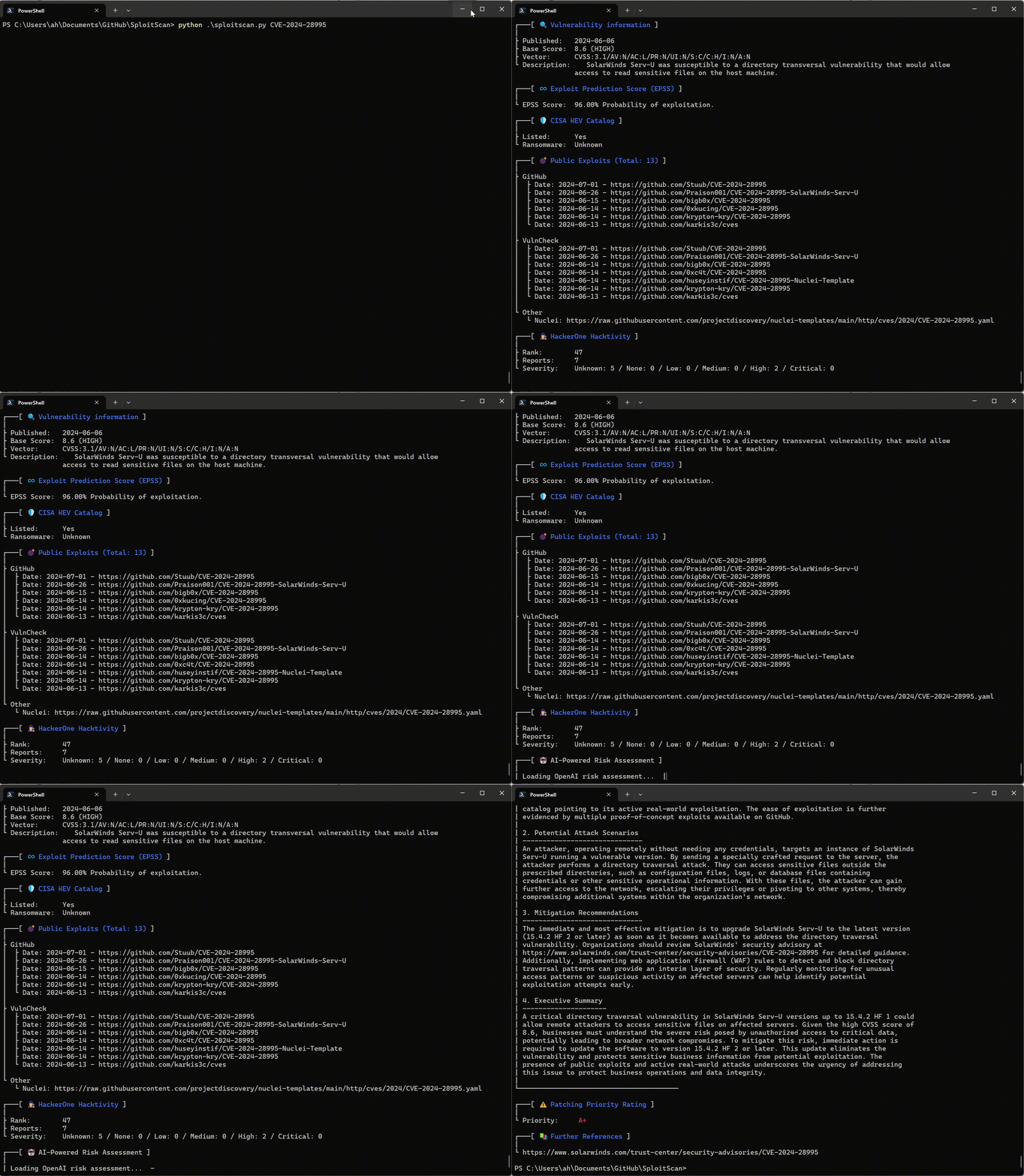
Benutzerfreundliche Oberfläche
Genießen Sie eine klare und übersichtliche Oberfläche, die alle Informationen in einem leicht lesbaren Format darstellt.