
Leitfaden zum Bau eines virtuellen iPhones unter Verwendung von VPHONE600AP-Komponenten aus Apples PCC-Firmware, mit Firmware-Patching, Bootchain-Modifikation und Kernel-Debugging für die iOS-Sicherheitsforschung.
Etwa Ende 2024 begann Apple, Private Cloud Compute einzuführen, und behauptete, einen neuen Horizont für cloudbasierte KI-Privatsphäre zu eröffnen. Dann, etwa Ende 2025, tauchten einige interessante Nachrichten auf: Apple hatte neu vphone600ap-bezogene Komponenten zur PCC-Firmware hinzugefügt, beginnend mit cloudOS 26.

Quelle: https://x.com/matteyeux/status/2006339694783848660/photo/1
"iPhone Research Environment Virtual Machine"?
Ist dies ein geplanter Schritt von Apple, eine virtuelle iPhone-Umgebung für andere Sicherheitsforscher zu erstellen und zu verteilen, oder war es einfach ein Fehler? Angesichts der Tatsache, dass der DEVELOPMENT/KASAN-Build-Kernel einmal in den iOS 15.0 Beta bis 15.1 Beta3 OTAs im Jahr 2021 entdeckt wurde, kann die Möglichkeit eines Ausrutschers nicht ausgeschlossen werden. Damals blieb der Kernel etwa 4 Monate lang enthalten, ungefähr von Juni bis Oktober 2021.
Dann wurde etwa im Januar dieses Jahres ein Tweet gepostet, der ein virtuelles iPhone zeigte, das unter Verwendung dieser vphone600ap-bezogenen Komponenten hochfährt.

Quelle: https://x.com/_inside/status/2008951845725548783
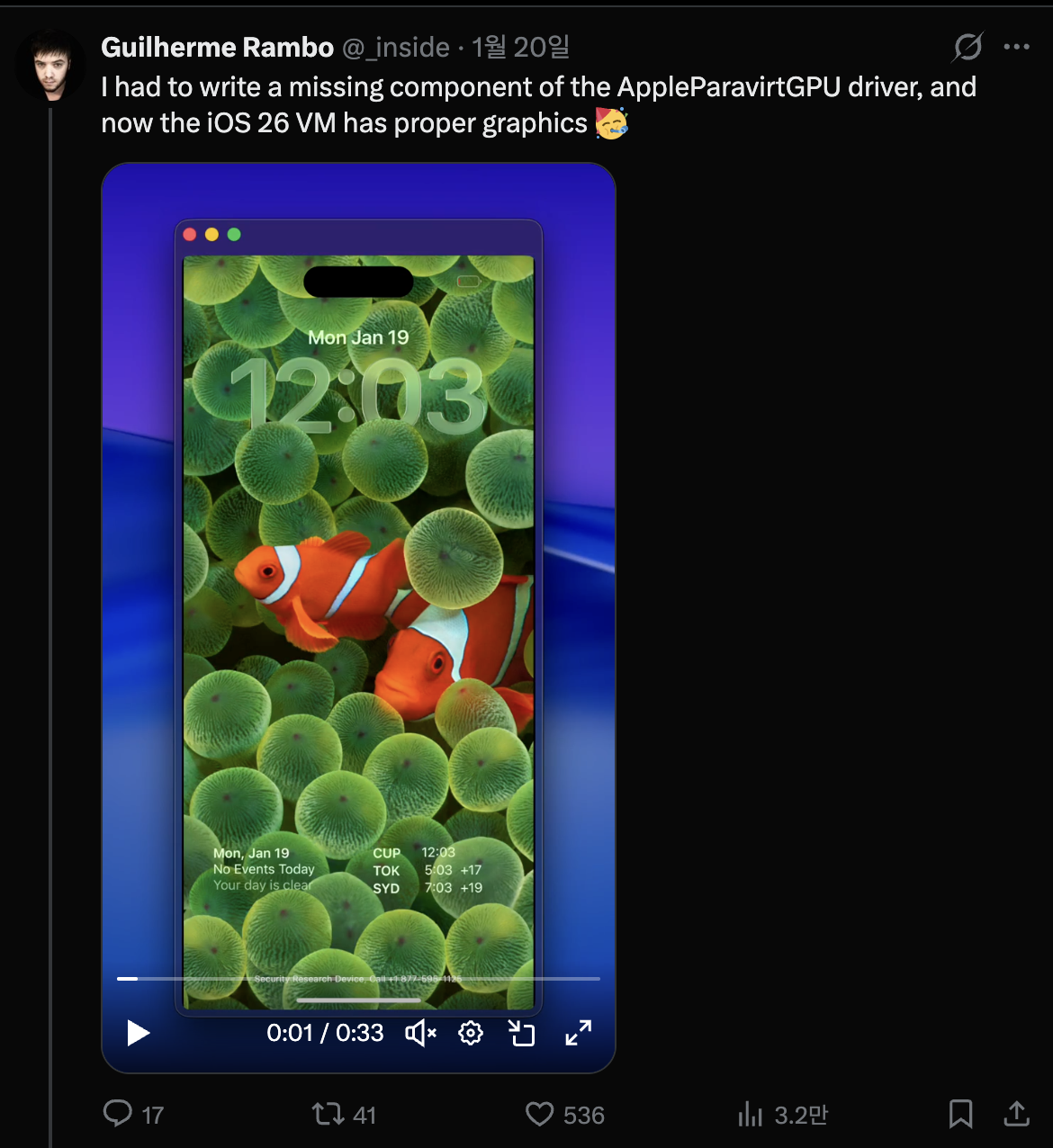
Nach dem, was ich sah, funktionierte fast alles wirklich elegant. Im Vergleich zu dem QEMUAppleSilicon(Inferno) project, das ich zuvor gesehen hatte, läuft es viel flotter und geschmeidiger. Darüber hinaus schien es sogar Metal-Beschleunigung zu unterstützen. Letztendlich, völlig davon gefesselt, tauchte ich ein und begann am 31. Januar mein eigenes virtuelles iPhone zu bauen.

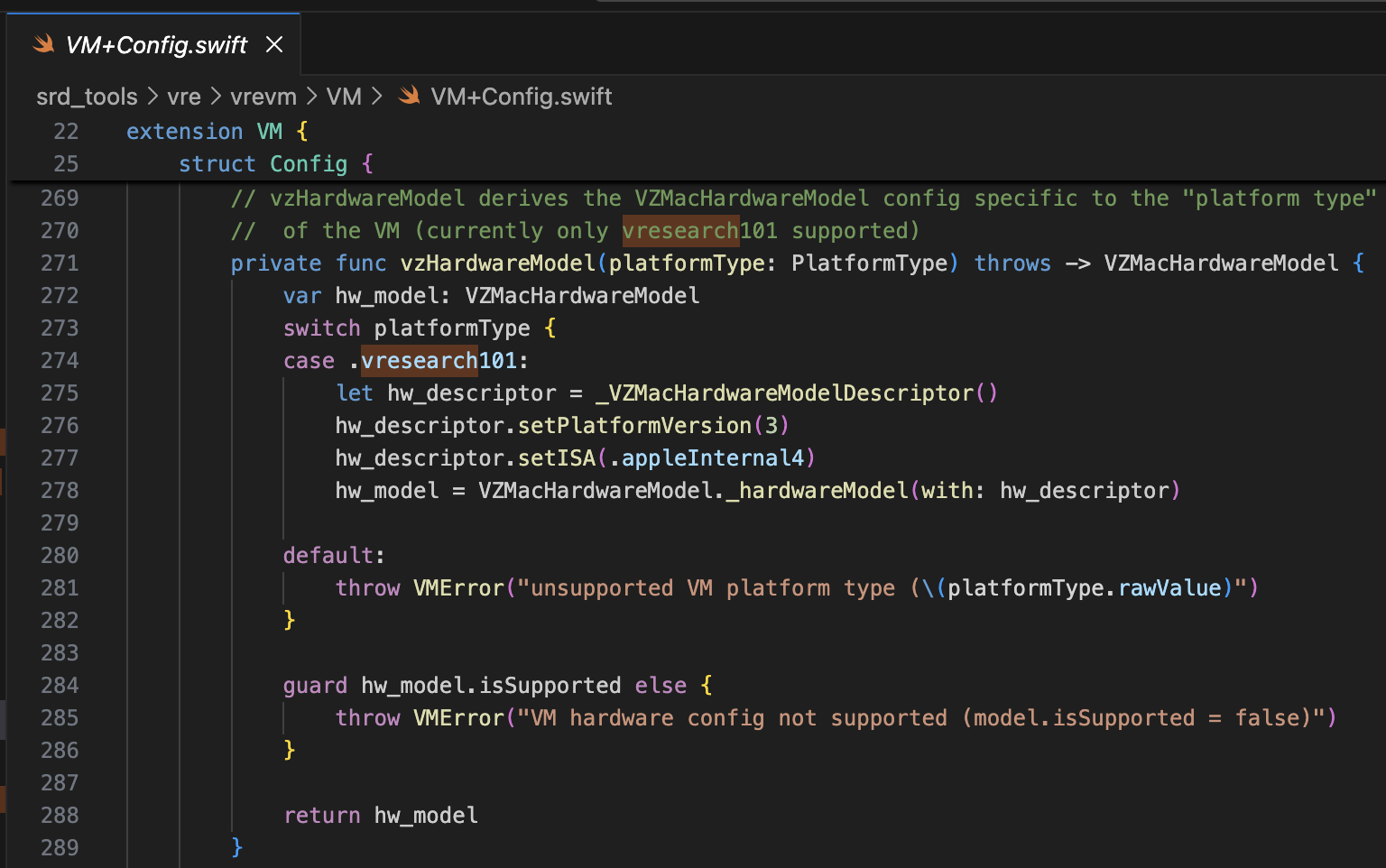
Das referenzierte Projekt ist security-pcc. Es entspricht dem Quellcode des Binärprogramms /System/Library/SecurityResearch/usr/bin/vrevm. Ein interessanter Punkt ist, dass es private Methoden verwendet, die von Virtualization.framework bereitgestellt werden. In der für die PCC-Forschung verwendeten virtuellen Maschine kann man sehen, dass die ISA und PlatformVersion während des Initialisierungsprozesses des Hardwaremodells explizit angegeben werden.
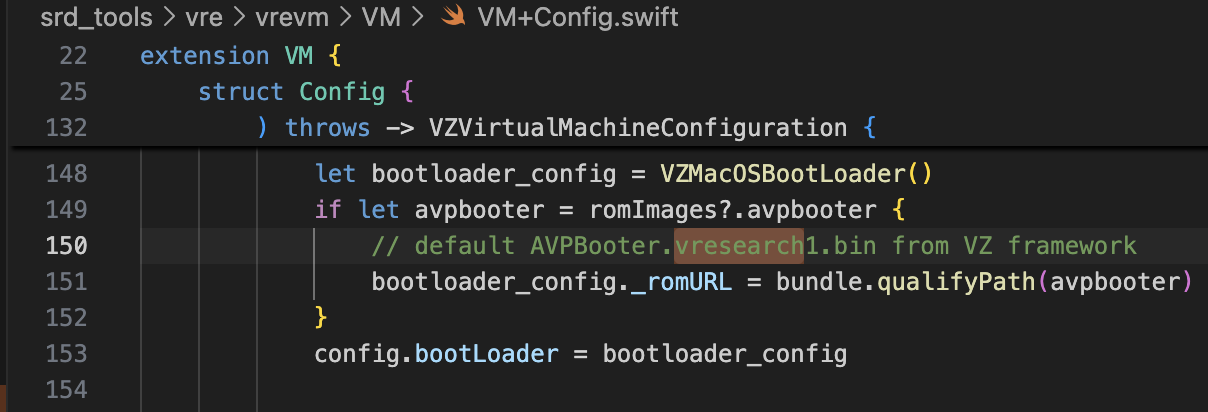
Für das Bootrom wird AVPBooter.vresearch1.bin verwendet (/System/Library/Frameworks/Virtualization.framework/Resources/AVPBooter.vresearch1.bin)
und für das SEPROM (avpsepbooter) wird AVPSEPBooter.vresearch1.bin verwendet, das separat eine SEPStorage-Datei lädt, die ähnlich wie AuxiliaryStorage funktioniert. (/System/Library/Frameworks/Virtualization.framework/Versions/A/Resources/AVPSEPBooter.vresearch1.bin)
Ein weiterer interessanter Punkt ist, dass, wenn man sich den Code zum Einstellen der Auflösung ansieht, diese auf 1290x2796 gesetzt ist, was den Geräten iPhone 14 Pro Max, 15 Plus, 15 Pro Max und 16 Plus entspricht.
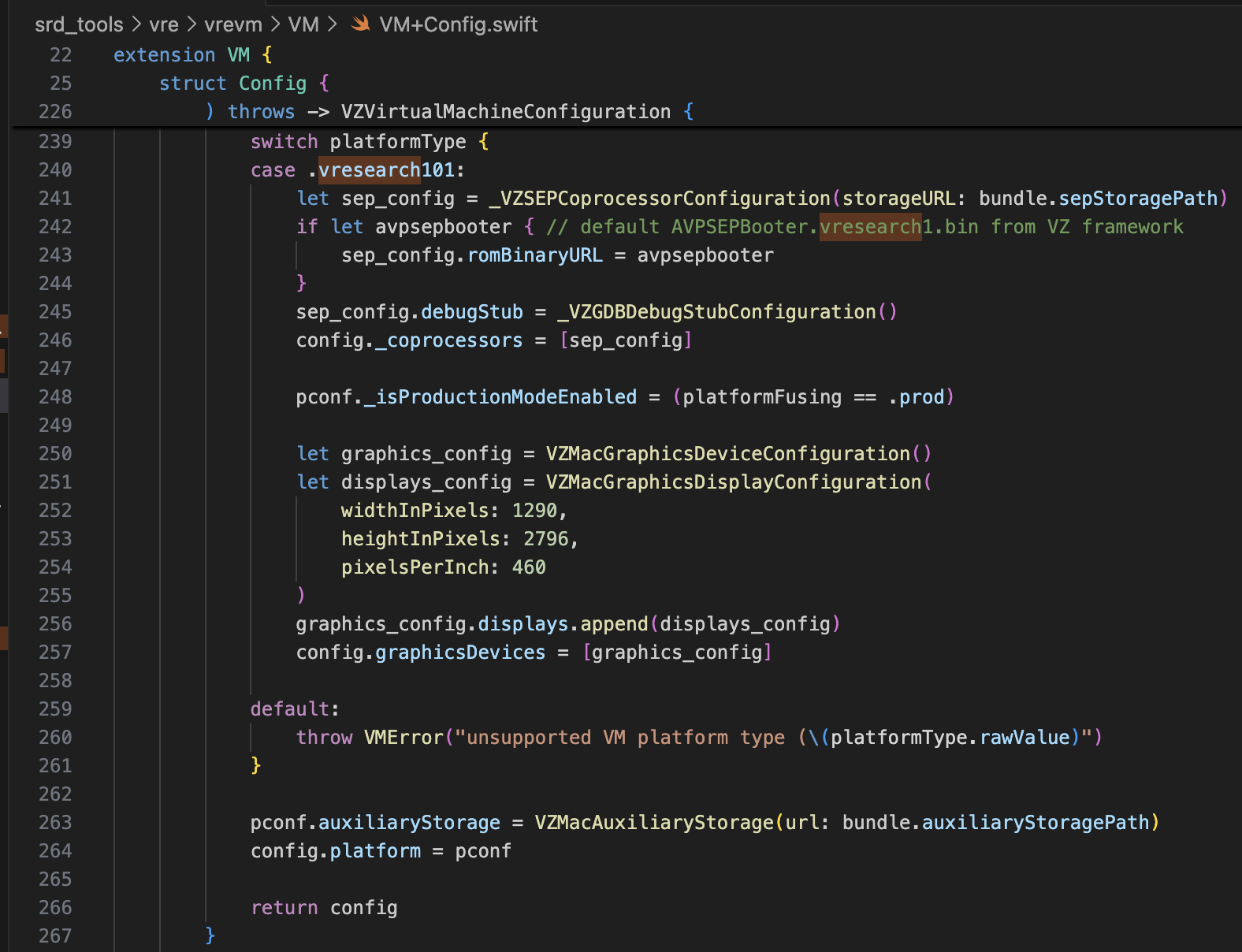
Mit diesen Informationen sollte es mehr als genug sein, um super-tart zu modifizieren, um das virtuelle iPhone zu booten. Ich habe die Änderungen wie unten gezeigt vorgenommen.
/Sources/tart/VM.swift```swift ... class VM: NSObject, VZVirtualMachineDelegate, ObservableObject { ... // vzHardwareModel derives the VZMacHardwareModel config specific to the "platform type" // of the VM (currently only vresearch101 supported) static private func vzHardwareModel_VRESEARCH101() throws -> VZMacHardwareModel { var hw_model: VZMacHardwareModel
guard let hw_descriptor = _VZMacHardwareModelDescriptor() else { fatalError("Failed to create hardware descriptor") } hw_descriptor.setPlatformVersion(3) // .appleInternal4 = 3 hw_descriptor.setBoardID(0x90) hw_descriptor.setISA(2) hw_model = VZMacHardwareModel._hardwareModel(withDescriptor: hw_descriptor)
guard hw_model.isSupported else { fatalError("VM hardware config not supported (model.isSupported = false)") }
return hw_model }
static func craftConfiguration( diskURL: URL, nvramURL: URL, romURL: URL, sepromURL: URL? = nil, vmConfig: VMConfig, network: Network = NetworkShared(), additionalStorageDevices: [VZStorageDeviceConfiguration], directorySharingDevices: [VZDirectorySharingDeviceConfiguration], serialPorts: [VZSerialPortConfiguration], suspendable: Bool = false, nested: Bool = false, audio: Bool = true, clipboard: Bool = true, sync: VZDiskImageSynchronizationMode = .full, caching: VZDiskImageCachingMode? = nil ) throws -> VZVirtualMachineConfiguration { let configuration: VZVirtualMachineConfiguration = .init()
// Boot loader let bootloader = try vmConfig.platform.bootLoader(nvramURL: nvramURL) Dynamic(bootloader)._setROMURL(romURL) configuration.bootLoader = bootloader
// SEP ROM let homeURL = FileManager.default.homeDirectoryForCurrentUser var sepstoragePath = homeURL.appendingPathComponent(".tart/vms/vphone/SEPStorage").path let sepstorageURL = URL(fileURLWithPath: sepstoragePath) let sep_config = Dynamic._VZSEPCoprocessorConfiguration(storageURL: sepstorageURL) if let sepromURL { // default AVPSEPBooter.vresearch1.bin from VZ framework sep_config.romBinaryURL = sepromURL } sep_config.debugStub = Dynamic._VZGDBDebugStubConfiguration(port: 8001) configuration._setCoprocessors([sep_config.asObject])
// Some vresearch101 config let pconf = VZMacPlatformConfiguration() pconf.hardwareModel = try vzHardwareModel_VRESEARCH101()
let serial = Dynamic._VZMacSerialNumber.initWithString("AAAAAA1337") let identifier = Dynamic.VZMacMachineIdentifier._machineIdentifierWithECID(0x1111111111111111, serialNumber: serial.asObject) pconf.machineIdentifier = identifier.asObject as! VZMacMachineIdentifier
pconf._setProductionModeEnabled(true) var auxiliaryStoragePath = homeURL.appendingPathComponent(".tart/vms/vphone/nvram.bin").path let auxiliaryStorageURL = URL(fileURLWithPath: auxiliaryStoragePath) pconf.auxiliaryStorage = VZMacAuxiliaryStorage(url: auxiliaryStorageURL)
if #available(macOS 14, *) { let keyboard = VZUSBKeyboardConfiguration() configuration.keyboards = [keyboard] }
if #available(macOS 14, *) { let touch = _VZUSBTouchScreenConfiguration() configuration._setMultiTouchDevices([touch]) } ... configuration.platform = pconf
# Firmware modifizieren
Das referenzierte Projekt ist [vma2pwn](https://github.com/nick-botticelli/vma2pwn). Speziell für Version 12.0.1 startet es eine Mac-VM mit fast der gesamten geänderten Bootchain.
Schauen wir uns zuerst das Skript [prepare.sh](https://github.com/nick-botticelli/vma2pwn/blob/main/prepare.sh) an. Es extrahiert Firmware-Komponenten wie Bootloader und Kernel im IM4P-Format in RAW und patcht Anweisungen/Daten an bestimmten fest codierten Adressen. RestoreRamdisk ist das Root-Dateisystem, das beim Wiederherstellen der Firmware verwendet wird, und AVPBooter ist der BootROM, der in der VM verwendet wird.
Zusammenfassend extrahiert es die einzelnen in der Firmware enthaltenen Dateien und patcht Integritätsprüfungen, um die Wiederherstellung benutzerdefinierter Firmware zu ermöglichen, oder ändert die boot-args-Parameter, um das Anzeigen von Boot-Logs zu erleichtern.
Schließlich ist [vma2pwn.sh](https://github.com/nick-botticelli/vma2pwn/blob/main/vma2pwn.sh) für die Wiederherstellung der benutzerdefinierten Firmware verantwortlich. Dies geschieht, indem zuvor der DFU-Modus betreten wird. Die VM verwendet dabei etwas namens super-tart. Dies ist eine Version der bestehenden tart-VM mit erweiterten Funktionen wie einem benutzerdefinierten Bootrom, seriellem Ausgang, DFU-Modus und GDB-Debugging. (Beachten Sie, dass SIP/AMFI deaktiviert sein müssen, damit dies funktioniert.)
Ich habe es in letzter Zeit sehr nützlich gefunden, während ich [XNU-Kernel-1-Day-Schwachstellen (CVE-2021-30937, CVE-2021-30955) studiert habe](https://github.com/wh1te4ever/xnu_1day_practice). Es ist fantastisch, da es Live-Kernel-Debugging unterstützt.
## Benutzerdefinierte Firmware erstellen
Ich habe die Komponenten von cloudOS 26.1 (23B85) und iOS 26.1 (iPhone17,3; 23B85) gemischt, äh,,, aber... Ich kann mich nicht an die genauen Details erinnern. Genauer gesagt, musste ich die iPhone 16- und vphone-bezogenen Komponenten richtig mischen, um die benutzerdefinierte Firmware zu erstellen, aber ich habe vergessen, welche ich letztendlich gemischt habe. Soweit ich mich erinnere:
- BuildManifest.plist:
Ich habe die Dictionary-Elemente unter dem Manifest-Key modifiziert. Ich habe es so konfiguriert, dass während des Wiederherstellungsprozesses die Komponenten SystemVolume, SystemVolumeCanonicalMetadata, OS, StaticTrustCache, RestoreTrustCache und RestoreRamDisk vom iPhone 16 (iOS 26.1) Modell verwendet werden. Der Rest wurde so eingerichtet, dass vphone-bezogene Dateien aus der PCC-Firmware verwendet werden.
- Restore.plist:
Ich glaube, ich habe Eigenschaften zu DeviceMap oder SupportedProductTypes hinzugefügt oder das Element SystemRestoreImageFileSystems geändert.
Die folgenden Dateien sind das Endergebnis meiner Mischung.
[Restore.plist](https://github.com/wh1te4ever/super-tart-vphone-writeup/blob/HEAD/contents/Restore.plist)
[BuildManifest.plist](https://github.com/wh1te4ever/super-tart-vphone-writeup/blob/HEAD/contents/BuildManifest.plist)
- get_fw.py (Teilweise)```python
...
# 3. Import things from cloudOS
# kernelcache
os.system("cp 399b664dd623358c3de118ffc114e42dcd51c9309e751d43bc949b98f4e31349_extracted/kernelcache.* iPhone17,3_26.1_23B85_Restore")
# agx, all_flash, ane, dfu, pmp...
os.system("cp 399b664dd623358c3de118ffc114e42dcd51c9309e751d43bc949b98f4e31349_extracted/Firmware/agx/* iPhone17,3_26.1_23B85_Restore/Firmware/agx")
os.system("cp 399b664dd623358c3de118ffc114e42dcd51c9309e751d43bc949b98f4e31349_extracted/Firmware/all_flash/* iPhone17,3_26.1_23B85_Restore/Firmware/all_flash")
os.system("cp 399b664dd623358c3de118ffc114e42dcd51c9309e751d43bc949b98f4e31349_extracted/Firmware/ane/* iPhone17,3_26.1_23B85_Restore/Firmware/ane")
os.system("cp 399b664dd623358c3de118ffc114e42dcd51c9309e751d43bc949b98f4e31349_extracted/Firmware/dfu/* iPhone17,3_26.1_23B85_Restore/Firmware/dfu")
os.system("cp 399b664dd623358c3de118ffc114e42dcd51c9309e751d43bc949b98f4e31349_extracted/Firmware/pmp/* iPhone17,3_26.1_23B85_Restore/Firmware/pmp")
# sptm, txm, etc...
os.system("cp 399b664dd623358c3de118ffc114e42dcd51c9309e751d43bc949b98f4e31349_extracted/Firmware/*.im4p iPhone17,3_26.1_23B85_Restore/Firmware")
# 4. TODO: parse what things needed from BuildManifest.plist, Restore.plist in cloudOS 26.1
# It will be really complicated, so import things from already parse completed
os.system("sudo cp custom_26.1/BuildManifest.plist iPhone17,3_26.1_23B85_Restore")
os.system("sudo cp custom_26.1/Restore.plist iPhone17,3_26.1_23B85_Restore")
os.system("echo 'Done, grabbed all needed components for restoring'")
Ich habe diesen Beitrag referenziert. Sie müssen image4_validate_property_callback patchen, um danach einen benutzerdefinierten Bootloader laden zu können. Verwenden Sie einfach die Funktion „Textsuche (langsam!)“ in IDA Pro, um nach „0x4447“ zu suchen, und patchen Sie den Epilog der entsprechenden Funktion so, dass immer 0 zurückgegeben wird.

Vor dem Wiederherstellen der Firmware waren einige Modifikationen erforderlich, um das vresearch101ap-Modell zu unterstützen. Nach dem Bau wird die Firmware-Wiederherstellung mit dem Tool idevicerestore möglich.
https://github.com/wh1te4ever/libirecovery

Ähnlich wie beim AVPBooter wurden die für die Wiederherstellung verwendeten Bootloader iBSS und iBEC gepatcht, um die Signaturprüfung zu umgehen. Ich habe auch die serielle Protokollausgabe aktiviert, sodass bei eventuellen Boot-Problemen die Ursache sofort identifiziert werden kann.
Wie Sie später sehen werden, ist die Umgehung der SSV-Überprüfung (Signed System Volume) erforderlich, um ein beliebiges Cryptex zu laden. Dies erfolgt im LLB, der beim Booten im Normalmodus und nicht im DFU-Modus geladen wird, und die Überprüfung wird manchmal auch im Kernel durchgeführt.
Zusätzlich habe ich das TXM so gepatcht, dass selbst wenn eine Binärdatei/Bibliothek nicht im Trustcache registriert ist, sie so erkannt wird, als ob sie es wäre.
patch(0x9D10, 0xd503201f) #nop patch(0x9D14, 0xd2800000) #mov x0, #0
patch(0x122d4, 0xd0000082) #adrp x2, #0x12000 patch(0x122d8, 0x9101c042) #add x2, x2, #0x70 patch(0x24070, "serial=3 -v debug=0x2014e %s")
patch(0xA0D8, 0xd503201f) #nop patch(0xA0DC, 0xd2800000) #mov x0, #0
patch(0x12888, 0xD0000082) #adrp x2, #0x12000 patch(0x1288C, 0x91264042) #add x2, x2, #0x990 patch(0x24990, "serial=3 -v debug=0x2014e %s")
patch(0x2BFE8, 0x1400000b) patch(0x2bca0, 0xd503201f) patch(0x2C03C, 0x17ffff6a) patch(0x2fcec, 0xd503201f) patch(0x2FEE8, 0x14000009)
patch(0x1AEE4, 0xd503201f) #nop
patch(0x2c1f8, 0xd2800000) #FFFFFFF0170301F8 patch(0x2bef4, 0xd2800000) #FFFFFFF01702FEF4 patch(0x2c060, 0xd2800000) #FFFFFFF017030060
patch(0x2476964, 0xd503201f) #FFFFFE000947A964
patch(0x23cfde4, 0xd503201f) #FFFFFE00093D3DE4
patch(0xf6d960, 0xd503201f) #FFFFFE0007F71960 ...
Nach der Konvertierung in das RAW-Format und dem Patchen müssen Sie es zurück in IM4P konvertieren.
Im Fall des Kernels oder TXM existiert eine PAYP-Struktur, daher war es notwendig, diese Struktur zu erhalten.
Unten finden Sie den Code, der IM4P → RAW → IM4P mithilfe der Tools [pyimg4](https://pypi.org/project/pyimg4/), [img4tool](https://github.com/tihmstar/img4tool), [img4](https://github.com/xerub/img4lib) konvertiert.
- patch_fw.py (Teilweiser Inhalt, Teil 2)```python
...
# Patch iBSS
if not os.path.exists("iPhone17,3_26.1_23B85_Restore/Firmware/dfu/iBSS.vresearch101.RELEASE.im4p.bak"):
os.system("cp iPhone17,3_26.1_23B85_Restore/Firmware/dfu/iBSS.vresearch101.RELEASE.im4p iPhone17,3_26.1_23B85_Restore/Firmware/dfu/iBSS.vresearch101.RELEASE.im4p.bak")
os.system("tools/img4 -i iPhone17,3_26.1_23B85_Restore/Firmware/dfu/iBSS.vresearch101.RELEASE.im4p.bak -o iBSS.vresearch101.RELEASE")
... # patch things from raw
os.system("tools/img4tool -c iPhone17,3_26.1_23B85_Restore/Firmware/dfu/iBSS.vresearch101.RELEASE.im4p -t ibss iBSS.vresearch101.RELEASE")
# Patch iBEC
if not os.path.exists("iPhone17,3_26.1_23B85_Restore/Firmware/dfu/iBEC.vresearch101.RELEASE.im4p.bak"):
os.system("cp iPhone17,3_26.1_23B85_Restore/Firmware/dfu/iBEC.vresearch101.RELEASE.im4p iPhone17,3_26.1_23B85_Restore/Firmware/dfu/iBEC.vresearch101.RELEASE.im4p.bak")
os.system("tools/img4 -i iPhone17,3_26.1_23B85_Restore/Firmware/dfu/iBEC.vresearch101.RELEASE.im4p.bak -o iBEC.vresearch101.RELEASE")
... # patch things from raw
os.system("tools/img4tool -c iPhone17,3_26.1_23B85_Restore/Firmware/dfu/iBEC.vresearch101.RELEASE.im4p -t ibec iBEC.vresearch101.RELEASE")
# Patch LLB
if not os.path.exists("iPhone17,3_26.1_23B85_Restore/Firmware/all_flash/LLB.vresearch101.RESEARCH_RELEASE.im4p.bak"):
os.system("cp iPhone17,3_26.1_23B85_Restore/Firmware/all_flash/LLB.vresearch101.RESEARCH_RELEASE.im4p iPhone17,3_26.1_23B85_Restore/Firmware/all_flash/LLB.vresearch101.RESEARCH_RELEASE.im4p.bak")
os.system("tools/img4 -i iPhone17,3_26.1_23B85_Restore/Firmware/all_flash/LLB.vresearch101.RESEARCH_RELEASE.im4p.bak -o LLB.vresearch101.RESEARCH_RELEASE")
... # patch things from raw
os.system("tools/img4tool -c iPhone17,3_26.1_23B85_Restore/Firmware/all_flash/LLB.vresearch101.RESEARCH_RELEASE.im4p -t illb LLB.vresearch101.RESEARCH_RELEASE")
# 6. Grab & Patch TXM
if not os.path.exists("iPhone17,3_26.1_23B85_Restore/Firmware/txm.iphoneos.research.im4p.bak"):
os.system("cp iPhone17,3_26.1_23B85_Restore/Firmware/txm.iphoneos.research.im4p iPhone17,3_26.1_23B85_Restore/Firmware/txm.iphoneos.research.im4p.bak")
os.system("pyimg4 im4p extract -i iPhone17,3_26.1_23B85_Restore/Firmware/txm.iphoneos.research.im4p.bak -o txm.raw")
... # patch things from raw
#create im4p
os.system("pyimg4 im4p create -i txm.raw -o txm.im4p -f trxm --lzfse")
# preserve payp structure
txm_im4p_data = Path('iPhone17,3_26.1_23B85_Restore/Firmware/txm.iphoneos.research.im4p.bak').read_bytes()
payp_offset = txm_im4p_data.rfind(b'PAYP')
if payp_offset == -1:
print("Couldn't find payp structure !!!")
sys.exit()
with open('txm.im4p', 'ab') as f:
f.write(txm_im4p_data[(payp_offset-10):])
payp_sz = len(txm_im4p_data[(payp_offset-10):])
print(f"payp sz: {payp_sz}")
txm_im4p_data = bytearray(open('txm.im4p', 'rb').read())
txm_im4p_data[2:5] = (int.from_bytes(txm_im4p_data[2:5], 'big') + payp_sz).to_bytes(3, 'big')
open('txm.im4p', 'wb').write(txm_im4p_data)
os.system("mv txm.im4p iPhone17,3_26.1_23B85_Restore/Firmware/txm.iphoneos.research.im4p")
# 7. Grab & patch kernelcache
if not os.path.exists("iPhone17,3_26.1_23B85_Restore/kernelcache.research.vphone600.bak"):
os.system("cp iPhone17,3_26.1_23B85_Restore/kernelcache.research.vphone600 iPhone17,3_26.1_23B85_Restore/kernelcache.research.vphone600.bak")
os.system("pyimg4 im4p extract -i iPhone17,3_26.1_23B85_Restore/kernelcache.research.vphone600.bak -o kcache.raw")
... # patch things from raw
#create im4p
os.system("pyimg4 im4p create -i kcache.raw -o krnl.im4p -f krnl --lzfse")
# preserve payp structure
kernel_im4p_data = Path('iPhone17,3_26.1_23B85_Restore/kernelcache.research.vphone600.bak').read_bytes()
payp_offset = kernel_im4p_data.rfind(b'PAYP')
if payp_offset == -1:
print("Couldn't find payp structure !!!")
sys.exit()
with open('krnl.im4p', 'ab') as f:
f.write(kernel_im4p_data[(payp_offset-10):])
payp_sz = len(kernel_im4p_data[(payp_offset-10):])
print(f"payp sz: {payp_sz}")
kernel_im4p_data = bytearray(open('krnl.im4p', 'rb').read())
kernel_im4p_data[2:5] = (int.from_bytes(kernel_im4p_data[2:5], 'big') + payp_sz).to_bytes(3, 'big')
open('krnl.im4p', 'wb').write(kernel_im4p_data)
os.system("mv krnl.im4p iPhone17,3_26.1_23B85_Restore/kernelcache.research.vphone600")
...
Sobald alles bereit ist, versetzen wir die virtuelle Maschine in den DFU-Modus und versuchen, sie wiederherzustellen.
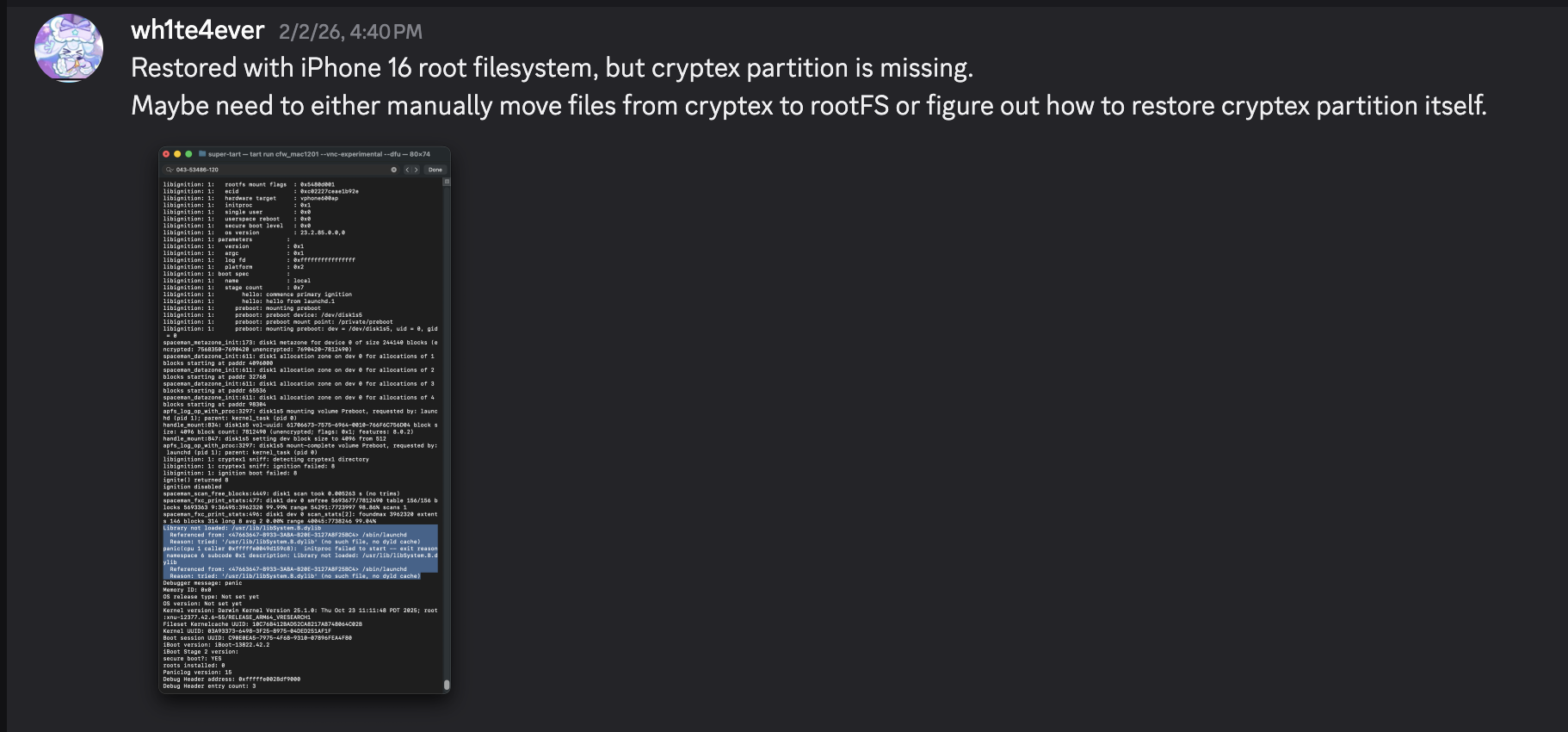
Nachfolgend sehen Sie einen Screenshot des Panics, der auftritt, wenn das SEP nicht korrekt konfiguriert ist. Wenn Sie es richtig eingerichtet haben, sollte es diesen Punkt ohne Probleme passieren.

Nach Abschluss der Wiederherstellung startet es automatisch neu. Allerdings tritt ein Panic im launchd-Prozess auf, da die Bibliothek /usr/lib/libSystem.B.dylib fehlt. Diese Bibliothek befindet sich im dyld_shared_cache auf der Cryptex-Partition, und aus irgendeinem Grund konnte die Cryptex-Partition nicht wiederhergestellt werden. Als temporären Workaround müssen Sie ein SSH-Ramdisk erstellen, um das Root-Dateisystem zu modifizieren und die erforderlichen Dateien zu injizieren. Genau aus diesem Grund war der Patch zur SSV-Verifizierung erforderlich.


Ich werde versuchen, das Startproblem zu beheben, indem ich die Ramdisk verwende, die in https://github.com/verygenericname/SSHRD_Script verwendet wird.
Um Komponenten wie den Bootloader oder Kernel mit dem irecovery-Tool im DFU-Modus hochzuladen und zu laden, wird ein IMG4-Image benötigt, das eine IM4M-Datei erfordert. Daher habe ich zuerst die shsh-Datei mit dem idevicerestore-Tool abgerufen und sie dann in eine IM4M-Datei konvertiert.```bash idevicerestore -e -y ./iPhone17,3_26.1_23B85_Restore -t
mv shsh/[ECID]-iPhone99,11-26.1.shsh shsh/[ECID]-iPhone99,11-26.1.shsh.gz
gunzip shsh/[ECID]-iPhone99,11-26.1.shsh.gz
...
pyimg4 im4m extract -i shsh/[ECID]-iPhone99,11-26.1.shsh -o vphone.im4m
Dann, unter Verwendung dieser IM4M-Datei, erzeugte ich mehrere IMG4-Dateien für jede der verwendeten Firmware-Komponenten, wie iBSS, iBEC und den Devicetree.```python
# 1. Grab & Patch iBSS
if not os.path.exists("iPhone17\\,3_26.1_23B85_Restore/Firmware/dfu/iBSS.vresearch101.RELEASE.im4p.bak"):
os.system("cp iPhone17\\,3_26.1_23B85_Restore/Firmware/dfu/iBSS.vresearch101.RELEASE.im4p iPhone17\\,3_26.1_23B85_Restore/Firmware/dfu/iBSS.vresearch101.RELEASE.im4p.bak")
os.system("tools/img4 -i iPhone17\\,3_26.1_23B85_Restore/Firmware/dfu/iBSS.vresearch101.RELEASE.im4p.bak -o iBSS.vresearch101.RELEASE")
... # patch things from raw
os.system("tools/img4tool -c iBSS.vresearch101.RELEASE.im4p -t ibss iBSS.vresearch101.RELEASE")
os.system("tools/img4 -i iBSS.vresearch101.RELEASE.im4p -o ./Ramdisk/iBSS.vresearch101.RELEASE.img4 -M ./vphone.im4m")
# 2. Grab & Patch iBEC
if not os.path.exists("iPhone17\\,3_26.1_23B85_Restore/Firmware/dfu/iBEC.vresearch101.RELEASE.im4p.bak"):
os.system("cp iPhone17\\,3_26.1_23B85_Restore/Firmware/dfu/iBEC.vresearch101.RELEASE.im4p iPhone17\\,3_26.1_23B85_Restore/Firmware/dfu/iBEC.vresearch101.RELEASE.im4p.bak")
os.system("tools/img4 -i iPhone17\\,3_26.1_23B85_Restore/Firmware/dfu/iBEC.vresearch101.RELEASE.im4p -o iBEC.vresearch101.RELEASE")
... # patch things from raw
os.system("tools/img4tool -c iBEC.vresearch101.RELEASE.im4p -t ibec iBEC.vresearch101.RELEASE")
os.system("tools/img4 -i iBEC.vresearch101.RELEASE.im4p -o Ramdisk/iBEC.vresearch101.RELEASE.img4 -M vphone.im4m")
# 3. Grab SPTM
os.system("tools/img4 -i iPhone17\\,3_26.1_23B85_Restore/Firmware/sptm.vresearch1.release.im4p -o Ramdisk/sptm.vresearch1.release.img4 -M vphone.im4m -T sptm")
# 4. Grab devicetree
os.system("tools/img4 -i iPhone17\\,3_26.1_23B85_Restore/Firmware/all_flash/DeviceTree.vphone600ap.im4p -o Ramdisk/DeviceTree.vphone600ap.img4 -M vphone.im4m -T rdtr")
# 5. Grab sep
os.system("tools/img4 -i iPhone17\\,3_26.1_23B85_Restore/Firmware/all_flash/sep-firmware.vresearch101.RELEASE.im4p -o Ramdisk/sep-firmware.vresearch101.RELEASE.img4 -M vphone.im4m -T rsep")
# 6. Grab & Patch TXM
if not os.path.exists("iPhone17\\,3_26.1_23B85_Restore/Firmware/txm.iphoneos.release.im4p.bak"):
os.system("cp iPhone17\\,3_26.1_23B85_Restore/Firmware/txm.iphoneos.release.im4p iPhone17\\,3_26.1_23B85_Restore/Firmware/txm.iphoneos.release.im4p.bak")
os.system("pyimg4 im4p extract -i iPhone17\\,3_26.1_23B85_Restore/Firmware/txm.iphoneos.release.im4p.bak -o txm.raw")
... # patch things from raw
#create im4p
os.system("pyimg4 im4p create -i txm.raw -o txm.im4p -f trxm --lzfse")
# preserve payp structure
txm_im4p_data = Path('iPhone17,3_26.1_23B85_Restore/Firmware/txm.iphoneos.release.im4p.bak').read_bytes()
payp_offset = txm_im4p_data.rfind(b'PAYP')
if payp_offset == -1:
print("Couldn't find payp structure !!!")
sys.exit()
with open('txm.im4p', 'ab') as f:
f.write(txm_im4p_data[(payp_offset-10):])
payp_sz = len(txm_im4p_data[(payp_offset-10):])
print(f"payp sz: {payp_sz}")
txm_im4p_data = bytearray(open('txm.im4p', 'rb').read())
txm_im4p_data[2:5] = (int.from_bytes(txm_im4p_data[2:5], 'big') + payp_sz).to_bytes(3, 'big')
open('txm.im4p', 'wb').write(txm_im4p_data)
# sign
os.system("pyimg4 img4 create -p txm.im4p -o Ramdisk/txm.img4 -m vphone.im4m")
# 7. Grab & patch kernelcache
if not os.path.exists("iPhone17\\,3_26.1_23B85_Restore/kernelcache.research.vphone600.bak"):
os.system("cp iPhone17\\,3_26.1_23B85_Restore/kernelcache.research.vphone600 iPhone17\\,3_26.1_23B85_Restore/kernelcache.research.vphone600.bak")
os.system("pyimg4 im4p extract -i iPhone17\\,3_26.1_23B85_Restore/kernelcache.research.vphone600.bak -o kcache.raw")
... # patch things from raw
#create im4p
os.system("pyimg4 im4p create -i kcache.raw -o krnl.im4p -f rkrn --lzfse")
# preserve payp structure
kernel_im4p_data = Path('iPhone17,3_26.1_23B85_Restore/kernelcache.research.vphone600.bak').read_bytes()
payp_offset = kernel_im4p_data.rfind(b'PAYP')
if payp_offset == -1:
print("Couldn't find payp structure !!!")
sys.exit()
with open('krnl.im4p', 'ab') as f:
f.write(kernel_im4p_data[(payp_offset-10):])
payp_sz = len(kernel_im4p_data[(payp_offset-10):])
print(f"payp sz: {payp_sz}")
kernel_im4p_data = bytearray(open('krnl.im4p', 'rb').read())
kernel_im4p_data[2:5] = (int.from_bytes(kernel_im4p_data[2:5], 'big') + payp_sz).to_bytes(3, 'big')
open('krnl.im4p', 'wb').write(kernel_im4p_data)
# sign
os.system("pyimg4 img4 create -p krnl.im4p -o Ramdisk/krnl.img4 -m vphone.im4m")
# 8. Grab ramdisk & build custom ramdisk
os.system("pyimg4 im4p extract -i iPhone17,3_26.1_23B85_Restore/043-53775-129.dmg -o ramdisk.dmg")
os.system("mkdir SSHRD")
os.system("sudo hdiutil attach -mountpoint SSHRD ramdisk.dmg -owners off")
os.system("sudo hdiutil create -size 254m -imagekey diskimage-class=CRawDiskImage -format UDZO -fs APFS -layout NONE -srcfolder SSHRD -copyuid root ramdisk1.dmg")
os.system("sudo hdiutil detach -force SSHRD")
os.system("sudo hdiutil attach -mountpoint SSHRD ramdisk1.dmg -owners off")
... #remove unneccessary files for expand space
#resign all things preserving ents
target_path= [
"SSHRD/usr/local/bin/*", "SSHRD/usr/local/lib/*",
"SSHRD/usr/bin/*", "SSHRD/bin/*",
"SSHRD/usr/lib/*", "SSHRD/sbin/*", "SSHRD/usr/sbin/*", "SSHRD/usr/libexec/*"
]
for pattern in target_path:
for path in glob.glob(pattern):
if os.path.isfile(path) and not os.path.islink(path):
if "Mach-O" in subprocess.getoutput(f"file \"{path}\""):
os.system(f"tools/ldid_macosx_arm64 -S -M -Cadhoc \"{path}\"")
#8-2. Grab & build custom ramdisk's trustcache while building custom ramdisk
os.system("pyimg4 im4p extract -i iPhone17,3_26.1_23B85_Restore/Firmware/043-53775-129.dmg.trustcache -o trustcache.raw")
os.system("tools/trustcache_macos_arm64 create sshrd.tc SSHRD")
os.system("pyimg4 im4p create -i sshrd.tc -o trustcache.im4p -f rtsc")
# sign
os.system("pyimg4 img4 create -p trustcache.im4p -o Ramdisk/trustcache.img4 -m vphone.im4m")
#8-2. end
os.system("sudo hdiutil detach -force SSHRD")
os.system("sudo hdiutil resize -sectors min ramdisk1.dmg")
# sign
os.system("pyimg4 im4p create -i ramdisk1.dmg -o ramdisk1.dmg.im4p -f rdsk")
os.system("pyimg4 img4 create -p ramdisk1.dmg.im4p -o Ramdisk/ramdisk.img4 -m vphone.im4m")
Sobald alle IMG4-Images erstellt sind, laden wir sie nacheinander und booten mit der Ramdisk.
sleep 1; irecovery -f Ramdisk/sptm.vresearch1.release.img4 irecovery -c firmware
irecovery -f Ramdisk/txm.img4 irecovery -c firmware
irecovery -f Ramdisk/trustcache.img4 irecovery -c firmware irecovery -f Ramdisk/ramdisk.img4 irecovery -c ramdisk irecovery -f Ramdisk/DeviceTree.vphone600ap.img4 irecovery -c devicetree irecovery -f Ramdisk/sep-firmware.vresearch101.RELEASE.img4 irecovery -c firmware irecovery -f Ramdisk/krnl.img4 irecovery -c bootx
Dann sehen Sie das Creeper-Gesicht aus Minecraft im dritten Fenster von links, wie unten gezeigt.
Falls Sie das USB-Menü in der System Information App überprüfen und dort "iPhone Research..." sehen, können Sie jetzt mit dem Tool [iproxy](https://github.com/libimobiledevice/libusbmuxd/blob/master/tools/iproxy.c) auf die virtuelle iPhone-Shell zugreifen. (`iproxy 2222 22 &`)

Um das Root-Dateisystem zu ändern, benennen Sie den Snapshot um.```python
ssh [email protected] -p2222
#pw: alpine
mount_apfs -o rw /dev/disk1s1 /mnt1
snaputil -l /mnt1
# (then will output will be printed with hash, result may be differ)
com.apple.os.update-8AAB8DBA5C8F1F756928411675F4A892087B04559CFB084B9E400E661ABAD119
snaputil -n <com.apple.os.update-hash> orig-fs /mnt1
umount /mnt1
exit
Entschlüsseln Sie die AEA-Datei mit dem ipsw Tool, um eine DMG-Datei zu erstellen, mounten Sie sie und übertragen Sie dann die Dateien von der Cryptex-Partition auf die virtuelle Maschine. Zusammen mit der Dateiübertragung waren spezifische Patches erforderlich. Aus Gründen der Bequemlichkeit habe ich drei bestimmte Prozesse hinzugefügt, die beim Booten starten: bash, dropbear und trollvnc.
seputil hatte ein Problem, bei dem es die Gigalocker-Datei nicht richtig finden konnte, also habe ich es gepatcht, um immer nach AA.gl zu suchen. Darüber hinaus habe ich launchd_cache_loader gepatcht, um sicherzustellen, dass die modifizierte /System/Library/xpc/launchd.plist korrekt geladen wird.```python ... ========= INSTALL CRYPTEX(SystemOS, AppOS) =========
key = subprocess.check_output("ipsw fw aea --key iPhone17,3_26.1_23B85_Restore/043-54303-126.dmg.aea", shell=True, text=True).strip() print(f"key: {key}") os.system(f"aea decrypt -i iPhone17,3_26.1_23B85_Restore/043-54303-126.dmg.aea -o CryptexSystemOS.dmg -key-value '{key}'")
os.system(f"cp iPhone17,3_26.1_23B85_Restore/043-54062-129.dmg CryptexAppOS.dmg")
os.system("mkdir CryptexSystemOS") os.system("sudo hdiutil attach -mountpoint CryptexSystemOS CryptexSystemOS.dmg -owners off")
os.system("mkdir CryptexAppOS") os.system("sudo hdiutil attach -mountpoint CryptexAppOS CryptexAppOS.dmg -owners off")
remote_cmd("/sbin/mount_apfs -o rw /dev/disk1s1 /mnt1")
remote_cmd("/bin/rm -rf /mnt1/System/Cryptexes/App") remote_cmd("/bin/rm -rf /mnt1/System/Cryptexes/OS")
remote_cmd("/bin/mkdir -p /mnt1/System/Cryptexes/App") remote_cmd("/bin/chmod 0755 /mnt1/System/Cryptexes/App") remote_cmd("/bin/mkdir -p /mnt1/System/Cryptexes/OS") remote_cmd("/bin/chmod 0755 /mnt1/System/Cryptexes/OS")
print("Copying cryptexs to vphone! Will take about 3 mintues...") os.system("tools/sshpass -p 'alpine' scp -q -r -ostricthostkeychecking=false -ouserknownhostsfile=/dev/null -o StrictHostKeyChecking=no -P 2222 CryptexSystemOS/. '[email protected]:/mnt1/System/Cryptexes/OS'") os.system("tools/sshpass -p 'alpine' scp -q -r -ostricthostkeychecking=false -ouserknownhostsfile=/dev/null -o StrictHostKeyChecking=no -P 2222 CryptexAppOS/. '[email protected]:/mnt1/System/Cryptexes/App'")
remote_cmd("/bin/ln -sf ../../../System/Cryptexes/OS/System/Library/Caches/com.apple.dyld /mnt1/System/Library/Caches/com.apple.dyld")
remote_cmd("/bin/ln -sf ../../../../System/Cryptexes/OS/System/DriverKit/System/Library/dyld /mnt1/System/DriverKit/System/Library/dyld")
os.system("rm custom_26.1/seputil 2>/dev/null") os.system("rm custom_26.1/seputil.bak 2>/dev/null")
file_path = "/mnt1/usr/libexec/seputil.bak" if not check_remote_file_exists(file_path): print(f"Created backup {file_path}") remote_cmd("/bin/cp /mnt1/usr/libexec/seputil /mnt1/usr/libexec/seputil.bak")
os.system("tools/sshpass -p 'alpine' scp -q -o StrictHostKeyChecking=no -o UserKnownHostsFile=/dev/null -P 2222 [email protected]:/mnt1/usr/libexec/seputil.bak ./custom_26.1") os.system("mv custom_26.1/seputil.bak custom_26.1/seputil")
fp = open("custom_26.1/seputil", "r+b") patch(0x1B3F1, "AA") fp.close()
os.system("tools/ldid_macosx_arm64 -S -M -Ksigncert.p12 -Icom.apple.seputil custom_26.1/seputil")
os.system("tools/sshpass -p 'alpine' scp -q -r -ostricthostkeychecking=false -ouserknownhostsfile=/dev/null -o StrictHostKeyChecking=no -P 2222 custom_26.1/seputil '[email protected]:/mnt1/usr/libexec/seputil'") remote_cmd("/bin/chmod 0755 /mnt1/usr/libexec/seputil")
os.system("rm custom_26.1/seputil 2>/dev/null")
remote_cmd("/sbin/mount_apfs -o rw /dev/disk1s3 /mnt3") remote_cmd("/bin/mv /mnt3/*.gl /mnt3/AA.gl")
... # ========= INSTALL AppleParavirtGPUMetalIOGPUFamily =========
os.system("tools/sshpass -p 'alpine' scp -q -r -ostricthostkeychecking=false -ouserknownhostsfile=/dev/null -o StrictHostKeyChecking=no -P 2222 jb/iosbinpack64.tar '[email protected]:/mnt1'")
remote_cmd("/usr/bin/tar --preserve-permissions --no-overwrite-dir -xvf /mnt1/iosbinpack64.tar -C /mnt1") remote_cmd("/bin/rm /mnt1/iosbinpack64.tar")
''' /iosbinpack64/bin/mkdir -p /var/dropbear /iosbinpack64/bin/cp /iosbinpack64/etc/profile /var/profile /iosbinpack64/bin/cp /iosbinpack64/etc/motd /var/motd '''
os.system("rm custom_26.1/launchd_cache_loader 2>/dev/null") os.system("rm custom_26.1/launchd_cache_loader.bak 2>/dev/null")
file_path = "/mnt1/usr/libexec/launchd_cache_loader.bak" if not check_remote_file_exists(file_path): print(f"Created backup {file_path}") remote_cmd("/bin/cp /mnt1/usr/libexec/launchd_cache_loader /mnt1/usr/libexec/launchd_cache_loader.bak")
os.system("tools/sshpass -p 'alpine' scp -q -o StrictHostKeyChecking=no -o UserKnownHostsFile=/dev/null -P 2222 [email protected]:/mnt1/usr/libexec/launchd_cache_loader.bak ./custom_26.1") os.system("mv custom_26.1/launchd_cache_loader.bak custom_26.1/launchd_cache_loader")
fp = open("custom_26.1/launchd_cache_loader", "r+b") patch(0xB58, 0xd503201f) fp.close()
os.system("tools/ldid_macosx_arm64 -S -M -Ksigncert.p12 -Icom.apple.launchd_cache_loader custom_26.1/launchd_cache_loader")
os.system("tools/sshpass -p 'alpine' scp -q -r -ostricthostkeychecking=false -ouserknownhostsfile=/dev/null -o StrictHostKeyChecking=no -P 2222 custom_26.1/launchd_cache_loader '[email protected]:/mnt1/usr/libexec/launchd_cache_loader'") remote_cmd("/bin/chmod 0755 /mnt1/usr/libexec/launchd_cache_loader")
os.system("rm custom_26.1/launchd_cache_loader 2>/dev/null")
os.system("tools/sshpass -p 'alpine' scp -q -r -ostricthostkeychecking=false -ouserknownhostsfile=/dev/null -o StrictHostKeyChecking=no -P 2222 jb/LaunchDaemons/bash.plist '[email protected]:/mnt1/System/Library/LaunchDaemons'") os.system("tools/sshpass -p 'alpine' scp -q -r -ostricthostkeychecking=false -ouserknownhostsfile=/dev/null -o StrictHostKeyChecking=no -P 2222 jb/LaunchDaemons/dropbear.plist '[email protected]:/mnt1/System/Library/LaunchDaemons'") os.system("tools/sshpass -p 'alpine' scp -q -r -ostricthostkeychecking=false -ouserknownhostsfile=/dev/null -o StrictHostKeyChecking=no -P 2222 jb/LaunchDaemons/trollvnc.plist '[email protected]:/mnt1/System/Library/LaunchDaemons'") remote_cmd("/bin/chmod 0644 /mnt1/System/Library/LaunchDaemons/bash.plist") remote_cmd("/bin/chmod 0644 /mnt1/System/Library/LaunchDaemons/dropbear.plist") remote_cmd("/bin/chmod 0644 /mnt1/System/Library/LaunchDaemons/trollvnc.plist")
os.system("rm custom_26.1/launchd.plist 2>/dev/null") os.system("rm custom_26.1/launchd.plist.bak 2>/dev/null")
file_path = "/mnt1/System/Library/xpc/launchd.plist.bak" if not check_remote_file_exists(file_path): print(f"Created backup {file_path}") remote_cmd("/bin/cp /mnt1/System/Library/xpc/launchd.plist /mnt1/System/Library/xpc/launchd.plist.bak")
os.system("tools/sshpass -p 'alpine' scp -q -o StrictHostKeyChecking=no -o UserKnownHostsFile=/dev/null -P 2222 [email protected]:/mnt1/System/Library/xpc/launchd.plist.bak ./custom_26.1") os.system("mv custom_26.1/launchd.plist.bak custom_26.1/launchd.plist")
os.system("plutil -convert xml1 custom_26.1/launchd.plist")
target_file = 'custom_26.1/launchd.plist' source_file = 'jb/LaunchDaemons/bash.plist' insert_key = '/System/Library/LaunchDaemons/bash.plist'
with open(target_file, 'rb') as ft, open(source_file, 'rb') as fs: target_data = plistlib.load(ft) source_data = plistlib.load(fs)
target_data.setdefault('LaunchDaemons', {})[insert_key] = source_data
with open(target_file, 'wb') as f: plistlib.dump(target_data, f, sort_keys=False)
source_file = 'jb/LaunchDaemons/dropbear.plist' insert_key = '/System/Library/LaunchDaemons/dropbear.plist'
with open(target_file, 'rb') as ft, open(source_file, 'rb') as fs: target_data = plistlib.load(ft) source_data = plistlib.load(fs)
target_data.setdefault('LaunchDaemons', {})[insert_key] = source_data
with open(target_file, 'wb') as f: plistlib.dump(target_data, f, sort_keys=False)
source_file = 'jb/LaunchDaemons/trollvnc.plist' insert_key = '/System/Library/LaunchDaemons/trollvnc.plist'
with open(target_file, 'rb') as ft, open(source_file, 'rb') as fs: target_data = plistlib.load(ft) source_data = plistlib.load(fs)
target_data.setdefault('LaunchDaemons', {})[insert_key] = source_data
with open(target_file, 'wb') as f: plistlib.dump(target_data, f, sort_keys=False)
os.system("tools/sshpass -p 'alpine' scp -q -r -ostricthostkeychecking=false -ouserknownhostsfile=/dev/null -o StrictHostKeyChecking=no -P 2222 custom_26.1/launchd.plist '[email protected]:/mnt1/System/Library/xpc'") remote_cmd("/bin/chmod 0644 /mnt1/System/Library/xpc/launchd.plist")
os.system("rm custom_26.1/launchd.plist 2>/dev/null")
... remote_cmd("/sbin/halt") ...
# Erster Bootversuch
Der Bootvorgang sollte jetzt einwandfrei funktionieren, aber wenn du versuchst, über den schwarzen Einrichtungsbildschirm hinauszugehen, macht es einen Respring und geht nicht weiter.


# Implementierung von Metal
Bei der Überprüfung mit einem benutzerdefinierten Programm namens MetalTest zeigt sich, dass Metal nicht unterstützt wird.```python
#import <stdio.h>
#import <Metal/Metal.h>
#import <Foundation/Foundation.h>
int main(int argc, char *argv[], char *envp[]) {
id<MTLDevice> device = MTLCreateSystemDefaultDevice();
NSLog(@"device: %@", device);
if (device) {
NSLog(@"Metal Device Create Success: %@", [device name]);
} else {
NSLog(@"Metal Not Supported!");
}
return 0;
}
Normalerweise sollte die Ausgabe wie das folgende Ergebnis aussehen.```python
seo@seos-Virtual-Machine Desktop % sysctl kern.version
kern.version: Darwin Kernel Version 25.0.0: Mon Aug 25 21:17:21 PDT 2025; root:xnu-12377.1.9~3/RELEASE_ARM64_VMAPPLE
seo@seos-Virtual-Machine Desktop % ./MetalTest
2026-02-08 23:16:56.846 MetalTest[682:5810] device: <AppleParavirtDevice: 0x102c48fe0>
name = Apple Paravirtual device
2026-02-08 23:16:56.847 MetalTest[682:5810] Metal Device Create Success: Apple Paravirtual device
seo@seos-Virtual-Machine Desktop %
Überprüfung mit ioreg -l zeigt, dass der Kernel tatsächlich AppleParavirtGPU erkannt hat.

Bei der Überprüfung auf einem iPad der 7. Generation mit iOS 16.6.1 greift die MTLCreateSystemDefaultDevice-Funktion intern über eine spezifische Bibliothek namens AGXMetalA10 auf den IOGPU-Treiber zu. Diese AGXMetalA10-Bibliothek befindet sich unter /System/Library/Extensions.
Hier kam mir plötzlich ein Gedanke: Gäbe es nicht auch GPU/Metal-bezogene Bibliotheken, die für das virtuelle iPhone verwendet werden?

Die Überprüfung desselben Pfads in der PCC-VM zeigt, dass dort 7 Dateien vorhanden sind.
Ich habe das in PCC verwendete /System/Library/Extensions/AppleParavirtGPUMetalIOGPUFamily.bundle genommen und direkt in das virtuelle iPhone eingefügt. (Dazu habe ich das SSH-Ramdisk verwendet.)

Bei erneuter Überprüfung von MetalTest funktioniert die MTLCreateSystemDefaultDevice-Funktion jetzt einwandfrei.

Da jedoch eine bestimmte dylib-Datei im dsc (dyld shared cache) des iPhone-16-Modells nicht vorhanden ist, musste ich sie separat aus dem dsc der PCC reverse-engineeren und implementieren.


Nach der Implementierung wird man nun mit dem Einrichtungsbildschirm samt Hintergrund begrüßt. Da ich den Home-Button nicht richtig implementieren konnte, habe ich dies mit einem temporären Workaround gelöst, indem ich ihn über iproxy/VNC steuere.

Es ist nur mit Apple Silicon Macs kompatibel, und die bestätigten Geräte/Versionen sind wie folgt:
Ich gehe davon aus, dass es wahrscheinlich auf jedem Zielsystem funktioniert, das pccvre unterstützt.

Quelle: https://security.apple.com/documentation/private-cloud-compute/vresetup
Im Gegensatz zu Tahoe Version 26 ist die Touch-Interaktion nicht allein mit dem VZVirtualMachineView-Objekt möglich, daher war es notwendig, die Mausereignisfunktionen zu überschreiben.
// Display let graphics_config = VZMacGraphicsDeviceConfiguration() let displays_config = VZMacGraphicsDisplayConfiguration( widthInPixels: 1179, heightInPixels: 2556, pixelsPerInch: 460 ) graphics_config.displays.append(displays_config) configuration.graphicsDevices = [graphics_config] ...