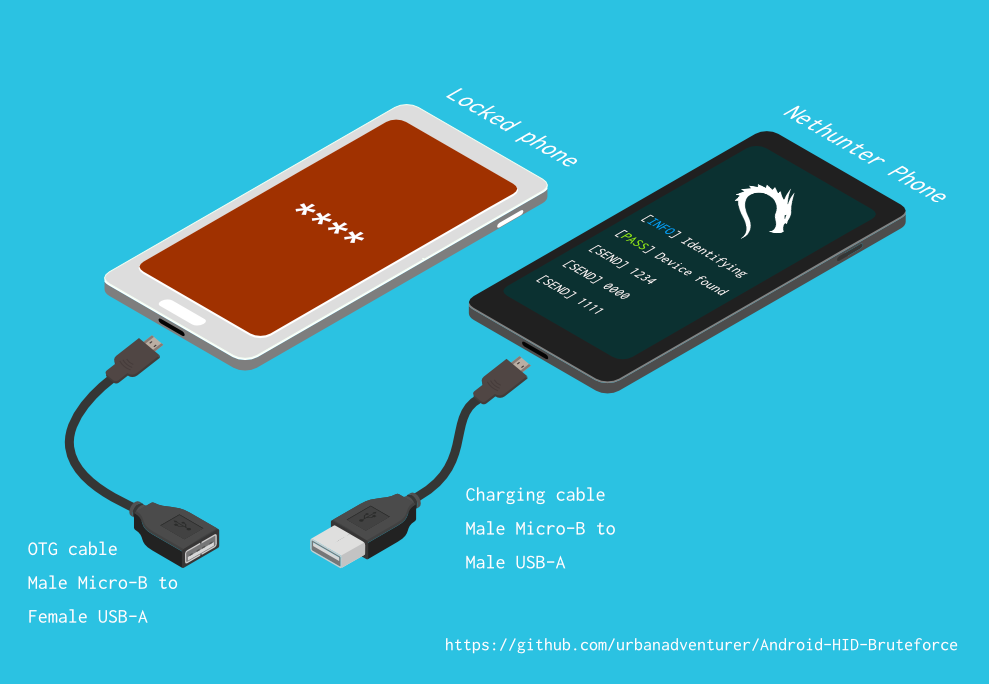

Entsperren Sie ein Android-Telefon (oder Gerät) durch Brute-Force-Angriff auf die Sperrbildschirm-PIN. Verwandle dein Kali Nethunter-Telefon in einen Brute-Force-PIN-Knacker für Android-Geräte! (kein Root, kein adb)
Entsperren Sie ein Android-Telefon (oder -Gerät) durch Brute-Force der Sperrbildschirm-PIN.
Verwandeln Sie Ihr Kali Nethunter-Telefon in einen Brute-Force-PIN-Knacker für Android-Geräte!
Es verwendet ein USB-OTG-Kabel, um das gesperrte Telefon mit dem Nethunter-Gerät zu verbinden. Es emuliert eine Tastatur, probiert automatisch PINs aus und wartet nach zu vielen falschen Versuchen.
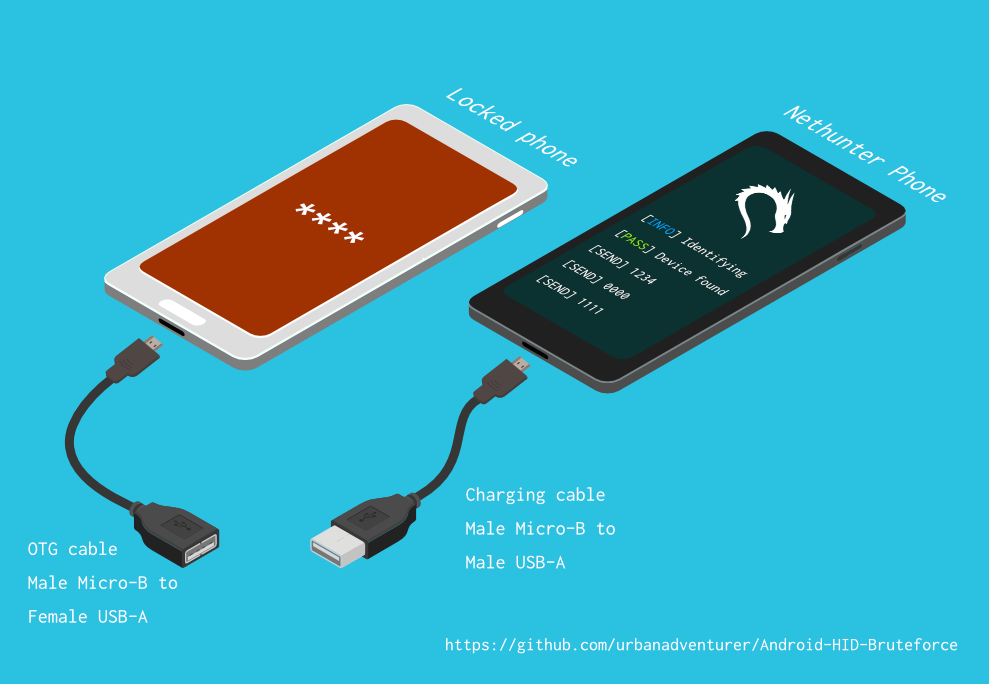
[Nethunter-Telefon] <--> [USB-Kabel] <--> [USB-OTG-Adapter] <--> [Gesperrtes Android-Telefon]
Der USB-HID-Gadget-Treiber ermöglicht die Emulation von USB-Human-Interface-Devices (HID). Dadurch kann ein Android-Nethunter-Gerät Tastatureingaben an das gesperrte Telefon emulieren. Es ist, als würde man eine Tastatur an das gesperrte Telefon anschließen und Tasten drücken.
⏱ Dies dauert mit einem Samsung S5 etwas mehr als 16,6 Stunden, um alle möglichen 4-stelligen PINs auszuprobieren, aber mit der optimierten PIN-Liste sollte es viel weniger Zeit in Anspruch nehmen.
TBC
Wenn Sie das Skript nach /sdcard/ installiert haben, können Sie es mit dem folgenden Befehl ausführen.bash ./android-pin-bruteforce
Note that Android mounts /sdcard with the noexec flag. You can verify this with mount.
Android-PIN-Bruteforce (0.2) wird verwendet, um ein Android-Telefon (oder -Gerät) durch Bruteforce der Sperrbildschirm-PIN zu entsperren.
Weitere Informationen unter: https://github.com/urbanadventurer/Android-PIN-Bruteforce
Befehle:
crack PIN-Knacken starten
resume Ab einer ausgewählten PIN fortsetzen
rewind PINs rückwärts ab einer ausgewählten PIN knacken
diag Diagnoseinformationen anzeigen
version Versionsinformationen anzeigen und beenden
Optionen:
-f, --from PIN Ab dieser PIN fortsetzen
-a, --attempts Ab NUM fehlerhaften Versuchen beginnen
-m, --mask REGEX Eine Maske für bekannte Ziffern der PIN verwenden
-t, --type TYPE PIN- oder MUSTER-Knacken auswählen
-l, --length NUM PINs mit NUM Länge knacken
-c, --config FILE Konfigurationsdatei zum Laden angeben
-p, --pinlist FILE Eine benutzerdefinierte PIN-Liste angeben
-d, --dry-run Testlauf. Sendet keine Tasten.
-v, --verbose Ausführliche Logs ausgeben
Nutzung:
android-pin-bruteforce <command> [options]```
## Supported Android Phones/Devices
This has been successfully tested with various phones including the Samsung S5, S7, Motorola G4 Plus and G5 Plus.
It can unlock Android versions 6.0.1 through to 10.0. The ability to perform a bruteforce attack doesn't depend on the Android version in use. It depends on how the device vendor developed their own lockscreen.
Check the Phone Database for more details
https://github.com/urbanadventurer/Android-PIN-Bruteforce/wiki/Phone-Database
## 🎳 PIN Lists
Optimised PIN lists are used by default unless the user selects a custom PIN list.
### Cracking PINs of different lengths
Use the `--length` commandline option.
Use this command to crack a 3 digit PIN,
`./android-pin-bruteforce crack --length 3`
Use this command to crack a 6 digit PIN
`./android-pin-bruteforce crack --length 6`
### Where did the optimised PIN lists come from?
The optimised PIN lists were generated by extracting numeric passwords from database leaks then sorting by frequency. All PINs that did not appear in the password leaks were appended to the list.
The optimised PIN lists were generated from *Ga$$Pacc DB Leak* (21GB decompressed, 688M Accounts, 243 Databases, 138920 numeric passwords).
#### The 4 digit PIN list
The reason that the 4 digit PIN list is used from a different source is because it gives better results than the generated list from *Ga$$Pacc DB Leak*.
`optimised-pin-length-4.txt` is an optimised list of all possible 4 digit PINs, sorted by order of likelihood.
It can be found with the filename `pinlist.txt` at https://github.com/mandatoryprogrammer/droidbrute
This list is used with permission from Justin Engler & Paul Vines from Senior Security Engineer, iSEC Partners,
and was used in their Defcon talk, [Electromechanical PIN Cracking with Robotic Reconfigurable Button Basher (and C3BO)](https://www.defcon.org/html/defcon-21/dc-21-speakers.html#Engler)
### Cracking with Masks
Masks use regular expressions with the standard grep extended format.
`./android-pin-bruteforce crack --mask "...[45]" --dry-run`
- To try all years from 1900 to 1999, use a mask of `19..`
- To try PINs that have a 1 in the first digit, and a 1 in the last digit, use a mask of `1..1`
- To try PINs that end in 4 or 5, use `...[45]`
## 📱 Configuration for different phones
Device manufacturers create their own lock screens that are different to the default or stock Android.
To find out what keys your phone needs, plug a keyboard into the phone and try out different combinations.
Load a different configuration file, with the `--config FILE` commandline parameter.
Example:
`./android-pin-bruteforce --config ./config.samsung.s5 crack`
You can also edit the `config` file by customising the timing and keys sent.
The following configuration variables can be used to support a different phone's lockscreen.
DELAY_BETWEEN_KEYS=0.25
PROGRESSIVE_ARRAY_ATTEMPT_COUNT__________=(1 11 41) PROGRESSIVE_ARRAY_ATTEMPTS_UNTIL_COOLDOWN=(5 1 1) PROGRESSIVE_ARRAY_COOLDOWN_IN_SECONDS____=(30 30 60)
SEND_KEYS_DISMISS_POPUPS_N_SECONDS_BEFORE_COOLDOWN_END=5
SEND_KEYS_DISMISS_POPUPS_AT_COOLDOWN_END="enter enter enter"
KEYS_BEFORE_EACH_PIN="escape enter"
KEYS_STAY_AWAKE_DURING_COOLDOWN="enter"
SEND_KEYS_STAY_AWAKE_DURING_COOLDOWN_EVERY_N_SECONDS=5
DELAY_BEFORE_STARTING=2
KEYS_BEFORE_STARTING="enter"```
We send keys before the end of the cooldown period, or optionally during the cooldown period. This is to keep the lockscreen app active and to dismiss any popups about the number of incorrect PIN attempts or a low battery warning.
Use ssh from your laptop to the NetHunter phone, and use this command to test sending keys:
In this example, the enter key is sent.
echo "enter" | /system/xbin/hid-keyboard /dev/hidg0 keyboard
In this example, ctrl-escape is sent.
echo "left-ctrl escape" | /system/xbin/hid-keyboard /dev/hidg0 keyboard
Note: Sending combinations of keys in config file variables is different. Currently only ctrl_escape is supported.
In this example, keys a, b, c are sent.
echo a b c | /system/xbin/hid-keyboard /dev/hidg0 keyboard
This Android app is a virtual USB Keyboard that you can use to test sending keys.
https://store.nethunter.com/en/packages/remote.hid.keyboard.client/
Use this list for the following variables:
To send special keys use the following labels. This list can be found in the hid_gadget_test source code.
To send more than one key at the same time, use the following list:
If you need more key combinations please open a new issue in the GitHub issues list.
The following section of the config file controls the progressive cooldown.
## Die PROGRESSIVE_COOLDOWN_ARRAY-Variablen fungieren als mehrdimensionales Array zur Anpassung der progressiven Abkühlung
## PROGRESSIVE_ARRAY_ATTEMPT_COUNT__________ ist die Versuchsnummer
## PROGRESSIVE_ARRAY_ATTEMPTS_UNTIL_COOLDOWN ist die Anzahl der Versuche vor der Abkühlung
## PROGRESSIVE_ARRAY_COOLDOWN_IN_SECONDS____ ist die Abkühlzeit in Sekunden
PROGRESSIVE_ARRAY_ATTEMPT_COUNT__________=(1 11 41)
PROGRESSIVE_ARRAY_ATTEMPTS_UNTIL_COOLDOWN=(5 1 1)
PROGRESSIVE_ARRAY_COOLDOWN_IN_SECONDS____=(30 30 60)```
The array is the same as this table.
| attempt number | attempts until cooldown | cooldown |
| ---------------- | ------------------------ | ---------- |
| 1 | 5 | 30 |
| 11 | 1 | 30 |
| 41 | 1 | 60 |
### Why can't you use a laptop, or is a Windows or Linux version coming soon?
This script works by emulating USB Human Interface Devices (HID), in this case it is keyboard and mouse input. Laptops have uni-directional USB ports and an Android mobile device/ phone has a bi-directional USB port. A bi-directional port is required to emulate a keyboard.
This might change in the future as USB-C is supposed to be uni-directional.
### How Android emulates a keyboard
Keys are sent using `/system/xbin/hid-keyboard`. To test this and send the key 1 you can use `echo 1 | /system/xbin/hid-keyboard dev/hidg0 keyboard`
In Kali Nethunter, `/system/xbin/hid-keyboard` is a compiled copy of `hid_gadget_test.c`. This is a small program for testing the HID gadget driver that is included in the Linux Kernel. The source code for this file can be found at https://www.kernel.org/doc/html/latest/usb/gadget_hid.html and https://github.com/aagallag/hid_gadget_test.
## 🔧 Troubleshooting
### If it is not bruteforcing PINs
#### Check the orientation of the cables
The Nethunter phone should have a regular USB cable attached, while the locked phone should have an OTG adaptor attached.
The OTG cable should be connected to the locked Android phone. The regular USB cable should be connected to the Nethunter phone.
Refer to the graphic on how to connect the phones.
#### Check it is emulating a keyboard
You can verify that the NetHunter phone is succesfully emulating a keyboard by connecting it to a computer using a regular charging/data USB cable. Open a text editor like Notepad while it is cracking and you should see it entering PIN numbers into the text editor.
Note that you will not need an OTG cable for this.
#### Try restarting the phones
Try powering off the phones and even taking out the batteries if that is possible.
#### Try new cables
Try using new cables/adaptors as you may have a faulty cable/adaptor.
### If it doesn't unlock the phone with a correct PIN
You might be sending keys too fast for the phone to process. Increase the DELAY_BETWEEN_KEYS variable in the config file.
💡 If you don't see 4 dots come up on the phone's screen then maybe it is not receiving 4 keys.
### 🔋 Managing Power Consumption
If your phone runs out of power too soon, follow these steps:
- Make sure both phones are fully charged to 100% before you begin
- Reduce the screen brightness on both the victim phone and NetHunter phone if possible
- Place both phones into Airplane mode, however you may want to enable WiFi to access the NetHunter phone via SSH.
- The locked phone will power the NetHunter phone, because it appears as a keyboard accessory
- Use a USB OTG cable with a Y splitter for an external power supply, to allow charging of the NetHunter phone while cracking
- Take breaks to charge your devices. Pause the script with CTRL-Z and resume with the `fg` shell command.
- Avoid the SEND_KEYS_STAY_AWAKE_DURING_COOLDOWN_EVERY_N_SECONDS configuration option. This will cause the locked phone to use more battery to keep the screen powered. Instead use the SEND_KEYS_DISMISS_POPUPS_N_SECONDS_BEFORE_COOLDOWN_END option (Default).
### Check the Diagnostics Report
Use the command `diag` display diagnostic information.
```bash ./android-pin-bruteforce diag```
Wenn Sie diese Nachricht erhalten, während das USB-Kabel eingesteckt ist, versuchen Sie, den Akku aus dem gesperrten Android-Telefon zu entfernen und es neu zu starten.```[FAIL] HID USB device not ready. Return code from /system/xbin/hid-keyboard was 5.```
### How the usb-devices command works
The diagnostics command uses the `usb-devices` script but it is only necessary as part of determining whether the USB cables are incorrectly connected. This can be downloaded from
https://github.com/gregkh/usbutils/blob/master/usb-devices
### Use verbose output
Use the `--verbose` option to check the configuration is as expected. This is especially useful when you are modifying the configuration.
### Use the dry-run
Use the `--dry-run` option to check how it operates without sending any keys to a device. This is especially useful when you are modifying the configuration or during development.
Dry run will:
- Not send any keys
- Will continue instead of aborting if the `KEYBOARD_DEVICE` or `HID_KEYBOARD` is missing.
### HID USB Mode
Try this command in a shell on the NetHunter phone:
```/system/bin/setprop sys.usb.config hid```
## 💣 Bekannte Probleme
- Dieses Tool kann nicht erkennen, wenn die richtige PIN eingegeben wurde und das Telefon entsperrt wird.
- Ihre Telefone könnten den 🔋 Akku leer haben, bevor die richtige PIN gefunden wird.
- Vertrauen Sie Telefonkonfigurationsdateien aus unbekannten Quellen nicht, ohne sie zuerst zu überprüfen. Die Konfigurationsdateien sind Shell-Skripte und könnten schädliche Befehle enthalten.
## 🚀 Fahrplan
- [ERLEDIGT] Funktioniert
- [ERLEDIGT] Erkennt USB-HID-Fehler
- [ERLEDIGT] Verbesserung der Bedienung und der Befehlszeilenoptionen/Konfigurationsdateien
- [ERLEDIGT] Bruteforce für n-stellige PINs hinzugefügt
- [ERLEDIGT] Maske für bekannte Ziffern
- [ERLEDIGT] PIN-Liste rückwärts knacken (um herauszufinden, welche aktuelle PIN das Gerät entsperrt hat)
- [ERLEDIGT] Konfigurierbare Sperrbildschirm-Eingabeaufforderung implementiert
- [ERLEDIGT] Abklingzeit-Änderung nach 10 Versuchen implementiert
- [IN ARBEIT] Weitere Geräte zum Bruteforce finden/testen
- Fortschrittsbalken hinzufügen
- Voraussichtliche Restzeit hinzufügen
- ASCII-Kunst
- Schönere GUI für NetHunter
- Für iPhone implementieren
- Erkennen, wenn ein Telefon entsperrt ist (Nethunter-Kamera als Sensor verwenden?)
- Android-Muster knacken (zuerst gängige Muster versuchen)
## 🙋 Mitwirken
Pull Requests sind willkommen. Bei größeren Änderungen eröffnen Sie bitte zuerst ein Issue, um zu besprechen, was Sie ändern möchten.
Bitte stellen Sie sicher, dass Sie Tests entsprechend aktualisieren.
## 😎 Autoren und Danksagung
Entwickelt von Andrew Horton (@urbanadventurer).
👏 Die folgenden Personen waren sehr hilfreich:
- Vlad Filatov (@v1adf): Testen vieler Telefone für die Wiki Phone Database
### Motivation
Meine ursprüngliche Motivation, dies zu entwickeln, war ein Samsung S5 Android-Telefon zu entsperren. Es hatte jemandem gehört, der verstorben war, und seine Familie benötigte Zugriff auf die darauf befindlichen Daten. Da ich weder einen USB Rubber Ducky noch andere Hardware zur Hand hatte, probierte ich verschiedene Methoden aus und erkannte schließlich, dass ich etwas Neues entwickeln musste.
### Anerkennung
Die optimierte PIN-Liste stammt von Justin Engler (@justinengler) & Paul Vines, Senior Security Engineer, iSEC Partners, und wurde in ihrem Defcon-Vortrag [Electromechanical PIN Cracking with Robotic Reconfigurable Button Basher (and C3BO).](https://www.defcon.org/html/defcon-21/dc-21-speakers.html#Engler) verwendet.
### Grafiken
Entworfen von Andrew Horton und dankbar unter Verwendung dieser kostenlosen Vektor-Pakete:
- [USB Ports Isometric Free Vector von VisionHeldup](https://www.vecteezy.com/vector-art/159576-usb-ports-isometric-free-vector)
- [HDMI and USB Vector Set von Mary Winkler](https://www.vecteezy.com/vector-art/107006-hdmi-and-usb-vector-set)
- [Isometric Data Security Illustration von Rizal.Medanguide](https://www.vecteezy.com/vector-art/661831-isometric-data-security-illustration)
- Kali NetHunter Logo
## 🗿 Vergleich mit anderen Projekten und Methoden zum Entsperren eines gesperrten Android-Telefons
### Was macht dieses Projekt einzigartig?
Ich wurde gefragt, was dieses Projekt einzigartig macht, wenn es andere Open-Source-Android-PIN-Knackprojekte gibt.
Android-PIN-Bruteforce ist einzigartig, weil es die PIN auf Android-Telefonen von einem NetHunter-Telefon aus knackt und das gesperrte Telefon nicht vorher gehackt sein muss.
Es funktioniert:
- Ohne spezielle Hardware kaufen zu müssen, wie einen Rubber Ducky, Celebrite oder XPIN Clip.
- Ohne ADB- oder Root-Zugriff (das Telefon muss nicht vorher gehackt sein).
| Projekt | ADB/USB Debugging | Benötigt Root | Benötigt $-Hardware | Kommerziell |
------------------------------------------------------- | ----------------- | ------------- | ------------------- | ----------- |
| ⭐ Android-PIN-Bruteforce | Nein | Nein | Nethunter-Telefon | Nein |
| github.com/PentesterES/AndroidPINCrack | Ja | Ja | Nein | Nein |
| github.com/ByteRockstar1996/Cracking-Android-Pin-Lock | Ja | Ja | Nein | Nein |
| github.com/sch3m4/androidpatternlock | Ja | Ja | Nein | Nein |
| github.com/georgenicolaou/androidlockcracker | Ja | Ja | Nein | Nein |
| github.com/MGF15/P-Decode | Ja | Ja | Nein | Nein |
| github.com/BitesFor/ABL | Ja | Ja | Nein | Nein |
| github.com/wuseman/WBRUTER | Ja | Nein | Nein | Nein |
| github.com/Gh005t/Android-BruteForce | Ja | Nein | Nein | Nein |
| github.com/mandatoryprogrammer/droidbrute | Nein | Nein | Rubber Ducky $ | Nein |
| github.com/hak5darren/USB-Rubber-Ducky | Nein | Nein | Rubber Ducky $ | Ja |
| github.com/bbrother/stm32f4androidbruteforce | Nein | Nein | STM32F4 Dev-Board $ | Nein |
| hdb-team.com/product/hdbox/ | Nein | Nein | HDBOX $$ | Ja |
| xpinclip.com | Nein | Nein | XPINClip $$ | Ja |
| cellebrite.com/en/ufed/ | Nein | Nein | Cellebrite UFED $$$ | Ja |
Einige dieser Projekte/Produkte sind wirklich großartig, aber sie verfolgen ein anderes Ziel als Android-PIN-Bruteforce.
Wenn ein Projekt eine gestures.key oder password.key benötigt, habe ich es als Root-erfordernd gelistet.
Wenn ein Projekt einen benutzerdefinierten Bootloader benötigt, habe ich es als ADB- und Root-erfordernd gelistet.
Wenn Sie Ihr Projekt in dieser Tabelle sehen möchten, eröffnen Sie bitte ein neues Issue.
Links zu jedem dieser Projekte finden Sie im Abschnitt 📚 Verwandte Projekte & Weiterführende Literatur.
### 😭 Normale Telefonnutzer
- Versuchen Sie die Top 20 PINs aus der [DataGenetics PIN-Analyse](https://datagenetics.com/blog/september32012/index.html), die anscheinend 26,83 % der Telefone entsperren.
- Verwenden Sie eine App zum Umgehen des Sperrbildschirms per SMS (erfordert App-Installation, bevor das Telefon gesperrt wird)
- Verwenden Sie Samsung Find My Mobile (erfordert Einrichtung, bevor das Telefon gesperrt wird)
- Absturz der Sperrbildschirm-Benutzeroberfläche (Android 5.0 und 5.1)
- Verwenden Sie Googles „Muster vergessen“, „PIN vergessen“ oder „Passwort vergessen“ (Android 4.4 KitKat und älter)
- Zurücksetzen auf Werkseinstellungen (Sie verlieren alle Ihre Daten 😭)
### 🤖 Benutzer, die ihr Android-ROM bereits ersetzt haben
Wenn das Telefon bereits gerootet ist, USB-Debugging aktiviert hat oder ADB aktiviert hat.
- Flashen Sie die `Pattern Password Disable` ZIP mit einer benutzerdefinierten Recovery (erfordert TWRP, CWM, Xrec usw.)
- Löschen Sie `/data/system/gesture.key` oder `password.key` (erfordert Root und ADB auf dem gesperrten Gerät)
- Knacken Sie `/data/system/gesture.key` und `password.key` (erfordert Root und ADB auf dem gesperrten Gerät)
- Aktualisieren Sie die sqlite3-Datenbank `settings.db` (erfordert Root und ADB auf dem gesperrten Gerät)
### 🔬 Forensische Ermittler
Diese Methoden können teuer sein und werden normalerweise nur von spezialisierten forensischen Telefonermittlern eingesetzt.
In der Reihenfolge nach Schwierigkeit und Kosten:
- Ausnutzen des aktivierten USB-Debuggings (Oxygen Forensic Suite)
- Bruteforce mit Tastaturemulation (⭐ Android-PIN-Bruteforce, RubberDucky-Angriff, XPIN Clip, HBbox)
- JTAG (Schnittstelle mit TAPs (Test Access Ports) auf der Geräteplatine)
- In-System Programming (ISP) (beinhaltet direkte Verbindung zu Pins auf Flash-Speicherchips auf der Geräteplatine)
- Chip Off (Entlöten und Entfernen von Flash-Speicherchips aus dem Gerät)
- Clock Glitching / Voltage Fault Injection (Hardware-CPU-Timing-Angriffe zur Umgehung von PIN-Beschränkungen)
- Bootloader-Exploits (Zero-Day-Exploits, die den Bootloader angreifen. GrayKey von Grayshift und Cellebrite)
JTAG-, ISP- und Chip-Off-Techniken sind heute weniger nützlich, da die meisten Geräte verschlüsselt sind.
Ich kenne keine praktischen Angriffe auf Telefon-PINs mit Clock Glitching; wenn Sie ein Produkt kennen, das diese Technik verwendet, lassen Sie es mich bitte wissen, damit ich es aufnehmen kann.
### 🕵 Sicherheitsexperten und technische Telefonnutzer
Verwenden Sie den USB-HID-Keyboard-Bruteforce mit spezieller Hardware.
- Ein Rubber Ducky und Darren Kitchen's Hak5-Bruteforce-Skript
- Ein Skript für einen USB Teensy schreiben
- Teure forensische Hardware kaufen
- Oder Sie können Android-PIN-Bruteforce mit Ihrem NetHunter-Telefon verwenden!
Versuche, das ansonsten großartige Projekt Duck Hunter zu verwenden, um ein RubberDucky-Payload für das Knacken von Android-PINs zu emulieren, funktionierten nicht. Es stürzte das Telefon ab, wahrscheinlich aufgrund der Payload-Länge.
## 📚 Verwandte Projekte & Weiterführende Literatur
### USB-HID-Hardware ohne NetHunter
hak5 12x17: Jede 4-stellige Android-PIN in 16 Stunden mit einem USB Rubber Ducky knacken
https://archive.org/details/hak5_12x17
Hak5: USB Rubber Ducky
https://shop.hak5.org/products/usb-rubber-ducky-deluxe
USB-Rubber-Ducky Payloads
https://github.com/hak5darren/USB-Rubber-Ducky/wiki/Payloads
Teensy
https://www.pjrc.com/teensy/
Bruteforce eines Android-Telefons mit einem STM32F4Discovery-Entwicklungsboard
https://github.com/bbrother/stm32f4androidbruteforce
https://hackaday.com/2013/11/10/brute-forcing-an-android-phone/
Automatisierter Bruteforce-Angriff auf die Mac EFI PIN (mit einem Teensy)
https://orvtech.com/atacar-efi-pin-macbook-pro-en.html
https://hackaday.io/project/2196-efi-bruteforcer
Droidbrute: Ein Android-PIN-knackendes USB-Rubber-Ducky-Payload, optimiert durch eine statistisch generierte Wortliste.
https://github.com/mandatoryprogrammer/droidbrute
Diskussionsforum über die hak5-Episode und Android Bruteforce 4-stelliger PIN
https://forums.hak5.org/topic/28165-payload-android-brute-force-4-digit-pin/
### NetHunter-HID-Tastaturangriffe
NetHunter HID-Tastaturangriffe
https://www.kali.org/docs/nethunter/nethunter-hid-attacks/
### Linux-Kernel-HID-Unterstützung
Human Interface Devices (HID)
https://www.kernel.org/doc/html/latest/hid/index.html#
Linux-USB-HID-Gadget-Treiber und hid-keyboard-Programm
https://www.kernel.org/doc/html/latest/usb/gadget_hid.html
https://github.com/aagallag/hid_gadget_test
Das usb-devices-Skript
https://github.com/gregkh/usbutils/blob/master/usb-devices
### Knacken von Android-PIN- und Musterdateien
AndroidPINCrack - Bruteforce des Android-Passcodes mit Hash und Salt (erfordert Root auf dem Telefon)
https://github.com/PentesterES/AndroidPINCrack
Android Pattern Lock Cracker - Bruteforce des Android-Musters mit einem SHA1-Hash (erfordert Root auf dem Telefon)
https://github.com/sch3m4/androidpatternlock
### Allgemeine Wiederherstellungsmethoden
[Android][Anleitung] Hacken und Umgehen von Android-Passwort/Muster/Gesichts-PI
https://forum.xda-developers.com/showthread.php?t=2620456
Android Bruteforce mit ADB & Shell Scripting
https://github.com/Gh005t/Android-BruteForce
### Forensische Methoden und Hardware
PATCtech Digital Forensics: Das Android-Passcode umgehen
http://patc.com/online/a/Portals/965/Android%20Passcode.pdf
XPIN Clip
https://xpinclip.com/
HDBox von HDB Team
https://hdb-team.com/product/hdbox/
Cellebrite UFED
https://www.cellebrite.com/en/ufed/
GrayKey von Grayshift
https://www.grayshift.com/graykey/
### PIN-Analyse
Electromechanical PIN Cracking with Robotic Reconfigurable Button Basher (and C3BO)
https://www.defcon.org/html/defcon-21/dc-21-speakers.html#Engler
DataGenetics PIN-Analyse https://datagenetics.com/blog/september32012/index.html
| Key label | Key label |
|---|
| left-ctrl | f6 |
| right-ctrl | f7 |
| left-shift | f8 |
| right-shift | f9 |
| left-alt | f10 |
| right-alt | f11 |
| left-meta | f12 |
| right-meta | insert |
| return | home |
| esc | pageup |
| bckspc | del |
| tab | end |
| spacebar | pagedown |
| caps-lock | right |
| f1 | left |
| f2 | down |
| f3 | kp-enter |
| f4 | up |
| f5 | num-lock |