

 six2dez/reconftw
reconFTW ist ein Tool, das entwickelt wurde, um automatisiertes Recon auf einer Zieldomäne durchzuführen, indem es die beste Auswahl an Tools zum Scannen und Auffinden von Schwachstellen ausführt.




















reconFTW ist ein leistungsstarkes automatisiertes Aufklärungstool, das für Sicherheitsforscher und Penetrationstester entwickelt wurde. Es optimiert den Prozess der Informationssammlung über ein Ziel durch Subdomain-Enumeration, Schwachstellenscans, OSINT und mehr. Mit einem modularen Design, umfangreichen Konfigurationsoptionen und Unterstützung für verteilte Scans über das AX Framework ist reconFTW darauf ausgelegt, umfassende Ergebnisse effizient zu liefern.
reconFTW nutzt eine breite Palette von Techniken, darunter passive und aktive Subdomain-Erkennung, Web-Schwachstellenprüfungen (z. B. XSS, SSRF, SQLi), OSINT, Verzeichnis-Fuzzing, Port-Scans und Screenshots. Es integriert modernste Tools und APIs, um Abdeckung und Genauigkeit zu maximieren und sicherzustellen, dass Sie bei Ihren Aufklärungsbemühungen immer einen Schritt voraus sind.
Hauptfunktionen:
Haftungsausschluss: Die Verwendung von reconFTW zum Angriff auf Ziele ohne vorherige Zustimmung ist illegal. Es liegt in der Verantwortung des Benutzers, alle geltenden Gesetze einzuhalten. Die Entwickler übernehmen keine Haftung für Missbrauch oder Schäden, die durch dieses Tool verursacht werden. Verwenden Sie es verantwortungsbewusst.
reconFTW ist vollgepackt mit Funktionen, um Aufklärung gründlich und effizient zu gestalten. Nachfolgend finden Sie eine detaillierte Aufschlüsselung seiner Fähigkeiten, aktualisiert, um die neueste Funktionalität im Skript und in der Konfiguration widerzuspiegeln.
IPV6_SCAN aktiviert ist.nuclei -dast-Templates über gesammelte URLs und GF-Kandidaten für zusätzliche DAST-Abdeckung aus.--quick-rescan / QUICK_RESCAN).hotlist.txt) basierend auf neuen Erkenntnissen.SHOW_COMMANDS, um jeden ausgeführten Befehl für Debugging-Zwecke in Zielprotokollen zu protokollieren.reconFTW verwendet eine modulare Architektur. Der Haupteinstiegspunkt (reconftw.sh) übernimmt die Argumentanalyse und bezieht 8 spezialisierte Module aus dem Verzeichnis modules/.
reconftw/ ├── reconftw.sh # Entry point — arg parsing, module loading, dispatch ├── reconftw.cfg # Default configuration ├── install.sh # Installer ├── Makefile # Data management, lint, fmt, test targets ├── modules/ │ ├── core.sh # Lifecycle, logging, notifications, cleanup (1024 lines) │ ├── modes.sh # Scan modes, argument parsing, help (902 lines) │ ├── subdomains.sh # Subdomain enumeration (1938 lines) │ ├── web.sh # Web analysis, fuzzing, JS checks (1712 lines) │ ├── vulns.sh # Vulnerability scanning (926 lines) │ ├── osint.sh # OSINT functions (500 lines) │ ├── axiom.sh # Ax/Axiom fleet helpers (143 lines) │ └── utils.sh # Utilities, sanitization, validation (508 lines) ├── tests/ │ ├── run_tests.sh # Test runner │ ├── unit/ # bats-core unit tests │ ├── integration/ # Integration tests │ └── fixtures/ # Test data ├── Docker/ │ └── Dockerfile # Official Docker image └── Terraform/ # AWS deployment
### Modulreferenz

| Modul | Zeilen | Zweck |
|--------|------:|---------|
| `core.sh` | 1024 | Lebenszyklusverwaltung, Protokollierung, Benachrichtigungen, Cleanup-Traps |
| `modes.sh` | 902 | Scanmodus-Definitionen, Argument-Parsing, Hilfeausgabe |
| `subdomains.sh` | 1938 | Alle Subdomain-Enumeration-Funktionen |
| `web.sh` | 1712 | Web-Analyse, Fuzzing, JS-Analyse, CMS-Erkennung |
| `vulns.sh` | 926 | Schwachstellen-Scanning (XSS, SQLi, SSRF, usw.) |
| `osint.sh` | 500 | OSINT-Funktionen (WHOIS, E-Mails, Dorks, Metadaten) |
| `utils.sh` | 508 | Gemeinsame Hilfsprogramme, Eingabebereinigung, Validierung |
| `axiom.sh` | 143 | Ax/Axiom-Verwaltung verteilter Flotten |

Das Flag `--source-only` ermöglicht das Einbinden von `reconftw.sh`, ohne die Hauptlogik auszuführen, wodurch Unit-Tests einzelner Funktionen möglich werden.

---

## 💿 Installation

reconFTW unterstützt mehrere Installationsmethoden, um unterschiedlichen Umgebungen gerecht zu werden. Stellen Sie sicher, dass Sie ausreichend Speicherplatz (mindestens 10 GB empfohlen) und eine stabile Internetverbindung haben.

### Schnellstart

1) Klonen und installieren```yaml
git clone https://github.com/six2dez/reconftw
cd reconftw
./install.sh --verbose
3) Minimaler Lauf (nur passiver Footprint)```bash
./reconftw.sh -d example.com -p
Tipp: Führen Sie später
./install.sh --toolserneut aus, um die Toolchain zu aktualisieren, ohne Systempakete neu zu installieren.
Voraussetzungen:
install_golang ist in reconftw.cfg standardmäßig aktiviert).sudo echo "${USERNAME} ALL=(ALL:ALL) NOPASSWD: ALL" | sudo tee -a /etc/sudoers.d/reconFTW
Schritte: ```bash git clone https://github.com/six2dez/reconftw cd reconftw ./install.sh ./reconftw.sh -d target.com -r
Hinweise:
install.sh installiert Abhängigkeiten, Tools und konfiguriert Pfade (GOROOT, GOPATH, PATH).install_golang=false in reconftw.cfg, wenn Golang bereits konfiguriert ist../install.sh --tools aus, um Go-Binaries, pipx-Pakete und Repositories zu aktualisieren, ohne Systempakete anzufassen.Für eine Liste von Zielen binden Sie die Listendatei in den Container ein und verweisen Sie auf den Pfad innerhalb des Containers: ```bash
docker run -it --rm
-v "${PWD}/domains.txt:/reconftw/domains.txt:ro"
-v "${PWD}/OutputFolder/:/reconftw/Recon/"
six2dez/reconftw:main -l /reconftw/domains.txt -r
3. **Ergebnisse anzeigen**:

- Die Ergebnisse werden im Verzeichnis `OutputFolder` auf dem Host gespeichert (nicht im Container).

4. **Anpassung**:
- Ändere das Docker-Image oder erstelle dein eigenes; siehe den [Docker-Leitfaden](https://github.com/six2dez/reconftw/wiki/4.-Docker).
- Um Ax-Tooling in benutzerdefinierten Builds zu überspringen, verwende `--build-arg INSTALL_AXIOM=false`.
- Binde deine notify-Konfiguration unter `~/.config/notify/provider-config.yaml` im Container ein, wenn du Benachrichtigungen nutzt.

5. **Geheimnisse zur Laufzeit**:

Übergib API-Schlüssel und Geheimnisse über Umgebungsvariablen – niemals in das Image einbetten:   ```bash
docker run -it --rm \
  -e SHODAN_API_KEY="your-key" \
  -e PDCP_API_KEY="your-projectdiscovery-key" \
  -e COLLAB_SERVER="your-server" \
  -e XSS_SERVER="your-server" \
  -v "${PWD}/OutputFolder/:/reconftw/Recon/" \
  six2dez/reconftw:main -d example.com -r
See SECURITY.md für die vollständige Anleitung zur Verwaltung von Geheimnissen.
Health Check:
Das Docker-Image enthält einen integrierten HEALTHCHECK, der alle 60 Sekunden ./reconftw.sh --health-check ausführt. Du kannst ihn auch manuell ausführen: ```bash
docker exec ./reconftw.sh --health-check
reconFTW wird in Go neu geschrieben. Die Neuimplementierung wird als opt-in Vorabversion ausgeliefert: Sie ist
auf der Releases-Seite gelistet, und GitHub
verweist releases/latest niemals auf eine Vorabversion – wenn du also nichts tust, erhältst du weiterhin
die Bash-Version. Das ist beabsichtigt.
Die Go-Binärdatei heißt reconftw; der Bash-Einstiegspunkt ist reconftw.sh. Sie überschreiben
sich nicht gegenseitig, sodass du beide behalten und jederzeit zurückwechseln kannst.
Die aktuelle Beta ist v5.0.0-beta.1. Sie wird nicht über releases/latest bereitgestellt, daher musst du
das Tag explizit angeben:```bash
curl -sSL "https://github.com/six2dez/reconftw/releases/download/v5.0.0-beta.1/reconftw_Linux_x86_64.tar.gz" | tar xz
sudo install -m 755 reconftw /usr/local/bin/reconftw
reconftw version
Wählen Sie das Asset, das zu Ihrer Plattform passt, von der
[Release-Seite](https://github.com/six2dez/reconftw/releases/tag/v5.0.0-beta.1) — `Darwin`-
und `arm64`-Builds, ein statischer musl-Build sowie `.deb`/`.rpm`-Pakete sind alle veröffentlicht.

- [**Was die Beta ist und was nicht**](https://github.com/six2dez/reconftw/blob/main/docs/V2-BETA-ANNOUNCEMENT.md) — einschließlich drei
  Dingen, die ausdrücklich noch nicht fertig sind.
- [**Etwas melden**](https://github.com/six2dez/reconftw/issues/new?template=v2-beta-feedback.md)
  — die Feedback-Vorlage für die v2-Beta. Fehler in der Bash-Version gehen weiterhin an den normalen Bug-Report.


## 🛠️ Fehlerbehebung

- Bash 4+ unter macOS: Die Skripte starten sich automatisch unter Homebrew Bash neu. Wenn Sie eine Meldung über Bash < 4 sehen, führen Sie `brew install bash` aus, öffnen Sie ein neues Terminal und führen Sie `./install.sh` erneut aus.
- timeout unter macOS: macOS stellt `gtimeout` über `brew install coreutils` bereit. Die Skripte erkennen und verwenden es jetzt automatisch.
- Netzwerkprobleme: Installationsprogramme verbergen die meisten Befehlsausgaben. Wenn etwas fehlschlägt, führen Sie es erneut mit `upgrade_tools=true` in `reconftw.cfg` aus, führen Sie `./install.sh --tools` aus oder installieren Sie das fehlende Tool manuell (der Fehler nennt es).
- GOPATH-Binaries: Binaries werden nach `/usr/local/bin` kopiert. Wenn Sie das nicht bevorzugen, stellen Sie sicher, dass `~/go/bin` in Ihrem `PATH` ist.
- Nuclei-Vorlagen: Wenn Vorlagen nicht geklont wurden, entfernen Sie `~/nuclei-templates` und führen Sie `./install.sh` erneut aus.

## 🔑 API-Checkliste (Optional)

- `subfinder`: `~/.config/subfinder/provider-config.yaml`
- GitHub-Tokens: `~/Tools/.github_tokens` (eines pro Zeile)
- GitLab-Tokens: `~/Tools/.gitlab_tokens` (eines pro Zeile)
- WHOISXML: setzen Sie `WHOISXML_API` in `reconftw.cfg` oder als Umgebungsvariable
- ASN-Enumeration (`asnmap`): setzen Sie `PDCP_API_KEY` in Umgebung/Konfiguration (`ASN_ENUM` wird übersprungen, wenn nicht gesetzt)
- Slack/Discord/Telegram: konfigurieren Sie `notify` in `~/.config/notify/provider-config.yaml`
- SSRF-Server: setzen Sie `COLLAB_SERVER` als Umgebungsvariable/Konfiguration, falls verwendet
- Blind-XSS-Server: setzen Sie `XSS_SERVER` als Umgebungsvariable/Konfiguration, falls verwendet

## 💾 Anforderungen

- Speicher: 10–20 GB freier Speicher empfohlen (Toolchain + Daten)
- Netzwerk: stabile Verbindung während Installation und Updates
- Betriebssystem: Linux/macOS mit Bash ≥ 4
- Extras: `shellcheck` und `shfmt` (optional) für `make lint`/`make fmt`

## ⚙️ Konfiguration

Die Datei `reconftw.cfg` steuert die gesamte Ausführung von reconFTW. Sie ermöglicht eine feingranulare Anpassung von:

- **Tool-Pfade**: Pfade für Tools, Resolver und Wortlisten festlegen (`tools`, `resolvers`, `fuzz_wordlist`).
- **API-Schlüssel**: Schlüssel für Shodan, WHOISXML usw. über Umgebungsvariablen oder `secrets.cfg` konfigurieren (siehe [SECURITY.md](https://github.com/six2dez/reconftw/blob/main/SECURITY.md)).
- **Scan-Modi**: Module aktivieren/deaktivieren (z. B. `OSINT`, `SUBDOMAINS_GENERAL`, `VULNS_GENERAL`).
- **Leistung**: Threads, Ratenlimits und Timeouts anpassen (z. B. `FFUF_THREADS`, `HTTPX_RATELIMIT`).
- **Adaptives Ratenlimit**: Automatisches Zurückfahren bei 429/503-Fehlern (`ADAPTIVE_RATE_LIMIT`, `MIN_RATE_LIMIT`, `MAX_RATE_LIMIT`).
- **Inkrementelles Scannen**: Nur neue Funde seit dem letzten Lauf scannen (`INCREMENTAL_MODE`).
- **Benachrichtigungen**: Slack-, Discord- oder Telegram-Benachrichtigungen einrichten (`NOTIFY_CONFIG`).
- **Ax (ehemals Axiom)**: Verteiltes Scannen und Resolver-Pfade konfigurieren (`AXIOM_FLEET_NAME`, `AXIOM_FLEET_COUNT`, `AXIOM_RESOLVERS_PATH`).
- **KI-Berichterstattung**: Modell/Profil/Format und Kontextsteuerung konfigurieren (`AI_MODEL`, `AI_REPORT_PROFILE`, `AI_REPORT_TYPE`, `AI_MAX_CHARS_PER_FILE`).
- **Erweiterte Web-Checks**: GraphQL-Introspection, Parametererkennung, WebSocket-Tests, gRPC-Erkennung und IPv6-Scanning umschalten.
- **Automatisierung & Daten**: Heuristiken für Schnell-Rescans, Asset-Protokollierung, Chunk-Größen, Hotlists und Debug-Tracing steuern (`QUICK_RESCAN`, `ASSET_STORE`, `CHUNK_LIMIT`, `HOTLIST_TOP`, `SHOW_COMMANDS`).
- **Speicher & Protokollierung**: Pre-Flight-Datenträgerprüfung (`MIN_DISK_SPACE_GB`), Protokollrotation (`MAX_LOG_FILES`, `MAX_LOG_AGE_DAYS`), strukturierte JSON-Protokollierung (`STRUCTURED_LOGGING`).
- **Caching**: Cache-Ablauf für Wortlisten und Resolver konfigurieren (`CACHE_MAX_AGE_DAYS`).
- **DNS-Resolver-Sicherheit**: Fehlende Resolver-Dateien führen zu schnellem Abbruch, Resolver-Downloads verwenden konfigurierbare Wiederholungs-/Timeout-Knöpfe (`RESOLVER_DOWNLOAD_*`), und DNS-Brute-/Resolve-Timeout ist standardmäßig deaktiviert (`DNS_*_TIMEOUT=0`) mit Heartbeat-Fortschritt.
- **Geheimnisse**: Verwenden Sie `secrets.cfg` für lokale Überschreibungen oder Umgebungsvariablen für CI/Docker (siehe [SECURITY.md](https://github.com/six2dez/reconftw/blob/main/SECURITY.md)).

**Beispielkonfiguration**:```bash
#############################################
#			reconFTW config file			#
#############################################

# General values
tools=$HOME/Tools   # Path installed tools
if [[ -z "${SCRIPTPATH:-}" ]]; then
	if [[ -n "${BASH_SOURCE[0]:-}" ]]; then
		SCRIPTPATH="$( cd "$(dirname "${BASH_SOURCE[0]}")" >/dev/null 2>&1 ; pwd -P )" # Get current script's path
	else
		SCRIPTPATH="$( cd "$(dirname "$0")" >/dev/null 2>&1 ; pwd -P )" # Get current script's path
	fi
fi
_detected_shell="${SHELL:-/bin/bash}"
profile_shell=".$(basename "${_detected_shell}")rc" # Get current shell profile
if git rev-parse --is-inside-work-tree >/dev/null 2>&1; then
	reconftw_version="$(git rev-parse --abbrev-ref HEAD)-$(git describe --tags 2>/dev/null || git rev-parse --short HEAD)"
else
	reconftw_version="standalone"
fi # Fetch current reconftw version
DATA_DIR="${SCRIPTPATH}/data"
WORDLISTS_DIR="${DATA_DIR}/wordlists"
PATTERNS_DIR="${DATA_DIR}/patterns"
generate_resolvers=false # Generate custom resolvers with dnsvalidator
update_resolvers=true # Fetch and rewrite resolvers from trickest/resolvers before DNS resolution
resolvers_url="https://raw.githubusercontent.com/trickest/resolvers/main/resolvers.txt"
resolvers_trusted_url="https://gist.githubusercontent.com/six2dez/ae9ed7e5c786461868abd3f2344401b6/raw/trusted_resolvers.txt"
RESOLVER_DOWNLOAD_CONNECT_TIMEOUT=10 # Seconds to wait for resolver download TCP connection
RESOLVER_DOWNLOAD_MAX_TIME=120 # Hard cap in seconds for resolver downloads
RESOLVER_DOWNLOAD_RETRY=2 # Retry count for resolver downloads
RESOLVER_DOWNLOAD_RETRY_DELAY=2 # Delay in seconds between resolver download retries
fuzzing_remote_list="https://raw.githubusercontent.com/six2dez/OneListForAll/main/onelistforallmicro.txt" # Used to send to Ax (if used) on fuzzing
proxy_url="http://127.0.0.1:8080/" # Proxy url
install_golang=true # Set it to false if you already have Golang configured and ready
upgrade_tools=true
upgrade_before_running=false # Upgrade tools before running
#dir_output=/custom/output/path
SHOW_COMMANDS=false # Set true to log every executed command to the per-target log (verbose; may include sensitive data)
MIN_DISK_SPACE_GB=0 # Minimum required disk space in GB before starting reconnaissance (0 to disable check)

# Incremental mode configuration
INCREMENTAL_MODE=false # Only scan new findings since last run (use --incremental flag to enable)
MONITOR_MODE=false # Continuous monitor mode (enabled by --monitor)
MONITOR_INTERVAL_MIN=60 # Minutes between monitoring cycles
MONITOR_MAX_CYCLES=0 # 0 = run forever until interrupted
ALERT_SUPPRESSION=true # Suppress repeated monitor alerts by fingerprint history
ALERT_SEEN_FILE=".incremental/alerts_seen.hashes" # Store of seen alert fingerprints

# Adaptive rate limiting configuration
ADAPTIVE_RATE_LIMIT=false # Automatically adjust rate limits when encountering 429/503 errors (use --adaptive-rate flag to enable)
MIN_RATE_LIMIT=10 # Minimum rate limit (requests per second)
MAX_RATE_LIMIT=500 # Maximum rate limit (requests per second)
RATE_LIMIT_BACKOFF_FACTOR=0.5 # Multiply rate by this when errors occur (0.5 = half speed)
RATE_LIMIT_INCREASE_FACTOR=1.2 # Multiply rate by this on success (1.2 = 20% faster)

# Cache configuration
CACHE_MAX_AGE_DAYS=30 # Maximum age in days for cached wordlists/resolvers (30 = 1 month)
CACHE_MAX_AGE_DAYS_RESOLVERS=7 # Resolver cache TTL
CACHE_MAX_AGE_DAYS_WORDLISTS=30 # Wordlist cache TTL
CACHE_MAX_AGE_DAYS_TOOLS=14 # Tool cache TTL
CACHE_REFRESH=false # Force-refresh cache (or use --refresh-cache)

# Log rotation
MAX_LOG_FILES=10       # Maximum number of log files to keep per target
MAX_LOG_AGE_DAYS=30    # Delete log files older than this many days

# Structured logging configuration (JSON format)
STRUCTURED_LOGGING=false # Enable JSON structured logging for advanced log analysis

# Golang Vars (Comment or change on your own)
export GOROOT="${GOROOT:-/usr/local/go}"
export GOPATH="${GOPATH:-$HOME/go}"
case ":${PATH}:" in
	*":$GOPATH/bin:"*) ;;
	*) PATH="$GOPATH/bin:$PATH" ;;
esac
case ":${PATH}:" in
	*":$GOROOT/bin:"*) ;;
	*) PATH="$GOROOT/bin:$PATH" ;;
esac
case ":${PATH}:" in
	*":$HOME/.local/bin:"*) ;;
	*) PATH="$HOME/.local/bin:$PATH" ;;
esac
export PATH

# Rust Vars (Comment or change on your own)
export PATH="$HOME/.cargo/bin:$PATH"

# Tools config files
#NOTIFY_CONFIG=~/.config/notify/provider-config.yaml # No need to define
GITHUB_TOKENS=${tools}/.github_tokens
GITLAB_TOKENS=${tools}/.gitlab_tokens
#CUSTOM_CONFIG=custom_config_path.txt # In case you use a custom config file, uncomment this line and set your files path

# APIs/TOKENS - Set via environment variables (preferred) or uncomment and edit below.
# Environment variables take precedence if set.
SHODAN_API_KEY="${SHODAN_API_KEY:-}"
WHOISXML_API="${WHOISXML_API:-}"
PDCP_API_KEY="${PDCP_API_KEY:-}"
XSS_SERVER="${XSS_SERVER:-}"
COLLAB_SERVER="${COLLAB_SERVER:-}"
slack_channel="${slack_channel:-}"
slack_auth="${slack_auth:-}"
# For additional secrets, create a secrets.cfg file (gitignored) and it will be auto-sourced

# File descriptors
DEBUG_STD="&>/dev/null" # Skips STD output on installer
DEBUG_ERROR="2>/dev/null" # Skips ERR output on installer

# Osint
OSINT=true # Enable or disable the whole OSINT module
GOOGLE_DORKS=true
GITHUB_DORKS=true
GITHUB_REPOS=true
METADATA=true # Fetch metadata from indexed office documents
EMAILS=true # Fetch emails from differents sites
DOMAIN_INFO=true # whois info
IP_INFO=true    # Reverse IP search, geolocation and whois
API_LEAKS=true # Check for API leaks
API_LEAKS_POSTLEAKS=true # Enhance API leaks with postleaksNg
THIRD_PARTIES=true # Check for 3rd parties misconfigs
SPOOF=true # Check spoofable domains
MAIL_HYGIENE=true # Check DMARC/SPF records
CLOUD_ENUM=true # Enumerate cloud storage across providers with cloud_enum
GITHUB_LEAKS=true # Search for leaked secrets across GitHub with ghleaks
GHLEAKS_THREADS=5 # Concurrent download threads for ghleaks
SECRETS_ENGINE="gitleaks" # gitleaks|titus|noseyparker|hybrid
SECRETS_SCAN_GIT_HISTORY=false # Include git history scans when supported
SECRETS_VALIDATE=false # Validate detected secrets when supported (titus)
GITHUB_ACTIONS_AUDIT=false # Audit GitHub Actions artifacts/workflows with gato
GATO_INCLUDE_ALL_ARTIFACT_SECRETS=false # Include noisy artifact secret matches in gato output

# Subdomains
SUBDOMAINS_GENERAL=true # Enable or disable the whole Subdomains module
SUBPASSIVE=true # Passive subdomains search
SUBCRT=true # crtsh search
CTR_LIMIT=999999 # Limit the number of results
SUBNOERROR=false # Check DNS NOERROR response and BF on them
SUBANALYTICS=true # Google Analytics search
SUBBRUTE=true # DNS bruteforcing
SUBSCRAPING=true # Subdomains extraction from passive URLs and live web metadata
SUBPERMUTE=true # DNS permutations
SUBIAPERMUTE=true # Permutations by AI analysis
SUBREGEXPERMUTE=true # Permutations by regex analysis
GOTATOR_FLAGS=" -depth 1 -numbers 3 -mindup -adv -md" # Flags for gotator
PERMUTATIONS_WORDLIST_MODE=auto # auto|full|short (auto: short if subs > threshold, full if DEEP)
PERMUTATIONS_SHORT_THRESHOLD=100 # Use short wordlist when subdomain count exceeds this
SUBTAKEOVER=true # Check subdomain takeovers, false by default cuz nuclei already check this
SUB_RECURSIVE_PASSIVE=false # Uses a lot of API keys queries
DEEP_RECURSIVE_PASSIVE=10 # Number of top subdomains for recursion
SUB_RECURSIVE_BRUTE=false # Needs big disk space and time to resolve
ZONETRANSFER=true # Check zone transfer
S3BUCKETS=true # Check S3 buckets misconfigs
REVERSE_IP=false # Check reverse IP subdomain search (set True if your target is CIDR/IP)
TLS_PORTS="21,22,25,80,110,135,143,261,271,324,443,448,465,563,614,631,636,664,684,695,832,853,854,990,993,989,992,994,995,1129,1131,1184,2083,2087,2089,2096,2221,2252,2376,2381,2478,2479,2482,2484,2679,2762,3077,3078,3183,3191,3220,3269,3306,3410,3424,3471,3496,3509,3529,3539,3535,3660,36611,3713,3747,3766,3864,3885,3995,3896,4031,4036,4062,4064,4081,4083,4116,4335,4336,4536,4590,4740,4843,4849,5443,5007,5061,5321,5349,5671,5783,5868,5986,5989,5990,6209,6251,6443,6513,6514,6619,6697,6771,7202,7443,7673,7674,7677,7775,8243,8443,8991,8989,9089,9295,9318,9443,9444,9614,9802,10161,10162,11751,12013,12109,14143,15002,16995,41230,16993,20003"
INSCOPE=false # Uses inscope tool to filter the scope, requires .scope file in reconftw folder

# Web detection
WEBPROBEFULL=true # Unified web probing over configured ports
WEBSCREENSHOT=true # Webs screenshooting
VIRTUALHOSTS=false # Check virtualhosts by fuzzing HOST header
UNCOMMON_PORTS_WEB="81,300,591,593,832,981,1010,1311,1099,2082,2095,2096,2480,3000,3001,3002,3003,3128,3333,4243,4567,4711,4712,4993,5000,5104,5108,5280,5281,5601,5800,6543,7000,7001,7396,7474,8000,8001,8008,8014,8042,8060,8069,8080,8081,8083,8088,8090,8091,8095,8118,8123,8172,8181,8222,8243,8280,8281,8333,8337,8443,8500,8834,8880,8888,8983,9000,9001,9043,9060,9080,9090,9091,9092,9200,9443,9502,9800,9981,10000,10250,11371,12443,15672,16080,17778,18091,18092,20720,32000,55440,55672"
WEBPROBE_PORTS="80,443,${UNCOMMON_PORTS_WEB}" # Ports used by webprobe_full

# Host
FAVIRECON=true # Favicon-based technology recon for discovered web targets
PORTSCANNER=true # Enable or disable the whole Port scanner module
GEO_INFO=true # Fetch Geolocalization info
PORTSCAN_PASSIVE=true # Port scanner with Shodan
PORTSCAN_ACTIVE=true # Port scanner with nmap
PORTSCAN_ACTIVE_OPTIONS="--top-ports 200 -sV -n -Pn --open --max-retries 2"
PORTSCAN_DEEP_OPTIONS="--top-ports 1000 -sV -n -Pn --open --max-retries 2 --script vulners"
PORTSCAN_STRATEGY=legacy # legacy|naabu_nmap
NAABU_ENABLE=true
NAABU_RATE=1000
NAABU_PORTS="--top-ports 1000"
SERVICE_FINGERPRINT=true # Fingerprint exposed services with nerva
SERVICE_FINGERPRINT_ENGINE="nerva" # nerva
SERVICE_FINGERPRINT_TIMEOUT_MS=2000 # nerva timeout per target (ms)
PORTSCAN_UDP=false
PORTSCAN_UDP_OPTIONS="--top-ports 20 -sU -sV -n -Pn --open"
CDN_IP=true # Check which IPs belongs to CDN
CDN_BYPASS=true # Try origin IP discovery on CDN-fronted hosts with hakoriginfinder

# Web analysis
WAF_DETECTION=true # Detect WAFs
NUCLEICHECK=true # Enable or disable nuclei
NUCLEI_TEMPLATES_PATH="$HOME/nuclei-templates" # Set nuclei templates path
NUCLEI_SEVERITY="info,low,medium,high,critical" # Set templates criticity
NUCLEI_EXTRA_ARGS="" # Additional nuclei extra flags, don't set the severity here but the exclusions like " -etags openssh"
#NUCLEI_EXTRA_ARGS="-etags openssh,ssl -eid node-express-dev-env,keycloak-xss,CVE-2023-24044,CVE-2021-20323,header-sql,header-reflection" # Additional nuclei extra flags, don't set the severity here but the exclusions like " -etags openssh"
NUCLEI_DAST=true # Run additional nuclei -dast module over webs/urls/gf candidates (forced on when VULNS_GENERAL=true, e.g. -a)
URL_CHECK=true # Enable or disable URL collection
URL_CHECK_PASSIVE=true # Search for urls, passive methods from Archive, OTX, CommonCrawl, etc
URL_CHECK_ACTIVE=true # Search for urls by crawling the websites
WAYMORE_TIMEOUT=30m # Timeout for waymore passive URL collection
WAYMORE_LIMIT=5000 # Optional URL collection limit for waymore
URL_GF=true # Url patterns classification
URL_EXT=true # Returns a list of files divided by extension
JSCHECKS=true # JS analysis
FUZZ=true # Web fuzzing
FUZZ_RECURSION_DEPTH=2 # ffuf recursion depth used in DEEP mode
IIS_SHORTNAME=true
CMS_SCANNER=true # CMS scanner
WORDLIST=true # Wordlist generation
ROBOTSWORDLIST=true # Check historic disallow entries on waybackMachine (DEEP mode only)
PASSWORD_DICT=true # Generate password dictionary
PASSWORD_DICT_ENGINE=cewler # cewler|pydictor
PASSWORD_MIN_LENGTH=5 # Min password length
PASSWORD_MAX_LENGTH=14 # Max password length
KATANA_HEADLESS_PROFILE=off # off|smart|full
CLOUD_ENUM_S3_PROFILE=optimized # optimized: quickscan (-qs + safe -m/-b paths) | exhaustive: -m/-b ${tools}/cloud_enum/enum_tools/fuzz.txt (missing fuzz => optimized)
CLOUD_ENUM_S3_THREADS=20 # Threads used by cloud_enum in s3buckets/cloud enumeration

# Vulns
VULNS_GENERAL=false # Enable or disable the vulnerability module (very intrusive and slow)
XSS=true # Check for xss with dalfox
TEST_SSL=true # SSL misconfigs
SSRF_CHECKS=true # SSRF checks
CRLF_CHECKS=true # CRLF checks
LFI=true # LFI by fuzzing
LFI_MAX_URLS=150 # Max single-parameter LFI candidates to test per target (0 = unlimited)
SSTI=true # SSTI by fuzzing
SSTI_ENGINE="TInjA" # SSTI engine
SQLI=true # Check SQLI
SQLMAP=true # Check SQLI with sqlmap
GHAURI=false # Check SQLI with ghauri
BROKENLINKS=true # Check for brokenlinks
BROKENLINKS_ENGINE="second-order" # Broken links engine
SPRAY=true # Performs password spraying
SPRAY_ENGINE="brutespray" # brutespray|brutus
SPRAY_BRUTUS_ONLY_DEEP=true # Run brutus only in DEEP mode unless disabled
BRUTUS_USERNAMES="" # Optional comma-separated usernames for brutus
BRUTUS_PASSWORDS="" # Optional comma-separated passwords for brutus
BRUTUS_KEY_FILE="" # Optional SSH private key path for brutus
COMM_INJ=true # Check for command injections with commix
SMUGGLING=true # Check for HTTP request smuggling flaws
WEBCACHE=true # Check for Web Cache issues
WEBCACHE_TOXICACHE=true # Complement web cache checks with toxicache
BYPASSER4XX=true # Check for 4XX bypasses
FUZZPARAMS=true # Fuzz parameters values

# Extra features
NOTIFICATION=false # Notification for every function
SOFT_NOTIFICATION=false # Only for start/end
DEEP=false # DEEP mode, really slow and don't care about the number of results
DEEP_LIMIT=500 # First limit to not run unless you run DEEP
DEEP_LIMIT2=1500 # Second limit to not run unless you run DEEP
DIFF=false # Diff function, run every module over an already scanned target, printing only new findings (but save everything)
REMOVETMP=false # Delete temporary files after execution (to free up space)
REMOVELOG=false # Delete logs after execution
PROXY=false # Send to proxy the websites found
SENDZIPNOTIFY=false # Send to zip the results (over notify)
PRESERVE=true      # set to true to avoid deleting the .called_fn files on really large scans
FFUF_FLAGS=" -mc all -fc 404 -sf -noninteractive -of json" # Ffuf flags

# HTTP options
HEADER="User-Agent: Mozilla/5.0 (X11; Linux x86_64; rv:72.0) Gecko/20100101 Firefox/72.0" # Default header

# Threads (auto-scaled based on CPU cores, override to set fixed values)
AVAILABLE_CORES=$(nproc 2>/dev/null || sysctl -n hw.ncpu 2>/dev/null || echo 4)
FFUF_THREADS=$((AVAILABLE_CORES * 10))
HTTPX_THREADS=$((AVAILABLE_CORES * 12))
HTTPX_UNCOMMONPORTS_THREADS=$((AVAILABLE_CORES * 25))
KATANA_THREADS=$((AVAILABLE_CORES * 5))
BRUTESPRAY_CONCURRENCE=$((AVAILABLE_CORES * 2))
DNSTAKE_THREADS=$((AVAILABLE_CORES * 25))
DALFOX_THREADS=$((AVAILABLE_CORES * 50))
DNS_RESOLVER=auto # auto|puredns|dnsx (auto: detects NAT/CGNAT → dnsx for home, puredns for VPS)
PUREDNS_PUBLIC_LIMIT=0 # Set between 2000 - 10000 if your router blows up, 0 means unlimited
PUREDNS_TRUSTED_LIMIT=400
PUREDNS_WILDCARDTEST_LIMIT=30
PUREDNS_WILDCARDBATCH_LIMIT=1500000
DNSX_THREADS=25 # Threads for dnsx when behind NAT (safe for home routers)
DNSX_RATE_LIMIT=100 # QPS for dnsx
DNSVALIDATOR_THREADS=200
INTERLACE_THREADS=10
LFI_INTERLACE_THREADS=4 # Dedicated interlace concurrency for LFI
TLSX_THREADS=1000
XNLINKFINDER_DEPTH=3

# Rate limits
HTTPX_RATELIMIT=150
NUCLEI_RATELIMIT=150
FFUF_RATELIMIT=0
LFI_FFUF_THREADS=20 # Dedicated ffuf threads for LFI
LFI_FFUF_RATELIMIT=50 # Dedicated ffuf rate limit for LFI

# Timeouts
SUBFINDER_ENUM_TIMEOUT=180          # Minutes
CMSSCAN_TIMEOUT=3600            # Seconds
FFUF_MAXTIME=900                # Seconds
LFI_INTERLACE_TIMEOUT=180       # Seconds per LFI interlace worker
LFI_FFUF_TIMEOUT=10             # Seconds per LFI HTTP request
LFI_FFUF_MAXTIME=90             # Seconds per single LFI ffuf job
LFI_FOLLOW_REDIRECTS=false      # Follow redirects during LFI fuzzing
HTTPX_TIMEOUT=10                # Seconds
HTTPX_UNCOMMONPORTS_TIMEOUT=10  # Seconds
PERMUTATIONS_LIMIT=21474836480  # Bytes, default is 20 GB
DNS_BRUTE_TIMEOUT=0             # timeout/gtimeout duration for DNS bruteforce (0 disables hard-timeout, e.g. 4h)
DNS_RESOLVE_TIMEOUT=0           # timeout/gtimeout duration for DNS resolve (0 disables hard-timeout, e.g. 6h)
DNS_HEARTBEAT_INTERVAL_SECONDS=20 # Progress heartbeat interval for long DNS jobs

# lists
fuzz_wordlist=${WORDLISTS_DIR}/fuzz_wordlist.txt
lfi_wordlist=${WORDLISTS_DIR}/lfi_wordlist.txt
ssti_wordlist=${WORDLISTS_DIR}/ssti_wordlist.txt
subs_wordlist=${WORDLISTS_DIR}/subdomains.txt
subs_wordlist_big=${tools}/subdomains_n0kovo_big.txt
headers_inject=${WORDLISTS_DIR}/headers_inject.txt
resolvers=${tools}/resolvers.txt
resolvers_trusted=${tools}/resolvers_trusted.txt

# Ax Fleet (formerly Axiom — uses attacksurge/ax)
# Resolver paths on Ax instances (change if your fleet uses a different home dir)
AXIOM_RESOLVERS_PATH="/home/op/lists/resolvers.txt"
AXIOM_RESOLVERS_TRUSTED_PATH="/home/op/lists/resolvers_trusted.txt"
# Will not start a new fleet if one exist w/ same name and size (or larger)
# AXIOM=false Uncomment only to overwrite command line flags
AXIOM_FLEET_LAUNCH=true # Enable or disable spin up a new fleet, if false it will use the current fleet with the AXIOM_FLEET_NAME prefix
AXIOM_FLEET_NAME="reconFTW" # Fleet's prefix name
AXIOM_FLEET_COUNT=10 # Fleet's number
AXIOM_FLEET_REGIONS="eu-central" # Fleet's region
AXIOM_FLEET_SHUTDOWN=true # # Enable or disable delete the fleet after the execution
AXIOM_AUTO_FIX_HOSTKEY=true # Auto-repair known_hosts entries on SSH host-key mismatch before fallback to local mode
# This is a script on your reconftw host that might prep things your way...
#AXIOM_POST_START="~/Tools/axiom_config.sh" # Useful  to send your config files to the fleet
AXIOM_EXTRA_ARGS="" # Leave empty if you don't want to add extra arguments
#AXIOM_EXTRA_ARGS=" --rm-logs" # Example

# Faraday-Server
FARADAY=false # Enable or disable Faraday integration
FARADAY_WORKSPACE="reconftw" # Faraday workspace

# AI
AI_EXECUTABLE="python3" # Python executable fallback if reconftw_ai venv python is not available
AI_MODEL="llama3:8b" # Model to use
AI_REPORT_TYPE="md" # Report type to use (md, txt)
AI_REPORT_PROFILE="bughunter" # Report profile to use (executive, brief, or bughunter)
AI_PROMPTS_FILE="" # Optional custom prompts file (empty uses reconftw_ai default)
AI_MAX_CHARS_PER_FILE=50000 # Max chars loaded per file before truncation
AI_MAX_FILES_PER_CATEGORY=200 # Max files loaded per category for AI context
AI_REDACT=true # Redact sensitive indicators before AI analysis
AI_ALLOW_MODEL_PULL=false # Allow reconftw_ai to auto-pull missing model
AI_STRICT=false # Fail AI analysis if one or more categories have no data

# API & Advanced Web Checks
GRAPHQL_CHECK=true # Detect GraphQL endpoints and introspection
GQLSPECTION=false # Run GQLSpection deep introspection on detected GraphQL endpoints (heavier)
PARAM_DISCOVERY=true # Parameter discovery with arjun
GRPC_SCAN=false # Attempt basic gRPC reflection on common ports
LLM_PROBE=false # Probe discovered web/API endpoints for LLM services with julius
LLM_PROBE_AUGUSTUS=false # Include augustus generator config in julius output

# IPv6
IPV6_SCAN=true # Attempt IPv6 discovery/portscan where addresses exist

# Wordlists / threads for new modules
ARJUN_THREADS=10

# Data & Automation
ASSET_STORE=true # Append assets/findings to assets.jsonl
EXPORT_FORMAT="" # Optional exporter at end of scan: json|html|csv|all
REPORT_ONLY=false # Rebuild report artifacts from existing results (or use --report-only)
QUICK_RESCAN=false # Skip heavy steps if no new subdomains/webs
CHUNK_LIMIT=2000 # Split very large lists into chunks (urls, webs)
HOTLIST_TOP=50 # Number of top risky assets to highlight

# Performance
RESOLVER_IQ=false # Prefer fast/healthy resolvers (experimental)
PERF_PROFILE="balanced" # low|balanced|max

# Estimated durations for skipped heavy modules (seconds)
TIME_EST_NUCLEI=600
TIME_EST_FUZZ=900
TIME_EST_URLCHECKS=300
TIME_EST_JSCHECKS=300
TIME_EST_API=300
TIME_EST_GQL=180
TIME_EST_PARAM=240
TIME_EST_GRPC=120
TIME_EST_IIS=60

# TERM COLORS
bred='\033[1;31m'
bblue='\033[1;34m'
bgreen='\033[1;32m'
byellow='\033[1;33m'
red='\033[0;31m'
blue='\033[0;34m'
green='\033[0;32m'
cyan='\033[0;36m'
yellow='\033[0;33m'
reset='\033[0m'
DNS-Resolver-Schutzmechanismen:
RESOLVER_DOWNLOAD_CONNECT_TIMEOUT, RESOLVER_DOWNLOAD_MAX_TIME, RESOLVER_DOWNLOAD_RETRY und RESOLVER_DOWNLOAD_RETRY_DELAY.DNS_BRUTE_TIMEOUT=0 und DNS_RESOLVE_TIMEOUT=0 deaktivieren das harte Timeout standardmäßig (empfohlen für sehr große Zielmengen). Heartbeat-Fortschritt wird weiterhin alle DNS_HEARTBEAT_INTERVAL_SECONDS ausgegeben.```bash
DNS_BRUTE_TIMEOUT=4h
DNS_RESOLVE_TIMEOUT=6h
DNS_HEARTBEAT_INTERVAL_SECONDS=20**Vollständige Details**: Siehe [Konfigurationsanleitung](https://github.com/six2dez/reconftw/wiki/3.-Configuration-file).
---
## 🚀 Verwendung
reconFTW unterstützt mehrere Modi und Optionen für flexible Aufklärung. Verwenden Sie das Flag `-h`, um das Hilfemenü anzuzeigen.
### Zieloptionen
| Flag | Beschreibung |
| ---- | ------------------------------------------------------------ |
| `-d` | Einzelne Zieldomain (z. B. `example.com`) |
| `-l` | Datei mit Liste von Zieldomains (eine pro Zeile) |
| `-m` | Multi-Domain-Ziel (z. B. Firmenname für verwandte Domains) |
| `-x` | Subdomains ausschließen (Out-of-Scope-Liste) |
| `-i` | Subdomains einschließen (In-Scope-Liste) |
### Modusoptionen
| Flag | Beschreibung |
| ---- | --------------------------------------------------------------------- |
| `-r` | **Recon**: Vollständige Aufklärung ohne aktive Angriffe |
| `-s` | **Subdomains**: Subdomain-Enumeration, Web-Probing und Takeovers |
| `-p` | **Passive**: Nur passive Aufklärung |
| `-a` | **All**: Vollständige Aufklärung plus aktive Schwachstellenprüfungen |
| `-w` | **Web**: Schwachstellenprüfungen auf bestimmten Web-Zielen |
| `-n` | **OSINT**: OSINT-Scan ohne Subdomain-Enumeration oder Angriffe |
| `-z` | **Zen**: Leichtgewichtige Aufklärung mit Basisprüfungen und einigen Schwachstellen |
| `-c` | **Custom**: Eine bestimmte Funktion ausführen (erfordert zusätzliche Argumente) |
| `-h` | Hilfemenü anzeigen |
### Allgemeine Optionen
| Flag | Beschreibung |
| ----------------- | -------------------------------------------------------- |
| `--deep` | Tiefenscan aktivieren (langsamer, VPS empfohlen) |
| `-f` | Pfad zur benutzerdefinierten Konfigurationsdatei |
| `-o` | Ausgabeverzeichnis für Ergebnisse |
| `-v` | Ax-Verteiltes Scannen aktivieren |
| `--vps-count` | Anzahl der Ax-Fleet-Instanzen für diesen Lauf überschreiben |
| `-q` | Ratenlimit festlegen (Anfragen pro Sekunde) |
| `-y` | KI-Ergebnisanalyse aktivieren |
| `--check-tools` | Beenden, wenn erforderliche Tools fehlen |
| `--quick-rescan` | Schwere Module überspringen, wenn keine neuen Subs/Webs gefunden werden |
| `--health-check` | System-Gesundheitscheck ausführen und beenden |
| `--incremental` | Nur neue Erkenntnisse seit dem letzten Lauf scannen |
| `--adaptive-rate` | Ratenlimits bei Fehlern automatisch anpassen (429/503) |
| `--dry-run` | Anzeigen, was ausgeführt würde, ohne Befehle auszuführen |
| `--parallel` | Unabhängige Funktionen parallel ausführen (schneller, mehr RAM) |
| `--no-parallel` | Sequenzielle Ausführung erzwingen, auch wenn parallel aktiviert ist |
| `--monitor` | Kontinuierlicher Überwachungsmodus (einzelnes Ziel; `-w` unterstützt `-l`) |
| `--monitor-interval` | Minuten zwischen Überwachungszyklen |
| `--monitor-cycles` | Nach N Zyklen stoppen (0 = unendlich) |
| `--report-only` | Berichtsartefakte ohne Scannen neu erstellen |
| `--refresh-cache` | Zwischengespeicherte Resolver/Wordlists zwangsweise aktualisieren |
| `--export` | Artefakte exportieren: `json`, `html`, `csv` oder `all` |
### Beispielverwendung
1. **Vollständige Aufklärung auf einem einzelnen Ziel**: ```bash
./reconftw.sh -d target.com -r
11. **Cache-Refresh erzwingen**:   ```bash
./reconftw.sh -d target.com -r --refresh-cache
13. **Kontinuierliche Überwachung (alle 30 Minuten, 48 Zyklen)**:   ```bash
./reconftw.sh -d target.com -r --monitor --monitor-interval 30 --monitor-cycles 48
**Vollständige Anleitung**: Siehe [Nutzungsanleitung](https://github.com/six2dez/reconftw/wiki/2.-Usage-Guide).

---

## ☁️ Ax Framework Unterstützung (zuvor Axiom)

reconFTW integriert sich in [Ax](https://github.com/attacksurge/ax) für verteiltes Scannen und reduziert die Ausführungszeit, indem Aufgaben auf mehrere Cloud-Instanzen verteilt werden.

- **Einrichtung**: Wählen Sie `reconftw` als Provisioner während der Ax-Konfiguration (`axiom-configure`).
- **Fleet-Verwaltung**: Automatisches Erstellen und Zerstören von Fleets (`AXIOM_FLEET_LAUNCH`, `AXIOM_FLEET_SHUTDOWN`) oder Verwendung eines bestehenden Fleets.
- **Konfiguration**: Legen Sie Fleet-Größe, Region und Namen in `reconftw.cfg` fest (`AXIOM_FLEET_COUNT`, `AXIOM_FLEET_REGIONS`, `AXIOM_FLEET_NAME`).

**Beispiel**:```bash
./reconftw.sh -d target.com -r -v
Details: Siehe die offizielle Ax-Dokumentation und das attacksurge/ax-Repository.
reconFTW integriert sich mit Faraday für webbasierte Berichterstattung und Schwachstellenmanagement.
faraday-cli authentifizieren und den Arbeitsbereich in reconftw.cfg konfigurieren (FARADAY_WORKSPACE).FARADAY=true in reconftw.cfg.reconFTW nutzt KI, um aus Scan-Ergebnissen detaillierte Berichte mit dem Tool reconftw_ai zu erstellen.
llama3:8b über AI_MODEL).AI_REPORT_TYPE).AI_REPORT_PROFILE).reconftw speichert einen maschinenlesbaren Bericht in ai_result/reconftw_analysis.json.AI_MAX_CHARS_PER_FILE und AI_MAX_FILES_PER_CATEGORY.AI_REDACT und AI_STRICT umschalten.Beispiel:```yaml AI_EXECUTABLE="python3" AI_MODEL="llama3:8b" AI_REPORT_TYPE="md" AI_REPORT_PROFILE="bughunter" AI_MAX_CHARS_PER_FILE=50000 AI_MAX_FILES_PER_CATEGORY=200 AI_REDACT=true AI_ALLOW_MODEL_PULL=false AI_STRICT=false
---

## 🗂️ Datenverwaltung

Verwalten Sie Scandaten und API-Schlüssel sicher mithilfe eines privaten Repositorys.

Wenn `ASSET_STORE=true` gesetzt ist, fasst reconFTW wichtige Ergebnisse während jedes Laufs in `assets.jsonl` zusammen, sodass nur umsetzbare Änderungen einfach mit Ihrem privaten Repo synchronisiert werden können.

### Makefile

Verwenden Sie das bereitgestellte `Makefile` für eine einfache Repository-Verwaltung (erfordert [GitHub CLI](https://cli.github.com/)).

1. **Bootstrap**:   ```bash
   export PRIV_REPO="$HOME/reconftw-data"
   make bootstrap
reconFTW verwendet bats-core für automatisierte Tests.
brew install bats-core
apt install bats
git clone https://github.com/bats-core/bats-core.git /tmp/bats sudo /tmp/bats/install.sh /usr/local
### Ausführen der Tests```bash
# Unit tests only
make test

# Unit + integration tests
make test-all

# Via the runner script
./tests/run_tests.sh         # unit only
./tests/run_tests.sh --all   # unit + integration
tests/ ├── run_tests.sh # Test runner script ├── unit/ # Unit tests (fast, no network) │ ├── test_sanitize.bats │ ├── test_utils.bats │ └── test_validation.bats ├── integration/ # Integration tests (require installed tools) │ └── test_smoke.bats ├── security/ # Security tests (injection, etc.) │ └── test_injection.bats ├── mocks/ # Mock tools for offline testing └── fixtures/ # Shared test data files
### Ausführen von Sicherheitstests```bash
# Test command injection prevention
make test-security

# Or directly
bats tests/security/
Die Tests verwenden das --source-only-Muster, um Funktionen zu laden, ohne das Hauptskript auszuführen:```bash
#!/usr/bin/env bats
setup() { source ./reconftw.sh --source-only }
@test "sanitize_domain strips invalid chars" { result="$(sanitize_domain 'exam;ple.com')" [ "$result" = "example.com" ] }
### CI-Pipeline
Der GitHub-Actions-Workflow (`.github/workflows/tests.yml`) wird bei jedem Push und Pull Request ausgeführt:
1. **ShellCheck** — prüft `reconftw.sh`, `modules/*.sh` und `install.sh`
2. **Unit-Tests** — führt alle `tests/unit/*.bats`-Dateien aus
3. **Integrationstests** — installiert reconFTW und validiert die Verfügbarkeit der Tools
---
## Mindmap/Workflow
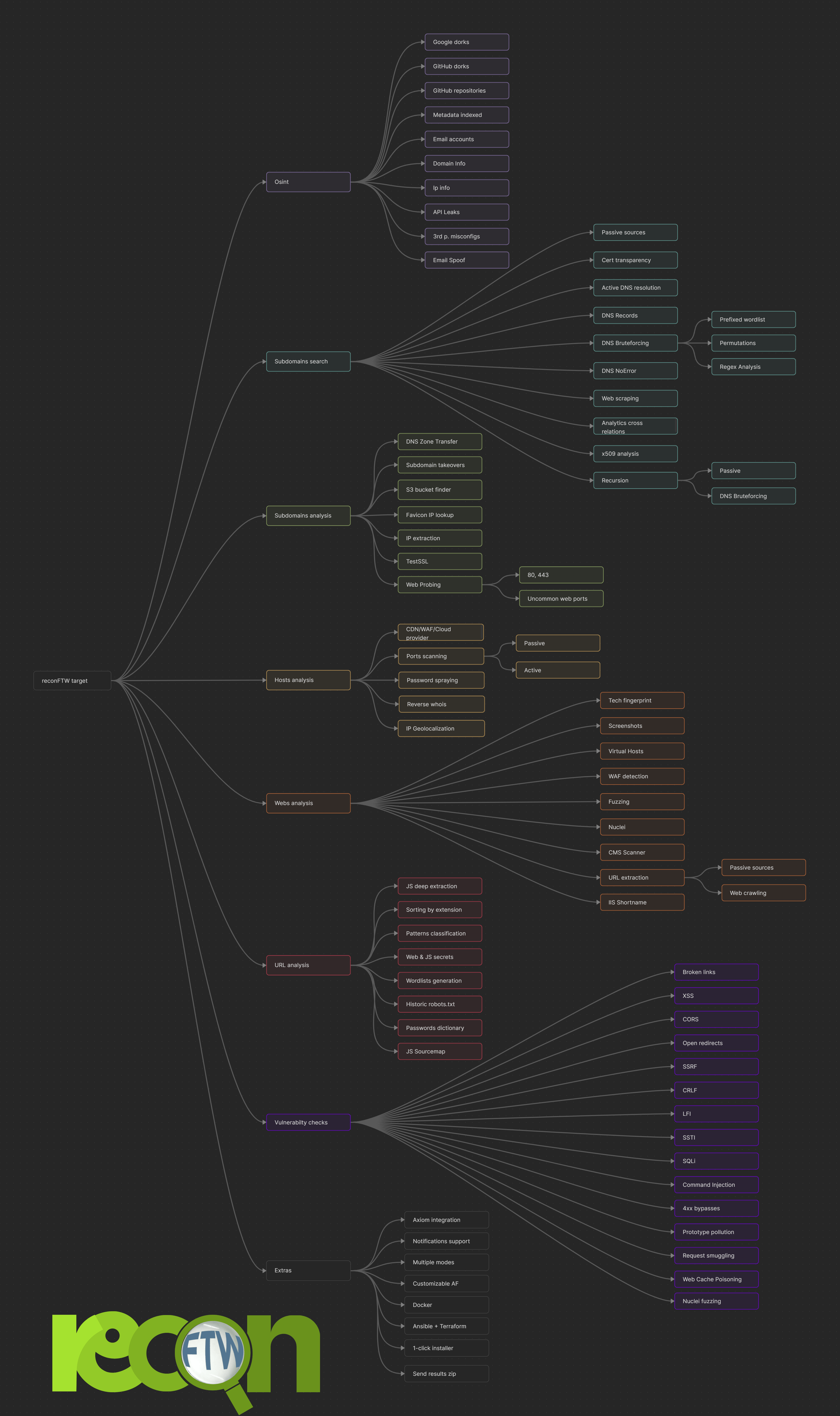
---
## Beispielvideo
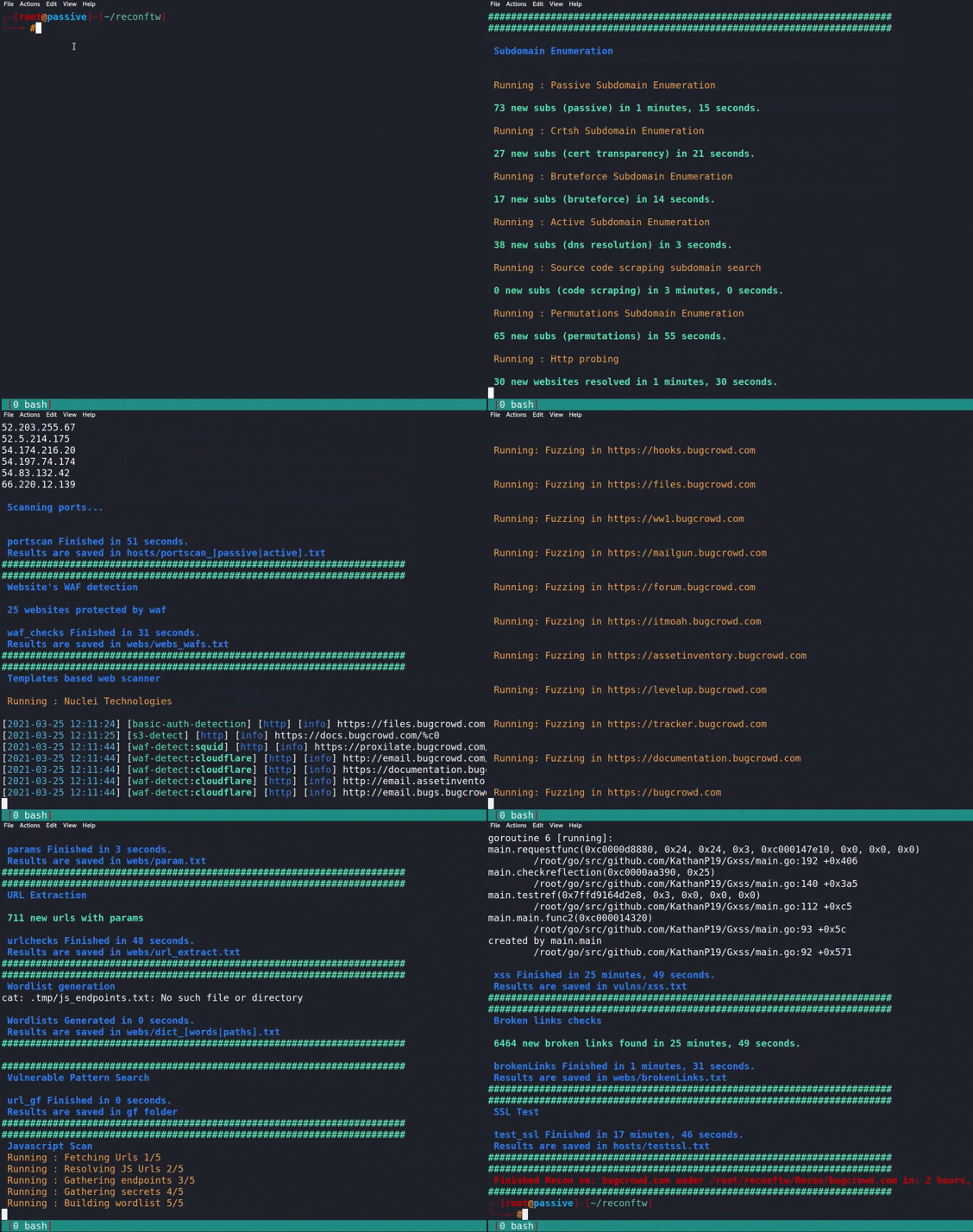
---
## 🤝 So kannst du beitragen
Siehe [CONTRIBUTING.md](https://github.com/six2dez/reconftw/blob/main/CONTRIBUTING.md) für den vollständigen Leitfaden zum Beitragen, einschließlich Entwicklungsumgebung, Codestil, Tests und PR-Prozess.
Schnellzugriffe:
- [Einen Fehler melden](https://github.com/six2dez/reconftw/issues/new/choose)
- [Pull Request einreichen](https://github.com/six2dez/reconftw/tree/dev) (Ziel: `dev`-Branch)
- [Verhaltenskodex](https://github.com/six2dez/reconftw/blob/main/CODE_OF_CONDUCT.md)
---
## 🔒 Sicherheit
Für Sicherheitsrichtlinien, Geheimnisverwaltung und Meldung von Schwachstellen siehe [SECURITY.md](https://github.com/six2dez/reconftw/blob/main/SECURITY.md).
---
## ❓ Brauchst du Hilfe?
- **Wiki**: Erkunde das [reconFTW-Wiki](https://github.com/six2dez/reconftw/wiki).
- **FAQ**: Sieh in die [FAQ](https://github.com/six2dez/reconftw/wiki/7.-FAQs).
- **Community**: Tritt dem [Discord-Server](https://discord.gg/R5DdXVEdTy) oder der [Telegram-Gruppe](https://t.me/joinchat/TO_R8NYFhhbmI5co) bei.
---
## 💖 Unterstütze dieses Projekt
Unterstütze die Entwicklung von reconFTW über:
- **Buy Me a Coffee**: [buymeacoffee.com/six2dez](https://www.buymeacoffee.com/six2dez)
[<img src="https://assets.kitploit.com/production/public/readmes/670/1177bf77de4c288d45b816dd405a8b5027116f0b1893449986cf200c765707ad.webp">](https://www.buymeacoffee.com/six2dez)
- **DigitalOcean-Empfehlung**: [Empfehlungslink](https://www.digitalocean.com/?refcode=f362a6e193a1&utm_campaign=Referral_Invite&utm_medium=Referral_Program&utm_source=badge)
<a href="https://www.digitalocean.com/?refcode=f362a6e193a1&utm_campaign=Referral_Invite&utm_medium=Referral_Program&utm_source=badge"><img src="https://web-platforms.sfo2.cdn.digitaloceanspaces.com/WWW/Badge%201.svg" alt="DigitalOcean Referral Badge" /></a>
- **GitHub-Sponsoring**: [github.com/sponsors/six2dez](https://github.com/sponsors/six2dez)
---
## 🙏 Danksagung
Besonderer Dank gilt den folgenden Diensten für die Unterstützung von reconFTW:
- [C99](https://api.c99.nl/)
- [CIRCL](https://www.circl.lu/)
- [NetworksDB](https://networksdb.io/)
- [ipinfo](https://ipinfo.io/)
- [hackertarget](https://hackertarget.com/)
- [Censys](https://censys.io/)
- [Fofa](https://fofa.info/)
- [intelx](https://intelx.io/)
- [Whoxy](https://www.whoxy.com/)
---
## 📝 Änderungsprotokoll
Siehe [CHANGELOG.md](https://github.com/six2dez/reconftw/blob/main/CHANGELOG.md) für eine detaillierte Liste der Änderungen in jeder Version.
---
## 🛠️ Entwicklung
### Projektstruktur```
reconftw/
├── reconftw.sh # Main entry point (~500 lines)
├── reconftw.cfg # Configuration file
├── modules/ # Phase modules
│ ├── utils.sh # Utilities, sanitization, caching, circuit breaker
│ ├── core.sh # Framework core, logging, lifecycle, health check
│ ├── modes.sh # Scan modes, argument parsing
│ ├── subdomains.sh # Subdomain enumeration
│ ├── web.sh # Web analysis, nuclei scans
│ ├── vulns.sh # Vulnerability scanning
│ ├── osint.sh # OSINT functions
│ └── axiom.sh # Ax/Axiom fleet helpers
├── lib/ # Pure utility libraries
│ └── validation.sh # Input validation functions
├── tests/ # Test suite (100+ tests)
│ ├── unit/ # Unit tests (bats)
│ ├── integration/ # Integration/smoke tests
│ └── security/ # Injection prevention tests
├── docs/ # Documentation
│ └── ARCHITECTURE.md # Detailed architecture guide
└── secrets.cfg.example # Template for API keys
make test # Unit tests make test-security # Security tests make test-all # All tests make lint # Shellcheck make lint-fix # Auto-fix with shfmt
### Entwicklungsworkflow```bash
# 1. Source without executing (for testing)
source ./reconftw.sh --source-only

# 2. Test individual functions
sanitize_domain "test;domain.com"

# 3. Run health check
./reconftw.sh --health-check

# 4. Dry run to preview
./reconftw.sh -d example.com -r --dry-run
Entwicklungsrichtlinien findest du in CONTRIBUTING.md und technische Details in docs/ARCHITECTURE.md.
reconFTW ist unter der MIT-Lizenz lizenziert.
cloudhunter_*-Bucket-Artefakte wurden entfernt; verwenden Sie stattdessen subdomains/cloud_enum_buckets_trufflehog.txt.ws://- und wss://-Endpunkten.assets.jsonl für nachgelagerte Automatisierung an, wenn ASSET_STORE aktiviert ist.report/report.json und report/index.html am Ende des Scans.--health-check (auch von Docker HEALTHCHECK verwendet).--incremental).--adaptive-rate).STRUCTURED_LOGGING).--dry-run).--parallel, deaktivieren mit --no-parallel).secrets.cfg und Docker-Runtime-Secrets (siehe SECURITY.md).