Skip to content
KitploitKITPLOIT
ToolsBlog
Einreichen
ToolsBlog
Einreichen

Hacking-, PenTest- und Cybersicherheits-Tools für Ihr Sicherheitsarsenal!

Kitploit ist ein Verzeichnis von Hacking-, Cybersicherheits- und Pentesting-Tools. Entdecken Sie die neuesten Projekt-Updates, um Schwachstellen zu finden, Systeme zu analysieren, Tests zu automatisieren und Ihre Sicherheit zu stärken.

··Feeds·Kontakt·Datenschutz·© 2026 Kitploit

Tool-Verzeichnis

Kategorien

Alle Kategorien anzeigen
Loading categories
nexmon — Das C-basierte Firmware-Patching-Framework für Broadcom/Cypress-WLAN-Chips, das Monitor-Modus, Frame-Injection und vieles mehr ermöglicht. | Kitploit
Tools/GitHubGitHub/seemoo-lab/nexmon
Embedded-System-SicherheitPaket-Sniffing & AnalyseWi-Fi-PrüfungReverse EngineeringInformationsbeschaffungDrahtlose SicherheitHardware-HackingHardware- & IoT-SicherheitFirmware-Analyse
GitHubseemoo-lab/nexmon

nexmon

Das C-basierte Firmware-Patching-Framework für Broadcom/Cypress-WLAN-Chips, das Monitor-Modus, Frame-Injection und vieles mehr ermöglicht.

2.9k505vor 1 MonatVon Kitploit geprüft

Beliebteste

Alle anzeigen →

Entdecken Sie die meistgenutzten Tools unserer Community.

Alle Tools erkunden

Durchsuchen Sie unsere Tool-Sammlung

Alle Tools anzeigen →
Teilen
Repository anzeigen

NexMon logo

Was ist nexmon?

Nexmon ist unser auf C basierendes Firmware-Patching-Framework für Broadcom/Cypress-WLAN-Chips, mit dem du deine eigenen Firmware-Patches schreiben kannst, zum Beispiel um den Monitor-Modus mit Radiotap-Headern und Frame-Injection zu aktivieren.

Im Folgenden findest du eine Übersicht darüber, was mit nexmon möglich ist. Dieses Repository konzentriert sich hauptsächlich darauf, den Monitor-Modus und die Frame-Injection auf vielen Chips zu ermöglichen. Wenn du zusätzliche Funktionen wünschst, könnten die folgenden Projekte für dich interessant sein:
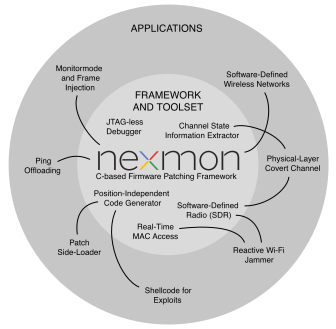
  • http://nexmon.org/jammer: Ein echter WLAN-Störsender, der es ermöglicht, laufende Frame-Übertragungen mit einem beliebigen Störsignal zu überlagern.
    • Er nutzt den WLAN-Chip als Software-defined Radio zur Erzeugung von Störsignalen
    • Er ermöglicht die Nutzung nicht standardkonformer Kanäle wie z. B. 80 MHz Bandbreite in den 2,4-GHz-Bändern
    • Er ermöglicht das Festlegen beliebiger Sendeleistungen
    • Er ermöglicht das Patchen der Echtzeit-MAC-Implementierung des D11-Kerns
  • http://nexmon.org/csi: Extraktor für Kanalzustandsinformationen (Channel State Information) für verschiedene WLAN-Chips
    • Er ermöglicht die Extraktion von CSI von bis zu 4x4-MIMO-Übertragungen bei 80 MHz Bandbreite
  • http://nexmon.org/debugger: Debugging von ARM-Mikrocontrollern ohne JTAG-Zugriff
    • Er ermöglicht Low-Level-Zugriff auf Debug-Register, um Breakpoints und Watchpoints zu setzen, und erlaubt Einzelschritt-Ausführung (Single Stepping)
  • http://nexmon.org/covert_channel: Verdeckter Kanal (Covert Channel), der Informationen in WLAN-Signalen verbirgt
    • Fortgeschrittenere Software-defined-Radio-Fähigkeiten als der Jammer
    • Beispielanwendung für die Extraktion von Kanalzustandsinformationen
  • http://nexmon.org/sdr: Nutze deinen WLAN-Chip als Software-defined Radio
    • Derzeit funktionieren nur Übertragungen in den 2,4- und 5-GHz-WLAN-Bändern

NexMon logo

WARNUNG

Unsere Software kann deine Hardware beschädigen und zum Verlust deines Hardware-Garantieanspruchs führen! Du nutzt unsere Tools auf eigenes Risiko und in eigener Verantwortung! Wenn dir diese Bedingungen nicht gefallen, verwende nexmon nicht!

Unterstützte Geräte

Die folgenden Geräte werden derzeit von unserem Nexmon-Firmware-Patch unterstützt.

1 bcm43430a1 wurde in der Vergangenheit fälschlicherweise als bcm43438 bezeichnet.

2 Verwende LD_PRELOAD=libnexmon.so anstelle von LD_PRELOAD=libfakeioctl.so, um Frames über ioctls zu injizieren.

3 Flash-Patches müssen 8 Bytes lang und an einer 8-Byte-Grenze ausgerichtet sein.

4 802.11ad-WLAN-Chip aus dem ersten 60-GHz-WLAN-Router Talon AD7200. Patche deine Firmware mit nexmon-arc und führe sie mit unserem benutzerdefinierten LEDE-Image lede-ad7200 aus.


5 Die Ausführungsschutzfunktion (Execute Never) in Region 1 wurde deaktiviert, da sie den nexmon-Code stört (Permission Fault on Section).

6 Um nexutil zu verwenden, musst du SELinux deaktivieren oder auf permissive setzen.

7 Siehe pico-nexmon für Beispielanwendungen, die das Pico SDK mit nexmon verwenden.

8 Flash-Patches müssen 16 Bytes lang und an einer 16-Byte-Grenze ausgerichtet sein.

9 Verwendet das Magisk-Modul, um Firmware und nexutil zu installieren und SELinux-Richtlinien festzulegen.

Legende

  • M = Monitor-Modus
  • RT = Monitor-Modus mit RadioTap-Headern
  • I = Frame-Injection
  • FP = Flash-Patching
  • UC = Ucode-Kompression
  • CT = c't-Artikelunterstützung (für konsistenten Support verwende unseren ct-artikel-Zweig)

Schritte zum Erstellen eigener Firmware-Patches

Patches für bcm4330, bcm4339 und bcm4358 mit einem x86-Computer unter Linux erstellen (z. B. Ubuntu 16.04)

  • Installiere einige Abhängigkeiten: sudo apt-get install git gawk qpdf adb flex bison
  • Nur für x86_64-Systeme erforderlich: Installiere die i386-Bibliotheken: ``` sudo dpkg --add-architecture i386 sudo apt-get update sudo apt-get install libc6:i386 libncurses5:i386 libstdc++6:i386
    root@kitploit:~
  • Klone unser Repository: git clone https://github.com/seemoo-lab/nexmon.git
  • Wechsle in das Wurzelverzeichnis des Repositorys: cd nexmon
    • Richte die Build-Umgebung ein: source setup_env.sh
    • Kompiliere einige Build-Tools und extrahiere die ucode- und Flashpatches aus den ursprünglichen Firmware-Dateien: make
  • Gehe in den patches-Ordner deines Zielgeräts (z. B. bcm4339 für das Nexus 5): cd patches/bcm4339/6_37_34_43/nexmon/
    • Kompiliere eine gepatchte Firmware: make
    • Erstelle ein Backup deiner ursprünglichen Firmware-Datei: make backup-firmware
    • Installiere die gepatchte Firmware auf deinem Smartphone: make install-firmware (stelle sicher, dass dein Smartphone zuvor mit deinem Rechner verbunden ist)

Verwenden des Monitor-Mode-Patches

  • Installiere mindestens nexutil und libfakeioctl aus unseren Hilfsprogrammen. Am einfachsten geht das mit dieser App: https://nexmon.org/app. Du kannst es aber auch aus dem Quellcode erstellen, indem du make im Ordner utilties ausführst (Hinweis: Du benötigst dafür das ordnungsgemäß installierte Android NDK).
  • Verbinde dich über die ADB-Werkzeuge mit deinem Android-Smartphone: adb shell
  • Stelle sicher, dass du nicht mit einem Zugangspunkt verbunden bist
  • Verwende nexutil, um den Monitor-Modus zu aktivieren: nexutil -m2
  • Ab diesem Punkt ist der Monitor-Modus aktiv. Es ist nicht nötig, airmon-ng aufzurufen.
  • Wichtig: Die meisten Werkzeuge benötigen ein Radiotap-Interface, um ordnungsgemäß zu funktionieren. libfakeioctl emuliert diesen Interface-Typ für dich. Verwende daher LD_PRELOAD, um diese Bibliothek zu laden, wenn du das gewünschte Werkzeug (z. B. tcpdump oder airodump-ng) aufrufst: LD_PRELOAD=libfakeioctl.so tcpdump -i wlan0
  • Ungetesteter Hinweis: Dank XDA-Mitglied ruleh gibt es einen bcmdhd-Treiberpatch, um den nativen Monitor-Modus zu aktivieren, siehe: https://github.com/ruleh/misc/tree/master/monitor

Verwenden von nexutil über UDP auf dem Nexus 5

Um ohne Root-Rechte mit der Firmware kommunizieren zu können, haben wir ein UDP-Interface erstellt, das über libnexio zugänglich ist und auch von nexutil verwendet wird. Zuerst musst du der Firmware durch Setzen eines Security-Cookies beweisen, dass du grundsätzlich Root-Rechte besitzt. Danach kannst du es für UDP-basierte Verbindungen verwenden. Dein wlan0-Interface benötigt außerdem eine IP-Adresse im Bereich 192.168.222.0/24, oder du musst die Standardeinstellung broadcast-ip von nexutil ändern:

  • Setze die IP-Adresse des wlan0-Interfaces: ifconfig wlan0 192.168.222.1 netmask 255.255.255.0
  • Setze den Security-Cookie als Root: nexutil -x<cookie (uint)>
  • Starte zum Beispiel eine UDP-Verbindung, um den Monitor-Modus zu aktivieren: nexutil -X<cookie> -m1

Erstelle Patches für bcm43430a1 auf dem RPI3/Zero W oder bcm434355c0 auf dem RPI3+/RPI4 oder bcm43436b0 auf dem RPI Zero 2W mit Raspbian/Raspberry Pi OS (empfohlen)

Hinweis: Wir unterstützen derzeit die Kernel-Versionen 4.4 (veraltet), 4.9, 4.14, 4.19, 5.4, 5.10 und 5.15. Raspbian enthält die Firmware-Version 7.45.154 für die bcm43455c0. Wir unterstützen außerdem das neuere Firmware-Release 7.45.189 von Cypress. Raspberry Pi OS enthält die Firmware-Version 7.45.206. Bitte probiere aus, was für dich am besten funktioniert.

  • Stelle sicher, dass die folgenden Befehle als Root ausgeführt werden: sudo su

  • Aktualisiere deine Raspbian-Installation: apt-get update && apt-get upgrade

  • Installiere die Kernel-Header, um den Treiber zu bauen, sowie einige Abhängigkeiten: sudo apt install raspberrypi-kernel-headers git libgmp3-dev gawk qpdf bison flex make autoconf libtool texinfo

  • Klone unser Repository: git clone https://github.com/seemoo-lab/nexmon.git

  • Wechsle in das Wurzelverzeichnis unseres Repositorys: cd nexmon

  • Auf 32-Bit-Raspbian/Raspberry-Pi-OS

    • Prüfe, ob /usr/lib/arm-linux-gnueabihf/libisl.so.10 existiert; wenn nicht, kompiliere es aus dem Quellcode:
    • cd buildtools/isl-0.10, ./configure, make, ,

Verwenden des Monitor-Mode-Patches

  • Dank der Vorarbeit von Mame82 kannst du ein neues Monitor-Mode-Interface einrichten, indem du Folgendes ausführst:iw phy `iw dev wlan0 info | gawk '/wiphy/ {printf "phy" $2}'` interface add mon0 type monitor
  • To activate monitor mode in the firmware, simply set the interface up: ifconfig mon0 up.
  • At this point, monitor mode is active. There is no need to call airmon-ng.
  • The interface already set the Radiotap header, therefore, tools like tcpdump or airodump-ng can be used out of the box: tcpdump -i mon0
  • Optional: To make the RPI3 load the modified driver after reboot:
    • Find the path of the default driver at reboot: modinfo brcmfmac #the first line should be the full path
    • Backup the original driver: mv "<PATH TO THE DRIVER>/brcmfmac.ko" "<PATH TO THE DRIVER>/brcmfmac.ko.orig"
    • Copy the modified driver (Kernel 4.9): cp /home/pi/nexmon/patches/bcm43430a1/7_45_41_46/nexmon/brcmfmac_kernel49/brcmfmac.ko "<PATH TO THE DRIVER>/"
    • Copy the modified driver (Kernel 4.14): cp /home/pi/nexmon/patches/bcm43430a1/7_45_41_46/nexmon/brcmfmac_4.14.y-nexmon/brcmfmac.ko "<PATH TO THE DRIVER>/"
    • Probe all modules and generate new dependency:

How to build the utilities

To build the utilities such as nexmon or dhdutil for Android, you need to download the old NDK version 11c, extract it and export the environment variable NDK_ROOT pointing to the directory where you extracted the NDK files.

How to extract the ROM

The Wi-Fi firmware consists of a read-only part stored in the ROM of every Wi-Fi chip and another part that is loaded by the driver into the RAM. To analyze the whole firmware, one needs to extract the ROM. There are two options to do this. Either you write a firmware patch that simply copies the contents of the ROM to RAM and then you dump the RAM, or you directly dump the ROM after loading the regular firmware into the RAM. Even though, the second option is easier, it only works, if the ROM can be directly accessed by the driver, which is not always the case. Additionally, the firmware loaded into RAM can contain ROM patches that overlay the data stored in ROM. By dumping the ROM after loading the original RAM firmware, it contains flash patches. Hence, the ROM needs to be dumped again for every RAM firmware update to be consistent. As a conclusion, we prefer to dump the clean ROM after copying it to RAM.

Dumping the ROM directly

To dump the ROM directly, you need to know, where to find it and how large it is. On chips with Cortex-M3 it is usually at upper addresses such as 0x800000, while on chips with Cortex-R4 it is likely at 0x0. Run dhdutil to perform the dump:

root@kitploit:~
dhdutil membytes -r 0x0 0xA0000 > rom.bin```

## Dumping a clean ROM after copying to RAM
For the BCM4339 and BCM4358, we created `rom_extraction` projects that load a firmware patch that copies ROM to 
RAM and them dumps it using dhdutil. To dump the ROM simply execute the following in the project directory:

make dump-rom```

After ROM extraction, the rom.bin file will be copies to the corresponding firmwares subdirectory. To apply the flash patches of a specific RAM firmware version, enter its directory and execute:

root@kitploit:~
make rom.bin```


# Structure of this repository
* `buildtools`: Contains compilers and other tools to build the firmware
* `firmwares`
  * `<chip version>`
    * `<firmware version>`
      * `<firmware file>`: The original firmware that will be loaded into the RAM of the WiFi Chip
      * `definitions.mk`: Contains mainly firmware specific addresses
      * `structs.h`: Structures only valid for this firmware version
      * `Makefile`: Used to extract flashpatches and ucode
      * `flashpatches.c` (generated by Makefile): Contains flashpatches
      * `ucode.bin` (extracted by Makefile): Contains uncompressed Ucode
    * `structs.common.h`: Structures that are common between firmware versions
* `patches`
  * `<chip version>`
    * `<firmware version>`
      * `nexmon`
        * `Makefile`: Used to build the firmware
        * `patch.ld`: Linker file
        * `src`
          * `patch.c`: General patches to the firmware
          * `injection.c`: Code related to frame injection
          * `monitormode.c`: Code related to monitor mode with radiotap headers
          * `ioctl.c`: Handling of custom IOCTLs
          * ...
        * `obj` (generated by Makefile): Object files created from C files
        * `log` (generated by Makefile): Logs written during compilation
        * `gen` (generated by Makefile): Files generated during the build process
          * `nexmon.pre` (generated by gcc plugin): Extracted at-attributes and targetregion-pragmas
          * `nexmon.ld` (generated from nexmon.pre): Linker file use to place patch code at defined addresses in the firmware
          * `nexmon.mk` (generated from nexmon.pre): Make file used take code from patch.elf and place it into firmware
          * `flashpatches.ld` (generated from nexmon.pre): Linker file that places flashpatches at target locations in firmware ROM
          * `flashpatches.mk` (generated from nexmon.pre): Make file used to insert flashpatch config and data structures into firmware
          * `patch.elf` (generated from object files and linker scripts): contains the newly compiled code placed at predefined addresses
    * `common`
      * `wrapper.c`: Wrappers for functions that already exist in the firmware
      * `ucode_compression.c`: [tinflate](http://achurch.org/tinflate.c) based ucode decompression
      * `radiotap.c`: RadioTap header parser
      * `helper.c`: Helpful utility functions
    * `driver`: Patched brcmfmac driver
    * `include`: Common include files
      * `firmware_version.h`: Definitions of chip and firmware versions
      * `patcher.h`: Macros use to perform patching for existing firmware code (e.g., BPatch patches a branch instruction)
      * `capabilities.h`: Allows to indicate capabilities (such as, monitor mode and frame injection)
      * `nexioctl.h`: Defines custom IOCTL numbers

# Related projects
* [bcmon](https://bcmon.blogspot.de/): Monitor Mode and Frame Injection for the bcm4329 and bcm4330
* [monmob](https://github.com/tuter/monmob): Monitor Mode and Frame Injection for the bcm4325, bcm4329 and bcm4330
* [P4wnP1](https://github.com/mame82/P4wnP1): Highly customizable attack platform, based on Raspberry Pi Zero W and Nexmon
* [kali Nethunter OS](https://github.com/nethunteros): ROM that brings Kali Linux to smartphones with Nexmon support
* [dustcloud-nexmon](https://github.com/dgiese/dustcloud-nexmon): Nexmon for Xiaomi IoT devices (ARM based)
* [InternalBlue](https://github.com/seemoo-lab/internalblue): Bluetooth experimentation framework based on Reverse Engineering of Broadcom Bluetooth Controllers

# Interesting articles on firmware hacks
If you know more projects that use nexmon or perform similar firmware hacks, let us know and we will add a link.

* [Project Zero](https://googleprojectzero.blogspot.de/2017/09/over-air-vol-2-pt-1-exploiting-wi-fi.html): Over The Air - Vol. 2, Pt. 1: Exploiting The Wi-Fi Stack on Apple Devices
* [broadpwn](https://blog.exodusintel.com/2017/07/26/broadpwn/): Remotely Compromising Android and IOS via a Bug in Broadcom's Wi-Fi Chipsets
* [Project Zero](https://googleprojectzero.blogspot.de/2017/04/over-air-exploiting-broadcoms-wi-fi_4.html): Over The Air: Exploiting Broadcom's Wi-Fi Stack (Part 1)
* [Project Zero](https://googleprojectzero.blogspot.de/2017/04/over-air-exploiting-broadcoms-wi-fi_11.html): Over The Air: Exploiting Broadcom's Wi-Fi Stack (Part 2) 

# Read my PhD thesis
* Matthias Schulz. [**Teaching Your Wireless Card New Tricks: Smartphone Performance and Security Enhancements through Wi-Fi Firmware Modifications**](http://tuprints.ulb.tu-darmstadt.de/7243/). Dr.-Ing. thesis, Technische Universität Darmstadt, Germany, February 2018. [pdf](http://tuprints.ulb.tu-darmstadt.de/7243/7/dissertation_2018_matthias_thomas_schulz.pdf)

# Read our papers
* F. Gringoli, M. Schulz, J. Link, and M. Hollick. [**Free Your CSI: A Channel State Information Extraction Platform For Modern Wi-Fi Chipsets**](https://doi.org/10.1145/3349623.3355477). Accepted to appear in *Proceedings of the 13th Workshop on Wireless Network Testbeds, Experimental evaluation & CHaracterization (WiNTECH 2019)*, October 2019. [code](https://nexmon.org/csi)
* D. Mantz, J. Classen, M. Schulz, and M. Hollick. [**InternalBlue - Bluetooth Binary Patching and Experimentation Framework**](https://dl.acm.org/citation.cfm?id=3326089). *In Proceedings of the 17th Annual International Conference on Mobile Systems, Applications, and Services (MobiSys '19)*. June 2019.
* M. Schuß, C. A. Boano, M. Weber, M. Schulz, M. Hollick, K. Römer. [**JamLab-NG: Benchmarking Low-Power Wireless Protocols under Controlable and Repeatable Wi-Fi Interference**](https://dl.acm.org/citation.cfm?id=3324331). *Proceedings of the 2019 International Conference on Embedded Wireless Systems and Networks (EWSN 2019)*, February 2019.
* M. Schulz, D. Wegemer, and M. Hollick. [**The Nexmon Firmware Analysis and Modification Framework: Empowering Researchers to Enhance Wi-Fi Devices**](https://doi.org/10.1016/j.comcom.2018.05.015). *Elsevier Computer Communications (COMCOM) Journal*. 2018.
* M. Schulz, J. Link, F. Gringoli, and M. Hollick. [**Shadow Wi-Fi: Teaching Smart- phones to Transmit Raw Signals and to Extract Channel State Information to Implement Practical Covert Channels over Wi-Fi**](https://dl.acm.org/citation.cfm?id=3210333). Accepted to appear in *Proceedings of the 16th ACM International Conference on Mobile Systems, Applications, and Services*, MobiSys 2018, June 2018.
* D. Steinmetzer, D. Wegemer, M. Schulz, J. Widmer, M. Hollick. [**Compressive Millimeter-Wave Sector Selection in Off-the-Shelf IEEE 802.11ad Devices**](https://dl.acm.org/citation.cfm?id=3143384). *Proceedings of the 13th International Conference on emerging Networking EXperiments and Technologies*, CoNEXT 2017, December 2017.
* M. Schulz, D. Wegemer, M. Hollick. [**Nexmon: Build Your Own Wi-Fi Testbeds With Low-Level MAC and PHY-Access Using Firmware Patches on Off-the-Shelf Mobile Devices**](https://dl.acm.org/citation.cfm?id=3131476). *Proceedings of the 11th ACM International Workshop on Wireless Network Testbeds, Experimental Evaluation & Characterization (WiNTECH 2017)*, October 2017. [pdf](https://www.seemoo.tu-darmstadt.de/mschulz/wintech2017) [video](https://youtu.be/m5Zrk4n4hoE)
* M. Schulz, F. Knapp, E. Deligeorgopoulos, D. Wegemer, F. Gringoli, M. Hollick. [**DEMO: Nexmon in Action: Advanced Applications Powered by the Nexmon Firmware Patching Framework**](https://dl.acm.org/citation.cfm?id=3133333), Accepted for publication in *Proceedings of the 11th ACM International Workshop on Wireless Network Testbeds, Experimental Evaluation & Characterization (WiNTECH 2017)*, October 2017. [pdf](https://www.seemoo.tu-darmstadt.de/mschulz/wintech2017demo)
* M. Schulz, F. Gringoli, D. Steinmetzer, M. Koch and M. Hollick. [**Massive Reactive Smartphone-Based Jamming using Arbitrary Waveforms and Adaptive Power Control**](https://dl.acm.org/citation.cfm?id=3098253). Proceedings of the *10th ACM Conference on Security and Privacy in Wireless and Mobile Networks (WiSec 2017)*, July 2017. [pdf](https://www.seemoo.tu-darmstadt.de/mschulz/wisec2017) [video](https://youtu.be/S2XPBK0KdiQ)
* M. Schulz, E. Deligeorgopoulos, M. Hollick and F. Gringoli. [**DEMO: Demonstrating Reactive Smartphone-Based Jamming**](https://dl.acm.org/citation.cfm?id=3106022). Proceedings of the *10th ACM Conference on Security and Privacy in Wireless and Mobile Networks (WiSec 2017)*, July 2017. [pdf](https://www.seemoo.tu-darmstadt.de/mschulz/wisec2017demo)
* M. Schulz. [**Nexmon - Wie man die eigene WLAN-Firmware hackt**](http://heise.de/-3538660), 
c't 26/2016, S. 168, Heise Verlag, 2016.
* M. Schulz, D. Wegemer, M. Hollick. [**DEMO: Using NexMon, the C-based WiFi 
firmware modification framework**](https://dl.acm.org/citation.cfm?id=2942419), 
Proceedings of the *9th ACM Conference on Security and Privacy in Wireless and 
Mobile Networks (WiSec 2016)*, July 2016. [pdf](https://www.seemoo.tu-darmstadt.de/mschulz/wisec2016demo1)
* M. Schulz, D. Wegemer and M. Hollick. [**NexMon: A Cookbook for Firmware 
Modifications on Smartphones to Enable Monitor Mode**](http://arxiv.org/abs/1601.07077), 
CoRR, vol. abs/1601.07077, December 2015. 
[bibtex](http://dblp.uni-trier.de/rec/bibtex/journals/corr/SchulzWH16)

[Get references as bibtex file](https://nexmon.org/bib)

# Reference our project
Any use of this project which results in an academic publication or other publication which includes a bibliography should include a citation to the Nexmon project and probably one of our papers depending on the code you use. Find all references in our [bibtex file](https://github.com/seemoo-lab/nexmon/blob/HEAD/nexmon.bib). Here is the reference for the project only:

@electronic{nexmon:project, author = {Schulz, Matthias and Wegemer, Daniel and Hollick, Matthias}, title = {Nexmon: Das C-basierte Firmware-Patching-Framework}, url = {https://nexmon.org}, year = {2017} }```

Contact

  • Matthias Schulz [email protected]
  • Daniel Wegemer [email protected]

Powered By

Secure Mobile Networking Lab (SEEMOO)

SEEMOO logo

Networked Infrastructureless Cooperation for Emergency Response (NICER)

NICER logo

Multi-Mechanisms Adaptation for the Future Internet (MAKI)

MAKI logo

Technische Universität Darmstadt

TU Darmstadt logo

Tool herunterladen
WLAN-ChipFirmware VersionVerwendet inBetriebssystemMRTIFPUCCT
bcm43305_90_100_41_staSamsung Galaxy S2Cyanogenmod 13.0XXXXO
bcm4335b06.30.171.1_staSamsung Galaxy S4LineageOS 14.1XXXXO
bcm43396_37_34_43Nexus 5Android 6 StockXXXXXO
bcm43430a117_45_41_26Raspberry Pi 3 and Zero WRaspbian 8XXXXXO
bcm43430a117_45_41_46Raspberry Pi 3 and Zero WRaspbian StretchXXXXXO
bcm43439a077_95_49 (2271bb6 CY)Raspberry Pi Pico WPico SDKXXXX
bcm43451b17_63_43_0iPhone 6iOS 10.1.1 (14B100)XX
bcm434557_45_77_0_hwHuawei P9Android 7 StockXXXXX
bcm434557_120_5_1_sta_C0Galaxy J7 2017?XX
bcm434557_45_77_0_hw(8-2017)Huawei P9Android 7 StockXXXXX
bcm4345557_46_77_11_hwHuawei P9Android 8 China StockXXXXX
bcm434557_45_59_16Sony Xperia Z5 CompactLineageOS 14.1XXXXX
bcm43455c07_45_154Raspberry Pi B3+/B4Raspbian Kernel 4.9/14/19XXXX
bcm43455c07_45_189Raspberry Pi B3+/B4Raspbian Kernel 4.14/19, 5.4XXXX
bcm43455c07_45_206Raspberry Pi B3+/B4Raspberry Pi OS Kernel 5.4XXXXX
bcm43455c07_45_234 (4ca95bb CY)Raspberry Pi B3+/B4/5Raspberry Pi OSXX
bcm43436b039_88_4_65Raspberry Pi Zero 2 WRaspberry Pi OS Kernel 5.10XXXXX
bcm43567_35_101_5_staNexus 6Android 7.1.2XXXXO
bcm43587_112_200_17_staNexus 6PAndroid 7 StockXXXXO
bcm43587_112_201_3_staNexus 6PAndroid 7.1.2 StockXXXXO
bcm435827_112_300_14_staNexus 6PAndroid 8.0.0 StockXXXXXO
bcm43596a039_75_155_45_sta_c0Samsung Galaxy S7Android 7 StockXOX
bcm43596a03,29_96_4_sta_c0Samsung Galaxy S7LineageOS 14.1XXXOX
bcm4375b13,5,618_38_18_staSamsung Galaxy S10Rooted + disabled SELinuxXXXOX
bcm4375b13,5,618_41_8_9_staSamsung Galaxy S20Rooted + disabled SELinuxXXXOX
bcm4389c15,8,920_82_42_sta (r994653)Samsung Galaxy S22 PlusAndroid 14, Rooted with MagiskXX
bcm4389c15,8,920_101_36_2 (r994653)Google Pixel 7 and 7 ProRooted with MagiskXX
bcm4389c15,8,920_101_57 (r1035009)Google Pixel 7 and 7 ProRooted with MagiskXX
bcm4398d05,8,924_671_6_9 (r1031525)Google Pixel 8Rooted with MagiskXX
bcm6715b0517_10_188_6401 (r808804)Asus RT-AX86U ProStock firmware 3.0.0.4_388.23565/X
qca950044-1-0_55TP-Link Talon AD7200Custom LEDE Image
make install
ln -s /usr/local/lib/libisl.so /usr/lib/arm-linux-gnueabihf/libisl.so.10
  • Prüfe, ob /usr/lib/arm-linux-gnueabihf/libmpfr.so.4 existiert; wenn nicht, kompiliere es aus dem Quellcode:
  • cd buildtools/mpfr-3.1.4, autoreconf -f -i, ./configure, make, make install, ln -s /usr/local/lib/libmpfr.so /usr/lib/arm-linux-gnueabihf/libmpfr.so.4
  • Auf 64-Bit-Raspberry-Pi-OS

    • sudo dpkg --add-architecture armhf
    • sudo apt-get update
    • sudo apt-get install libc6:armhf libisl23:armhf libmpfr6:armhf libmpc3:armhf libstdc++6:armhf
    • sudo ln -s /usr/lib/arm-linux-gnueabihf/libisl.so.23.0.0 /usr/lib/arm-linux-gnueabihf/libisl.so.10
    • sudo ln -s /usr/lib/arm-linux-gnueabihf/libmpfr.so.6.1.0 /usr/lib/arm-linux-gnueabihf/libmpfr.so.4
  • Danach kannst du die Build-Umgebung zum Kompilieren von Firmware-Patches einrichten

    • Richte die Build-Umgebung ein: source setup_env.sh
    • Kompiliere einige Build-Tools und extrahiere die ucode- und Flashpatches aus den ursprünglichen Firmware-Dateien: make
  • Gehe in den patches-Ordner für den bcm43430a1/bcm43455c0/bcm43436b0-Chipsatz: cd patches/bcm43430a1/7_45_41_46/nexmon/ / patches/bcm43455c0/<7_45_154 or 7_45_189>/nexmon/ / cd patches/bcm43436b0/9_88_4_65/nexmon/

    • Kompiliere eine gepatchte Firmware: make
    • Erstelle ein Backup deiner ursprünglichen Firmware-Datei: make backup-firmware
    • Installiere die gepatchte Firmware auf deinem RPI3: make install-firmware
  • Installiere nexutil: Wechsle vom Wurzelverzeichnis unseres Repositorys in den nexutil-Ordner: cd utilities/nexutil/. Kompiliere und installiere nexutil: make && make install.

  • Optional: Entferne wpa_supplicant für eine bessere Kontrolle über die WiFi-Schnittstelle: apt-get remove wpasupplicant
    Außerdem kann das Deaktivieren der Energiesparfunktionen (iw dev wlan0 set power_save off) helfen, Firmware-Abstürze zu verhindern.

  • Hinweis: Um dich mit normalen Zugangspunkten zu verbinden, musst du zuerst nexutil -m0 ausführen

  • depmod -a
  • The new driver should be loaded by default after reboot: reboot  * Note: It is possible to connect to an access point or run your own access point in parallel to the monitor mode interface on the wlan0 interface.