
Fortschrittlicher SQL-Injection-Scanner mit KI-gestützter Analyse, ethischem Compliance-Rahmenwerk und professioneller Berichterstattung.
Produktionsreifer SQL-Injection-Scanner mit 6 Erkennungsmethoden, KI-gestützter Behebung, SARIF-Ausgabe und CI/CD-Integration.
Schnellstart · Dokumentation · Docker · KI-Analyse · Star auf GitHub
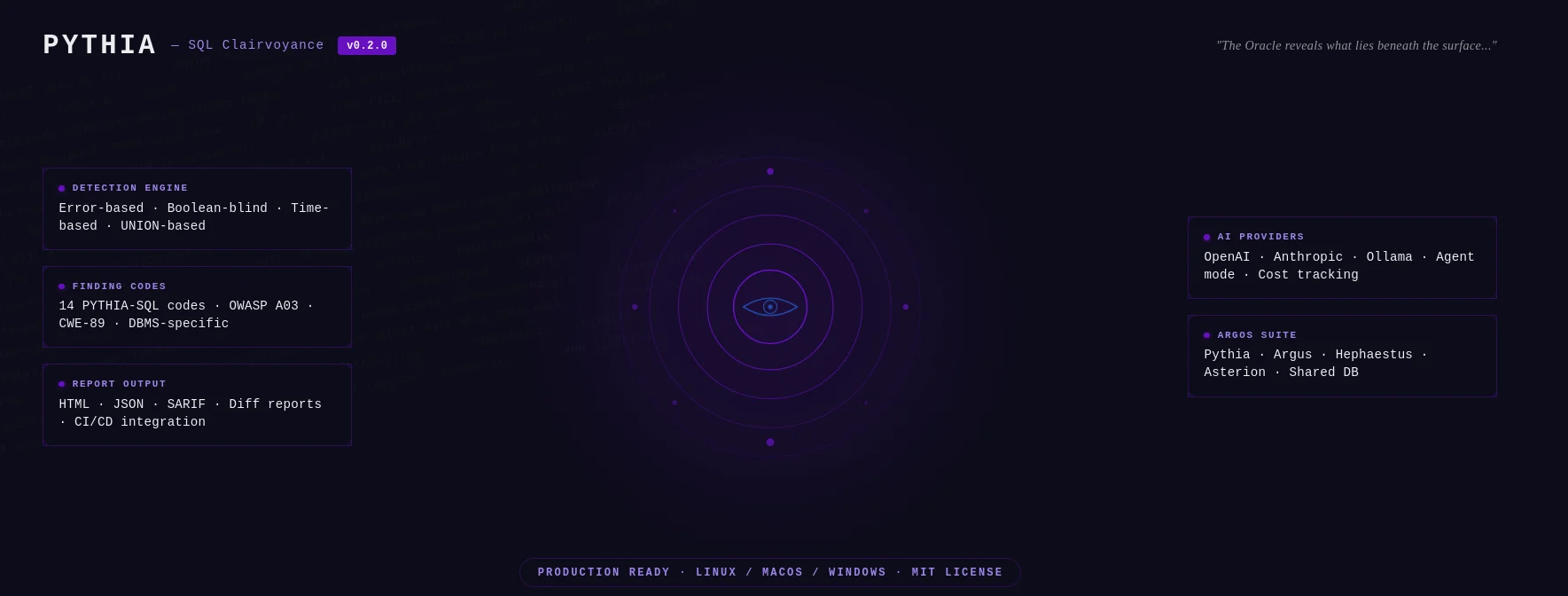
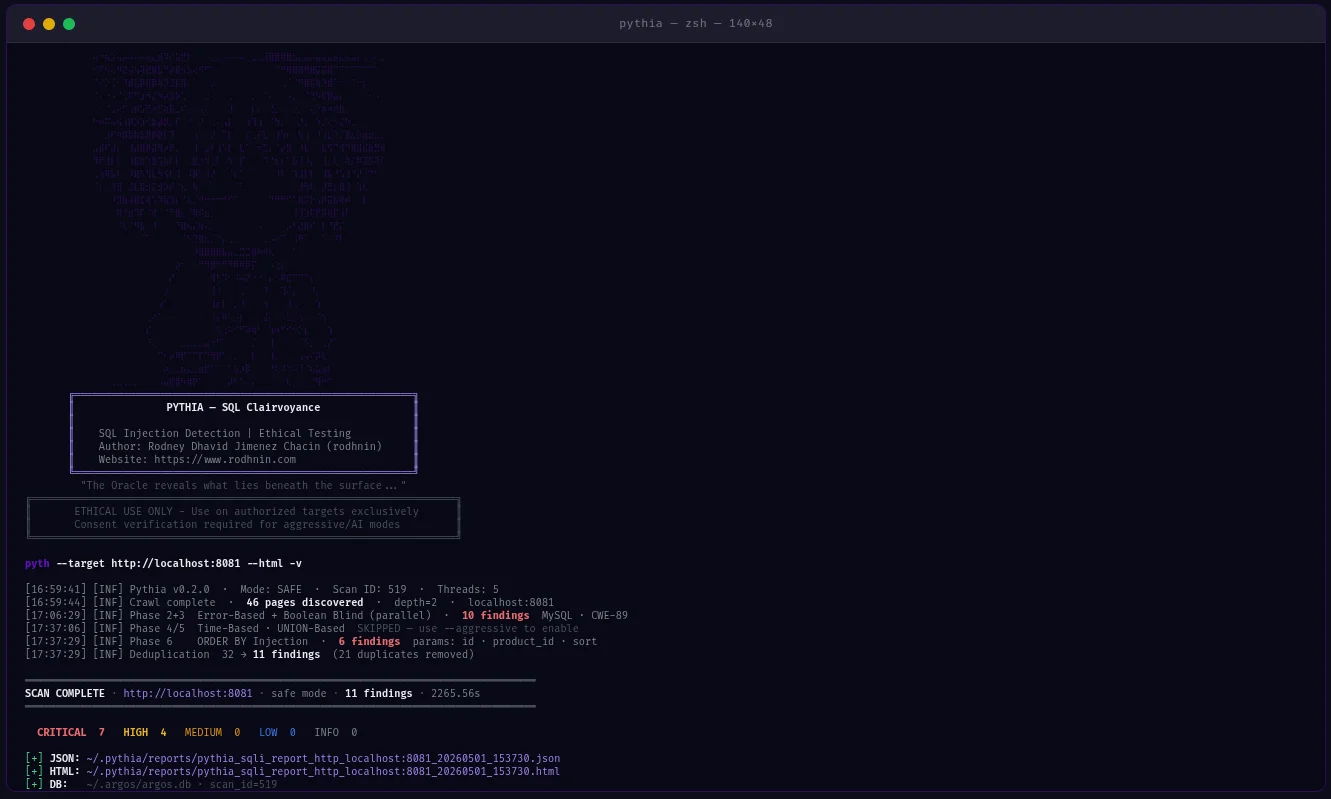
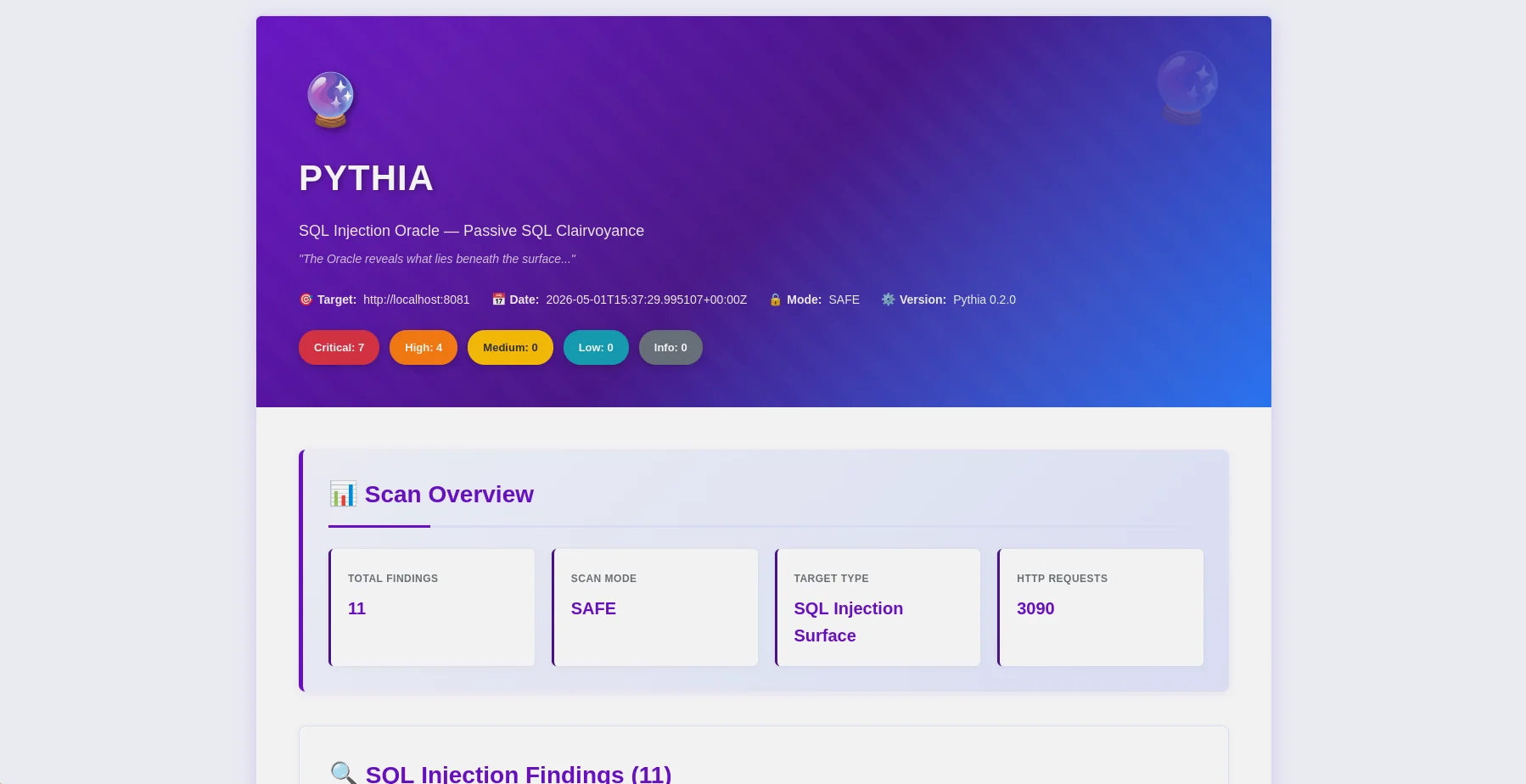
HTML-Bericht — Fundübersicht mit Schweregrad-Badges und OWASP-Zuordnung |
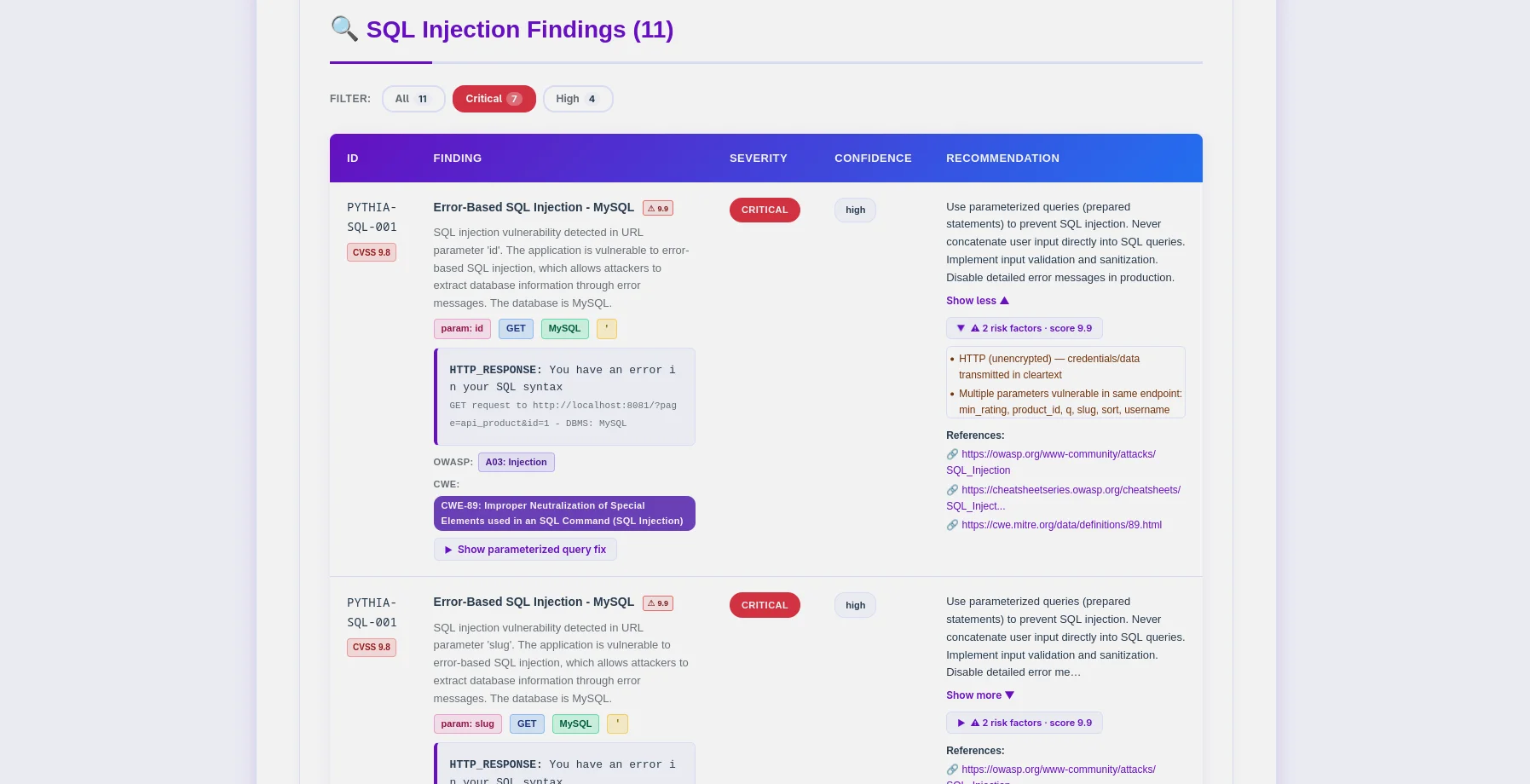
Fundtabelle — PYTHIA-SQL-Codes, DBMS-Erkennung, CWE-89-Zuordnung |
Pythia ist ein produktionsreifer SQL-Injection-Erkennungsscanner, der Ethik an erste Stelle setzt. Entwickelt für Penetrationstester, Sicherheitsforscher und DevSecOps-Ingenieure, erkennt er SQL-Injection-Schwachstellen mit 6 Erkennungsmethoden und lässt sich direkt in CI/CD-Pipelines integrieren.
--fail-on, --sarif, --diff-Flags für die Pipeline-Integration~/.argos/argos.db)| Erkennungsmethode | Beschreibung | Erforderlicher Modus |
|---|---|---|
| Fehlerbasiert | SQL-Fehler in Antworten (MySQL, PostgreSQL, MSSQL, Oracle, SQLite) | Safe |
| Boolean-Blind | Antwortunterschiede bei TRUE/FALSE-Bedingungen | Safe |
| Zeitbasiert (Blind) | Antwortverzögerungen durch SLEEP/WAITFOR-Payloads | Aggressive |
| UNION-basiert | Datenextraktion über UNION SELECT | Aggressive |
| Second-Order | Speichern→Abrufen-Injektionsmuster (POST→GET-Kette) | Aggressive |
| ORDER-BY-Injection | Numerische Sortierparameter-Injektion | Aggressive |
python -m pyth --target http://example.com/products?id=1 --html
- **14 Erkennungscodes**: DBMS-spezifisch (MySQL, PostgreSQL, MSSQL, Oracle, SQLite) + technikspezifisch
- **DBMS-Fingerprinting**: Automatische Erkennung von Datenbanktyp und -version
- **WAF-Bypass**: 170+ Bypass-Payloads im aggressiven Modus (Hex, URL-Kodierung, Inline-Kommentare, Groß-/Kleinschreibungsvarianten)
- **Session-Variablen-Erkennung**: POST→GET-Kette für Authentifizierungsmuster im DVWA-high-Stil
- **Smart Crawler**: BFS mit Popup-/onclick-Extraktion (`--js`), Sitemap, robots.txt
- **False-Positive-Härtung**: SequenceMatcher-Ähnlichkeitsbewertung + Mehrfach-Payload-Bestätigung
### CI/CD-Integration```bash
# Pipeline-friendly: exit 10 if high+ findings found
python -m pyth --target https://staging.app.com --aggressive --fail-on high
echo $? # 0=clean, 10=findings found, 1=error
# SARIF for GitHub Security / GitLab SAST
python -m pyth --target https://app.com --aggressive --sarif > results.sarif
# Compare vs last scan — show what's new, what's fixed
python -m pyth --target https://app.com --aggressive --diff last --html
python -m pyth --target https://api.example.com/v1/users
--auth-header "Authorization: Bearer eyJhbGc..."
--auth-header "X-API-Key: sk-prod-xxx"
--aggressive --html
Übergeben Sie `--auth-header` mehrmals für mehrere Header.
### KI-gestützte Analyse
Wählen Sie Ihren KI-Anbieter über die Befehlszeile:
| Anbieter | Am besten für | Geschwindigkeit | Kosten | Datenschutz |
| -------------------------------- | --------------------------------- | ---------- | ----------- | ------------ |
| **OpenAI gpt-4o-mini** (Standard) | Produktionsqualität, geringe Kosten | Schnell | ~$0,02/Scan | Standard |
| **Anthropic Claude** | Datenschutzorientiert, Code-Behebung | Schnell | ~$0,06/Scan | Erweitert |
| **Ollama (Lokal)** | Vollständiger Datenschutz | Langsam (CPU) | Kostenlos | 100 % offline |```bash
# Standard analysis
python -m pyth --target http://example.com --use-ai --ai-tone technical --html
# Agent mode: AI queries NVD for real CVEs (no API key for NVD)
python -m pyth --target http://example.com --use-ai --ai-agent --html
# Multi-provider comparison
python -m pyth --target http://example.com --use-ai \
--ai-compare "openai:gpt-4o-mini,anthropic:claude-3-5-haiku-20241022" --html
# With budget cap
python -m pyth --target http://example.com --use-ai --ai-budget 0.05 --html
JSON-Berichte (maschinenlesbar, v0.2.0-Schema)```json { "tool": "pythia", "version": "0.2.0", "target": "http://localhost:8081", "mode": "aggressive", "summary": { "total": 26, "critical": 18, "high": 6, "medium": 2 }, "findings": [ { "id": "PYTHIA-SQL-001", "title": "Error-Based SQL Injection (MySQL/MariaDB)", "severity": "critical", "confidence": "high", "parameter": "id", "vector": "GET", "dbms": "MySQL 8.0.32", "cvss": 9.8, "contextual_score": 9.9, "risk_factors": ["no_ssl", "pii_detected"], "payload": "' OR '1'='1' --", "owasp": { "id": "A03", "name": "Injection" }, "cwe": { "id": "CWE-89", "name": "SQL Injection" }, "detection_method": "error-based" } ], "notes": { "scan_duration_seconds": 87.3, "requests_sent": 342, "rate_limit_applied": "5.0 req/s", "false_positive_disclaimer": "..." }, "diff": null }
**HTML-Berichte** (benutzerfreundlich)
- Filterleiste: Schweregrad, OWASP-Kategorie, Erkennungsmethode, DBMS
- OWASP/CWE/CVE-Abzeichen pro Befund (klickbar zu externen Referenzen)
- CVSS-Basis- und Kontextwert mit Farbcodierung
- Aufklappbare Beweisabschnitte mit Payload-Visualisierung
- KI-Analyse-Tabs (Standard / Agent / Vergleich)
- Diff-Abschnitt (neue/behobene/bestehende Befunde)
- Oracle-Design (lila `#6a11cb`) — ohne Bearbeitung an Kunden lieferbar
### Befundcodes
Alle Codes → **OWASP A03 Injection** / **CWE-89 SQL Injection**
| Code | Typ | DBMS / Vektor | Modus |
| ---------------- | ------------------ | ------------------------ | ---------- |
| `PYTHIA-SQL-001` | Fehlerbasiert | MySQL / MariaDB | Sicher |
| `PYTHIA-SQL-002` | Fehlerbasiert | PostgreSQL | Sicher |
| `PYTHIA-SQL-003` | Fehlerbasiert | MSSQL | Sicher |
| `PYTHIA-SQL-004` | Fehlerbasiert | Oracle | Sicher |
| `PYTHIA-SQL-005` | Fehlerbasiert | SQLite | Sicher |
| `PYTHIA-SQL-010` | Boolesch Blind | Beliebiges DBMS | Sicher |
| `PYTHIA-SQL-011` | Boolesch Blind | Über Header-Injection | Sicher |
| `PYTHIA-SQL-020` | Zeitbasiert | MySQL SLEEP() | Aggressiv |
| `PYTHIA-SQL-021` | Zeitbasiert | MSSQL WAITFOR | Aggressiv |
| `PYTHIA-SQL-022` | Zeitbasiert | PostgreSQL pg_sleep() | Aggressiv |
| `PYTHIA-SQL-030` | UNION-basiert | GET/POST-Parameter | Aggressiv |
| `PYTHIA-SQL-031` | UNION-basiert | Über Cookie | Aggressiv |
| `PYTHIA-SQL-040` | Second-Order | Speichern → Abrufen-Muster | Aggressiv |
| `PYTHIA-SQL-050` | ORDER-BY-Injection | Numerischer Sortierparameter | Aggressiv |
---
## Validierung & Tests
Pythia v0.2.0 wurde anhand kontrollierter Docker-basierter verwundbarer Anwendungen **empirisch validiert**.
### QA-Ergebnisse (Mai 2026)
| Ziel | Modus | Befunde | Anmerkungen |
| ----------------------- | --------------------------------- | --------------- | ------------------------------------------ |
| **PHP Lab** (8081) | `--aggressive` | **26 Befunde** | Alle 4 Techniken + Second-Order + ORDER BY |
| **Flask Lab** (8082) | `--js --aggressive` | **18 Befunde** | Session-Variable + Second-Order + ORDER BY |
| **DVWA Low** | `--no-crawl --aggressive` | 4/4 Techniken | PYTHIA-SQL-001/010/020/030 |
| **DVWA Medium** | `--no-crawl --aggressive` | 4/4 Techniken | POST-Formular, alle Techniken |
| **DVWA High** | `--js --max-pages 2 --aggressive` | 4/4 Techniken | POST→GET-Kette über Session-Variable |
| **False-Positive-Test** | `--aggressive` | **0 Befunde** | Statische URL — bestätigt keine False Positives |
**Wichtigste Validierungen:**
- ✅ Alle 14 Befundcodes funktionsfähig
- ✅ DVWA high (Session-Variable-Muster) — volle 4/4-Parität
- ✅ Second-Order-Erkennung (PYTHIA-SQL-040)
- ✅ ORDER-BY-Injection-Erkennung (PYTHIA-SQL-050)
- ✅ Keine False Positives bei statischen URLs
- ✅ `--fail-on`-Exit-Codes (0/10/1) korrekt
- ✅ SARIF 2.1.0-Ausgabe ist valide
- ✅ `--diff last`-Vergleich funktioniert
- ✅ `--auth-header` reicht Header bei allen Anfragen durch
---
## Schnellstart
### Voraussetzungen
- **Python 3.11+** (3.12 empfohlen)
- **pip** (Python-Paketmanager)
- **Docker** (optional, für verwundbare Labore)
### Installation
**1. Repository klonen**```bash
git clone https://github.com/rodhnin/pythia-sql-clairvoyance.git
cd pythia-sql-clairvoyance
2. Virtuelle Umgebung erstellen und aktivieren```bash python3 -m venv .venv source .venv/bin/activate
**3. Abhängigkeiten installieren**```bash
python -m pip install --upgrade pip
python -m pip install -r requirements.txt
4. API-Schlüssel konfigurieren (falls Cloud-KI verwendet wird)```bash export OPENAI_API_KEY="sk-..." export ANTHROPIC_API_KEY="sk-ant-..."
**5. Installation überprüfen**```bash
python -m pyth --version
# Output: Pythia v0.2.0
python -m pyth --target "http://testphp.vulnweb.com/artists.php?artist=1"
python -m pyth --target "http://testphp.vulnweb.com/artists.php?artist=1" --html
python -m pyth --gen-consent example.com python -m pyth --verify-consent http --domain example.com --token verify-abc123 python -m pyth --target http://example.com --aggressive --html
Berichte werden unter `~/.pythia/reports/` gespeichert.
---
## Verwendungsanleitung
### CLI-Flags-Referenz```
Scan Options:
--target URL Target URL to scan
--safe Safe mode (default): error-based + boolean-blind
--aggressive Aggressive mode: all 6 techniques + WAF bypass payloads
Auth:
--cookie COOKIE Session cookie string
--auth-header HEADER Custom HTTP header (pass multiple times for multiple headers)
--auto-csrf Automatically detect and include CSRF tokens
Crawler:
--max-depth N Max crawl depth (default: 2)
--max-pages N Max pages to crawl (default: 100)
--no-robots Ignore robots.txt
--no-crawl Skip BFS crawl, test target URL only
--js JS-aware popup/onclick URL extraction
Output:
--report-dir DIR Output directory for reports (default: ~/.pythia/reports/)
--html Generate HTML report
--db Save findings to database
--diff SCAN_ID Compare vs previous scan (use "last" for most recent)
--sarif Output SARIF 2.1.0 to stdout (logs redirect to stderr)
--fail-on SEVERITY Exit 10 if findings found at this severity or higher
CI/CD:
--fail-on SEVERITY Exit codes: 0=clean, 10=findings found, 1=error
Logging:
-v / -vv / -vvv Verbosity levels
-q Quiet mode (errors only)
--log-file FILE Log to file
--log-json Structured JSON logging
--no-color Disable colored output
AI:
--use-ai Enable AI analysis
--ai-tone TONE Analysis tone: technical, non_technical, both
--api-key-env VAR Environment variable name for API key
--ai-provider NAME AI provider: openai, anthropic, ollama
--ai-model MODEL Model name (e.g. gpt-4o-mini, claude-3-5-haiku-20241022)
--ai-stream Stream AI output token by token
--ai-compare LIST Compare providers (e.g. "openai,anthropic" or "openai:gpt-4o-mini,anthropic:claude-3-5-haiku-20241022")
--ai-agent Agent mode: NVD CVE lookup + iterative analysis
--ai-budget AMOUNT Cost cap per scan in USD
Consent:
--gen-consent DOMAIN Generate consent token for domain
--verify-consent METHOD Verify consent: http or dns
--domain DOMAIN Domain for consent verification
--token TOKEN Consent token value
Advanced:
--rate N Request rate limit (default: 2.0 safe, 5.0 aggressive)
--timeout N HTTP timeout in seconds (default: 10)
--user-agent STRING Custom User-Agent
--no-verify-ssl Disable SSL verification
--threads N Worker threads (default: 5)
--version Show version and exit
python -m pyth --target "http://example.com/search?q=test"
python -m pyth --target "http://example.com/products?id=1" --html
python -m pyth --target "http://example.com/api/users?id=1" -vv
python -m pyth --target "http://example.com/api/users?id=1" --no-crawl
### CI/CD Integration```bash
# Exit 10 if high or critical findings exist (blocks pipeline)
python -m pyth \
--target https://staging.myapp.com \
--aggressive \
--fail-on high
# SARIF output for GitHub Security tab
python -m pyth \
--target https://staging.myapp.com \
--aggressive \
--sarif > results.sarif
# Compare vs last scan to see what changed
python -m pyth \
--target https://staging.myapp.com \
--aggressive \
--diff last \
--html
python -m pyth
--target https://api.example.com/v1/products
--aggressive
--auth-header "Authorization: Bearer eyJhbGc..."
--html
python -m pyth
--target https://api.example.com/v1/users
--aggressive
--auth-header "Authorization: Bearer eyJhbGc..."
--auth-header "X-API-Key: sk-prod-xxx"
--html
python -m pyth
--target "http://localhost:8080/vulnerabilities/sqli/?id=1&Submit=Submit"
--no-crawl
--aggressive
--cookie "PHPSESSID=abc123; security=low"
### JS-bewusstes Crawling```bash
# Extract popup/onclick URLs for complex navigation patterns
python -m pyth \
--target http://localhost:8082 \
--js \
--aggressive \
--html
# DVWA high: session-variable form (needs popup URL extraction)
python -m pyth \
--target "http://localhost:8080/vulnerabilities/sqli/" \
--js \
--max-pages 2 \
--aggressive \
--cookie "PHPSESSID=abc123; security=high"
Das --js-Flag verwendet Regex-Extraktion aus onclick-Attributen — keine Playwright-Abhängigkeit erforderlich.
python -m pyth --gen-consent example.com
python -m pyth --verify-consent http
--domain example.com
--token verify-a3f9b2c1d8e4
python -m pyth
--target http://example.com
--aggressive
--html -v
---
## Docker-Bereitstellung
Pythia bietet zwei Docker-Bereitstellungsoptionen:
1. **Scanner-Image**: Erstellen Sie Pythia als Docker-Image für einmalige Scans
2. **Testlabor**: Verwundbare Anwendungen (DVWA, PHP, Flask) für sicheres Testen
### Schnellstart```bash
cd docker
./deploy.sh
NIEMALS das Testlabor dem öffentlichen Internet aussetzen — NUR LOKALES TESTEN!```bash
sudo docker compose -f docker/compose.testing.yml up -d
python -m pyth --target http://localhost:8081 --aggressive --html
sudo docker compose -f docker/compose.testing.yml down
---
## KI-gestützte Analyse
Pythia nutzt **LangChain v1.0.0** mit Unterstützung für mehrere KI-Anbieter.
### Zwei Analysemodi
- **Technisch**: Prepared Statements, parametrisierte Abfragen, Eingabevalidierungscode (PHP/PDO, Python/SQLAlchemy, Node.js/pg, Java/PreparedStatement)
- **Management**: Risikobewertung in verständlicher Sprache für Stakeholder und Management
### Anbieter wechseln```bash
# CLI flags (v0.2.0) — no YAML editing required
python -m pyth --target http://example.com --use-ai --ai-provider anthropic --ai-model claude-3-5-haiku-20241022 --html
python -m pyth --target http://example.com --use-ai --ai-provider ollama --ai-model llama3.2 --html
YAML-Konfiguration (config/default.yaml) kann weiterhin als Fallback verwendet werden. CLI-Flags haben Priorität.
Für die vollständige Anleitung zur KI-Integration siehe docs/AI_INTEGRATION.md
~/.pythia/ ├── reports/ │ ├── pythia_sqli_report_localhost_20260318_143022.json │ └── pythia_sqli_report_localhost_20260318_143022.html ~/.argos/ ├── argos.db # Shared Argos Suite database ├── costs.json # AI cost tracking (shared) └── logs/ └── pythia.log # Scan logs
### Schweregrad-Zuordnung
- **CRITICAL (9.0-10.0)**: Fehlerbasiert, zeitbasiert, UNION-basiert, Second-Order mit bestätigter Ausnutzung
- **HIGH (7.0-8.9)**: Boolean-blind (hohe Konfidenz), ORDER-BY-Injection
- **MEDIUM (4.0-6.9)**: Boolean-blind (mittlere Konfidenz)
- **LOW (0.1-3.9)**: Mögliche SQLi mit nicht eindeutigen Beweisen
### Exit-Codes
| Code | Bedeutung |
| ----- | ----------------------------------------------------------------------------- |
| `0` | Scan abgeschlossen, keine Befunde an der `--fail-on`-Schwelle (oder kein `--fail-on` verwendet) |
| `1` | Technischer Fehler (Verbindung, Zeitüberschreitung, Datenbank) |
| `10` | Befunde an oder über der `--fail-on`-Schweregradschwelle |
| `130` | Vom Benutzer abgebrochen (Ctrl+C) |
---
## Datenbank-Persistenz
SQLite-Datenbank **gemeinsam mit dem Argos-Ökosystem genutzt** (`~/.argos/argos.db`):
- **Scan-Verlauf**: Datum, Dauer, Anzahl der Befunde, Erkennungsmethoden
- **Befund-Repository**: Durchsuchbare SQL-Injection-Schwachstellendatenbank
- **Verifizierte Domains**: Tracking von Einwilligungstokens mit Ablauf
- **KI-Kosten**: Kostenverfolgung pro Scan (neu in v0.2.0)```bash
# Query recent Pythia scans
sqlite3 ~/.argos/argos.db "SELECT * FROM scans WHERE tool='pythia' ORDER BY scan_id DESC LIMIT 10"
# Find critical SQL injections
sqlite3 ~/.argos/argos.db "SELECT * FROM findings WHERE severity='critical' AND scan_id IN (SELECT scan_id FROM scans WHERE tool='pythia')"
# View AI cost summary
sqlite3 ~/.argos/argos.db "SELECT provider, model, ROUND(SUM(cost_usd),4) FROM ai_costs WHERE tool='pythia' GROUP BY provider, model"
pythia-sql-clairvoyance/ ├── pyth/ │ ├── checks/ │ │ ├── crawler.py # BFS web crawler (JS-aware with --js) │ │ ├── error_based.py # PYTHIA-SQL-001..005 │ │ ├── boolean_blind.py # PYTHIA-SQL-010..011 │ │ ├── time_based.py # PYTHIA-SQL-020..022 │ │ ├── union_based.py # PYTHIA-SQL-030..031 │ │ ├── second_order.py # PYTHIA-SQL-040 │ │ ├── order_injection.py # PYTHIA-SQL-050 │ │ ├── waf_bypass.py # WAF bypass payloads (aggressive only) │ │ └── forms.py # Form analysis │ ├── core/ │ │ ├── ai.py # AI integration + AICostTracker │ │ ├── config.py # Config loader │ │ ├── consent.py # Consent token system │ │ ├── cve_lookup.py # NVD CVE API client │ │ ├── db.py # ArgosDB (shared SQLite) │ │ ├── diff.py # Diff reports │ │ ├── http_client.py # Rate-limited HTTP session │ │ ├── logging.py # Structured logging + secret redaction │ │ ├── owasp.py # OWASP/CWE mapper │ │ ├── report.py # Report generation (JSON + HTML + SARIF) │ │ └── risk_scoring.py # Contextual CVSS scoring │ ├── cli.py # CLI argument parser (35+ flags) │ ├── scanner.py # Main scan orchestrator │ └── init.py # version = "0.2.0" ├── config/ │ ├── default.yaml │ └── prompts/ # AI prompt templates ├── db/migrate.sql # Shared DB schema ├── schema/report.schema.json # JSON Schema Draft 2020-12 ├── templates/report.html.j2 # HTML template (oracle purple theme) ├── docker/ # Docker deployment + vulnerable labs └── docs/ ├── AI_INTEGRATION.md ├── CONSENT.md ├── DATABASE_GUIDE.md ├── ETHICS.md ├── REPORT_FORMAT.md ├── ROADMAP.md └── TESTING_GUIDE.md
---
## Roadmap
### v0.1.0 — Initial Release (November 2025)
**Status:** Veröffentlicht
- 4 Erkennungsmethoden, KI-gestützte Behebung, Einwilligungssystem, HTML+JSON-Berichte, SQLite-Persistenz
### v0.2.0 — Volle Parität & Enterprise-Funktionen (Mai 2026)
**Status:** Veröffentlicht
- 6 Erkennungsmethoden (hinzugefügt Second-Order + ORDER BY)
- 14 DBMS-spezifische Finding-Codes
- CI/CD-Integration (`--fail-on`, `--sarif`, `--diff`)
- Auth-Header, JS-fähiges Crawling, WAF-Bypass-Payloads
- KI: Streaming, Vergleich, Agent (NVD-CVE-Suche), Kostenverfolgung, `--ai-provider`/`--ai-model`-Flags
- OWASP/CWE/CVSS/kontextbezogene Risikobewertung in jedem Finding
- False-Positive-Härtung (Ähnlichkeitsbewertung, Multi-Payload-Bestätigung)
- DVWA-High-Security-Parität (Session-Variablen-Kette)
### v0.3.0 — pytest-Suite & Entwickler-Tooling (Q3 2026)
**Geplant:**
- 40+ pytest-Tests, die alle 14 Finding-Codes abdecken
- Interaktive Konfigurationsverwaltung (`python -m pyth config set`)
- Datenbank-CLI (`python -m pyth db scans list`)
- Session-Ablauf-Erkennung bei authentifizierten Scans
- Multi-Site-Batch-Scanning (`--targets targets.txt`)
### v0.4.0 — Intelligenz & Automatisierung (Q1 2027)
**Geplant:**
- ML-basierte Anomalieerkennung
- Automatisierte Nur-Lese-Exploitation (Impact-Nachweis)
- KI-Chat-Oberfläche zur Analyse von Scan-Ergebnissen
Für detaillierte Funktionsbeschreibungen siehe [docs/ROADMAP.md](https://github.com/rodhnin/pythia-sql-clairvoyance/blob/main/docs/ROADMAP.md)
---
## Ethik & Rechtliches
### Die Goldene Regel
**Scanne nur Systeme, die dir gehören oder für die du eine ausdrückliche schriftliche Erlaubnis zum Testen hast.**
### Einwilligungsdurchsetzung
| Modus | Tests | Einwilligung erforderlich | Ratenlimit |
| --------------- | -------------------------- | ---------------- | ---------- |
| **Sicher** | Fehlerbasiert, Boolean-Blind | Nein | 2.0 req/s |
| **Aggressiv** | Alle 6 Techniken | Ja | 5.0 req/s |
| **KI-Analyse** | Behebungsanleitung | Ja | N/A |
### Rechtlicher Rahmen
- USA: Computer Fraud and Abuse Act (CFAA)
- UK: Computer Misuse Act 1990
- EU: Richtlinie 2013/40/EU
- International: Verschiedene Gesetze gegen Cyberkriminalität
Für vollständige ethische Richtlinien siehe [docs/ETHICS.md](https://github.com/rodhnin/pythia-sql-clairvoyance/blob/main/docs/ETHICS.md)
---
## Mitwirken
Wir freuen uns über Beiträge — Fehlerberichte, Funktionsanfragen, Dokumentationsverbesserungen und Code-Beiträge.
### So kannst du beitragen
1. Forke das Repository
2. Erstelle einen Feature-Branch (`git checkout -b feature/amazing-feature`)
3. Nimm deine Änderungen vor und schreibe Tests
4. Committe deine Änderungen
5. Pushe den Branch und öffne einen Pull-Request
### Entwicklungs-Setup```bash
git clone https://github.com/YOUR-USERNAME/pythia-sql-clairvoyance.git
cd pythia-sql-clairvoyance
python -m pip install -r requirements.txt
python -m pip install pytest black flake8 mypy
black pyth/
flake8 pyth/
pytest tests/
| Document | Description |
|---|---|
| AI_INTEGRATION.md | Vollständiger KI-Einrichtungsleitfaden (Anbieter, Streaming, Agent, Kostenverfolgung) |
| CONSENT.md | Technische Details zum Consent-Token-System |
| DATABASE_GUIDE.md | SQLite-Schema v1.1, Abfragen, ai_costs-Tabelle |
| ETHICS.md | Rechtlicher Rahmen und ethische Richtlinien |
| REPORT_FORMAT.md | Vollständiges JSON-Schema, SARIF, Diff-Format |
| ROADMAP.md | Funktionshistorie und Entwicklungspläne |
| TESTING_GUIDE.md | Docker-Laboreinrichtung und v0.2.0-Testszenarien |
Dieses Projekt steht unter der MIT-Lizenz — Einzelheiten finden Sie in der Datei LICENSE.
WICHTIG: Dieses Tool ist ausschließlich für autorisierte Sicherheitstests bestimmt.
Durch die Nutzung von Pythia bestätigen und akzeptieren Sie, dass:
Rodney Dhavid Jimenez Chacin (rodhnin)
Entwickelt für ethische Hacker, Penetrationstester und DevSecOps-Ingenieure weltweit
Fehler melden • Funktion anfordern • Dokumentation
Pythia v0.2.0 — Mai 2026