
Netzwerk- und Domänensicherheits-Auditor, der Windows Active Directory, Linux-Systeme und Netzwerkinfrastruktur scannt, mit KI-gestützten Härtungsleitfäden und professioneller Berichterstattung.
Ethischer Netzwerksicherheits-Auditor — 50+ Prüfungen über SMB, RDP, LDAP, SSH, Kerberos und mehr, mit KI-gestützter CVE-Analyse und OWASP/CIS/NIST-Compliance-Zuordnung.
Schnellstart · Dokumentation · Docker · KI-Funktionen · Auf GitHub bewerten
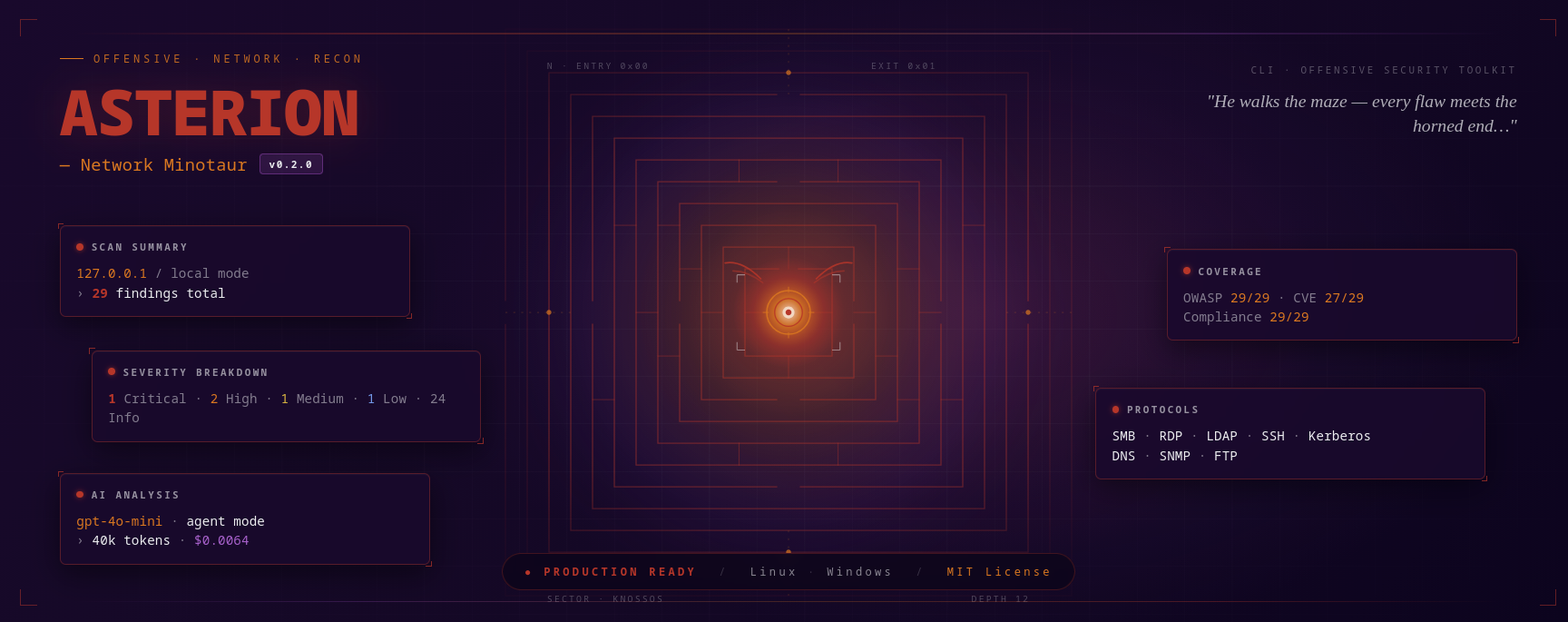
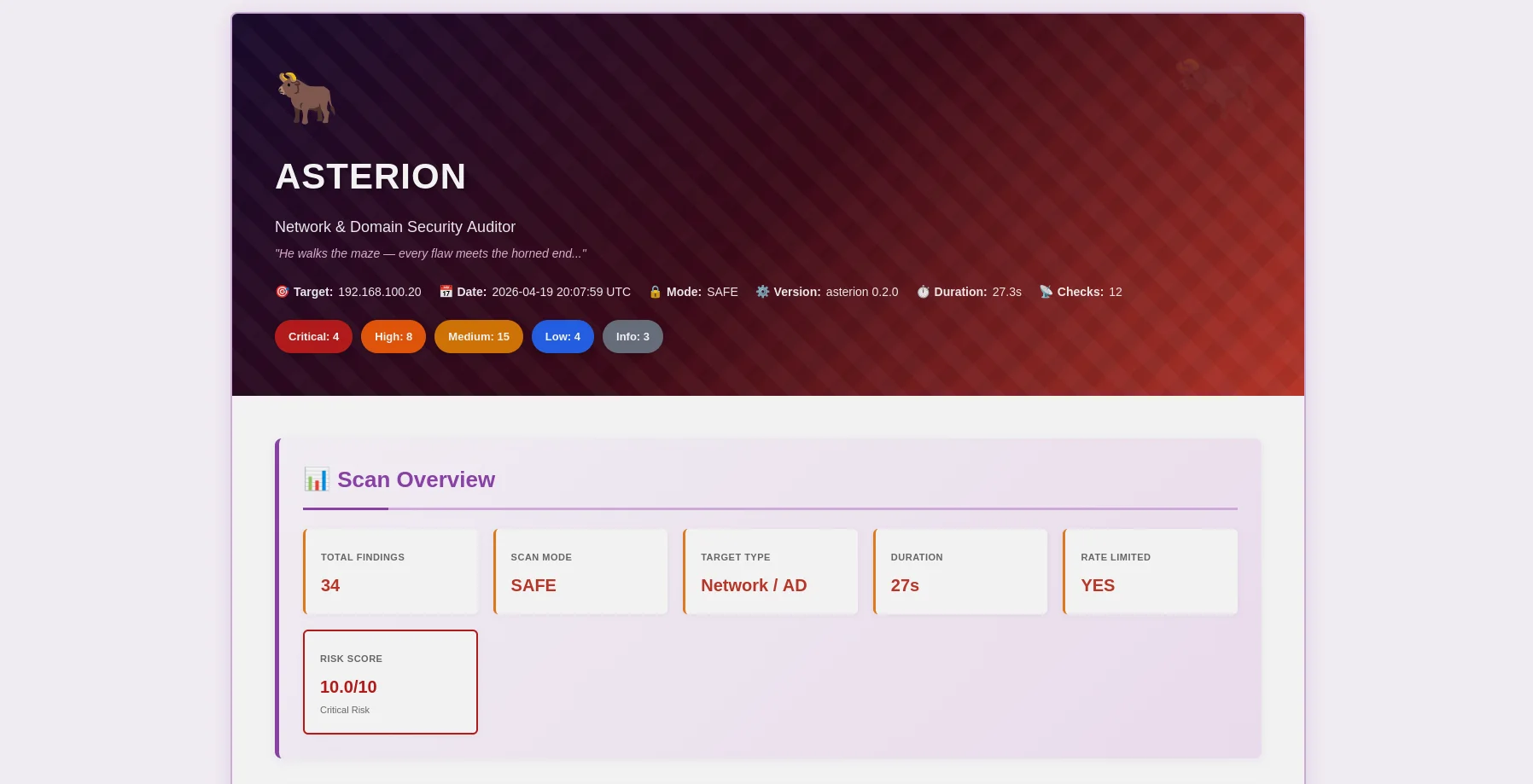
Minotaurus-thematisierter HTML-Bericht — Schweregrad-Abzeichen, erweiterbare Beweise, KI-Behebung |
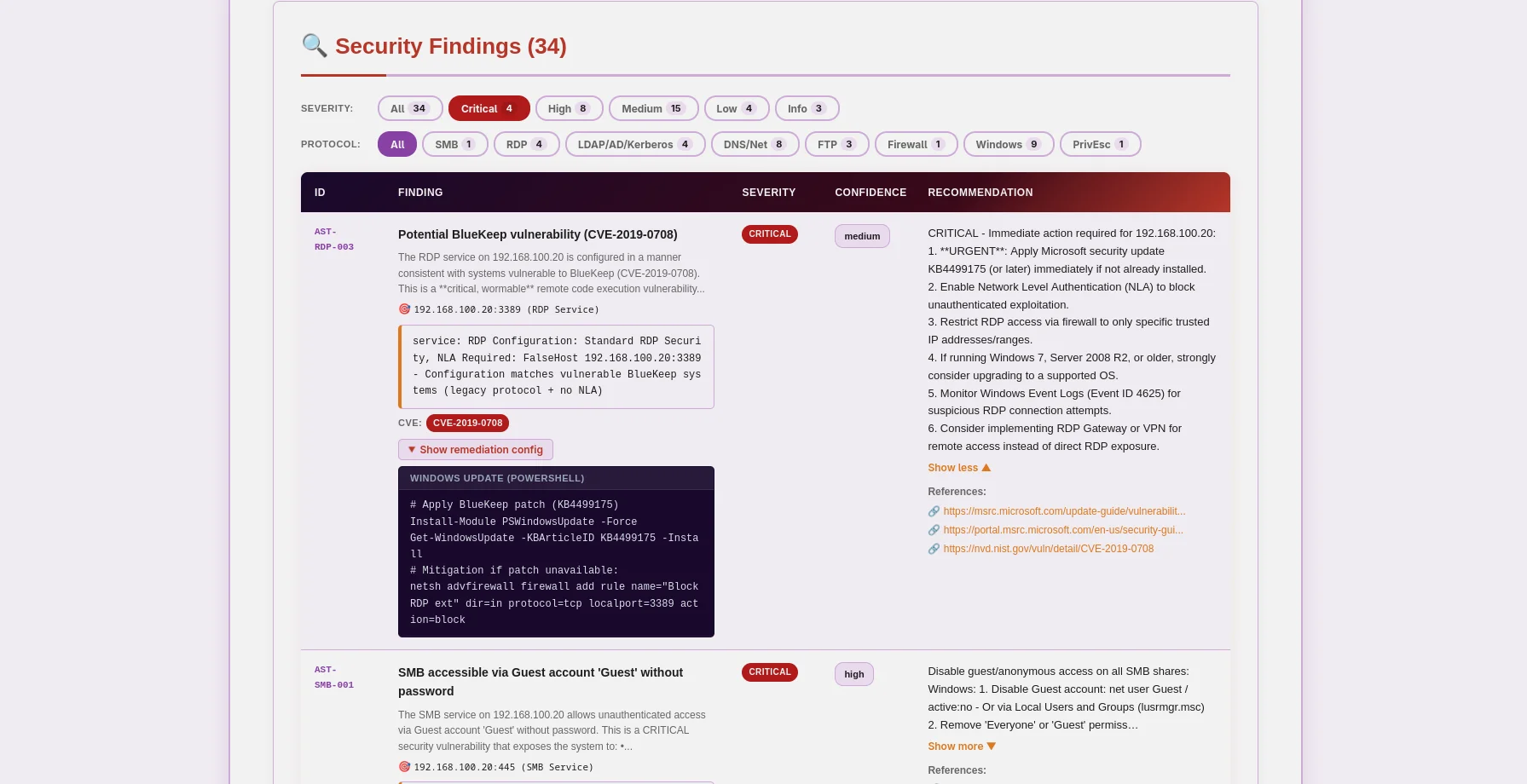
JSON-Bericht — OWASP/CIS/NIST/PCI-Zuordnung, CVE-Daten, maschinenlesbar |
Asterion ist ein produktionsreifer Netzwerk- und Domänen-Sicherheitsauditor, der Ethik an erste Stelle setzt. Entwickelt für Penetrationstester, Sicherheitsforscher und Enterprise-Sicherheitsteams, kombiniert es traditionelle Schwachstellenscans mit modernster KI-Analyse, um umsetzbare Erkenntnisse für Windows Active Directory, Linux-Systeme und Netzwerkinfrastruktur zu liefern.
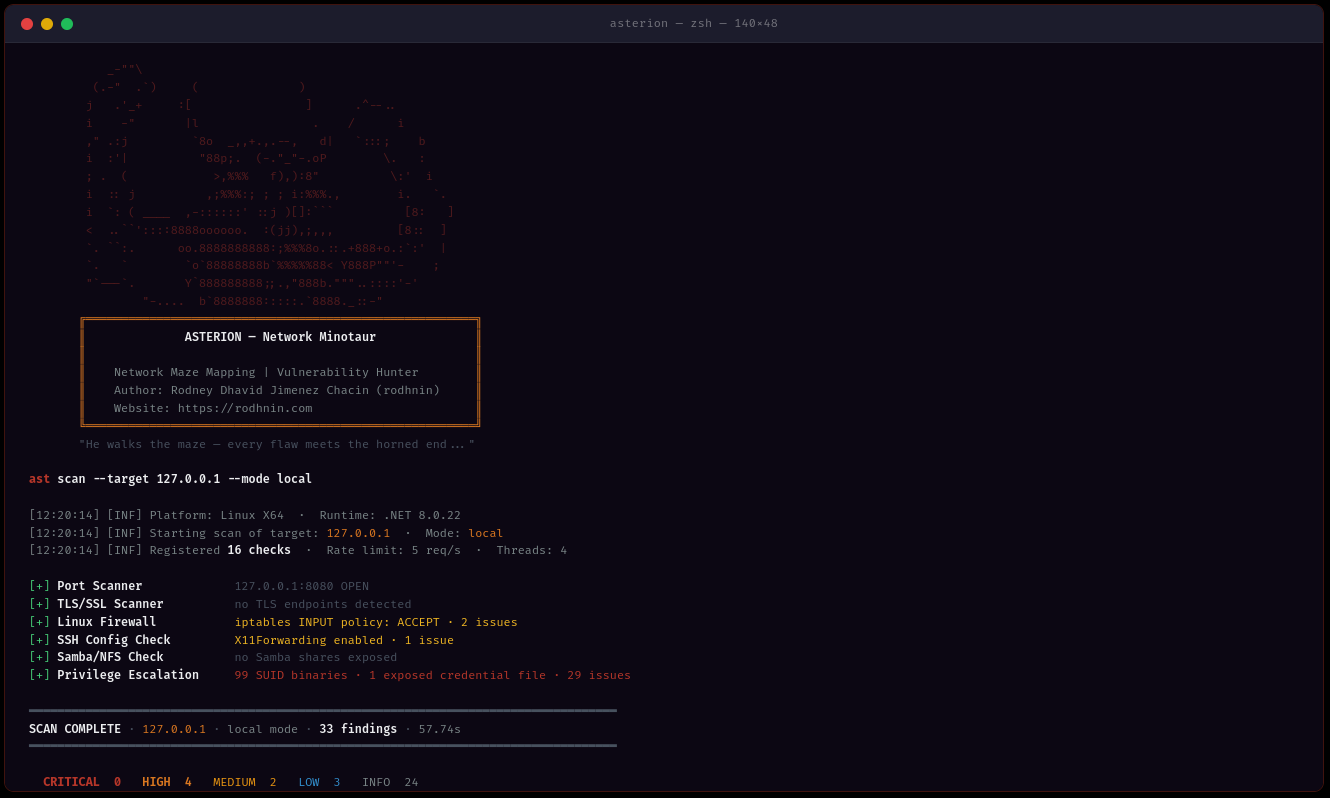
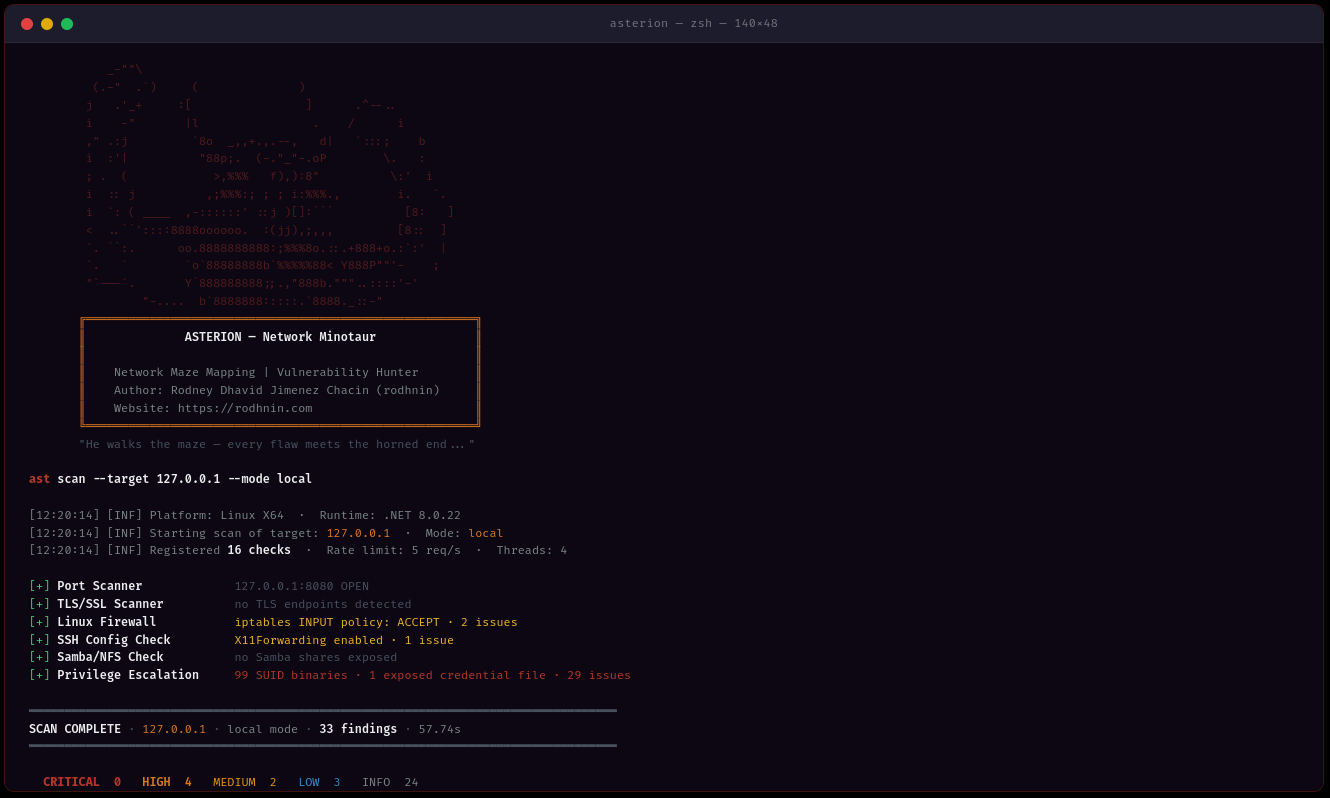
ast scan --target 10.0.0.0/24 --output html
- **Multi-Methoden-Erkennung**: SMB, RDP, LDAP, Kerberos, SSH, FTP, DNS, SNMP-Protokollanalyse
- **Multi-Threading**: Gleichzeitiges Scannen mit 1–20 Worker-Threads
- **Intelligentes Raten-Limiting**: Konfigurierbare Anforderungsdrosselung (1–20 req/s) zur Vermeidung von Erkennung
- **Beweissammlung**: SMB-Freigaben, LDAP-Abfragen, PowerShell-Ausgabe erhalten
### 🤖 KI-gestützte Analyse
Wählen Sie Ihren KI-Anbieter je nach Bedarf:
| Anbieter | Am besten für | Geschwindigkeit | Kosten | Datenschutz |
| ---------------------- | -------------------- | --------------- | --------------- | ---------------- |
| **OpenAI GPT-4** | Produktionsqualität | ⚡ Schnell (40s) | 💰 $0.30/Scan | 🔒 Standard |
| **Anthropic Claude** | Datenschutzorientiert | ⚡ Schnell (50s) | 💰 $0.35/Scan | 🔒 Erweitert |
| **Ollama (Lokal)** | Vollständige Privatsphäre | 🐢 Langsam (30min) | 💰 Kostenlos | 🔐 100% Offline |
**Zwei Analysemodi:**
- **Technisch**: Schrittweise Behebung mit PowerShell-/GPO-Befehlen und Konfigurationsschnipseln
- **Management**: Einfach verständliche Zusammenfassungen für Stakeholder und Führungskräfte
### 📊 Professionelle Berichterstattung
**JSON-Berichte** (maschinenlesbar)```json
{
"tool": "asterion",
"version": "0.2.0",
"target": "192.168.1.10",
"riskScore": 10.0,
"summary": {
"critical": 3,
"high": 8,
"medium": 16,
"low": 5,
"info": 2
},
"findings": [
{
"id": "AST-SMB-003",
"title": "SMBv1 protocol enabled (EternalBlue vector)",
"severity": "high",
"owasp": { "id": "A06", "name": "Vulnerable and Outdated Components" },
"vulnerabilities": [
{
"cve_id": "CVE-2017-0143",
"cvss_score": 9.8,
"cwe_id": "CWE-119"
}
],
"cvss": 9.8
}
],
"attackChains": [...],
"diff": { "refScanId": 41, "new": [...], "fixed": [...], "persisting": [...] }
}
HTML Reports (benutzerfreundlich)
Asterion erzwingt ethisches Hacken durch Technologie. Aggressives Scannen und KI-Analyse erfordern Eigentumsnachweis:```bash
ast consent generate --domain corp.local
ast consent verify --method http --domain corp.local --token verify-abc123
ast scan --target corp.local --mode aggressive --use-ai
### 💾 Datenbank-Persistenz
Gemeinsame SQLite-Datenbank mit Argos Suite verfolgt alles:
- **Scan-Historie**: Datum, Dauer, Anzahl der Funde, Schweregrad-Aufschlüsselung
- **Fund-Repository**: Durchsuchbare Schwachstellendatenbank über alle Argos-Tools hinweg
- **Verifizierte Domains**: Consent-Token-Tracking mit Ablauf
- **Trend-Analyse**: Scans im Zeitverlauf vergleichen```bash
# Query recent scans (works for all Argos Suite tools)
sqlite3 ~/.argos/argos.db "SELECT * FROM scans WHERE tool='asterion' ORDER BY started_at DESC LIMIT 10"
# Find critical issues
sqlite3 ~/.argos/argos.db "SELECT * FROM v_critical_findings WHERE tool='asterion'"
Alle Plattformen:
Optional:
git clone https://github.com/rodhnin/asterion-network-minotaur.git cd asterion-network-minotaur
chmod +x scripts/setup.py python3 scripts/setup.py
**Das Skript wird:**
1. ✅ Überprüfe Voraussetzungen (.NET, Python)
2. ✅ Installiere Python-Abhängigkeiten
3. ✅ Richte die gemeinsame Argos Suite-Datenbank ein
4. ✅ Baue Asterion im Release-Modus
5. ✅ Erstelle Verzeichnisse (~/.asterion, ~/.argos)
6. ✅ Erstelle Wrapper-Skript `/usr/local/bin/ast` (optional)
#### Windows (PowerShell)```powershell
# Clone repository
git clone https://github.com/rodhnin/asterion-network-minotaur.git
cd asterion-network-minotaur
# Run setup (right-click PowerShell > Run as Administrator)
.\scripts\setup.ps1
Das Skript wird:
Wenn die automatisierten Skripte auf Ihrem System nicht funktionieren, folgen Sie diesen Schritten:
git clone https://github.com/rodhnin/asterion-network-minotaur.git cd asterion-network-minotaur
#### Schritt 2: Abhängigkeiten installieren
**Linux/macOS:**```bash
pip3 install -r scripts/requirements.txt
Windows (Eingabeaufforderung):```cmd pip install -r scripts\requirements.txt
#### Schritt 3: Datenbank einrichten
**Linux/macOS:**```bash
python3 scripts/db_migrate.py
Windows:```cmd python scripts\db_migrate.py
#### Schritt 4: Asterion erstellen
**Alle Plattformen:**```bash
dotnet build -c Release
Linux/macOS:```bash mkdir -p ~/.asterion/reports mkdir -p ~/.asterion/consent-proofs mkdir -p ~/.argos
**Windows (PowerShell):**```powershell
New-Item -ItemType Directory -Force -Path "$env:USERPROFILE\.asterion\reports" | Out-Null
New-Item -ItemType Directory -Force -Path "$env:USERPROFILE\.asterion\consent-proofs" | Out-Null
New-Item -ItemType Directory -Force -Path "$env:USERPROFILE\.argos" | Out-Null
sudo nano /usr/local/bin/ast
#!/bin/bash exec dotnet "$(cd "$(dirname "${BASH_SOURCE[0]}")/.." && pwd)/src/Asterion/bin/Release/net8.0/Asterion.dll" "$@"
sudo chmod +x /usr/local/bin/ast
#### Step 7: API-Schlüssel konfigurieren (optional)
Eine einzelne Umgebungsvariable funktioniert für alle KI-Anbieter (OpenAI, Anthropic):
**Linux/macOS:**```bash
export AI_API_KEY="sk-proj-..." # OpenAI key
# or
export AI_API_KEY="sk-ant-..." # Anthropic key
# Add to ~/.bashrc or ~/.zshrc to make permanent
Windows (PowerShell):```powershell $env:AI_API_KEY = "sk-proj-..."
[Environment]::SetEnvironmentVariable("AI_API_KEY", "sk-proj-...", [System.EnvironmentVariableTarget]::User)
#### Schritt 8: Installation überprüfen
**Linux/macOS (falls symlink erstellt wurde):**```bash
ast version
Windows oder direkter Aufruf:```cmd .\src\Asterion\bin\Release\net8.0\ast.exe version
dotnet .\src\Asterion\bin\Release\net8.0\Asterion.dll version
### Ihr erster Scan
#### Automatisches Scannen des lokalen Netzwerks
**Asterion kann Ihr lokales Netzwerk automatisch erkennen und scannen!**
**Windows (PowerShell) — Nach der Einrichtung (empfohlen):**```powershell
# Test on localhost (simple)
ast scan --target localhost --output html
# Scan local subnet with AI analysis
ast scan --target 192.168.1.0/24 --output both --threads 10 --rate 5 --use-ai --ai-tone both
# Domain scan with authentication
ast scan --target corp.local --auth "CORP\admin:Password123" --use-ai
Windows (PowerShell) — Ohne PATH-Einrichtung:```powershell
.\src\Asterion\bin\Release\net8.0\ast.exe scan --target localhost
--output html --use-ai
--ai-tone both
.\src\Asterion\bin\Release\net8.0\ast.exe scan --target 192.168.1.0/24
--output both --threads 10
--rate 5
**Linux/macOS:**```bash
# Scan localhost
ast scan --target localhost \
--output html \
--use-ai \
--ai-tone both
# Scan local subnet (e.g., 192.168.1.0/24)
ast scan --target 192.168.1.0/24 \
--output both \
--threads 10 \
--rate 5
# Scan domain
ast scan --target corp.local \
--auth "CORP\admin:Password123" \
--output html \
--use-ai
Asterion unterstützt drei Ausgabeformate mit --output:
Steuern Sie, wie die KI-Analyse formatiert wird mit --ai-tone:
| Ton | Verwendungszweck | Ausgabe |
|---|---|---|
Einfacher Netzwerkscan (keine Authentifizierung):```bash ast scan --target 10.0.0.0/24
**Mit HTML-Bericht:**```bash
ast scan --target 192.168.1.0/24 --output html
Authentifizierter Scan (Windows-Domäne):```bash
ast scan --target dc01.corp.local
--auth "CORP\Administrator:P@ssw0rd"
--output html
**Mit KI-Analyse (technisch + Führungsebene):**```bash
ast scan --target 10.0.0.0/24 \
--use-ai \
--ai-tone both \
--output html
Schnelles Scannen (10 threads, 10 req/s):```bash
ast scan --target 10.0.0.0/24
--threads 10
--rate 10
--output json
#### Berichtsverzeichnisse
**Native Installation:**
- Berichte: `~/.asterion/reports/`
- Datenbank: `~/.argos/argos.db`
**Windows:**
- Berichte: `%USERPROFILE%\.asterion\reports\`
- Datenbank: `%USERPROFILE%\.argos\argos.db`
**Docker-Bereitstellung:**
- Berichte: `docker/reports/`
- Datenbank: `docker/data/argos.db`
**🎉 Erfolg!** Überprüfen Sie das reports-Verzeichnis auf JSON- und HTML-Ausgabedateien.
---
### Ausführen mit Docker
**Automatische Bereitstellung:**```bash
cd docker
./deploy.sh # Linux/macOS
.\deploy.ps1 # Windows
Manuelles Docker-Deployment:```bash
docker compose up -d
docker compose exec asterion dotnet /app/ast.dll scan
--target 192.168.1.0/24
--output html
docker compose logs -f asterion
docker compose down
---
## 📘 Benutzerhandbuch
### Befehlsstruktur```bash
ast <command> [options]
Verfügbare Befehle:
scan — Sicherheitsscan ausführenconsent — Einwilligungstoken verwaltenversion — Versionsinformationen anzeigenast scan --target 192.168.1.0/24
ast scan --target 192.168.1.0/24 --output html
ast scan --target 10.0.0.5 --output both
#### Netzwerk-Targeting```bash
# CIDR notation
ast scan --target 10.0.0.0/24
# IP range
ast scan --target 192.168.1.10-50
# Domain name
ast scan --target corp.local
# Single host
ast scan --target 192.168.1.1
ast scan --target 10.0.0.0/24 --threads 3 --rate 2
ast scan --target 10.0.0.0/24 --threads 15 --rate 15
ast scan --target 10.0.0.0/24 --ports 445,3389,22,139
#### Windows-Domänen-Scanning```bash
# Network + LDAP/Kerberos/AD checks
ast scan --target dc01.corp.local \
--auth "CORP\Administrator:P@ssw0rd"
# WinRM: remote firewall, registry, services, privesc
ast scan --target 192.168.1.10 \
--winrm "CORP\admin:P@ssw0rd"
# Full Windows audit: auth + WinRM + AI + HTML
ast scan --target 192.168.1.10 \
--auth "CORP\admin:P@ssw0rd" \
--winrm "CORP\admin:P@ssw0rd" \
--use-ai --ai-tone technical -o both -v
# With NTLM hash (Pass-the-Hash)
ast scan --target 10.0.0.5 \
--auth-ntlm "admin:aad3b435b51404eeaad3b435b51404ee:8846f7eaee8fb117ad06bdd830b7586c"
# Diff against last scan (track security changes)
ast scan --target 192.168.1.10 --winrm "CORP\admin:P@ssw0rd" --diff last -o both
ast scan --target 10.0.0.25 --ssh "admin:password"
ast scan --target 10.0.0.25 --ssh "admin:password" --sudo-password "sudopass"
ast scan --target 10.0.0.25 --ssh-key "admin:~/.ssh/id_rsa"
ast scan --target internal.corp.local
--bastion "bastion.corp.local:jumpuser:~/.ssh/bastion_key"
--ssh "admin:password"
ast scan --target 10.0.0.25
--ssh "root:toor"
--use-ai --ai-tone technical -o both -v
#### KI-gestützte Analyse```bash
# Technical remediation (default, for security teams)
ast scan --target 10.0.0.5 \
--ssh "root:pass" \
--use-ai --ai-tone technical -o html
# Executive summary (for management)
ast scan --target 10.0.0.5 \
--use-ai --ai-tone non_technical -o html
# Both formats + streaming output
ast scan --target 10.0.0.5 --use-ai --ai-tone both --ai-stream -o both
# Agent mode (NVD CVE lookup tool enabled)
ast scan --target 10.0.0.5 --ssh "root:pass" --use-ai --ai-agent -v
# Compare two models
ast scan --target 10.0.0.5 --use-ai \
--ai-compare "openai/gpt-4o-mini-2024-07-18,anthropic/claude-3-5-haiku-20241022"
# Enforce cost budget
ast scan --target 10.0.0.5 --winrm "admin:pass" --use-ai --ai-budget 0.05
ast scan --target 10.0.0.5 -v
ast scan --target 10.0.0.5 -v --timeout 20
ast scan --target 10.0.0.5 --timeout 5
### Einwilligungstoken-Verwaltung
#### Einwilligungstoken generieren```bash
ast consent generate --domain corp.local

# Output: Token: verify-a3f9b2c1d8e4f5a6
HTTP-Methode (Datei auf Webserver platzieren):```bash
ast consent verify
--method http
--domain corp.local
--token verify-a3f9b2c1d8e4f5a6
**DNS-Methode** (TXT-Eintrag hinzufügen):```bash
# 1. Add DNS TXT record: corp.local = "asterion-verify=verify-a3f9b2c1d8e4f5a6"
# 2. Verify:
ast consent verify \
--method dns \
--domain corp.local \
--token verify-a3f9b2c1d8e4f5a6
SSH-Methode (Datei auf dem System erstellen):```bash
ast consent verify
--method ssh
--domain corp.local
--token verify-a3f9b2c1d8e4f5a6
--ssh "user:password"
#### Aggressiven Modus ausführen```bash
# After verifying consent token:
ast scan --target corp.local --mode aggressive
ast scan --target 192.168.1.0/24 --output html --threads 10 --rate 10
#### Szenario 2: Vollständiges Domain-Audit```bash
# Complete Windows AD assessment with AI analysis
ast scan --target corp.local \
--auth "CORP\admin:P@ssw0rd" \
--use-ai \
--ai-tone both \
--output both \
--threads 8 \
--rate 8
ast scan --target 10.0.0.0/24
--threads 2
--rate 1
--timeout 20
--output json
#### Szenario 4: Penetrationstests```bash
# Generate consent first
ast consent generate --domain internal.corp
# Place token and verify
ast consent verify --method http --domain internal.corp --token <token>
# Run aggressive assessment
ast scan --target internal.corp \
--mode aggressive \
--auth "CORP\pentest:P@ssw0rd" \
--use-ai \
--output both
Asterion verwendet LangChain 1.0.0 mit Unterstützung für mehrere KI-Anbieter über eine Python-Brücke, was Ihnen Flexibilität basierend auf Ihren Sicherheits-, Datenschutz- und Budgetanforderungen bietet.
Am besten für: Produktionseinsatz
#### Anthropic Claude
**Am besten für: Verbesserte Privatsphäre**
- ⭐ Qualität: Hervorragend (5/5)
- ⚡ Geschwindigkeit: ~50–70 Sekunden
- 💰 Kosten: ~$0.007–0.015 pro Scan (claude-3-5-haiku)
- 🔒 Privatsphäre: Verbessert (Anthropics datenschutzorientierter Ansatz)```bash
export AI_API_KEY="sk-ant-..." # Same variable, Anthropic key format
Am besten für: Vollständige Privatsphäre
ollama pull llama3.2
### Privacy & Security
**Automatische Bereinigung**
Bevor Daten an KI-Anbieter gesendet werden, entfernt Asterion automatisch:
- ✅ Einwilligungs-Tokens
- ✅ Domain-Anmeldedaten (Passwörter, NTLM-Hashes)
- ✅ Personenbezogene Daten (PII)
- ✅ Interne IP-Adressen (auf Anfrage)
- ✅ SMB-Freigabepfade mit sensiblen Daten
**Nur mit Zustimmung**
- KI-Analyse erfordert explizites Flag `--use-ai`
- Aggressives Scannen erfordert verifizierten Einwilligungs-Token
- Sie kontrollieren, welcher Anbieter Ihre Daten sieht
**Für maximale Privatsphäre**
Verwenden Sie Ollama lokal. Obwohl langsamer und weniger genau, verlassen Ihre Scandaten niemals Ihren Rechner.
### Anbieter wechseln
**Aktuelle Methode (v0.2.0):** Bearbeiten Sie `config/defaults.yaml````yaml
ai:
langchain:
provider: "ollama" # Changed from "openai"
model: "llama3.2" # Ollama model
ollama_base_url: "http://localhost:11434"
Kommt in v0.3.0: Interaktives Konfigurationsmenü (Metasploit-Stil)```bash
ast --show-options ast --set ai.provider=anthropic ast --save-profile privacy-mode
## 🧪 Sicheres Testlabor
**⚠️ SCANNEN SIE NIEMALS Produktionsnetzwerke ohne schriftliche Genehmigung!**
Nutzen Sie unser Docker-Labor zum sicheren Üben:
### Testumgebung einrichten```bash
# Navigate to docker directory
cd docker
# Deploy vulnerable network lab
docker-compose -f compose.testing.yml up -d
# Wait for services to start (~60 seconds)
docker-compose -f compose.testing.yml logs -f
# Create vulnerable conditions
docker-compose -f compose.testing.yml exec windows-target powershell -c "Disable-NetFirewallProfile -All"
cd ..
ast scan --target 172.20.0.0/24 --output html
ast scan --target 172.20.0.2 --auth "LAB\admin:P@ssw0rd123" --output both
ast scan --target 172.20.0.0/24 --use-ai --output html
### Bereinigung```bash
cd docker
docker-compose -f compose.testing.yml down -v # -v removes all data
Ausführliche Testszenarien finden Sie unter docs/TESTING_GUIDE.md
Scannen Sie nur Netzwerke und Systeme, die Sie besitzen oder für die Sie eine ausdrückliche schriftliche Erlaubnis zum Testen haben.
Asterion implementiert technische Kontrollen, um Missbrauch zu verhindern:
Unbefugter Zugriff auf Computersysteme ist in den meisten Rechtsordnungen illegal:
Vollständige ethische Richtlinien finden Sie unter docs/ETHICS.md
Asterion bietet plattformübergreifende Bereitstellungsskripte:
Linux/macOS:```bash cd docker ./deploy.sh
**Windows (PowerShell):**```powershell
cd docker
.\deploy.ps1
Bereitstellungsoptionen:
Linux/macOS:```bash cd docker docker compose up -d
docker compose exec asterion dotnet /app/ast.dll scan --target 10.0.0.0/24
docker compose logs -f asterion
docker compose down
**Windows (PowerShell):**```powershell
cd docker
docker compose up -d
# Execute scans (note the dotnet wrapper)
docker compose exec asterion dotnet /app/ast.dll scan --target 10.0.0.0/24
# View logs
docker compose logs -f asterion
# Stop service
docker compose down
Persistente Daten:
./reports/ → Host-Verzeichnis docker/reports/./data/argos.db → Host-Verzeichnis docker/data/argos.db (gemeinsame Argos Suite DB)./logs/asterion.log → Host-Verzeichnis docker/logs/asterion.logHinweis: Asterion erkennt die Docker-Umgebung automatisch über die Umgebungsvariable ASTERION_IN_DOCKER.
Für die vollständige Docker-Dokumentation (Linux/Windows) siehe: docker/README.md
Native Installation:``` ~/.asterion/ ├── reports/ │ ├── asterion_report_10_0_0_0_24_20260419_143000.json # Machine-readable │ └── asterion_report_10_0_0_0_24_20260419_143000.html # Human-friendly (Minotaur-themed) └── consent-proofs/ └── corp_local_verify-abc123_20260419.txt
~/.argos/ ├── argos.db # Shared Argos Suite database └── logs/ └── argos.log # Shared log file
**Docker-Bereitstellung:**```
asterion-network-minotaur/
├── docker/
│ ├── reports/
│ │ ├── asterion_report_10_0_0_0_24_20260419_143000.json
│ │ └── asterion_report_10_0_0_0_24_20260419_143000.html
│ ├── data/
│ │ └── argos.db # Shared Argos Suite database (Docker)
│ ├── logs/
│ │ └── asterion.log
│ └── workspace/
│ └── consent-proofs/
Hinweis: Die Docker-Umgebung wird automatisch über die Umgebungsvariable ASTERION_IN_DOCKER erkannt.
{ "tool": "asterion", "version": "0.2.0", "target": "10.0.0.0/24", "date": "2026-04-13T14:30:00Z", "mode": "safe", "summary": { "critical": 12, "high": 8, "medium": 15, "low": 5, "info": 20 }, "findings": [ { "id": "AST-SMB-003", "title": "SMBv1 enabled (EternalBlue vulnerability)", "severity": "critical", "confidence": "high", "description": "SMBv1 is enabled on this system. This protocol is vulnerable to EternalBlue (CVE-2017-0143), a critical remote code execution vulnerability exploited by WannaCry ransomware.", "evidence": { "type": "smb", "value": "SMBv1 negotiated successfully", "context": "Port 445/tcp open, SMB signing not required" }, "recommendation": "URGENT - Disable SMBv1 immediately:\n\nPowerShell:\nDisable-WindowsOptionalFeature -Online -FeatureName SMB1Protocol -NoRestart\n\nGroup Policy:\nComputer Configuration → Administrative Templates → MS Security Guide\n→ Configure SMBv1 client driver startup = Disabled\n→ Configure SMBv1 server = Disabled\n\nVerify:\nGet-SmbServerConfiguration | Select EnableSMB1Protocol", "references": [ "https://docs.microsoft.com/en-us/windows-server/storage/file-server/troubleshoot/detect-enable-and-disable-smbv1-v2-v3", "https://nvd.nist.gov/vuln/detail/CVE-2017-0143" ], "affected_component": "SMB Server" }, { "id": "AST-LDAP-001", "title": "LDAP anonymous bind allowed", "severity": "high", "confidence": "high", "description": "LDAP server allows anonymous bind, permitting unauthenticated enumeration of domain users, groups, and configuration.", "evidence": { "type": "ldap", "value": "Anonymous bind successful to port 389/tcp", "context": "Retrieved domain base DN: DC=corp,DC=local" }, "recommendation": "Disable LDAP anonymous bind:\n\nGroup Policy:\nComputer Configuration → Policies → Windows Settings → Security Settings → Local Policies → Security Options\n→ Network access: Allow anonymous SID/Name translation = Disabled\n→ Network access: Do not allow anonymous enumeration of SAM accounts = Enabled\n→ Network access: Do not allow anonymous enumeration of SAM accounts and shares = Enabled\n\nRegistry:\nreg add "HKLM\SYSTEM\CurrentControlSet\Control\Lsa" /v RestrictAnonymous /t REG_DWORD /d 1 /f", "affected_component": "LDAP Server" }, { "id": "AST-RDP-001", "title": "RDP without Network Level Authentication (NLA)", "severity": "high", "confidence": "high", "description": "Remote Desktop Protocol (RDP) is configured without Network Level Authentication (NLA). This allows unauthenticated attackers to reach the login screen and attempt brute-force attacks.", "evidence": { "type": "rdp", "value": "RDP port 3389/tcp open, NLA not required", "context": "Encryption level: High" }, "recommendation": "Enable Network Level Authentication:\n\nPowerShell:\n(Get-WmiObject -class Win32_TSGeneralSetting -Namespace root\cimv2\terminalservices -Filter "TerminalName='RDP-tcp'").SetUserAuthenticationRequired(1)\n\nGroup Policy:\nComputer Configuration → Administrative Templates → Windows Components → Remote Desktop Services → Remote Desktop Session Host → Security\n→ Require user authentication for remote connections by using Network Level Authentication = Enabled", "affected_component": "RDP Server" } ], "notes": { "scan_duration_seconds": 67.5, "targets_scanned": 12, "rate_limit_applied": true, "scope_limitations": "Scan limited to network services. Local system checks require SSH/WinRM credentials.", "false_positive_disclaimer": "Manual verification recommended for all findings before remediation." }, "aiAnalysis": { "executiveSummary": "The network scan identified 12 critical security vulnerabilities requiring immediate attention...", "technicalRemediation": "### Critical Issues\n\n1. \n - Affected systems: 10.0.0.5, 10.0.0.10\n - Remediation: Disable SMBv1...", "generatedAt": "2026-04-19T14:35:00Z", "modelUsed": "gpt-4o-mini-2024-07-18", "provider": "openai" } }
### HTML-Berichtsfunktionen
- **📊 Executive Dashboard**: Zusammenfassungskarten mit Schweregradzählungen und Minotaur-Branding
- **🤖 KI-Analyse**: Ausklappbare Abschnitte für Führungs- und technische Einblicke
- **🔍 Detaillierte Ergebnisse**: Nach Schweregrad organisiert mit PowerShell/GPO-Reparaturbefehlen
- **📋 Nachweise**: SMB-Freigaben, LDAP-Abfragen, RDP-Konfigurationen, PowerShell-Ausgaben
- **🔗 Externe Referenzen**: Links zu CVE, Microsoft-Dokumentation, OWASP-Anleitungen
- **📱 Mobil responsiv**: Funktioniert auf allen Geräten
- **🎨 Minotaur-Design**: Rot/Orange/Lila-Farbschema
---
## 📁 Projektstruktur```
asterion-network-minotaur/
│
├── src/
│ ├── Asterion/ # Main C# application
│ │ ├── Asterion.csproj # .NET project file
│ │ │
│ │ ├── Checks/ # Security check modules
│ │ │ ├── ICheck.cs # Check interface
│ │ │ ├── BaseCheck.cs # Abstract base class (350 lines)
│ │ │ ├── CheckCategory.cs # Check category enum
│ │ │ │
│ │ │ ├── CrossPlatform/ # Network service scanners (work from any OS)
│ │ │ │ ├── PortScanner.cs # TCP port scanning
│ │ │ │ ├── SmbScanner.cs # SMB/CIFS security (42KB)
│ │ │ │ ├── RdpScanner.cs # RDP configuration (24KB)
│ │ │ │ ├── LdapScanner.cs # LDAP/AD security (38KB)
│ │ │ │ ├── KerberosScanner.cs # Kerberos security (22KB)
│ │ │ │ ├── SnmpScanner.cs # SNMP vulnerabilities (21KB)
│ │ │ │ ├── DnsScanner.cs # DNS misconfigurations (14KB)
│ │ │ │ ├── FtpScanner.cs # FTP security (27KB)
│ │ │ │ ├── TlsScanner.cs # TLS/SSL certificate checks
│ │ │ │ ├── SysvolCheck.cs # SYSVOL/GPP password exposure
│ │ │ │ ├── AdAggressiveCheck.cs # AS-REP roasting, delegation, weak ACLs
│ │ │ │ └── WinRmChecks.cs # Remote Windows audit via WS-Man
│ │ │ │
│ │ │ ├── Windows/ # Local Windows system checks
│ │ │ │ ├── WinFirewallCheck.cs # Firewall configuration
│ │ │ │ ├── WinRegistryCheck.cs # Registry security
│ │ │ │ ├── AdPolicyCheck.cs # Active Directory policies
│ │ │ │ ├── WinServicesCheck.cs # Service misconfigurations
│ │ │ │ └── PrivEscCheckWin.cs # Windows privilege escalation
│ │ │ │
│ │ │ └── Linux/ # Local/remote Linux checks (via SSH)
│ │ │ ├── LinuxFirewallCheck.cs # iptables/nftables/ufw
│ │ │ ├── SshConfigCheck.cs # SSH hardening
│ │ │ ├── SambaNfsCheck.cs # Samba/NFS security
│ │ │ └── PrivEscCheckLinux.cs # SUID, sudo misconfig
│ │ │
│ │ ├── Core/ # Core infrastructure
│ │ │ ├── Orchestrator.cs # Main execution engine (1,243 lines)
│ │ │ ├── Config.cs # YAML configuration loader
│ │ │ ├── ScanOptions.cs # Scan configuration
│ │ │ ├── Database.cs # SQLite operations
│ │ │ ├── ConsentValidator.cs # Consent token verification
│ │ │ ├── SshConnectionManager.cs # SSH.NET wrapper (password/key/bastion)
│ │ │ ├── WinRmConnectionManager.cs # WS-Man HTTP/NTLM (Linux → Windows)
│ │ │ ├── AttackChainAnalyzer.cs # Multi-step attack chain correlation
│ │ │ ├── NtlmSpnego.cs # NTLM/SPNEGO auth implementation
│ │ │ ├── NtlmV2Auth.cs # NTLMv2 auth implementation
│ │ │ │
│ │ │ ├── Output/
│ │ │ │ └── ReportBuilder.cs # Report generation (risk score, labels)
│ │ │ │
│ │ │ └── Utils/
│ │ │ ├── NetworkUtils.cs # Network operations
│ │ │ ├── CidrParser.cs # CIDR/IP range parsing
│ │ │ ├── AuthenticationManager.cs # Credential handling
│ │ │ └── OsDetector.cs # Per-target OS detection (SSH/SMB/TTL)
│ │ │
│ │ ├── Models/ # Data models
│ │ │ ├── Report.cs # Main report structure
│ │ │ ├── Finding.cs # Security finding (OWASP/CVE/Compliance)
│ │ │ ├── Evidence.cs # Finding proof
│ │ │ ├── ConsentInfo.cs # Consent verification
│ │ │ └── AiAnalysis.cs # AI-generated content (cost tracking)
│ │ │
│ │ ├── Program.cs # Application entry point
│ │ └── Cli.cs # CLI argument parser (all flags)
│ │
│ └── Asterion.sln # Visual Studio solution
│
├── scripts/ # Python bridge scripts
│ ├── ai_analyzer.py # LangChain AI integration (stream/agent/compare)
│ ├── cve_lookup.py # NVD API v2 CVE enrichment
│ ├── owasp.py # OWASP Top 10 mapping (139 entries)
│ ├── compliance.py # CIS/NIST/PCI mapping (95 entries)
│ ├── db_migrate.py # Database setup
│ ├── render_html.py # HTML report generation (Jinja2)
│ ├── setup.sh # Linux/macOS installation script
│ ├── setup.ps1 # Windows PowerShell setup
│ └── requirements.txt # Python dependencies
│
├── config/ # Configuration files
│ ├── defaults.yaml # Default settings
│ └── prompts/ # AI prompt templates
│ ├── technical.txt # Technical remediation prompts
│ └── non_technical.txt # Executive summary prompts
│
├── db/
│ └── migrate.sql # Database schema (shared with Argos Suite)
│
├── docker/ # Docker deployment
│ ├── Dockerfile # Production image
│ ├── docker-compose.yml # Production deployment
│ ├── compose.testing.yml # Vulnerable lab environment
│ ├── .dockerignore
│ ├── .env.example
│ └── README.md # Docker instructions
│
├── docs/ # Documentation
│ ├── AI_INTEGRATION.md # AI setup guide
│ ├── CONSENT.md # Consent token system
│ ├── DATABASE_GUIDE.md # SQLite schema and queries
│ ├── ETHICS.md # Ethical guidelines
│ ├── NETWORK_CHECKS.md # Complete check catalog (50+ checks)
│ └── ROADMAP.md # Development roadmap
│
├── schema/
│ └── report.schema.json # Argos Suite unified schema
│
├── templates/
│ └── report.html.j2 # HTML report template (35KB, Minotaur-themed)
│
├── assets/
│ └── ascii.txt # Minotaur ASCII art banner
│
├── CHANGELOG.md # Version history
├── README_PATTERN.md # README visual branding guide
├── LICENSE # MIT License
└── README.md # This file
Statistiken:
Status: 🎉 Veröffentlicht
--winrm)--ssh-key, --bastion, --sudo-password)--diff last / --diff <id> — Sicherheits-Rückschritte verfolgen--creds-file credentials.yaml--ai-budget, Kosten in DB + costs.json gespeichertSchwerpunkt: Benutzerfreundlichkeit, Skalierung, interaktive KI
--show-options, --set)ast db scans list, ast db findings search)Schwerpunkt: Automatische Behebung, ML-Erkennung, verteiltes Scannen
Für detaillierte Funktionsbeschreibungen siehe docs/ROADMAP.md
Wir begrüßen Beiträge! Ob es sich um Folgendes handelt:
git checkout -b feature/amazing-feature)git commit -m 'Add amazing feature')git push origin feature/amazing-feature)git clone https://github.com/YOUR-USERNAME/asterion-network-minotaur.git cd asterion-network-minotaur
pip install -r scripts/requirements.txt dotnet restore
dotnet build
dotnet run --project src/Asterion -- scan --target 192.168.1.1 -v
### Code-Stil
- **C#-Formatierung**: Befolge die Microsoft C#-Codierungskonventionen
- **Python-Formatierung**: Wir verwenden [Black](https://github.com/psf/black) (Zeilenlänge: 88)
- **XML-Dokumentation**: Erforderlich für alle öffentlichen Klassen/Methoden
- **Code-Kommentare**: Verwende `//` für Inline-Kommentare, `///` für XML-Dokumentation
### Probleme melden
Einen Bug gefunden? Einen Feature-Wunsch?
**Ein Issue öffnen**: https://github.com/rodhnin/asterion-network-minotaur/issues
Bitte füge Folgendes hinzu:
- Asterion-Version (`ast version`)
- .NET-Version (`dotnet --version`)
- Python-Version (`python --version`)
- Betriebssystem
- Schritte zur Reproduktion (für Bugs)
- Erwartetes vs. tatsächliches Verhalten
---
## 📚 Dokumentation
Umfassende Dokumentation verfügbar im `docs/`-Verzeichnis:
| Dokument | Beschreibung |
| ------------------------------------------- | -------------------------------------------- |
| [AI_INTEGRATION.md](https://github.com/rodhnin/asterion-network-minotaur/blob/HEAD/docs/AI_INTEGRATION.md) | Vollständiger KI-Einrichtungsleitfaden (alle 3 Anbieter) |
| [CONSENT.md](https://github.com/rodhnin/asterion-network-minotaur/blob/HEAD/docs/CONSENT.md) | Technische Details des Consent-Token-Systems |
| [DATABASE_GUIDE.md](https://github.com/rodhnin/asterion-network-minotaur/blob/HEAD/docs/DATABASE_GUIDE.md) | SQLite-Schema, Abfragen, Verwaltung |
| [ETHICS.md](https://github.com/rodhnin/asterion-network-minotaur/blob/HEAD/docs/ETHICS.md) | Rechtlicher Rahmen und ethische Richtlinien |
| [NETWORK_CHECKS.md](https://github.com/rodhnin/asterion-network-minotaur/blob/HEAD/docs/NETWORK_CHECKS.md) | Vollständiger Katalog von 50+ Sicherheitsprüfungen |
| [ROADMAP.md](https://github.com/rodhnin/asterion-network-minotaur/blob/HEAD/docs/ROADMAP.md) | Zukünftige Funktionen und Entwicklungspläne |
### Schnellzugriffe
- **Changelog**: [CHANGELOG.md](https://github.com/rodhnin/asterion-network-minotaur/blob/HEAD/CHANGELOG.md)
- **Lizenz**: [LICENSE](https://github.com/rodhnin/asterion-network-minotaur/blob/HEAD/LICENSE)
- **ASCII-Kunst**: [assets/ascii.txt](https://github.com/rodhnin/asterion-network-minotaur/blob/HEAD/assets/ascii.txt)
---
## 🤝 Teil der Argos Suite
Asterion ist die vierte Komponente der **Argos Security Suite**:
| Tool | Sprache | Ziel | Status |
| -------------- | ----------- | ------------------------ | --------------- |
| **Argus** | Python | WordPress | ✅ Stabil |
| **Hephaestus** | Python | Server (Linux/Windows) | ✅ Stabil |
| **Pythia** | Python | SQL-Injection | ✅ Stabil |
| **Asterion** | C# + Python | Netzwerke/Domänen/AD | 🎉 Veröffentlicht |
**Gemeinsame Infrastruktur:**
- SQLite-Datenbank (`~/.argos/argos.db`)
- Einheitliches JSON-Berichtsschema
- Consent-Token-System
- KI-Analyse via LangChain
---
## ⚖️ Lizenz
Dieses Projekt ist unter der **MIT-Lizenz** lizenziert – siehe die Datei [LICENSE](https://github.com/rodhnin/asterion-network-minotaur/blob/HEAD/LICENSE) für Details.```
MIT License
Copyright (c) 2025-2026 Rodney Dhavid Jimenez Chacin
Permission is hereby granted, free of charge, to any person obtaining a copy
of this software and associated documentation files (the "Software"), to deal
in the Software without restriction, including without limitation the rights
to use, copy, modify, merge, publish, distribute, sublicense, and/or sell
copies of the Software, and to permit persons to whom the Software is
furnished to do so, subject to the following conditions:
The above copyright notice and this permission notice shall be included in all
copies or substantial portions of the Software.
THE SOFTWARE IS PROVIDED "AS IS", WITHOUT WARRANTY OF ANY KIND, EXPRESS OR
IMPLIED, INCLUDING BUT NOT LIMITED TO THE WARRANTIES OF MERCHANTABILITY,
FITNESS FOR A PARTICULAR PURPOSE AND NONINFRINGEMENT.
WICHTIG: Dieses Tool ist nur für autorisierte Sicherheitstests bestimmt.
Durch die Nutzung von Asterion erkennen Sie Folgendes an und stimmen zu:
Wenn Sie mit Asterion Schwachstellen entdecken:
Scannen Sie nicht. Wenn Sie nicht sicher sind, ob Sie eine Erlaubnis haben, haben Sie wahrscheinlich keine.
Asterion steht auf den Schultern von Giganten:
Besonderer Dank gilt allen Sicherheitsforschern, die ethischen Hacken praktizieren und fördern.
Rodney Dhavid Jimenez Chacin (rodhnin)
Bei Fragen, Feedback oder Kooperationsanfragen besuchen Sie bitte rodhnin.com
Mit ❤️ erstellt für Sicherheitsexperten und Netzwerkadministratoren weltweit
⭐ Markieren Sie dieses Repository mit einem Stern, wenn Sie es nützlich finden! ⭐
Fehler melden • Funktion anfragen • Dokumentation
🐂 Asterion — Navigieren im Netzwerklabyrinth 🐂
Asterion v0.2.0 — Mai 2026
Mit ❤️ gemacht von rodhnin | Teil der Argos Security Suite
| Prüfkategorie | Details |
|---|
| SMB/CIFS-Sicherheit | Anonyme Freigaben, SMB-Signierung, SMBv1 (EternalBlue), NTLMv1, beschreibbare Freigaben |
| RDP-Sicherheit | Netzwerkebenen-Authentifizierung (NLA), Verschlüsselungsstufen, exponiertes RDP |
| LDAP/Active Directory | Anonymer Bind, LDAP-Signierung, Kennwortrichtlinien, Kerberos-Vorauthentifizierung |
| Kerberos-Sicherheit | AS-REP-Roasting, Kerberoasting, übermäßige Ticket-Lebensdauer |
| SNMP | Standard-Community-Strings, SNMPv1/v2c, Schreibzugriff |
| DNS/NetBIOS | Zonentransfer (AXFR), LLMNR/NetBIOS-Vergiftung, mDNS |
| Windows-Systeme | Firewall, Registry (UAC, LSA), Dienste, Privilegieneskalation |
| Linux-Systeme | iptables/nftables, SSH, Samba/NFS, SUID-Binärdateien, sudo-Fehlkonfiguration |
| Format | Befehl | Ausgabe |
|---|
| JSON | --output json | Maschinenlesbare Berichte (Standard) |
| HTML | --output html | Schöne Minotaurus-thematische Berichte |
| Both | --output both | Beide Formate generieren: JSON und HTML |
| Sicherheitsteams |
| Schritt-für-Schritt-Behebung mit PowerShell/GPO-Befehlen |
| non_technical | Zusammenfassung für Führungsebene | Einfache Beschreibungen für das Management |
| both | Vollständige Analyse | Sowohl technische als auch Führungsformate |
| Option | Werte | Standard | Beschreibung |
|---|
--target, -t | IP/CIDR/Domain | Erforderlich | Ziel(e): 192.168.1.0/24, 10.0.0.1, corp.local, Komma-getrennte Liste |
--mode, -m | safe, aggressive | safe | Scan-Modus (aggressiv erfordert Einwilligungstoken) |
--output, -o | json, html, both | json | Ausgabeformat |
--ports, -p | Portliste | Auto-Detect | Zu scannende Ports (z.B. 22,80,443 oder 8000-9000) |
--threads | 1-20 | 5 | Anzahl gleichzeitiger Threads |
--rate | 1-20 | 5 | Anfragenratenbegrenzung (req/s) |
--timeout | Sekunden | 10 | Verbindungs-Timeout |
--verify-ssl | Flagge | true | SSL/TLS-Zertifikate überprüfen (für selbstsignierte Zertifikate deaktivieren) |
--verbose, -v | Flagge | false | Ausführliche Protokollierung aktivieren |
--diff | last / scan_id | - | Mit vorherigem Scan vergleichen (--diff last oder --diff 42) |
--creds-file | Pfad zu YAML | - | Alle Anmeldedaten aus YAML-Datei laden |
| Option | Werte | Beschreibung |
|---|
--auth | DOMAIN\user:pass | Domänenanmeldedaten für LDAP/Kerberos/SMB/AD-Prüfungen |
--auth-ntlm | user:hash | Pass-the-Hash NTLM-Authentifizierung |
--kerberos | user:pass@REALM | Kerberos-Anmeldedaten |
--winrm | DOMAIN\user:pass | WinRM-Fernprüfungen für Windows (Firewall, Registrierung, Dienste, AD) |
--ssh | user:pass | SSH-Passwort-Authentifizierung für entfernte Linux-Prüfungen |
--ssh-key | user:/path/key | SSH-Schlüsselbasierte Authentifizierung |
--sudo-password | pass | Sudo-Erhöhungspasswort für privilegierte Linux-Prüfungen |
--bastion | host:user:key | Jump-/Bastion-Host für Multi-Hop-SSH |
| Option | Werte | Standard | Beschreibung |
|---|
--use-ai | Flagge | false | KI-gestützte Analyse aktivieren |
--ai-tone | technical, non_technical, both | technical | KI-Analyseformat |
--ai-provider | openai, anthropic, ollama | openai | KI-Anbieter |
--ai-model | Modellname | gpt-4o-mini-2024-07-18 | Zu verwendendes KI-Modell |
--ai-budget | USD-Betrag | - | KI abbrechen, wenn geschätzte Kosten diesen Wert überschreiten |
--ai-stream | Flagge | false | KI-Token in Echtzeit an stdout streamen |
--ai-agent | Flagge | false | LangChain-Agentenmodus mit NVD-CVE-Suchtool |
--ai-compare | prov/model,prov/model | - | Multi-Modell-Vergleich |
| Mode | Checks | Consent Required | Rate Limit |
|---|
| Safe | Nicht-intrusive Netzwerkprüfungen | ❌ Nein | 5 req/s |
| Aggressive | Tiefgehende AD/System-Tests | ✅ Ja | 10 req/s |
| AI Analysis | Schwachstellenanalyse | ✅ Ja | N/A |
--ai-stream--ai-agent--ai-compare