ragnt/angryoxide
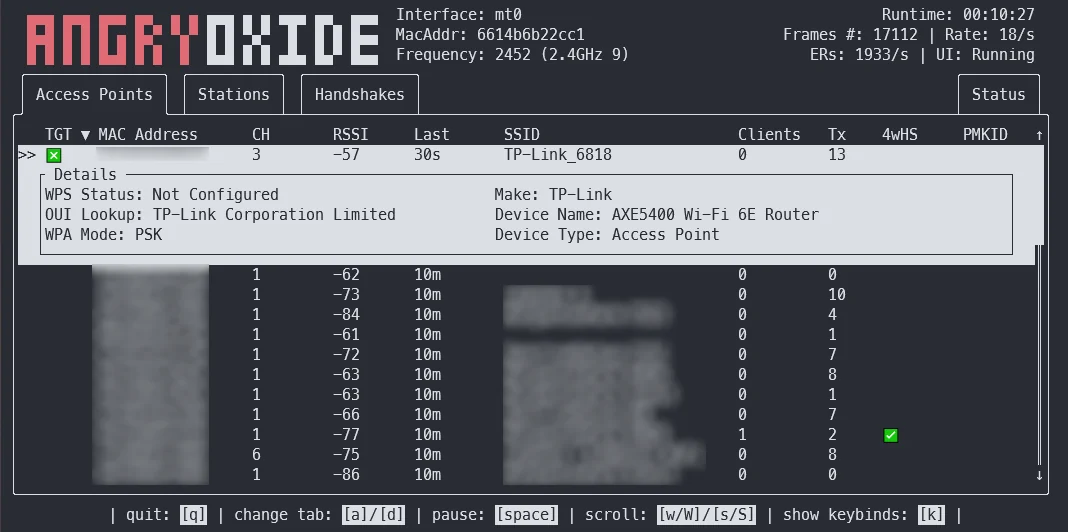
Offensives 802.11-Auditing-Tool, das die Erfassung von WPA/WPA2-Handshakes und PMKID durch Deauthentifizierungs-, Rogue-Client- und Kanalwechsel-Angriffe automatisiert, mit Headless-Modus, GPS-Protokollierung und Hashcat-kompatibler Ausgabe.



Dieses Tool dient ausschließlich Forschungszwecken. Ich bin nicht verantwortlich für irgendetwas, das du tust, oder für Schäden, die du bei der Verwendung von AngryOxide verursachst. Verwende es nur gegen Netzwerke, für die du eine Erlaubnis hast.
AngryOxide wurde entwickelt, um Rust, Netlink, Kernel-Sockets und die Ausnutzung von WiFi gleichzeitig zu lernen.
Informationen zur Verwendung von AngryOxide findest du im Benutzerhandbuch.
HINWEIS: Dieses Projekt befindet sich in STARKER Entwicklung, und du kannst einen sehr schnellen Release-Zyklus erwarten.
Das übergeordnete Ziel dieses Tools ist es, eine Survey-Fähigkeit über eine einzige Schnittstelle mit fortschrittlichen automatisierten Angriffen bereitzustellen, die gültige Hashlines erzeugen, die du mit Hashcat knacken kannst.
Dieses Tool ist stark von hcxdumptool inspiriert, und die Entwicklung wäre ohne die Hilfe von ZerBea nicht möglich gewesen.
Wenn du Fragen oder Probleme hast, kannst du mich auf dem AngryOxide Discord erreichen.
Du kannst vorkompilierte Binärdateien von AngryOxide in den Releases herunterladen.
tar -xf angryoxide-linux-x86_64.tar.gz # Untar
chmod +x install.sh # Make executable
sudo ./install.sh # Install (as root, including zsh/bash completions)
Informationen zur Verwendung von AngryOxide findest du im Benutzerhandbuch.
sudo ./install.sh uninstall # Uninstall
Standardmäßig werden ALLE Access Points in Reichweite angegriffen, sofern nicht mindestens ein Ziel angegeben ist; in diesem Fall sendet das Tool nur gegen definierte Ziele. (Es sammelt jedoch weiterhin passiv auf anderen Access Points.)
Alle diese Angriffe sind ratenbegrenzt, um sowohl fehlerhafte EAPOL-Timer-Resets zu verhindern als auch ein gewisses Maß an operativer Sicherheit zu wahren.
❯ angryoxide --help
Does awesome things... with wifi.

Usage: angryoxide [OPTIONS] --interface <INTERFACE>

Options:
  -i, --interface <INTERFACE>     Interface to use
  -c, --channel <CHANNEL>         Optional - Channel to scan. Will use "-c 1,6,11" if none specified
  -b, --band <2 | 5 | 6 | 60>     Optional - Entire band to scan - will include all channels interface can support
  -o, --output <Output Filename>  Optional - Output filename
  -h, --help                      Print help
  -V, --version                   Print version

Targeting:
  -t, --target-entry <Target MAC/SSID>
          Optional - Target (MAC or SSID) to attack - will attack everything if none specified
  -w, --whitelist-entry <WhiteList MAC/SSID>
          Optional - Whitelist (MAC or SSID) to NOT attack
      --targetlist <Targets File>
          Optional - File to load target entries from
      --whitelist <Whitelist File>
          Optional - File to load whitelist entries from

Advanced Options:
  -r, --rate <Attack Rate>            Optional - Attack rate (1, 2, 3 || 3 is most aggressive) [default: 2]
      --combine                       Optional - Combine all hc22000 files into one large file for bulk processing
      --active                        Optional - Use Active Monitor mode - WARNING, may cause bugs.
      --rogue <MAC Address>           Optional - Tx MAC for rogue-based attacks - will randomize if excluded
      --gpsd <GPSD Host:Port>         Optional - Alter default HOST:Port for GPSD connection [default: 127.0.0.1:2947]
      --autohunt                      Optional - AO will auto-hunt all channels then lock in on the ones targets are on
      --headless                      Optional - Set the tool to headless mode without a UI. (useful with --autoexit)
      --autoexit                      Optional - AO will auto-exit when all targets have a valid hashline
      --notransmit                    Optional - Do not transmit - passive only
      --notar                         Optional - Do not tar output files
      --disablemouse                  Optional - Disable mouse capture (scroll wheel)
      --dwell <Dwell Time (seconds)>  Optional - Adjust channel hop dwell time [default: 2]

Geofencing:
      --geofence
          Optional - Enable geofencing using a specified latlng and distance
      --center <CENTER>
          Lat,Lng for geofencing (required if geofence is enabled)
      --distance <DISTANCE>
          Distance in meters from the center (required if geofence is enabled)
      --geofence-timeout <GEOFENCE_TIMEOUT>
          Timeout to disable geofence if GPS is lost. (default 300 seconds) [default: 300]