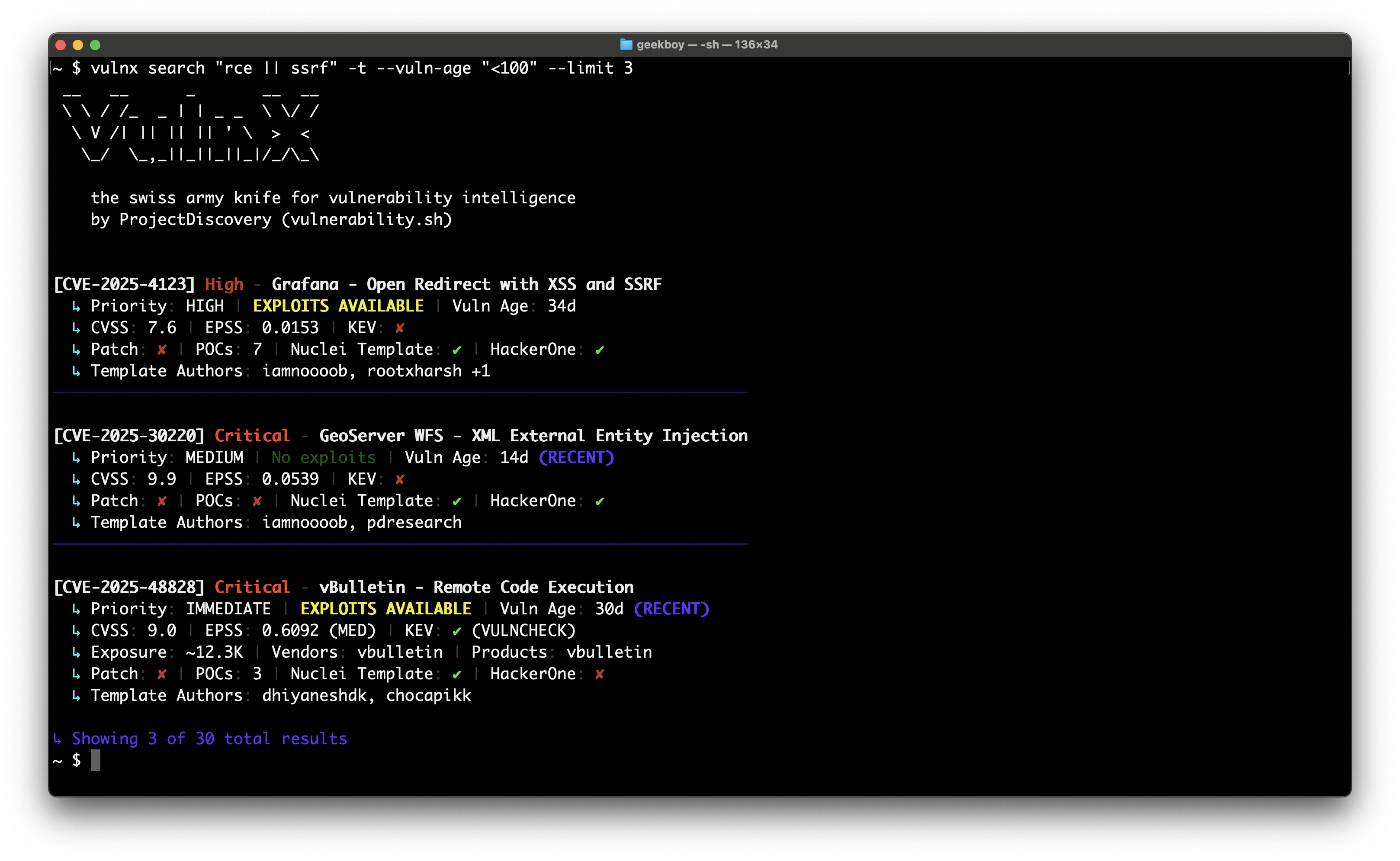

Moderne CLI zum Durchsuchen von Schwachstellendaten mit leistungsstarken Such-, Filter- und Analysefunktionen.

# 1. Get vulnx
go install github.com/projectdiscovery/vulnx/v2/cmd/vulnx@latest
# 2. Explore commands
vulnx --help
vulnx search --help
# 3. Start exploring vulnerabilities (no API key required)
vulnx filters # See all available search fields
vulnx search apache # Basic search (subject to rate limits)
# 4. Set up your API key (recommended to avoid rate limits)
vulnx auth # Get free API key at https://cloud.projectdiscovery.io
# 5. Enhanced exploration with higher limits
vulnx search apache # No rate limits
vulnx id CVE-2021-44228 # Faster responses
Schwachstellen präzise suchen:
vulnx search "severity:critical && is_remote:true"
vulnx search "apache || nginx" --limit 20
vulnx search "cvss_score:>8.0 && cve_created_at:2024"
Detaillierte Informationen zu Schwachstellen abrufen:
vulnx id CVE-2021-44228
vulnx id CVE-2024-1234 --json
Schwachstellenmuster analysieren:
vulnx analyze --fields severity
vulnx analyze --fields affected_products.vendor
Ausgabeformate:
vulnx search "apache" --json # Machine-readable JSON
vulnx search "apache" --output results.json # Save to file
vulnx search "apache" --silent # Quiet output
Suchsteuerung:
vulnx search "apache" --limit 50 # Get 50 results
vulnx search "apache" --sort-desc cvss_score # Sort by CVSS score
vulnx search "apache" --fields cve_id,severity # Specific fields only
Erweiterte Suche:
vulnx search --term-facets severity=5,tags=10 "apache"
vulnx search --range-facets numeric:cvss_score:high:8:10 "remote"
vulnx search --highlight "apache" # Enable search highlighting
vulnx search --facet-size 20 "nginx" # More facet buckets
vulnx search --detailed "xss" # Detailed output like 'id' command
Erkunden Sie, wonach Sie suchen können:
vulnx filters # Show all available search fields
vulnx filters --json # Machine-readable field list
vulnx filters --output fields.json # Save field info to file
Der Befehl filters zeigt detaillierte Informationen zu allen durchsuchbaren Feldern, einschließlich:
Beispielausgabe:
Field: severity
Data Type: string
Description: Vulnerability severity level (e.g., critical, high, medium, low, info)
Can Sort: Yes
Facet Possible: Yes
Search Analyzer: keyword-lower
Examples: severity:critical, severity:high
Enum Values: critical, high, medium, low, info, unknown
Total: 69 filters available
Verwenden Sie diesen Befehl, um neue Suchmöglichkeiten zu entdecken und die Feldsyntax zu verstehen, bevor Sie komplexe Abfragen erstellen.
Hochriskante Schwachstellen finden:
vulnx search "severity:critical && is_remote:true && is_kev:true"
vulnx search "cvss_score:>8.0 && cve_created_at:>=2024" # High CVSS from 2024
vulnx search "is_kev:true && age_in_days:<90" # Recent KEV exploits
Nach Technologie suchen:
vulnx search "apache" # Apache vulnerabilities
vulnx search "apache || nginx" # Multiple technologies
vulnx search "affected_products.vendor:microsoft" # By vendor
Nach Schweregrad und Bewertungen filtern:
vulnx search "severity:high" # High severity
vulnx search "cvss_score:>7.0" # CVSS score above 7
vulnx search "epss_score:>0.8" # High EPSS score
Zeitbasierte Suchen:
vulnx search "cve_created_at:>=2024" # Published in 2024 or later
vulnx search "cve_created_at:>=2024-01-01 && cve_created_at:<2024-07-01" # First half of 2024
vulnx search "age_in_days:<30" # Recent vulnerabilities (last 30 days)
Ausnutzbare Schwachstellen finden:
vulnx search "is_poc:true" # Has proof of concept
vulnx search "is_kev:true" # Known exploited vulns
vulnx search "is_template:true" # Has Nuclei templates
vulnx search --detailed "log4j" # Detailed analysis of specific vuln
Filtern nach Produkt und Anbieter:
vulnx search --product apache,nginx # Filter by products (searches both vendor and product fields)
vulnx search --vendor microsoft,oracle # Filter by vendors only
vulnx search "NOT apache" # Exclude products using query syntax
vulnx search "NOT affected_products.vendor:microsoft" # Exclude vendors using query syntax
Schweregrad und Bewertung:
vulnx search --severity critical,high # Filter by severity
vulnx search "NOT severity:low" # Exclude severities using query syntax
vulnx search --cvss-score ">8.0" # Filter by CVSS score
vulnx search --epss-score ">0.8" # Filter by EPSS score
vulnx search --vuln-status confirmed # Filter by status
vulnx search --vuln-age "<30" # Recent vulnerabilities
Exploit-Eigenschaften:
vulnx search --kev # KEV vulnerabilities only
vulnx search --template # Has Nuclei templates
vulnx search --poc # Has proof of concept
vulnx search --hackerone # HackerOne reported
vulnx search --remote-exploit # Remotely exploitable
Mehrere Eingabemethoden:
# Single ID lookup
vulnx id CVE-2024-1234
# Multiple IDs (comma-separated)
vulnx id CVE-2024-1234,CVE-2024-5678,CVE-2023-9999
# Auto-detection from stdin (no 'id' command needed!)
echo "CVE-2024-1234" | vulnx
echo -e "CVE-2024-1234\nCVE-2024-5678" | vulnx
# File input
vulnx id --file ids.txt
Stapelverarbeitung:
# JSON output for automation
vulnx id --json CVE-2024-1234 CVE-2024-5678
# Save to file
vulnx id --output vulns.json --file ids.txt
# Pipeline integration
cat report.txt | grep -o 'CVE-[0-9]\{4\}-[0-9]\+' | vulnx id --json
Basis-Suchen:
vulnx search "apache" # Simple term
vulnx search "remote code execution" # Phrase search
vulnx search "severity:critical" # Field search
Boolesche Logik:
vulnx search "apache && nginx" # Both terms
vulnx search "apache || nginx" # Either term
vulnx search "apache NOT tomcat" # Exclude term
vulnx search "(apache || nginx) && severity:high" # Grouped
Bereiche und Platzhalter:
vulnx search "cvss_score:>8.0" # Greater than
vulnx search "cvss_score:<9.0" # Less than
vulnx search "cve_created_at:>=2024-01-01" # Date comparison
vulnx search "age_in_days:<30" # Recent vulnerabilities
vulnx search "apache*" # Wildcard
Wichtig: Datumsfelder erfordern Vergleichsoperatoren (>=, >, <, <=).
Einzelne Datumsvergleiche:
vulnx search "cve_created_at:>=2024" # CVEs from 2024 onward
vulnx search "cve_created_at:<2024" # CVEs before 2024
vulnx search "cve_created_at:>2024-06-01" # CVEs after June 1, 2024
Datumsbereiche:
# CVEs from January 2024 only
vulnx search "cve_created_at:>=2024-01-01 && cve_created_at:<2024-02-01"
# High CVSS CVEs from 2024
vulnx search "cvss_score:>8.0 && cve_created_at:>=2024"
# Recent vulnerabilities (age-based)
vulnx search "age_in_days:<30" # Last 30 days
vulnx search "age_in_days:>365" # Older than 1 year
Unterstützte Formate:
2024 (Jahr)2024-01 (Jahr-Monat)2024-01-15 (vollständiges Datum)vulnx funktioniert ohne API-Schlüssel, aber die Authentifizierung bietet erhebliche Vorteile:
⚠️ Ohne API-Schlüssel:
✅ Mit API-Schlüssel:
Authentifizierung einrichten:
vulnx auth # Interactive setup
vulnx auth --api-key YOUR_API_KEY # Non-interactive (automation)
vulnx auth --test # Test current API key
export PDCP_API_KEY="your-key-here" # Environment variable
Authentifizierungsmodi:
vulnx auth – Geführte Einrichtung mit Eingabeaufforderungenvulnx auth --api-key KEY – Perfekt für Automatisierung/CI/CDvulnx auth --test – Aktuelle Konfiguration validierenVersionsverwaltung:
vulnx version # Show version and check for updates
vulnx version --disable-update-check # Show version without update check
vulnx update # Update to latest version
vulnx --update # Alternative update command
Globale Optionen:
vulnx --json search "apache" # JSON output
vulnx --silent search "apache" # No banner
vulnx --timeout 60s search "apache" # Custom timeout
vulnx --disable-update-check search "apache" # Disable automatic update checks
Probleme mit Ratenbegrenzung:
Rate limit exceeded! API key required for higher limits.
→ Run: vulnx auth to configure API key and get higher limits
Automatisierung/CI/CD-Einrichtung:
# Docker containers
vulnx auth --api-key "$SECRET_API_KEY"
# CI/CD pipelines
vulnx auth --api-key "${PDCP_API_KEY}"
# Kubernetes init containers
vulnx auth --api-key "$(cat /secrets/api-key)"
# Test authentication in scripts
vulnx auth --test && echo "Auth OK" || echo "Auth failed"
Vorschläge zur Ratenbegrenzung:
Configure API key with 'vulnx auth' to avoid rate limits
→ This appears when no API key is configured. To remove:
1. Set up API key: vulnx auth
2. Or use --silent flag to suppress informational messages
Keine Ergebnisse:
vulnx search "is_kev:true" --limit 1 # Test with known results
vulnx healthcheck # Check connectivity
Große Ergebnismengen:
vulnx search "apache" --limit 100 # Increase limit
vulnx search "apache" --offset 100 # Pagination
vulnx search --fields cve_id,severity "apache" # Fewer fields
Verbindungsprobleme:
vulnx --timeout 60s search "apache" # Increase timeout
vulnx --proxy http://localhost:8080 search "apache" # Use proxy
vulnx --debug search "apache" # Debug mode
Hilfebefehle (kein API-Schlüssel erforderlich):
vulnx --help # All commands overview
vulnx search --help # Search command help
vulnx id --help # ID command help
vulnx filters --help # Filters command help
vulnx analyze --help # Analyze command help
vulnx version # Version info with update check
vulnx version --disable-update-check # Version info without update check
Datenerkundung (ohne API-Schlüssel gelten Ratenbegrenzungen):
vulnx filters # Show all searchable fields
vulnx search help # Detailed search fields
vulnx analyze help # Available analyze fields
⚠️ Hinweis Alle Befehle funktionieren ohne API-Schlüssel, unterliegen jedoch Ratenbegrenzungen. Konfigurieren Sie mit
vulnx autheinen API-Schlüssel, um höhere Grenzwerte und eine bessere Leistung zu erhalten.
vulnx search apache ausvulnx auth für intensive Nutzung--disable-update-check, um dies zu deaktivierenvulnx filters, um alle verfügbaren Suchfelder und deren Syntax zu entdecken--json für Skripting und Automatisierunganalyze, um Datenmuster zu verstehenFür fortgeschrittene Anwendungsmuster und Beispiele siehe USAGE.md.
Für Entwicklungseinrichtung, Code-Qualitätsprüfungen und Beitragsrichtlinien siehe DEVELOPMENT.md.
vulnx wird unter der MIT-Lizenz vertrieben.
| Befehl | Zweck | Beispiel |
|---|
search | Schwachstellen mit erweiterten Filtern finden | vulnx search "apache && severity:high" |
id | Details zu einer bestimmten CVE abrufen | vulnx id CVE-2021-44228 |
filters | Alle verfügbaren Suchfelder und Filter auflisten | vulnx filters |
analyze | Daten nach Feldern aggregieren | vulnx analyze -f severity |
auth | API-Zugriff konfigurieren | vulnx auth |
version | Versionsinformationen anzeigen und nach Updates suchen | vulnx version |
update | vulnx auf die neueste Version aktualisieren | vulnx update |
healthcheck | Konnektivität testen | vulnx healthcheck |
| Flag | Kurz | Beschreibung | Beispiel |
|---|
--product | -p | Nach Produkten filtern | --product apache,nginx |
--vendor | Nach Anbietern filtern | --vendor microsoft,oracle | |
--severity | -s | Nach Schweregrad filtern | --severity critical,high |
--tags | Nach Tags filtern | --tags rce,injection | |
--cvss-score | Nach CVSS-Score filtern | --cvss-score ">8.0" | |
--epss-score | Nach EPSS-Score filtern | --epss-score ">0.8" | |
--vuln-age | -a | Nach Alter filtern | --vuln-age "<30" |
--vuln-type | Nach Schwachstellentyp filtern | --vuln-type sql_injection | |
--kev | Nur KEV-Schwachstellen | --kev | |
--template | -t | Hat Nuclei-Vorlagen | --template |
--poc | Hat Proof of Concept | --poc | |
--hackerone | Von HackerOne gemeldet | --hackerone | |
--remote-exploit | Remote ausnutzbar | --remote-exploit | |
--vuln-status | Nach Schwachstellenstatus filtern | --vuln-status confirmed |
| Flag | Kurz | Beschreibung | Beispiel |
|---|
--detailed | Detaillierte Ausgabe wie 'id' | --detailed | |
--highlight | Suchhervorhebung aktivieren | --highlight | |
--limit | -n | Anzahl der Ergebnisse | --limit 50 |
--offset | Paginierungsoffset | --offset 100 | |
--sort-asc | Aufsteigend sortieren | --sort-asc cvss_score | |
--sort-desc | Absteigend sortieren | --sort-desc cve_created_at | |
--fields | Bestimmte Felder auswählen | --fields cve_id,severity | |
--term-facets | Term-Facetten berechnen | --term-facets severity=5 | |
--range-facets | Bereichsfacetten berechnen | --range-facets numeric:cvss_score:high:8:10 | |
--facet-size | Anzahl der Facetten-Buckets | --facet-size 20 |
| Feld | Beschreibung | Beispielwerte |
|---|
severity | Schweregrad der Schwachstelle | low, medium, high, critical |
cvss_score | CVSS-Score (0-10) | 7.5, >8.0, <9.0 |
cve_id | CVE-Kennung | CVE-2021-44228 |
is_remote | Remote ausnutzbar | true, false |
is_kev | Bekannte ausgenutzte Schwachstelle | true, false |
is_poc | Hat Proof of Concept | true, false |
affected_products.vendor | Anbietername | apache, microsoft |
affected_products.product | Produktname | tomcat, windows |
cve_created_at | Veröffentlichungsdatum | >=2024, >2024-01-01, <2023 |
age_in_days | Tage seit Veröffentlichung | <30, >365, <=90 |