
Skip to content
KitploitKITPLOIT
ToolsBlog
Einreichen
ToolsBlog
Einreichen

Hacking-, PenTest- und Cybersicherheits-Tools für Ihr Sicherheitsarsenal!

Kitploit ist ein Verzeichnis von Hacking-, Cybersicherheits- und Pentesting-Tools. Entdecken Sie die neuesten Projekt-Updates, um Schwachstellen zu finden, Systeme zu analysieren, Tests zu automatisieren und Ihre Sicherheit zu stärken.

··Feeds·Kontakt·Datenschutz·© 2026 Kitploit

Tool-Verzeichnis

Kategorien

Alle Kategorien anzeigen
Loading categories
Steganography-Online-Codec-JavaScript — Steganografischer Online-Codec ermöglicht es dir, eine passwortverschlüsselte Nachricht in Bildern & Fotos zu verbergen, unter Verwendung des AES-Verschlüsselungsalgorithmus mit einem 256-Bit-PBKDF2-abgeleiteten Schlüssel. | Kitploit
Tools/GitHubGitHub/pelock/steganography-online-codec-javascript
Verschlüsselungs-/EntschlüsselungstoolsWebsicherheitSteganografieKryptographiePrivatsphäre
GitHubpelock/steganography-online-codec-javascript

Steganography-Online-Codec-JavaScript

Steganografischer Online-Codec ermöglicht es dir, eine passwortverschlüsselte Nachricht in Bildern & Fotos zu verbergen, unter Verwendung des AES-Verschlüsselungsalgorithmus mit einem 256-Bit-PBKDF2-abgeleiteten Schlüssel.

Beliebteste

Alle anzeigen →

Entdecken Sie die meistgenutzten Tools unserer Community.

Alle Tools erkunden

Durchsuchen Sie unsere Tool-Sammlung

Alle Tools anzeigen →
Teilen
Repository anzeigen
Webseite
35vor 4 MonatenNoch nicht geprüft

Steganography Online Codec SDK für JavaScript & NPM

Steganographic Online Codec ermöglicht es Ihnen, eine passwortverschlüsselte Nachricht in Bildern & Fotos zu verbergen, unter Verwendung des AES-Verschlüsselungsalgorithmus mit einem 256-Bit PBKDF2-abgeleiteten Schlüssel.

Sie können es kostenlos nutzen unter:

https://www.pelock.com/products/steganography-online-codec

Dieses SDK bietet programmatischen Zugriff auf den Codec und seine Kodierungs- und Dekodierungsfunktionen über eine WebAPI-Schnittstelle.

Was ist Steganografie & wie funktioniert sie?

Steganografie ist ein Begriff, der die Kunst und Wissenschaft beschreibt, Informationen zu verbergen, indem Nachrichten in andere, scheinbar harmlose Bilddateien eingebettet werden.

In diesem Fall werden die einzelnen Bits der verschlüsselten verborgenen Nachricht als die niederwertigsten (LSB) Bits in den RGB-Farbkomponenten der Pixel des ausgewählten Bildes gespeichert.
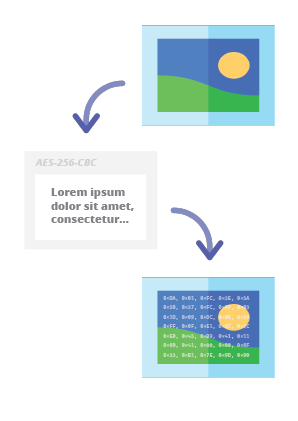
Steganography Online Codec - Hide Message in Image

Mit unserem steganografischen Encoder können Sie jede Textnachricht sicher in einem Bild verbergen und sie senden, ohne Verdacht zu erregen. Die Nachricht kann nur nach Eingabe eines gültigen Entschlüsselungspassworts gelesen werden.

Installation

Die bevorzugte Methode zur Installation des Web-API-SDKs ist über NPM (Node Package Manager).

Führen Sie aus:

root@kitploit:~
npm i steganography-online-codec

Oder fügen Sie diesen Eintrag hinzu:

root@kitploit:~
  "dependencies": {
    "steganography-online-codec": "latest"
  },

direkt in Ihre package.json im Abschnitt dependencies.

Das Installationspaket ist verfügbar unter https://www.npmjs.com/package/steganography-online-codec

Pakete für andere Programmiersprachen

Die Installationspakete wurden in die Repositorys mehrerer gängiger Programmiersprachen hochgeladen und ihre Quellcodes wurden auf GitHub veröffentlicht:

Alternative Verwendung

Wenn Sie das Python-Modul nicht verwenden möchten, können Sie direkt aus der Datei importieren:

root@kitploit:~
from pelock.steganography_online_codec import *

So verbergen Sie eine geheime Nachricht in einer Bilddatei

root@kitploit:~
"use strict";

/******************************************************************************
 *
 * Steganography Online Codec WebApi interface usage example.
 *
 * In this example shows how to hide an encrypted secret message in an image file.
 *
 * Version      : v1.00
 * Language     : JavaScript
 * Author       : Bartosz Wójcik (original example)
 * Project      : https://www.pelock.com/products/steganography-online-codec
 * Homepage     : https://www.pelock.com
 *
 * @link https://www.pelock.com/products/steganography-online-codec
 * @copyright Copyright (c) 2020-2025 PELock LLC
 * @license Apache-2.0
 *
/*****************************************************************************/

// include Steganography Online Codec module
import { SteganographyOnlineCodec, Errors } from 'steganography-online-codec';
// or if tested locally use:
//import { SteganographyOnlineCodec, Errors } from '../src/SteganographyOnlineCodec.mjs';

// create Steganography Online Codec class instance (we are using our activation key)
const mySteganographyOnlineCodec = new SteganographyOnlineCodec('YOUR-WEB-API-KEY');

// encode a hidden message (encrypted with your password) within an image file
(async () => {

	const inputFile = 'input_file.jpg';
	const secretMessage = 'Secret message';
	const password = 'Pa$$word';
	const outputFile = 'output_file_with_hidden_secret_message.png';

	try {
		const result = await mySteganographyOnlineCodec.encode(inputFile, secretMessage, password, outputFile);

		// result object holds the encoding results as well as other information
		console.log('Secret messaged encoded and saved to the output PNG file.');
	} catch (err) {
		console.error('Encoding failed:', err.error_message || err.message || String(err));
	}
})();

Komplexeres Beispiel mit besserer Erklärung und korrekter Fehlercode-Prüfung

root@kitploit:~
"use strict";

/******************************************************************************
 *
 * Steganography Online Codec WebApi interface usage example.
 *
 * In this example, we will see how to hide an encrypted message in an
 * image file using our codec.
 *
 * Version      : v1.00
 * Language     : JavaScript
 * Author       : Bartosz Wójcik
 * Project      : https://www.pelock.com/products/steganography-online-codec
 * Homepage     : https://www.pelock.com
 *
 * @link https://www.pelock.com/products/steganography-online-codec
 * @copyright Copyright (c) 2020-2025 PELock LLC
 * @license Apache-2.0
 *
 /*****************************************************************************/

// include Steganography Online Codec module
import { SteganographyOnlineCodec, Errors } from 'steganography-online-codec';
// or if tested locally use:
//import { SteganographyOnlineCodec, Errors } from '../src/SteganographyOnlineCodec.mjs';


// create Steganography Online Codec class instance (we are using our activation key)
const mySteganographyOnlineCodec = new SteganographyOnlineCodec('YOUR-WEB-API-KEY');

// encode a hidden message within the source image file
(async () => {
	// full version image size limit is set to 10 MB (demo 50 kB max)
	// supported image formats are PNG, JPG, GIF, BMP, WBMP, GD2, AVIF, WEBP (mail me for more)
	const inputFilePath = 'input_file.webp';

	// full version message size is unlimited (demo 16 chars max)
	const secretMessage = 'Secret message';

	// full version password length is 128 characters max (demo 8 chars max)
	const password = 'Pa$$word';

	// where to save encoded image with the secret message
	const outputFilePath = 'output_file_with_hidden_secret_message.png';

	try {
		// encode a hidden message (encrypted with your password) within an image file
		const result = await mySteganographyOnlineCodec.encode(inputFilePath, secretMessage, password, outputFilePath);

		// result object holds the encoding results as well as other information
		const versionType = result.license && result.license.activationStatus ? 'full' : 'demo';
		console.log(`You are running in ${versionType} version`);

		console.log(`Secret messaged encoded and saved to ${outputFilePath}`);
		if (result.license && result.license.usagesCount !== undefined) {
			console.log(`Remaining number of usage credits - ${result.license.usagesCount}`);
		}
	} catch (err) {
		const errorCode = err.error;

		switch (errorCode) {
			case Errors.INVALID_INPUT:
				console.log(`Invalid input file ${inputFilePath} or file doesn't exist`);
				break;
			case Errors.MESSAGE_TOO_LONG:
				console.log('Message is too long for the provided image file, use larger file');
				break;
			case Errors.IMAGE_TOO_BIG:
				console.log(`Image file is too big, current limit is set to ${err.raw?.limits?.maxFileSize ?? 'unknown'}`);
				break;
			case Errors.LIMIT_MESSAGE:
				console.log(`Message is too long, current limit is set to ${err.raw?.limits?.maxMessageLen ?? 'unknown'}`);
				break;
			case Errors.LIMIT_PASSWORD:
				console.log(`Password is too long, current limit is set to ${err.raw?.limits?.maxPasswordLen ?? 'unknown'}`);
				break;
			case Errors.INVALID_PASSWORD:
				console.log('Invalid password');
				break;
			default:
				console.log(`An error occurred: ${err.error_message ?? `Error code ${errorCode}`}`);
		}
	}
})();

So extrahieren Sie eine verschlüsselte geheime Nachricht aus der Bilddatei

root@kitploit:~
"use strict";

/******************************************************************************
 *
 * Steganography Online Codec WebApi interface usage example.
 *
 * In this example, we will see how to extract a previously encrypted & hidden
 * secret message from an image file.
 *
 * Version      : v1.00
 * Language     : JavaScript
 * Author       : Bartosz Wójcik
 * Project      : https://www.pelock.com/products/steganography-online-codec
 * Homepage     : https://www.pelock.com
 *
 * @link https://www.pelock.com/products/steganography-online-codec
 * @copyright Copyright (c) 2020-2025 PELock LLC
 * @license Apache-2.0
 *
 /*****************************************************************************/

// include Steganography Online Codec module
import { SteganographyOnlineCodec, Errors } from 'steganography-online-codec';
// or if tested locally use:
//import { SteganographyOnlineCodec, Errors } from '../src/SteganographyOnlineCodec.mjs';

// create Steganography Online Codec class instance (we are using our activation key)
const mySteganographyOnlineCodec = new SteganographyOnlineCodec('YOUR-WEB-API-KEY');

// extract a hidden message from the previously encoded image file
(async () => {
	// full version image size limit is set to 10 MB (demo 50 kB max)
	// supported image format is PNG and only PNG!
	const inputFilePath = 'output_file_with_hidden_secret_message.png';

	// full version password length is 128 characters max (demo 8 chars max)
	const password = 'Pa$$word';

	try {
		// extract a hidden message from the image (PNG files only)
		const result = await mySteganographyOnlineCodec.decode(inputFilePath, password);

		// result object holds the decoding results as well as other information
		console.log(`You are running in ${result.license?.activationStatus ? 'full' : 'demo'} version`);

		console.log(`Secret message is "${result.message}"`);

		if (result.license && result.license.usagesCount !== undefined) {
			console.log(`Remaining number of usage credits - ${result.license.usagesCount}`);
		}
	} catch (err) {
		switch (err.error) {
			case Errors.INVALID_INPUT:
				console.log(`Invalid input file ${inputFilePath} or file doesn't exist`);
				break;
			case Errors.IMAGE_TOO_BIG:
				console.log(`Image file is too big, current limit is set to ${err.raw?.limits?.maxFileSize ?? 'unknown'}`);
				break;
			case Errors.LIMIT_MESSAGE:
				console.log(`Extracted message is too long, current limit is set to ${err.raw?.limits?.maxMessageLen ?? 'unknown'}`);
				break;
			case Errors.LIMIT_PASSWORD:
				console.log(`Password is too long, current limit is set to ${err.raw?.limits?.maxPasswordLen ?? 'unknown'}`);
				break;
			case Errors.INVALID_PASSWORD:
				console.log('Invalid password');
				break;
			default:
				console.log(`An error occurred: ${err.error_message ?? String(err)}`);
		}
	}
})();

So überprüfen Sie den Lizenzschlüsselstatus & aktuelle Limits

root@kitploit:~
"use strict";

/******************************************************************************
 *
 * Steganography Online Codec WebApi interface usage example.
 *
 * In this example we will verify our activation key status.
 *
 * Version      : v1.00
 * Language     : JavaScript
 * Author       : Bartosz Wójcik
 * Project      : https://www.pelock.com/products/steganography-online-codec
 * Homepage     : https://www.pelock.com
 *
 * @link https://www.pelock.com/products/steganography-online-codec
 * @copyright Copyright (c) 2020-2025 PELock LLC
 * @license Apache-2.0
 *
 /*****************************************************************************/

// include Steganography Online Codec module
import { SteganographyOnlineCodec, Errors } from 'steganography-online-codec';
// or if tested locally use:
//import { SteganographyOnlineCodec, Errors } from '../src/SteganographyOnlineCodec.mjs';

// create Steganography Online Codec class instance (we are using our activation key)
const mySteganographyOnlineCodec = new SteganographyOnlineCodec('YOUR-WEB-API-KEY');

// login to the service
(async () => {
	try {
		const result = await mySteganographyOnlineCodec.login();

		// result object holds the information about the license & current limits
		const versionType = result.license && result.license.activationStatus ? 'full' : 'demo';
		console.log(`You are running in ${versionType} version`);

		// information about the current license
		if (result.license && result.license.activationStatus) {
			console.log(`Registered for - ${result.license.userName}`);
			const licenseType = result.license.type === 0 ? 'personal' : 'company';
			console.log(`License type - ${licenseType}`);
			console.log(`Total number of purchased usage credits - ${result.license.usagesTotal}`);
			console.log(`Remaining number of usage credits - ${result.license.usagesCount}`);
		}

		// current limits (different for DEMO and FULL versions)
		if (result.limits) {
			console.log(`Max. password length - ${result.limits.maxPasswordLen}`);
			const msgLen = result.limits.maxMessageLen === -1 ? 'unlimited' : result.limits.maxMessageLen;
			console.log(`Max. message length - ${msgLen}`);
			console.log(`Max. input image file size - ${mySteganographyOnlineCodec.convert_size(result.limits.maxFileSize)}`);
		}
	} catch (err) {
		console.error(`Login failed: ${err.error_message || String(err)}`);
	}
})();

Haben Sie Fragen?

Wenn Sie an der Steganography Online Codec Web API interessiert sind oder Fragen zu SDK-Paketen, technischen Details haben oder etwas unklar ist, kontaktieren Sie mich bitte. Ich beantworte gerne alle Ihre Fragen.

Bartosz Wójcik

  • Besuchen Sie meine Website unter — https://www.pelock.com
  • X — https://x.com/PELock
  • GitHub — https://github.com/PELock
Tool herunterladen
RepositorySpracheInstallationPaketGitHub
PyPI repository for PythonPythonFühren Sie pip install steganography-online-codec ausPyPIQuellen
NPM repository for JavaScript and TypeScriptJavaScript, TypeScriptFühren Sie npm i steganography-online-codec aus oder fügen Sie "steganography-online-codec": "latest" unter dependencies in package.json hinzuNPMQuellen
Rust crates.ioRustFühren Sie cargo add steganography-online-codec aus oder fügen Sie steganography-online-codec = "1" zu Cargo.toml hinzu (optional: git / path für unveröffentlichte oder vendored Builds)crates.ioQuellen