
Automatisieren Sie die Verschleierung und Virtualisierung von PowerShell-Skriptquellcode mit einer flexiblen Web-API für Python (pip-Paket).
PowerShell Pro Obfuscator schützt proprietäre .ps1-Skripte mit Umbenennung, polymorpher String- und Integer-Verschlüsselung, Control-Flow-Flattening, endlichen Automaten (FSA), einer VM-Engine, selbstverteidigenden Integritätsprüfungen, einem Schutz-Linker und Anti-Debugging-Sonden.
Verschleiern, virtualisieren und schützen Sie PowerShell-.ps1-Skripte mit polymorpher String-Verschlüsselung, VM-Engine, endlichen Automaten-Transformationen, Selbstintegritäts- und Anti-Debugging-Prüfungen — über GUI, CLI, Online-Tool oder API.
Weitere technische Details, Downloads und Dokumentation finden Sie unter:
https://www.pelock.com/products/powershell-pro-obfuscator
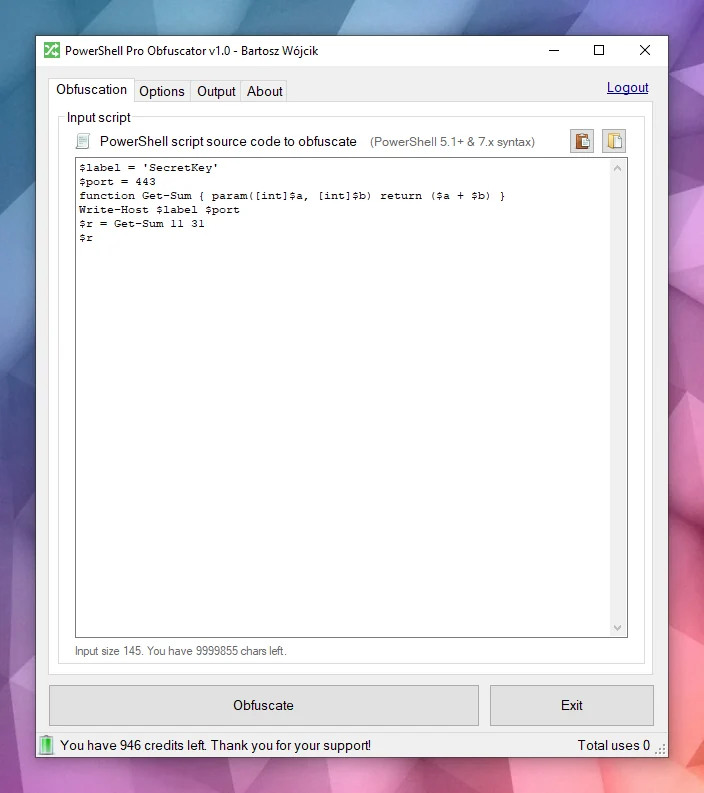
Es ist für Windows und Linux verfügbar:
Mehrere Programmier-APIs verfügbar:
Eine Online-Obfuscator-Oberfläche:
Skripte werden in der Regel als einfache .ps1-Dateien verteilt oder in Module eingebettet. Dieser Komfort bedeutet, dass jeder mit Dateizugriff die gesamte Logik lesen, nach Anmeldedaten oder API-Schlüsseln in Strings suchen und Ihre Algorithmen stehlen kann, sofern Sie nicht zusätzliche Schritte unternehmen, um die Absicht zu verbergen.
PowerShell ist eine plattformübergreifende Shell und Skriptsprache, die auf .NET basiert. Sie wird häufig für Automatisierung, Konfiguration, DevOps-Pipelines und Endpunktverwaltung unter Windows und Linux eingesetzt.
PowerShell Pro Obfuscator bietet viele fortschrittliche Verschleierungs-, Virtualisierungs- und Schutzstrategien. Sie können den Schutz einfach gegen Größe und Leistung abwägen.
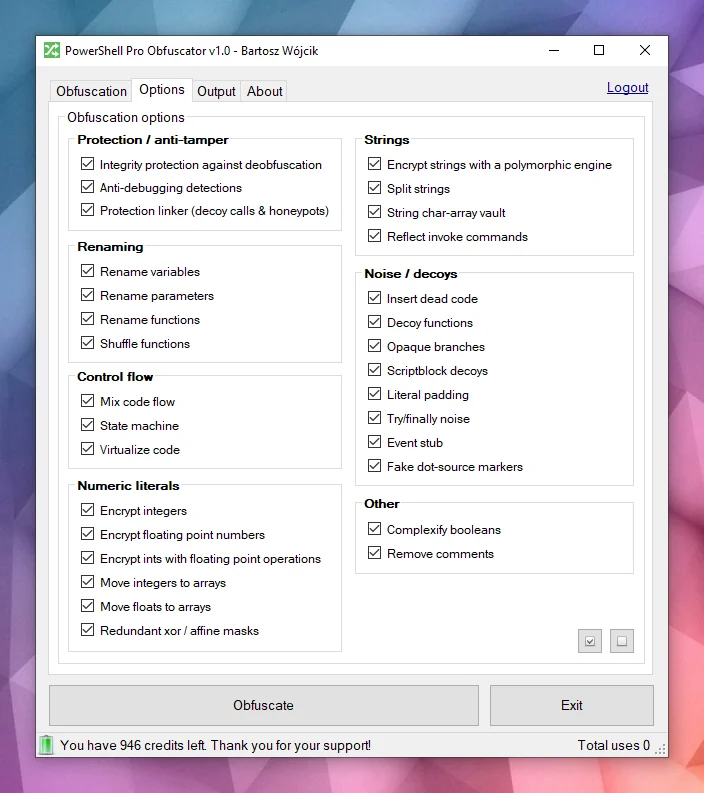
Leistungsstarke VerschleierungPowerShell Pro Obfuscator verwendet modernste Verschleierungsstrategien wie polymorphe String-Verschlüsselung, Integer- und Float-Verschlüsselung sowie Täuschungs-Rauschen. Das Ergebnis verbirgt Literale und Struktur, während das getestete Laufzeitverhalten erhalten bleibt.
Code-VirtualisierungAusgewählte Anweisungen werden in Opcodes einer zufällig generierten VM-Engine angehoben, mit gemischten Switch-Cases, Täuschungs-Opcodes und einer verschleierten Dispatcher-Schleife. Analysten müssen die virtuelle Maschine interpretieren, statt einfaches PowerShell zu lesen.
Endliche Automaten (FSA)Die Verschleierung mit endlichen Automaten (FSA) schreibt lineare PowerShell-Anweisungsblöcke in Automaten mit zwei Zuständen um, mit opaken Planern und gemischten Dispatch-Handlern. Statt Code von oben nach unten zu lesen, müssen Analysten numerische Zustände, Übergangstabellen und Täuschungspfade verfolgen, um die ursprüngliche Reihenfolge zu rekonstruieren.
Anti-DebuggingDer Anti-Debugging-Schutz fügt polymorphe Sonden ein, die angehängte Debugger, PowerShell-Breakpoints, Debug-Präferenz- und Tracing-Modi sowie verwandte Host-Signale erkennen. Wenn eine Prüfung ausgelöst wird, beendet sich das verschleierte Skript still, statt geschützte Logik unter interaktiver Analyse preiszugeben.
SelbstintegritätsprüfungenEine Bootstrap-Sonde überprüft die Skriptform auf der Festplatte (Funktionsanzahl und Integritätstoken) und setzt einen Manipulationsschlüssel, wenn die Datei nicht mehr dem verschleierten Build entspricht. String-Entschlüsseler konsumieren diesen Schlüssel, sodass gepatchte Skripte Müll statt Klartext zurückgeben. Diese selbstverteidigende Schicht erhöht die Kosten für beiläufige Entschleierung und Dateibearbeitungen.
Schutz-LinkerEin später Durchlauf verdrahtet Honeypot-Auflöser, Schein-Hilfsaufrufe mit zufälligen Argumenten und Tripwires mit flacher Stapeltiefe, die nur aktiv bleiben, bevor der Bootstrap abgeschlossen ist. Extrahierte Ausschnitte behalten laute Aufrufoberflächen, die bei statischer Prüfung echt aussehen. Die normale Ausführung nach einer erfolgreichen Integritätsprüfung bleibt unverändert.
Betrachten Sie dieses Beispiel — dasselbe Skript wird nach der Verschleierung auf einen Blick schwerer lesbar.
function Get-Greeting {
param([string]$Name)
Write-Host "Hello World from $Name!"
}
Get-Greeting "PowerShell Pro Obfuscator"
$script:_HnJTskg = 0
$jwNTQ = 297 * 400 + 36
$x4e8bfda = [Math]::Abs($jwNTQ - 8074)
$_EvKocNn = [Math]::Max($jwNTQ, $x4e8bfda) - [Math]::Min($jwNTQ, $x4e8bfda)
[void]$_EvKocNn
$script:_jUoXkBYh = 0
function gnJjzMCN3V8P {
param([int]$slot, [int]$salt, [int]$guard)
if (-not ((Get-Variable -Name _HnJTskg -Scope Script -ErrorAction SilentlyContinue).Value)) { return '' }
@('JFE', 'm0ao', 'R8Ysw') | ForEach-Object { $_.ToUpper() } | Out-Null
if ((((($slot * 31) + $salt) -band 65535) -ne $guard)) { return '' }
$tk = (Get-Variable -Name _jUoXkBYh -Scope Script -ErrorAction SilentlyContinue).Value
$IEm39CSpDOEFp = @{ 'Ouj1' = 455; 'vjzO' = 170; 'IQNV' = 291 }
$IEm39CSpDOEFp['R5LrM'] = $IEm39CSpDOEFp['Ouj1'] + $IEm39CSpDOEFp['vjzO']
$YWxSO = ($IEm39CSpDOEFp.Values | Measure-Object -Sum).Sum
[void]$YWxSO
if ($null -eq $tk) { [long]$tk = 0 }
$v93a130f2e4 = 508
switch ($v93a130f2e4) {
524 { $_GYF7IA14Go = 'H1Vph' }
561 { $_GYF7IA14Go = 'HAWoB' }
default { $_GYF7IA14Go = $v93a130f2e4 * 2 }
}
[void]$_GYF7IA14Go
$dk = (Get-Variable -Name vb6a18ffee4 -Scope Script -ErrorAction SilentlyContinue).Value
try { $xgLN5KZyEusFo7 = [Math]::Sqrt(850) } finally { [void]$xgLN5KZyEusFo7 }
if ($null -eq $dk) { [long]$dk = 0 }
$d = @(46866, 46865)
if ((((-not 113))-and(([int](272 -ne 272) -eq 21)))-and(([Math]::Sign(-12) -eq 4))) { $w4iTzi2hooy1GW = @(711, 562, 665); $w4iTzi2hooy1GW = ($w4iTzi2hooy1GW | Measure-Object -Sum).Sum }
$r = ''
for ($s9qOSpiZzufQlVyV = 0; $s9qOSpiZzufQlVyV -lt $d.Length; $s9qOSpiZzufQlVyV++) {
[long]$v = [long]$d[$s9qOSpiZzufQlVyV]
for ($jL9gL7PEtQeIS = 2; $jL9gL7PEtQeIS -ge 0; $jL9gL7PEtQeIS--) {
for ($PsbomDHxAy = 2; $PsbomDHxAy -ge 0; $PsbomDHxAy--) {
[long]$v = [long]$v + ([long](https://github.com/pelock/powershell-pro-obfuscator-python/blob/HEAD/230))
}
}
for ($zhH33vzxjIzegl9 = 0; $zhH33vzxjIzegl9 -ge 0; $zhH33vzxjIzegl9--) {
[long]$v = [long]$v + ([long]([int]((((((236 + (-3 * $s9qOSpiZzufQlVyV) + (3 * $zhH33vzxjIzegl9))) % 256) + 256) % 256))))
[long]$v = [long]$v -bxor ([long](https://github.com/pelock/powershell-pro-obfuscator-python/blob/HEAD/53766))
}
[long]$v = [long]$v - ([long]($salt + $slot + $tk + $dk + 0))
if ([long]$v -ge 0 -and [long]$v -le 0xFFFF) { $r += [char][int][long]$v }
elseif ([long]$v -ge 0x10000 -and [long]$v -le 0x10FFFF) { $r += [System.Char]::ConvertFromUtf32([int][long]$v) }
}
return $r
}
and more...
Würden Sie die ursprüngliche Absicht noch erkennen, wenn Sie nur den verschleierten Text und keine frühere Kopie des Skripts hätten?

Die Engine parst PowerShell-Quellcode in einen AST-Baum und wendet dann auswählbare Transformationen an: Bezeichner-Umbenennung, Control-Flow-Flattening, endliche Automaten (FSA), VM-Virtualisierung, polymorphe String- und Integer-Verschlüsselung, Einfügung von Rauschen und Täuschungen, selbstverteidigende Integritätssonden, den Schutz-Linker und Anti-Debugging-Prüfungen. Viele Techniken sind produktspezifisch; einige Ideen werden mit unseren anderen Schutzwerkzeugen geteilt.

Wenn alle Durchläufe abgeschlossen sind, erzeugt die Engine eine neue .ps1-Datei. Randfälle in der PowerShell-Grammatik und Hosting-Umgebungen bedeuten, dass Sie die Ausgabe immer in Ihrer Ziel-Laufzeitumgebung testen sollten.
Gehen Sie kein Risiko ein — verwenden Sie PowerShell Pro Obfuscator, um Ihre PowerShell-Skripte und Algorithmen zu verschleiern, zu virtualisieren und zu schützen.
Unser Unternehmen hat eine lange Geschichte in Verschleierungstechnologien und Code-Obfuscatoren (siehe unsere x86 Assembly, AutoIt & Java Obfuscatoren).
Wir beheben aktiv Fehler, forschen und entwickeln neue Verschleierungsstrategien für unsere Werkzeuge.
Sie können auf unsere Expertise und Unterstützung in diesem Bereich zählen.
Die bevorzugte Methode zur Installation der WebApi-Schnittstelle ist über pip.
Führen Sie aus:
pip install powershell-pro-obfuscator
oder
python3 -m pip install powershell-pro-obfuscator
Und fügen Sie dann diesen Import zu Ihrem Quellcode hinzu:
from powershellproobfuscator import PowerShellProObfuscator
Das Installationspaket ist verfügbar unter https://pypi.org/project/powershell-pro-obfuscator/
#!/usr/bin/env python
###############################################################################
#
# PowerShell Pro Obfuscator WebApi interface usage example.
#
# In this example we will obfuscate sample source with default options.
#
# Version : v1.0.0
# Language : Python
# Author : Bartosz Wójcik
# Web page : https://www.pelock.com
#
###############################################################################
#
# include PowerShell Pro Obfuscator module
#
from powershellproobfuscator import PowerShellProObfuscator
#
# if you don't want to use Python module, you can import directly from the file
#
#from pelock.powershellproobfuscator import PowerShellProObfuscator
#
# create PowerShell Pro Obfuscator class instance (we are using our activation key)
#
myPowerShellProObfuscator = PowerShellProObfuscator("ABCD-ABCD-ABCD-ABCD")
#
# source code in PowerShell format
#
scriptSourceCode = """function Get-Greeting {
param([string]$Name)
Write-Host "Hello World from $Name!"
}
Get-Greeting "PowerShell Pro Obfuscator\""""
#
# by default all obfuscation options are enabled, so we can just simply call
#
result = myPowerShellProObfuscator.obfuscate_script_source(scriptSourceCode)
#
# it's also possible to pass a PowerShell script file path instead of a string with the source e.g.
#
# result = myPowerShellProObfuscator.obfuscate_script_file("/path/to/project/script.ps1")
#
# result[] array holds the obfuscation results as well as other information
#
# result["error"] - error code
# result["output"] - obfuscated code
# result["demo"] - was it used in demo mode (invalid or empty activation key was used)
# result["credits_left"] - usage credits left after this operation
# result["credits_total"] - total number of credits for this activation code
# result["expired"] - if this was the last usage credit for the activation key it will be set to True
#
if result and "error" in result:
# display obfuscated code
if result["error"] == PowerShellProObfuscator.ERROR_SUCCESS:
# format output code for HTML display
print(result["output"])
else:
print(f'An error occurred, error code: {result["error"]}')
else:
print("Something unexpected happen while trying to obfuscate the code.")
#!/usr/bin/env python
###############################################################################
#
# PowerShell Pro Obfuscator WebApi interface usage example.
#
# In this example we will obfuscate sample source with custom options.
#
# Version : v1.0.0
# Language : Python
# Author : Bartosz Wójcik
# Web page : https://www.pelock.com
#
###############################################################################
#
# include PowerShell Pro Obfuscator module
#
from powershellproobfuscator import PowerShellProObfuscator
#
# if you don't want to use Python module, you can import directly from the file
#
#from pelock.powershellproobfuscator import PowerShellProObfuscator
#
# create PowerShell Pro Obfuscator class instance (we are using our activation key)
#
myPowerShellProObfuscator = PowerShellProObfuscator("ABCD-ABCD-ABCD-ABCD")
#
# should the source code be compressed (both input & compressed)
#
myPowerShellProObfuscator.enableCompression = False
#
# global obfuscation options
#
# you can disable a particular obfuscation strategy globally if it
# fails or you don't want to use it without modifying the source codes
#
# by default all obfuscation strategies are enabled
#
#
# protection against tampering with protected code (integrity verification)
#
myPowerShellProObfuscator.selfDefending = True
#
# protection linker (decoy call graph)
#
myPowerShellProObfuscator.protectionLinker = True
#
# rename variable names to random string values
#
myPowerShellProObfuscator.renameVariables = True
#
# rename parameter names to random string values
#
myPowerShellProObfuscator.renameParameters = True
#
# rename function names to random string values
#
myPowerShellProObfuscator.renameFunctions = True
#
# shuffle function order in the output source
#
myPowerShellProObfuscator.shuffleFunctions = True
#
# change linear code execution flow via control-flow flattening
#
myPowerShellProObfuscator.controlFlowFlatten = True
#
# rewrite statement blocks into finite-state automata (state-machine obfuscation)
#
myPowerShellProObfuscator.stateMachine = True
#
# lift selected statements into a VM engine (virtualized statements)
#
myPowerShellProObfuscator.vmStrategy = True
#
# encrypt integers
#
myPowerShellProObfuscator.encryptIntegers = True
#
# split strings into concatenated chunks
#
myPowerShellProObfuscator.splitStrings = True
#
# encrypt strings using randomly generated polymorphic encryption algorithms
#
myPowerShellProObfuscator.encryptStrings = True
#
# move integers to arrays
#
myPowerShellProObfuscator.integersToArrays = True
#
# move floats to arrays
#
myPowerShellProObfuscator.floatsToArrays = True
#
# insert dead code
#
myPowerShellProObfuscator.insertDeadCode = True
#
# replace boolean conditions with equivalent complex expressions
#
myPowerShellProObfuscator.complexifyBooleans = True
#
# represent integers via floating-point math
#
myPowerShellProObfuscator.integersToFloating = True
#
# encrypt floating point numbers
#
myPowerShellProObfuscator.encryptFloating = True
#
# insert decoy functions
#
myPowerShellProObfuscator.decoyFunctions = True
#
# insert anti-debugging detections
#
myPowerShellProObfuscator.detectDebugger = True
#
# insert fake dot-source comment markers
#
myPowerShellProObfuscator.fakeDotSourceMarkers = True
#
# insert opaque predicate branches
#
myPowerShellProObfuscator.opaqueBranches = True
#
# insert scriptblock decoys
#
myPowerShellProObfuscator.scriptblockDecoys = True
#
# insert here-string padding
#
myPowerShellProObfuscator.literalPadding = True
#
# use indirect command invocation
#
myPowerShellProObfuscator.reflectInvokeCommands = True
#
# store string fragments in char-code array vaults
#
myPowerShellProObfuscator.stringCharArrayVault = True
#
# wrap code in try/finally blocks with dead noise
#
myPowerShellProObfuscator.tryFinallyNoise = True
#
# apply redundant xor / affine integer masks
#
myPowerShellProObfuscator.affineIntegerMask = True
#
# insert dead event/timer stubs
#
myPowerShellProObfuscator.eventStub = True
#
# strip comments from the output source
#
myPowerShellProObfuscator.removeComments = True
#
# source code in PowerShell format
#
scriptSourceCode = """function Get-Greeting {
param([string]$Name)
Write-Host "Hello World from $Name!"
}
Get-Greeting "PowerShell Pro Obfuscator\""""
#
# by default all obfuscation options are enabled, so we can just simply call
#
result = myPowerShellProObfuscator.obfuscate_script_source(scriptSourceCode)
#
# it's also possible to pass a PowerShell script file path instead of a string with the source e.g.
#
# result = myPowerShellProObfuscator.obfuscate_script_file("/path/to/project/script.ps1")
#
# result[] array holds the obfuscation results as well as other information
#
# result["error"] - error code
# result["output"] - obfuscated code
# result["demo"] - was it used in demo mode (invalid or empty activation key was used)
# result["credits_left"] - usage credits left after this operation
# result["credits_total"] - total number of credits for this activation code
# result["expired"] - if this was the last usage credit for the activation key it will be set to True
#
if result and "error" in result:
# display obfuscated code
if result["error"] == PowerShellProObfuscator.ERROR_SUCCESS:
# format output code for HTML display
print(result["output"])
else:
print(f'An error occurred, error code: {result["error"]}')
else:
print("Something unexpected happen while trying to obfuscate the code.")
#!/usr/bin/env python
###############################################################################
#
# PowerShell Pro Obfuscator WebApi interface usage example.
#
# In this example we will verify our activation key status.
#
# Version : v1.0.0
# Language : Python
# Author : Bartosz Wójcik
# Web page : https://www.pelock.com
#
###############################################################################
#
# include PowerShell Pro Obfuscator module
#
from powershellproobfuscator import PowerShellProObfuscator
#
# if you don't want to use Python module, you can import directly from the file
#
#from pelock.powershellproobfuscator import PowerShellProObfuscator
#
# create PowerShell Pro Obfuscator class instance (we are using our activation key)
#
myPowerShellProObfuscator = PowerShellProObfuscator("ABCD-ABCD-ABCD-ABCD")
#
# login to the service
#
result = myPowerShellProObfuscator.login()
#
# result[] array holds the information about the license
#
# result["demo"] - is it a demo mode (invalid or empty activation key was used)
# result["credits_left"] - usage credits left after this operation
# result["credits_total"] - total number of credits for this activation code
# result["string_limit"] - max. source code size allowed (it's 1000 bytes for demo mode)
#
if result:
print(f'Demo version status - {"True" if result["demo"] else "False"}')
print(f'Usage credits left - {result["credits_left"]}')
print(f'Total usage credits - {result["credits_total"]}')
print(f'Max. source code size - {result["string_limit"]}')
else:
print("Something unexpected happen while trying to login to the service.")
Die Online-Oberfläche für PowerShell Pro Obfuscator ist verfügbar unter:
https://www.pelock.com/powershell-pro-obfuscator/


Sie können es herunterladen unter:
https://www.pelock.com/products/powershell-pro-obfuscator/download
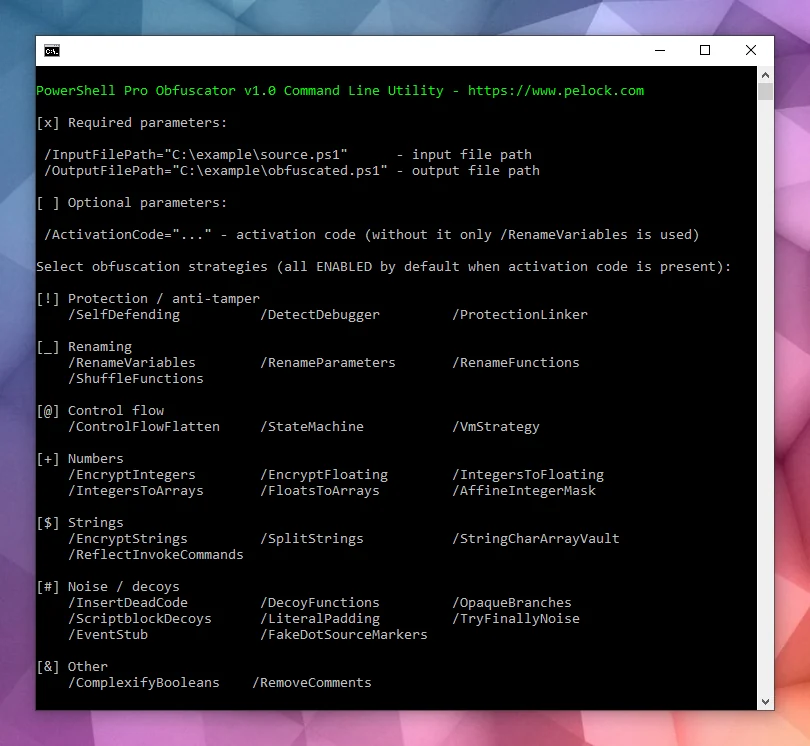
Das Installationspaket enthält eine zusätzliche Befehlszeilenoberfläche:

PowerShell Pro Obfuscator wird mit einer Befehlszeilenoberfläche für Windows- und Linux-Automatisierung geliefert.
Verwenden Sie sie, um die Verschleierung in Build-Server, CI-Jobs oder Batch-Packaging zu integrieren.
Bartosz Wójcik