
Skip to content
KitploitKITPLOIT
ToolsBlog
Einreichen
ToolsBlog
Einreichen

Hacking-, PenTest- und Cybersicherheits-Tools für Ihr Sicherheitsarsenal!

Kitploit ist ein Verzeichnis von Hacking-, Cybersicherheits- und Pentesting-Tools. Entdecken Sie die neuesten Projekt-Updates, um Schwachstellen zu finden, Systeme zu analysieren, Tests zu automatisieren und Ihre Sicherheit zu stärken.

··Feeds·Kontakt·Datenschutz·© 2026 Kitploit

Tool-Verzeichnis

Kategorien

Alle Kategorien anzeigen
Loading categories
linux-security-audit — Automatisiertes Linux-Sicherheitsaudit-Tool, das über 130 CIS-Benchmark-Elemente für RHEL-basierte Systeme überprüft und detaillierte XML-Berichte über Systemkonfiguration, Kryptorichtlinien und Servicehärtung erstellt. | Kitploit
Tools/GitHubGitHub/password123456/linux-security-audit
SchwachstellenscannerKonfigurationsprüfung
GitHubpassword123456/linux-security-audit

linux-security-audit

Automatisiertes Linux-Sicherheitsaudit-Tool, das über 130 CIS-Benchmark-Elemente für RHEL-basierte Systeme überprüft und detaillierte XML-Berichte über Systemkonfiguration, Kryptorichtlinien und Servicehärtung erstellt.


Repository anzeigen

Beliebteste

Alle anzeigen →

Entdecken Sie die meistgenutzten Tools unserer Community.

Alle Tools erkunden

Durchsuchen Sie unsere Tool-Sammlung

Alle Tools anzeigen →
Teilen
304vor 1 JahrVon Kitploit geprüft

Linux-Sicherheitsaudit-Tool

made-with-python Python Versions Hits

  • Linux-Sicherheitsaudit-Tool basierend auf dem CIS - Red Hat Enterprise Linux 8 Benchmark v3.0.0
  • Wenn Sie dies hilfreich finden, geben Sie bitte einen "Stern"🌟, um weitere Verbesserungen zu unterstützen.

Inhaltsverzeichnis

  • 1. Funktionen
  • 2. Vorschau
  • 3. Ergebnisprotokoll
  • 4. Unterstützte Betriebssysteme
  • 5. Voraussetzungen
  • 6. Hinweise
    • 6.1. Warum wurde es erstellt?
    • 6.2. Verwendungstipps
    • Und...

1. Funktionen

  • Führt Audits zu etwa 130 Punkten gemäß CIS - Red Hat Enterprise Linux 8 Benchmark v3.0.0 durch (nicht der vollständige Satz aus dem Dokument).

Punkte:

root@kitploit:~
1. Initial Setup
 1.6 Configure system wide crypto policy 
  1.6.1 Ensure system wide crypto policy is not set to legacy 
  1.6.2 Ensure system wide crypto policy disables sha1 hash and signature support  
  1.6.3 Ensure system wide crypto policy disables cbc for ssh  
  1.6.4 Ensure system wide crypto policy disables macs less than 128 bits  
  
 1.7 Configure Command Line Warning Banners 
  1.7.1 Ensure message of the day is configured properly
  1.7.2 Ensure local login warning banner is configured properly  
  1.7.3 Ensure remote login warning banner is configured properly 
  1.7.4 Ensure access to /etc/motd is configured 
  1.7.5 Ensure access to /etc/issue is configured 
  1.7.6 Ensure access to /etc/issue.net is configured 

2. Services
 2.1 Configure Time Synchronization
  2.1.1 Ensure time synchronization is in use
  2.1.2 Ensure chrony is configured  
  2.1.3 Ensure chrony is not run as the root user
  
 2.2 Configure Special Purpose Services 
  2.2.1 Ensure autofs services are not in use 
  2.2.2 Ensure avahi daemon services are not in use 
  2.2.3 Ensure dhcp server services are not in use 
  2.2.4 Ensure dns server services are not in use 
  2.2.5 Ensure dnsmasq services are not in use 
  2.2.6 Ensure samba file server services are not in use 
  2.2.7 Ensure ftp server services are not in use 
  2.2.8 Ensure message access server services are not in use 
  2.2.9 Ensure network file system services are not in use 
  2.2.10 Ensure nis server services are not in use 
  2.2.11 Ensure print server services are not in use 
  2.2.12 Ensure rpcbind services are not in use 
  2.2.13 Ensure rsync services are not in use 
  2.2.14 Ensure snmp services are not in use 
  2.2.15 Ensure telnet server services are not in use 
  2.2.16 Ensure tftp server services are not in use 
  2.2.17 Ensure web proxy server services are not in use 
  2.2.18 Ensure web server services are not in use 
  2.2.19 Ensure xinetd services are not in use 
  2.2.20 Ensure X window server services are not in use
  2.2.21 Ensure mail transfer agents are configured for local-only mode
  2.2.22 Ensure only approved services are listening on a network interface

4. Access, Authentication and Authorization 
 4.1 Configure job schedulers 
  4.1.1 Configure cron.
   4.1.1.1 Ensure cron daemon is enabled and active
   4.1.1.2 Ensure permissions on /etc/crontab are configured  
   4.1.1.3 Ensure permissions on /etc/cron.hourly are configured 
   4.1.1.4 Ensure permissions on /etc/cron.daily are configured  
   4.1.1.5 Ensure permissions on /etc/cron.weekly are configured 
   4.1.1.6 Ensure permissions on /etc/cron.monthly are configured 
   4.1.1.7 Ensure permissions on /etc/cron.d are configured  
   4.1.1.8 Ensure crontab is restricted to authorized users  
  4.1.2 Configure at 
   4.1.2.1 Ensure at is restricted to authorized users   
   
 4.2 Configure SSH Server 
  4.2.1 Ensure permissions on /etc/ssh/sshd_config are configured 
  4.2.2 Ensure permissions on SSH private host key files are configured 
  4.2.3 Ensure permissions on SSH public host key files are configured 
  4.2.4 Ensure sshd access is configured  
  4.2.5 Ensure sshd Banner is configured 
  4.2.6 Ensure sshd Ciphers are configured  
  4.2.7 Ensure sshd ClientAliveInterval and ClientAliveCountMax are configured 
  4.2.8 Ensure sshd DisableForwarding is enabled  
  4.2.9 Ensure sshd HostbasedAuthentication is disabled 
  4.2.10 Ensure sshd IgnoreRhosts is enabled 
  4.2.11 Ensure sshd KexAlgorithms is configured  
  4.2.12 Ensure sshd LoginGraceTime is configured 
  4.2.13 Ensure sshd LogLevel is configured 
  4.2.14 Ensure sshd MACs are configured 
  4.2.15 Ensure sshd MaxAuthTries is configured  
  4.2.16 Ensure sshd MaxSessions is configured 
  4.2.17 Ensure sshd MaxStartups is configured  
  4.2.18 Ensure sshd PermitEmptyPasswords is disabled 
  4.2.19 Ensure sshd PermitRootLogin is disabled  
  4.2.20 Ensure sshd PermitUserEnvironment is disabled 
  4.2.21 Ensure sshd UsePAM is enabled  
  4.2.22 Ensure sshd crypto_policy is not set
  
 4.3 Configure privilege escalation 
  4.3.1 Ensure sudo is installed  
  4.3.2 Ensure sudo commands use pty  
  4.3.3 Ensure sudo log file exists 
  4.3.4 Ensure users must provide password for escalation  
  4.3.5 Ensure re-authentication for privilege escalation is not disabled globally 
  4.3.6 Ensure sudo authentication timeout is configured correctly 
  4.3.7 Ensure access to the su command is restricted  
  
 4.4 Configure Pluggable Authentication Modules
  4.4.2 Configure authselect 
   4.4.2.1 Ensure active authselect profile includes pam modules 
   4.4.2.2 Ensure pam_faillock module is enabled  
   4.4.2.3 Ensure pam_pwquality module is enabled  
   4.4.2.4 Ensure pam_pwhistory module is enabled  
   4.4.2.5 Ensure pam_unix module is enabled  
  4.4.3 Configure pluggable module arguments 
   4.4.3.1.1 Ensure password failed attempts lockout is configured 
   4.4.3.1.2 Ensure password unlock time is configured  
   4.4.3.1.3 Ensure password failed attempts lockout includes root account 
   4.4.3.2.1 Ensure password number of changed characters is configured  
   4.4.3.2.2 Ensure password length is configured 
   4.4.3.2.3 Ensure password complexity is configured (Manual)
   4.4.3.2.4 Ensure password same consecutive characters is configured 
   4.4.3.2.5 Ensure password maximum sequential characters is configured 
   4.4.3.2.6 Ensure password dictionary check is enabled 
   4.4.3.2.7 Ensure password quality is enforced for the root user 
   4.4.3.3.1 Ensure password history remember is configured 
   4.4.3.3.2 Ensure password history is enforced for the root user
   4.4.3.3.3 Ensure pam_pwhistory includes use_authtok
   4.4.3.4.1 Ensure pam_unix does not include nullok   
   4.4.3.4.2 Ensure pam_unix does not include remember  
   4.4.3.4.3 Ensure pam_unix includes a strong password hashing algorithm 
   4.4.3.4.4 Ensure pam_unix includes use_authtok 

4.5 User Accounts and Environment 
 4.5.1 Configure shadow password suite parameters
  4.5.1.1 Ensure strong password hashing algorithm is configured 
  4.5.1.2 Ensure password expiration policy is 180 days or less 
  4.5.1.3 Ensure password expiration warning days is 7 or more 
  4.5.1.4 Ensure inactive password lock is 30 days or less 
  4.5.1.5 Ensure all users last password change date is in the past 
 4.5.2 Configure root and system accounts and environment
  4.5.2.1 Ensure default group for the root account is GID 0  
  4.5.2.2 Ensure root user umask is configured  
  4.5.2.3 Ensure system accounts are secured  
  4.5.2.4 Ensure root password is set  
 4.5.3 Configure user default environment 
  4.5.3.1 Ensure nologin is not listed in /etc/shells 
  4.5.3.2 Ensure default user shell timeout is configured  
  4.5.3.3 Ensure default user umask is configured

5. Logging and Auditing.
 5.1 Configure Logging
  5.1.1 Configure rsyslog
   5.1.1.1 Ensure rsyslog is installed  
   5.1.1.2 Ensure rsyslog service is enabled
   5.1.1.4 Ensure rsyslog default file permissions are configured  
   5.1.1.5 Ensure logging is configured
   5.1.1.6 Ensure rsyslog is configured to send logs to a remote log host
   5.1.1.7 Ensure rsyslog is not configured to receive logs from a remote client 

6. System Maintenance 
 6.1 System File Permissions 
  6.1.1 Ensure permissions on /etc/passwd are configured  
  6.1.2 Ensure permissions on /etc/passwd- are configured  
  6.1.3 Ensure permissions on /etc/opasswd are configured  
  6.1.4 Ensure permissions on /etc/group are configured  
  6.1.5 Ensure permissions on /etc/group- are configured  
  6.1.6 Ensure permissions on /etc/shadow are configured  
  6.1.7 Ensure permissions on /etc/shadow- are configured 
  6.1.8 Ensure permissions on /etc/gshadow are configured  
  6.1.9 Ensure permissions on /etc/gshadow- are configured 
  6.1.10 Ensure permissions on /etc/shells are configured  
  6.1.11 Ensure world writable files and directories are secured  
  6.1.12 Ensure no unowned or ungrouped files or directories exist 
  6.1.13 Ensure SUID and SGID files are reviewed 
  6.1.14 Audit system file permissions

6.2 Local User and Group Settings 
  6.2.1 Ensure accounts in /etc/passwd use shadowed passwords 
  6.2.2 Ensure /etc/shadow password fields are not empty  
  6.2.3 Ensure all groups in /etc/passwd exist in /etc/group 
  6.2.4 Ensure no duplicate UIDs exist  
  6.2.5 Ensure no duplicate GIDs exist  
  6.2.6 Ensure no duplicate user names exist 
  6.2.7 Ensure no duplicate group names exist  
  6.2.8 Ensure root path integrity  
  6.2.9 Ensure root is the only UID 0 account  
  6.2.10 Ensure local interactive user home directories are configured 
  6.2.11 Ensure local interactive user dot files access is configured 

2. Vorschau

preview

root@kitploit:~
$ date
Tue Aug  6 04:00:37 UTC 2024

$ python3 -V
Python 3.6.8

$ sudo python3 main.py
===========================================================
		Linux Security Audit Tool 1.0.1 (2024.08.06)
				by password123456
 ===========================================================

[+][2024-08-06 04:01:14] Start Security Audit.
---------------------------------------------------------

 Hostname: buddy2
 OS: Rocky Linux 8.8 (Green Obsidian)
 IP Address: [ens192] 172.16.13.51
 MAC Address: [ens192] 00:50:56:a6:76:b8

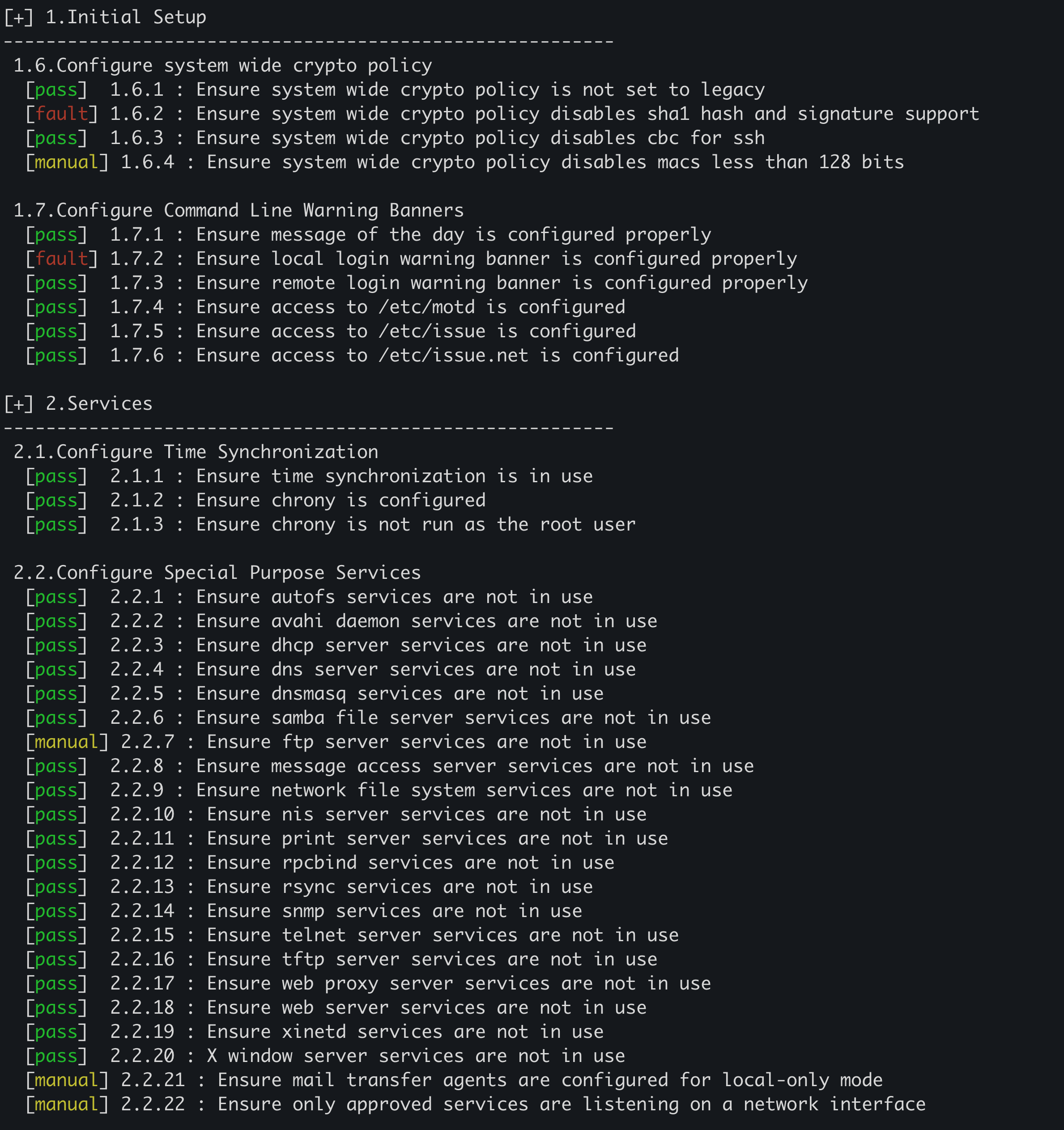
[+] 1.Initial Setup
---------------------------------------------------------
 1.6.Configure system wide crypto policy
  [pass]  1.6.1 : Ensure system wide crypto policy is not set to legacy
  [fault] 1.6.2 : Ensure system wide crypto policy disables sha1 hash and signature support
  [pass]  1.6.3 : Ensure system wide crypto policy disables cbc for ssh
  [manual] 1.6.4 : Ensure system wide crypto policy disables macs less than 128 bits

 1.7.Configure Command Line Warning Banners
  [pass]  1.7.1 : Ensure message of the day is configured properly
  [fault] 1.7.2 : Ensure local login warning banner is configured properly
  [pass]  1.7.3 : Ensure remote login warning banner is configured properly
  [pass]  1.7.4 : Ensure access to /etc/motd is configured
  [pass]  1.7.5 : Ensure access to /etc/issue is configured
  [pass]  1.7.6 : Ensure access to /etc/issue.net is configured

...

[*] RESULT
---------------------------------------------------------
output=/home/buddy/1722884474_buddy2_audit.xml
---------------------------------------------------------

[+][2024-08-06 04:01:57] End Security Audit.

3. Ergebnisprotokoll

  • Erzeugt detaillierte Rohdaten im XML-Format für jeden Auditpunkt und die Verifizierung.
  • Die Rohdaten sind so gestaltet, dass sie sehr detaillierte Log-Ausgaben zeigen, um das Format und den Inhalt der Audit-Protokolle zu demonstrieren.
root@kitploit:~
$ cat 1722884474_buddy2_audit.xml
root@kitploit:~
<?xml version="1.0" encoding="UTF-8"?>
<results>
  <items>
	<status>ok</status>
	<datetime>2024-08-06 04:01:14</datetime>
	<auditor>password123456</auditor>
	<target>buddy2</target>
	<os_name>Rocky Linux 8.8 (Green Obsidian)</os_name>
	<os_version>8.8</os_version>
	<os_id>rocky</os_id>
	<os_architecture>x86_64</os_architecture>
	<ip_address>[ens192] 172.16.13.51</ip_address>
	<mac_address>[ens192] 00:50:56:a6:76:b8</mac_address>
	<item_no>1.6.1</item_no>
	<item_title>Ensure system wide crypto policy is not set to legacy</item_title>
	<result>pass</result>
	<result_code>0</result_code>
	<raw_data>
	  <![CDATA[
[ok] Not Found: /etc/crypto-policies/config --> ^[ \t]*(\bLEGACY\b)

# cat /etc/crypto-policies/config
...
DEFAULT
	  ]]>
	</raw_data>
  </items>
  <items>
	<status>ok</status>
	<datetime>2024-08-06 04:01:14</datetime>
	<auditor>password123456</auditor>
	<target>buddy2</target>
	<os_name>Rocky Linux 8.8 (Green Obsidian)</os_name>
	<os_version>8.8</os_version>
	<os_id>rocky</os_id>
	<os_architecture>x86_64</os_architecture>
	<ip_address>[ens192] 172.16.13.51</ip_address>
	<mac_address>[ens192] 00:50:56:a6:76:b8</mac_address>
	<item_no>1.6.2</item_no>
	<item_title>Ensure system wide crypto policy disables sha1 hash and signature support</item_title>
	<result>fault</result>
	<result_code>1</result_code>
	<raw_data>
	  <![CDATA[
[vul] Found: /etc/crypto-policies/state/CURRENT.pol
- found: ^[ \t]*(hash|sign)[ \t]*=[ \t]*([^\n\r#]+)?-sha1\b --> `ECDSA-SHA1,RSA-PSS-SHA1,RSA-SHA1` near at line: 13

# cat /etc/crypto-policies/state/CURRENT.pol
...
11: mac = AEAD HMAC-SHA2-256 HMAC-SHA1 UMAC-128 HMAC-SHA2-384 HMAC-SHA2-512
12: protocol =
13: sign = ECDSA-SHA3-256 ECDSA-SHA2-256 ECDSA-SHA3-384 ECDSA-SHA2-384 ECDSA-SHA3-512 ECDSA-SHA2-512 EDDSA-ED25519 EDDSA-ED448 RSA-PSS-SHA2-
256 RSA-PSS-SHA2-384 RSA-PSS-SHA2-512 RSA-SHA3-256 RSA-SHA2-256 RSA-SHA3-384 RSA-SHA2-384 RSA-SHA3-512 RSA-SHA2-512 ECDSA-SHA2-224 RSA-PSS-S
HA2-224 RSA-SHA2-224 ECDSA-SHA1 RSA-PSS-SHA1 RSA-SHA1
14: arbitrary_dh_groups = 1
15: min_dh_size = 2048


[vul] Found: /etc/crypto-policies/state/CURRENT.pol
- found: ^[ \t]*sha1_in_certs[ \t]*=[ \t]*(0|1)$ --> `1` near at line: 18

# cat /etc/crypto-policies/state/CURRENT.pol
...
16: min_dsa_size = 2048
17: min_rsa_size = 2048
18: sha1_in_certs = 1
19: ssh_certs = 1
20: ssh_etm = 1
	  ]]>
	</raw_data>
  </items>
    
 ...
    
  <items>
        <status>ok</status>
        <datetime>2024-08-06 04:01:38</datetime>
        <auditor>password123456</auditor>
        <target>buddy2</target>
        <os_name>Rocky Linux 8.7 (Green Obsidian)</os_name>
        <os_version>8.7</os_version>
        <os_id>rocky</os_id>
        <os_architecture>x86_64</os_architecture>
        <ip_address>[ens192] 172.16.13.51</ip_address>
        <mac_address>[ens192] 00:50:56:a6:4a:80</mac_address>
        <item_no>6.1.10</item_no>
        <item_title>Ensure permissions on /etc/shells are configured</item_title>
        <result>pass</result>
        <result_code>0</result_code>
        <raw_data>
          <![CDATA[
[ok] -rw-r--r-- 1 root root 44 Sep 10 20:51 /etc/shells
- permissions: 644
- owner:group: root:root          
          ]]>
        </raw_data>
  </items>    
</results>

4. Unterstützte Betriebssysteme

  • RHEL-basierte Linux-Distributionen
    • CentOS
    • RHEL
    • Rocky Linux
  • Obwohl das Skript hauptsächlich für RHEL-basierte Systeme entwickelt wurde, sollte es mit minimalen Anpassungen auf allen RHEL-Abkömmlingen funktionieren.
  • Das Tool kann nach Bedarf angepasst und erweitert werden.

5. Voraussetzungen

  • Python 3.6+ (keine externen Abhängigkeiten erforderlich).
  • Verwendet eine Handvoll grundlegender Shell-Befehle (selektiv eingesetzt zur Effizienz bei bestimmten Auditpunkten).

6. Hinweise

6.1. Warum wurde es erstellt?

  • Sicherheitsaudit-Tools werden oft mit SHELL-Skripten entwickelt, aufgrund ihrer Einfachheit und des direkten Zugriffs auf Systembefehle.
  • Während SHELL-Skript-basierte Tools bekannt sind, gibt es einen Mangel an Tools, die in anderen Sprachen entwickelt wurden.
  • Dieses Tool zielt darauf ab, dies durch den Einsatz von Python zu erreichen, einer Sprache, die auf den meisten modernen Linux-Distributionen nativ unterstützt wird.
  • Auf Linux-Systemen, die nicht das End-of-Life erreicht haben, ist Python 3.6+ standardmäßig enthalten.

Ziel war es, dieses Tool mit nahezu 100 % reinem Python-Code zu implementieren. Es gab jedoch spezifische Fälle, in denen die Verwendung von Shell-Befehlen unvermeidbar war.

Unvermeidbare Fälle:

  • Wenn die erforderliche Funktionalität nicht in den Python-Standardbibliotheken verfügbar ist.
  • Wenn Operationen wie die Suche nach Dateien und Verzeichnissen mit Befehlen wie find erheblich schneller sind als mit nativem Python-Code.

Dieses Skript vermeidet nach Möglichkeit das übliche Muster Python code > subprocess to run shell commands > parse output und besteht zu über 90 % aus reinem Python-Code.

6.2. Verwendung

  • In großen Umgebungen (Tausende oder Zehntausende von Servern) kann Python bereitgestellt, ausgeführt und die Audit-Protokolle mit Tools zur entfernten Ausführung wie Ansible oder anderen Systemen abgerufen werden.
  • Die Ergebnisse können mit Log-Aggregations-Tools, die XML parsen können, oder durch die Erstellung einer eigenen Webanwendung zur XML-Parsing analysiert und visualisiert werden.
  • Die Protokolle enthalten sowohl die Auditergebnisse (pass, fault, manual, error) als auch die Rohdaten des Systems zur Überprüfung.
  • Es ist kein direkter Zugriff auf die Server erforderlich; die Rohdaten enthalten ausreichende Informationen, um Ergebnisse zu validieren und Fehlalarme zu erkennen.
  • Sie können auch Protokolle von Erstaudits mit denen nach der Behebung vergleichen, um Änderungen und Verbesserungen nachzuverfolgen.

Und...

The raw audit data in the logs may appear cluttered, depending on your perspective.

  • Sie können den Code gerne überprüfen und an Ihre spezifischen Anforderungen anpassen.
Tool herunterladen
