 ninoseki/mitaka
Browser-Erweiterung für die OSINT-Suche und IoC-Analyse. Erkennt Kompromittierungsindikatoren automatisch, refangt sie und fragt anschließend über 65+ Threat-Intelligence- und Sicherheitsdienste zur schnellen Anreicherung ab.

# Mitaka
[link-cws]: https://chromewebstore.google.com/detail/mitaka/bfjbejmeoibbdpfdbmbacmefcbannnbg
[link-amo]: https://addons.mozilla.org/en-US/firefox/addon/mitaka/
[](https://github.com/ninoseki/mitaka/actions?query=workflow%3A%22Node.js+CI%22)
[](https://www.codefactor.io/repository/github/ninoseki/mitaka)
[](https://coveralls.io/github/ninoseki/mitaka)
Mitaka ist eine Browsererweiterung, die Ihre OSINT-Suche (Open Source Intelligence) und -Scans erleichtert.
- Hauptfunktionen:
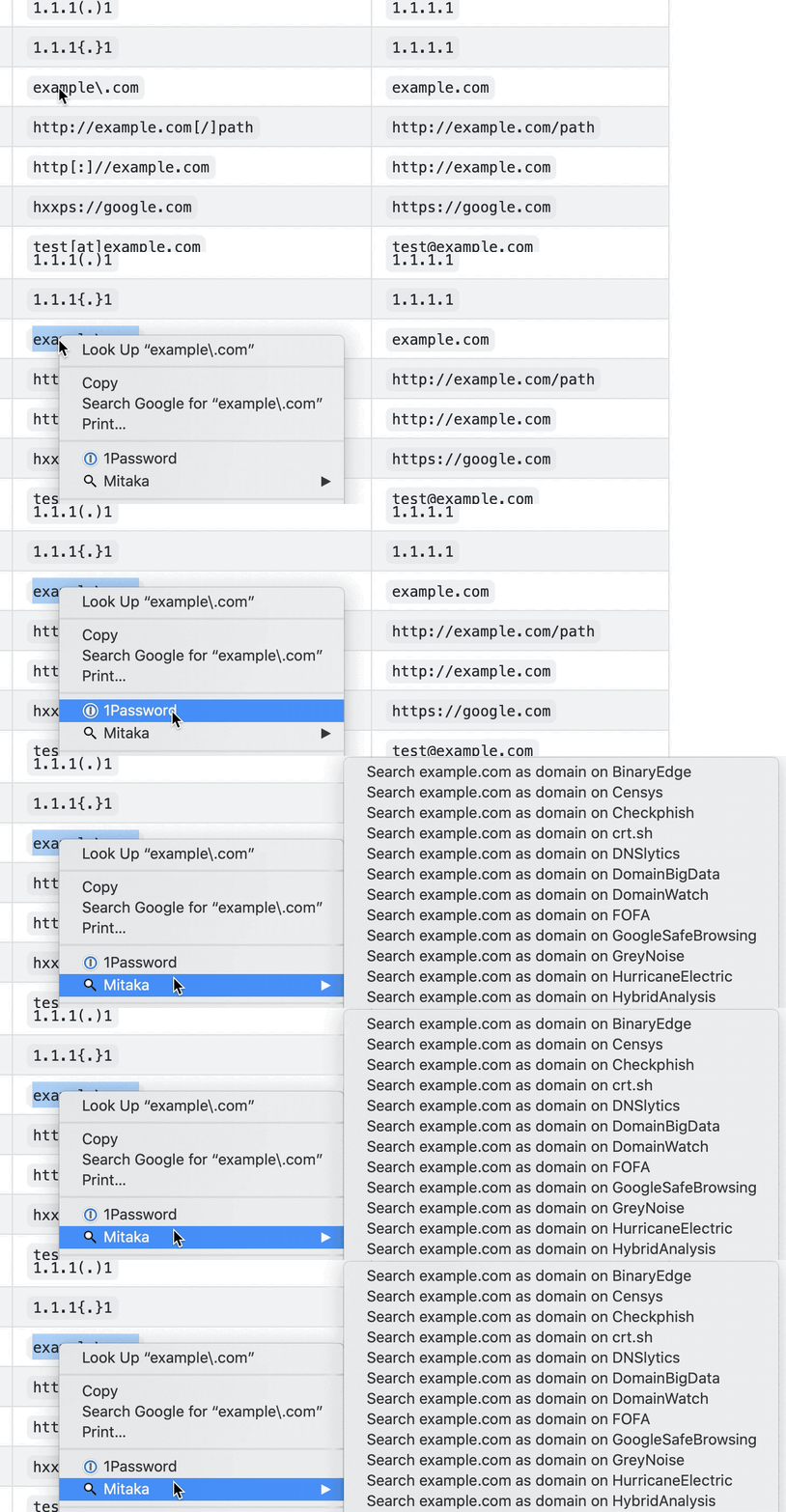
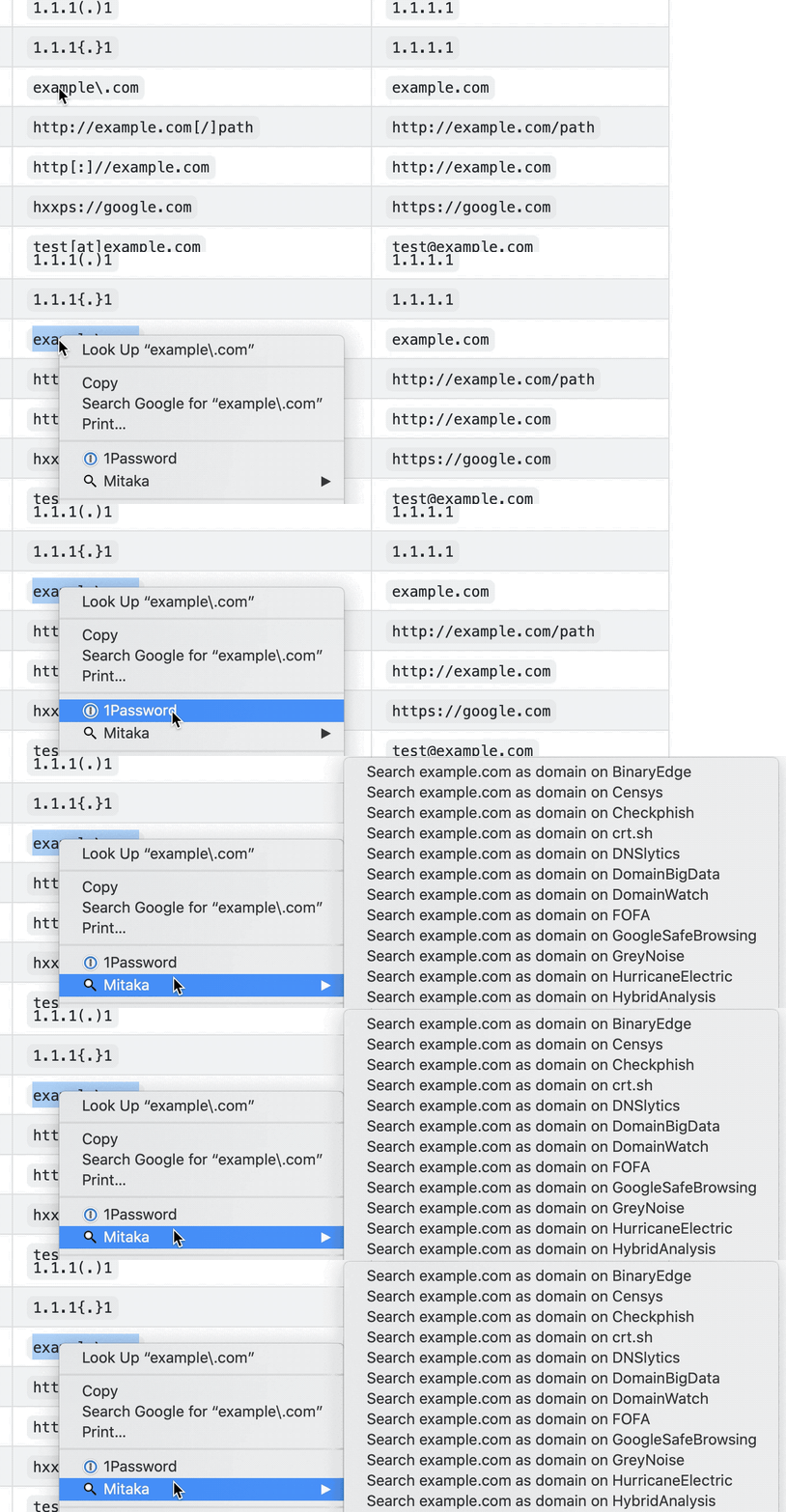
- Automatische IoC-Auswahl (Indicators of Compromise) mit Refanging.
- Z. B. `example[.]com` zu `example.com`, `test[at]example.com` zu `[email protected]`, `hxxp://example.com` zu `http://example.com`, usw.
- Unterstützt 65+ Dienste.
## Installation
<img src="https://raw.githubusercontent.com/alrra/browser-logos/90fdf03c/src/chrome/chrome.svg" width="48" alt="Chrome" valign="middle"> [<img valign="middle" src="https://img.shields.io/chrome-web-store/v/bfjbejmeoibbdpfdbmbacmefcbannnbg.svg">][link-cws] [<img valign="middle" src="https://img.shields.io/chrome-web-store/users/bfjbejmeoibbdpfdbmbacmefcbannnbg.svg">][link-cws]
<img src="https://raw.githubusercontent.com/alrra/browser-logos/90fdf03c/src/firefox/firefox.svg" width="48" alt="Firefox" valign="middle"> [<img valign="middle" src="https://img.shields.io/amo/v/mitaka.svg">][link-amo] [<img valign="middle" src="https://img.shields.io/amo/users/mitaka.svg">][link-amo]
## Funktionen
### Unterstützte IoCs (Indicators of Compromise)
| Name | Beschreibung | Beispiel |
| :-------- | :-------------------------- | :------------------------------------------- |
| ANS | ASN | `AS13335` |
| BTC | BTC-Adresse | `1A1zP1eP5QGefi2DMPTfTL5SLmv7DivfNa` |
| CVE | CVE-Nummer | `CVE-2018-11776` |
| Domain | Domainname | `github.com` |
| Email | E-Mail-Adresse | `[email protected]` |
| ETH | Ethereum-Adresse | `0x32be343b94f860124dc4fee278fdcbd38c102d88` |
| GaPubID | Google Adsense Publisher ID | `pub-9383614236930773` |
| GaTrackID | Google Analytics Tracker ID | `UA-67609351-1` |
| Hash | MD5, SHA1, SHA256 | `44d88612fea8a8f36de82e1278abb02f` |
| IP | IPv4-Adresse | `8.8.8.8` |
| URL | URL | `https://github.com` |
### Unterstützte Suchmaschinen
| Name | URL | Unterstützte Typen |
| :------------------- | :--------------------------------------- | :----------------------------- |
| AbuseIPDB | <https://www.abuseipdb.com> | IP |
| AnyRun | <https://app.any.run> | Hash |
| archive.org | <https://archive.org> | URL |
| Blockchain.com | <https://www.blockchain.com> | BTC |
| BlockCypher | <https://live.blockcypher.com> | BTC |
| Censys | <https://censys.io> | IP, domain, ASN, email |
| Checkphish | <https://checkphish.ai> | IP, domain |
| Coalition | <https://ess.coalitioninc.com> | CVE |
| crt.sh | <https://crt.sh> | Domain |
| CVE | <https://cve.org> | CVE |
| DNS Coffee | <https://dns.coffee> | Domain |
| DNSlytics | <https://search.dnslytics.com> | IP, domain |
| DomainTools | <https://www.domaintools.com> | IP, domain |
| EmailRep | <https://emailrep.io> | Email |
| Google Safe Browsing | <https://transparencyreport.google.com> | Domain, URL |
| GreyNoise | <https://viz.greynoise.io> | IP, domain, ASN, CVE |
| Host.io | <https://host.io> | Domain |
| Hurricane Electric | <https://bgp.he.net/> | IP, domain, ASN |
| HybridAnalysis | <https://www.hybrid-analysis.com> | IP, domain, hash |
| Intezer | <https://analyze.intezer.com> | Hash |
| IPinfo | <https://ipinfo.io> | IP, ASN |
| Joe Sandbox | <https://www.joesandbox.com> | Hash |
| Maltiverse | <https://www.maltiverse.com> | Domain, hash |
| MalwareBazaar | <https://bazaar.abuse.ch> | Hash |
| NVD | <https://nvd.nist.gov> | CVE |
| OOCPR | <https://data.occrp.org> | Email |
| OpenTIP | <https://opentip.kaspersky.com> | Hash |
| OTX | <https://otx.alienvault.com> | IP, domain, CVE, URL, hash |
| Pulsedive | <https://pulsedive.com> | IP, domain, URL, hash |
| Radar | <https://radar.cloudflare.com> | IP, domain |
| Robtex | <https://www.robtex.com> | IP, domain |
| SecurityTrails | <https://securitytrails.com> | IP, domain |
| Shodan | <https://www.shodan.io> | IP, domain, ASN |
| Sploitus | <https://sploitus.com> | CVE |
| SpyOnWeb | <https://spyonweb.net> | IP, domain, gaPubID, gaTrackID |
| Talos | <https://talosintelligence.com> | IP, domain |
| ThreatBook | <https://threatbook.io> | IP, domain |
| ThreatConnect | <https://app.threatconnect.com> | IP, domain, email |
| ThreatMiner | <https://www.threatminer.org> | IP, domain, hash |
| TIP | <https://threatintelligenceplatform.com> | IP, domain |
| Triage | <https://tria.ge> | Hash, URL |
| URLhaus | <https://urlhaus.abuse.ch> | IP, domain |
| urlscan.io | <https://urlscan.io> | IP, domain, ASN, URL |
| URLVoid | <https://www.urlvoid.com> | Domain |
| ViewDNS | <https://viewdns.info> | IP, domain, email |
| VirusTotal | <https://www.virustotal.com> | IP, domain, URL, hash |
| VMRay | <https://www.vmray.com> | Hash |
| Vulmon | <https://vulmon.com> | CVE |
| WebCheck | <https://web-check.xyz> | Domain |
| X-Force Exchange | <https://exchange.xforce.ibmcloud.com> | IP, domain, hash |
| ZoomEye | <https://www.zoomeye.ai> | IP |
### Unterstützte Scan-Engines
| Name | URL | Unterstützte Typen |
| :------------- | :-------------------------------- | :----------------- |
| Browserling | <https://www.browserling.com> | URL |
| HybridAnalysis | <https://www.hybrid-analysis.com> | URL |
| urlscan.io | <https://urlscan.io> | IP, domain, URL |
| VirusTotal | <https://www.virustotal.com> | URL |
## Verwendung
- [Mit Mitaka In-Browser-OSINT durchführen, um Malware, zwielichtige Websites, unseriöse E-Mails und mehr zu identifizieren](https://null-byte.wonderhowto.com/how-to/use-mitaka-perform-browser-osint-identify-malware-sketchy-sites-shady-emails-more-0216352/)
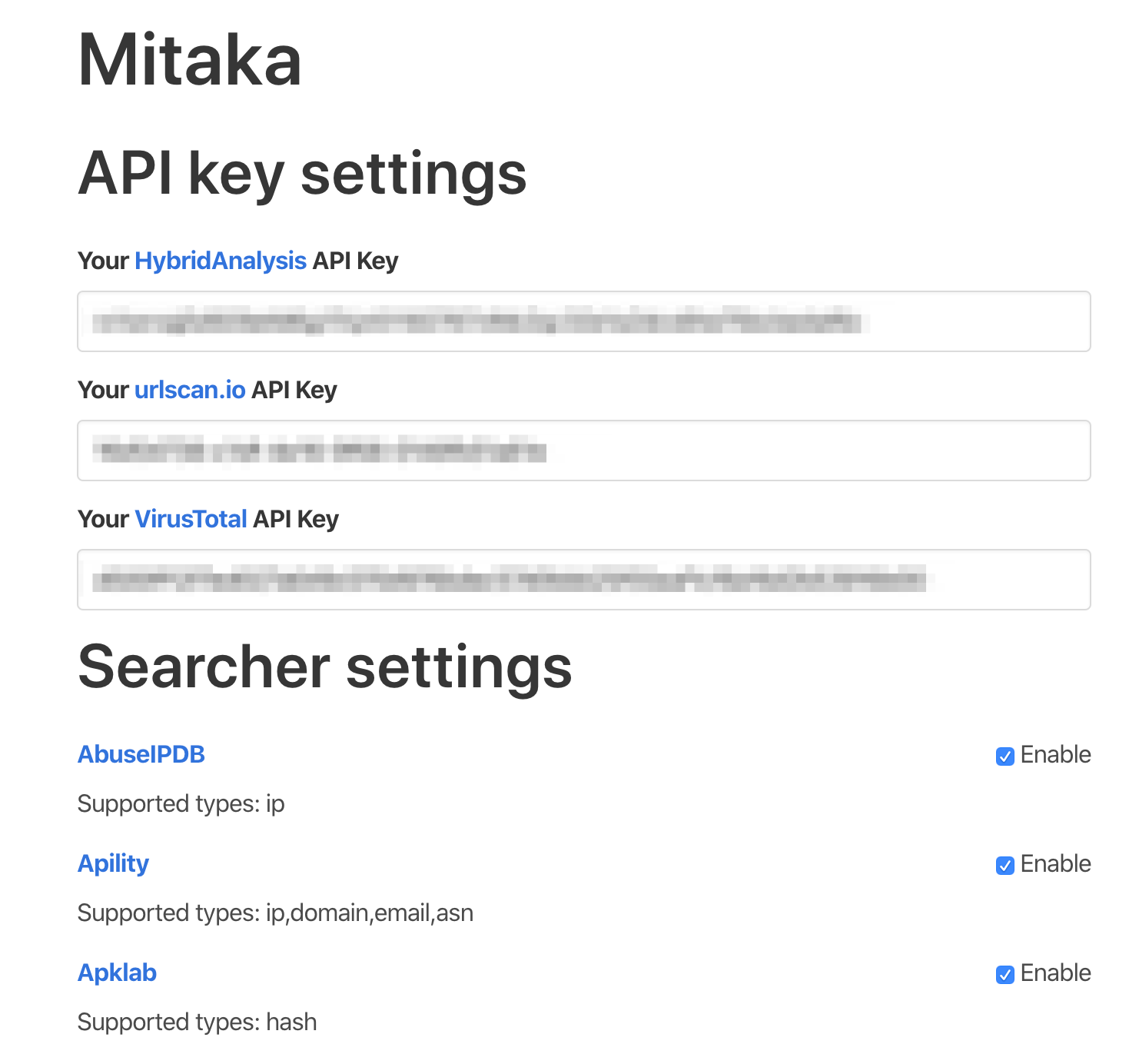
**Hinweis:** Bitte legen Sie Ihre API-Schlüssel in den Optionen fest, um HybridAnalysis-, urlscan.io- und VirusTotal-Scans zu aktivieren.
## Optionen
Sie können auf der Optionsseite je nach Präferenz eine Suchmaschine aktivieren/deaktivieren.
> [!NOTE]
> Grundlegende Einstellungen werden in [storage.sync](https://developer.chrome.com/docs/extensions/reference/api/storage) gespeichert. Dadurch werden sie geräteübergreifend synchronisiert.
> API-Schlüssel werden jedoch in `storage.local` gespeichert. Sie müssen die API-Schlüssel pro Gerät festlegen.
## Berechtigungen
> [!NOTE]
> Ich sammle keine Informationen von den Nutzern und werde dies auch nie tun. Sie können dies überprüfen, indem Sie den Quellcode einsehen.
### Firefox
Bitte erlauben Sie die Berechtigung „Auf Ihre Daten auf allen Websites zugreifen“. Andernfalls funktioniert diese Erweiterung nicht.
<img width="703" alt="Screenshot 2023-07-15 at 8 27 26" src="https://assets.kitploit.com/production/public/readmes/363/2d324ac3709c0f0d03a7a8e252d3e0ddc3b1d1c373d9d44357235e8479f62eac.png">
## Datenschutzerklärung
- [Datenschutzerklärung für die Erweiterung](https://ninoseki.github.io/chrome-webstore/privacy-policy/)
## Häufige Fragen
- F. Das Kontextmenü wird nicht angezeigt.
- A. Manchmal dauert es einen Moment, bis die Kontextmenüs erscheinen. Oder beim Aktualisieren der Kontextmenüs geht etwas schief. Dieser Fehler lässt sich beheben, indem Sie eine Sekunde warten. Atmen Sie nach der Auswahl durch und klicken Sie dann mit der rechten Maustaste.
## Alternativen oder ähnliche Tools
- [CrowdScrape](https://chromewebstore.google.com/detail/crowdscrape/jjplaeklnlddpkbbdbnogmppffokemej)
- [Gotanda](https://github.com/HASH1da1/Gotanda)
- [SOC Multi-tool](https://github.com/zdhenard42/SOC-Multitool)
- [Sputnik](https://github.com/mitchmoser/sputnik)
- [ThreatConnect Integrated Chrome Extension](https://chromewebstore.google.com/detail/threatconnect-integrated/lblgcphpihpadjdpjgjnnoikjdjcnkbh)
- [ThreatPinch Lookup](https://github.com/cloudtracer/ThreatPinchLookup)
- [VTchromizer](https://chromewebstore.google.com/detail/vtchromizer/efbjojhplkelaegfbieplglfidafgoka)
## So funktioniert es
```mermaid
flowchart LR
CS[Content Script] --> |1 - Send Selection| BSW[Background Service Worker]
BSW --> |2 - Create Context Menus| CS
CS --> |3 - Click Context Menu| BSW
BSW --> |4 - Search/Scan| T[New Tab]
```
## Mitwirken
Lesen Sie den [Beitragsleitfaden](https://github.com/ninoseki/mitaka/blob/master/contributing.md) und schließen Sie sich den [Mitwirkenden](https://github.com/ninoseki/mitaka/graphs/contributors) an.