
idahunt is a framework to analyze binaries with IDA Pro and hunt for things in IDA Pro

idahunt ist ein Framework zur Analyse von Binärdateien mit IDA Pro und zur Suche nach Dingen in IDA Pro. Es ist ein Kommandozeilenwerkzeug, um alle ausführbaren Dateien rekursiv aus einem bestimmten Ordner zu analysieren. Es führt IDA im Hintergrund aus, sodass Sie nicht jede Datei manuell öffnen müssen. Es unterstützt die Ausführung externer IDA-Python-Skripte.
Nützliche Beispiele sind (nicht abschließende Liste):
Die Möglichkeiten von IDA-Python-Skripten sind unbegrenzt. Sie können jedes vorhandene IDA-Python-Skript importieren oder eigene erstellen. Einige Beispiele:
idahunt.py: Hauptwerkzeug zur Analyse ausführbarer Dateienfilters/: enthält grundlegende Filter, die entscheiden, welche Dateien in einem Eingabeordner mit IDA analysiert werden sollen
filters/default.py: standardmäßiger Basisfilter, der nichts filtert und standardmäßig verwendet wirdfilters/ciscoasa.py: nützlich zur Analyse von Cisco-ASA-Firewall-Imagesfilters/hpilo.py: nützlich zur Analyse von HP-iLO-Imagesfilters/names.py: Basisfilter basierend auf Name, Namenslänge oder Erweiterungscript_template.py: enthält ein IDA-Python-Skript vom Typ hello worldC:\idahunt> C:\Python37-x64\python.exe .\idahunt.py -h
usage: idahunt.py [-h] [--inputdir INPUTDIR] [--analyse] [--open]
[--ida-args IDA_ARGS] [--scripts SCRIPTS [SCRIPTS ...]]
[--filter FILTER] [--cleanup] [--temp-cleanup] [--verbose]
[--max-ida MAX_IDA] [--list-only] [--version IDA_VERSION]
optional arguments:
-h, --help show this help message and exit
--inputdir INPUTDIR Input folder to search for files
--analyse, --analyze analyse all files i.e. create .idb for all of them
--open open all files into IDA (debug only)
--ida-args IDA_ARGS Additional arguments to pass to IDA (e.g.
-p<processor> -i<entry_point> -b<load_addr>)
--scripts SCRIPTS [SCRIPTS ...]
List of IDA Python scripts to execute in this order
--filter FILTER External python script with optional arguments
defining a filter for the names of the files to
analyse. See filters/names.py for example
--cleanup Cleanup i.e. remove .asm files that we don't need
--temp-cleanup Cleanup temporary database files i.e. remove .id0,
.id1, .id2, .nam, .dmp files if IDA Pro crashed and
did not delete them
--verbose be more verbose to debug script
--max-ida MAX_IDA Maximum number of instances of IDA to run at a time
(default: 10)
--list-only List only what files would be handled without
executing IDA
--version IDA_VERSION
Override IDA version (e.g. "7.5"). This is used to
find the path of IDA on Windows.
Sie können --list-only mit einer beliebigen Befehlszeile verwenden, um nur aufzulisten, was das Werkzeug tun würde, ohne es tatsächlich auszuführen.
C:\idahunt>idahunt.py --inputdir C:\re --analyse --filter "filters\names.py -a 32 -v" --list-only
[idahunt] Simulating only...
[idahunt] ANALYSING FILES
[idahunt] Analysing C:\re\cves\cve-2014-4076.dll
[idahunt] Analysing C:\re\cves\cve-2014-4076.exe
[idahunt] Analysing C:\re\DownloadExecute.exe
[idahunt] Analysing C:\re\ReverseShell.exe
Hier starten wir eine erste Analyse. Sie endet nach einigen Sekunden:
C:\idahunt>idahunt.py --inputdir C:\re --analyse --filter "filters\names.py -a 32 -v"
[idahunt] ANALYSING FILES
[idahunt] Analysing C:\re\cves\cve-2014-4076.dll
[idahunt] Analysing C:\re\cves\cve-2014-4076.exe
[idahunt] Analysing C:\re\DownloadExecute.exe
[idahunt] Analysing C:\re\ReverseShell.exe
[idahunt] Waiting on remaining 4 IDA instances
Hier bereinigen wir temporäre .asm-Dateien, die von der ersten Analyse erstellt wurden:
C:\idahunt>idahunt.py --inputdir C:\re --cleanup
[idahunt] Deleting C:\re\cves\cve-2014-4076.asm
[idahunt] Deleting C:\re\DownloadExecute.asm
[idahunt] Deleting C:\re\ReverseShell.asm
Wir können die erzeugten .idb- sowie einige .log-Dateien sehen, die das Ausgabefenster von IDA Pro enthalten.
C:\idahunt>tree /f C:\re
Folder PATH listing
Volume serial number is XXXX-XXXX
C:\RE
│ DownloadExecute.exe
│ DownloadExecute.idb
│ DownloadExecute.log
│ ReverseShell.exe
│ ReverseShell.idb
│ ReverseShell.log
│
└───cves
cve-2014-4076.dll
cve-2014-4076.exe
cve-2014-4076.idb
cve-2014-4076.log
Hier führen wir ein einfaches IDA-Python-Skript aus, das [script_template] I execute in IDA, yay! im Ausgabefenster von IDA Pro ausgibt.
C:\idahunt>idahunt.py --inputdir C:\re --filter "filters\names.py -a 32 -v" --scripts C:\idahunt\script_template.py
[idahunt] EXECUTE SCRIPTS
[idahunt] Executing script C:\idahunt\script_template.py for C:\re\cves\cve-2014-4076.dll
[idahunt] Executing script C:\idahunt\script_template.py for C:\re\cves\cve-2014-4076.exe
[idahunt] Executing script C:\idahunt\script_template.py for C:\re\DownloadExecute.exe
[idahunt] Executing script C:\idahunt\script_template.py for C:\re\ReverseShell.exe
[idahunt] Waiting on remaining 4 IDA instances
Da es in der .log-Datei gespeichert ist, können wir überprüfen, dass es erfolgreich ausgeführt wurde:
Autoanalysis subsystem has been initialized.
Database for file 'ReverseShell.exe' has been loaded.
Compiling file 'C:\Program Files (x86)\IDA 6.95\idc\ida.idc'...
Executing function 'main'...
[script_template] I execute in IDA, yay!
idahunt lässt sich hervorragend mit diaphora für Binärdiffing integrieren, und zwar seit diesem PR.
Sie benötigen eine Ordnerhierarchie mit den verschiedenen Versionen desselben Dateinamens, z. B.:
C:\> tree C:\tests\ /F
C:\tests
├───patch
│ tm.sys
│
└───vuln
tm.sys
Falls noch nicht geschehen, müssen Sie die erste IDA-Analyse durchführen, um die IDBs zu erstellen.
C:\idahunt> python idahunt.py --inputdir C:\tests\ --analyse --verbose
[idahunt] IDA32 = C:\Program Files\IDA Core 8.1\ida.exe
[idahunt] IDA64 = C:\Program Files\IDA Core 8.1\ida64.exe
[idahunt] ANALYSING FILES
[idahunt] Analysing C:\tests\patch\tm.sys
[idahunt] C:\Program Files\IDA Core 8.1\ida64.exe -B -oC:\tests\patch\tm.i64 -LC:\tests\patch\tm.log C:\tests\patch\tm.sys
[idahunt] Analysing C:\tests\vuln\tm.sys
[idahunt] C:\Program Files\IDA Core 8.1\ida64.exe -B -oC:\tests\vuln\tm.i64 -LC:\tests\vuln\tm.log C:\tests\vuln\tm.sys
[idahunt] Executed IDA 2/2 times IDA instances
[idahunt] Took 0:00:15.03 to execute this
C:\> tree C:\tests\ /F
C:\tests
├───patch
│ tm.i64
│ tm.log
│ tm.sys
│
└───vuln
tm.i64
tm.log
tm.sys
Dabei wird diaphora verwendet, um den Diff-Export für jede Datei durchzuführen (Erstellung der <filename>.sqlite-SQLite3-Datenbank) und anschließend den Diff zwischen den Versionen (Erstellung der <filename>.diaphora-SQLite3-Datenbank).
C:\idahunt> python idahunt.py --diaphora-path C:\diaphora --inputdir C:\tests --diff --filename tm.sys --verbose
[idahunt] IDA32 = C:\Program Files\IDA Core 8.1\ida.exe
[idahunt] IDA64 = C:\Program Files\IDA Core 8.1\ida64.exe
[idahunt] EXECUTE DIFF-EXPORT
[idahunt] Executing script C:\diaphora\diaphora_ida.py for C:\tests\patch\tm.sys
[idahunt] C:\Program Files\IDA Core 8.1\ida64.exe -A -SC:\diaphora\diaphora_ida.py -LC:\tests\patch\tm.log C:\tests\patch\tm.i64
[idahunt] Environment variables:
[idahunt] DIAPHORA_AUTO2=1
[idahunt] DIAPHORA_EXPORT_FILE=tm.sqlite
[idahunt] Executing script C:\diaphora\diaphora_ida.py for C:\tests\vuln\tm.sys
[idahunt] C:\Program Files\IDA Core 8.1\ida64.exe -A -SC:\diaphora\diaphora_ida.py -LC:\tests\vuln\tm.log C:\tests\vuln\tm.i64
[idahunt] Environment variables:
[idahunt] DIAPHORA_AUTO2=1
[idahunt] DIAPHORA_EXPORT_FILE=tm.sqlite
[idahunt] Executed IDA 2/2 times IDA instances
[idahunt] EXECUTE DIFF
[idahunt] Diffing patch vs vuln
[idahunt] C:\Program Files\Python39\python.exe C:\diaphora\diaphora.py C:\tests\patch\tm.sqlite C:\tests\vuln\tm.sqlite -o C:\tests\vuln\patch_vs_vuln\tm.sys.diaphora
[diaphora][Wed Dec 14 10:33:49 2022] Diffing...es
[diaphora][Wed Dec 14 10:33:49 2022] Callgraphs from both programs differ in 0.706714%
[diaphora][Wed Dec 14 10:33:49 2022] Finding best matches...
[diaphora][Wed Dec 14 10:33:49 2022] Finding with heuristic 'Perfect match, same name'
[diaphora][Wed Dec 14 10:33:50 2022] All functions matched in at least one database, finishing.
[diaphora][Wed Dec 14 10:33:50 2022] Finding partial matches
[diaphora][Wed Dec 14 10:33:50 2022] All functions matched in at least one database, finishing.
[diaphora][Wed Dec 14 10:33:50 2022] Finding with heuristic 'Small names difference'
[diaphora][Wed Dec 14 10:33:50 2022] Finding with heuristic 'Call address sequence'
[diaphora][Wed Dec 14 10:33:50 2022] Finding with heuristic 'Call address sequence'
[diaphora][Wed Dec 14 10:33:50 2022] Finding unmatched functions
[diaphora][Wed Dec 14 10:33:50 2022] Done. Took 1.110000000000582 seconds.
[diaphora][Wed Dec 14 10:33:50 2022] Diffing results saved in file 'C:\tests\vuln\patch_vs_vuln\tm.sys.diaphora'.
[idahunt] Executed Python 1/1 times
[idahunt] Took 0:00:30.07 to execute this
C:\> tree C:\tests\ /F
C:\tests
├───patch
│ tm.i64
│ tm.log
│ tm.sqlite
│ tm.sys
│
└───vuln
│ tm.i64
│ tm.log
│ tm.sqlite
│ tm.sys
│
└───patch_vs_vuln
tm.sys.diaphora
tm.sys.txt
Wie oben gezeigt, erstellt es außerdem eine <filename>.txt-Datei neben der <filename>.diaphora-Datei mit der Liste der besten Übereinstimmungen:
partial,00000,1c0002708,WPP_SF_DDq,1c0002708,WPP_SF_DDq,0.950,1,1,Perfect match, same name
partial,00001,1c0002770,WPP_SF_Dq,1c0002770,WPP_SF_Dq,0.940,1,1,Perfect match, same name
partial,00002,1c00027c8,WPP_SF_qq_guid_D,1c00027c8,WPP_SF_qq_guid_D,0.960,1,1,Perfect match, same name
partial,00003,1c0002844,WPP_SF_qqi,1c0002844,WPP_SF_qqi,0.950,1,1,Perfect match, same name
partial,00004,1c00028a8,WPP_SF_qqii,1c00028a8,WPP_SF_qqii,0.960,1,1,Perfect match, same name
partial,00005,1c0015500,TmRecoverResourceManagerExt,1c0015500,TmRecoverResourceManagerExt,0.860,37,36,Perfect match, same name
partial,00006,1c001a610,TmpHeuristicAbortTransaction,1c001a640,TmpHeuristicAbortTransaction,0.986,6,6,Perfect match, same name
partial,00007,1c001a6c0,TmpHeuristicAbortTransactionAfterCheckpoint,1c001a6f0,TmpHeuristicAbortTransactionAfterCheckpoint,0.992,11,11,Perfect match, same name
partial,00008,1c001ad58,TmpIsClusteredTransactionManager,1c001ad88,TmpIsClusteredTransactionManager,0.994,15,15,Perfect match, same name
partial,00009,1c001b0c0,TmpMigrateEnlistments,1c001b0f0,TmpMigrateEnlistments,0.980,10,10,Perfect match, same name
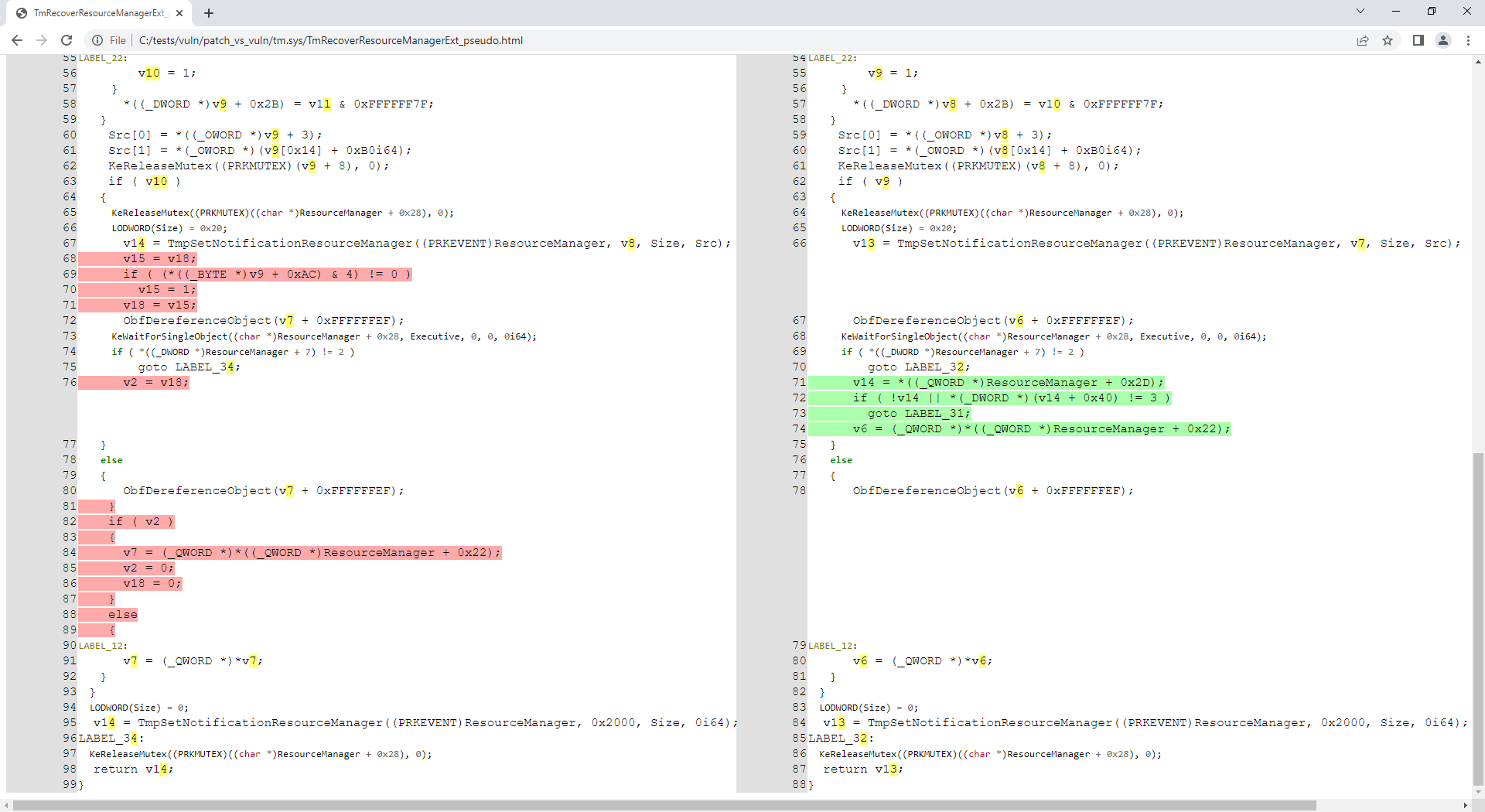
Es stellt sich heraus, dass die tm.sys-Dateien (im Repository enthalten) mit CVE-2018-8611 zusammenhängen. Analysieren wir also die gepatchte Funktion TmRecoverResourceManagerExt():
C:\idahunt> python idahunt.py --diaphora-path C:\diaphora\ --inputdir C:\tests\ --html --filename tm.sys --funcname TmRecoverResourceManagerExt --verbose
[idahunt] IDA32 = C:\Program Files\IDA Core 8.1\ida.exe
[idahunt] IDA64 = C:\Program Files\IDA Core 8.1\ida64.exe
[idahunt] EXECUTE GENERATE HTML
C:\tests\patch\tm.sqlite C:\tests\vuln\tm.sqlite
C:\tests\vuln\patch_vs_vuln\tm.sys\TmRecoverResourceManagerExt_asm.html C:\tests\vuln\patch_vs_vuln\tm.sys\TmRecoverResourceManagerExt_pseudo.html
[idahunt] Showing patch vs vuln for TmRecoverResourceManagerExt
[idahunt] C:\Program Files\IDA Core 8.1\ida64.exe -A -SC:\diaphora\diaphora_ida.py -LC:\tests\patch\tm.log C:\tests\patch\tm.i64
[idahunt] Environment variables:
[idahunt] DIAPHORA_AUTO4=1
[idahunt] DIAPHORA_DB1=C:\tests\patch\tm.sqlite
[idahunt] DIAPHORA_DB2=C:\tests\vuln\tm.sqlite
[idahunt] DIAPHORA_DIFF=C:\tests\vuln\patch_vs_vuln\tm.sys.diaphora
[idahunt] DIAPHORA_EA1=1c0015500
[idahunt] DIAPHORA_EA2=1c0015500
[idahunt] DIAPHORA_HTML_ASM=C:\tests\vuln\patch_vs_vuln\tm.sys\TmRecoverResourceManagerExt_asm.html
[idahunt] DIAPHORA_HTML_PSEUDO=C:\tests\vuln\patch_vs_vuln\tm.sys\TmRecoverResourceManagerExt_pseudo.html
[idahunt] Executed IDA 1/1 times IDA instances
[idahunt] Took 0:00:10.03 to execute this
Jetzt haben wir den erzeugten Assembler- und dekompilierten Code für diese Funktion:
C:\idahunt> tree C:\tests\ /F
C:\tests
├───patch
│ tm.i64
│ ...
│
└───vuln
│ tm.i64
│ ...
│
└───patch_vs_vuln
│ tm.sys.diaphora
│ tm.sys.txt
│
└───tm.sys
TmRecoverResourceManagerExt_asm.html
TmRecoverResourceManagerExt_pseudo.html

Wir können filtern, dass idahunt nur Dateien mit einem bestimmten Muster im Namen analysiert (-n Download unten):
C:\idahunt>idahunt.py --inputdir C:\re --filter "filters\names.py -a 32 -v -n Download" --scripts C:\idahunt\script_template.py --list-only
[idahunt] Simulating only...
[idahunt] EXECUTE SCRIPTS
[names] Skipping non-matching name Download in cve-2014-4076.dll
[names] Skipping non-matching name Download in cve-2014-4076.exe
[idahunt] Executing script C:\idahunt\script_template.py for C:\re\DownloadExecute.exe
[names] Skipping non-matching name Download in ReverseShell.exe
Wir können auch filtern, dass idahunt nur Dateien mit einer bestimmten Erweiterung analysiert (-e dll unten):
C:\idahunt>idahunt.py --inputdir C:\re --filter "filters\names.py -a 32 -v -e dll" --scripts C:\idahunt\script_template.py --list-only
[idahunt] Simulating only...
[idahunt] EXECUTE SCRIPTS
[idahunt] Executing script C:\idahunt\script_template.py for C:\re\cves\cve-2014-4076.dll
[names] Skipping non-matching extension .dll in cve-2014-4076.exe
[names] Skipping non-matching extension .dll in DownloadExecute.exe
[names] Skipping non-matching extension .dll in ReverseShell.exe
Die Architektur muss im Voraus bekannt sein, aufgrund der IDA-Pro-Architektur und der Tatsache, dass sie zwei verschiedene ausführbare Dateien idaq.exe und idaq64.exe enthält, um Binärdateien der beiden Architekturen 32-Bit und 64-Bit zu analysieren. Dies gilt insbesondere, wenn Sie den HexRays-Dekompiler verwenden möchten.
idahunt erkennt automatisch die Architekturen i386, ia64 und amd64 in Windows-PE-Dateien. Wenn Sie andere Architekturen automatisch erkennen müssen, können Sie ein Issue erstellen, es zu idahunt hinzufügen und einen PR erstellen.
Wenn Sie vergessen, die Architektur der zu analysierenden Dateien anzugeben, gibt der Basisfilter filters\names.py einen Fehler zurück:
C:\idahunt>idahunt.py --inputdir C:\re --filter "filters\names.py -v -e dll" --scripts C:\idahunt\script_template.py --list-only
[idahunt] Simulating only...
[idahunt] EXECUTE SCRIPTS
[names] Unknown architecture: None. You need to specify it with -a
[names] Skipping non-matching extension .dll in cve-2014-4076.exe
[names] Skipping non-matching extension .dll in DownloadExecute.exe
[names] Skipping non-matching extension .dll in ReverseShell.exe
Es gibt Filter für die Analyse von HP-iLO- oder Cisco-ASA-Firmware.
