
Skip to content
KitploitKITPLOIT
ToolsBlog
Einreichen
ToolsBlog
Einreichen

Hacking-, PenTest- und Cybersicherheits-Tools für Ihr Sicherheitsarsenal!

Kitploit ist ein Verzeichnis von Hacking-, Cybersicherheits- und Pentesting-Tools. Entdecken Sie die neuesten Projekt-Updates, um Schwachstellen zu finden, Systeme zu analysieren, Tests zu automatisieren und Ihre Sicherheit zu stärken.

··Feeds·Kontakt·Datenschutz·© 2026 Kitploit

Tool-Verzeichnis

Kategorien

Alle Kategorien anzeigen
Loading categories
GPT_Vuln-analyzer — Verwendet ChatGPT API, Bard API und Llama2, Python-Nmap, DNS Recon, PCAP und JWT Recon-Module und verwendet das GPT3-Modell, um Schwachstellenberichte basierend auf Nmap-Scan-Daten und DNS-Scan-Informationen zu erstellen. Es kann auch Subdomain-Enumeration in großem Umfang durchführen. | Kitploit
Tools/GitHubGitHub/morpheuslord/gpt_vuln-analyzer
AufklärungSchwachstellenscannerNetzwerkkartierungPort-ScanningSchwachstellenanalyseDNS- und Subdomain-EnumerationInformationsbeschaffungPenetrationstestsDNS-Analyse

Beliebteste

Alle anzeigen →

Entdecken Sie die meistgenutzten Tools unserer Community.

Alle Tools erkunden

Durchsuchen Sie unsere Tool-Sammlung

Alle Tools anzeigen →
KI-Sicherheit
GitHubmorpheuslord/gpt_vuln-analyzer

GPT_Vuln-analyzer

Repository anzeigen
59567vor 1 JahrVon Kitploit geprüft

Über

Verwendet ChatGPT API, Bard API und Llama2, Python-Nmap, DNS Recon, PCAP und JWT Recon-Module und verwendet das GPT3-Modell, um Schwachstellenberichte basierend auf Nmap-Scan-Daten und DNS-Scan-Informationen zu erstellen. Es kann auch Subdomain-Enumeration in großem Umfang durchführen.

Teilen

GPT_Vuln-analyzer

Dies ist eine Proof of Concept-Anwendung, die demonstriert, wie KI verwendet werden kann, um präzise Ergebnisse für Schwachstellenanalysen zu generieren, und die eine weitere Nutzung des bereits äußerst nützlichen ChatGPT ermöglicht. Sie wurde mit openai-api, python-nmap, dnsresolver Python-Modulen sowie customtkinter und tkinter für die GUI-Version des Codes erstellt. Dieses Projekt verfügt auch über eine CLI- und eine GUI-Schnittstelle. Es ist in der Lage, Netzwerk-Schwachstellenanalysen, DNS-Enumeration und auch Subdomain-Enumeration durchzuführen.

Anforderungen

  • Python 3.10 oder höher
  • Alle im requirements.txt genannten Pakete
  • OpenAI API
  • Bard API (MakerSuite Palm)
  • Runpod serverless endpoint
  • IPGeolocation API
  • Docker
  • Wireshark und tshark (beide zum Pfad hinzugefügt)

Verwendung des Pakets

Pakete importieren```bash

cd package && pip3/pip install .

root@kitploit:~
Importieren Sie einfach eines der 3 Pakete und definieren Sie dann die Variablen entsprechend.```python
from GVA.scanner import NetworkScanner
from GVA.dns_recon import DNSRecon
from GVA.geo import geo_ip_recon
from GVA.jwt import JWTAnalyzer
from GVA.menus import Menus
from GVA.packet_analysis import PacketAnalysis
from GVA.ai_models import NMAP_AI_MODEL
from GVA.ai_models import DNS_AI_MODEL
from GVA.ai_models import JWT_AI_MODEL
from GVA.assets import Assets
from GVA.subdomain import sub_enum
from GVA import gui

# The components defined
dns_enum = DNSRecon()
geo_ip = geo_ip_recon()
p_ai_models = NMAP_AI_MODEL()
dns_ai_models = DNS_AI_MODEL()
port_scanner = NetworkScanner()
jwt_analizer = JWTAnalyzer()
sub_recon = sub_enum()
asset_codes = Assets()
packet_analysis = PacketAnalysis()

# KEEP IT BLANK IF YOU HAVE NO CLUE THE MENU WILL ASK TO FILL IT ONCE ACTIVE
lkey = "LLAMA API KEY"
lendpoint = "LLAMA ENDPOINT"
keyset = "AI API KEY"
output_loc = "OUTPUT LOCATION FOR PCAP"
threads = 200 # Default INT 200 but can be increased.
target_ip_hostname_or_token = "TARGET IP, HOSTNAME OR TOKEN"
profile_num = "PROFILE FOR NMAP SCAN"
ai_set = "AI OF CHOICE"
akey_set = "OPENAI API KEY"
bkey_set = "BARD API KEY"
ai_set_args = ""  # Keep it blank at any cost
llamakey = "LLAMA RUNPOD API KEY"
llamaendpoint = "LLAMA RUNPOD ENDPOINT"

Menus(
    lamma_key=lkey,
    llama_api_endpoint=lendpoint,
    initial_keyset=keyset,
    threads=threads,
    output_loc=output_loc,
    target=target_ip_hostname,
    profile_num=profile_num,
    ai_set=ai_set,
    openai_akey_set=akey_set,
    bard_key_set=bkey_set,
    ai_set_args=ai_set_args,
    llama_runpod_key=llamakey,
    llama_endpoint=llamaendpoint
)


gui.application()

Das Update für passcracker im Paket und die GUI sind noch in Arbeit.

Verwendung CLI

  • Ersetzen Sie zuerst die Teile "OPENAI_API_KEY", "GEOIP_API_KEY" und "BARD_API_KEY" im Code durch den OpenAI-API-Schlüssel und den IPGeolocation-API-Schlüssel in der .env-Datei
  • Für die llama-api-Option bzw. speziell für die Bereitstellungsoption des serverlosen Endpunkts von llama auf Runpod müssen Sie die serverless endpoint ID von Runpod und Ihren RUNPOD API KEY eingeben```python GEOIP_API_KEY = '' OPENAI_API_KEY = '' BARD_API_KEY = '' RUNPOD_ENDPOINT_ID = '' RUNPOD_API_KEY = ''
root@kitploit:~
- zweitens installiere die Pakete```bash
pip3 install -r requirements.txt
or
pip install -r requirements.txt
  • Führen Sie den Code python3 gpt_vuln.py aus```bash

Regular Help Menu

python gpt_vuln.py --help

Rich Help Menu

python gpt_vuln.py --r help

Specify target with the attack

python gpt_vuln.py --target <IP/hostname/token> --attack dns/nmap/jwt

Specify target and profile for nmap

python gpt_vuln.py --target <IP/hostname/token> --attack nmap --profile <1-13> (Default:1)

Specify target for DNS no profile needed

python gpt_vuln.py --target <IP/hostname/token> --attack dns

Specify target for Subdomain Enumeration no profile used default list file

python gpt_vuln.py --target --attack sub

Specify target for Subdomain Enumeration no profile used custom list file

python gpt_vuln.py --target --attack sub --sub_list

Specify target for geolocation lookup

python gpt_vuln.py --target --attack geo

Specify PCAP file for packet analysis

python gpt_vuln.py --target --attack pcap --output --thread NUM of threads <200:default>

Specify the AI to be used for nmap

python gpt_vuln.py --target --attack nmap --profile <1-5> --ai llama /llama-api /bard / openai

Specify the AI to be used for dns

python gpt_vuln.py --target --attack dns --ai llama /llama-api /bard / openai

Specify the AI to be used for JWT analysis

python gpt_vuln.py --target --attack jwt --ai llama /llama-api /bard / openai

Password Cracker

python gpt_vuln.py --password_hash --wordlist_file --algorithm --parallel --complexity

Interactive step by step cli interface

python gpt_vuln.py --menu True

root@kitploit:~
#### CLI-Schnittstellenoption```bash
  ________________________
| GVA Usage in progress... |
  ========================
                        \
                         \
                           ^__^
                           (oo)\_______
                           (__)\       )\/\
                               ||----w |
                               ||     ||
┏━━━━━━━━━┳━━━━━━━━━━━━━━━━┓
┃ Options ┃ Utility        ┃
┡━━━━━━━━━╇━━━━━━━━━━━━━━━━┩
│ 1       │ Nmap Enum      │
│ 2       │ DNS Enum       │
│ 3       │ Subdomain Enum │
│ 4       │ GEO-IP Enum    │
| 5       | JWT Analysis   |
| 6       | PCAP Analysis  |
| 6       | Hash Cracker   |
│ q       │ Quit           │
└─────────┴────────────────┘
Enter your choice:

Die CLI-Oberfläche hat ein paar zu beachtende Punkte.

  • Die API-Schlüssel müssen manuell bereitgestellt werden.
  • Die in den .env-Dateien definierten funktionieren mit den Args-Optionen
  • Der Prozess ist ähnlich, aber besser organisiert.

Meine Ansichten zu Bard

Es ist dasselbe wie OpenAI GPT3.5, aber schneller. Es kann dieselbe Antwort in doppelter Geschwindigkeit generieren.

OS Supported

Den Code verstehen

Profile:

Das Profil ist der Scantyp, der vom Nmap-Subprozess ausgeführt wird. Die IP oder das Ziel wird über Argparse bereitgestellt. Zunächst wird der benutzerdefinierte Nmap-Scan ausgeführt, der alle entscheidenden Argumente für die Fortsetzung des Scans enthält. Als Nächstes werden die Scandaten aus der riesigen Datenmenge extrahiert, die von Nmap generiert wurde. Das "scan"-Objekt enthält eine Liste von Unterdaten unter "tcp", die jeweils nach den geöffneten Ports benannt sind. Sobald die Daten extrahiert sind, werden sie über einen Prompt an das Davinci-Modell der OpenAI-API gesendet. Der Prompt fordert speziell eine JSON-Ausgabe an und dass die Daten auf eine bestimmte Weise verwendet werden sollen.

Die gesamte Struktur der Anfrage, die an die OpenAI-API gesendet werden muss, ist im Completion-Abschnitt des Programms gestaltet.```python class NetworkScanner(): profile_arguments = { 1: '-Pn -sV -T4 -O -F', 2: '-Pn -T4 -A -v', 3: '-Pn -sS -sU -T4 -A -v', 4: '-Pn -p- -T4 -A -v', 5: '-Pn -sS -sU -T4 -A -PE -PP -PY -g 53 --script=vuln', 6: '-Pn -sV -p- -A', 7: '-Pn -sS -sV -O -T4 -A', 8: '-Pn -sC', 9: '-Pn -p 1-65535 -T4 -A -v', 10: '-Pn -sU -T4', 11: '-Pn -sV --top-ports 100', 12: '-Pn -sS -sV -T4 --script=default,discovery,vuln', 13: '-Pn -F' }

root@kitploit:~
def scanner(self, ip: Optional[str], profile: int, akey: Optional[str],
            bkey: Optional[str], lkey, lendpoint, AI: str) -> str:
    nm.scan(ip, arguments=self.profile_arguments.get(profile))
    json_data = nm.analyse_nmap_xml_scan()
    analyze = json_data["scan"]

    try:
        ai_methods = {
            'openai': lambda: AIModels.GPT_AI(akey, analyze),
            'bard': lambda: AIModels.BardAI(bkey, analyze),
            'llama': lambda: AIModels.Llama_AI(analyze, "local", lkey, lendpoint),
            'llama-api': lambda: AIModels.Llama_AI(analyze, "runpod", lkey, lendpoint)
        }

        if AI in ai_methods and (akey or bkey):
            response = ai_methods[AI]()
        else:
            raise ValueError("Invalid AI type or missing keys")

    except KeyboardInterrupt:
        print("Bye")
        quit()

    return str(response)
root@kitploit:~
# Regex

Wir verwenden Regex, um nur die wichtigen Informationen aus dem benutzerdefinierten Prompt zu extrahieren. Dadurch wird die Gesamtmenge an unerwünschten Daten reduziert.

Der KI-Code definiert ein Ausgabeformat und weist die KI an, einige vorgegebene Regeln zu befolgen, um die Genauigkeit zu erhöhen.
Der Regex-Extraktionscode führt die Extraktion durch, und die Hauptfunktion ordnet sie anschließend in Tabellen an.

## Verwendung von Bard AI

Um Bard AI zu nutzen, müssen Sie sich für den Entwicklerzugang zur MakerSuit Palm API anmelden und dort Ihren API-Schlüssel generieren. Für Links und zur Funktionsweise können Sie dieses Video [MakerSuit](https://www.youtube.com/watch?v=Ce1AOchQMzA&t=128s) verwenden.

Sobald die API beschafft wurde, fügen Sie sie einfach in die `.env`-Datei ein, und schon kann es losgehen.

## Alte LLama2-Implementierung

Die Verwendung von LLama2 ist eine der besten Offline- und kostenlosen Optionen, die es gibt. Sie wird derzeit verbessert; ich arbeite an einem Prompt, der die Cybersicherheitsperspektive besser in die KI einbezieht.
Ich möchte **@thisserand** und seinem [llama2_local](https://github.com/thisserand/llama2_local)-Repository sowie seinem YT-Video [YT_Video](https://youtu.be/WzCS8z9GqHw) danken. Sie waren großartige Ressourcen. Um ehrlich zu sein, stammt der llama2-Code zu 95 % von ihm; ich habe den Code nur übernommen und eine Flask-API-Funktionalität hinzugefügt.

Die Genauigkeit der KI offline und außerhalb der Codetests war großartig und hatte die gleiche Genauigkeit wie OpenAI oder Bard, aber im Code gab es aufgrund der Promptgestaltung einige Probleme. Ich werde versuchen, dies zu beheben.
Die Geschwindigkeit hängt von Ihrem System sowie den GPU- und CPU-Konfigurationen ab. Derzeit wird das Modell `TheBloke/Llama-2-7B-Chat-GGML` verwendet und kann über die Dateien `portscanner` und `dnsrecon` geändert werden.

Derzeit werden der llama-Code und die Scans unterschiedlich gehandhabt. Nach einigen Tests habe ich festgestellt, dass llama ein wenig trainiert werden muss, um so zu funktionieren, wie ich es beabsichtigt habe, daher braucht es etwas Zeit. Vorschläge, wie ich das bewerkstelligen kann, können in den Diskussionen dieses Repositorys hinzugefügt werden: [Diskussionslink](https://github.com/morpheuslord/GPT_Vuln-analyzer/discussions). Derzeit wird die Ausgabe keine aufgeteilte Liste aller Daten sein, sondern eine Erklärung der von der KI entdeckten Schwachstellen oder Probleme.

Der Prompt für die Modellnutzung sieht wie folgt aus:```prompt
[INST] <<SYS>> {user_instruction}<</SYS>> NMAP Data to be analyzed: {user_message} [/INST]

Die Anleitung sieht so aus:```prompt Do a NMAP scan analysis on the provided NMAP scan information. The NMAP output must return in a asked format accorging to the provided output format. The data must be accurate in regards towards a pentest report. The data must follow the following rules: 1) The NMAP scans must be done from a pentester point of view 2) The final output must be minimal according to the format given. 3) The final output must be kept to a minimal. 4) If a value not found in the scan just mention an empty string. 5) Analyze everything even the smallest of data. 6) Completely analyze the data provided and give a confirm answer using the output format. 7) mention all the data you found in the output format provided so that regex can be used on it. 8) avoid unnecessary explaination. 9) the critical score must be calculated based on the CVE if present or by the nature of the services open 10) the os information must contain the OS used my the target. 11) the open ports must include all the open ports listed in the data[tcp] and varifying if it by checking its states value. you should not negect even one open port. 12) the vulnerable services can be determined via speculation of the service nature or by analyzing the CVE's found. The output format: critical score: - Give info on the criticality "os information": - List out the OS information "open ports and services": - List open ports - List open ports services "vulnerable service": - Based on CVEs or nature of the ports opened list the vulnerable services "found cve": - List the CVE's found and list the main issues.

root@kitploit:~
Mithilfe des Anweisungssatzes und der über die Eingabeaufforderung bereitgestellten Daten generiert die Llama AI ihre Ausgabe.

Für die häufigste Nutzung empfehle ich Ihnen, eine serverlose Runpod-Endpunktbereitstellung von Llama zu erstellen. Sie können sich auf dieses Tutorial beziehen: [Tutorial](https://www.youtube.com/watch?v=Ftb4vbGUr7U). Folgen Sie dem Tutorial für eine bessere Nutzung.

### Llama2 Ollama

Dieses neueste Update verwendet ein Ollama-Docker-Image, um das lokalisierte Llama-System zu implementieren, und dies erhöht aus irgendeinem Grund die Genauigkeit der Ausgabe, möglicherweise aufgrund einer besseren Konfiguration oder Ähnlichem. Ich werde hier nicht näher darauf eingehen, aber ich werde an dem Teil der GPU-Integration des Codes arbeiten, damit wir GPU-Leistung zur Verarbeitung hinzufügen und sie effizienter gestalten können. Dank an @andr6 für die Eröffnung der Diskussion; falls jemand ein besseres Verständnis dieser Implementierung hat, kann er gerne improvisieren und einen PR erstellen.

### Output

#### JWT Output:```
                                            GVA Report for JWT
┏━━━━━━━━━━━━━━━━━━━━━┳━━━━━━━━━━━━━━━━━━━━━━━━━━━━━━━━━━━━━━━━━━━━━━━━━━━━━━━━━━━━━━━━━━━━━━━━━━━━━━━━━━┓
┃ Variables           ┃ Results                                                                          ┃
┡━━━━━━━━━━━━━━━━━━━━━╇━━━━━━━━━━━━━━━━━━━━━━━━━━━━━━━━━━━━━━━━━━━━━━━━━━━━━━━━━━━━━━━━━━━━━━━━━━━━━━━━━━┩
│ Algorithm Used      │ HS256                                                                            │
│ Header              │ eyJhbGciOiAiSFMyNTYiLCAidHlwIjogIkpXVCJ9                                         │
│ Payload             │ eyJzdWIiOiAiMTIzNDU2Nzg5MCIsICJuYW1lIjogIkpvaG4gRG9lIiwgImlhdCI6IDE1MTYyMzkwMjJ9 │
│ Signature           │                                                                                  │
│ PossibleAttacks     │ None identified                                                                  │
│ VulnerableEndpoints │ Unable to determine without additional information                               │
└─────────────────────┴──────────────────────────────────────────────────────────────────────────────────┘

Nmap-Ausgabe:

OpenAI und Bard:```table

┏━━━━━━━━━━━━━━━━━━━━┳━━━━━━━━━━━━━━━━━━━━━━━━━━━━━━━━━━━━━━━━━━━━━━━━━━━━━┓ ┃ Elements ┃ Results ┃ ┡━━━━━━━━━━━━━━━━━━━━╇━━━━━━━━━━━━━━━━━━━━━━━━━━━━━━━━━━━━━━━━━━━━━━━━━━━━━┩ │ critical score │ High │ │ os information │ Microsoft Windows 11 21H2 │ │ open ports │ 80, 22, 445, 902, 912 │ │ open services │ http, ssh, microsoft-ds, vmware-auth, vmware-auth │ │ vulnerable service │ OpenSSH │ │ found cve │ CVE-2023-28531 │ └────────────────────┴─────────────────────────────────────────────────────┘

root@kitploit:~
##### LLama2```table
╭───────────────────────────────────────────── The GVA LLama2 ──────────────────────────────────────────────╮
│                                                                                                           │
│                                                                                                           │
│                                                                                                           │
│  Based on the provided NMAP data, I have conducted a thorough analysis of the target system's open ports  │
│  and services, vulnerabilities, and operating system information. Here is my findings: Critical Score:    │
│  The critical score for this target system is 7 out of 10. The system has several open ports that could   │
│  potentially be exploited, including port 80 (HTTP), port 135 (RPC), and port 445 (Microsoft DS). While   │
│  These ports are not necessarily vulnerable, they do indicate that the system is running services that    │
│  could be targeted by attackers. Additionally, the system has an outdated version of Microsoft IIS        │
│  running on port 80, which could be a potential vulnerability. OS Information: The target system is       │
│  running Microsoft Windows 10 1607. Open Ports and Services: The target system has the following open     │
│  ports:                                                                                                   │
│                                                                                                           │
│   • Port 80: HTTP (Microsoft IIS httpd)                                                                   │
│   • Port 135: RPC (Microsoft Windows RPC)                                                                 │
│   • Port 445: Microsoft DS                                                                                │
│   • Port 8000: Splunkd httpd All of these ports are currently open and have a state of "open".            │
│     Vulnerable Services: Based on the CVEs found in the NMAP data, there are several potential            │
│     vulnerabilities in the target system's services. These include:                                       │
│   • CVE-2019-1489: An elevation of privilege vulnerability in Microsoft IIS that could be exploited by    │
│     an attacker to gain control of the system. This vulnerability is related to the outdated version of   │
│     Microsoft IIS running on port 80.                                                                     │
│   • CVE-2017-0143: A remote code execution vulnerability in Microsoft Windows RPC that could be           │
│     exploited by an attacker to execute arbitrary code on the target system. This vulnerability is        │
│     related to the outdated version of Microsoft Windows RPC running on port 135.                         │
│   • CVE-2020-1362: A remote code execution vulnerability in Microsoft DS that could be exploited by an    │
│     attacker to execute arbitrary code on the target system. This vulnerability is related to the         │
│     outdated version of Microsoft DS running on port 445. Found CVEs: The following C                     │
│                                                                                                           │
╰───────────────────────────────────────────────────────────────────────────────────────────────────────────╯

DNS-Ausgabe:

Ziel ist jainuniversity.ac.in```table ┏━━━━━━━━━━┳━━━━━━━━━━━━━━━━━━━━━━━━━━━━━━━━━━━━━━━━━━━━━━━━━━━━━━━━━━━━━━━━━━━━━━━━━━━━━━━━━━━━━━━━━━━━━━━━━━━━━━━━━━━━━━━━━━━┓ ┃ Elements ┃ Results ┃ ┡━━━━━━━━━━╇━━━━━━━━━━━━━━━━━━━━━━━━━━━━━━━━━━━━━━━━━━━━━━━━━━━━━━━━━━━━━━━━━━━━━━━━━━━━━━━━━━━━━━━━━━━━━━━━━━━━━━━━━━━━━━━━━━━┩ │ A │ 172.67.147.95", "104.21.41.132 │ │ AAA │ │ │ NS │ mia.ns.cloudflare.com.","paul.ns.cloudflare.com. │ │ MX │ 30 aspmx5.googlemail.com.","30 aspmx4.googlemail.com.","20 alt2.aspmx.l.google.com.","30 │ │ │ aspmx3.googlemail.com.","30 aspmx2.googlemail.com.","20 alt1.aspmx.l.google.com.","10 aspmx.l.google.com. │ │ PTR │ │ │ SOA │ mia.ns.cloudflare.com. dns.cloudflare.com. 2309618668 10000 2400 604800 3600 │ │ TXT │ atlassian-sending-domain-verification=5b358ce4-5ad3-404d-b4b4-005bf933603b","include:_spf.atlassian.net │ └──────────┴───────────────────────────────────────────────────────────────────────────────────────────────────────────────────┘

root@kitploit:~
#### Geolokalisierungsausgabe:```table
┏━━━━━━━━━━━━━━━━━━━━━━━━━━━━━┳━━━━━━━━━━━━━━━━━━━━━━━━━━━━━━━━━━━━━━━━━━━━━━━━━━━━━━━━━━━━━━━━━━━━━━━━━┓
┃ Identifiers                 ┃ Data                                                                    ┃
┡━━━━━━━━━━━━━━━━━━━━━━━━━━━━━╇━━━━━━━━━━━━━━━━━━━━━━━━━━━━━━━━━━━━━━━━━━━━━━━━━━━━━━━━━━━━━━━━━━━━━━━━━┩
│ ip                          │ █████████████                                                           │
│ continent_code              │ AS                                                                      │
│ continent_name              │ Asia                                                                    │
│ country_code2               │ IN                                                                      │
│ country_code3               │ IND                                                                     │
│ country_name                │ India                                                                   │
│ country_capital             │ New Delhi                                                               │
│ state_prov                  │ Haryana                                                                 │
│ state_code                  │ IN-HR                                                                   │
│ district                    │                                                                         │
│ city                        │ Gurugram                                                                │
│ zipcode                     │ 122003                                                                  │
│ latitude                    │ 28.44324                                                                │
│ longitude                   │ 77.05501                                                                │
│ is_eu                       │ False                                                                   │
│ calling_code                │ +91                                                                     │
│ country_tld                 │ .in                                                                     │
│ languages                   │ en-IN,hi,bn,te,mr,ta,ur,gu,kn,ml,or,pa,as,bh,sat,ks,ne,sd,kok,doi,mni,… │
│ country_flag                │ https://ipgeolocation.io/static/flags/in_64.png                         │
│ geoname_id                  │ 9148991                                                                 │
│ isp                         │ Bharti Airtel Limited                                                   │
│ connection_type             │                                                                         │
│ organization                │ Bharti Airtel Limited                                                   │
│ currency.code               │ INR                                                                     │
│ currency.name               │ Indian Rupee                                                            │
│ currency.symbol             │ ₹                                                                       │
│ time_zone.name              │ Asia/Kolkata                                                            │
│ time_zone.offset            │ 5.5                                                                     │
│ time_zone.current_time      │ 2023-07-11 17:08:35.057+0530                                            │
│ time_zone.current_time_unix │ 1689075515.057                                                          │
│ time_zone.is_dst            │ False                                                                   │
│ time_zone.dst_savings       │ 0                                                                       │
└─────────────────────────────┴─────────────────────────────────────────────────────────────────────────┘

PCAP-Ausgabe```

Collecting Json Data Extracting IP details... Extracting DNS details... Extracting EAPOL details... Extracting TCP STREAMS details... TCP streams can take some time.. Total Streams combination: 252 Number of workers in progress: 250 Completed GVA Report for PCAP ┏━━━━━━━━━━━━━━━━━━━━━━━━━━━━━━━━━━━━┳━━━━━━━━━━━━━━━━━━━━━━━━━━━━━━━━━━━━━━━━━━━━━━━━━━━━━━━━━━━━━━━━━━━━━━━━━━━━━━━━━━━━━━━━━━━━━━━━━━━━┓ ┃ Identifiers ┃ Data ┃ ┡━━━━━━━━━━━━━━━━━━━━━━━━━━━━━━━━━━━━╇━━━━━━━━━━━━━━━━━━━━━━━━━━━━━━━━━━━━━━━━━━━━━━━━━━━━━━━━━━━━━━━━━━━━━━━━━━━━━━━━━━━━━━━━━━━━━━━━━━━━┩ │ PacketAnalysis.Services │ ['49943', '49958', '49934', '49944', '49931', '443', '49957'] │ │ PacketAnalysis.TCP Streams │ ['1', '4', '5', '2', '0', '3'] │ │ PacketAnalysis.Sources Address │ ['█████████████', '1.1.1.1', '█████████████', '█████████████', '█████████████', '█████████████'] │ │ PacketAnalysis.Destination Address │ ['█████████████', '1.1.1.1', '█████████████', '█████████████', '█████████████', '█████████████'] │ │ PacketAnalysis.DNS Resolved │ [] │ │ PacketAnalysis.DNS Query │ ['oneclient.sfx.ms'] │ │ PacketAnalysis.DNS Response │ ['oneclient.sfx.ms.edgekey.net', 'e9659.dspg.akamaiedge.net', 'oneclient.sfx.ms'] │ │ PacketAnalysis.EAPOL Data │ [] │ │ PacketAnalysis. Total Streams Data │ 126 │ └────────────────────────────────────┴────────────────────────────────────────────────────────────────────────────────────────────────────┘

root@kitploit:~
#### Password Cracker Ausgabe```
  ________________________
| GVA Usage in progress... |
  ========================
                        \
                         \
                           ^__^
                           (oo)\_______
                           (__)\       )\/\
                               ||----w |
                               ||     ||
Cracking... ━━━━━━━━━━━━━━━━━━━━━━━━━━━━━━━━━━━━━━━━ 100% 0:00:00
╭────────────────────────────────────────────── The GVA Password Cracker  ──────────────────────────────────────────────╮      │                                                                                                                       │ │                                                                                                                       │
│                                        Password Cracked! Password:  legion                                            │
│                                                                                                                       │
╰───────────────────────────────────────────────────────────────────────────────────────────────────────────────────────╯

Verwendung der GUI

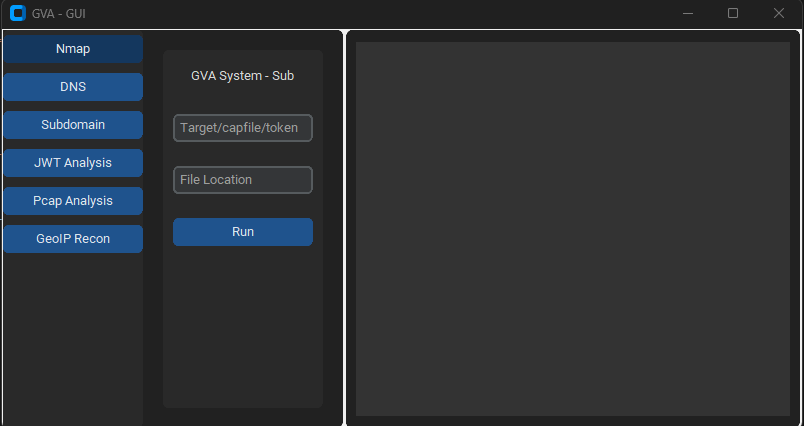
Die GUI verwendet customtkinter für die Ausführung des Codes. Die Bedienoberfläche ist einfach, das Einzige, was man sich merken muss, ist:

  • Bei Verwendung des DNS-Angriffs das Profil nicht angeben.```bash python GVA_gui.py
root@kitploit:~
### Initialfenster

![init](https://assets.kitploit.com/production/public/readmes/5784/03469f428403c0d8ea05932b8b8854649e26d8b325f5468a7af7358d658464a7.png)

### NMAP-Fenster

![nmap](https://assets.kitploit.com/production/public/readmes/5784/d795e0f39f8eda944ea6d76b5a150ef73bb4cce3f070e7bbcc76623f433b217a.png)

### DNS-Fenster

![dns](https://assets.kitploit.com/production/public/readmes/5784/8420ce56819a0063f3268ca1650645fdd1faa3440c11b0cd699c6b66be67c00e.png)

### GEOIP-Fenster

![geoip](https://assets.kitploit.com/production/public/readmes/5784/309b00715f1b645259b2d80f153f0b6be45622b34a4c4321cbd17cdaf707d1d8.png)

### PCAP-Fenster

![pcap](https://assets.kitploit.com/production/public/readmes/5784/c25ebeee2e87706c1145382ade9142ca8449cfd77412000c849c1f000f115de0.png)

### SUBDOMAIN-Fenster

![subdomain](https://assets.kitploit.com/production/public/readmes/5784/5ecffc756794097d6f77939aefbd029078575eb77ee3512add7174f03e7aacc2.png)

### JWT-Fenster

![jwt](https://assets.kitploit.com/production/public/readmes/5784/f00ff0ff586b10ab3523a92bc62808875fcb4bb48fa3024f482614dc7dfdb3ef.png)
Tool herunterladen
PreviewCodeNameWorking StatusOpenAI StatusBard StatusLLama2 Status
LINGNU/Linux✅✅✅❌ [nicht getestet]
WINWindows✅✅✅✅
ParameterRückgabedatenBeschreibungNmap-Befehl
p1jsonEffektiver Scan-Pn -sV -T4 -O -F
p2jsonEinfacher Scan-Pn -T4 -A -v
p3jsonScan mit niedriger Leistung-Pn -sS -sU -T4 -A -v
p4jsonTeilweise intensiver Scan-Pn -p- -T4 -A -v
p5jsonVollständiger intensiver Scan-Pn -sS -sU -T4 -A -PE -PP -PY -g 53 --script=vuln
p6jsonUmfassende Service-Versionserkennung-Pn -sV -p- -A
p7jsonAggressiver Scan mit Betriebssystemerkennung-Pn -sS -sV -O -T4 -A
p8jsonSkript-Scan auf häufige Schwachstellen-Pn -sC
p9jsonIntensiver Scan, alle TCP-Ports-Pn -p 1-65535 -T4 -A -v
p10jsonUDP-Scan-Pn -sU -T4
p11jsonService- und Versionserkennung für die Top-Ports-Pn -sV --top-ports 100
p12jsonAggressiver Scan mit NSE-Skripten auf Schwachstellen-Pn -sS -sV -T4 --script=default,discovery,vuln
p13jsonSchneller Scan auf häufige Ports-Pn -F