 mhaskar/exchangefinder
Findet die Microsoft Exchange-Instanz für eine angegebene Domäne und identifiziert die genaue Version.


ExchangeFinder ist ein einfaches Open-Source-Tool, das versucht, eine Micrsoft Exchange-Instanz für eine bestimmte Domain anhand der häufigsten DNS-Namen für Microsoft Exchange zu finden.
ExchangeFinder kann die genaue Version von Microsoft Exchange von Microsoft Exchange 4.0 bis Microsoft Exchange Server 2019 identifizieren.
ExchangeFinder wird zunächst versuchen, alle Subdomains aufzulösen, die häufig für Exchange-Server verwendet werden, und dann einige HTTP-Anfragen senden, um den Inhalt der vom Server gesendeten Antwort zu analysieren und zu identifizieren, ob Microsoft Exchange verwendet wird oder nicht.
Derzeit verfügt das Tool über eine Signatur jeder Version von Microsoft Exchange, beginnend mit Microsoft Exchange 4.0 bis Microsoft Exchange Server 2019, und basierend auf der Build-Version, die von Exchange über den Header X-OWA-Version gesendet wird, können wir die genaue Version identifizieren.
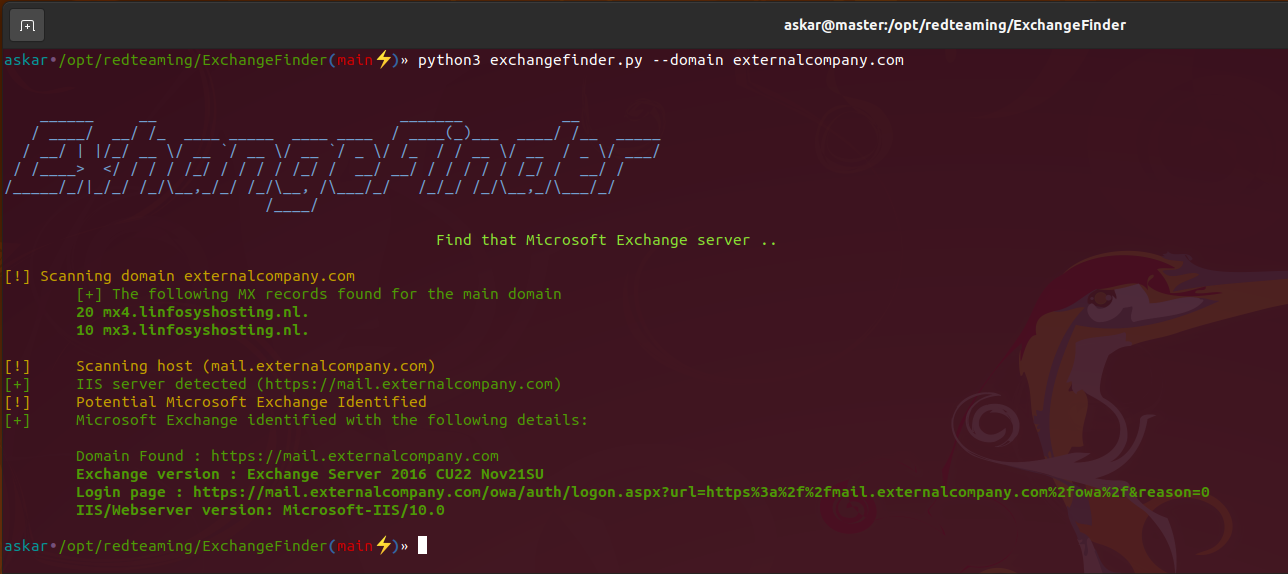
Wenn das Tool eine gültige Microsoft Exchange-Instanz gefunden hat, gibt es die folgenden Ergebnisse zurück:
Klonen Sie die neueste Version von ExchangeFinder mit dem folgenden Befehl:
git clone https://github.com/mhaskar/ExchangeFinder
Und installieren Sie dann alle Abhängigkeiten mit dem Befehl poetry install.
┌──(kali㉿kali)-[~/Desktop/ExchangeFinder]
└─$ poetry install                                                                                                                   1 ⨯
Installing dependencies from lock file


Package operations: 15 installs, 0 updates, 0 removals

  • Installing pyparsing (3.0.9)
  • Installing attrs (22.1.0)
  • Installing certifi (2022.6.15)
  • Installing charset-normalizer (2.1.1)
  • Installing idna (3.3)
  • Installing more-itertools (8.14.0)
  • Installing packaging (21.3)
  • Installing pluggy (0.13.1)
  • Installing py (1.11.0)
  • Installing urllib3 (1.26.12)
  • Installing wcwidth (0.2.5)
  • Installing dnspython (2.2.1)
  • Installing pytest (5.4.3)
  • Installing requests (2.28.1)
  • Installing termcolor (1.1.0)

Installing the current project: ExchangeFinder (0.1.0)

┌──(kali㉿kali)-[~/Desktop/ExchangeFinder]
┌──(kali㉿kali)-[~/Desktop/ExchangeFinder]
└─$ python3 exchangefinder.py


    ______     __                           _______           __
   / ____/  __/ /_  ____ _____  ____ ____  / ____(_)___  ____/ /__  _____
  / __/ | |/_/ __ \/ __ `/ __ \/ __ `/ _ \/ /_  / / __ \/ __  / _ \/ ___/
 / /____>  </ / / / /_/ / / / / /_/ /  __/ __/ / / / / / /_/ /  __/ /
/_____/_/|_/_/ /_/\__,_/_/ /_/\__, /\___/_/   /_/_/ /_/\__,_/\___/_/
                             /____/

                                                Find that Microsoft Exchange server ..

[-] Please use --domain or --domains option

┌──(kali㉿kali)-[~/Desktop/ExchangeFinder]
└─$
Sie können die Option -h verwenden, um das Hilfebanner anzuzeigen:
askar•/opt/redteaming/ExchangeFinder(main⚡)» python3 exchangefinder.py -h


    ______     __                           _______           __
   / ____/  __/ /_  ____ _____  ____ ____  / ____(_)___  ____/ /__  _____
  / __/ | |/_/ __ \/ __ `/ __ \/ __ `/ _ \/ /_  / / __ \/ __  / _ \/ ___/
 / /____>  </ / / / /_/ / / / / /_/ /  __/ __/ / / / / / /_/ /  __/ /
/_____/_/|_/_/ /_/\__,_/_/ /_/\__, /\___/_/   /_/_/ /_/\__,_/\___/_/
                             /____/

                                                Find that Microsoft Exchange server ..

usage: exchangefinder.py [-h] [--domain DOMAIN] [--domains DOMAINS] [--useragent USERAGENT] [--output OUTPUT] [--verbose]

DNSStager main parser

optional arguments:
  -h, --help            show this help message and exit
  --domain DOMAIN       The target domain you want to scan (example.com)
  --domains DOMAINS     Path to domains file you want to scan (domains.txt)
  --useragent USERAGENT
                        Useragent to use, the default is "Mozilla/5.0 (Windows NT 10.0; Win64; x64) AppleWebKit/537.36 (KHTML, like Gecko) Chrome/104.0.0.0 Safari/537.36."
  --output OUTPUT       Export results to given .csv file
  --verbose             Show detailed output
askar•/opt/redteaming/ExchangeFinder(main⚡)»
Um eine einzelne Domain zu scannen, verwenden Sie die Option --domain wie folgt:
askar•/opt/redteaming/ExchangeFinder(main⚡)» python3 exchangefinder.py --domain dummyexchangetarget.com


    ______     __                           _______           __
   / ____/  __/ /_  ____ _____  ____ ____  / ____(_)___  ____/ /__  _____
  / __/ | |/_/ __ \/ __ `/ __ \/ __ `/ _ \/ /_  / / __ \/ __  / _ \/ ___/
 / /____>  </ / / / /_/ / / / / /_/ /  __/ __/ / / / / / /_/ /  __/ /
/_____/_/|_/_/ /_/\__,_/_/ /_/\__, /\___/_/   /_/_/ /_/\__,_/\___/_/
                             /____/

                                                Find that Microsoft Exchange server ..

[!] Scanning domain dummyexchangetarget.com
	[+] The following MX records found for the main domain
	10 mx01.dummyexchangetarget.com.

[!] 	Scanning host (mail.dummyexchangetarget.com)
[+] 	IIS server detected (https://mail.dummyexchangetarget.com)
[!] 	Potential Microsoft Exchange Identified
[+] 	Microsoft Exchange identified with the following details:

	Domain Found : https://mail.dummyexchangetarget.com
	Exchange version : Exchange Server 2016 CU22 Nov21SU
	Login page : https://mail.dummyexchangetarget.com/owa/auth/logon.aspx?url=https%3a%2f%2fmail.dummyexchangetarget.com%2fowa%2f&reason=0
	IIS/Webserver version: Microsoft-IIS/10.0

[!] 	Scanning host (autodiscover.dummyexchangetarget.com)
[+] 	IIS server detected (https://autodiscover.dummyexchangetarget.com)
[!] 	Potential Microsoft Exchange Identified
[+] 	Microsoft Exchange identified with the following details:

	Domain Found : https://autodiscover.dummyexchangetarget.com
	Exchange version : Exchange Server 2016 CU22 Nov21SU
	Login page : https://autodiscover.dummyexchangetarget.com/owa/auth/logon.aspx?url=https%3a%2f%2fautodiscover.dummyexchangetarget.com%2fowa%2f&reason=0
	IIS/Webserver version: Microsoft-IIS/10.0

askar•/opt/redteaming/ExchangeFinder(main⚡)»
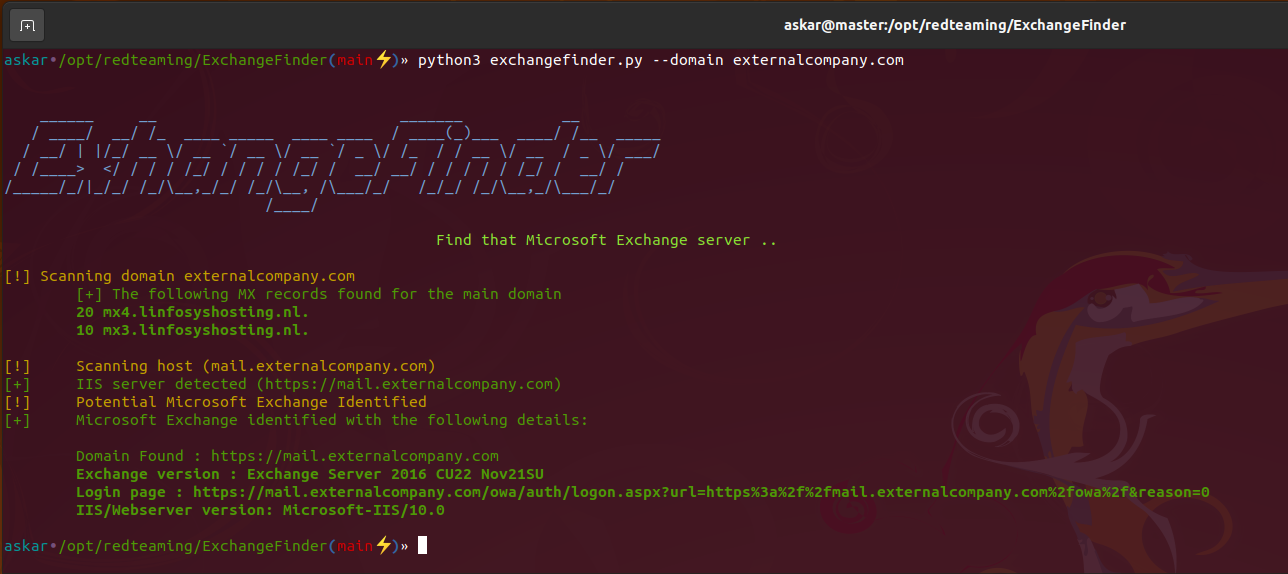
Um mehrere Domains (Ziele) zu scannen, verwenden Sie die Option --domains und wählen Sie eine Datei wie folgt:
askar•/opt/redteaming/ExchangeFinder(main⚡)» python3 exchangefinder.py --domains domains.txt
