 knqyf263/ndff
Ein flussbasierter Netzwerkmonitor mit Deep Packet Inspection

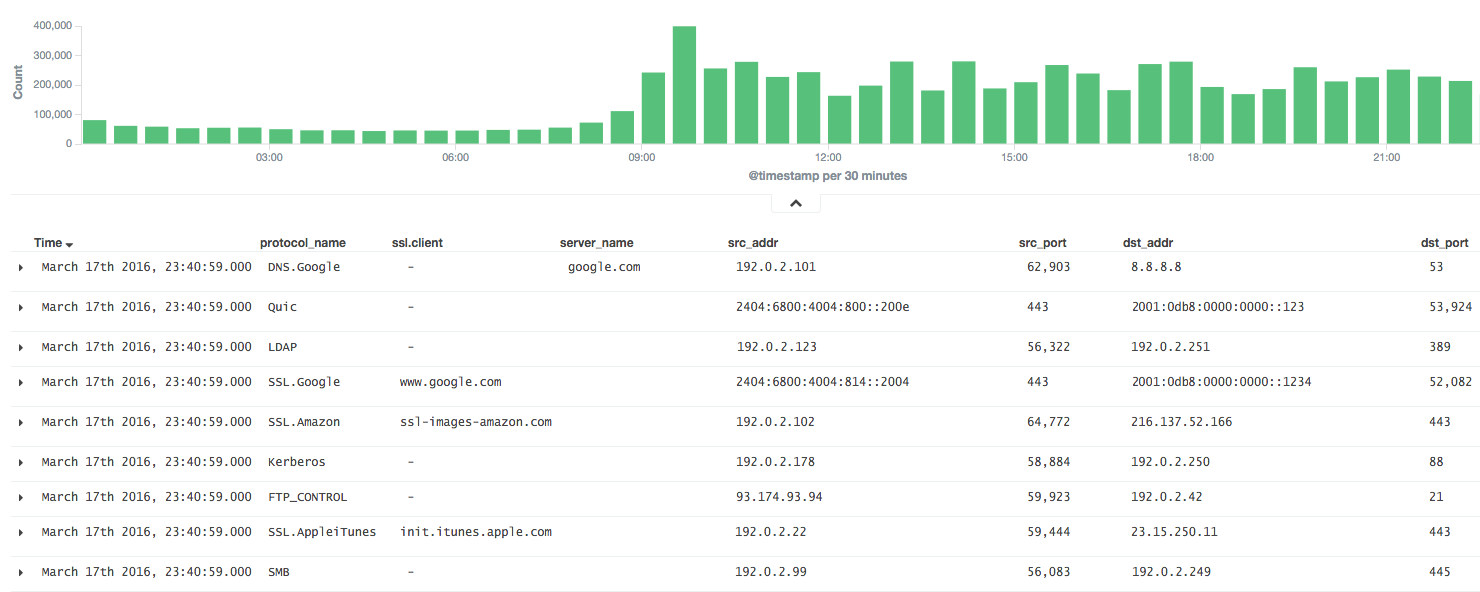
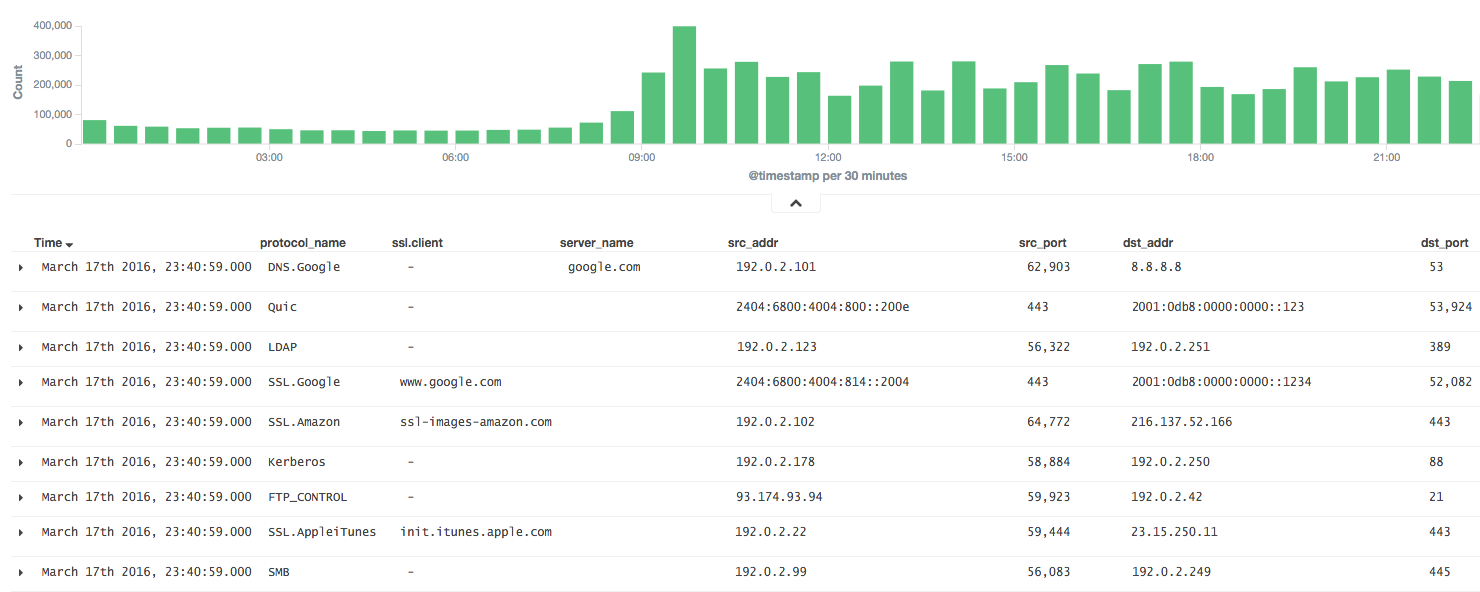
ndff ist ein Flow-Collector mit der nDPI-Bibliothek für fluentd.
ndff wurde auf der Grundlage von ndpiReader implementiert, einem Beispiel in nDPI.
nDPI ist eine Open-Source-Bibliothek unter LGPLv3 für Deep-Packet-Inspektion. ndpiReader ist ein Beispiel in nDPI mit den folgenden Funktionen.
Es ist sehr nützlich, wenn die Ergebnisse von nDPI in fluentd analysiert werden können.
Daher aggregiert ndff Pakete als Flow wie bei NetFlow und leitet die Ergebnisse in Form von JSON oder MessagePack an den fluentd-Server weiter.
Installieren Sie ndff aus einer Binärdatei (CentOS 6).
$ sudo yum -y install libpcap msgpack json-c
$ sudo rpm -ivh https://forensics.cert.org/centos/cert/6.5/x86_64/nDPI-1.7.1-1.el6.x86_64.rpm
$ sudo rpm -ivh https://github.com/knqyf263/ndff/releases/download/0.0.2/ndff-0.0.2-1.x86_64.rpm
Und dann ausführen:
$ sudo ndff -i eth0 -s 127.0.0.1 -p 24224 -m msgpack
Siehe INSTALL.md
Installieren Sie anschließend json-c oder msgpack-c.
Im Fall von json-c:
$ git clone https://github.com/json-c/json-c.git
$ cd json-c
$ sh autogen.sh
$ ./configure
$ make
$ make install
Installieren Sie schließlich ndff aus dem Git-Repository.
$ git clone https://github.com/knqyf263/ndff.git
$ cd ndff
$ ./autogen.sh
$ make
$ sudo make install
$ ndff
ndff -i <file|device> [-s <server>] [-m <json|msgpack>] [-f <filter>]
          [-p <port>][-P <protos>][-t <tag>][-q][-d][-D][-h][-T][-v <level>]
          [-n <threads>] [-w <file>]

Usage:
  -i <file.pcap|device>     | Specify a pcap file/playlist to read packets from or a device for live capture (comma-separated list)
  -m <json|msgpack>         | Specify a protocol to send messages to the server (json or msgpack)
  -f <BPF filter>           | Specify a BPF filter for filtering selected traffic
  -s <server>               | Specify a server for fluentd (If not, ndff runs in the dry-run mode)
  -p <port>                 | Specify a port for fluentd (default: 24224)
  -P <file>.protos          | Specify a protocol file (eg. protos.txt)
  -n <num threads>          | Number of threads. Default: number of interfaces in -i. Ignored with pcap files.
  -g <id:id...>             | Thread affinity mask (one core id per thread)
  -d                        | Daemonize (run in background)
  -D                        | Disable protocol guess and use only DPI
  -q                        | Quiet mode
  -t                        | Specify a tag for fluentd (default: ndpi.flow)
  -T                        | Dissect GTP/TZSP tunnels
  -r                        | Print nDPI version and git revision
  -w <path>                 | Write test output on the specified file. This is useful for
                            | testing purposes in order to compare results across runs
  -h                        | This help
  -v <1|2>                  | Verbose 'unknown protocol' packet print. 1=verbose, 2=very verbose
Führen Sie ndff im Vordergrund oder im Hintergrund aus
Exportieren Sie die Ergebnisse nach stdout.
$ sudo ndff -v 2 -i eth0
[WARN] No server is specified. This is dry-run mode.
[INFO] Capturing live traffic from device eth0...
[INFO] Running thread 0...

	1	ICMPV6 [2001:db8::253]:0 <-> [2001:db8::22]:0 [VLAN: 262][proto: 102/ICMPV6][1 pkts/90 bytes]
	2	UDP 192.0.2.10:1985 <-> 192.0.2.11:1985 [VLAN: 262][proto: 125/Skype][1 pkts/98 bytes]
	3	VRRP 192.0.2.10:0 <-> 192.0.2.11:0 [VLAN: 262][proto: 73/VRRP][1 pkts/60 bytes]
	4	UDP 192.0.2.12:1985 <-> 192.0.2.13:1985 [proto: 125/Skype][1 pkts/94 bytes]
	5	TCP 192.0.2.14:22 <-> 192.0.2.15:51462 [proto: 92/SSH][11 pkts/1510 bytes]
Exportieren Sie die Ergebnisse in die Datei.
$ sudo ndff -v 2 -i tests/pcap/bittorrent.pcap -w bittorrent.txt
[WARN] No server is specified. This is dry-run mode.
[INFO] Reading packets from pcap file tests/pcap/bittorrent.pcap...
[INFO] Running thread 0...

$ head -n5 bittorrent.txt
        1       TCP 192.168.1.3:52888 <-> 82.58.216.115:38305 [proto: 37/BitTorrent][1 pkts/134 bytes][BT Hash: dcfcdccfb9e670ccc3dd40c78c161f2bea243126]
        2       TCP 192.168.1.3:52887 <-> 82.57.97.83:53137 [proto: 37/BitTorrent][1 pkts/134 bytes][BT Hash: dcfcdccfb9e670ccc3dd40c78c161f2bea243126]
        3       TCP 192.168.1.3:52895 <-> 83.216.184.241:51413 [proto: 37/BitTorrent][1 pkts/134 bytes][BT Hash: dcfcdccfb9e670ccc3dd40c78c161f2bea243126]
        4       TCP 79.53.228.2:14627 <-> 192.168.1.3:52896 [proto: 37/BitTorrent][1 pkts/134 bytes][BT Hash: dcfcdccfb9e670ccc3dd40c78c161f2bea243126]
        5       TCP 192.168.1.3:52894 <-> 120.62.33.241:39332 [proto: 37/BitTorrent][1 pkts/134 bytes][BT Hash: dcfcdccfb9e670ccc3dd40c78c161f2bea243126]
Senden Sie an den fluentd-Server.
$ sudo ndff -q -i eth0 -s fluentd.example.com -p 22425 -t json.ndpi.flow -m json
Capturing live traffic from device eth0...
Running thread 0...
Die Ausgabe auf dem fluentd-Server sieht dann wie folgt aus:
2016-03-29 14:41:23 +0900 ndpi.flow: {"protocol":"ICMPV6","src_addr":"2001:DB8::1234","src_port":0,"dst_addr":"2001:DB8::5678","dst_port":0,"detected_protocol":102,"protocol_name":"ICMPV6","out_pkts":1,"out_bytes":86,"in_pkts":0,"in_bytes":0,"first_switched":1459230083,"last_switched":1459230083,"server_name":""}
2016-03-29 14:41:00 +0900 ndpi.flow: {"protocol":"UDP","src_addr":"192.0.2.2","src_port":1985,"dst_addr":"192.0.2.3","dst_port":1985,"detected_protocol":125,"protocol_name":"Skype","out_pkts":16,"out_bytes":1568,"in_pkts":0,"in_bytes":0,"first_switched":1459230060,"last_switched":1459230100,"server_name":""}
2016-03-29 14:41:35 +0900 ndpi.flow: {"protocol":"TCP","src_addr":"192.0.2.4","src_port":49751,"dst_addr":"192.0.2.5","dst_port":80,"detected_protocol":7,"protocol_name":"HTTP","out_pkts":6,"out_bytes":514,"in_pkts":4,"in_bytes":816,"first_switched":1459230095,"last_switched":1459230096,"server_name":"google.co.jp"}
2016-03-29 14:41:35 +0900 ndpi.flow: {"protocol":"UDP","src_addr":"192.0.2.4,"src_port":36605,"dst_addr":"192.0.2.6","dst_port":53,"master_protocol":5,"detected_protocol":126,"protocol_name":"DNS.Google","out_pkts":2,"out_bytes":152,"in_pkts":2,"in_bytes":488,"first_switched":1459230095,"last_switched":1459230095,"server_name":"www.google.co.jp"}
$ sudo ndff -q -i eth0 -s fluentd.example.com -p 22425 -t msgpack.ndpi.flow -m msgpack
Capturing live traffic from device eth0...
Running thread 0...
