Erweiterbares Azure-Sicherheitstool - Dokumentation
Extensible Azure Security Tool (später als E.A.S.T. bezeichnet) ist ein Werkzeug zur Bewertung von Azure und in gewissem Umfang von Azure AD-Sicherheitskontrollen. Der primäre Anwendungsfall von EAST ist die Sammlung von Sicherheitsdaten zur Bewertung in Azure Assessments. Diese Informationen (JSON-Inhalt) können dann in verschiedenen Berichtswerkzeugen verwendet werden, mit denen wir die Daten weiter korrelieren und untersuchen.
Dieses Tool ist unter der MIT-Lizenz lizenziert.
Inhaltsverzeichnis
v 0.5
miGeneral.jsquery.jsv 0.4
Preview-Branch eingeführt
Änderungen:
Die Installation berücksichtigt jetzt die aktualisierte Version von Azure Cloud Shell hinsichtlich der Abhängigkeiten (Cloud Shell hat jetzt Node.JS v 16 installiert)
Überprüfung von Databricks-Cluster-Typen gemäß Advisory
Content.json hat jetzt eine schlüssel- und inhaltsbasierte Sortierung. Dies ermöglicht Delta-Prüfungen mit git diff HEAD^1 ¹, da content.json eine vorgegebene Ergebnisreihenfolge hat
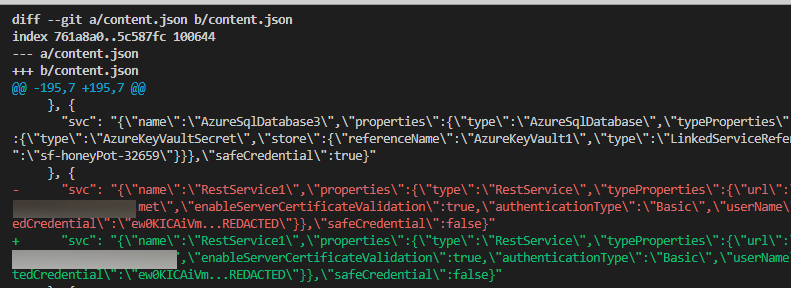
¹ ⚠️ Vorsichtshinweis: Wenn Sie Deltas von content.json überprüfen möchten, muss content.json in
.gitignore„unignoriert“ werden, wodurch Ergebnisse für jeden von Ihnen konfigurierten Upstream offengelegt werden.Verwenden Sie diese Funktion mit Vorsicht und stellen Sie sicher, dass Sie für den Branch, für den Sie diese Funktion verwenden, keinen öffentlichen Upstream eingerichtet haben
Wechsel von Programmiermustern, um mögliche Race Conditions mit größeren Datensätzen zu vermeiden. Dies betrifft hauptsächlich Änderungen von var zu let in for await-Schleifen
⚠️ Der aktuelle Status des Tools ist Beta
exec() – Obwohl ich nicht alle Pfade überprüft habe, glaube ich, dass Shellcode-Ausführung trivial zu erreichen ist. Dieses Tool geht nicht von feindseliger Eingabe aus, daher die Empfehlung, Startargumente nicht ohne vorherige Überprüfung in die Befehlszeile einzufügen.Um die Menge an Code zu reduzieren, werden die folgenden Abhängigkeiten für Betrieb und Ästhetik verwendet (Dank an die Betreuer dieser fantastischen Pakete)
| Paket | Ästhetik | Betrieb | Lizenz |
|---|---|---|---|
| axios | ✅ | MIT | |
| yargs | ✅ | MIT | |
| jsonwebtoken | ✅ | MIT | |
| chalk | ✅ | MIT | |
| js-beautify | ✅ | MIT |
Weitere Abhängigkeiten für den Betrieb des Tools: Wenn Sie dies in Azure Cloud Shell ausführen möchten, müssen Sie Azure CLI nicht installieren:
Azure Cloud Shell (BASH) oder entsprechendes Linux-Distro / WSL
| Anforderung | Beschreibung | Installation |
|---|---|---|
| ✅ AZ CLI | AZCLI USE | curl -sL https://aka.ms/InstallAzureCLIDeb | sudo bash |
| ✅ Node.js Laufzeit 14 | Node.js Laufzeit für EAST | Installation mit NVM |
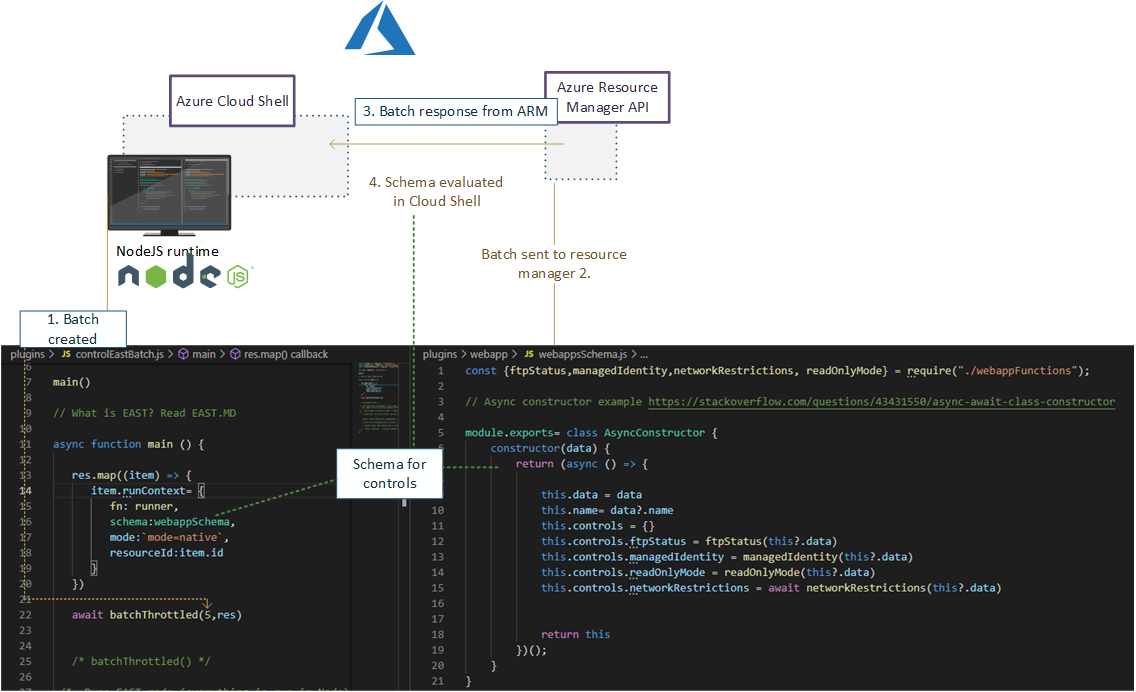
EAST bietet drei Kategorien von Kontrollen: Basic, Advanced und Composite
Die maschinenlesbare Kontrolle sieht wie folgt aus, unabhängig vom Typ (Basic/Advanced/Composite):```json { "name": "fn-sql-2079", "resource": "/subscriptions/6193053b-408b-44d0-b20f-4e29b9b67394/resourcegroups/rg-fn-2079/providers/microsoft.web/sites/fn-sql-2079", "controlId": "managedIdentity", "isHealthy": true, "id": "/subscriptions/6193053b-408b-44d0-b20f-4e29b9b67394/resourcegroups/rg-fn-2079/providers/microsoft.web/sites/fn-sql-2079", "Description": "\r\n Ensure The Service calls downstream resources with managed identity", "metadata": { "principalId": { "type": "SystemAssigned", "tenantId": "033794f5-7c9d-4e98-923d-7b49114b7ac3", "principalId": "cb073f1e-03bc-440e-874d-5ed3ce6df7f8" }, "roles": [{ "role": [{ "properties": { "roleDefinitionId": "/subscriptions/6193053b-408b-44d0-b20f-4e29b9b67394/providers/Microsoft.Authorization/roleDefinitions/b24988ac-6180-42a0-ab88-20f7382dd24c", "principalId": "cb073f1e-03bc-440e-874d-5ed3ce6df7f8", "scope": "/subscriptions/6193053b-408b-44d0-b20f-4e29b9b67394/resourceGroups/RG-FN-2079", "createdOn": "2021-12-27T06:03:09.7052113Z", "updatedOn": "2021-12-27T06:03:09.7052113Z", "createdBy": "4257db31-3f22-4c0f-bd57-26cbbd4f5851", "updatedBy": "4257db31-3f22-4c0f-bd57-26cbbd4f5851" }, "id": "/subscriptions/6193053b-408b-44d0-b20f-4e29b9b67394/resourceGroups/RG-FN-2079/providers/Microsoft.Authorization/roleAssignments/ada69f21-790e-4386-9f47-c9b8a8c15674", "type": "Microsoft.Authorization/roleAssignments", "name": "ada69f21-790e-4386-9f47-c9b8a8c15674", "RoleName": "Contributor" }] }] }, "category": "Access" },
### Einfach
Einfache Steuerungen beinhalten Prüfungen auf dem anfänglichen ARM-Objekt für einfache "Ein/Aus"-Boolesche Einstellungen des genannten Dienstes.
**Beispiel: Azure Container Registry adminUser**
[acr_adminUser](https://github.com/jsa2/east/blob/public/providers/microsoft.containerregistry/functions/acr_adminUser.js)
Portal|EAST
-|-
 | ``if (item.properties?.adminUserEnabled == false ){returnObject.isHealthy = true }``
### Erweitert
Erweiterte Steuerungen beinhalten Prüfungen, die über das anfängliche ARM-Objekt hinausgehen. Oft werden neue Anfragen gestellt, um weitere Informationen über die betreffende Ressource und ihre Beziehung zu anderen Diensten zu erhalten.
**Beispiel: Rollenzuweisungen**
Neben der Überprüfung der Rollenzuweisungen des Abonnements wird eine zusätzliche Prüfung über Azure AD Conditional Access Reporting für MFA durchgeführt, und dass privilegierte Konten nicht nur durch Passwörter (SPNs mit Client-Geheimnissen) geschützt sind.
**Beispiel: Azure Data Factory**
[ADF_pipeLineRuns](https://github.com/jsa2/east/blob/public/providers/microsoft.datafactory/functions/ADF_pipeLineRuns.js)
Das Pipeline-Mapping von Azure Data Factory kombiniert Pipelines -> Aktivitäten -> und Datenziele und prüft dann auf im Log durchgeführte Aktivitäten durchgesickerte Geheimnisse anhand des Ausführungsverlaufs der genannten Aktivitäten.

---
### Zusammengesetzt
Zusammengesetzte Steuerungen kombinieren zwei oder mehr Steuerungsergebnisse aus der Pipeline, um eine oder mehrere neue Steuerungen zu bilden. Die Verwendung von Zusammensetzungen löst zwei Anwendungsfälle für EAST:
1. Sie können keine Reihenfolge der in der Pipeline zurückgegebenen Steuerungsergebnisse garantieren
2. Sie müssen mehr als ein Steuerungsergebnis aus einer einzigen Prüfung zurückgeben
**Beispiel: [composite_resolve_alerts](https://github.com/jsa2/east/blob/public/composites/composite_resolve_alerts.js)**
1. Alarme von Microsoft Cloud Defender bei der Abonnementprüfung abrufen
2. Neue Steuerungen pro resourceProvider für Alarme erstellen
## Berichterstattung
EAST konzentriert sich nicht auf die automatisierte Berichterstellung, da es hauptsächlich JSON-Dateien mit Steuerungs- und Bewertungsstatus bereitstellt. Die Idee ist, separate Tools zur Erstellung von Berichten zu verwenden, die recht trivial über Markdown-Erstellungsskripte und Tools wie [Pandoc](https://github.com/jgm/pandoc#the-universal-markup-converter) automatisiert werden können.
- Obwohl der Fokus nicht auf der Berichterstattung liegt, enthält dieses Repository Beispielautomatisierung für die Berichterstellung mit Pandoc, um das Lesen der Ergebnisse in einem einzigen Dokumentformat zu erleichtern.
Obwohl dieses Tool Pandoc nicht vertreibt, kann es bei der Erstellung der Berichte verwendet werden, daher wird der folgende Zitierungsnachweis hinzugefügt: https://github.com/jgm/pandoc/blob/master/CITATION.cff```
cff-version: 1.2.0
title: Pandoc
message: "If you use this software, please cite it as below."
type: software
url: "https://github.com/jgm/pandoc"
authors:
- given-names: John
family-names: MacFarlane
email: [email protected]
orcid: 'https://orcid.org/0000-0003-2557-9090'
- given-names: Albert
family-names: Krewinkel
email: [email protected]
orcid: '0000-0002-9455-0796'
- given-names: Jesse
family-names: Rosenthal
email: [email protected]
Dieser Teil enthält eine Anleitung, wie Sie dies entweder auf BASH@linux oder BASH in der Azure Cloud Shell ausführen können (Cloud Shell ist offensichtlich auch Linux, erfordert jedoch nicht, dass Sie eine eigene Linux-Box besitzen).
⚠️ Wenn Sie das Tool in der Cloud Shell ausführen, müssen Sie möglicherweise einige der Installationen erneut anwenden, da die Cloud Shell verschiedene Sitzungseinstellungen nicht beibehält.
Voraussetzungen auf der Cloud Shell installieren und danach vergessen```bash curl -o- https://raw.githubusercontent.com/jsa2/EAST/preview/sh/initForuse.sh | bash;
[Weiter zum nächsten Schritt](#login-az-cli-and-run-the-scan)
#### Detaillierte Voraussetzungen (Dies gilt, wenn Sie sich gegen die "Fire and Forget"-Version entschieden haben)
**Voraussetzungen**```bash
git clone https://github.com/jsa2/EAST --branch preview
cd EAST;
npm install
Pandoc-Installation in der Cloud Shell```bash
wget "https://github.com/jgm/pandoc/releases/download/2.17.1.1/pandoc-2.17.1.1-linux-amd64.tar.gz"; tar xvzf "pandoc-2.17.1.1-linux-amd64.tar.gz" --strip-components 1 -C ~
**Installieren von pandoc auf Distributionen, die APT unterstützen**```bash
# Get pandoc for reporting (first time only)
sudo apt install pandoc
az account clear az login
cd EAST
subId=6193053b-408b-44d0-b20f-4e29b9b67394
node ./plugins/main.js --batch=10 --nativescope=true --roleAssignments=true --helperTexts=true --checkAad=true --scanAuditLogs --composites --subInclude=$subId

**Bericht erstellen**
``cd EAST; node templatehelpers/eastReports.js --doc``
- Wenn Sie alle Ergebnisse des Azure Security Benchmark in den Bericht aufnehmen möchten
``cd EAST; node templatehelpers/eastReports.js --doc --asb``
**Bericht aus der Cloud Shell exportieren**
`` pandoc -s fullReport2.md -f markdown -t docx --reference-doc=pandoc-template.docx -o fullReport2.docx ``

**Azure Devops (Experimentell)**
Es gibt eine Azure Devops-Steuerung zum Ausgeben von Pipeline-Logs. Sie können den Steuerungslauf wie folgt angeben:``` node ./plugins/main.js --batch=10 --nativescope=true --roleAssignments=true --helperTexts=true --checkAad=true --scanAuditLogs --composites --subInclude=$subId --azdevops "organizationName" ```
---
## Licensing
**Community use**
- Share relevant controls across multiple environments as community effort
**Company use**
- Companies have possibility to develop company specific controls which apply to company specific work. Companies can then control these implementations by decision to share, or not share them based on the operating principle of that company.
**Non IPR components**
- Code logic and functions are under MIT license. since code logic and functions are alredy based on open-source components & vendor API's, it does not make sense to restrict something that is already based on open source
If you use this tool as part of your commercial effort we only require, that you follow the very relaxed terms of [MIT license](https://github.com/jsa2/east/blob/public/LICENSE)
[Read license](https://github.com/jsa2/EAST/blob/public/LICENSE)
---
# Tool operation documentation
## Principles
### AZCLI USE
**Existing tooling enhanced with Node.js runtime**
Use rich and maintained context of [Microsoft Azure CLI](https://github.com/Azure/azure-cli#microsoft-azure-cli) ``login & commands`` with Node.js control flow which supplies enhanced rest-requests and maps results to schema.
- This tool does not include or distribute Microsoft Azure CLI, but rather uses it when it has been installed on the source system (Such as Azure Cloud Shell, which is primary platform for running EAST)
### Speedup
View more [details](https://github.com/jsa2/east/blob/public/speedup.md)
✅ Using Node.js runtime as orchestrator utilises Nodes asynchronous nature allowing batching of requests. Batching of requests utilizes the full extent of Azure Resource Managers incredible speed.
✅ Compared to running requests one-by-one, the speedup can be up to 10x, when Node executes the batch of requests instead of single request at time
## Parameters reference
**Example:**
```shell
node ./plugins/main.js --batch=10 --nativescope --roleAssignments --helperTexts=true --checkAad --scanAuditLogs --composites --shuffle --clearTokens
Param| Description | Default if undefined
-|-|-
`` --nativescope `` | Currently mandatory parameter | no values
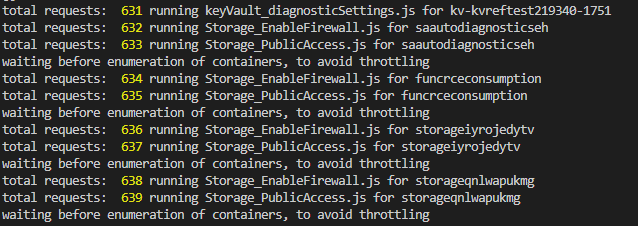
`` --shuffle `` | Can help with throttling. Shuffles the resource list to reduce the possibility of resource provider throttling threshold being met | no values
`` --roleAssignments `` | Checks controls as per [microsoft.authorization](https://github.com/jsa2/east/blob/public/providers/microsoft.authorization/controls) | no values
`` --includeRG `` | Checks controls with ResourceGroups as per [microsoft.authorization](https://github.com/jsa2/east/blob/public/providers/microsoft.authorization/controls) | no values
`` --checkAad `` | Checks controls as per [microsoft.azureactivedirectory](https://github.com/jsa2/east/blob/public/providers/microsoft.azureactivedirectory/controls) | no values
`` --subInclude `` | Defines subscription scope | no default, requires subscriptionID/s, if not defined will enumerate all subscriptions the user have access to
`` --namespace `` | text filter which matches full, or part of the resource ID <br> **example** `` /microsoft.storage/storageaccounts`` all storage accounts in the scope| optional parameter
`` --notIncludes `` | text filter which matches full, or part of the resource ID <br> **example** `` /microsoft.storage/storageaccounts`` all storage accounts in the scope are **excluded**| optional parameter
`` --batch `` | size of batch interval between throttles |5
`` --wait `` | size of batch interval between throttles | 1500
`` --scanAuditLogs `` | optional parameter. When defined in hours will toggle Azure Activity Log scanning for weak authentication events <br> **defined in:** [scanAuditLogs](https://github.com/jsa2/east/blob/public/providers/microsoft.authorization/functions/scanAuditLogs.js) | 24h
`` --composites `` | read [composite](#composite)| no values
`` --clearTokens `` | clears tokens in session folder, use this if you get authorization errors, or have just changed to other `` az login `` account <br> use `` az account clear`` if you want to clear AZ CLI cache too | no values
`` --tag `` | Filter all results in the end based on single tag``--tag=svc=aksdev`` | no values
``--ignorePreCheck`` | use this option when used with browser delegated tokens| no values
``--helperTexts`` | Will append text descriptions from [general](https://github.com/jsa2/east/blob/public/providers/microsoft.general/controls) to manual controls| no values
``--reprocess`` | Will update results to existing content.json. Useful for incremental runs| no values
**Parameters reference for example report:**
```shell
node templatehelpers/eastReports.js --asb```
Param| Description | Default if undefined
-|-|-
`` --asb `` | gets all ASB results available to users | no values
`` --policy `` | gets all Policy results available to users | no values
`` --doc`` | prints pandoc string for export to console | no values
## (Highly experimental) Running in restricted environments where only browser use is available
Read here [Running in restricted environments](https://github.com/jsa2/EAST/tree/DelegationToken#highly-experimental---bypassing-trusted-device-requirements-for-azure-cli-in-highly-restricted-environments-where-apis-are-available-for-browser-sessions)
## Developing controls
Developer guide including control flow description is here [``dev-guide.md``](https://github.com/jsa2/east/blob/public/dev-guide.md)
## Updates and examples
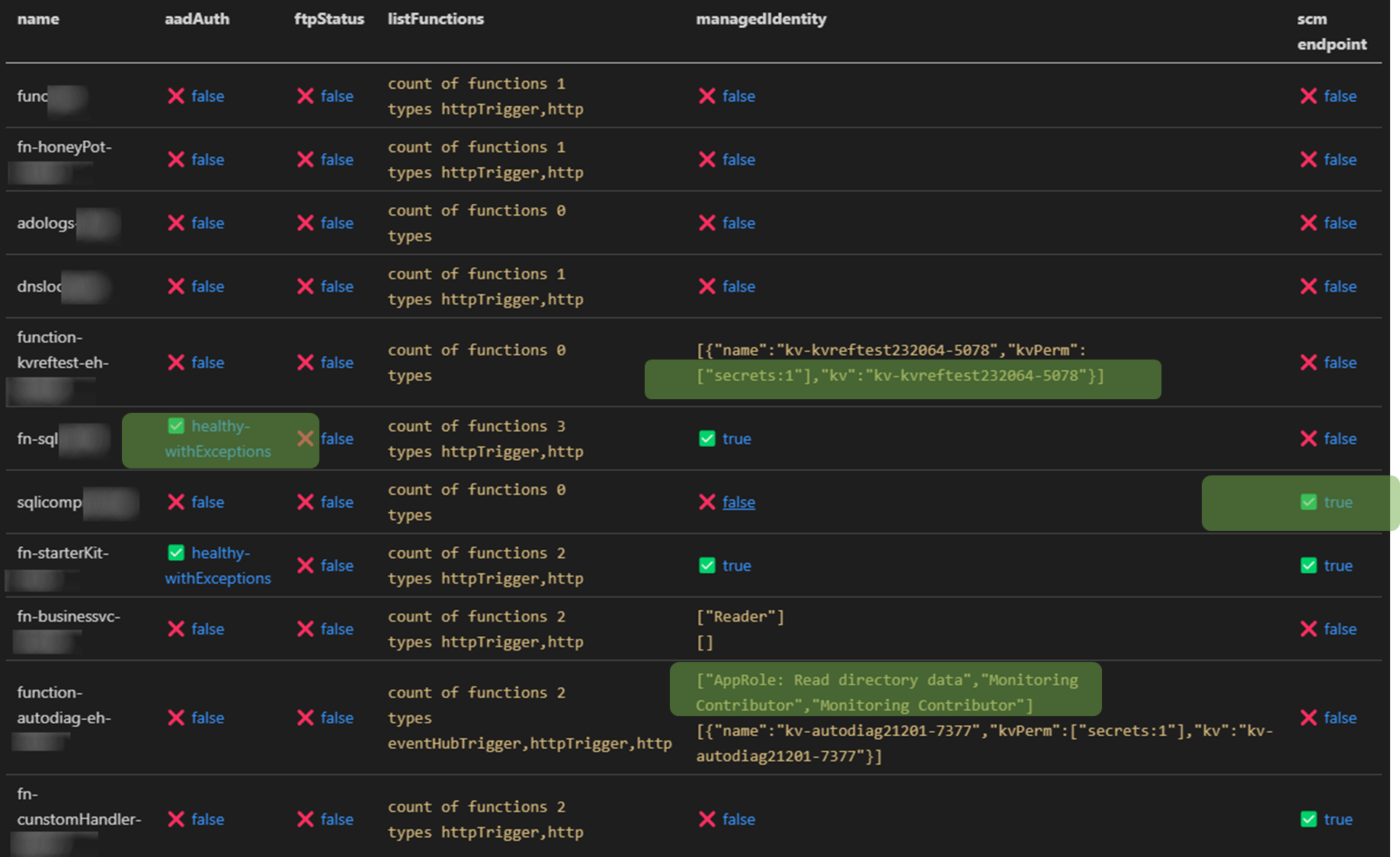
### Auditing Microsoft.Web provider (Functions and web apps)
✅ Check roles that are assigned to function managed identity in Azure AD and all Azure Subscriptions the audit account has access to <br>
✅ Relation mapping, check which keyVaults the function uses across all subs the audit account has access to<br>
✅ Check if Azure AD authentication is enabled
✅ Check that generation of access tokens to the api requires assigment ``.appRoleAssignmentRequired`` <br>
✅ Audit bindings <br>
- Function or Azure AD Authentication enabled
- Count and type of triggers
<br>
✅ Check if [SCM](https://docs.microsoft.com/en-us/azure/azure-functions/security-concepts#secure-the-scm-endpoint) and [FTP](https://docs.microsoft.com/en-us/azure/azure-functions/security-concepts#disable-ftp) endpoints are secured

### Azure RBAC baseline authorization
⚠️ Detect principals in privileged subscriptions roles protected only by password-based single factor authentication.
- Checks for users without MFA policies applied for set of conditions
- Checks for ServicePrincipals protected only by password (as opposed to using Certificate Credential, workload federation and or workload identity CA policy)
Maps to [App Registration Best Practices](https://docs.microsoft.com/en-us/azure/active-directory/develop/security-best-practices-for-app-registration#credential-configuration)
- *An unused credential on an application can result in security breach. While it's convenient to use <span style="color:red">password</span>. secrets as a credential, we strongly recommend that you use x509 certificates as the only credential type for getting tokens for your application*
``✅State healthy`` - **User result example**
```JSON
{
"subscriptionName": "EAST -msdn",
"friendlyName": "[email protected]",
"mfaResults": {
"oid": "138ac68f-d8a7-4000-8d41-c10ff26a9097",
"appliedPol": [{
"GrantConditions": "challengeWithMfa",
"policy": "baseline",
"oid": "138ac68f-d8a7-4000-8d41-c10ff26a9097"
}],
"checkType": "mfa"
},
"basicAuthResults": {
"oid": "138ac68f-d8a7-4000-8d41-c10aa26a9097",
"appliedPol": [{
"GrantConditions": "challengeWithMfa",
"policy": "baseline",
"oid": "138ac68f-d8a7-4000-8d41-c10aa26a9097"
}],
"checkType": "basicAuth"
},
}
```
``⚠️State unHealthy`` - **Application principal example**
```json
{
"subscriptionName": "EAST - HoneyPot",
"friendlyName": "thx138-kvref-6193053b-408b-44d0-b20f-4e29b9b67394",
"creds": {
"@odata.context": "https://graph.microsoft.com/beta/$metadata#servicePrincipals(id,displayName,appId,keyCredentials,passwordCredentials,servicePrincipalType)/$entity",
"id": "babec804-037d-4caf-946e-7a2b6de3a45f",
"displayName": "thx138-kvref-6193053b-408b-44d0-b20f-4e29b9b67394",
"appId": "5af1760e-89ff-46e4-a968-0ac36a7b7b69",
"servicePrincipalType": "Application",
"keyCredentials": [],
"passwordCredentials": [],
"OnlySingleFactor": [{
"customKeyIdentifier": null,
"endDateTime": "2023-10-20T06:54:59.2014093Z",
"keyId": "7df44f81-a52c-4fd6-b704-4b046771f85a",
"startDateTime": "2021-10-20T06:54:59.2014093Z",
"secretText": null,
"hint": null,
"displayName": null
}],
"StrongSingleFactor": []
}
}
```
## Contributing
Following methods work for contributing for the time being:
1. Submit a pull request with code / documentation change
2. Submit a issue
- issue can be a:
- ⚠️ Problem (issue)
- 📝 Feature request
- ❔Question
### Other
1. By default EAST tries to work with the current depedencies - Introducing new (direct) depedencies is not directly encouraged with EAST. If such vital depedency is introduced, then review licensing of such depedency, and update [readme.md - depedencies](#depedencies)
- There is nothing to prevent you from creating your own fork of EAST with your own depedencies