
Skip to content
KitploitKITPLOIT
ToolsBlog
Einreichen
ToolsBlog
Einreichen

Hacking-, PenTest- und Cybersicherheits-Tools für Ihr Sicherheitsarsenal!

Kitploit ist ein Verzeichnis von Hacking-, Cybersicherheits- und Pentesting-Tools. Entdecken Sie die neuesten Projekt-Updates, um Schwachstellen zu finden, Systeme zu analysieren, Tests zu automatisieren und Ihre Sicherheit zu stärken.

··Feeds·Kontakt·Datenschutz·© 2026 Kitploit

Tool-Verzeichnis

Kategorien

Alle Kategorien anzeigen
Loading categories
urx — Extrahiert URLs aus OSINT-Archiven für Sicherheitseinblicke | Kitploit
Tools/GitHubGitHub/hahwul/urx
OSINT (Open-Source-Intelligence)AufklärungInformationsbeschaffungWebsicherheitCrawler
GitHubhahwul/urx

urx

Extrahiert URLs aus OSINT-Archiven für Sicherheitseinblicke

Repository anzeigen
19020vor 6 TagenVon Kitploit geprüft

Beliebteste

Alle anzeigen →

Entdecken Sie die meistgenutzten Tools unserer Community.

Alle Tools erkunden

Durchsuchen Sie unsere Tool-Sammlung

Alle Tools anzeigen →
Teilen
Webseite
Urx Logo

Extrahiert URLs aus OSINT-Archiven für Sicherheitseinblicke.

Urx ist ein Befehlszeilenprogramm, das zum Sammeln von URLs aus OSINT-Archiven wie der Wayback Machine und Common Crawl entwickelt wurde. Dank der Implementierung in Rust nutzt es asynchrone Verarbeitung, um schnell mehrere Datenquellen abzufragen. Dieses Tool vereinfacht das Sammeln von URL-Informationen für eine bestimmte Domain und liefert einen umfassenden Datensatz, der für verschiedene Zwecke genutzt werden kann, darunter Sicherheitstests und -analysen.

Funktionen

  • URLs parallel aus mehreren Quellen abrufen (Wayback Machine, Common Crawl, OTX, Arquivo.pt)
  • Standardmäßig schlüssellos: Wayback, Common Crawl, OTX, Arquivo.pt und URLScan (anonym) funktionieren alle ohne API-Schlüssel
  • Unterstützung für API-Schlüsselrotation bei VirusTotal- und URLScan-Anbietern zur Minderung von Ratenbegrenzungen
  • Ergebnisse nach Dateierweiterungen, Mustern oder vordefinierten Voreinstellungen filtern (z. B. „no-image“, um Bilder auszuschließen)
  • URL-Normalisierung und Deduplizierung: Abfrageparameter sortieren, abschließende Schrägstriche entfernen und semantisch identische URLs zusammenführen
  • Unterstützung für mehrere Ausgabeformate: Klartext, JSON, CSV
  • Direkte Dateieingabeunterstützung: URLs direkt aus WARC-Dateien, URLTeam-komprimierten Dateien und Textdateien einlesen
  • Ergebnisse auf der Konsole oder in einer Datei ausgeben oder über stdin für die Pipeline-Integration streamen
  • URL-Tests:
    • URLs basierend auf HTTP-Statuscodes und -mustern filtern und validieren.
    • Zusätzliche Links aus gesammelten URLs extrahieren
  • Caching und inkrementelles Scannen:
    • Lokales SQLite- oder entferntes Redis-Caching, um erneutes Scannen von Domains zu vermeiden
    • Inkrementeller Modus, um nur neue URLs seit dem letzten Scan zu entdecken
    • Konfigurierbare Cache-TTL und automatische Bereinigung abgelaufener Einträge

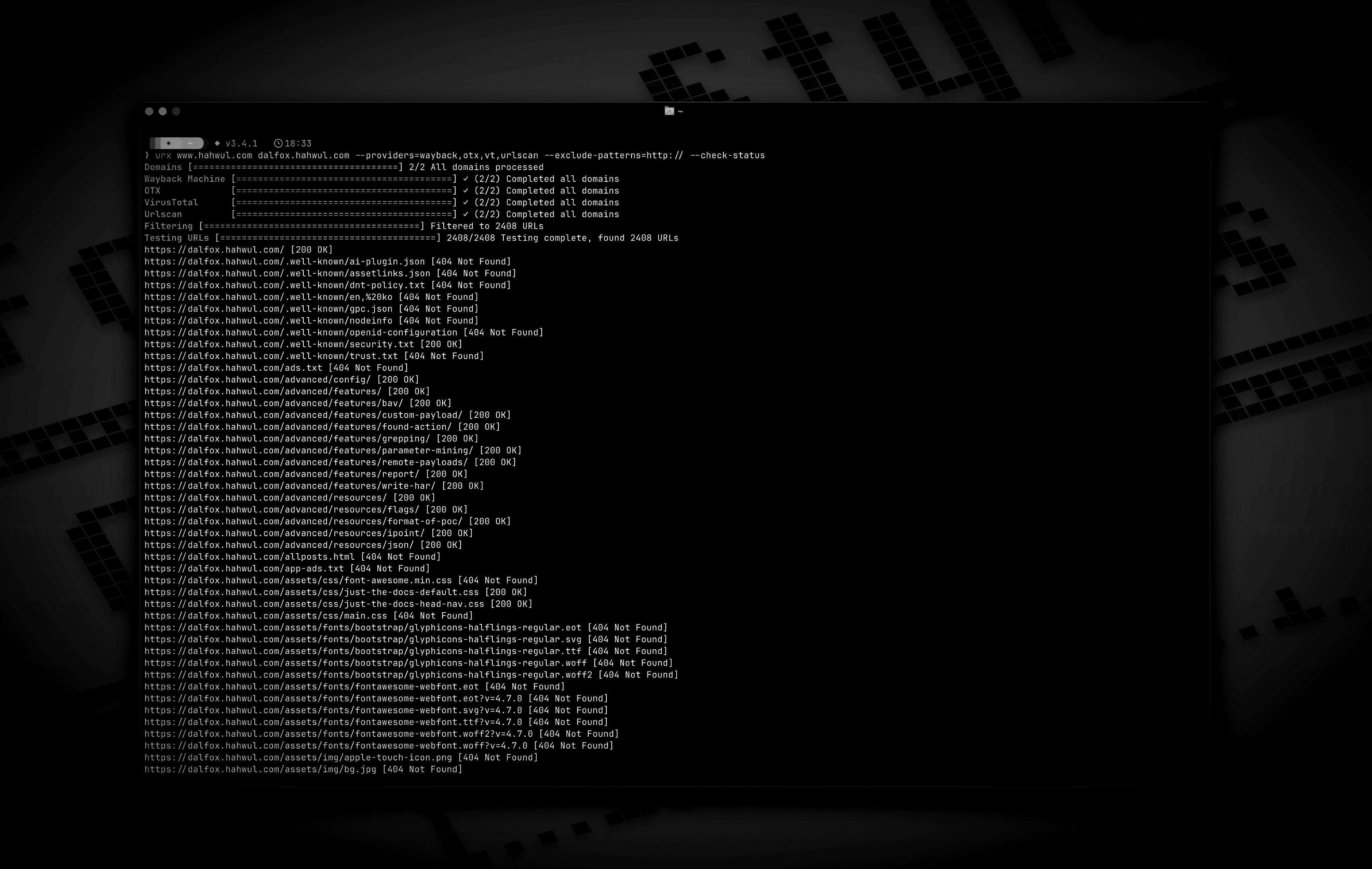
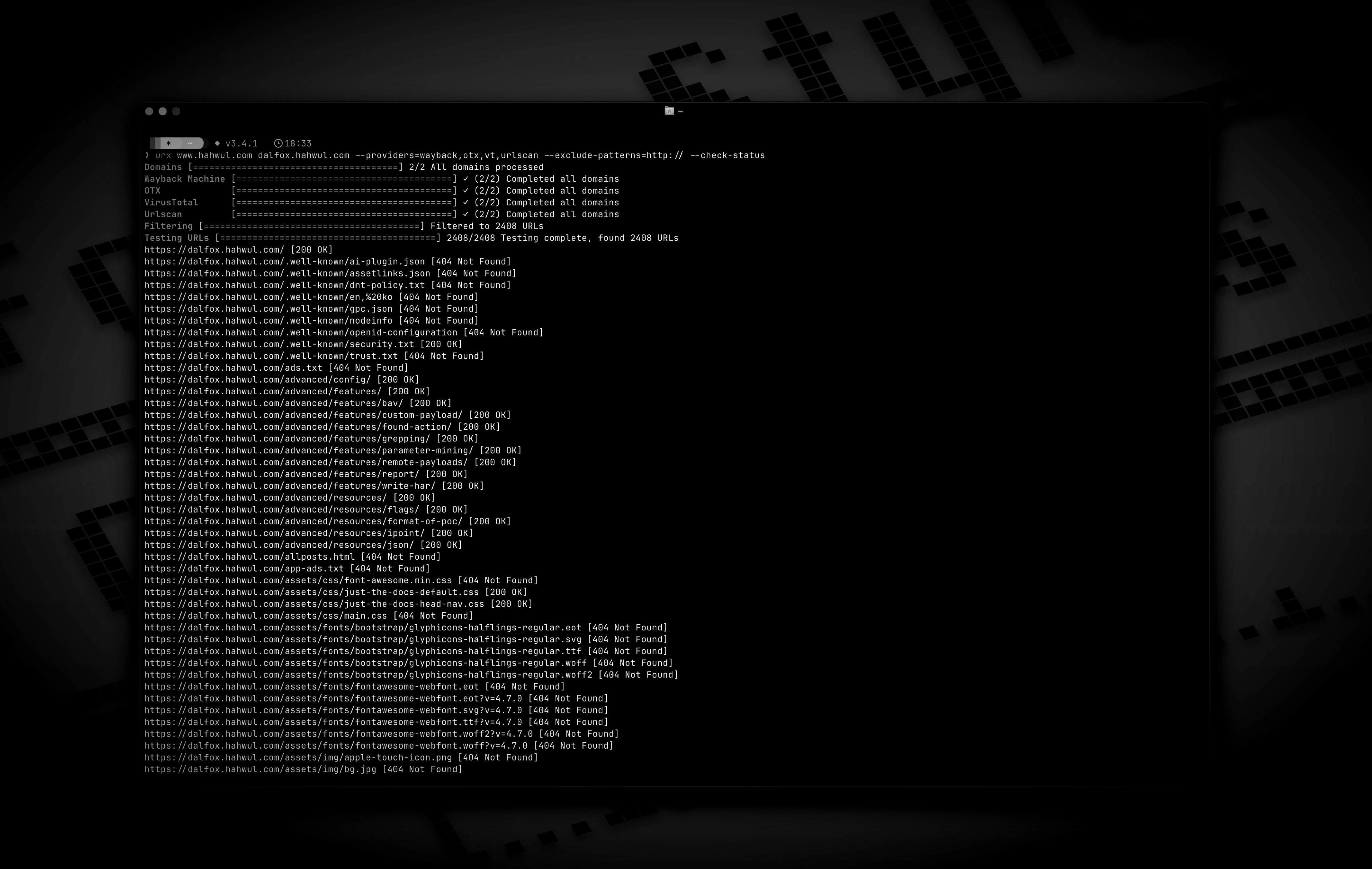
Vorschau

Installation

Von Cargo

root@kitploit:~
# https://crates.io/crates/urx
cargo install urx

Von Homebrew

root@kitploit:~
# https://formulae.brew.sh/formula/urx
brew install urx

Aus dem Quellcode

root@kitploit:~
git clone https://github.com/hahwul/urx.git
cd urx
cargo build --release

Das kompilierte Binary ist unter target/release/urx verfügbar.

Von Docker

ghcr.io/hahwul/urx

Verwendung

Grundlegende Verwendung

root@kitploit:~
# Scan a single domain
urx example.com

# Scan multiple domains
urx example.com example.org

# Scan domains from a file
cat domains.txt | urx

Optionen

root@kitploit:~
Usage: urx [OPTIONS] [DOMAINS]...

Arguments:
  [DOMAINS]...  Domains to fetch URLs for

Options:
  -c, --config <CONFIG>           Config file to load
      --provider-config <PATH>    Separate provider config file holding only API keys (default: $XDG_CONFIG_HOME/urx/provider-config.toml). CLI/env > provider-config > main config.
  -h, --help             Print help
  -V, --version          Print version

Input Options:
      --files <FILES>...        Read URLs directly from files (supports WARC, URLTeam compressed, and text files)
      --domain-list <PATH>      File of newline-separated domains to scan (repeatable; merged with positional DOMAINS and stdin; `#` comments allowed)

Output Options:
  -o, --output <OUTPUT>          Output file to write results
      --output-dir <PATH>        Write one file per domain into this directory (extension matches --format). Coexists with --output / stdout.
  -f, --format <FORMAT>          Output format (e.g., "plain", "json", "csv") [default: plain]
      --merge-endpoint   Merge endpoints with the same path and merge URL parameters
      --normalize-url    Normalize URLs for better deduplication (sorts query parameters, removes trailing slashes)

Provider Options:
      --providers <PROVIDERS>
          Providers to use (comma-separated, e.g., "wayback,cc,otx,arquivo,vt,urlscan") [default: wayback,cc,otx]
      --exclude-providers <EXCLUDE_PROVIDERS>
          Providers to exclude (comma-separated). Wins on conflict with --providers / --all-providers.
      --all-providers
          Enable every supported provider. API-keyed providers only activate when a key is available.
      --list-providers
          List every supported provider then exit.
      --subs
          Include subdomains when searching
      --cc-index <CC_INDEX>
          Common Crawl index to use; accepts comma-separated list to query multiple indexes in parallel (e.g. `CC-MAIN-2026-17,CC-MAIN-2025-51`). `latest` (the default) resolves the newest via collinfo.json. [default: latest]
      --wayback-from <DATE>
          Restrict Wayback Machine results to snapshots at or after DATE (YYYY/YYYYMM/YYYYMMDD/YYYYMMDDhhmmss)
      --wayback-to <DATE>
          Restrict Wayback Machine results to snapshots at or before DATE (same format as --wayback-from)
      --vt-api-key <VT_API_KEY>
          API key for VirusTotal (can be used multiple times for rotation, can also use URX_VT_API_KEY environment variable with comma-separated keys)
      --urlscan-api-key <URLSCAN_API_KEY>
          Optional API key for Urlscan; the provider also works anonymously (rate-limited ~30 req/min per IP). Can be used multiple times for rotation, or via URX_URLSCAN_API_KEY (comma-separated keys)
      --github-api-key <GITHUB_API_KEY>
          Personal access token for the GitHub Code Search provider (also reads URX_GITHUB_API_KEY, comma-separated for rotation)

Discovery Options:
      --exclude-robots   Exclude robots.txt discovery
      --exclude-sitemap  Exclude sitemap.xml discovery

Display Options:
  -v, --verbose       Show verbose output
      --silent        Silent mode (no output)
      --no-progress   No progress bar
      --show-sources  Annotate output URLs with the providers that returned them
      --stats         Print a per-provider summary to stderr at end of run

Filter Options:
  -p, --preset <PRESET>
          Filter Presets (e.g., "no-resources,no-images,no-audio,only-js,only-style")
  -e, --extensions <EXTENSIONS>
          Filter URLs to only include those with specific extensions (comma-separated, e.g., "js,php,aspx")
      --exclude-extensions <EXCLUDE_EXTENSIONS>
          Filter URLs to exclude those with specific extensions (comma-separated, e.g., "html,txt")
      --patterns <PATTERNS>
          Filter URLs to only include those containing specific patterns (comma-separated)
      --exclude-patterns <EXCLUDE_PATTERNS>
          Filter URLs to exclude those containing specific patterns (comma-separated)
      --show-only-host
          Only show the host part of the URLs
      --show-only-path
          Only show the path part of the URLs
      --show-only-param
          Only show the parameters part of the URLs
      --min-length <MIN_LENGTH>
          Minimum URL length to include
      --max-length <MAX_LENGTH>
          Maximum URL length to include
      --strict
          Enforce exact host validation (default)

Network Options:
      --network-scope <NETWORK_SCOPE>  Control which components network settings apply to (all, providers, testers, or providers,testers) [default: all]
      --proxy <PROXY>                  Use proxy for HTTP requests (format: <http://proxy.example.com:8080>)
      --proxy-auth <PROXY_AUTH>        Proxy authentication credentials (format: username:password)
      --insecure                       Skip SSL certificate verification (accept self-signed certs)
      --random-agent                   Use a random User-Agent for HTTP requests
      --timeout <TIMEOUT>              Request timeout in seconds [default: 120]
      --retries <RETRIES>              Number of retries for failed requests [default: 2]
      --parallel <PARALLEL>            Maximum domains fetched concurrently per provider (and concurrent URL tests); a provider's --rate-limit is shared across them [default: 5]
      --rate-limit <RATE_LIMIT>        Rate limit (requests per second)
      --rate-limit-by <PAIRS>          Per-provider rate overrides (e.g. `vt=1,wayback=10`); falls back to --rate-limit for unlisted providers
      --max-time <MAX_TIME>            Global ceiling on provider enumeration time in seconds (0 = unlimited) [default: 0]

Testing Options:
      --check-status
          Check HTTP status code of collected URLs [aliases: ----cs]
      --include-status <INCLUDE_STATUS>
          Include URLs with specific HTTP status codes or patterns (e.g., --is=200,30x) [aliases: ----is]
      --exclude-status <EXCLUDE_STATUS>
          Exclude URLs with specific HTTP status codes or patterns (e.g., --es=404,50x,5xx) [aliases: ----es]
      --extract-links
          Extract additional links from collected URLs (requires HTTP requests)

Beispiele

root@kitploit:~
# Save results to a file
urx example.com -o results.txt

# Output in JSON format
urx example.com -f json -o results.json

# Filter for JavaScript files only
urx example.com -e js

# Exclude HTML and text files
urx example.com --exclude-extensions html,txt

# Filter for API endpoints
urx example.com --patterns api,v1,graphql

# Exclude specific patterns
urx example.com --exclude-patterns static,images

# Use Fileter Preset (similar to --exclude-extensions=png,jpg,.....)
urx example.com -p no-images

# Use specific providers
urx example.com --providers wayback,otx

# Add the keyless Arquivo.pt (Portuguese web archive) provider
urx example.com --providers wayback,cc,otx,arquivo

# URLScan works without a key (anonymous, rate-limited); a key just raises limits
urx example.com --providers urlscan

# Using VirusTotal and URLScan providers
# 1. Explicitly add to providers (with API keys via command line)
urx example.com --providers=vt,urlscan --vt-api-key=*** --urlscan-api-key=***

# 2. Using environment variables for API keys
URX_VT_API_KEY=*** URX_URLSCAN_API_KEY=*** urx example.com --providers=vt,urlscan

# 3. Auto-enabling: providers are automatically added when API keys are provided
urx example.com --vt-api-key=*** --urlscan-api-key=*** # No need to specify in --providers

# 4. Multiple API key rotation (to mitigate rate limits)
# Using repeated flags for multiple keys
urx example.com --vt-api-key=key1 --vt-api-key=key2 --vt-api-key=key3

# Using environment variables with comma-separated keys
URX_VT_API_KEY=key1,key2,key3 URX_URLSCAN_API_KEY=ukey1,ukey2 urx example.com

# Combining CLI flags and environment variables (CLI keys are used first)
URX_VT_API_KEY=env_key1,env_key2 urx example.com --vt-api-key=cli_key1 --vt-api-key=cli_key2

# URLs from robots.txt and sitemap.xml are included by default

# Exclude URLs from robots.txt files
urx example.com --exclude-robots

# Exclude URLs from sitemap
urx example.com --exclude-sitemap

# Include subdomains
urx example.com --subs

# Check status of collected URLs
urx example.com --check-status

# Read URLs directly from a text file
urx --files urls.txt

# Combine file input with filtering
urx --files urls.txt --patterns api,admin -f json

# Extract additional links from collected URLs
urx example.com --extract-links

# Network configuration
urx example.com --proxy http://localhost:8080 --timeout 60 --parallel 10 --insecure

# Advanced filtering
urx example.com -e js,php --patterns admin,login --exclude-patterns logout,static --min-length 20

# HTTP Status code based filtering
urx example.com --include-status 200,30x,405 --exclude-status 20x

# Disable host validation
urx example.com --strict false

# URL normalization and deduplication
# Normalize URLs by sorting query parameters and removing trailing slashes
urx example.com --normalize-url

# Combine normalization with endpoint merging for comprehensive deduplication
urx example.com --normalize-url --merge-endpoint

# URL normalization with file input
urx --files urls.txt --normalize-url

Caching und inkrementelles Scannen

Urx unterstützt Caching zur Leistungsverbesserung bei wiederholten Scans und inkrementelles Scannen zur Erkennung nur neuer URLs.

root@kitploit:~
# Enable caching with SQLite (default)
urx example.com --cache-type sqlite --cache-path ~/.urx/cache.db

# Use Redis for distributed caching
urx example.com --cache-type redis --redis-url redis://localhost:6379

# Incremental scanning - only show new URLs since last scan
urx example.com --incremental

# Set cache TTL (time-to-live) to 12 hours
urx example.com --cache-ttl 43200

# Disable caching entirely
urx example.com --no-cache

# Combine incremental scanning with filters
urx example.com --incremental -e js,php --patterns api

# Configuration file with caching settings
urx -c example/config.toml example.com

Anwendungsfälle für Caching

root@kitploit:~
# Daily monitoring - only alert on new URLs
urx target.com --incremental --silent | notify-tool

# Efficient domain lists processing
cat domains.txt | urx --incremental --cache-ttl 3600 > new_urls.txt

# Distributed team scanning with Redis
urx example.com --cache-type redis --redis-url redis://shared-cache:6379

# Fast re-scans during development
urx test-domain.com --cache-ttl 300  # 5-minute cache for rapid iterations

Integration mit anderen Tools

Urx funktioniert gut in Pipelines mit anderen Sicherheits- und Aufklärungswerkzeugen:

root@kitploit:~
# Find domains, then discover URLs
echo "example.com" | urx | grep "login" > potential_targets.txt

# Combine with other tools
cat domains.txt | urx --patterns api | other-tool

Inspiration

Urx wurde von gau (GetAllUrls) inspiriert, einem Tool, das bekannte URLs von AlienVaults Open Threat Exchange, der Wayback Machine und Common Crawl abruft. Während es ähnliche Kernfunktionen bietet, wurde Urx von Grund auf in Rust entwickelt, mit Fokus auf Leistung, Parallelverarbeitung und erweiterten Filterfunktionen.

Mitwirken

Urx ist ein Open-Source-Projekt und mit ❤️ gemacht. Wenn Sie zu diesem Projekt beitragen möchten, lesen Sie bitte CONTRIBUTING.md und reichen Sie einen Pull-Request mit Ihren coolen Inhalten ein.

Tool herunterladen