 google/magika
Schnelle und genaue KI-gestützte Erkennung von Dateiinhaltenstypen







Magika ist ein neuartiges, KI-gestütztes Tool zur Dateityperkennung, das auf den neuesten Fortschritten im Deep Learning basiert, um eine genaue Erkennung zu ermöglichen. Im Hintergrund verwendet Magika ein eigenes, hoch optimiertes Modell, das nur etwa einige MB wiegt und eine präzise Dateiidentifikation innerhalb von Millisekunden ermöglicht – selbst bei Ausführung auf einer einzelnen CPU. Magika wurde mit einem Datensatz von ~100 Millionen Proben trainiert und evaluiert, die über 200 Inhaltstypen abdecken (sowohl binäre als auch textuelle Dateiformate), und erreicht auf unserem Testsatz eine durchschnittliche Genauigkeit von ~99%.
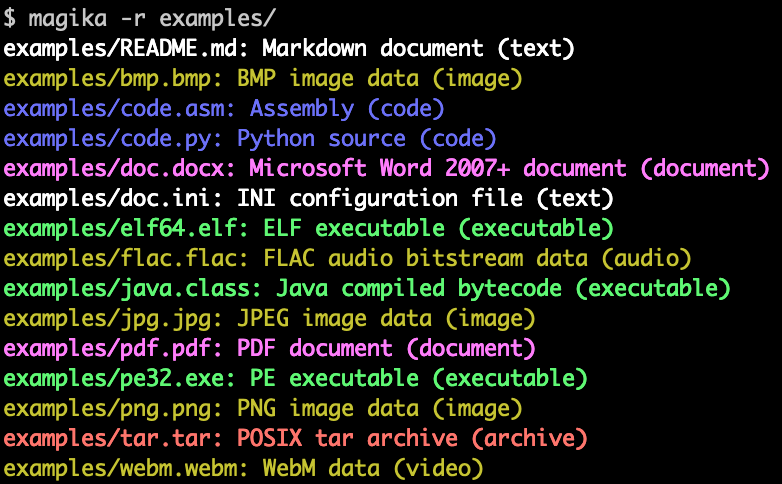
Hier ist ein Beispiel, wie die Magika-Befehlszeilenausgabe aussieht:
Magika wird im großen Maßstab eingesetzt, um die Sicherheit der Google-Nutzer zu verbessern, indem Dateien in Gmail, Drive und Safe Browsing an die richtigen Sicherheits- und Inhaltsrichtlinienscanner weitergeleitet werden – wobei wöchentlich hunderte Milliarden Proben verarbeitet werden. Magika wurde auch in VirusTotal (Beispiel) und abuse.ch (Beispiel) integriert.
Weitere Hintergrundinformationen finden Sie in unserem ursprünglichen Ankündigungsbeitrag im Google OSS Blog, auf Magikas Website und in unserem Forschungspapier, das auf der IEEE/ACM International Conference on Software Engineering (ICSE) 2025 veröffentlicht wurde.
Sie können Magika ohne Installation ausprobieren, indem Sie unsere Web-Demo verwenden, die lokal in Ihrem Browser läuft!
-r verwenden, um ein Verzeichnis rekursiv zu durchsuchen.high-confidence, medium-confidence und best-guess.Magika wird mit einem in Rust geschriebenen CLI ausgeliefert und kann auf verschiedene Arten installiert werden.
Über das magika Python-Paket:
pipx install magika
Über brew (macOS / Linux)
brew install magika
Über Installationsskript:
curl -LsSf https://securityresearch.google/magika/install.sh | sh
oder:
powershell -ExecutionPolicy Bypass -c "irm https://securityresearch.google/magika/install.ps1 | iex"
Über das magika-cli Rust-Paket:
cargo install --locked magika-cli
pip install magika
npm install magika
Hier finden Sie einige kurze Beispiele, um loszulegen.
Um mehr über die Funktionsweise von Magika zu erfahren, lesen Sie den Abschnitt Kernkonzepte auf Magikas Website.
% cd tests_data/basic && magika -r * | head
asm/code.asm: Assembly (code)
batch/simple.bat: DOS batch file (code)
c/code.c: C source (code)
css/code.css: CSS source (code)
csv/magika_test.csv: CSV document (code)
dockerfile/Dockerfile: Dockerfile (code)
docx/doc.docx: Microsoft Word 2007+ document (document)
docx/magika_test.docx: Microsoft Word 2007+ document (document)
eml/sample.eml: RFC 822 mail (text)
empty/empty_file: Empty file (inode)
% magika ./tests_data/basic/python/code.py --json
[
  {
    "path": "./tests_data/basic/python/code.py",
    "result": {
      "status": "ok",
      "value": {
        "dl": {
          "description": "Python source",
          "extensions": [
            "py",
            "pyi"
          ],
          "group": "code",
          "is_text": true,
          "label": "python",
          "mime_type": "text/x-python"
        },
        "output": {
          "description": "Python source",
          "extensions": [
            "py",
            "pyi"
          ],
          "group": "code",
          "is_text": true,
          "label": "python",
          "mime_type": "text/x-python"
        },
        "score": 0.996999979019165
      }
    }
  }
]
% cat tests_data/basic/ini/doc.ini | magika -
-: INI configuration file (text)
% magika --help
Determines file content types using AI

Usage: magika [OPTIONS] [PATH]...

Arguments:
  [PATH]...
          List of paths to the files to analyze.

          Use a dash (-) to read from standard input (can only be used once).

Options:
  -r, --recursive
          Identifies files within directories instead of identifying the directory itself


