 genymobile/scrcpy
Ihr Android-Gerät anzeigen und steuern

> [!WARNING]
> **Dieses GitHub-Repo (<https://github.com/Genymobile/scrcpy>) ist die einzige offizielle
Quelle für das Projekt. Lade keine Releases von beliebigen Websites herunter, selbst wenn
deren Name `scrcpy` enthält.**
# scrcpy (v5.0.1)
<img src="https://raw.githubusercontent.com/genymobile/scrcpy/HEAD/app/data/scrcpy.svg" width="128" height="128" alt="scrcpy" align="right" />
_ausgesprochen „**scr**een **c**o**py**“_
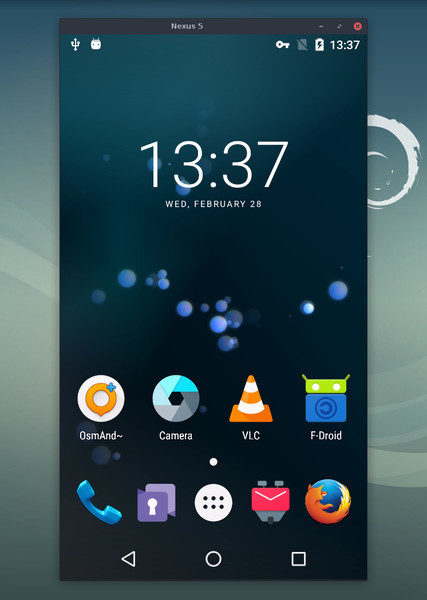
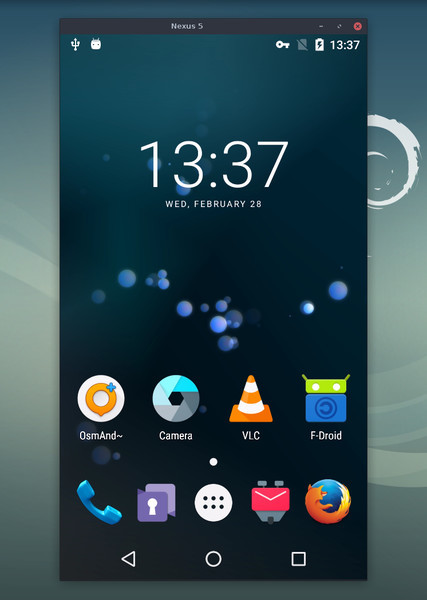
Diese Anwendung spiegelt Android-Geräte (Video und Audio), die über USB oder
[TCP/IP](https://github.com/genymobile/scrcpy/blob/master/doc/connection.md#tcpip-wireless) verbunden sind, und ermöglicht die Steuerung mit
Tastatur und Maus des Computers. Sie erfordert weder _root_-Zugriff noch eine auf dem Gerät
installierte App. Sie funktioniert unter _Linux_, _Windows_ und _macOS_.
[](doc/linux.md)
[](doc/windows.md)
[](doc/macos.md)
Der Fokus liegt auf:
- **Leichtgewichtigkeit**: nativ, zeigt nur den Gerätebildschirm an
- **Leistung**: 30~120fps, je nach Gerät
- **Qualität**: 1920×1080 oder höher
- **geringer Latenz**: [35~70ms][lowlatency]
- **kurzer Startzeit**: ~1 Sekunde bis zur Anzeige des ersten Bildes
- **Nicht-Intrusivität**: nichts bleibt auf dem Android-Gerät installiert
- **Vorteilen für Nutzer**: kein Konto, keine Werbung, kein Internet erforderlich
- **Freiheit**: freie und Open-Source-Software
[lowlatency]: https://github.com/Genymobile/scrcpy/pull/646
Zu den Funktionen gehören:
- [Audio-Weiterleitung](https://github.com/genymobile/scrcpy/blob/master/doc/audio.md) (Android 11+)
- [Aufzeichnung](https://github.com/genymobile/scrcpy/blob/master/doc/recording.md)
- [virtuelles Display](https://github.com/genymobile/scrcpy/blob/master/doc/virtual-display.md)
- Spiegeln bei [ausgeschaltetem Android-Gerätebildschirm](https://github.com/genymobile/scrcpy/blob/master/doc/device.md#turn-screen-off)
- [Kopieren und Einfügen](https://github.com/genymobile/scrcpy/blob/master/doc/control.md#copy-paste) in beide Richtungen
- [konfigurierbare Qualität](https://github.com/genymobile/scrcpy/blob/master/doc/video.md)
- [Kamera-Spiegelung](https://github.com/genymobile/scrcpy/blob/master/doc/camera.md) (Android 12+)
- [Spiegelung als Webcam (V4L2)](https://github.com/genymobile/scrcpy/blob/master/doc/v4l2.md) (nur Linux)
- Simulation physischer [Tastatur][hid-keyboard] und [Maus][hid-mouse] (HID)
- Unterstützung für [Gamepads](https://github.com/genymobile/scrcpy/blob/master/doc/gamepad.md)
- [OTG-Modus](https://github.com/genymobile/scrcpy/blob/master/doc/otg.md)
- und mehr…
[hid-keyboard]: https://raw.githubusercontent.com/genymobile/scrcpy/master/doc/keyboard.md#physical-keyboard-simulation
[hid-mouse]: https://raw.githubusercontent.com/genymobile/scrcpy/master/doc/mouse.md#physical-mouse-simulation
## Voraussetzungen
Das Android-Gerät benötigt mindestens API 21 (Android 5.0).
[Audio-Weiterleitung](https://github.com/genymobile/scrcpy/blob/master/doc/audio.md) wird für API >= 30 (Android 11+) unterstützt.
Stelle sicher, dass du [USB-Debugging aktiviert hast][enable-adb] auf deinem/deinen Gerät(en).
[enable-adb]: https://developer.android.com/studio/debug/dev-options#enable
Auf manchen Geräten (insbesondere Xiaomi) kann folgender Fehler auftreten:
```
Injecting input events requires the caller (or the source of the instrumentation, if any) to have the INJECT_EVENTS permission.
```
In diesem Fall müssen Sie [eine zusätzliche Option][control] `USB-Debugging (Sicherheitseinstellungen)` aktivieren (dies ist ein anderer Eintrag als `USB-Debugging`), um es mit Tastatur und Maus steuern zu können. Nach dem Setzen dieser Option ist ein Neustart des Geräts erforderlich.
[control]: https://github.com/Genymobile/scrcpy/issues/70#issuecomment-373286323
Beachten Sie, dass USB-Debugging nicht erforderlich ist, um scrcpy im [OTG-Modus](https://github.com/genymobile/scrcpy/blob/master/doc/otg.md) auszuführen.
## Die App herunterladen
- [Linux](https://github.com/genymobile/scrcpy/blob/master/doc/linux.md)
- [Windows](https://github.com/genymobile/scrcpy/blob/master/doc/windows.md) (lesen Sie [wie man sie ausführt](https://github.com/genymobile/scrcpy/blob/master/doc/windows.md#run))
- [macOS](https://github.com/genymobile/scrcpy/blob/master/doc/macos.md)
## Wichtige Tipps
- [Die Auflösung reduzieren](https://github.com/genymobile/scrcpy/blob/master/doc/video.md#size) kann die Leistung erheblich verbessern
(`scrcpy -m1024`)
- [_Rechtsklick_](https://github.com/genymobile/scrcpy/blob/master/doc/mouse.md#mouse-bindings) löst `BACK` aus
- [_Mittelklick_](https://github.com/genymobile/scrcpy/blob/master/doc/mouse.md#mouse-bindings) löst `HOME` aus
- <kbd>Alt</kbd>+<kbd>f</kbd> schaltet den [Vollbildmodus](https://github.com/genymobile/scrcpy/blob/master/doc/window.md#fullscreen) um
- Es gibt viele weitere [Tastenkürzel](https://github.com/genymobile/scrcpy/blob/master/doc/shortcuts.md)
## Anwendungsbeispiele
Es gibt viele Optionen, [dokumentiert](#user-documentation) auf separaten Seiten.
Hier sind nur einige gängige Beispiele.
- Den Bildschirm in H.265 (bessere Qualität) aufnehmen, die Größe auf 1920 begrenzen, die
Bildrate auf 60fps begrenzen, Audio deaktivieren und das Gerät durch Simulieren
einer physischen Tastatur steuern:
```bash
scrcpy --video-codec=h265 --max-size=1920 --max-fps=60 --no-audio --keyboard=uhid
scrcpy --video-codec=h265 -m1920 --max-fps=60 --no-audio -K # Kurzversion
```
- VLC in einem neuen virtuellen Display starten (getrennt vom Gerätedisplay):
```bash
scrcpy --new-display=1920x1080 --start-app=org.videolan.vlc
```
- VLC in einem neuen _flex_-Display mit H.265 und einer Bitrate von 16 Mbps starten,
während das Display aktiv gehalten wird, damit es sich nicht ausschaltet:
```bash
scrcpy --new-display -x --keep-active --start-app=org.videolan.vlc --video-codec=h265 -b16M
```
- Die Gerätekamera in H.265 bei 1920x1080 (und das Mikrofon) in einer MP4-Datei
aufzeichnen:
```bash
scrcpy --video-source=camera --video-codec=h265 --camera-size=1920x1080 --record=file.mp4
```
- Die Frontkamera des Geräts erfassen und sie auf dem Computer als Webcam bereitstellen (unter
Linux):
```bash
scrcpy --video-source=camera --camera-size=1920x1080 --camera-facing=front --v4l2-sink=/dev/video2 --no-playback
```
- Das Gerät ohne Spiegelung steuern, indem eine physische Tastatur und
Maus simuliert werden (USB-Debugging nicht erforderlich):
```bash
scrcpy --otg
```
- Das Gerät mit am Computer angeschlossenen Gamepads steuern:
```bash
scrcpy --gamepad=uhid
scrcpy -G # Kurzversion
```
## Benutzerdokumentation
Die Anwendung bietet viele Funktionen und Konfigurationsoptionen. Sie sind
auf den folgenden Seiten dokumentiert:
- [Verbindung](https://github.com/genymobile/scrcpy/blob/master/doc/connection.md)
- [Video](https://github.com/genymobile/scrcpy/blob/master/doc/video.md)
- [Audio](https://github.com/genymobile/scrcpy/blob/master/doc/audio.md)
- [Steuerung](https://github.com/genymobile/scrcpy/blob/master/doc/control.md)
- [Tastatur](https://github.com/genymobile/scrcpy/blob/master/doc/keyboard.md)
- [Maus](https://github.com/genymobile/scrcpy/blob/master/doc/mouse.md)
- [Gamepad](https://github.com/genymobile/scrcpy/blob/master/doc/gamepad.md)
- [Gerät](https://github.com/genymobile/scrcpy/blob/master/doc/device.md)
- [Fenster](https://github.com/genymobile/scrcpy/blob/master/doc/window.md)
- [Aufzeichnung](https://github.com/genymobile/scrcpy/blob/master/doc/recording.md)
- [Virtuelles Display](https://github.com/genymobile/scrcpy/blob/master/doc/virtual-display.md)
- [Tunnel](https://github.com/genymobile/scrcpy/blob/master/doc/tunnels.md)
- [OTG](https://github.com/genymobile/scrcpy/blob/master/doc/otg.md)
- [Kamera](https://github.com/genymobile/scrcpy/blob/master/doc/camera.md)
- [Video4Linux](https://github.com/genymobile/scrcpy/blob/master/doc/v4l2.md)
- [Tastenkürzel](https://github.com/genymobile/scrcpy/blob/master/doc/shortcuts.md)
## Ressourcen
- [FAQ](https://github.com/genymobile/scrcpy/blob/master/FAQ.md)
- [Übersetzungen][wiki] (nicht unbedingt aktuell)
- [Build-Anleitung](https://github.com/genymobile/scrcpy/blob/master/doc/build.md)
- [Entwickler](https://github.com/genymobile/scrcpy/blob/master/doc/develop.md)
- [Release-Signaturen überprüfen](https://github.com/genymobile/scrcpy/blob/master/doc/verify-release.md)
[wiki]: https://github.com/Genymobile/scrcpy/wiki
## Artikel
- [Introducing scrcpy][article-intro]
- [Scrcpy now works wirelessly][article-tcpip]
- [Scrcpy 2.0, with audio][article-scrcpy2]
[article-intro]: https://blog.rom1v.com/2018/03/introducing-scrcpy/
[article-tcpip]: https://www.genymotion.com/blog/open-source-project-scrcpy-now-works-wirelessly/
[article-scrcpy2]: https://blog.rom1v.com/2023/03/scrcpy-2-0-with-audio/
## Kontakt
Sie können ein [Issue] für Fehlerberichte, Funktionswünsche oder allgemeine Fragen eröffnen.
Für Fehlerberichte lesen Sie bitte zuerst die [FAQ](https://github.com/genymobile/scrcpy/blob/master/FAQ.md), möglicherweise finden Sie dort sofort eine Lösung
für Ihr Problem.
[issue]: https://github.com/Genymobile/scrcpy/issues
Du kannst auch folgende Kanäle nutzen:
- Reddit: [`r/scrcpy`](https://www.reddit.com/r/scrcpy)
- BlueSky: [`@scrcpy.bsky.social`](https://bsky.app/profile/scrcpy.bsky.social)
- Twitter: [`@scrcpy_app`](https://twitter.com/scrcpy_app)
## Spenden
Ich bin [@rom1v](https://github.com/rom1v), der Autor und Maintainer von _scrcpy_.
Wenn dir diese Anwendung gefällt, kannst du [meine Open-Source-Arbeit
unterstützen][donate]:
- [GitHub Sponsors](https://github.com/sponsors/rom1v)
- [Liberapay](https://liberapay.com/rom1v/)
- [PayPal](https://paypal.me/rom2v)
[donate]: https://blog.rom1v.com/about/#support-my-open-source-work
## Lizenz
Copyright (C) 2018 Genymobile
Copyright (C) 2018-2026 Romain Vimont
Licensed under the Apache License, Version 2.0 (the "License");
you may not use this file except in compliance with the License.
You may obtain a copy of the License at
http://www.apache.org/licenses/LICENSE-2.0
Unless required by applicable law or agreed to in writing, software
distributed under the License is distributed on an "AS IS" BASIS,
WITHOUT WARRANTIES OR CONDITIONS OF ANY KIND, either express or implied.
See the License for the specific language governing permissions and
limitations under the License.