
Skip to content
KitploitKITPLOIT
ToolsBlog
Einreichen
ToolsBlog
Einreichen

Hacking-, PenTest- und Cybersicherheits-Tools für Ihr Sicherheitsarsenal!

Kitploit ist ein Verzeichnis von Hacking-, Cybersicherheits- und Pentesting-Tools. Entdecken Sie die neuesten Projekt-Updates, um Schwachstellen zu finden, Systeme zu analysieren, Tests zu automatisieren und Ihre Sicherheit zu stärken.

··Feeds·Kontakt·Datenschutz·© 2026 Kitploit

Tool-Verzeichnis

Kategorien

Alle Kategorien anzeigen
Loading categories
karma_v2 — ⡷⠂𝚔𝚊𝚛𝚖𝚊 𝚟𝟸⠐⢾ ist ein passives Open Source Intelligence (OSINT) automatisierte Erkundung (Framework) | Kitploit
Tools/GitHubGitHub/dheerajmadhukar/karma_v2
OSINT (Open-Source-Intelligence)AufklärungSchwachstellenanalyseDNS- und Subdomain-EnumerationInformationsbeschaffungSubdomain-EnumerationCrawler
GitHubdheerajmadhukar/karma_v2

karma_v2

⡷⠂𝚔𝚊𝚛𝚖𝚊 𝚟𝟸⠐⢾ ist ein passives Open Source Intelligence (OSINT) automatisierte Erkundung (Framework)


Repository anzeigen
1.0k1855vor 2 JahrenVon Kitploit geprüft

Beliebteste

Alle anzeigen →

Entdecken Sie die meistgenutzten Tools unserer Community.

Alle Tools erkunden

Durchsuchen Sie unsere Tool-Sammlung

Alle Tools anzeigen →
Teilen
Webseite

karma_v2

⡷⠂𝚔𝚊𝚛𝚖𝚊 𝚟𝟸⠐⢾

𝚔𝚊𝚛𝚖𝚊 𝚟𝟸 ist ein passives Open Source Intelligence (OSINT) – automatisiertes Aufklärungs-Framework

Follow on Twitter Version Build Build Donate

𝚔𝚊𝚛𝚖𝚊 𝚟𝟸 kann von Infosec-Forschern, Pentestern und Bug-Huntern verwendet werden, um tiefgehende Informationen, zusätzliche Assets, WAF/CDN-umgangene IPs, interne/externe Infrastruktur, öffentlich zugängliche Leaks und vieles mehr über ihr Ziel zu finden. Ein Premium-Shodan-API-Schlüssel ist erforderlich, um diese Automatisierung zu nutzen. Die Ausgabe von 𝚔𝚊𝚛𝚖𝚊 𝚟𝟸 wird auf dem Bildschirm angezeigt und in Dateien/Verzeichnissen gespeichert.

ℹ Informationen zur Premium-Shodan-API findest du auf der Shodan-Website.

Shodan-Website: Shodan Website API : Developer API

Funktionen

  • Leistungsstarke und flexible Ergebnisse durch Shodan-Dorks
  • SSL-SHA1-Prüfsummen-/Fingerabdruck-Suche
  • Nur IPs innerhalb des Gültigkeitsbereichs (In-Scope) treffen
  • Jede IP mit SSL/TLS-Zertifikatsaussteller-Abgleich per RegEx verifizieren
  • IPs außerhalb des Gültigkeitsbereichs (Out-Of-Scope) anzeigen
  • Alle Ports inklusive bekannter/ungewöhnlicher/dynamischer finden
  • Alle CVEs-bezogenen Schwachstellen der Ziele abrufen
  • Banner-Grab für jede IP, Produkt, Betriebssystem, Dienste und Organisation usw.
  • Favicon-Symbole abrufen
  • Favicon-Hash mit dem Python3-Modul mmh3 generieren
  • Favicon-Technologieerkennung mit benutzerdefinierter nuclei-Vorlage
  • ASN-Scan
  • BGP-Nachbarn
  • IPv4- und IPv6-Präfixe für ASN
  • Interessante Leaks wie Indexierung, NDMP, SMB, Login, SignUp, OAuth, SSO, Status 401/403/500, VPN, Citrix, Jfrog, Dashboards, OpenFire, Control Panels, Wordpress, Laravel, Jetty, S3-Buckets, Cloudfront, Jenkins, Kubernetes, Node Exports, Grafana, RabbitMQ, Container, GitLab, MongoDB, Elastic, FTP anonym, Memcached, DNS-Rekursion, Kibana, Prometheus, Standard-Passwörter, Geschützte Objekte, Moodle, Spring Boot, Django, Jira, Ruby, Secret Key und viele mehr...

Installation

1. Repository klonen

root@kitploit:~
# git clone https://github.com/Dheerajmadhukar/karma_v2.git

2. Shodan- und mmh3-Python-Module installieren

root@kitploit:~
# python3 -m pip install shodan mmh3

3. JSON-Parser JQ installieren

root@kitploit:~
# apt install jq -y

4. httprobe installieren @tomnomnom zum Testen der Anfragen

root@kitploit:~
# go install -v github.com/tomnomnom/httprobe@master

5. Interlace installieren @codingo für Multithreading [Befolge die Anweisungen des codingo interlace-Repos]

root@kitploit:~
# git clone https://github.com/codingo/Interlace.git & entsprechend installieren. 

6. nuclei installieren @projectdiscovery

root@kitploit:~
# go install -v github.com/projectdiscovery/nuclei/v2/cmd/nuclei@latest

7. lolcat installieren

root@kitploit:~
# apt install lolcat -y

8. anew installieren

root@kitploit:~
# go install -v github.com/tomnomnom/anew@master

Ok, wie verwende ich es?

root@kitploit:~
# cat > .token
SHODAN_PREMIUM_API_HERE

Verwendung

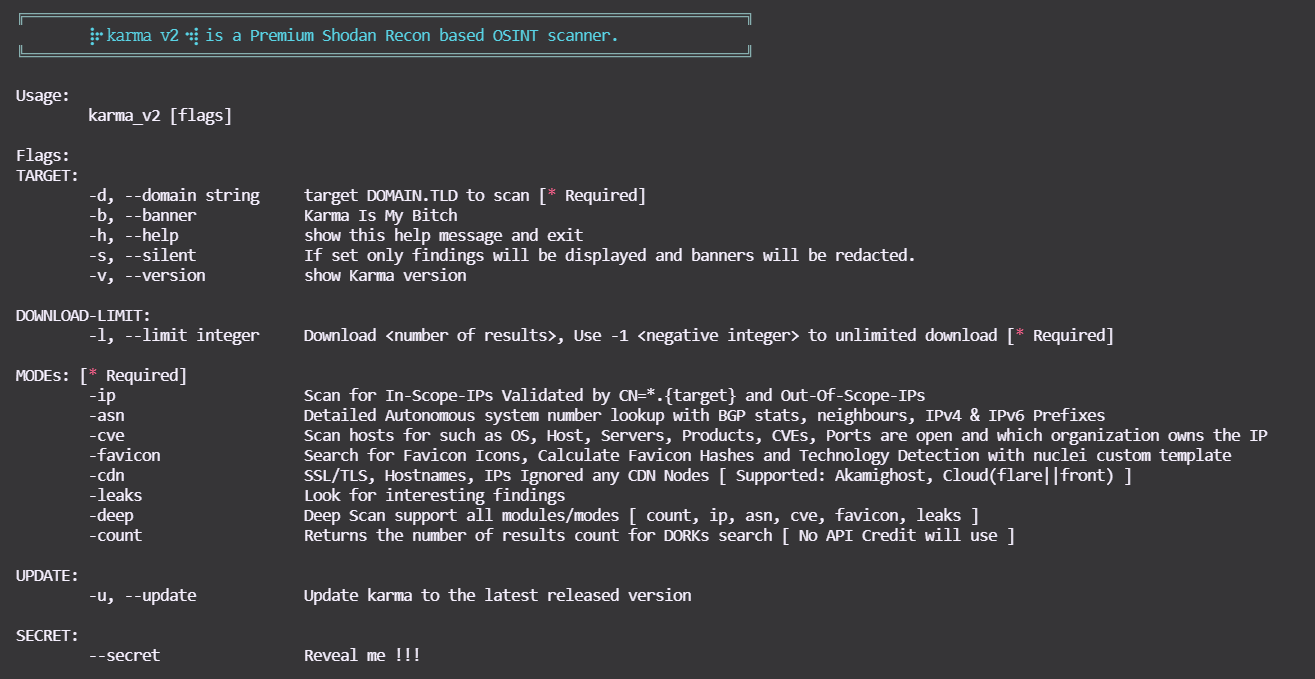
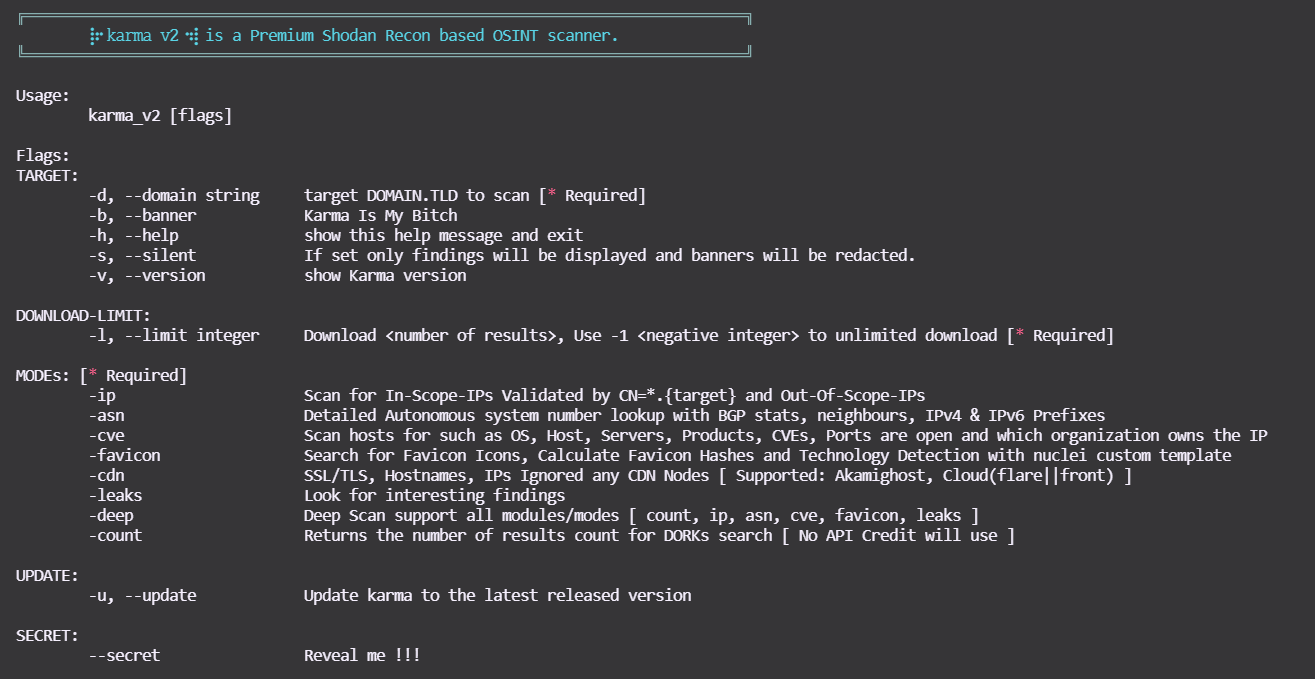
Du kannst diesen Befehl verwenden, um die Hilfe anzuzeigen:

root@kitploit:~
$ bash karma_v2 -h
karma_v2

MODI

Demo

  • karma_v2 [Modus -ip] asciicast

  • karma_v2 [Modus -asn] asciicast

  • karma_v2 [Modus -cve] asciicast

  • karma_v2 [Modus -favicon] asciicast

  • karma_v2 [Modus -leaks]

asciicast


  • karma_v2 [Modus -deep]

-deep unterstützt alle oben genannten Modi, z.B. -count, -ip, -asn, -favicon, -cve, -leaks!


Ausgabe

root@kitploit:~
output/bugcrowd.com-YYYY-MM-DD/ 

.
├── ASNs_Detailed_bugcrowd.com.txt
├── Collect
│   ├── host_domain_domain.tld.json.gz
│   ├── ssl_SHA1_12289a814...83029f8944b6088d60204a92e_domain.tld.json.gz
│   ├── ssl_SHA1_17537bf84...73cb1d684a495db7ea5aa611b_domain.tld.json.gz
│   ├── ssl_SHA1_198d6d4ec...681b77585190078b07b37c5e1_domain.tld.json.gz
│   ├── ssl_SHA1_26a9c5618...d60eae2947b42263e154d203f_domain.tld.json.gz
│   ├── ssl_SHA1_3da3825a2...3b852a42470410183adc3b9ee_domain.tld.json.gz
│   ├── ssl_SHA1_4d0eab730...68cf11d2db94cc2454c906532_domain.tld.json.gz
│   ├── ssl_SHA1_8907dab4c...12fdbdd6c445a4a8152f6b7b7_domain.tld.json.gz
│   ├── ssl_SHA1_9a9b99eba...5dc5106cea745a591bf96b044_domain.tld.json.gz
│   ├── ssl_SHA1_a7c14d201...b6fd4bc4e95ab2897e6a0bsfd_domain.tld.json.gz
│   ├── ssl_SHA1_a90f4ddb0...85780bdb06de83fefdc8a612d_domain.tld.json.gz
│   ├── ssl_domain_domain.tld.json.gz
│   ├── ssl_subjectCN_domain.tld.json.gz
│   └── ssl_subject_domain.tld.json.gz
|   └── . . .
├── IP_VULNS
│   ├── 104.x.x.x.json.gz
│   ├── 107.x.x.x.json.gz
│   └── 99.x.x.x.json.gz
|   └── . . .
├── favicons_domain.tld.txt
├── host_enum_domain.tld.txt
├── ips_inscope_domain.tld.txt
├── main_domain.tld.data
├── . . . 

Von karma_v2 neu hinzugefügte Shodan-Dorks

  • SonarQube
  • Apache hadoop node
  • Directory Listing
  • Oracle Business intelligence
  • Oracle Web Login
  • Docker Exec
  • Apache Status
  • Apache-Coyote/1.1 Tomcat-5.5
  • Swagger UI
  • H-SPHERE
  • Splunk
  • JBoss
  • phpinfo
  • ID_VC
  • Confluence
  • TIBCO_Jaspersoft
  • Shipyard_Docker_management
  • Symfony PHP info AWS creds
  • Ignored-by_CDNs
  • Django_Exposed
  • Cluster_Node_etcd
  • SAP_NetWeaver_Application

Von 𝚔𝚊𝚛𝚖𝚊 𝚟𝟸 unterstützte Shodan-Dorks

Von 𝚔𝚊𝚛𝚖𝚊 𝚟𝟸 neu hinzugefügte Shodan-Dorks

Unterstützung

Wenn dir ⡷⠂𝚔𝚊𝚛𝚖𝚊 𝚟𝟸⠐⢾ gefällt und es dir bei der Arbeit, Geld/Bounties, Pentests, Recon oder einfach nur gute Laune bringt, dann zeige deine Unterstützung! 🛑 Bitte erstelle keine GitHub-Issues für Supportanfragen oder Fragen! Kauf mir ein Bier, um mich am Laufen zu halten :)

Kauf mir ein Bier

Tool herunterladen
MODUSBeispiele
-ip bash karma_v2 -d <DOMAIN.TLD> -l <INTEGER> -ip
-asn bash karma_v2 -d <DOMAIN.TLD> -l <INTEGER> -asn
-cve bash karma_v2 -d <DOMAIN.TLD> -l <INTEGER> -cve
-cveid bash karma_v2 -d <DOMAIN.TLD> -l <INTEGER> -cveid CVE-2021-34473
-favicon bash karma_v2 -d <DOMAIN.TLD> -l <INTEGER> -favicon
-leaks bash karma_v2 -d <DOMAIN.TLD> -l <INTEGER> -leaks
-deep bash karma_v2 -d <DOMAIN.TLD> -l <INTEGER> -deep
-count bash karma_v2 -d <DOMAIN.TLD> -l <INTEGER> -count
DORKsDORKsDORKs
ssl.cert.fingerprinthttp.status:"302" oauth"Server: Jetty"
sslhttp.status:"302" ssoX-Amz-Bucket-Region
orgtitle:"401 Authorization Required""development" org:"Amazon.com"
hostnamehttp.html:"403 Forbidden""X-Jenkins" "Set-Cookie: JSESSIONID" http.title:"Jenkins [Jenkins]"
ssl.cert.issuer.cnhttp.html:"500 Internal Server Error"http.favicon.hash:81586312 200
ssl.cert.subject.cnssl.cert.subject.cn:*vpn*product:"Kubernetes" port:"10250, 2379"
ssl.cert.expired:truetitle:"citrix gateway"port:"9100" http.title:"Node Exporter"
ssl.cert.subject.commonNamehttp.html:"JFrog"http.title:"Grafana"
http.title:"Index of /""X-Jfrog"http.title:"RabbitMQ"
ftp port:"10000"http.title:"dashboard"HTTP/1.1 307 Temporary Redirect "Location: /containers"
"Authentication: disabled" port:445 product:"Samba"http.title:"Openfire Admin Console"http.favicon.hash:1278323681
title:"Login - Adminer"http.title:"control panel""MongoDB Server Information" port:27017 -authentication
http.title:"sign up"http.html:"* The wp-config.php creation script uses this file"port:"9200" all:"elastic indices"
http.title:"LogIn"clockwork"220" "230 Login successful." port:21
port:"11211" product:"Memcached""port: 53" Recursion: Enabledtitle:"kibana"
port:9090 http.title:"Prometheus Time Series Collection and Processing Server""default password"title:protected
http.component:Moodlehttp.favicon.hash:116323821html:"/login/?next=" title:"Django"
html:"/admin/login/?next=" title:"Django"title:"system dashboard" html:jirahttp.component:ruby port:3000
html:"secret_key_base"I will add more soon. . .
DORKsDORKsDORKs
"netweaver"port:"2379" product:"etcd"http.title:"DisallowedHost"
ssl:"${target}" "-AkamaiGHost" "-GHost"ssl:"${target}" "-Cloudflare"ssl:"${target}" "-Cloudfront"
"X-Debug-Token-Link" port:443http.title:"shipyard" HTTP/1.1 200 OK Accept-Ranges: bytes Content-Length: 5664http.title:"TIBCO Jaspersoft:" port:"443" "1970"
"Confluence"http.title:"SonarQube"html:"jmx?qry=Hadoop:*"
http.title:"Directory Listing"http.title:"H-SPHERE"http.title:"Swagger UI - "
Server: Apache-Coyote/1.1 Tomcat-5.5"port:2375 product:"Docker"http.title:"phpinfo()"
http.title:"ID_VC_Welcome""x-powered-by" "jboss"jboss http.favicon.hash:-656811182
http.title:"Welcome to JBoss"port:"8089, 8000" "splunkd"http.favicon.hash:-316785925
title:"splunkd" org:"Amazon.com"http.title:"oracle business intelligence sign in"http.title:"Oracle WebLogic Server Administration Console"
http.title:"Apache Status"I will add more soon. . .