
Skip to content
KitploitKITPLOIT
ToolsBlog
Einreichen
ToolsBlog
Einreichen

Hacking-, PenTest- und Cybersicherheits-Tools für Ihr Sicherheitsarsenal!

Kitploit ist ein Verzeichnis von Hacking-, Cybersicherheits- und Pentesting-Tools. Entdecken Sie die neuesten Projekt-Updates, um Schwachstellen zu finden, Systeme zu analysieren, Tests zu automatisieren und Ihre Sicherheit zu stärken.

··Feeds·Kontakt·Datenschutz·© 2026 Kitploit

Tool-Verzeichnis

Kategorien

Alle Kategorien anzeigen
Loading categories
awsEnum — Aufzählen von AWS-Cloud-Ressourcen basierend auf bereitgestellten Anmeldeinformationen | Kitploit
Tools/GitHubGitHub/bassammaged/awsenum
SchwachstellenanalyseInformationsbeschaffungPenetrationstestsCloud-Sicherheit
GitHubbassammaged/awsenum

awsEnum

Aufzählen von AWS-Cloud-Ressourcen basierend auf bereitgestellten Anmeldeinformationen

Repository anzeigen
527vor 4 JahrenVon Kitploit geprüft

Beliebteste

Alle anzeigen →

Entdecken Sie die meistgenutzten Tools unserer Community.

Alle Tools erkunden

Durchsuchen Sie unsere Tool-Sammlung

Alle Tools anzeigen →
Teilen

awsEnum

Aufzählen von AWS-Diensten! Ohne Lärm.

awsEnum ist ein Python-Skript, das AWS-Dienste über die bereitgestellten Anmeldeinformationen aufzählt.
:book: Inhaltsverzeichnis

Inhaltsverzeichnis
  1. Screenshot
  2. Haftungsausschluss
  3. Funktionen
  4. Voraussetzungen
  5. Installation
  6. Ergebnisse und FAQs
  7. Aufgaben

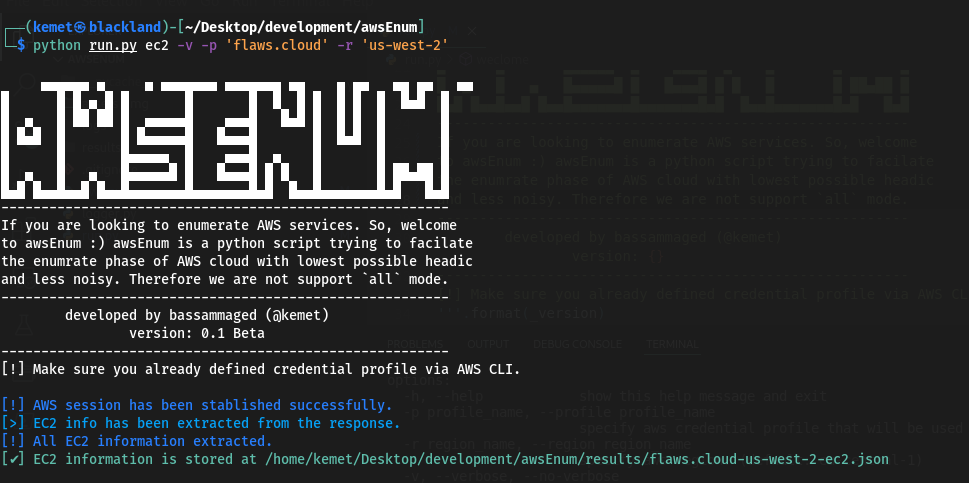
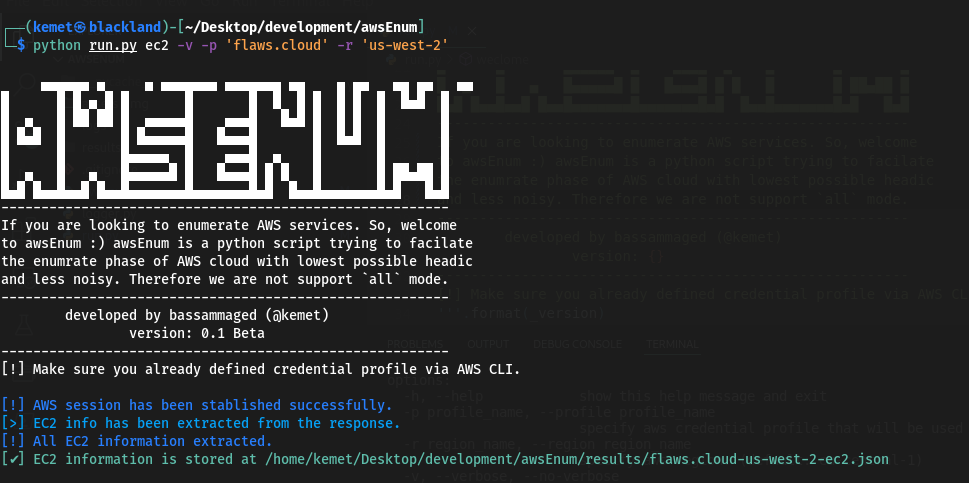
:clapper: Screenshot

root@kitploit:~
     ▄▄▄▄▄▄ ▄     ▄ ▄▄▄▄▄▄▄ ▄▄▄▄▄▄▄ ▄▄    ▄ ▄▄   ▄▄ ▄▄   ▄▄ 
█      █ █ ▄ █ █       █       █  █  █ █  █ █  █  █▄█  █
█  ▄   █ ██ ██ █  ▄▄▄▄▄█    ▄▄▄█   █▄█ █  █ █  █       █
█ █▄█  █       █ █▄▄▄▄▄█   █▄▄▄█       █  █▄█  █       █
█      █       █▄▄▄▄▄  █    ▄▄▄█  ▄    █       █       █
█  ▄   █   ▄   █▄▄▄▄▄█ █   █▄▄▄█ █ █   █       █ ██▄██ █
█▄█ █▄▄█▄▄█ █▄▄█▄▄▄▄▄▄▄█▄▄▄▄▄▄▄█▄█  █▄▄█▄▄▄▄▄▄▄█▄█   █▄█
--------------------------------------------------------
If you are looking to enumerate AWS services. So, welcome
to awsEnum, awsEnum is a python script trying to facilitate 
the enumerate phase of AWS cloud with the lowest possible
headache and less noise. Therefore we are not supporting 
the `all` mode. ----------------------------------------
--------------------------------------------------------
        developed by bassammaged (@kemet)
                version: 0.1 Beta
--------------------------------------------------------
[!] Make sure you already defined credential profile via AWS CLI.

usage: run.py [-h] [-p profile_name] [-r region_name] [-v | --verbose | --no-verbose] [-t TRIES] aws_service_name

positional arguments:
  aws_service_name      Specify the aws service for enumration. Supported services are: ['ec2', 'iam', 's3'] (default: all)

options:
  -h, --help            show this help message and exit
  -p profile_name, --profile profile_name
                        specify aws credential profile that will be used through the enumeration. (default: default)
  -r region_name, --region region_name
                        specify aws region. (default: eu-central-1)
  -v, --verbose, --no-verbose
                        Allows the script to print out the message level start with debug. (default: False)
  -t TRIES, --tries TRIES
                        set maximum tries. (default: 1000)

:pencil: Haftungsausschluss

awsEnum ist in der Beta-Version und sollte fehlerfrei sein, aber falls Probleme auftreten, reichen Sie bitte ein Ticket ein. awsEnum wurde programmiert und veröffentlicht, um in bestimmten Situationen verwendet zu werden:

  1. Durchführung von Penetrationstests.
  2. Durchführung von Bug-Hunting-Aktivitäten.
  3. AWS-Cloud-Sicherheitsaudit.
  4. Jede andere rechtmäßige Aktivität, die vom Eigentümer des Assets genehmigt wurde.

awsEnum wurde für den Betrieb unter der Haube entwickelt, was bedeutet, dass keine Absicht besteht, den all-Modus zu unterstützen.

:fuelpump: Funktionen

  • Verbindung zum AWS-Dienst über boto3, mit anderen Worten: Signieren der Anfrage.
  • awsEnum erlaubt dem Benutzer die Anzahl der Anfragen festzulegen [Standard: 1000].
  • awsEnum speichert Ergebnisse in einer json-Datei.
  • AWS-Anmeldedaten in der awscli-Konfiguration belassen und einfach profile_name an awsEnum übergeben.
  • Unterstützte Dienste: ec2, iam, s3.

:cd: Voraussetzungen

  1. Python3
  2. pip Paketmanager
  3. python3 -m pip install requirements.txt
  4. Verwenden Sie awsEnum einfach über das Skript run.py

:paperclip: Ergebnisse und FAQs

root@kitploit:~
[
    {
        "AmiLaunchIndex": 0,
        "ImageId": "ami-7c803d1c",
        "InstanceId": "i-05bef8a081f307783",
        "InstanceType": "t2.micro",
        "KeyName": "Default",
        "LaunchTime": "2017-02-12 22:29:24+00:00",
        "Monitoring": {
            "State": "disabled"
        },
        "Placement": {
            "AvailabilityZone": "us-west-2a",
            "GroupName": "",
            "Tenancy": "default"
        },
        "PrivateDnsName": "ip-172-31-41-84.us-west-2.compute.internal",
        "PrivateIpAddress": "172.31.41.84",
        "ProductCodes": [],
        "PublicDnsName": "ec2-35-165-182-7.us-west-2.compute.amazonaws.com",
        "PublicIpAddress": "35.165.182.7",
        "State": {
            "Code": 16,
            "Name": "running"
        },
        "StateTransitionReason": "",
        "SubnetId": "subnet-d962aa90",
        "VpcId": "vpc-1052ce77",
        "Architecture": "x86_64",
        "BlockDeviceMappings": [
            {
                "DeviceName": "/dev/sda1",
                "Ebs": {
                    "AttachTime": "2017-02-12 22:29:25+00:00",
                    "DeleteOnTermination": true,
                    "Status": "attached",
                    "VolumeId": "vol-04f1c039bc13ea950"
                }
            }
        ],
        "ClientToken": "kTOiC1486938563883",
        "EbsOptimized": false,
        "Hypervisor": "xen",
        "IamInstanceProfile": {
            "Arn": "arn:aws:iam::975426262029:instance-profile/flaws",
            "Id": "AIPAIK7LV6U6UXJXQQR3Q"
        },
        "NetworkInterfaces": [
            {
                "Association": {
                    "IpOwnerId": "amazon",
                    "PublicDnsName": "ec2-35-165-182-7.us-west-2.compute.amazonaws.com",
                    "PublicIp": "35.165.182.7"
                },
                "Attachment": {
                    "AttachTime": "2017-02-12 22:29:24+00:00",
                    "AttachmentId": "eni-attach-a4901fc2",
                    "DeleteOnTermination": true,
                    "DeviceIndex": 0,
                    "Status": "attached",
                    "NetworkCardIndex": 0
                },
                "Description": "",
                "Groups": [
                    {
                        "GroupName": "launch-wizard-1",
                        "GroupId": "sg-490f6631"
                    }
                ],
                "Ipv6Addresses": [],
                "MacAddress": "06:b0:7a:92:21:cf",
                "NetworkInterfaceId": "eni-c26ed780",
                "OwnerId": "975426262029",
                "PrivateDnsName": "ip-172-31-41-84.us-west-2.compute.internal",
                "PrivateIpAddress": "172.31.41.84",
                "PrivateIpAddresses": [
                    {
                        "Association": {
                            "IpOwnerId": "amazon",
                            "PublicDnsName": "ec2-35-165-182-7.us-west-2.compute.amazonaws.com",
                            "PublicIp": "35.165.182.7"
                        },
                        "Primary": true,
                        "PrivateDnsName": "ip-172-31-41-84.us-west-2.compute.internal",
                        "PrivateIpAddress": "172.31.41.84"
                    }
                ],
                "SourceDestCheck": true,
                "Status": "in-use",
                "SubnetId": "subnet-d962aa90",
                "VpcId": "vpc-1052ce77",
                "InterfaceType": "interface"
            }
        ],
        "RootDeviceName": "/dev/sda1",
        "RootDeviceType": "ebs",
        "SecurityGroups": [
            {
                "GroupName": "launch-wizard-1",
                "GroupId": "sg-490f6631"
            }
        ],
        "SourceDestCheck": true,
        "VirtualizationType": "hvm",
        "CpuOptions": {
            "CoreCount": 1,
            "ThreadsPerCore": 1
        },
        "CapacityReservationSpecification": {
            "CapacityReservationPreference": "open"
        },
        "HibernationOptions": {
            "Configured": false
        },
        "MetadataOptions": {
            "State": "applied",
            "HttpTokens": "optional",
            "HttpPutResponseHopLimit": 1,
            "HttpEndpoint": "enabled",
            "HttpProtocolIpv6": "disabled",
            "InstanceMetadataTags": "disabled"
        },
        "EnclaveOptions": {
            "Enabled": false
        },
        "PlatformDetails": "Linux/UNIX",
        "UsageOperation": "RunInstances",
        "UsageOperationUpdateTime": "2017-02-12 22:29:24+00:00",
        "PrivateDnsNameOptions": {},
        "MaintenanceOptions": {
            "AutoRecovery": "default"
        }
    }
]

:paperclip: Aufgaben

  • Unterstützung für s3-Dienste.
  • Unterstützung für iam-Dienste.
Tool herunterladen